
Forwarded from Telegram Info English (Antonio Marreti)
Custom Reactions for Telegram Channels
In the Beta version of Telegram for macOS, a mention of custom reactions on channels appeared.
The @tginfo editors believe that the function will be available to channels from a certain level, similar to personal colors for a channel.
#macOS
In the Beta version of Telegram for macOS, a mention of custom reactions on channels appeared.
The @tginfo editors believe that the function will be available to channels from a certain level, similar to personal colors for a channel.
#macOS
Forwarded from Telegram Info English (Dunjaša🎐)
Telegram for Android and iOS has been updated to version 10.3.
⚠️ Other Telegram users will receive the new version in the closest future. The update will probably come to users gradually.
Similar Channels
• When you join a channel, you now see a list of similar public channels.
• Only public channels appear in the list, they are selected automatically based on audience overlap.
• You can also see the list of similar channels in a special tab in the channel's profile.
Reposting Stories
• Now you can repost stories from your friends and favorite channels.
• You can add your own text, audio or even a video to the story.
• Choose the audience who will be able to see your repost.
• To repost a story, tap the share arrow and select "Repost Story".
• You can only repost stories that are visible to "Everyone".
Video Messages on Stories
• You can now add video messages over the stories.
• You can change the size of the video message, move it anywhere on the screen, and choose when the "circle" starts and ends.
• You can also add a video message to a repost of another user's story.
• To record a video message, hold the camera icon in the story editor.
• Hold on the timeline at the bottom of the screen to control volume.
⭐ Profile Colors
• Now Telegram Premium also lets you choose a unique color combination with logos for your profile to further enhance the personality of the page.
• You can customize your messages or profile, go to Settings > Chat Settings > Change Your Color (on Android) or Settings > Appearance > Your Color (On iOS).
⭐ Wallpapers for Both Sides
• Premium users can now set any wallpaper for themselves and their conversation partners in private chats at the same time.
• To set a custom wallpaper in any private chat, tap ⋮ (on iOS, open the user's profile, then select ⋯) > Change Wallpaper.
⚡ Custom emojis as Reactions in Channels
• Channel admins have a new interface for managing reactions – where they easily can add or remove specific emoji.
• In addition to standard reactions, emoji from custom sets can now be used.
• You can add 1 custom reaction for each channel level.
• Channel stats now shows a reaction sentiment graph of the tone of reactions, showing how users reacted to posts.
Voice-to-Text for Everyone
• With this update, all users can transcribe up to 2 audio or video messages per week.
• To do so simply tap the ➔A icon to try it out.
• This feature may not be available immediately - it will be enabled gradually for users from different regions.
Other New Features
• Story stats for channels.
• Thanos Snap Effects on iOS for messages that are automatically deleted when their timer runs out.
• Improvements for topics: app save your view preference in topic groups (as a single chat or individual topics).
• Code highlighting in messages and detecting the coding language.
• Expandable panel of reactions in channels.
• Volume control of the uploaded video in stories.
• Like counter in the statistics of latest posts.
• New way to open channel settings and statistics.
• Updated appearance of advertising messages.
Article: https://telegram.org/blog/similar-channels
Android: Google Play, APK from the official website or verified channel.
iOS: App Store.
Desktop: from the official website or from GitHub.
macOS: App Store, from the official website or from the verified channel.
Unigram for Windows 10+: Microsoft Store | Direct download | Installation instructions
#update #Android #iOS #Desktop #macOS #Unigram
⚠️ Other Telegram users will receive the new version in the closest future. The update will probably come to users gradually.
Similar Channels
• When you join a channel, you now see a list of similar public channels.
• Only public channels appear in the list, they are selected automatically based on audience overlap.
• You can also see the list of similar channels in a special tab in the channel's profile.
Reposting Stories
• Now you can repost stories from your friends and favorite channels.
• You can add your own text, audio or even a video to the story.
• Choose the audience who will be able to see your repost.
• To repost a story, tap the share arrow and select "Repost Story".
• You can only repost stories that are visible to "Everyone".
Video Messages on Stories
• You can now add video messages over the stories.
• You can change the size of the video message, move it anywhere on the screen, and choose when the "circle" starts and ends.
• You can also add a video message to a repost of another user's story.
• To record a video message, hold the camera icon in the story editor.
• Hold on the timeline at the bottom of the screen to control volume.
• Now Telegram Premium also lets you choose a unique color combination with logos for your profile to further enhance the personality of the page.
• You can customize your messages or profile, go to Settings > Chat Settings > Change Your Color (on Android) or Settings > Appearance > Your Color (On iOS).
• Premium users can now set any wallpaper for themselves and their conversation partners in private chats at the same time.
• To set a custom wallpaper in any private chat, tap ⋮ (on iOS, open the user's profile, then select ⋯) > Change Wallpaper.
• Channel admins have a new interface for managing reactions – where they easily can add or remove specific emoji.
• In addition to standard reactions, emoji from custom sets can now be used.
• You can add 1 custom reaction for each channel level.
• Channel stats now shows a reaction sentiment graph of the tone of reactions, showing how users reacted to posts.
Voice-to-Text for Everyone
• With this update, all users can transcribe up to 2 audio or video messages per week.
• To do so simply tap the ➔A icon to try it out.
• This feature may not be available immediately - it will be enabled gradually for users from different regions.
Other New Features
• Story stats for channels.
• Thanos Snap Effects on iOS for messages that are automatically deleted when their timer runs out.
• Improvements for topics: app save your view preference in topic groups (as a single chat or individual topics).
• Code highlighting in messages and detecting the coding language.
• Expandable panel of reactions in channels.
• Volume control of the uploaded video in stories.
• Like counter in the statistics of latest posts.
• New way to open channel settings and statistics.
• Updated appearance of advertising messages.
Article: https://telegram.org/blog/similar-channels
Android: Google Play, APK from the official website or verified channel.
iOS: App Store.
Desktop: from the official website or from GitHub.
macOS: App Store, from the official website or from the verified channel.
Unigram for Windows 10+: Microsoft Store | Direct download | Installation instructions
#update #Android #iOS #Desktop #macOS #Unigram
Please open Telegram to view this post
VIEW IN TELEGRAM
Telegram
Similar Channels, Reposting Stories, and 9 More Features
Today's update lets you find more channels on similar topics, repost stories from friends and channels, and add video messages to stories. We've also added profile colors, wallpapers for both sides, story stats and custom reactions for channels, voice transcription…
Forwarded from Telegram Info English (Dunjaša🎐)
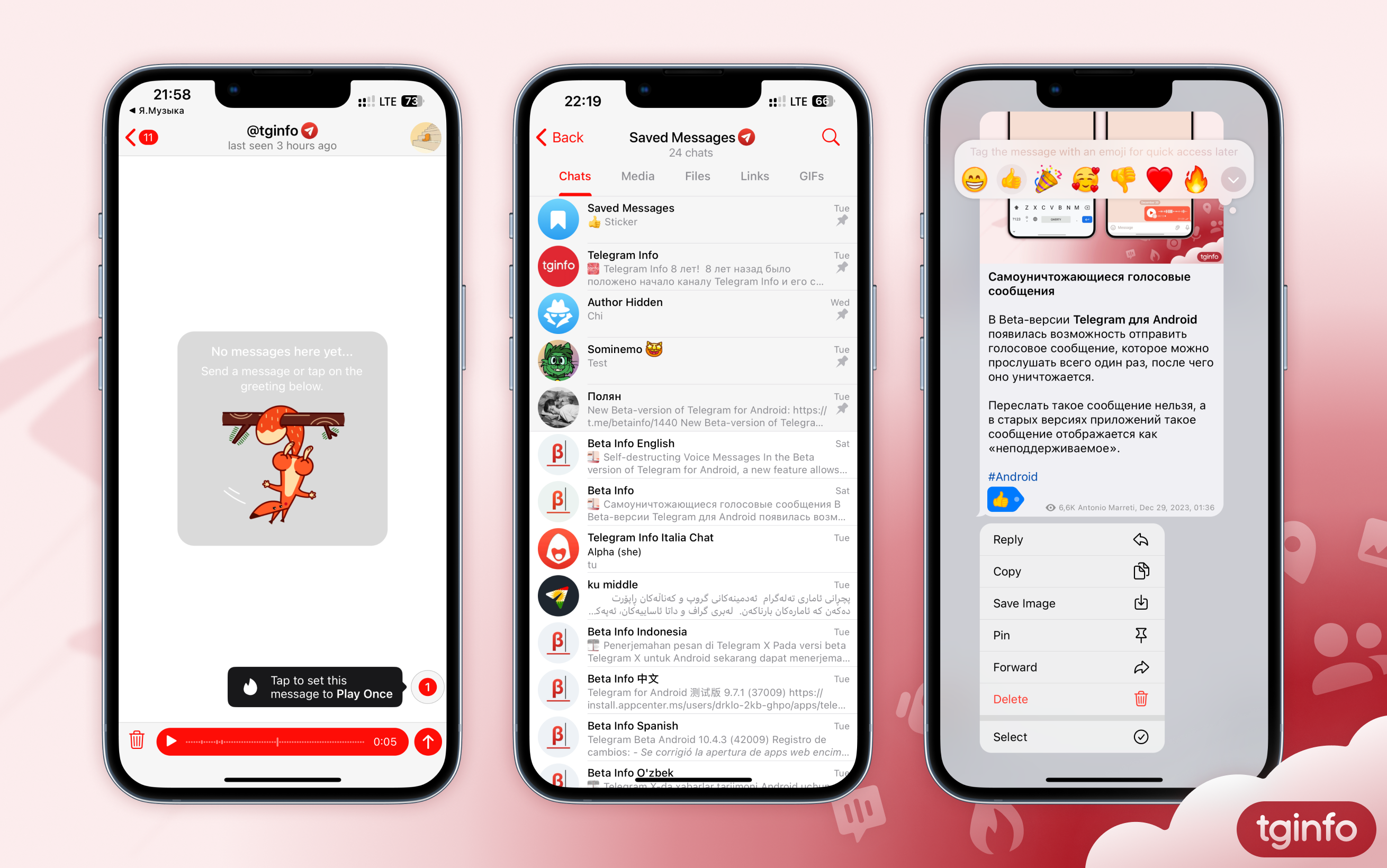
Unmentioned New Features on Telegram
On December 31, in their official blog, Telegram representatives hinted at the presence of several innovations, which they promised to talk about in January. Some of these features have already appeared in stable versions of applications.
1. Self-destructing voice messages
Telegram users now have the option to send a voice message that will be automatically deleted after the recipient listens to it.
• This message can only be sent in a personal chat.
• This message cannot be forwarded or recorded.
• If the recipient has started listening to a message, it will be deleted as soon as they finish listening to it or close the playback screen.
• In older versions of Telegram, such a voice message is displayed as “unsupported”.
Whether this feature will be implemented for video messages is unknown.
2. Updated the Saved Messages chat
Some users can now view the Saved Messages as Sections.
• To switch to section mode, you need to open the Saved Messages chat and click on its title.
• The list of sections is generated automatically by the application: each section corresponds to a separate chat from which messages were previously forwarded to the Saved Messages. In this case, messages sent to the Saved Messages by the user itself are displayed in the “My Notes” section, and messages from users who have prohibited linking their account when forwarding are stored in the “Author Hidden” section.
• Sections are sorted by the date of the last message forwarded from a given chat to the Saved Messages.
• Sections can be pinned, and pinned sections can be arranged in a convenient order.
• When you go to any section, the application displays all messages forwarded from the corresponding chat. Next to each message there is an icon to go to the original message, and at the bottom of the screen there is a button to go to the chat itself.
• In profiles of chats and channels from which at least one message was forwarded to the Saved Messages, the “Saved Messages” tab is now available. It displays all messages forwarded to Saved Messages from this chat.
⚠️ Attention: Currently only some users have these functions. The editors have no information about when they will become available to everyone.
3. Tags in Saved Messages chat on iOS
In one of the versions of the application for iOS, users could mark messages in the Saved Messages chat with reactions in order to quickly find all messages for any of them in the future. Thus, the reactions in this chat were supposed to function as tags.
However, the search for messages based on their reactions did not become available. In addition, in a subsequent update, references to the ability to sort messages based on reactions also disappeared from the interface.
#update #Android #iOS #Desktop #macOS
On December 31, in their official blog, Telegram representatives hinted at the presence of several innovations, which they promised to talk about in January. Some of these features have already appeared in stable versions of applications.
1. Self-destructing voice messages
Telegram users now have the option to send a voice message that will be automatically deleted after the recipient listens to it.
• This message can only be sent in a personal chat.
• This message cannot be forwarded or recorded.
• If the recipient has started listening to a message, it will be deleted as soon as they finish listening to it or close the playback screen.
• In older versions of Telegram, such a voice message is displayed as “unsupported”.
Whether this feature will be implemented for video messages is unknown.
2. Updated the Saved Messages chat
Some users can now view the Saved Messages as Sections.
• To switch to section mode, you need to open the Saved Messages chat and click on its title.
• The list of sections is generated automatically by the application: each section corresponds to a separate chat from which messages were previously forwarded to the Saved Messages. In this case, messages sent to the Saved Messages by the user itself are displayed in the “My Notes” section, and messages from users who have prohibited linking their account when forwarding are stored in the “Author Hidden” section.
• Sections are sorted by the date of the last message forwarded from a given chat to the Saved Messages.
• Sections can be pinned, and pinned sections can be arranged in a convenient order.
• When you go to any section, the application displays all messages forwarded from the corresponding chat. Next to each message there is an icon to go to the original message, and at the bottom of the screen there is a button to go to the chat itself.
• In profiles of chats and channels from which at least one message was forwarded to the Saved Messages, the “Saved Messages” tab is now available. It displays all messages forwarded to Saved Messages from this chat.
⚠️ Attention: Currently only some users have these functions. The editors have no information about when they will become available to everyone.
3. Tags in Saved Messages chat on iOS
In one of the versions of the application for iOS, users could mark messages in the Saved Messages chat with reactions in order to quickly find all messages for any of them in the future. Thus, the reactions in this chat were supposed to function as tags.
However, the search for messages based on their reactions did not become available. In addition, in a subsequent update, references to the ability to sort messages based on reactions also disappeared from the interface.
#update #Android #iOS #Desktop #macOS
Forwarded from Telegram Info English (Dunjaša🎐)
Telegram Has Been Updated to Version 10.6
Telegram's January update has been released in the app stores, and here's something interesting about it:
• Self-destructing Voice Messages: Users can now send a voice message that can be listened to only once, after which it self-destructs. The feature works only in private chats. You cannot forward such messages to other chats.
• Self-destructing Video Messages: Like self-destructing voice messages, video messages disappear after the first view and only work in private chats.
• Pause During Recording: Pause and play back a voice or a video message before it is sent to the person you are chatting with.
• Updated Saved Messages: Now, when you tap on the header, a list of chats is displayed, from which messages have been forwarded to Saved Messages. In addition, in profiles of channels, groups, and other users, the Saved Messages tab allows you to view messages saved from this source.
This update was released without a related post on the messenger's official blog.
Android: Google Play, APK from the official website or verified channel.
iOS: App Store.
Desktop: the official website or GitHub.
macOS: App Store, the official website or verified channel.
Unigram for Windows 10+: Microsoft Store | Direct download | Installation instructions
#update #Android #iOS #Desktop #macOS
Telegram's January update has been released in the app stores, and here's something interesting about it:
• Self-destructing Voice Messages: Users can now send a voice message that can be listened to only once, after which it self-destructs. The feature works only in private chats. You cannot forward such messages to other chats.
• Self-destructing Video Messages: Like self-destructing voice messages, video messages disappear after the first view and only work in private chats.
• Pause During Recording: Pause and play back a voice or a video message before it is sent to the person you are chatting with.
• Updated Saved Messages: Now, when you tap on the header, a list of chats is displayed, from which messages have been forwarded to Saved Messages. In addition, in profiles of channels, groups, and other users, the Saved Messages tab allows you to view messages saved from this source.
This update was released without a related post on the messenger's official blog.
Android: Google Play, APK from the official website or verified channel.
iOS: App Store.
Desktop: the official website or GitHub.
macOS: App Store, the official website or verified channel.
Unigram for Windows 10+: Microsoft Store | Direct download | Installation instructions
#update #Android #iOS #Desktop #macOS
Forwarded from Telegram Info English (Dunjaša🎐)
Telegram Updated to Version 10.6.1
Telegram has released another January update. The Android and iOS apps are already available in the app stores, other clients will be updated in the near future.
The following features and settings are now available to users in the new version:
• Limit Who You Can Receive Private Messages From: Telegram Premium subscribers can now choose who can start new chats with them: "All users" or "Contacts and Premium users". The new setting is available in the Privacy and Security.
• Message Reading Time in Private Chats: Users can see exactly when the chat partner has read their messages In private chat. And Premium subscribers have the option to hide the time of reading from those chatters who cannot see their last seen time.
• Premium Subscribers Can See the "Last Seen" of Other Users: From this day, Telegram Premium subscribers who have hidden their last seen time will be able to see last seen time of those users who have not hidden it in their privacy settings.
Android: Google Play, APK from the official website or verified channel.
iOS: App Store.
Desktop: the official website or GitHub.
macOS: App Store, the official website or verified channel.
Unigram for Windows 10+: Microsoft Store | Direct download | Installation instructions
#update #Android #iOS #Desktop #macOS #Unigram
Telegram has released another January update. The Android and iOS apps are already available in the app stores, other clients will be updated in the near future.
The following features and settings are now available to users in the new version:
• Limit Who You Can Receive Private Messages From: Telegram Premium subscribers can now choose who can start new chats with them: "All users" or "Contacts and Premium users". The new setting is available in the Privacy and Security.
• Message Reading Time in Private Chats: Users can see exactly when the chat partner has read their messages In private chat. And Premium subscribers have the option to hide the time of reading from those chatters who cannot see their last seen time.
• Premium Subscribers Can See the "Last Seen" of Other Users: From this day, Telegram Premium subscribers who have hidden their last seen time will be able to see last seen time of those users who have not hidden it in their privacy settings.
Android: Google Play, APK from the official website or verified channel.
iOS: App Store.
Desktop: the official website or GitHub.
macOS: App Store, the official website or verified channel.
Unigram for Windows 10+: Microsoft Store | Direct download | Installation instructions
#update #Android #iOS #Desktop #macOS #Unigram
Forwarded from Telegram Stable Releases
Telegram native client for macOS has been updated 🎉🎊
🔄 New version:
📆 Released (DD/MM/YYYY):
01/04/2024
💻 OS:
macOS 10.13 and higher
📄 Changelog:
• Bug fixes, minor improvements, and more.
Source: @tgstable
Alternative source: https://t.me/macos_stable_updates_files/257
#macos #stable #update
🔄 New version:
10.10.1 (build 261717)
📆 Released (DD/MM/YYYY):
01/04/2024
💻 OS:
macOS 10.13 and higher
📄 Changelog:
• Bug fixes, minor improvements, and more.
Source: @tgstable
Alternative source: https://t.me/macos_stable_updates_files/257
#macos #stable #update
Telegram
Telegram for macOS Updates
Forwarded from Telegram Info English (iDubno)
Sticker Editor - Create Your Own Stickers
Telegram has published an article on their blog, which describes in detail about how to create new stickers and sticker packs through the built-in sticker editor, in addition to adding a sticker to a pack, expanding a sticker pack, and so on.
At the end of the article, the developers announced that they will reveal 16 new features this month. You can read about some of these features in this post.
Article: telegram.org/blog/sticker-maker/
#update #Android #iOS #Desktop #macOS #Unigram
Telegram has published an article on their blog, which describes in detail about how to create new stickers and sticker packs through the built-in sticker editor, in addition to adding a sticker to a pack, expanding a sticker pack, and so on.
At the end of the article, the developers announced that they will reveal 16 new features this month. You can read about some of these features in this post.
Article: telegram.org/blog/sticker-maker/
#update #Android #iOS #Desktop #macOS #Unigram
Telegram
Sticker Editor — Create Your Own Stickers
Starting today, anyone can quickly create stickers and entire sticker sets using a new powerful editor — without leaving Telegram.
Forwarded from Telegram Info English (iDubno)
"My Profile" Section, Recommended Channels and 15 Other Updates
The new Telegram blog post details the features added to the messenger this April.
Among the notable new features is a new menu section to view your profile, a tab with recommended channels in the global search, the ability to specify your birthday and a link to your channel in your profile, improved moderation tools for group administrators, and much more.
An important milestone this month was that the number of monthly active Telegram users reached 900 million. Half of these users use the messenger every day.
Article: telegram.org/blog/my-profile-and-15-more/
#update #Android #iOS #Desktop #macOS #Unigram
The new Telegram blog post details the features added to the messenger this April.
Among the notable new features is a new menu section to view your profile, a tab with recommended channels in the global search, the ability to specify your birthday and a link to your channel in your profile, improved moderation tools for group administrators, and much more.
An important milestone this month was that the number of monthly active Telegram users reached 900 million. Half of these users use the messenger every day.
Article: telegram.org/blog/my-profile-and-15-more/
#update #Android #iOS #Desktop #macOS #Unigram
Telegram
My Profile, Recommended Channels and 15 More Features
This month we've added more than 15 new features, including recommended channels, a way to view your own profile and display your channel and birthday on your page, improved moderation tools for group admins – and much more.
Forwarded from Telegram Info English (iDubno)
Telegram Info English
Telegram Apps for Android and iOS Have Been Updated to Version 10.13 Here are the new features introduced in the May update: • Global Hashtag Search: Users can now quickly switch between three search modes for messages with the desired hashtag by tapping…
Messages with Animated Effects, Hashtag Search, and Much More
Telegram has introduced the May update, version 10.13, in their blog, highlighting the key new features of this release:
Article: telegram.org/blog/message-effects-and-more/
#update #Android #iOS #Desktop #macOS #Unigram
Telegram has introduced the May update, version 10.13, in their blog, highlighting the key new features of this release:
Starting today, you can send messages with stunning animated effects, place captions above photos and videos, use global hashtags to search messages from public chats, hide text fragments with collapsible quotes, and much more.
Article: telegram.org/blog/message-effects-and-more/
#update #Android #iOS #Desktop #macOS #Unigram
Telegram
Message Effects, Hashtag Search, and More
With this update, you can add spectacular animated effects to messages you send, move captions above media, find public posts using global hashtags, hide fragments of text with collapsible quote blocks – and more.
Forwarded from Telegram Info English (iDubno)
Telegram Stars: Payment for Digital Goods and More
Starting today, bots and mini apps on Telegram can sell digital goods and services using a new in-app currency named "Telegram Stars."
According to the blog, you can purchase Stars through in-app purchases in Apple and Google stores or via the official @PremiumBot, and then spend them on various digital products offered by bots, ranging from eBooks and online courses to in-game items.
Developers will soon be able to convert the Stars earned by bots into the cryptocurrency Toncoin using the Fragment platform.
Telegram promises to add more features related to Telegram Stars in future updates. For example, users will be able to not only purchase digital goods and services in mini apps but also send gifts to content creators.
Article: telegram.org/blog/telegram-stars
#update #Android #iOS #Desktop #macOS #Unigram
Starting today, bots and mini apps on Telegram can sell digital goods and services using a new in-app currency named "Telegram Stars."
According to the blog, you can purchase Stars through in-app purchases in Apple and Google stores or via the official @PremiumBot, and then spend them on various digital products offered by bots, ranging from eBooks and online courses to in-game items.
Developers will soon be able to convert the Stars earned by bots into the cryptocurrency Toncoin using the Fragment platform.
Telegram promises to add more features related to Telegram Stars in future updates. For example, users will be able to not only purchase digital goods and services in mini apps but also send gifts to content creators.
Article: telegram.org/blog/telegram-stars
#update #Android #iOS #Desktop #macOS #Unigram
Telegram
Telegram Stars: Pay for Digital Goods and More
Over 400 million users interact with bots and mini apps on Telegram every month – to buy products, access services, play games, and much more. With today's update, bots and mini apps can sell digital goods and services.