Download link of ESD file - Win10 2004 20H1 May :
https://bit.ly/2ZUmWYg
————————————————
Link of "WINNTSETUP" software to install WIN10 with the above ESD file :
http://jfx.cwcodes.net/WinNTSetup/Release/WinNTSetup4.rar
————————————————
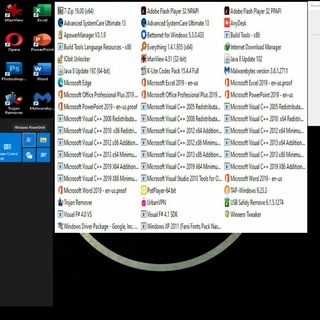
Installed softwares/Applications :
7zip
Everything
Microsoft Office 2019(word/excel/powerpoint/proofing)
Potplayer
UrbanVPN/Betternet Premium
Runtimes + Essential(Visual C++ 20XX + Java 8 + adobe Flash Player 32 + Directx + .Net Framework4.8)
Malwarebytes Antimalware/Trojan Remover(SimplySup)/{Optional} 360 Total Security (Setup on Desktop)
Anydesk
Internet Download Manager(IDM)
IrfanView
K-lite Codecs
Opera Browser / Microsoft Edge
USB SAFELY REMOVE
384 Font Farsi
ApowerSoft Phone Manager
ioBit Advanced System Care Ultimate + Unlocker
WinAero Tweaks
Photoshop CS5
Format Factory / Handbrake
NitroPDF
**********
Size needed to install : 27GB-30GB
Installed language Keyboard : English/Persian(Farsi)
--------------
This release is based on "TomorrowLand ISO by Mirkec"
@laptopstockshiraz
https://bit.ly/2ZUmWYg
————————————————
Link of "WINNTSETUP" software to install WIN10 with the above ESD file :
http://jfx.cwcodes.net/WinNTSetup/Release/WinNTSetup4.rar
————————————————
Installed softwares/Applications :
7zip
Everything
Microsoft Office 2019(word/excel/powerpoint/proofing)
Potplayer
UrbanVPN/Betternet Premium
Runtimes + Essential(Visual C++ 20XX + Java 8 + adobe Flash Player 32 + Directx + .Net Framework4.8)
Malwarebytes Antimalware/Trojan Remover(SimplySup)/{Optional} 360 Total Security (Setup on Desktop)
Anydesk
Internet Download Manager(IDM)
IrfanView
K-lite Codecs
Opera Browser / Microsoft Edge
USB SAFELY REMOVE
384 Font Farsi
ApowerSoft Phone Manager
ioBit Advanced System Care Ultimate + Unlocker
WinAero Tweaks
Photoshop CS5
Format Factory / Handbrake
NitroPDF
**********
Size needed to install : 27GB-30GB
Installed language Keyboard : English/Persian(Farsi)
--------------
This release is based on "TomorrowLand ISO by Mirkec"
@laptopstockshiraz
👍1
For Drivers Installation of any PC/LAPTOP/NOTEBOOK :
Snappy Driver Installer (SDI) R2000 (March2020)
Size : ~19GB
Http://file.download.id/snappydriver_DOWNLOAD.ID.zip
Mirror Alternative link :
www.Mediafire.com/file/k8b8kl1jeskwavy
Pass :
download.id
*****************
Mirror alternative Link :
Size : 19.75GB
www.uploadship.com/114181462685f734
@laptopstockshiraz
Snappy Driver Installer (SDI) R2000 (March2020)
Size : ~19GB
Http://file.download.id/snappydriver_DOWNLOAD.ID.zip
Mirror Alternative link :
www.Mediafire.com/file/k8b8kl1jeskwavy
Pass :
download.id
*****************
Mirror alternative Link :
Size : 19.75GB
www.uploadship.com/114181462685f734
@laptopstockshiraz
Please open Telegram to view this post
VIEW IN TELEGRAM
WinNTSetup_v425.exe
2.3 MB
WinntSetup 4.25
http://www.mediafire.com/file/qscqnnlma28om41/WinNTSetup_v425.rar/file
Self-Extracting Archive (for both Windows versions : 32Bit X86 & 64bit X64 OS )
after extract, RIGHT-CLICK on "WinNTSetup_x64/X86.exe"
& """"" RUN AS ADMINISTRATOR """""
http://www.mediafire.com/file/qscqnnlma28om41/WinNTSetup_v425.rar/file
Self-Extracting Archive (for both Windows versions : 32Bit X86 & 64bit X64 OS )
after extract, RIGHT-CLICK on "WinNTSetup_x64/X86.exe"
& """"" RUN AS ADMINISTRATOR """""
to create a Bootable Flash Removable Thumbdrive,Use :
Ventoy - A MultiISO Multi-Boot bootable flash maker
Download latest from link below:
https://github.com/ventoy/Ventoy/releases/download/
Ex: https://github.com/ventoy/Ventoy/releases/download/v1.0.28/ventoy-1.0.28-windows.zip
for Live Boot Emergency Tools ,Built-in Windows10 with lots of Softwares,Use :
Sergei Strelec Liveboot
Download latest from link below:
https://sergeistrelec.ru/winpe-10-8-sergei-strelec-english/
Ex:https://www.mediafire.com/file/gc64tewavwo62yu/WinPE10_8_Sergei_Strelec_2020.11.27_English.rar/file#!
Ventoy - A MultiISO Multi-Boot bootable flash maker
Download latest from link below:
https://github.com/ventoy/Ventoy/releases/download/
Ex: https://github.com/ventoy/Ventoy/releases/download/v1.0.28/ventoy-1.0.28-windows.zip
for Live Boot Emergency Tools ,Built-in Windows10 with lots of Softwares,Use :
Sergei Strelec Liveboot
Download latest from link below:
https://sergeistrelec.ru/winpe-10-8-sergei-strelec-english/
Ex:https://www.mediafire.com/file/gc64tewavwo62yu/WinPE10_8_Sergei_Strelec_2020.11.27_English.rar/file#!
sergeistrelec.ru
WinPE 10-8 Sergei Strelec English» Sergei Strelec
Boot USB Sergei Strelec - резервное копирование и восстановление системы и данных, работа с жестким диском, тестирование компьютера, диагностика системы, установка Windows
There will be 2 releases to download for " 21H1 "version :
1-a liteplus optimized version for slower/low/old systems or for those with light workloads such as office-browse net-multimedia-... which doesn't rely/need on all windows capcity(&files&services) to use their pc/laptops..it takes 100-300MB less Ram
And
2-there will be another optimized one for nearly all workloads which will keep more features of windows to let the user experience more stable&smooth operation system.
1-a liteplus optimized version for slower/low/old systems or for those with light workloads such as office-browse net-multimedia-... which doesn't rely/need on all windows capcity(&files&services) to use their pc/laptops..it takes 100-300MB less Ram
And
2-there will be another optimized one for nearly all workloads which will keep more features of windows to let the user experience more stable&smooth operation system.
Windows 10 lite plus 21H1 1023
Preactivated with essentials already installed
For users with "multimedia-browsing web-office-..." & ('''offline''') Gaming Purpose and/or low/old system
Download Link (size 4.39GB) :
Https://Bit.ly/2TUEHWl
Install with " Winntsetup "
For those who doesn't have any Winpe liveboot iso like "sergei strelec", here is a 500MB windowsPE live to boot from (the Winntsetup is located in the app folder shortcut on the desktop)j support both UEFI GPT&legacy MBR BOOT) :
https://bit.ly/3gqqBTY
it takes 1-5minutes to loadup
To make your flash bootable,simply use "Ventoy"; make sure the ventoy drive is formated by this settings : NTFS&2048 allocation size
*********************
for non-persian language users, uninstall "windows xp 2011..." in program&features to get rid of of all farsi/persian fonts. and remove 2nd keyboard language as well.
Preactivated with essentials already installed
For users with "multimedia-browsing web-office-..." & ('''offline''') Gaming Purpose and/or low/old system
Download Link (size 4.39GB) :
Https://Bit.ly/2TUEHWl
Install with " Winntsetup "
For those who doesn't have any Winpe liveboot iso like "sergei strelec", here is a 500MB windowsPE live to boot from (the Winntsetup is located in the app folder shortcut on the desktop)j support both UEFI GPT&legacy MBR BOOT) :
https://bit.ly/3gqqBTY
it takes 1-5minutes to loadup
To make your flash bootable,simply use "Ventoy"; make sure the ventoy drive is formated by this settings : NTFS&2048 allocation size
*********************
for non-persian language users, uninstall "windows xp 2011..." in program&features to get rid of of all farsi/persian fonts. and remove 2nd keyboard language as well.
Overall recommended steps to do to install windows with Winntsetup
Windows 10 21H1 1052 Optimized (bloatfree)
Preactivated with essentials already installed
For users with every use & purposes such as workstation,gaming,light&common porpuses,etc
Download Link (size 5.65GB) :
https://bit.ly/3glcEIb
Install with " Winntsetup "
For those who doesn't have any Winpe liveboot iso like "sergei strelec", here is a 500MB windowsPE live to boot from (the Winntsetup is located in the app folder shortcut on the desktop)which supports both UEFI GPT&legacy MBR BOOT CMS) :
https://bit.ly/3gqqBTY
it takes 1-5minutes to loadup
Too make your flash bootable,simply use "Ventoy" ; make sure the ventoy drive is formated by : NTFS&2048 allocation size
*********************
for non-persian language users, uninstall "windows xp 2011..." in program&features to get rid of of all farsi/persian fonts. and remove 2nd keyboard language as well.
Preactivated with essentials already installed
For users with every use & purposes such as workstation,gaming,light&common porpuses,etc
Download Link (size 5.65GB) :
https://bit.ly/3glcEIb
Install with " Winntsetup "
For those who doesn't have any Winpe liveboot iso like "sergei strelec", here is a 500MB windowsPE live to boot from (the Winntsetup is located in the app folder shortcut on the desktop)which supports both UEFI GPT&legacy MBR BOOT CMS) :
https://bit.ly/3gqqBTY
it takes 1-5minutes to loadup
Too make your flash bootable,simply use "Ventoy" ; make sure the ventoy drive is formated by : NTFS&2048 allocation size
*********************
for non-persian language users, uninstall "windows xp 2011..." in program&features to get rid of of all farsi/persian fonts. and remove 2nd keyboard language as well.
👍1
For those who were asking for Windows 11, it's been uploaded to it's own channel:
@windows11_setup
@windows11_setup