
Боже! Как давно я это искал
После "допиливания" надеюсь поможет мне навести порядок в моих скриптах
Получение отформатированных сценариев без комментариев в проекте с использованием скрипта Google Apps
P.S.
1. Хотя почему-то комментарии не удалил при тестовом прогоне хотя это даже к лучшему.
2. Стоит посмотреть как среагирует на среду разработки V.8
После "допиливания" надеюсь поможет мне навести порядок в моих скриптах
Получение отформатированных сценариев без комментариев в проекте с использованием скрипта Google Apps
P.S.
1. Хотя почему-то комментарии не удалил при тестовом прогоне хотя это даже к лучшему.
2. Стоит посмотреть как среагирует на среду разработки V.8
Новый триггер onSelectionChange срабатывает при изменении пользовательского выделения https://developers.google.com/apps-script/guides/triggers#onselectionchangee
Google for Developers
Simple Triggers | Apps Script | Google for Developers
Learn about simple triggers in Apps Script, which are built-in functions that automatically run when specific events occur in Google Workspace applications.
#snippet
Unpivot a pivot table of any size/**
* Unpivot a pivot table of any size.
*
* @param {A1:D30} data The pivot table.
* @param {1} fixColumns Number of columns, after which pivoted values begin. Default 1.
* @param {1} fixRows Number of rows (1 or 2), after which pivoted values begin. Default 1.
* @param {"city"} titlePivot The title of horizontal pivot values. Default "column".
* @param {"distance"[,...]} titleValue The title of pivot table values. Default "value".
* @return The unpivoted table
* @customfunction
*/
function unpivot(data,fixColumns,fixRows,titlePivot,titleValue) {
var fixColumns = fixColumns || 1; // how many columns are fixed
var fixRows = fixRows || 1; // how many rows are fixed
var titlePivot = titlePivot || 'column';
var titleValue = titleValue || 'value';
var ret=[],i,j,row,uniqueCols=1;
// we handle only 2 dimension arrays
if (!Array.isArray(data) || data.length < fixRows || !Array.isArray(data[0]) || data[0].length < fixColumns)
throw new Error('no data');
// we handle max 2 fixed rows
if (fixRows > 2)
throw new Error('max 2 fixed rows are allowed');
// fill empty cells in the first row with value set last in previous columns (for 2 fixed rows)
var tmp = '';
for (j=0;j<data[0].length;j++)
if (data[0][j] != '')
tmp = data[0][j];
else
data[0][j] = tmp;
// for 2 fixed rows calculate unique column number
if (fixRows == 2)
{
uniqueCols = 0;
tmp = {};
for (j=fixColumns;j<data[1].length;j++)
if (typeof tmp[ data[1][j] ] == 'undefined')
{
tmp[ data[1][j] ] = 1;
uniqueCols++;
}
}
// return first row: fix column titles + pivoted values column title + values column title(s)
row = [];
for (j=0;j<fixColumns;j++) row.push(fixRows == 2 ? data[0][j]||data[1][j] : data[0][j]); // for 2 fixed rows we try to find the title in row 1 and row 2
for (j=3;j<arguments.length;j++) row.push(arguments[j]);
ret.push(row);
// processing rows (skipping the fixed columns, then dedicating a new row for each pivoted value)
for (i=fixRows;i<data.length && data[i].length > 0 && data[i][0];i++)
{
row = [];
for (j=0;j<fixColumns && j<data[i].length;j++)
row.push(data[i][j]);
for (j=fixColumns;j<data[i].length;j+=uniqueCols)
ret.push(
row.concat([data[0][j]]) // the first row title value
.concat(data[i].slice(j,j+uniqueCols)) // pivoted values
);
}
return ret;
}Класс для управления Properties
#snippet #GAS
#snippet #GAS
/**
   * Класс для управления Properties
   * DocumentProperties or ScriptProperties or UserProperties
   *
   * Creates an instance of Props.
   * @param {string} prop
   * @memberof Props
   * @constructor
   * https://developers.google.com/apps-script/reference/properties
   * @example
   * const testProps=()=>{
   * const scrProp=new Props("ScriptProperties");
   * scrProp.set("v","1")
   * concole.log(scrProp.get("v"))
   * }
   * @return {} Class Properties
   */
class Props {
    constructor(prop) {
      this[prop] = PropertiesService['get'+prop]();
      this.type=prop
      return this;
  }

  get(name) {
      return this[this.type].getProperty(name);
  }

   getProperties(name) {
      return this[this.type].getProperties();
  }
  type(prop) {
      return this.type;
  }
  set(name, value) {
      return this[this.type].setProperty(name, value);
  }

  forget(name) {
      return this[this.type].deleteProperty(name);
  }

  getKeys() {
      return this[this.type].getKeys();
  }
    has(callback,name) {
      return this[this.type].getKeys().some(callback,element);
  }

  deleteAllProperties(){
   this[this.type].deleteAllProperties();
  }

  setProperties(properties){
   this[this.type].setProperties(properties);
  }
  setProperties(properties, deleteAllOthers){
   this[this.type].setProperties(properties, deleteAllOthers);
  }
}Как получить имя запущенной функции в JavaScript?
#snippet
#snippet
const es6=()=>{console.log(getMyName())}

function getMyName() {
  var e = new Error('dummy');
  var stack = e.stack
                .split('\n')[2]
                // " at functionName ( ..." => "functionName"
                .replace(/^\s+at\s+(.+?)\s.+/g, '$1' );
                return stack
}ᅠ
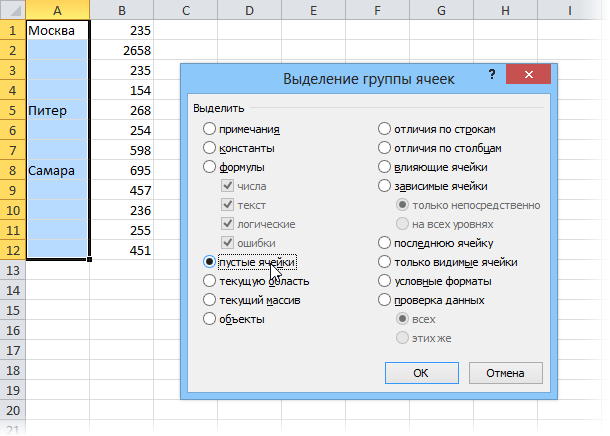
Заполнить пустые ячейки данными из предыдущих непустых
#snippet
Заполнить пустые ячейки данными из предыдущих непустых
#snippet
/**
 * Заполнить пустые ячейки данными из предыдущих непустых
 * тут формулами https://contributor.pw/post/fill-blank-cells-with-data-from-above-cell/
 * но для одного столбца
 * @param {Object} obj {arr,columnIndexStart,columnIndexStart}
 * @param {Array[[]]} obj.arr - Индекс столбца с которого начинается преобразование
 * @param {Number} obj.columnIndexStart - Индекс столбца с которого начинается преобразование
 * @param {Number} obj.columnIndexEnd - Индекс столбца перед которого закончится преобразование(В выборку не попадает)
 * @returns {Array} Преобразованный массив
 * @example
 * input Array
 * let arr=[
 *          [1,2,3],
 *          [,,5],
 *          [8,9,10],
 *          [,11,12]
 *  ]
 * return Array
 *  [ [ 1, 2, 3 ],
 *  [ 1, 2, 5 ],
 *  [ 8, 9, 10 ],
 *  [ 8, 11, 12 ]
 *  ]
 *
 *
 *
 */
const fillData_ = ({ arr, columnIndexStart = 0, columnIndexEnd }) => {
    /*
    // tmp.forEach((item,j)=>{   //!!!!!forEach НЕ ВИДИТ undefined элементы

    */


    let arrReptValue = arr[0].slice(columnIndexStart, columnIndexEnd)
    arr.forEach((row, i, data) => {

        let tmp = row.slice(columnIndexStart, columnIndexEnd)

        for (j = 0; j < tmp.length; j++) {
            if (isEmpty(tmp[j])) {
                arr[i][j] = arrReptValue[j]
            } else {
                arrReptValue[j] = arr[i][j]
            }
        }
    })
    return arr
}
const isEmpty = (value) => {
    return value === undefined || value === null || value === "";
}
Как удалить пустые столбцы в 2D Array в JS
#snippet #JS #GAS
#snippet #JS #GAS
var csvData = [["", "2", ""], ["", "3", ""], ["", "4", ""], ["1", "3", ""]],
    columns = csvData.reduce(
        (r, a) => (a.forEach((v, i) => r[i] = r[i] || v), r),
        csvData[0].map(_ => false)
    );

csvData = csvData.map(a => a.filter((_, i) => columns[i]));

console.log(csvData);Текущее время смайликами
=join("➗";{VLOOKUP((HOUR(NOW())-mod(HOUR(NOW());10))/10;{SEQUENCE(10;1;0)\{"0️⃣";"1️⃣";"2️⃣";"3️⃣";"4️⃣";"5️⃣";"6️⃣";"7️⃣";"8️⃣";"9️⃣"}};2)&VLOOKUP(mod(HOUR(NOW());10);{SEQUENCE(10;1;0)\{"0️⃣";"1️⃣";"2️⃣";"3️⃣";"4️⃣";"5️⃣";"6️⃣";"7️⃣";"8️⃣";"9️⃣"}};2)\VLOOKUP((MINUTE(NOW())-mod(MINUTE(NOW());10))/10;{SEQUENCE(10;1;0)\{"0️⃣";"1️⃣";"2️⃣";"3️⃣";"4️⃣";"5️⃣";"6️⃣";"7️⃣";"8️⃣";"9️⃣"}};2)&VLOOKUP(mod(MINUTE(NOW());10);{SEQUENCE(10;1;0)\{"0️⃣";"1️⃣";"2️⃣";"3️⃣";"4️⃣";"5️⃣";"6️⃣";"7️⃣";"8️⃣";"9️⃣"}};2)\VLOOKUP((SECOND(NOW())-mod(SECOND(NOW());10))/10;{SEQUENCE(10;1;0)\{"0️⃣";"1️⃣";"2️⃣";"3️⃣";"4️⃣";"5️⃣";"6️⃣";"7️⃣";"8️⃣";"9️⃣"}};2)&VLOOKUP(mod(SECOND(NOW());10);{SEQUENCE(10;1;0)\{"0️⃣";"1️⃣";"2️⃣";"3️⃣";"4️⃣";"5️⃣";"6️⃣";"7️⃣";"8️⃣";"9️⃣"}};2)})/
* @OnlyCurrentDoc
* EN: Restricts script access to the current sheet only.
* RU: Ограничивает доступ скрипта только к текущему листу.
*/
/* exported REGEXMATCHS */
/* globals sorosWrapper_ */
/
* 𝗘𝗡: Returns an array of matches.
*
* 𝗥𝗨: Возвращает массив совпадений.
*
* 𝗩𝗲𝗿𝘀𝗶𝗼𝗻: 1.0
*
* 𝗔𝘂𝘁𝗵𝗼𝗿: Stoyanov Maksim (stomaks)
* 𝗦𝗶𝘁𝗲: stomaks.me
* 𝗕𝗹𝗼𝗴: G-Apps-Script.COM
*
* @param {string} text
* 𝗘𝗡: The text to check.
*
* 𝗥𝗨: Текст, который необходимо проверить.
*
* @param {string} regexp
* 𝗘𝗡: The regular expression to find in the text.
*
* 𝗥𝗨: Регулярное выражение, которое нужно найти в тексте.
*
* @param {number} type
* 𝗘𝗡: Type of response (
* 0 - substring;
* 1 - index of the first character of the substring;
* 2 - substring length;
* 3 - index of the last character of the substring).
*
* 𝗥𝗨: Тип ответа (
* 0 - подстрока;
* 1 - индекс первого символа подстроки;
* 2 - длина подстроки;
* 3 - индекс последнего символа подстроки).
*
* @return {array}
* 𝗘𝗡: An array of matches.
*
* 𝗥𝗨: Массив совпадений.
*
* @customfunction
*/
function REGEXMATCHS ( text, regexp, type ) {
var response = [];
text = String(text);
var flags = "g";
if ( /^\(\?i\)/.test(regexp) ) {
regexp = regexp.replace(/^\(\?i\)/, "");
flags += "i";
}
var subs = text.match( new RegExp(regexp, flags) );
if ( !subs ) return null;
for ( var cursor = subs.index, l = subs.length, i = 0; i < l; i += 1 ) {
var index = cursor;
if ( i+1 !== l && subs[i] !== subs[i+1] ) {
nextIndex = text.indexOf(subs[i+1], cursor);
while ( true ) {
currentIndex = text.indexOf(subs[i], index);
if ( currentIndex !== -1 && currentIndex <= nextIndex ) {
index = currentIndex + 1;
} else break;
}
index -= 1;
} else {
index = text.indexOf(subs[i], cursor);
}
cursor = index + subs[i].length;
switch ( type ) {
case 1:
response.push( index );
break;
case 2:
response.push( subs[i].length );
break;
case 3:
response.push( index + subs[i].length );
break;
case 0:
default:
response.push( subs[i] );
break;
}
}
return response;
}/**
* Как разбить массив на заданные куски
* splitEvery(3, [1, 2, 3, 4, 5, 6, 7]); //=> [[1, 2, 3], [4, 5, 6], [7]]
* Number → [a] → [[a]]
* @param {*} n
* @param {*} row
* @returns
*/
function splitEvery(n, row) {
return (row) => {
var result = [];
var idx = 0;
while (idx < row.length) {
result.push(row.slice(idx, idx += n));
}
return result
}
}
#snippetВытягиваем код Вашего проекта в таблицу
/**
        * Returns an array of function names and their code
        * In the current project
        * Arrow functions do not fall into this array
        * ....................................................
        * Возвращает массив имен функций и их кода
        * В текущем проекте
        * Функции-стрелки в этот массив не попадают
        *
        * @return {Array}
        * @customfunction
        */
       function getFunction(){
        const nameFn=Object.keys(this)
        return (nameFn.map(el=>[el,this[el]]))
        }
#snippet #GASО сортировке замолвите слово
function compareNumbers(a, b) {
        if (a === b) return 0;
        if (a > b) return 1;
        /* else */
        return -1;
    }

    function compareNumbers1(a, b) {
        if (+a === +b) return 0;
        if (+a > +b) return 1;
        /* else */
        return -1;
    }
    let nums = ["7", "3", "1", "5", "8", "11", "6", "4", "2"];
    nums.sort()
    console.log(nums)
    nums.sort(compareNumbers);
    console.log(nums);
    /* 〕[
      '1', '11', '2',
      '3', '4',  '5',
      '6', '7',  '8'
    ]
    */
    nums.sort(compareNumbers1);
    console.log(nums);
    /*
    [
      '1', '2', '3',
      '4', '5', '6',
      '7', '8', '11'
    ]
    */