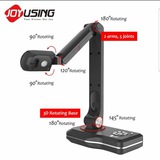
Belilah dengan syarikat kami pembekal visualizer guru yang utama di Malaysia dan diyakini semua.
Klik sini http://www.wasap.my/60172524359/nakbelivisual
Klik sini http://www.wasap.my/60172524359/nakbelivisual
Forwarded from HUB LCD PROJECTOR
Pembeli Puas hati penggunaan LCD GP100
Di sekolah pancar jelas
Di Rumah boleh buat pawagam
Di sekolah pancar jelas
Di Rumah boleh buat pawagam
Forwarded from HUB TEKNOLOGI PENDIDIKAN DIGITAL
VISUALIZER TERKINI
Nak Beli?
Klik di sini 👉 http://www.wasap.my/60172524359/Nakbeli-visualizer-Nombor-
Nak Beli?
Klik di sini 👉 http://www.wasap.my/60172524359/Nakbeli-visualizer-Nombor-
Testimoni penggunaan Visualizer V5 yang amat puas hati dalam kelas semasa PdPc
Ingin beli satu?
Klik sini http://www.wasap.my/60172524359/V52019
Ingin beli satu?
Klik sini http://www.wasap.my/60172524359/V52019
Visualizer Avervision 300P
Features:
Plug and Play, No Software Required
Display 3D objects or Documents on to any Projector/Monitor/TV with RGB/S-video/Composite Inputs 8 times Digital Zoom (800%) & 2 times AVerZoom (200%) and Pan function LED Lighting System with Laser Positioning Point 3 Presentation Modes Camera Mode
- Displays any 3D object or Document onto any Projector/Monitor/TV
- Supports D-Sub 15pin (VGA)/S-Video CVBS Output RGB Mode
- for D-Sub 15pin (VGA) Output Only
- Display PC Presentations (Active while Power On/Off)
-Playback Mode
- Display the images Captured by Camera
- up to 80 frames
LAST STOCK RM 1700
BEG ADA SEKALI
TERUS CONNECT KE LCD PROJECTOR TANPA LAPTOP
FREE POS SELURUH MALAYSIA
1 TAHUN WARRANTY
SIAPA CEPAT DIA DAPAT
NAK BELI?
KLIK 👉 http://www.wasap.my/60172524359/AVER300P
Features:
Plug and Play, No Software Required
Display 3D objects or Documents on to any Projector/Monitor/TV with RGB/S-video/Composite Inputs 8 times Digital Zoom (800%) & 2 times AVerZoom (200%) and Pan function LED Lighting System with Laser Positioning Point 3 Presentation Modes Camera Mode
- Displays any 3D object or Document onto any Projector/Monitor/TV
- Supports D-Sub 15pin (VGA)/S-Video CVBS Output RGB Mode
- for D-Sub 15pin (VGA) Output Only
- Display PC Presentations (Active while Power On/Off)
-Playback Mode
- Display the images Captured by Camera
- up to 80 frames
LAST STOCK RM 1700
BEG ADA SEKALI
TERUS CONNECT KE LCD PROJECTOR TANPA LAPTOP
FREE POS SELURUH MALAYSIA
1 TAHUN WARRANTY
SIAPA CEPAT DIA DAPAT
NAK BELI?
KLIK 👉 http://www.wasap.my/60172524359/AVER300P
Visualizer OEM Terkini
RM 2300 sahaja
Boleh terus sambung ke lcd projecter
Product Description
What Does A Visualiser Do?
A Visualiser is an extremely flexible teaching and presentation tool allowing presenters, teachers or students to display objects onto an interactive whiteboard, computer or LED touch screen.
This means 3D objects, books, worksheets, maps and text can be viewed by a large audiencewithout the need to be copied and distributed.
Features such as mirror, rotate, split screen, black and white, positive / negative, image freeze and title grab allow you to manipulate objects or text live on
What's the Main Features?
Our Visual Presenter’s Main Features include:
Easy to Integrate
This Visual Presenter has camera, image system process (ISP) and power all in one. It can be used to display a wide range of materials by connecting to a proper display device.
Excellent Image Quality
This product is equipped with 8.0 mega pixels CMOS camera lens that enhances the quality of the image.
Easy To Use
When this Visual Presenter is not connected with power source, the signal received from the “COMPUTER IN” can be outputted in “COMPUTER OUT”. This means the Visual Presenter can be operated even when disconnected from computer.
Easy to Adjust
The Focus/Iris/White Balance are automatically adjusted. These functions can also be adjusted manually to best fit user’s needs.
Fast Auto-Focus
Images will be auto-focused in only 1~2 seconds.
12X Optical Camera Zoom
12X optical camera zoom enlarge the shooting zone.
Image Freeze
Make the images become still on the screen.
Multi-Scene Display
The multi-scene feature allows multiple images to be shown at the same time.
Image Rotation
The displayed image can be rotated by 90°,180°,270°
Flexible Mechanical Structure
The camera stand has multiple joints and is highly versatile. When the camera stand is positioned vertically, the camera head can rotate 180° (upward and downward).
Display of Various Materials
This Visual Presenter can display text, film, 3D objects and a wide range of other materials in fined details. It can also show negative film by turning on the base light and pressing the “NEG” button.
LED Lamps as Auxiliary Light Source
LED lamps which have longer rated life and lower energy consumption are installed inside the one arm of this Visual Presenter.
Image Storage and Retrieval
Images can be stored in the Visual Presenter for review at a later time.
Built-in Image Switch
The built-in image switch allows easy swap between the Visual Presenter and the other image device input.
Applications:
1. Perfectly use in multi-media classrooms
Share books, 3D objects, and detailed demonstrations or experiments with your entire class using the easy-to use document cameras.
2. Record and share lessons
Record lessons for viewing at a later time, and give your students a more interactive learning experience.
Display content from your iPad, record lessons for viewing at a later time, and give your students a more interactive learning experience.
3. Live Video Presentation
Conference and Training: Present documents / 3D Objects to large screen by working with projector;
Vivid Presentation with Electronical Whiteboard for Education.
RM 2300 sahaja
Boleh terus sambung ke lcd projecter
Product Description
What Does A Visualiser Do?
A Visualiser is an extremely flexible teaching and presentation tool allowing presenters, teachers or students to display objects onto an interactive whiteboard, computer or LED touch screen.
This means 3D objects, books, worksheets, maps and text can be viewed by a large audiencewithout the need to be copied and distributed.
Features such as mirror, rotate, split screen, black and white, positive / negative, image freeze and title grab allow you to manipulate objects or text live on
What's the Main Features?
Our Visual Presenter’s Main Features include:
Easy to Integrate
This Visual Presenter has camera, image system process (ISP) and power all in one. It can be used to display a wide range of materials by connecting to a proper display device.
Excellent Image Quality
This product is equipped with 8.0 mega pixels CMOS camera lens that enhances the quality of the image.
Easy To Use
When this Visual Presenter is not connected with power source, the signal received from the “COMPUTER IN” can be outputted in “COMPUTER OUT”. This means the Visual Presenter can be operated even when disconnected from computer.
Easy to Adjust
The Focus/Iris/White Balance are automatically adjusted. These functions can also be adjusted manually to best fit user’s needs.
Fast Auto-Focus
Images will be auto-focused in only 1~2 seconds.
12X Optical Camera Zoom
12X optical camera zoom enlarge the shooting zone.
Image Freeze
Make the images become still on the screen.
Multi-Scene Display
The multi-scene feature allows multiple images to be shown at the same time.
Image Rotation
The displayed image can be rotated by 90°,180°,270°
Flexible Mechanical Structure
The camera stand has multiple joints and is highly versatile. When the camera stand is positioned vertically, the camera head can rotate 180° (upward and downward).
Display of Various Materials
This Visual Presenter can display text, film, 3D objects and a wide range of other materials in fined details. It can also show negative film by turning on the base light and pressing the “NEG” button.
LED Lamps as Auxiliary Light Source
LED lamps which have longer rated life and lower energy consumption are installed inside the one arm of this Visual Presenter.
Image Storage and Retrieval
Images can be stored in the Visual Presenter for review at a later time.
Built-in Image Switch
The built-in image switch allows easy swap between the Visual Presenter and the other image device input.
Applications:
1. Perfectly use in multi-media classrooms
Share books, 3D objects, and detailed demonstrations or experiments with your entire class using the easy-to use document cameras.
2. Record and share lessons
Record lessons for viewing at a later time, and give your students a more interactive learning experience.
Display content from your iPad, record lessons for viewing at a later time, and give your students a more interactive learning experience.
3. Live Video Presentation
Conference and Training: Present documents / 3D Objects to large screen by working with projector;
Vivid Presentation with Electronical Whiteboard for Education.