
JS asynchronous iterators
Something that many people still don't use in JS programming are async iterators. Typically before the ES2015 was introduced you would use
The
☝️The interesting thing happens with ES2018 and their
If you haven't heard of this before, but can already feel the benefit check the full description with examples here
Something that many people still don't use in JS programming are async iterators. Typically before the ES2015 was introduced you would use
for, for...in, while and methods like map(), filter(), forEach(), but there is also iterator interface, check the below example:const arr = [10, 20, 30];
const iterator = arr[Symbol.iterator]();
console.log(iterator.next()); // 10 console.log(iterator.next()); // 20
console.log(iterator.next()); // 30 console.log(iterator.next()); //undefinedThe
next() method returns an object with 2 properties: value (10,20..) and done (true, false depending if its the end or not). Should be self explanatory from the code snippet, but you might be thinking "so why the hell not use for or while ??!🤯". ☝️The interesting thing happens with ES2018 and their
Symbol.asyncIterator which returns a promise that fulfills value and done. If you haven't heard of this before, but can already feel the benefit check the full description with examples here
CSS-Tricks
New ES2018 Features Every JavaScript Developer Should Know
The ninth edition of the ECMAScript standard, officially known as ECMAScript 2018 (or ES2018 for short), was released in June 2018. Starting with ES2016,
Help us be better
If you think this channel is useful and you like some of the content, please give it a 💙. Thank you🤝
https://t.me/tgdrbot?start=thefrontend
If you think this channel is useful and you like some of the content, please give it a 💙. Thank you🤝
https://t.me/tgdrbot?start=thefrontend
Telegram
Telegram Directory Bot
Support:
support@tgdr.io
Website:
https://tgdr.io
Source (GitHub):
https://github.com/thedevs-network/tgdr
support@tgdr.io
Website:
https://tgdr.io
Source (GitHub):
https://github.com/thedevs-network/tgdr
Wireframing thoughts
Recently asked myself a question - out of all those things like Sketch, inVision, Axure, Framer, paper sketches, .ppts - is there a fast way to create an interactive wireframe/prototype that can visually showcase your idea very quickly?
Let the AI do it - was my first thoughts, so I went on to test out skecth2code and uizard.io.
The first one turned out to be pretty cool, but raw - the neural network couldn't even correctly recognise and transform some of their own sketches. And the second one is still in beta with no current public access.
Then how?
Well, I ended up finding an awesome combination with Adobe Comp + Marvel.
The comp thing let you draw wireframes on a tablet (iPad in my case) with really simple gestures. The whole UX is similar to paper sketches, but just better as you can make full colored UI with it. Plus they have free market with tons of usable components. First time I even thought there is something easier than paper sketch.
Marvel, on the other hand, allows you make your static pages interactive with nice transitions.
Morale of the story
Keep trying and testing new things, it always end up being a useful experience.
And go check those, they might make your life really simple at some point. Didn't pay a penny by the way.
Recently asked myself a question - out of all those things like Sketch, inVision, Axure, Framer, paper sketches, .ppts - is there a fast way to create an interactive wireframe/prototype that can visually showcase your idea very quickly?
Let the AI do it - was my first thoughts, so I went on to test out skecth2code and uizard.io.
The first one turned out to be pretty cool, but raw - the neural network couldn't even correctly recognise and transform some of their own sketches. And the second one is still in beta with no current public access.
Then how?
Well, I ended up finding an awesome combination with Adobe Comp + Marvel.
The comp thing let you draw wireframes on a tablet (iPad in my case) with really simple gestures. The whole UX is similar to paper sketches, but just better as you can make full colored UI with it. Plus they have free market with tons of usable components. First time I even thought there is something easier than paper sketch.
Marvel, on the other hand, allows you make your static pages interactive with nice transitions.
Morale of the story
Keep trying and testing new things, it always end up being a useful experience.
And go check those, they might make your life really simple at some point. Didn't pay a penny by the way.
Some cool stuff
You probably noticed how the channel got less active after the new year celebrations. Want to compensate a bit and share something usefull for the community.
Therr is a great service for all you wonderful design aspirations - evernote.design
Here is a few links to my favorite services from it.
❤️ Design inspiration
💰 Free UI resources
🕶️ Learn design here
📱 Wireframing
✒️ Typography
📗 Design books
Regarding the book, already shared the Refactoring UI with the winner of the contest. Let me know if any of you also want it and we see if we can make another competition on something.
Definitely save this list, it will be handy at some point, I'm telling you.
You probably noticed how the channel got less active after the new year celebrations. Want to compensate a bit and share something usefull for the community.
Therr is a great service for all you wonderful design aspirations - evernote.design
Here is a few links to my favorite services from it.
❤️ Design inspiration
💰 Free UI resources
🕶️ Learn design here
📱 Wireframing
✒️ Typography
📗 Design books
Regarding the book, already shared the Refactoring UI with the winner of the contest. Let me know if any of you also want it and we see if we can make another competition on something.
Definitely save this list, it will be handy at some point, I'm telling you.
Evernote.Design
All in One Bookmark Links for Inspiration
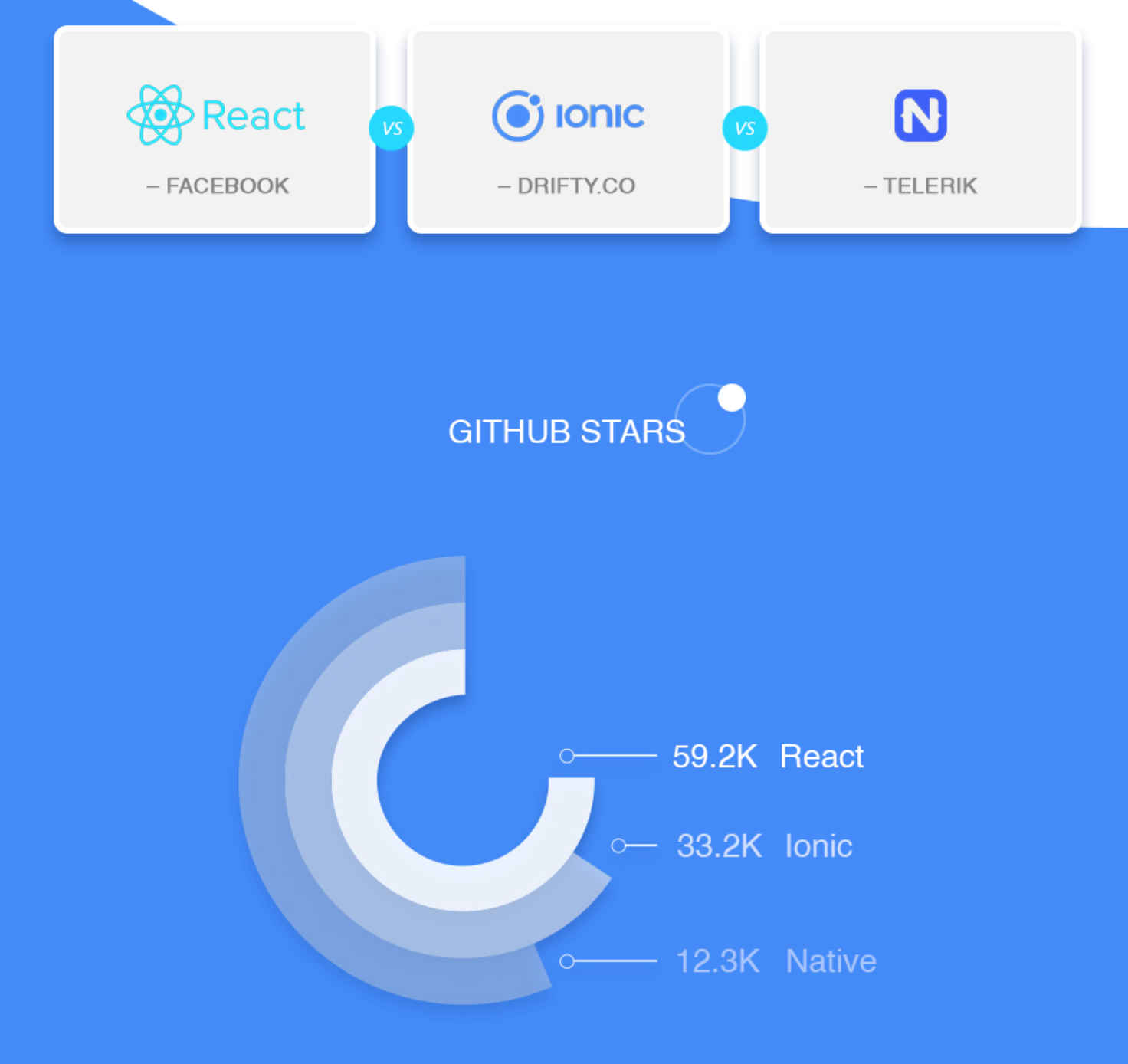
Ionic - React Native - NativeScript comparison infographics
Which platform is better for cross-platform mobile app development?
Check it out
Which platform is better for cross-platform mobile app development?
Check it out
👔 Six applications === six job offers
Good motivating and educating article on application process and preparation for the biggest tech companies.
Good motivating and educating article on application process and preparation for the biggest tech companies.
Medium
I interviewed at six top companies in Silicon Valley in six days, and stumbled into six job offers
In a six-weekday period in August, I interviewed at LinkedIn, Yelp, Apple, Amazon, Facebook, and Google and got all six offers. Here’s how.
This media is not supported in your browser
VIEW IN TELEGRAM
Slack recently updated their logo to decrease the amount of colors and follow simplification trend.
I liked more how it looked before.
I liked more how it looked before.
Hows slack new logo in your opinion?
Anonymous Poll
24%
Wow. Awesome.
29%
Pf. So bad.
48%
Doesn't matter really
Nice free iPhone X mockup for you.
Got all the trends in one place - iPhone with a notch, wireless freaking expensive airpods and something red.
Got all the trends in one place - iPhone with a notch, wireless freaking expensive airpods and something red.
Media is too big
VIEW IN TELEGRAM
A bit more on the mock-ups.
Found an app that can create a 3D rendered phone mockup in literally 10 seconds (although they claim 3 sec).
Can adjust the phone color, background and apply custom animations🔥
designcamera.app
Found an app that can create a 3D rendered phone mockup in literally 10 seconds (although they claim 3 sec).
Can adjust the phone color, background and apply custom animations🔥
designcamera.app
This media is not supported in your browser
VIEW IN TELEGRAM
FilePond - amazing JS library with Angular, React, Vue, jQuery connectors that has stunning UI and not just allows you to upload, preview, fully control the process, but can also give cropping and editing functionalities with image optimization powered with Doka 💎
Parent & Children issues in React
🤔How to pass data to children in React?
Anyone who is familiar with React development even lightly would easily answer this one, telling you "Oh, well thats what
And obviously teach the child to use this data and present somewhere in your frontend.
However, thats 'easy-peasy' you will say.
I agree.
The more interesting question is how to let the child pass data to the parent. I have seen many answering this question in a form "well, you can't really, because React is doing it only one-way", this including some answers on stackoverflow. Some even say to rewrite your structure so that only your parent send stuff, not other way around.
However, the reality is that we quite often have scenarios where we need to pass data from children to parent or from child to child etc.
I kept doing it through callbacks and acessing it via children.
And finally managed to find a really well explained article on medium that deserves your claps. After a 3 min read, you will find that the unusual child-parent communication can be done in the following way:
and in your child component have a function something like
Can't be easier!
Full article - https://medium.com/@ruthmpardee/passing-data-between-react-components-103ad82ebd17
P.S. You can clap up to 50 times, just hold the clap button.
🤔How to pass data to children in React?
Anyone who is familiar with React development even lightly would easily answer this one, telling you "Oh, well thats what
props are for, so in you parent component just pass it over to a child" ...
return (
<Child importantInfo = {this.importantInfo}>
)
...
And obviously teach the child to use this data and present somewhere in your frontend.
However, thats 'easy-peasy' you will say.
I agree.
The more interesting question is how to let the child pass data to the parent. I have seen many answering this question in a form "well, you can't really, because React is doing it only one-way", this including some answers on stackoverflow. Some even say to rewrite your structure so that only your parent send stuff, not other way around.
However, the reality is that we quite often have scenarios where we need to pass data from children to parent or from child to child etc.
I kept doing it through callbacks and acessing it via children.
And finally managed to find a really well explained article on medium that deserves your claps. After a 3 min read, you will find that the unusual child-parent communication can be done in the following way:
//Parent Component
<Child callbackFromParent={this.myCallback}>
and in your child component have a function something like
tellDad = () => {this.props.callbackFromParent(this.responseToDad)}Can't be easier!
Full article - https://medium.com/@ruthmpardee/passing-data-between-react-components-103ad82ebd17
P.S. You can clap up to 50 times, just hold the clap button.

By the way, if you haven't checked yet - here is the list of main changes in webpack 5
GitHub
changelog-v5/README.md at master · webpack/changelog-v5
Temporary repo for the changelog for webpack 5. Contribute to webpack/changelog-v5 development by creating an account on GitHub.
App magic
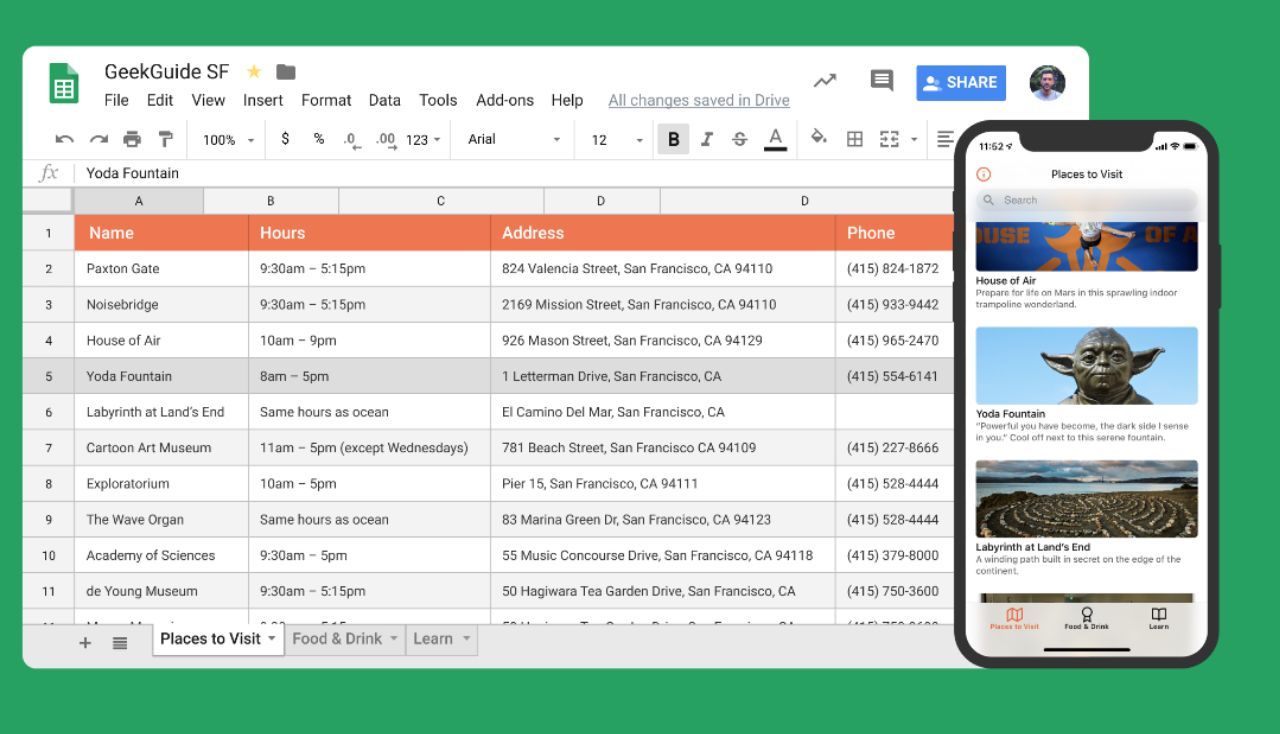
If you also have friends who think creating apps or learning programming is tough - share this one.
Glideapps - basically a magic compiler that creates a simple app from your Google docs. Simple, but can also let you use things like commenting.
Also 2 min of their must watch YouTube tutorial.
If you also have friends who think creating apps or learning programming is tough - share this one.
Glideapps - basically a magic compiler that creates a simple app from your Google docs. Simple, but can also let you use things like commenting.
Also 2 min of their must watch YouTube tutorial.
Turns out this gradient is called -
Find other names and nice gradients - https://uigradients.com/#SublimeVivid
Sublime Vivid. Find other names and nice gradients - https://uigradients.com/#SublimeVivid