
Quiz Results:
👌🏻: 115 peeps. (68.86%)
☝🏻: 16 peeps. (9.58%)
✌🏻: 15 peeps. (8.98%)
🤟🏻: 21 peeps. (12.57%)
Total: 167 peeps.
Updated 2018-11-30 02:25:06 UTC
🔥🔥🔥
8 people get extra points for noticing that the quiz had none correct answers. The current snippet will render 'it' 3 times.
To make 👌 answer correct, we need to have
👌🏻: 115 peeps. (68.86%)
☝🏻: 16 peeps. (9.58%)
✌🏻: 15 peeps. (8.98%)
🤟🏻: 21 peeps. (12.57%)
Total: 167 peeps.
Updated 2018-11-30 02:25:06 UTC
🔥🔥🔥
8 people get extra points for noticing that the quiz had none correct answers. The current snippet will render 'it' 3 times.
To make 👌 answer correct, we need to have
{langs.map(it => <p>{it}</p>)}
Meanwhile, we finally got our community to 4K🔥
Want to say Thank You to every single one of you for keeping engaged and for all the nice words that you sent me during this 6 months. This is what truly motivates and keep this channel alive.
As a giving back, I want to understand you better and get to know what do you want to see in the channel in the future! I encourage you to vote as this will help us shape the content and make it more relevant for everyone (not just stuff that interests me personally).
🗞️ IT news
👓 Tutorials and Reading material
🔥 Nice UI and UX
🚀 Tricks and Tips
🤓 More tech stuff
💡 Keep it as it is now
If there is something else - just dm me personally @masant1
Thank you all again and have an awesome day ahead!
Want to say Thank You to every single one of you for keeping engaged and for all the nice words that you sent me during this 6 months. This is what truly motivates and keep this channel alive.
As a giving back, I want to understand you better and get to know what do you want to see in the channel in the future! I encourage you to vote as this will help us shape the content and make it more relevant for everyone (not just stuff that interests me personally).
🗞️ IT news
👓 Tutorials and Reading material
🔥 Nice UI and UX
🚀 Tricks and Tips
🤓 More tech stuff
💡 Keep it as it is now
If there is something else - just dm me personally @masant1
Thank you all again and have an awesome day ahead!
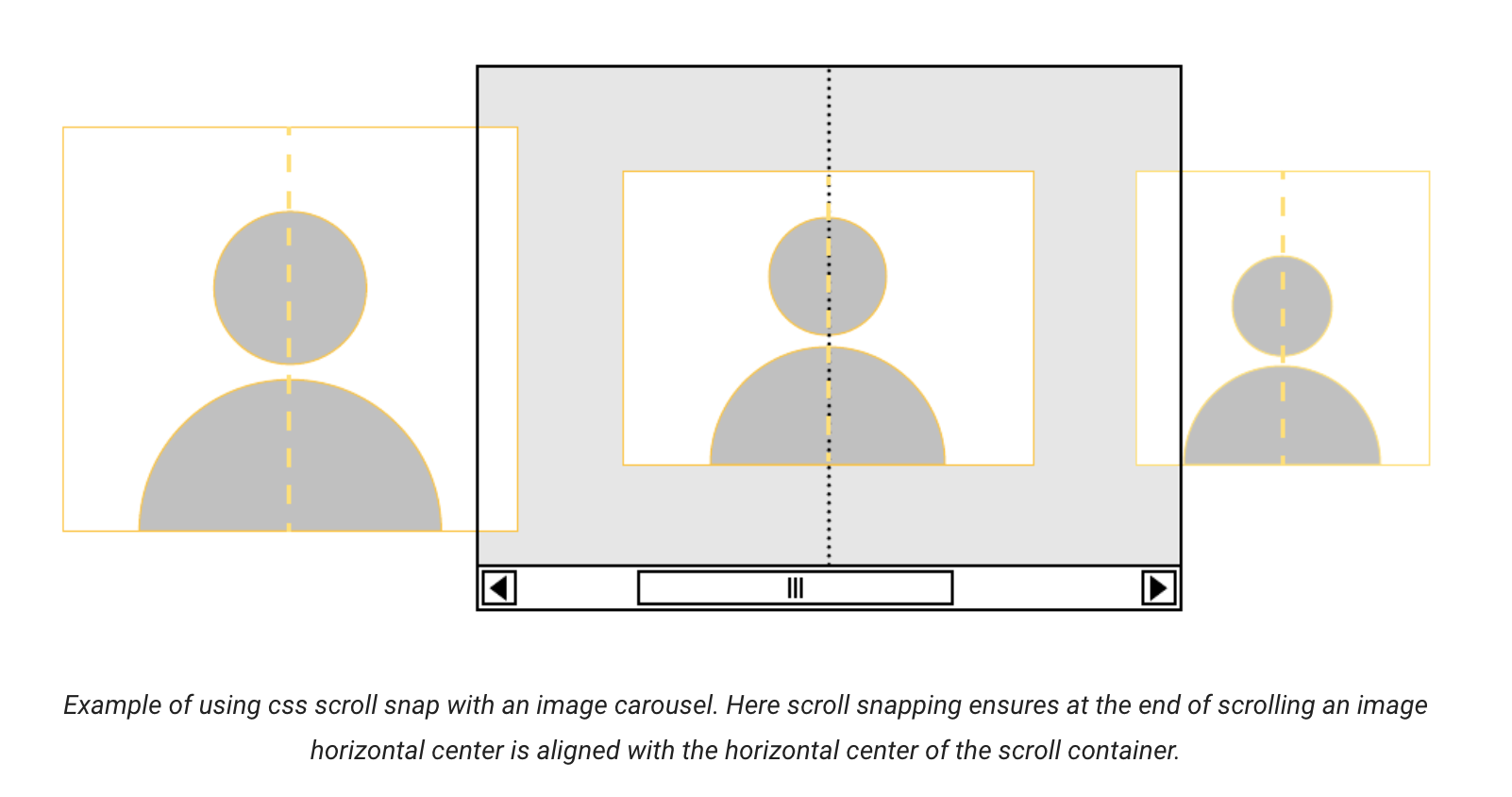
New CSS property
Also works great on mobile devices.
A few examples
scroll-snap allow you to easily create well-controlled scroll experience for your users. No JavaScript or plugins needed. Plain CSS!Also works great on mobile devices.
A few examples
👓 Tutorials and Reading material
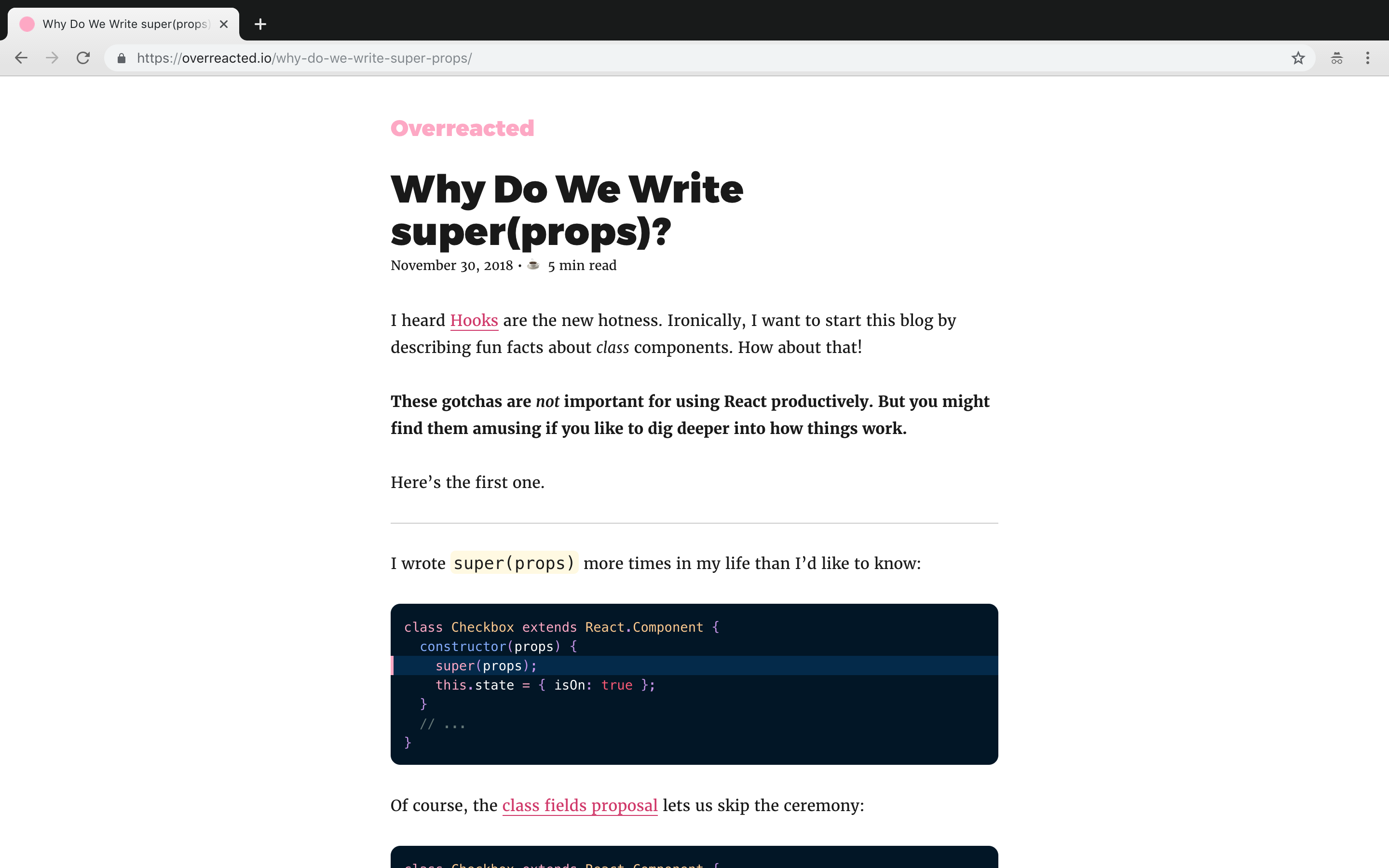
Why Do We Write super(props)?
I remember when I asked myself "Ah, what do I even write this:"
It felt like I read somewhere "Its how you do it, its not gonna work otherwise" and then as usual you get used to do it without even realising the real need apart from "well, it probably just to use something from the parent". Thats why we use
Great to finally get a professional explain this. Especially good that the guy is so close to React development. Thanks, Dan Abramov.
I suggest you also have a read
On a side note, I think it will be nice to now split some of the posts in categories that you vote for in this post. Might even create stickers for that one day 😂
Why Do We Write super(props)?
I remember when I asked myself "Ah, what do I even write this:"
constructor (props) {
super(props);
}
It felt like I read somewhere "Its how you do it, its not gonna work otherwise" and then as usual you get used to do it without even realising the real need apart from "well, it probably just to use something from the parent". Thats why we use
super in JS, isn't it?Great to finally get a professional explain this. Especially good that the guy is so close to React development. Thanks, Dan Abramov.
I suggest you also have a read
On a side note, I think it will be nice to now split some of the posts in categories that you vote for in this post. Might even create stickers for that one day 😂
This media is not supported in your browser
VIEW IN TELEGRAM
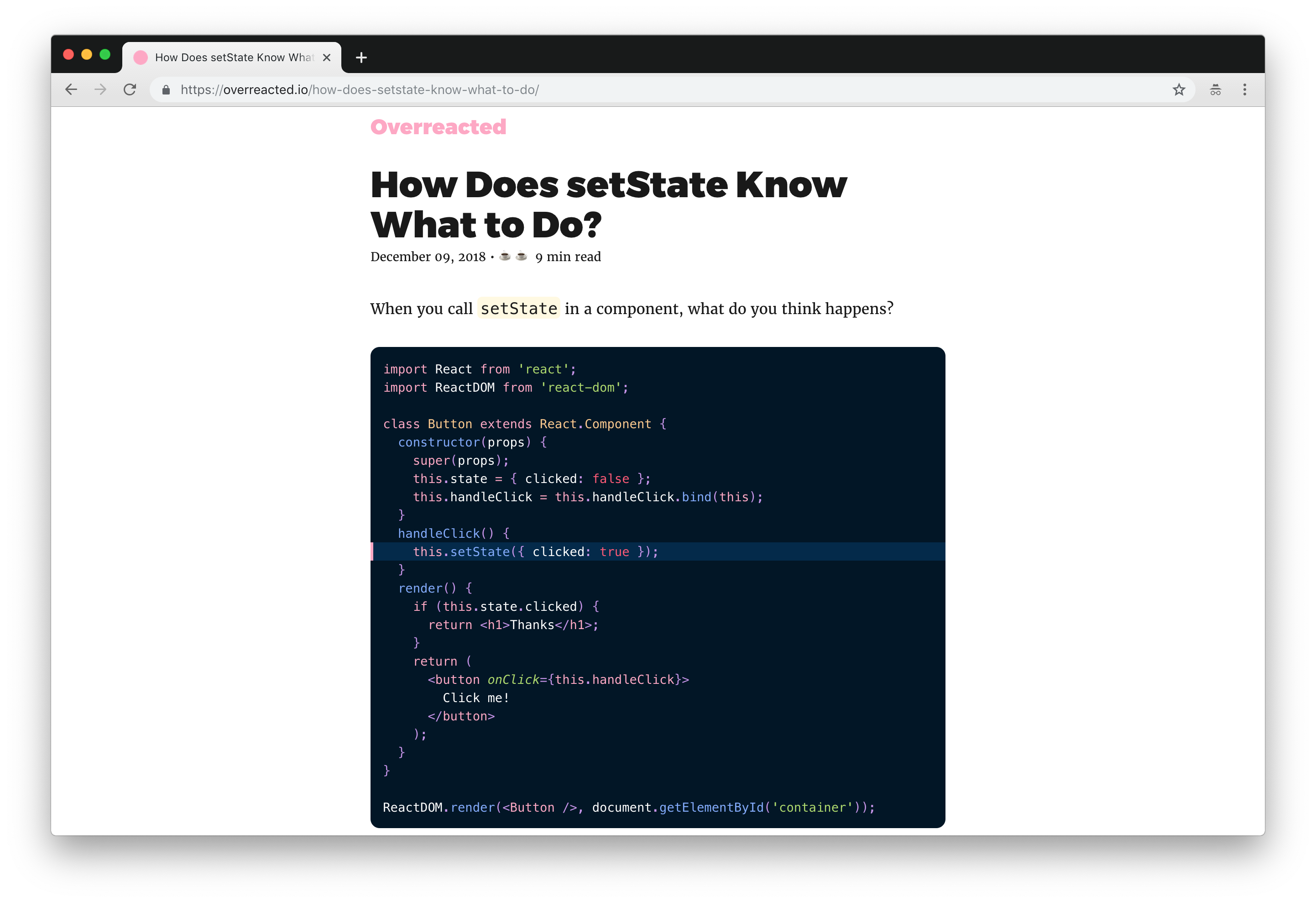
Great UX for a simple to - do app. Created with After Effects. Which should answer your main question 😂
And yes, collated a few stickers to categorise some of the posts in the channel, what do you think (vote at sticker)?
The plan is to split some posts so it can be easily categorised, if there are several posts under one category e.g. 👓 Tutorials and Reading material, then there will be only one sticker at the top and then articles. Might help to navigate a bit easier as I know some of you don't open telegram every single day.
And yes, collated a few stickers to categorise some of the posts in the channel, what do you think (vote at sticker)?
The plan is to split some posts so it can be easily categorised, if there are several posts under one category e.g. 👓 Tutorials and Reading material, then there will be only one sticker at the top and then articles. Might help to navigate a bit easier as I know some of you don't open telegram every single day.
Someone has very correctly pointed out a question on those UI - "thats cool, but how do you do those", which is why I think it's fair to give you a bit more practical explantation.
Most of the coolest ones I've seen was done in AE with motion graphics and other fancy words. Some a bit more complex, some can be done in like 30 min with very basic AE experience.
Sharing a video on how this stuff can be done (🎬 30 min).
Apart from being cool and causing a "Wow effect" from the client's side and "Oh fuck effect" from your developers, it can also be a nice visual for web site or during presentation.
I do think though that if you goal is to create an app/service in a limited timeframe - spending much time in AE is not reasonable enough. Maybe one-two screens, but definitely not the whole app. The prototyping tools like Sketch, Figma, Framer are much better for that.
Enjoy 🔥
Most of the coolest ones I've seen was done in AE with motion graphics and other fancy words. Some a bit more complex, some can be done in like 30 min with very basic AE experience.
Sharing a video on how this stuff can be done (🎬 30 min).
Apart from being cool and causing a "Wow effect" from the client's side and "Oh fuck effect" from your developers, it can also be a nice visual for web site or during presentation.
I do think though that if you goal is to create an app/service in a limited timeframe - spending much time in AE is not reasonable enough. Maybe one-two screens, but definitely not the whole app. The prototyping tools like Sketch, Figma, Framer are much better for that.
Enjoy 🔥
YouTube
Mobile App UI Interaction Design/Animation Tutorial in After Effects CC 2018!
🚀 Get 2 free months of Skillshare Premium & watch my Course for free:
https://skl.sh/2TVhf8z
In this Tutorial, we will learn to Animate the Screens and Elements of a UI for a Mobile App using After Effects CC 2018. This is also called as Interaction Design…
https://skl.sh/2TVhf8z
In this Tutorial, we will learn to Animate the Screens and Elements of a UI for a Mobile App using After Effects CC 2018. This is also called as Interaction Design…
Continuing on design, there has been an Adobe MAX 2018 conference recently, where they provided a sneak peek onto some cool projects within algorithmic design.
The one I particularly loved and all designers or typographists here will surely appreciate is Project Fontphoria.
It simply can take your photo with, say, graffiti and by analysing all symbols on the picture, easily create a font from it and render it in live.
True magic🔥
As developers, I am sure you have also done a bit of design and this thing truly saves a lot of time. I mean, you can technically become a designer tomorrow with that😂
One more sneak 👀 or let's switch from design to programming👨💻 already?
The one I particularly loved and all designers or typographists here will surely appreciate is Project Fontphoria.
It simply can take your photo with, say, graffiti and by analysing all symbols on the picture, easily create a font from it and render it in live.
True magic🔥
As developers, I am sure you have also done a bit of design and this thing truly saves a lot of time. I mean, you can technically become a designer tomorrow with that😂
One more sneak 👀 or let's switch from design to programming👨💻 already?
YouTube
#Fontphoria: Adobe MAX 2018 (Sneak Peek) | Adobe Creative Cloud
A glyph morphing and generation system that smartly manages the representation of a glyph smoothly without creating/modifying any font and generates complete alphabets and fonts captured from a single letter glyph or word/phrase. Read more about this year's…
Alright, I'll throw another sneak peek for you.
Moving Stills - a one-button software that transforms your static photos into #CoolMovingLikeFacebook 3D ones.
The AI there does a good job and saves you quite some time for achieving the same effect in AE.
The one I really liked is the fact that you can import the whole album and just create a pretty cool slide show that looks more like a short video clips than simple Ken Burns effect.
Thats it for this week's design stuff, programming articles coming up tomorrow😉
Moving Stills - a one-button software that transforms your static photos into #CoolMovingLikeFacebook 3D ones.
The AI there does a good job and saves you quite some time for achieving the same effect in AE.
The one I really liked is the fact that you can import the whole album and just create a pretty cool slide show that looks more like a short video clips than simple Ken Burns effect.
Thats it for this week's design stuff, programming articles coming up tomorrow😉
YouTube
#MovingStills: Adobe MAX 2018 (Sneak Peek) | Adobe Creative Cloud
Enables any photograph to be turned into a live photo; animating the image in 3D, simulating the realistic effect of flying through the scene. Read more about this year's #AdobeMAX Sneak Peeks: https://adobe.ly/2yra9xG
Subscribe to Adobe Creative Cloud:…
Subscribe to Adobe Creative Cloud:…
As a developer, you always have to deal with conflicting information. JS is better than PHP, Vue is cooler than React, GraphQL over REST etc.
But its crucial to be able to critically review this kind of information and strategically apply it to your specific case.
Which is why I want to give you a nice challenge today. I'll share 2 good reading materials and let you make a decision, which one is better for most of your work.
☝️The first one called "Progressive Web Apps - the future of mobile web". Its actually a free book with support from Google , Microsoft and Awwwards. Check it out
✌️ The second reading material has a name "You need neither PWA nor AMP to make your website load fast" and discusses a topic from a slightly different perspective - link
Feel free to throw this post into
As a side note, I am openning comments below for you to write what kind of reading material are you most interested in. Tutorials on specific languages or frameworks, nice explanations on programming concepts, what to read when you just starting to learn coding etc, sky is not even a limit in this case. Share your thoughts.
But its crucial to be able to critically review this kind of information and strategically apply it to your specific case.
Which is why I want to give you a nice challenge today. I'll share 2 good reading materials and let you make a decision, which one is better for most of your work.
☝️The first one called "Progressive Web Apps - the future of mobile web". Its actually a free book with support from Google , Microsoft and Awwwards. Check it out
✌️ The second reading material has a name "You need neither PWA nor AMP to make your website load fast" and discusses a topic from a slightly different perspective - link
Feel free to throw this post into
Saved Messages and read those when you are in the bus or a train, at least thats what I normally do. As a side note, I am openning comments below for you to write what kind of reading material are you most interested in. Tutorials on specific languages or frameworks, nice explanations on programming concepts, what to read when you just starting to learn coding etc, sky is not even a limit in this case. Share your thoughts.
Weekends are over, time to get back to reading/learning. Today we go through CSS for hackers or A timing attack with CSS selectors and JS
💡Quote of the day:
Breaking stuff is bad, but understanding how it can be broken can prevent it in the future.
-Just made it up, free to use, no copyright😂
💡Quote of the day:
Breaking stuff is bad, but understanding how it can be broken can prevent it in the future.
-Just made it up, free to use, no copyright😂
JSX is a syntactic sugar, which is a good thing.
A good article explains behind the scenes for JSX, how it works, what gets translated to virtual & real DOM.
Still think mixing HTML and JS is ugly? Fine, the article is for you.
A good article explains behind the scenes for JSX, how it works, what gets translated to virtual & real DOM.
Still think mixing HTML and JS is ugly? Fine, the article is for you.
fettblog.eu
JSX is syntactic sugar
If you follow me you know that I’m super late to the React game. It was not until functional components showed up that I got really interested in the framework. I just loved the idea of having everything wrapped in an easy function rather than needing to…
This media is not supported in your browser
VIEW IN TELEGRAM
If you ever thought that it would be good to properly learn JS, the time has come.
http://jstherightway.org - it covers it all from where JS is coming from all the way to linting, game engines, design patterns, libraries etc. Its like REALLY elaborated (and free🤷♂).
http://jstherightway.org - it covers it all from where JS is coming from all the way to linting, game engines, design patterns, libraries etc. Its like REALLY elaborated (and free🤷♂).
Today, data is everything. Digital empires are built on data, and there's a fierce war for the audience. Having great UX/UI is an amazing way to bring the users in. But even more effort goes into keeping the audience, and simplest mistakes can cause serious churn.
When users trust you with their data, breaking their trust is the fastest way to failure. Join Prisma/Channel and you will always be aware of the latest security news and trends, data breaches and leaks, and everything you need to keep your systems safe.
https://t.me/prisma_channel
When users trust you with their data, breaking their trust is the fastest way to failure. Join Prisma/Channel and you will always be aware of the latest security news and trends, data breaches and leaks, and everything you need to keep your systems safe.
https://t.me/prisma_channel
Oh well, you gonna love me for this♥️. Sharing with you the nicest coding job interview questions and answers.
JS, React, Angular, Vue, CSS, Bootstrap, C#, Ruby, Java, Azure, Git, SQL.. oh boy, you name it.
The best part is that it is also splitted in Junior, Mid and Senior, so you can check which ones you are good for (considering the experience).
It's so nice, I will even use some of them here as posts in the future, to highlight it for those who are lazy.
Its a free Github repo, give guys some starts 🌟, they did something phenomenally useful.
Enjoy
Guess that should be it for the Reading/Tutorial section for now, let's see which one do you want to see next. You have 24hr to make a decision😉
🗞️ IT news
🔥 Nice UI and UX
🚀 Tricks and Tips
🤓 Tech stuff
JS, React, Angular, Vue, CSS, Bootstrap, C#, Ruby, Java, Azure, Git, SQL.. oh boy, you name it.
The best part is that it is also splitted in Junior, Mid and Senior, so you can check which ones you are good for (considering the experience).
It's so nice, I will even use some of them here as posts in the future, to highlight it for those who are lazy.
Its a free Github repo, give guys some starts 🌟, they did something phenomenally useful.
Enjoy
Guess that should be it for the Reading/Tutorial section for now, let's see which one do you want to see next. You have 24hr to make a decision😉
🗞️ IT news
🔥 Nice UI and UX
🚀 Tricks and Tips
🤓 Tech stuff