
🎧 Desktop music player focused on streaming from free sources
Say goodbye to proprietary music players filled with ads, tracking, and profiling.
Nuclear Player empowers you to listen to what you want, where you want, and how you want, for free.
Main features:
- Searching for and playing music from YouTube, Jamendo, Audius and SoundCloud;
- Searching for albums (powered by Last.fm and Discogs), album view, automatic song lookup based on artist and track name;
- Song queue, which can be exported as a playlist;
- Scrobbling to last.fm;
- Newest releases with reviews - tracks and albums;
- Radio mode (automatically queue similar tracks);
- No accounts, no ads.
#windows #app #music #youtube
Say goodbye to proprietary music players filled with ads, tracking, and profiling.
Nuclear Player empowers you to listen to what you want, where you want, and how you want, for free.
Main features:
- Searching for and playing music from YouTube, Jamendo, Audius and SoundCloud;
- Searching for albums (powered by Last.fm and Discogs), album view, automatic song lookup based on artist and track name;
- Song queue, which can be exported as a playlist;
- Scrobbling to last.fm;
- Newest releases with reviews - tracks and albums;
- Radio mode (automatically queue similar tracks);
- No accounts, no ads.
#windows #app #music #youtube
GitHub
Releases · nukeop/nuclear
Streaming music player that finds free music for you - nukeop/nuclear
👍2
Lifehack of the day pinned «🎧 Desktop music player focused on streaming from free sources Say goodbye to proprietary music players filled with ads, tracking, and profiling. Nuclear Player empowers you to listen to what you want, where you want, and how you want, for free. Main features:…»
🚀 Free and Open Source, full-featured torrent client for Android
LibreTorrent is an ad-free, open-source, Material Design torrent client with IP filtering, Tor support, proxy support, automatic file moving, sequential downloading, and the ability to select files for download.
Main features:
* Move files while downloading;
* Stream files, with sequential downloads;
* 35+ translations;
* Scheduling;
* Auto-downloading, with Atom/RSS manager;
* HTTP\S and magnet links;
* DHT, PeX, encryption, LSD, UPnP, NAT*PMP, µTP;
* IP filtering (eMule dat and PeerGuardian);
* Supports proxy for trackers and peers.
#android #app
LibreTorrent is an ad-free, open-source, Material Design torrent client with IP filtering, Tor support, proxy support, automatic file moving, sequential downloading, and the ability to select files for download.
Main features:
* Move files while downloading;
* Stream files, with sequential downloads;
* 35+ translations;
* Scheduling;
* Auto-downloading, with Atom/RSS manager;
* HTTP\S and magnet links;
* DHT, PeX, encryption, LSD, UPnP, NAT*PMP, µTP;
* IP filtering (eMule dat and PeerGuardian);
* Supports proxy for trackers and peers.
#android #app

👍4
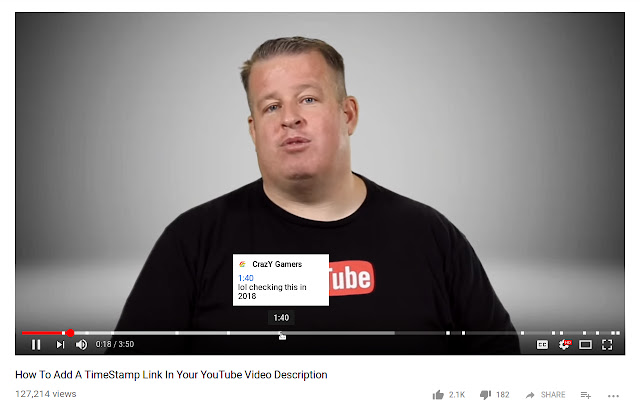
YouTube Timestamps extension shows timestamps from comments on timeline
A YouTube timestamp is a way to link to a specific moment in your video. Often, users will bounce or navigate away from video content if it is not what they are looking for. By adding a timestamp, you can improve retention by directing users to the most relevant portion of your video from the outset.
This extension shows YouTube timestamps from comments on timeline.
Note: To scroll a long comment scroll right on the comment's timestamp on the video timeline.
#chrome #firefox #addon
A YouTube timestamp is a way to link to a specific moment in your video. Often, users will bounce or navigate away from video content if it is not what they are looking for. By adding a timestamp, you can improve retention by directing users to the most relevant portion of your video from the outset.
This extension shows YouTube timestamps from comments on timeline.
Note: To scroll a long comment scroll right on the comment's timestamp on the video timeline.
#chrome #firefox #addon
❤1
📳 An application that shows trackers and permissions from other installed apps
Exodus is an Android application that let you know what trackers are embedded in apps installed on your smartphone using the εxodus plateform. It let you also know the permissions required by any apps on your smartphone.
It helps you to take your privacy back!
Note: The app can only detect apps installed from the Google Play store.
#app #android #privacy
Exodus is an Android application that let you know what trackers are embedded in apps installed on your smartphone using the εxodus plateform. It let you also know the permissions required by any apps on your smartphone.
It helps you to take your privacy back!
Note: The app can only detect apps installed from the Google Play store.
#app #android #privacy

👍1
🎨 How to learn to draw from samples
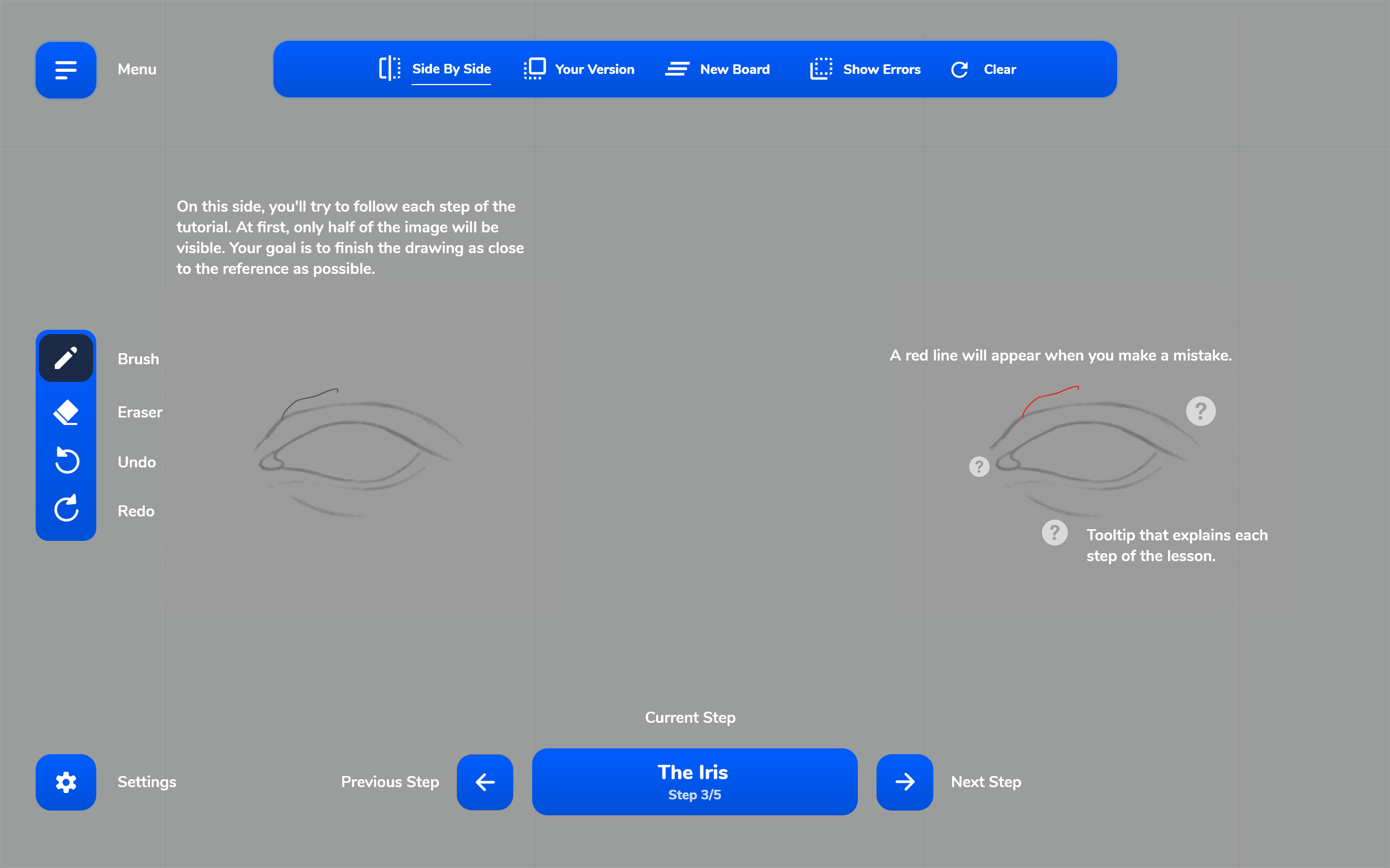
If you've always wanted to learn how to draw beautifully, but didn't know where to start, then use the TryDraw website. The service will teach you linear graphics:
1. Go to the website: https://www.trydraw.com/
2. Make a sketch according to the proposed sample. Draw along the contour, as in the original.
3. Discrepancies are highlighted in red as errors. You can choose other samples from a large list.
Practice on different samples and increase your drawing skills in this way. In the paid version, even more complex sketches are available for the advanced level.
#service #lifehack
If you've always wanted to learn how to draw beautifully, but didn't know where to start, then use the TryDraw website. The service will teach you linear graphics:
1. Go to the website: https://www.trydraw.com/
2. Make a sketch according to the proposed sample. Draw along the contour, as in the original.
3. Discrepancies are highlighted in red as errors. You can choose other samples from a large list.
Practice on different samples and increase your drawing skills in this way. In the paid version, even more complex sketches are available for the advanced level.
#service #lifehack
👍3
🤷 Powerful tool to root Android device easily
Magisk is a very powerful tool that allows you to root Android device easily.
Major features that Magisk offers:
- Root any Android device with the open-source root solution;
- Manage root permissions and use biometrics like fingerprint or Face Unlock to grant superuser permissions;
- Pass Google’s SafetyNet tests even when the phone is rooted;
- Use banking and security applications on rooted devices;
- Add third-party features using Magisk Modules;
- Easily install OTA updates on your rooted Android device.
#android #app #lifehack
Magisk is a very powerful tool that allows you to root Android device easily.
Major features that Magisk offers:
- Root any Android device with the open-source root solution;
- Manage root permissions and use biometrics like fingerprint or Face Unlock to grant superuser permissions;
- Pass Google’s SafetyNet tests even when the phone is rooted;
- Use banking and security applications on rooted devices;
- Add third-party features using Magisk Modules;
- Easily install OTA updates on your rooted Android device.
#android #app #lifehack

👍1
⚡How to Install Magisk on Android
The easiest method to install Magisk on Android is by flashing the latest Magisk installer ZIP file using TWRP.
Step-by-step guide:
1. Download the latest Magisk installer zip.
2. Connect your phone to the PC using the USB cable and enable MTP/File Transfer mode.
3. Copy the downloaded Magisk zip file (e.g. Magisk-v24.0.zip) to the device’s internal storage or SD card.
4. Boot your Android device into TWRP recovery using the relevant key combination.
5. Alternatively, you can also use the following ADB command while your device is connected with USB debugging enabled: adb reboot recovery
6. Tap on ‘Install’ in the TWRP main screen.
7. Navigate to the phone’s internal/external storage and select the Magisk installer zip file (e.g. Magisk-v24.0.zip).
8. The file will be added to the TWRP flashing queue.
9. Swipe the button on the bottom of the screen to flash the file and install Magisk on your Android device.
10. When the flashing process is complete, hit the 'Reboot System' button.
After your Android phone boots, you will see the latest Magisk Manager app present in the app drawer.
#android #guide #lifehack
The easiest method to install Magisk on Android is by flashing the latest Magisk installer ZIP file using TWRP.
Step-by-step guide:
1. Download the latest Magisk installer zip.
2. Connect your phone to the PC using the USB cable and enable MTP/File Transfer mode.
3. Copy the downloaded Magisk zip file (e.g. Magisk-v24.0.zip) to the device’s internal storage or SD card.
4. Boot your Android device into TWRP recovery using the relevant key combination.
5. Alternatively, you can also use the following ADB command while your device is connected with USB debugging enabled: adb reboot recovery
6. Tap on ‘Install’ in the TWRP main screen.
7. Navigate to the phone’s internal/external storage and select the Magisk installer zip file (e.g. Magisk-v24.0.zip).
8. The file will be added to the TWRP flashing queue.
9. Swipe the button on the bottom of the screen to flash the file and install Magisk on your Android device.
10. When the flashing process is complete, hit the 'Reboot System' button.
After your Android phone boots, you will see the latest Magisk Manager app present in the app drawer.
#android #guide #lifehack
GitHub
Releases · topjohnwu/Magisk
The Magic Mask for Android. Contribute to topjohnwu/Magisk development by creating an account on GitHub.
👍1
Lifehack of the day pinned «⚡How to Install Magisk on Android The easiest method to install Magisk on Android is by flashing the latest Magisk installer ZIP file using TWRP. Step-by-step guide: 1. Download the latest Magisk installer zip. 2. Connect your phone to the PC using the…»
🏠 Free, open source, no ads launcher for Android
Shade Launcher is extremely lightweight and open-source launcher application for Android.
Main Features:
- At a Glance ‘Unread’ notifications;
- Disable ‘At a Glance’ widgets;
- Notification Dots and Apps Suggestions;
- Accent colors, custom icon packs, and fonts;
- Adaptive Icons support;
- Built-in Activity Launcher;
- Custom search widget support;
- Customize grid spacing between icons;
- Google News feed integration.
#android #launcher
Shade Launcher is extremely lightweight and open-source launcher application for Android.
Main Features:
- At a Glance ‘Unread’ notifications;
- Disable ‘At a Glance’ widgets;
- Notification Dots and Apps Suggestions;
- Accent colors, custom icon packs, and fonts;
- Adaptive Icons support;
- Built-in Activity Launcher;
- Custom search widget support;
- Customize grid spacing between icons;
- Google News feed integration.
#android #launcher
👍1
Lifehack of the day pinned «🏠 Free, open source, no ads launcher for Android Shade Launcher is extremely lightweight and open-source launcher application for Android. Main Features: - At a Glance ‘Unread’ notifications; - Disable ‘At a Glance’ widgets; - Notification Dots and Apps…»
📨The third-party Telegram android app with many features
Nekogram X is an free and open source third-party Telegram client, based on Telegram-FOSS with features added.
Main features:
- Unlimited login accounts;
- Built-in VMess, Shadowsocks, SSR, Trojan-GFW proxies support;
- Built-in public proxy list / Proxy subscription support;
- Ipv6 MTProxy support;
- Scan the QR code (any link, can add a proxy);
- Add stickers without sticker pack;
- Delete all messages in group;
- Login via QR code;
- OpenKeychain client (sign / verify / decrypt / import);
- Google Cloud Translate / Yandex.Translate support;
- View stats option for messages;
- Option to upgrade group to supergroup.
#android #app #telegram
Nekogram X is an free and open source third-party Telegram client, based on Telegram-FOSS with features added.
Main features:
- Unlimited login accounts;
- Built-in VMess, Shadowsocks, SSR, Trojan-GFW proxies support;
- Built-in public proxy list / Proxy subscription support;
- Ipv6 MTProxy support;
- Scan the QR code (any link, can add a proxy);
- Add stickers without sticker pack;
- Delete all messages in group;
- Login via QR code;
- OpenKeychain client (sign / verify / decrypt / import);
- Google Cloud Translate / Yandex.Translate support;
- View stats option for messages;
- Option to upgrade group to supergroup.
#android #app #telegram
👍2
Lifehack of the day pinned «📨The third-party Telegram android app with many features Nekogram X is an free and open source third-party Telegram client, based on Telegram-FOSS with features added. Main features: - Unlimited login accounts; - Built-in VMess, Shadowsocks, SSR, Trojan…»
❌How to delete data without the possibility of recovery
Did you know that files, even deleted from the Windows Recycle Bin, can be restored? If you want to delete files without the possibility of recovery, you will have to use third-party software.
Eraser is an advanced security tool for Windows which allows you to completely remove sensitive data from your hard drive by overwriting it several times with carefully selected patterns.
Instructions:
1. Download the latest stable version of Eraser and install it.
2. Run Eraser, select "New Task" from the "Erase Schedule" menu to display the "Task Properties" window and ensure "Run Manually" is selected as the Task Type. Click on "Add Data" to display the "Select Data to Erase" window.
3. Make sure File is selected and click "Browse" to select the files you want to delete. Click on "Open" and then click OK twice. Finally, in the "Erase Schedule" right-click on the file and select "Run now" from the menu.
Done!
#windows #privacy
Did you know that files, even deleted from the Windows Recycle Bin, can be restored? If you want to delete files without the possibility of recovery, you will have to use third-party software.
Eraser is an advanced security tool for Windows which allows you to completely remove sensitive data from your hard drive by overwriting it several times with carefully selected patterns.
Instructions:
1. Download the latest stable version of Eraser and install it.
2. Run Eraser, select "New Task" from the "Erase Schedule" menu to display the "Task Properties" window and ensure "Run Manually" is selected as the Task Type. Click on "Add Data" to display the "Select Data to Erase" window.
3. Make sure File is selected and click "Browse" to select the files you want to delete. Click on "Open" and then click OK twice. Finally, in the "Erase Schedule" right-click on the file and select "Run now" from the menu.
Done!
#windows #privacy

👍2
🎙️ A fully-featured digital audio workstation
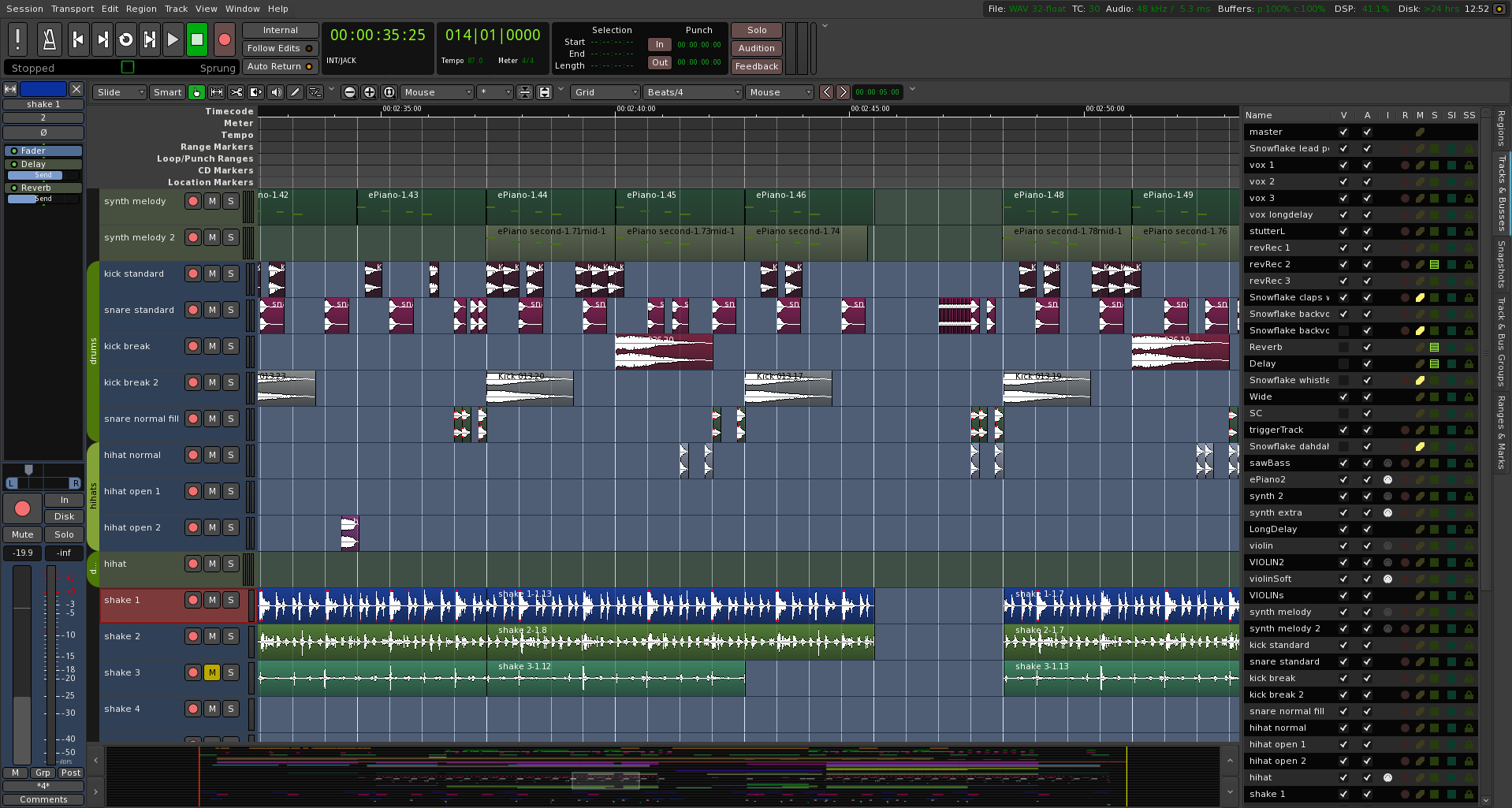
Ardour is a computer program for professional sound recording and processing, similar to other software like ProTools, Nuendo, Sonar and Logic, and running on GNU/Linux, Windows and macOS operating systems.
Some features:
- Ardour's recording abilities are limited by only the hardware it is run on; there are no built-in limits in its capabilities;
- No limits on number of tracks, buses, plugins, inserts, or sends;
- Non-destructive, non-linear editing with unlimited undo/redo, even across editing sessions;
- All editing is in-window: no switching to piano roll or other dedicated dialogs/displays for specialized operations.
#music #windows #linux #mac
Ardour is a computer program for professional sound recording and processing, similar to other software like ProTools, Nuendo, Sonar and Logic, and running on GNU/Linux, Windows and macOS operating systems.
Some features:
- Ardour's recording abilities are limited by only the hardware it is run on; there are no built-in limits in its capabilities;
- No limits on number of tracks, buses, plugins, inserts, or sends;
- Non-destructive, non-linear editing with unlimited undo/redo, even across editing sessions;
- All editing is in-window: no switching to piano roll or other dedicated dialogs/displays for specialized operations.
#music #windows #linux #mac
👍1
🏠 A simple, easy-to-use, elegant open-source Home Cloud system
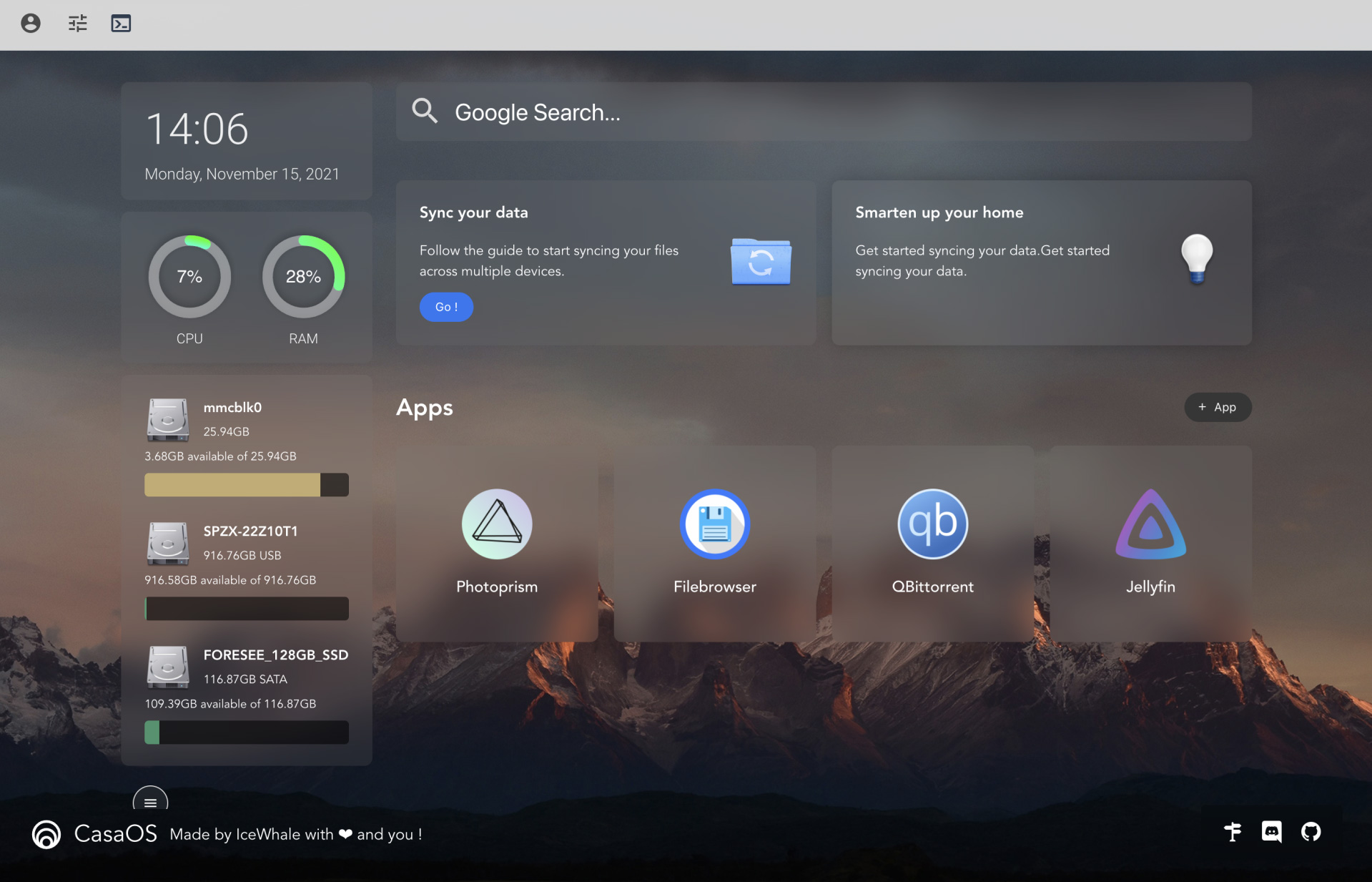
CasaOS is an open-source Home Cloud system based on the Docker ecosystem and designed for home scenarios. The system will reorganize your smart home step by step and take control of lighting, cameras, home cloud.
You can install CasaOS on Intel NUC or Raspberry Pi.
Key Features:
* UI designed for home scenarios - simple, elegant, and easy-to-use;
* Quick Docker app installation with only three steps, plus automatic management;
* App Store for Home Cloud (is under development);
* Home data/digital asset management (is under development);
* Smart home manager (is under development).
#github #cloud #lifehack
CasaOS is an open-source Home Cloud system based on the Docker ecosystem and designed for home scenarios. The system will reorganize your smart home step by step and take control of lighting, cameras, home cloud.
You can install CasaOS on Intel NUC or Raspberry Pi.
Key Features:
* UI designed for home scenarios - simple, elegant, and easy-to-use;
* Quick Docker app installation with only three steps, plus automatic management;
* App Store for Home Cloud (is under development);
* Home data/digital asset management (is under development);
* Smart home manager (is under development).
#github #cloud #lifehack
👍2
Lifehack of the day pinned «🏠 A simple, easy-to-use, elegant open-source Home Cloud system CasaOS is an open-source Home Cloud system based on the Docker ecosystem and designed for home scenarios. The system will reorganize your smart home step by step and take control of lighting…»
🤔 How to create multiple WhatsApp accounts on the same device
What if you want to use one account for work and the other for personal chats? We have a solution. Create a clone!
How to do it:
1. Download and run Parallel Space.
2. Click on the "+" icon, then select "WhatsApp".
3. After you have cloned the messenger, you can create its shortcut on the home screen.
Done! Now all you have to do is log in and use it the same way you use the regular version of WhatsApp.
#android #data #whatsapp
What if you want to use one account for work and the other for personal chats? We have a solution. Create a clone!
How to do it:
1. Download and run Parallel Space.
2. Click on the "+" icon, then select "WhatsApp".
3. After you have cloned the messenger, you can create its shortcut on the home screen.
Done! Now all you have to do is log in and use it the same way you use the regular version of WhatsApp.
#android #data #whatsapp
Google Play
Parallel Space - app cloning - Apps on Google Play
Run multiple accounts of the same app on a single device
👍2
✍️ Loop Habit Tracker
Loop is a mobile app that helps you create and maintain good habits, allowing you to achieve your long-term goals. Detailed graphs and statistics show you how your habits improved over time. It is completely ad-free and open source.
Main Features:
* Loop has an elegant and minimalistic interface that is very easy to use, even for first-time users. Highly optimized for speed, the app works well even on older phones.
* Loop has an advanced formula for calculating the strength of your habits. Every repetition makes your habit stronger and every missed day makes it weaker.
* Loop supports habits with more complex schedules, such as 3 times per week or every other day.
* Schedule notifications to remind you of your habits. Each habit can have its own reminder, at a chosen time of the day.
* Colorful widgets allow you to track your habits directly from your home screen, without even opening the app.
* If you want to further analyze your data, or move it to another service, Loop allows you to export it to spreadsheets (CSV) or to a database file (SQLite).
* Loop imposes no artificial limits on how many habits you can have. All features are available to all users. There are no in-app purchases.
* There are no advertisements, annoying notifications or intrusive permissions in this app, and there will never be.
* Loop doesn't require an Internet connection or online account registration. Your confidential data is never sent to anyone. Neither the developers nor any third-parties have access to it.
#app #android
Loop is a mobile app that helps you create and maintain good habits, allowing you to achieve your long-term goals. Detailed graphs and statistics show you how your habits improved over time. It is completely ad-free and open source.
Main Features:
* Loop has an elegant and minimalistic interface that is very easy to use, even for first-time users. Highly optimized for speed, the app works well even on older phones.
* Loop has an advanced formula for calculating the strength of your habits. Every repetition makes your habit stronger and every missed day makes it weaker.
* Loop supports habits with more complex schedules, such as 3 times per week or every other day.
* Schedule notifications to remind you of your habits. Each habit can have its own reminder, at a chosen time of the day.
* Colorful widgets allow you to track your habits directly from your home screen, without even opening the app.
* If you want to further analyze your data, or move it to another service, Loop allows you to export it to spreadsheets (CSV) or to a database file (SQLite).
* Loop imposes no artificial limits on how many habits you can have. All features are available to all users. There are no in-app purchases.
* There are no advertisements, annoying notifications or intrusive permissions in this app, and there will never be.
* Loop doesn't require an Internet connection or online account registration. Your confidential data is never sent to anyone. Neither the developers nor any third-parties have access to it.
#app #android
Google Play
Loop Habit Tracker - Apps on Google Play
Create good habits and track their progress over time
👍2
🤔 What to do if I forgot my Wi-Fi password
If you have Windows, there is a way to find a forgotten password right on the command line.
How to do it:
1. Open the command prompt, type "cmd" in the Windows search and click "Run as administrator" under the results.
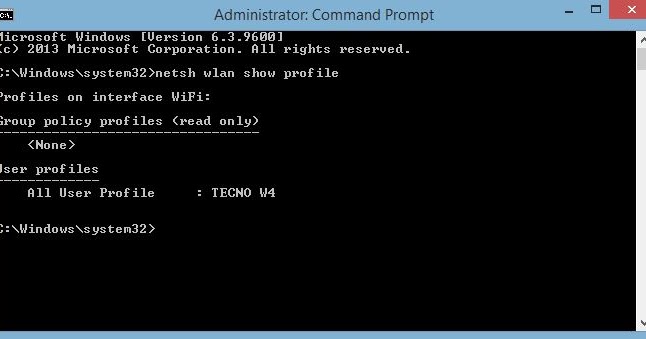
2. In the command prompt window, enter "netsh wlan show profiles". This will allow us to find out the name of the network.
3. Now enter this: "netsh wlan show profile name="WiFi Profile Name" key=clear". Don't forget to replace "WiFi Profile Name" with the name of your network, you found it in the previous step.
4. The password will appear in the "Key Content" field.
Done!
#windows #lifehack
If you have Windows, there is a way to find a forgotten password right on the command line.
How to do it:
1. Open the command prompt, type "cmd" in the Windows search and click "Run as administrator" under the results.
2. In the command prompt window, enter "netsh wlan show profiles". This will allow us to find out the name of the network.
3. Now enter this: "netsh wlan show profile name="WiFi Profile Name" key=clear". Don't forget to replace "WiFi Profile Name" with the name of your network, you found it in the previous step.
4. The password will appear in the "Key Content" field.
Done!
#windows #lifehack
👍1
Index Of Shared Lifehacks🔥 and Tips💯
1. 📺 How to find and download an excerpt from the movie
2. ❌ How to recover deleted files from hard disk
3. ✂️ How to remove unnecessary objects from a photo in 5 seconds without Photoshop
4. 🎤 How to find music similar to your favorite
5. 📷 How to check if Camera2 API is enabled at your phone
6. 📺 How to stop a video on the right frame in TikTok
7. 🎮 How to find out how long it will take to complete the game
8. ❌ How to stop automatic Windows updates
9. 🧾 How to make clear instructions from a computer screen in a minute
10. 🎧 How to cut a voice or minus from a track without complex programs
11. 🤔 How to create multiple WhatsApp accounts on the same device
12. 👉 How to delete the history of views and actions on YouTube
13. 🎞 How to reduce the volume of video without loss of quality
14. 👻 How to enable guest mode on Android
15. ❌How to remove pre-installed Windows 10 apps that spy on you
16. 🤷 How to create a beautiful fake chat in any social network and messenger
17. 🎬 How to get the whole history of your Instagram
18. 🔋 How to detect battery wear on Android
19. 📱 How not to be distracted by games and social networks on your smartphone during important work
20. 👻 How to make Chrome always run in incognito mode
21. 🤔 What to do if I forgot my Wi-Fi password
22. ⚡️How to Install Magisk on Android
23. 🔐 How to run a secret game on Android 10
24. 🎨 How to improve image quality of your photos
25. 🚀 How to create your own set of stickers in Telegram
1. 📺 How to find and download an excerpt from the movie
2. ❌ How to recover deleted files from hard disk
3. ✂️ How to remove unnecessary objects from a photo in 5 seconds without Photoshop
4. 🎤 How to find music similar to your favorite
5. 📷 How to check if Camera2 API is enabled at your phone
6. 📺 How to stop a video on the right frame in TikTok
7. 🎮 How to find out how long it will take to complete the game
8. ❌ How to stop automatic Windows updates
9. 🧾 How to make clear instructions from a computer screen in a minute
10. 🎧 How to cut a voice or minus from a track without complex programs
11. 🤔 How to create multiple WhatsApp accounts on the same device
12. 👉 How to delete the history of views and actions on YouTube
13. 🎞 How to reduce the volume of video without loss of quality
14. 👻 How to enable guest mode on Android
15. ❌How to remove pre-installed Windows 10 apps that spy on you
16. 🤷 How to create a beautiful fake chat in any social network and messenger
17. 🎬 How to get the whole history of your Instagram
18. 🔋 How to detect battery wear on Android
19. 📱 How not to be distracted by games and social networks on your smartphone during important work
20. 👻 How to make Chrome always run in incognito mode
21. 🤔 What to do if I forgot my Wi-Fi password
22. ⚡️How to Install Magisk on Android
23. 🔐 How to run a secret game on Android 10
24. 🎨 How to improve image quality of your photos
25. 🚀 How to create your own set of stickers in Telegram
Telegram
Lifehack of the day
📺 How to find and download an excerpt from the movie
Youtubers like to insert excerpts from movies into their videos. If you think that they download whole movies specifically for this, then you are mistaken. There is a simpler solution.
Life Hack:
There…
Youtubers like to insert excerpts from movies into their videos. If you think that they download whole movies specifically for this, then you are mistaken. There is a simpler solution.
Life Hack:
There…
👍2