
🎧How to pair AirPods with your Android phone
Unlike with an iPhone, which can be paired by just opening the AirPods case, Android users will have to go to the Bluetooth settings to connect to the AirPods.
How to use it:
1. On your smartphone, swipe down from the top to open the Quick Settings panel.
2. Long-press on the Bluetooth icon to open the Bluetooth settings.
3. Once you are in the Bluetooth settings, you’ll see an option like Pair a new device. Tap on it and wait for the AirPods to show up under Available devices.
4. Open the lid of the AirPods charging case with the AirPods in them, and press and hold the button on the back of the case until the light starts blinking white.
5. Your phone will now detect the AirPods and show them under Available devices. Tap on it, and follow the on-screen instructions to complete the pairing process.
6. You can now use them like any other TWS earbuds.
#android #lifehack
Unlike with an iPhone, which can be paired by just opening the AirPods case, Android users will have to go to the Bluetooth settings to connect to the AirPods.
How to use it:
1. On your smartphone, swipe down from the top to open the Quick Settings panel.
2. Long-press on the Bluetooth icon to open the Bluetooth settings.
3. Once you are in the Bluetooth settings, you’ll see an option like Pair a new device. Tap on it and wait for the AirPods to show up under Available devices.
4. Open the lid of the AirPods charging case with the AirPods in them, and press and hold the button on the back of the case until the light starts blinking white.
5. Your phone will now detect the AirPods and show them under Available devices. Tap on it, and follow the on-screen instructions to complete the pairing process.
6. You can now use them like any other TWS earbuds.
#android #lifehack

👍2
🔐Multi-format password manager for your smartphone
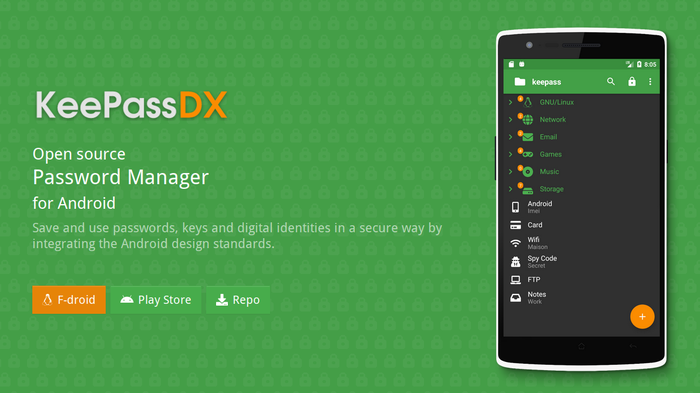
KeePassDX is a password manager, which helps you manage your passwords in a secure way in one database, locked with a master key and/or a keyfile. You only have to remember one single master password and/or select the keyfile to unlock the whole database. The databases are encrypted using the best and most secure encryption algorithms currently known.
Main features:
- Allows opening and copying URI / URL fields quickly.
- Biometric recognition for fast unlocking (fingerprint / face unlock, etc.).
- One-Time Password management (HOTP / TOTP) for Two-factor authentication (2FA).
#android #app #security
KeePassDX is a password manager, which helps you manage your passwords in a secure way in one database, locked with a master key and/or a keyfile. You only have to remember one single master password and/or select the keyfile to unlock the whole database. The databases are encrypted using the best and most secure encryption algorithms currently known.
Main features:
- Allows opening and copying URI / URL fields quickly.
- Biometric recognition for fast unlocking (fingerprint / face unlock, etc.).
- One-Time Password management (HOTP / TOTP) for Two-factor authentication (2FA).
#android #app #security
👍2
Lifehack of the day pinned «🔐Multi-format password manager for your smartphone KeePassDX is a password manager, which helps you manage your passwords in a secure way in one database, locked with a master key and/or a keyfile. You only have to remember one single master password and/or…»
✏️A minimalistic note taking app with powerful features
Notally is extremely light, minimalistic and elegant note taking app. There are no ads, trackers or analytics of any kind. All your notes are stored completely on and never leave your device.
Main features:
- Auto save;
- No permissions required;
- Add labels to your notes for quick organisation;
- Export notes as plain text, XML, JSON, HTML or PDF files with formatting;
- Add clickable links to notes with support for phone numbers, email addresses and web urls.
#android #app
Notally is extremely light, minimalistic and elegant note taking app. There are no ads, trackers or analytics of any kind. All your notes are stored completely on and never leave your device.
Main features:
- Auto save;
- No permissions required;
- Add labels to your notes for quick organisation;
- Export notes as plain text, XML, JSON, HTML or PDF files with formatting;
- Add clickable links to notes with support for phone numbers, email addresses and web urls.
#android #app

👍1
🎵 An Open-Source Music Player App for all your needs
If you are looking for an awesome Music Player with good streaming quality, no ads and subscription, importing playlists from Spotify and many other features, BlackHole player is your choice!
Main features:
- Best Streaming Quality (320kbps aac);
- Trending Songs;
- Artist and Genre Radios;
- Local and Global Top Spotify songs;
- YouTube Search Support;
- Inbuilt Equalizer;
- No Subscription;
- No Ads.
#android #app #music #youtube
If you are looking for an awesome Music Player with good streaming quality, no ads and subscription, importing playlists from Spotify and many other features, BlackHole player is your choice!
Main features:
- Best Streaming Quality (320kbps aac);
- Trending Songs;
- Artist and Genre Radios;
- Local and Global Top Spotify songs;
- YouTube Search Support;
- Inbuilt Equalizer;
- No Subscription;
- No Ads.
#android #app #music #youtube

👍2
📷 How to edit a photo directly in the browser
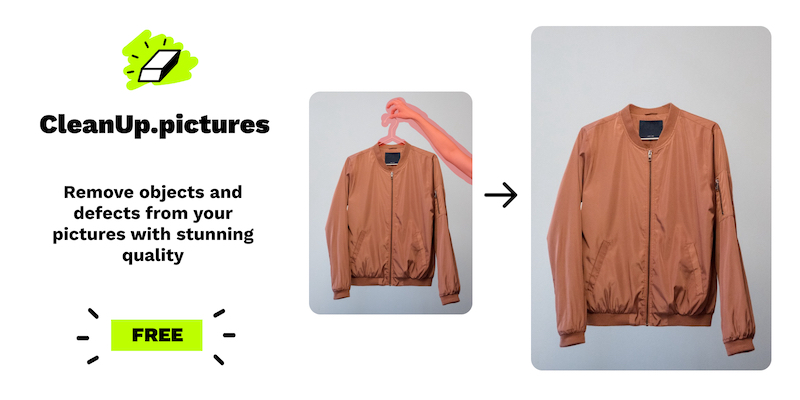
A simple and convenient photo editing service that will allow you to quickly remove unnecessary objects, perform retouching, smooth out unnecessary glare directly in the browser.
How to use the service:
1. Open the website: https://cleanup.pictures/
2. Drag the desired photo inside the frame or select a photo through the file manager.
3. Using the “Brush" size slider, adjust the size of the brush and perform retouching in the right place.
4. Download the finished image via the "Download" button.
The use of the service is completely free and without restrictions on the number of photos.
#service #lifehack #photo
A simple and convenient photo editing service that will allow you to quickly remove unnecessary objects, perform retouching, smooth out unnecessary glare directly in the browser.
How to use the service:
1. Open the website: https://cleanup.pictures/
2. Drag the desired photo inside the frame or select a photo through the file manager.
3. Using the “Brush" size slider, adjust the size of the brush and perform retouching in the right place.
4. Download the finished image via the "Download" button.
The use of the service is completely free and without restrictions on the number of photos.
#service #lifehack #photo
👍2
🕶️How to protect your photos from face recognition algorithms
Facial recognition systems scan billions of faces without their consent. If you don't want your face to get into this huge database too, there is a Fawkes program.
It changes the pixels in the photo so that the algorithms could not recognize the face, and the person did not notice anything.
How to use it:
1. Go to the website (http://sandlab.cs.uchicago.edu/fawkes/), scroll down, click "Downloads" and select your operating system: macOS, Windows or Linux.
2. Download, install and run the program.
3. Click "Select Images" and select the desired photos in which you want to hide your face from recognition systems.
4. Click "Run Protection".
The modified photos are saved to the same place where the original photos were. Now you can post any photo on a social network and not be afraid that algorithms will identify you.
#privacy #program
Facial recognition systems scan billions of faces without their consent. If you don't want your face to get into this huge database too, there is a Fawkes program.
It changes the pixels in the photo so that the algorithms could not recognize the face, and the person did not notice anything.
How to use it:
1. Go to the website (http://sandlab.cs.uchicago.edu/fawkes/), scroll down, click "Downloads" and select your operating system: macOS, Windows or Linux.
2. Download, install and run the program.
3. Click "Select Images" and select the desired photos in which you want to hide your face from recognition systems.
4. Click "Run Protection".
The modified photos are saved to the same place where the original photos were. Now you can post any photo on a social network and not be afraid that algorithms will identify you.
#privacy #program

👍2
🎨 How to improve image quality of your photos
To improve a blurry or unsuccessful photo, there are neural networks. For example, the new Upscaler service increases the image resolution up to 4 times in a couple of clicks with the help of AI.
How to use it:
1. Open the website (https://www.upscale.media/), click "Upload Image" and select the desired file. png, jpeg, jpg and webp formats are supported.
2. After a couple of seconds you will see the result, that is, an improved photo without loss of quality. To download it, click "Download Image".
3. You can choose how many times to increase the resolution. In order to do this, just click "Increase resolution to".
4. To improve the quality and remove artifacts of the photo, there is also an "Enhance Quality" button.
The service is completely free and without restrictions. You can use it as much as you want.
#service #lifehack
To improve a blurry or unsuccessful photo, there are neural networks. For example, the new Upscaler service increases the image resolution up to 4 times in a couple of clicks with the help of AI.
How to use it:
1. Open the website (https://www.upscale.media/), click "Upload Image" and select the desired file. png, jpeg, jpg and webp formats are supported.
2. After a couple of seconds you will see the result, that is, an improved photo without loss of quality. To download it, click "Download Image".
3. You can choose how many times to increase the resolution. In order to do this, just click "Increase resolution to".
4. To improve the quality and remove artifacts of the photo, there is also an "Enhance Quality" button.
The service is completely free and without restrictions. You can use it as much as you want.
#service #lifehack
Upscale.media
AI Image Upscaler - Enlarge & Enhance Your Photos for Free - Upscale.media
Upscale images to 2x or 4x without losing textures or details with our AI tool. The best AI image upscaler for stunning visuals. Try Upscale.media now!
👍1
🔋 How to determine the status of the laptop battery
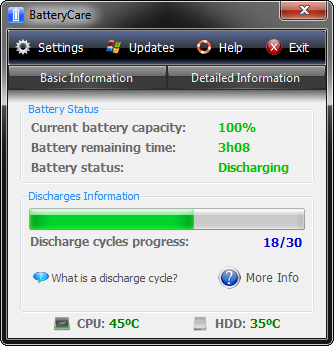
To determine the level of laptop's battery wear, you can use the BatteryCare program, which will show the estimated battery capacity and its wear as a percentage.
How to use:
1. Download the application from the website.
2. Install and run it.
3. Find the application icon in the system tray and right-click. Next, select "Show BatteryCare".
4. To find out the percentage of wear, click on "Advanced" and look for the line "Battery wear".
If the percentage of battery wear is more than 15-20%, then the autonomy of the battery will fall faster. And you should already think about replacing it.
#app #windows
To determine the level of laptop's battery wear, you can use the BatteryCare program, which will show the estimated battery capacity and its wear as a percentage.
How to use:
1. Download the application from the website.
2. Install and run it.
3. Find the application icon in the system tray and right-click. Next, select "Show BatteryCare".
4. To find out the percentage of wear, click on "Advanced" and look for the line "Battery wear".
If the percentage of battery wear is more than 15-20%, then the autonomy of the battery will fall faster. And you should already think about replacing it.
#app #windows
👍1
🔥 How to make your Windows 10 computer as powerful and fast as possible
If you want to get the ultimate performance of your hardware, there is a secret feature that appeared in the Windows 10 April 2018 Update. Depending on the version, there may be two options where this mode is located:
1. Hit Windows+I to open the Settings app and then click the “System” category.
2. Click the “Power & Sleep” tab on the left. On the right, click the “Additional Power Settings” link under the “Related Settings” section.
3. In the window that pops up, click “Show Additional Plans” and then click the “Ultimate Performance” option.
If you couldn't find this mode, open the command line and at the prompt, type (or copy and paste) the following command and then hit Enter:
powercfg -duplicatescheme e9a42b02-d5df-448d-aa00-03f14749eb61
#windows #lifehack
If you want to get the ultimate performance of your hardware, there is a secret feature that appeared in the Windows 10 April 2018 Update. Depending on the version, there may be two options where this mode is located:
1. Hit Windows+I to open the Settings app and then click the “System” category.
2. Click the “Power & Sleep” tab on the left. On the right, click the “Additional Power Settings” link under the “Related Settings” section.
3. In the window that pops up, click “Show Additional Plans” and then click the “Ultimate Performance” option.
If you couldn't find this mode, open the command line and at the prompt, type (or copy and paste) the following command and then hit Enter:
powercfg -duplicatescheme e9a42b02-d5df-448d-aa00-03f14749eb61
#windows #lifehack
👍2
📞 How to avoid leaking your contacts
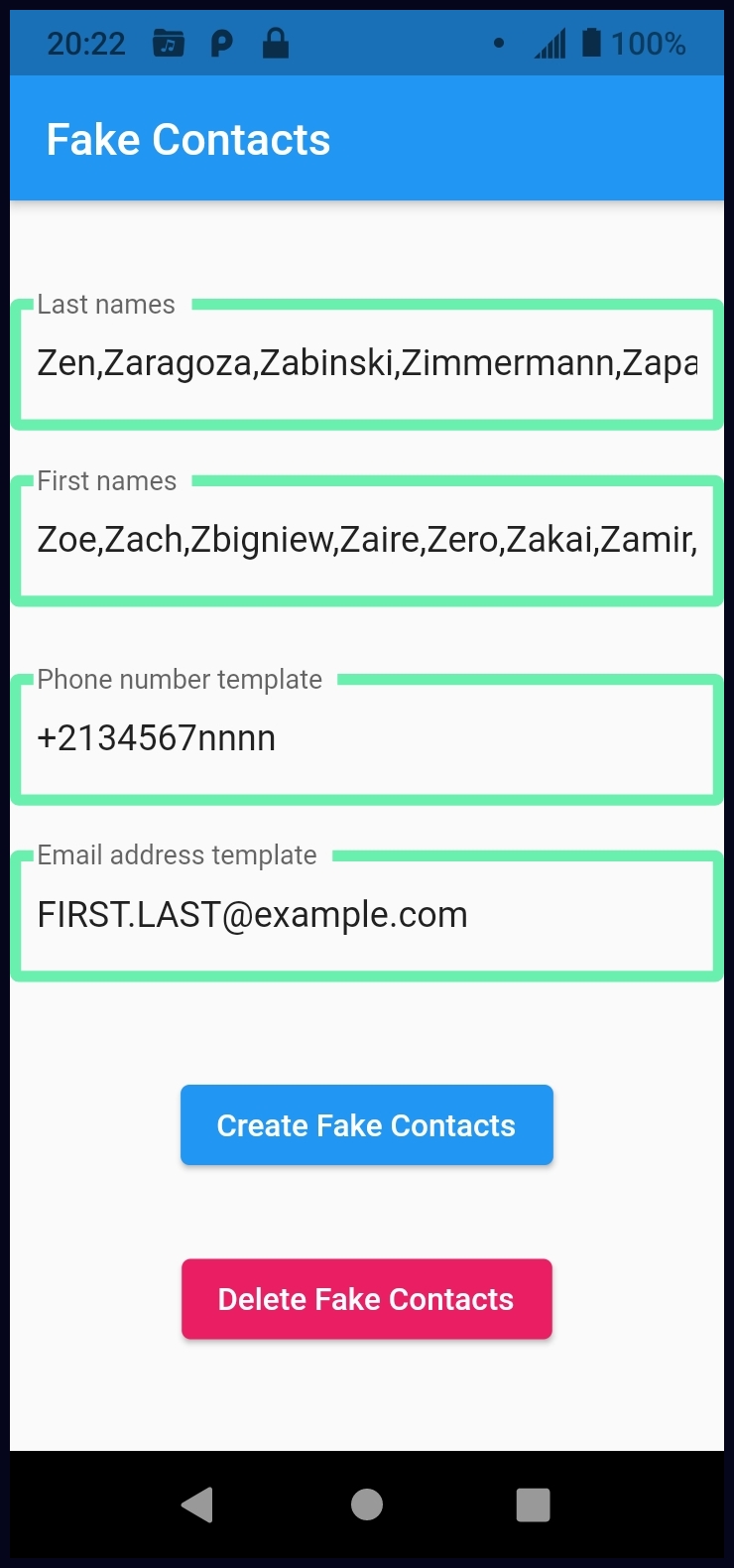
Sooner or later, the leakage of personal data can happen to anyone, no one is immune from this. Fake Contacts is an application that creates fake contacts in your phone book.
How to use:
1. Download and install the Fake Contacts application.
2. Click on "Create Fake Contacts". When you launch the application, a window will appear with the creation of fake contacts.
3. Check the phone book for fake accounts and use these contacts to avoid leaks.
Use it and always remember about the confidentiality of your data.
#app #android
Sooner or later, the leakage of personal data can happen to anyone, no one is immune from this. Fake Contacts is an application that creates fake contacts in your phone book.
How to use:
1. Download and install the Fake Contacts application.
2. Click on "Create Fake Contacts". When you launch the application, a window will appear with the creation of fake contacts.
3. Check the phone book for fake accounts and use these contacts to avoid leaks.
Use it and always remember about the confidentiality of your data.
#app #android
❤1👍1
🔐 How to run a secret game on Android 10
Google has been hiding Easter eggs inside its operating system for many years. And here's how to open the game in the 10th version of Android:
1. Open "Settings" and go to the "About phone" section.
2. Then quickly click on the line "Android Version".
3. The "Android 10" logo will appear. Arrange the number 10 in the shape of the letter "Q".
To control the logo, double-tap on it and then hold to rotate the number "1". You will realize that you did everything right when the gray and white stripes start moving. After that, the second part of the Easter egg will appear: the Picross game. This is a puzzle where you need to fill in the fields according to the instructions on the borders. If you solve it, a picture will open.
#android #lifehack
Google has been hiding Easter eggs inside its operating system for many years. And here's how to open the game in the 10th version of Android:
1. Open "Settings" and go to the "About phone" section.
2. Then quickly click on the line "Android Version".
3. The "Android 10" logo will appear. Arrange the number 10 in the shape of the letter "Q".
To control the logo, double-tap on it and then hold to rotate the number "1". You will realize that you did everything right when the gray and white stripes start moving. After that, the second part of the Easter egg will appear: the Picross game. This is a puzzle where you need to fill in the fields according to the instructions on the borders. If you solve it, a picture will open.
#android #lifehack

👍2
💻Nice open-source alternative to Zoom
If you are tired of Zoom or you don't like to have a proprietary application, then we have an alternative for you: Jitsi Meet. It lets you stay in touch with your family, friends or colleagues.
Main features Jitsi Meet offers:
- Support for all current browsers;
- Mobile applications;
- Web and native SDKs for integration;
- HD audio and video;
- Content sharing;
- End-to-End Encryption;
- Chat with private conversations
#app #privacy #windows #android
If you are tired of Zoom or you don't like to have a proprietary application, then we have an alternative for you: Jitsi Meet. It lets you stay in touch with your family, friends or colleagues.
Main features Jitsi Meet offers:
- Support for all current browsers;
- Mobile applications;
- Web and native SDKs for integration;
- HD audio and video;
- Content sharing;
- End-to-End Encryption;
- Chat with private conversations
#app #privacy #windows #android

❤1👍1
🚀 How to create your own set of stickers in Telegram
Anyone can create their own set of stickers. To do this, you need to write to the @stickers bot and follow its instructions:
1. Type the command /newpack and enter the name of your future set. It can be anything.
2. Send the bot a picture, and then an emoji that will match it. Repeat this procedure until you run out of pictures. The maximum number of stickers in one set is 120 pieces.
3. Now send the /publish command to the bot and enter the short name of the set. Your friends will be able to add this set for themselves using provided link. The name is only in English and at least 4 letters.
4. Everything is ready! Now the bot will give you a link to your set of stickers.
#telegram
Anyone can create their own set of stickers. To do this, you need to write to the @stickers bot and follow its instructions:
1. Type the command /newpack and enter the name of your future set. It can be anything.
2. Send the bot a picture, and then an emoji that will match it. Repeat this procedure until you run out of pictures. The maximum number of stickers in one set is 120 pieces.
3. Now send the /publish command to the bot and enter the short name of the set. Your friends will be able to add this set for themselves using provided link. The name is only in English and at least 4 letters.
4. Everything is ready! Now the bot will give you a link to your set of stickers.
#telegram

👍1
🎞️ An ultimate cross platform FFmpeg GUI
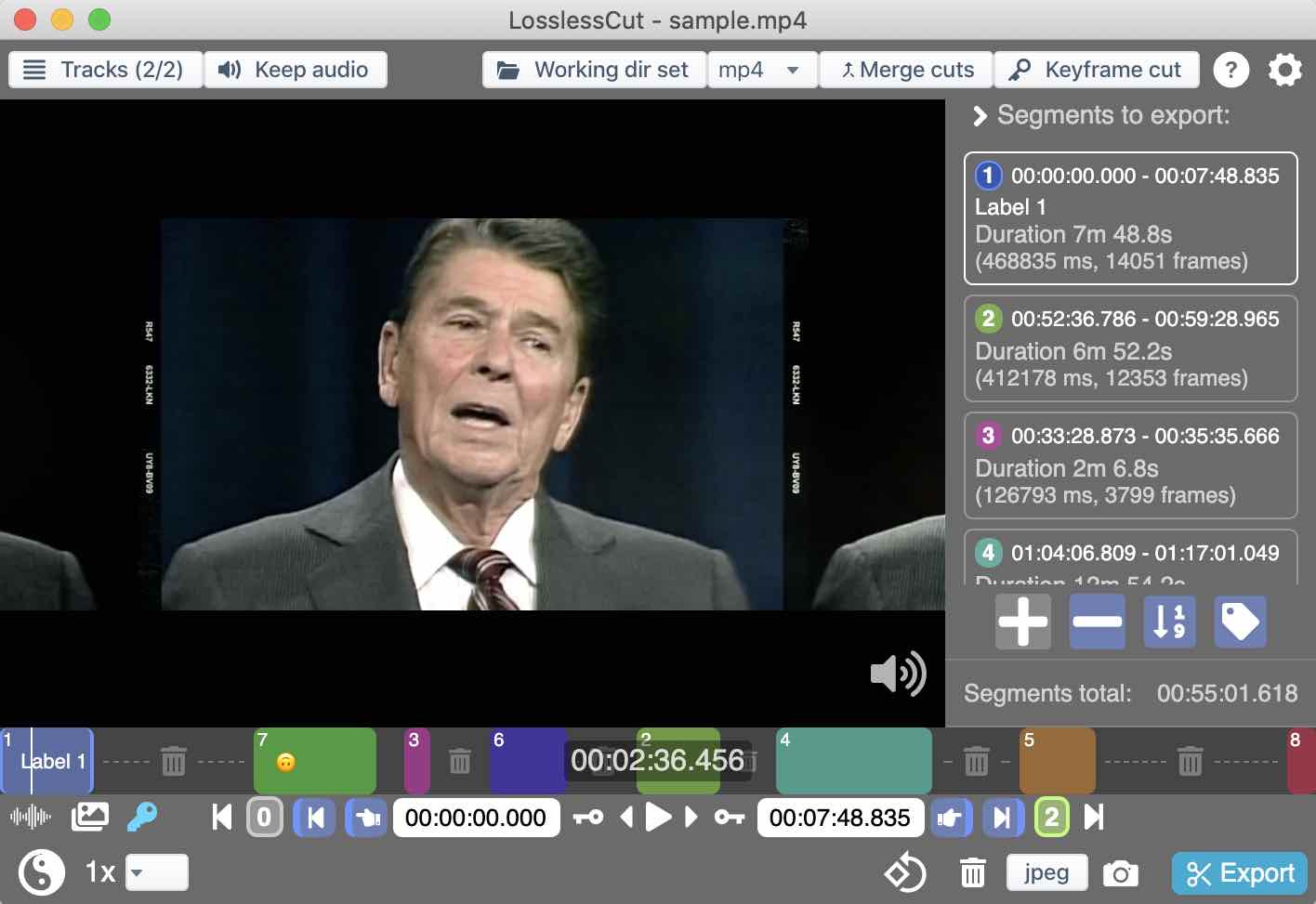
LosslessCut aims to be the ultimate cross platform FFmpeg GUI for extremely fast and lossless operations on video, audio, subtitle and other related media files.
Key Features:
✔️ Lossless cutting of most video and audio formats;
✔️ Losslessly rearrange the order of video/audio segments
✔️ Lossless merge/concatenation of arbitrary files (with identical codecs parameters, e.g. from the same camera);
✔️ Lossless stream editing: Combine arbitrary tracks from multiple files (ex. add music or subtitle track to a video file);
✔️ Losslessly extract all tracks from a file (extract video, audio, subtitle, attachments and other tracks from one file into separate files);
✔️ Apply a per-file timecode offset (and auto load timecode from file);
✔️ Change rotation/orientation metadata in videos.
#video #audio #app #github
LosslessCut aims to be the ultimate cross platform FFmpeg GUI for extremely fast and lossless operations on video, audio, subtitle and other related media files.
Key Features:
✔️ Lossless cutting of most video and audio formats;
✔️ Losslessly rearrange the order of video/audio segments
✔️ Lossless merge/concatenation of arbitrary files (with identical codecs parameters, e.g. from the same camera);
✔️ Lossless stream editing: Combine arbitrary tracks from multiple files (ex. add music or subtitle track to a video file);
✔️ Losslessly extract all tracks from a file (extract video, audio, subtitle, attachments and other tracks from one file into separate files);
✔️ Apply a per-file timecode offset (and auto load timecode from file);
✔️ Change rotation/orientation metadata in videos.
#video #audio #app #github
👍1
🔒 Streamer Mode for Firefox
An extension that hides personal information from pages, similar to Discord's Streamer mode.
When people are sharing their screen on Discord, Zoom, or even on sites like Twitch, they often use their browser to react to videos, present information, play a game, etc.
And if they visit a page that displays their full name, email, or some other type of personal information, that information is visible to the stream and there is nothing they can do to stop it. That information can then be used to spam, dox, and harrass a streamer or a user of these platforms.
With this extension, you can prevent your information from getting in the hands of people that shouldn't have ever had it; by preemptively removing that information from pages, before those pages are even visible.
#privacy #security #addon
An extension that hides personal information from pages, similar to Discord's Streamer mode.
When people are sharing their screen on Discord, Zoom, or even on sites like Twitch, they often use their browser to react to videos, present information, play a game, etc.
And if they visit a page that displays their full name, email, or some other type of personal information, that information is visible to the stream and there is nothing they can do to stop it. That information can then be used to spam, dox, and harrass a streamer or a user of these platforms.
With this extension, you can prevent your information from getting in the hands of people that shouldn't have ever had it; by preemptively removing that information from pages, before those pages are even visible.
#privacy #security #addon
addons.mozilla.org
Streamer Mode for Firefox – Get this Extension for 🦊 Firefox (en-US)
Download Streamer Mode for Firefox for Firefox. Hides visible personal information from pages, similar to Discord's Streamer mode.
👍2
🤔 How to quickly reset Windows 10 to factory settings via the command line
If the PC is slow, buggy, then you need to reset it to factory settings. You can, of course, reinstall Windows, but it's a long time, but the way is faster:
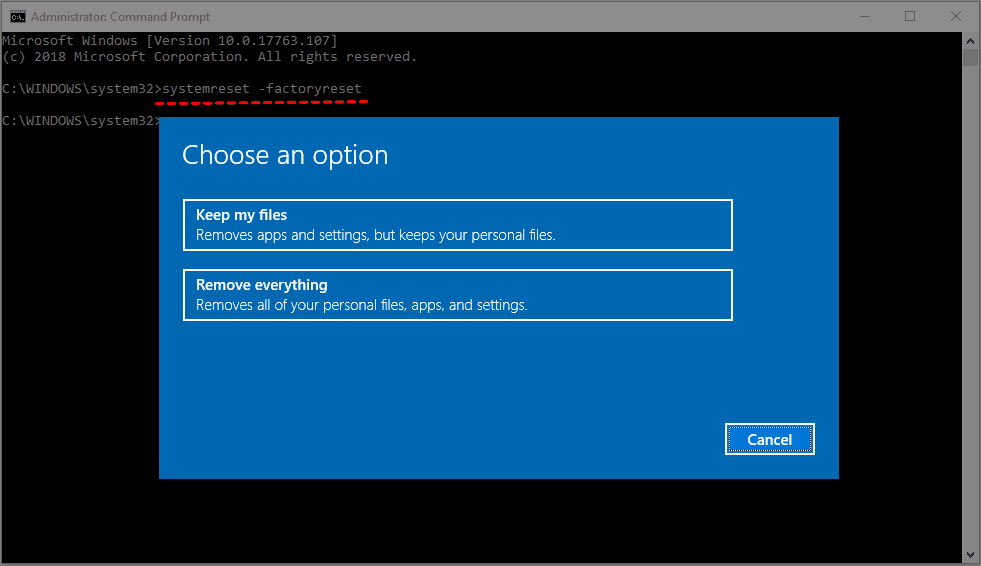
1. Run the command line.
2. Enter: “systemreset –factoryreset” (without quotes).
3. Select the desired reset mode: whether to save any files and drivers.
4. Click "Reset".
After that, the OS will be reset to the factory state and you will be taken to the initial system setup window.
#windows #lifehack #data
If the PC is slow, buggy, then you need to reset it to factory settings. You can, of course, reinstall Windows, but it's a long time, but the way is faster:
1. Run the command line.
2. Enter: “systemreset –factoryreset” (without quotes).
3. Select the desired reset mode: whether to save any files and drivers.
4. Click "Reset".
After that, the OS will be reset to the factory state and you will be taken to the initial system setup window.
#windows #lifehack #data
👍2
🎧 Desktop music player focused on streaming from free sources
Say goodbye to proprietary music players filled with ads, tracking, and profiling.
Nuclear Player empowers you to listen to what you want, where you want, and how you want, for free.
Main features:
- Searching for and playing music from YouTube, Jamendo, Audius and SoundCloud;
- Searching for albums (powered by Last.fm and Discogs), album view, automatic song lookup based on artist and track name;
- Song queue, which can be exported as a playlist;
- Scrobbling to last.fm;
- Newest releases with reviews - tracks and albums;
- Radio mode (automatically queue similar tracks);
- No accounts, no ads.
#windows #app #music #youtube
Say goodbye to proprietary music players filled with ads, tracking, and profiling.
Nuclear Player empowers you to listen to what you want, where you want, and how you want, for free.
Main features:
- Searching for and playing music from YouTube, Jamendo, Audius and SoundCloud;
- Searching for albums (powered by Last.fm and Discogs), album view, automatic song lookup based on artist and track name;
- Song queue, which can be exported as a playlist;
- Scrobbling to last.fm;
- Newest releases with reviews - tracks and albums;
- Radio mode (automatically queue similar tracks);
- No accounts, no ads.
#windows #app #music #youtube
GitHub
Releases · nukeop/nuclear
Streaming music player that finds free music for you - nukeop/nuclear
👍2
Lifehack of the day pinned «🎧 Desktop music player focused on streaming from free sources Say goodbye to proprietary music players filled with ads, tracking, and profiling. Nuclear Player empowers you to listen to what you want, where you want, and how you want, for free. Main features:…»
🚀 Free and Open Source, full-featured torrent client for Android
LibreTorrent is an ad-free, open-source, Material Design torrent client with IP filtering, Tor support, proxy support, automatic file moving, sequential downloading, and the ability to select files for download.
Main features:
* Move files while downloading;
* Stream files, with sequential downloads;
* 35+ translations;
* Scheduling;
* Auto-downloading, with Atom/RSS manager;
* HTTP\S and magnet links;
* DHT, PeX, encryption, LSD, UPnP, NAT*PMP, µTP;
* IP filtering (eMule dat and PeerGuardian);
* Supports proxy for trackers and peers.
#android #app
LibreTorrent is an ad-free, open-source, Material Design torrent client with IP filtering, Tor support, proxy support, automatic file moving, sequential downloading, and the ability to select files for download.
Main features:
* Move files while downloading;
* Stream files, with sequential downloads;
* 35+ translations;
* Scheduling;
* Auto-downloading, with Atom/RSS manager;
* HTTP\S and magnet links;
* DHT, PeX, encryption, LSD, UPnP, NAT*PMP, µTP;
* IP filtering (eMule dat and PeerGuardian);
* Supports proxy for trackers and peers.
#android #app

👍4
YouTube Timestamps extension shows timestamps from comments on timeline
A YouTube timestamp is a way to link to a specific moment in your video. Often, users will bounce or navigate away from video content if it is not what they are looking for. By adding a timestamp, you can improve retention by directing users to the most relevant portion of your video from the outset.
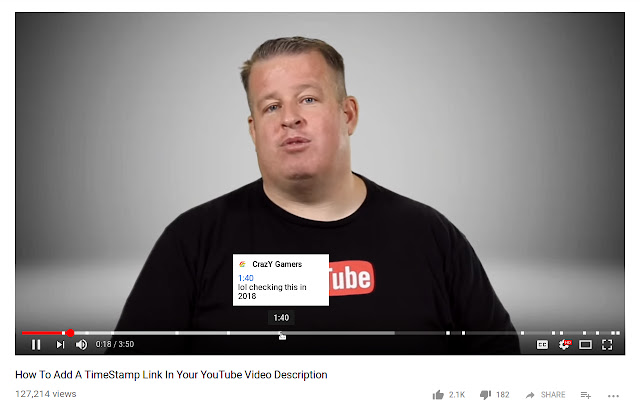
This extension shows YouTube timestamps from comments on timeline.
Note: To scroll a long comment scroll right on the comment's timestamp on the video timeline.
#chrome #firefox #addon
A YouTube timestamp is a way to link to a specific moment in your video. Often, users will bounce or navigate away from video content if it is not what they are looking for. By adding a timestamp, you can improve retention by directing users to the most relevant portion of your video from the outset.
This extension shows YouTube timestamps from comments on timeline.
Note: To scroll a long comment scroll right on the comment's timestamp on the video timeline.
#chrome #firefox #addon
❤1