
Block particular sites in Google search results
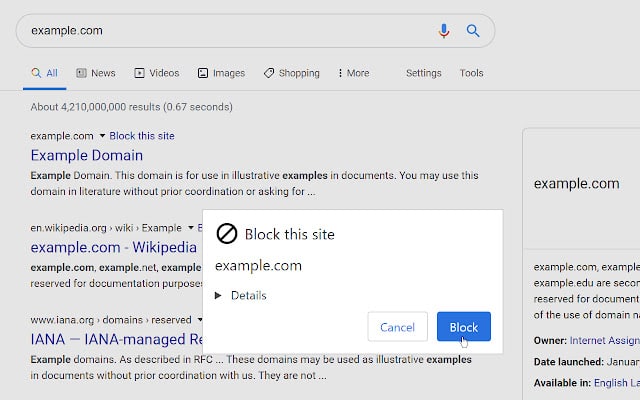
The uBlacklist extension allows you to hide individual sites on a Google search page. After installing it, the option "Block site" will appear next to each of the suggested items, click on it, and this line will disappear.
Essentially, the search results will not change. You will just be shown one line less on this page. Everything works as simply and conveniently as possible.
What you may need it for? First and foremost for parental control when you want to forcibly limit access to a particular page. The same applies to the corporate segment.
The extension is available for Chrome and Mozilla.
Use it!
#service
The uBlacklist extension allows you to hide individual sites on a Google search page. After installing it, the option "Block site" will appear next to each of the suggested items, click on it, and this line will disappear.
Essentially, the search results will not change. You will just be shown one line less on this page. Everything works as simply and conveniently as possible.
What you may need it for? First and foremost for parental control when you want to forcibly limit access to a particular page. The same applies to the corporate segment.
The extension is available for Chrome and Mozilla.
Use it!
#service
👍14
Transform your email into easy-to-use lists
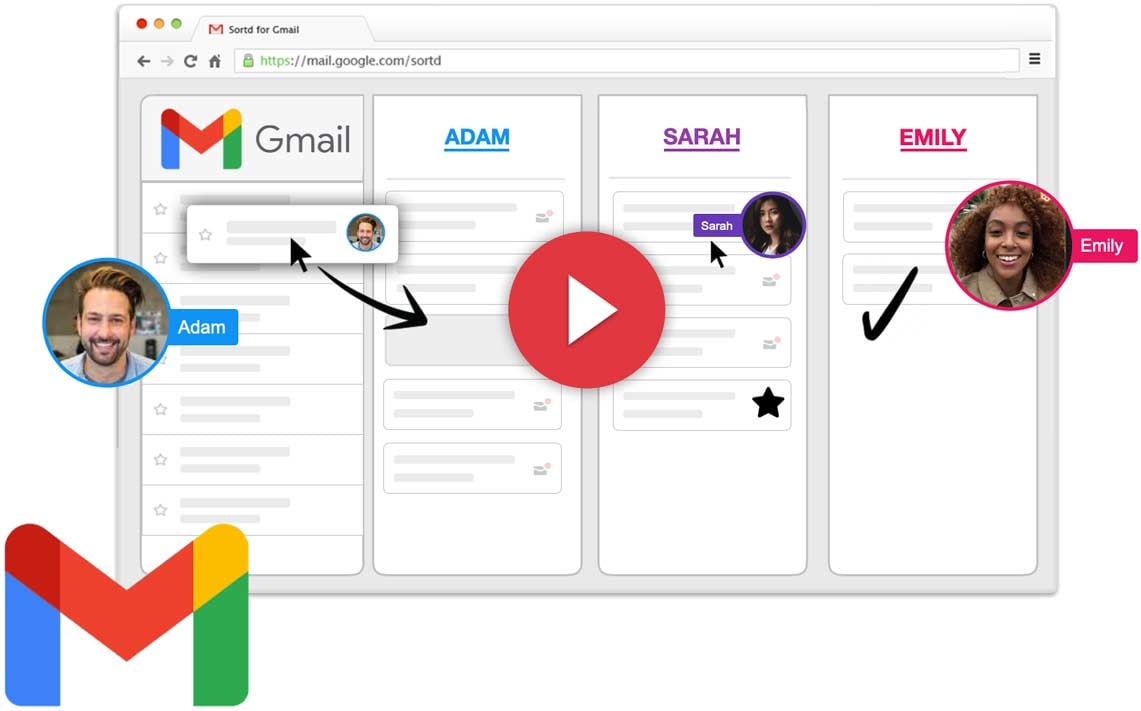
Manage your email, clients, tasks and team workflow with ease without leaving your inbox with Sortd.
Sortd for Gmail is a simple and easy add-on for Gmail that will turn your emails into organized lists to help you grow your business.
Your entire team can now easily see who's working on what, thanks to a transparent view of both email conversations and team tasks in one place.
Perfect for teams and companies that need a simple, cost-effective and powerful solution for important functions like sales, account management and customer support.
Use it!
#service
Manage your email, clients, tasks and team workflow with ease without leaving your inbox with Sortd.
Sortd for Gmail is a simple and easy add-on for Gmail that will turn your emails into organized lists to help you grow your business.
Your entire team can now easily see who's working on what, thanks to a transparent view of both email conversations and team tasks in one place.
Perfect for teams and companies that need a simple, cost-effective and powerful solution for important functions like sales, account management and customer support.
Use it!
#service
👍12
Search for duplicate files in a cloud storage
There are applications for finding duplicate files on our devices. But there are not so many applications for searching cloud storages. DeDuplicate is one of the very few representatives of this kind of utilities.
You give the application access to the files in a cloud and start scanning them. You can specify individual folders or the entire cloud. Once the scan is complete, you will need to check which files you want to keep and which you want to discard.
The advantage is that DeDuplicate does not download files to your device and the size of files is not particularly important for the speed of scanning.
The utility supports Google Drive, Dropbox, OneDrive, MEGA and Yandex.Disk. There are versions for iOS and Android available.
Use it!
#service
There are applications for finding duplicate files on our devices. But there are not so many applications for searching cloud storages. DeDuplicate is one of the very few representatives of this kind of utilities.
You give the application access to the files in a cloud and start scanning them. You can specify individual folders or the entire cloud. Once the scan is complete, you will need to check which files you want to keep and which you want to discard.
The advantage is that DeDuplicate does not download files to your device and the size of files is not particularly important for the speed of scanning.
The utility supports Google Drive, Dropbox, OneDrive, MEGA and Yandex.Disk. There are versions for iOS and Android available.
Use it!
#service
👍16❤3
Check websites reputation
Have you ever wondered how to check the security of a website? Check the reputation and security of websites by enlisting the expertise of other users with Web of Trust, extension for Chrome.
While browsing, the extension will alert you when you visit dangerous sites, dishonest online stores, dangerous links and more.
Reputation icons are displayed next to search engine results, social media, email, and other popular sites to help you:
🟢 Green shows that the site is safe.
🟡 Yellow urges you to be wary.
🔴 Red indicates potential danger. Do not visit the site, threats are identified.
A site's reputation is calculated by combining advanced algorithms and millions of user reviews.
Use it!
#security
Have you ever wondered how to check the security of a website? Check the reputation and security of websites by enlisting the expertise of other users with Web of Trust, extension for Chrome.
While browsing, the extension will alert you when you visit dangerous sites, dishonest online stores, dangerous links and more.
Reputation icons are displayed next to search engine results, social media, email, and other popular sites to help you:
🟢 Green shows that the site is safe.
🟡 Yellow urges you to be wary.
🔴 Red indicates potential danger. Do not visit the site, threats are identified.
A site's reputation is calculated by combining advanced algorithms and millions of user reviews.
Use it!
#security
👍12👏2
Private, fast and secure access to the open internet
Lantern allows you to access banned and inaccessible sites and bypass regional restrictions.
The service automatically detects if the site you're visiting is blocked and then opens a blocked resource through its own servers or through Lantern users running access points.
If the site is not blocked, the utility does not use a proxy and your browser opens web pages directly at the fastest possible speed.
You can download it for Windows, Linux, Mac, iOS and Android. It's free.
Use it!
#security
Lantern allows you to access banned and inaccessible sites and bypass regional restrictions.
The service automatically detects if the site you're visiting is blocked and then opens a blocked resource through its own servers or through Lantern users running access points.
If the site is not blocked, the utility does not use a proxy and your browser opens web pages directly at the fastest possible speed.
You can download it for Windows, Linux, Mac, iOS and Android. It's free.
Use it!
#security
👍22❤9👏3🔥2
Useful keyboard ⌨️ shortcuts you should know and use
There are many different combinations of keys that make life easier.
✅ Alt + Backspace. If you accidentally deleted some text, this combination will help to get everything back in its place.
✅ Ctrl+Shift+N. The key combination creates a new folder on the desktop. In the Google Chrome browser, it opens a new tab in incognito mode.
✅ Alt+Tab helps you quickly switch between all open windows.
✅ Shift+Delete deletes files without going to the Trash folder. Be careful with this function, it will not be so easy to get the data back.
✅ Win+L - lock screen. Useful function if you don't want someone to use your 💻.
#lifehack #pc
There are many different combinations of keys that make life easier.
✅ Alt + Backspace. If you accidentally deleted some text, this combination will help to get everything back in its place.
✅ Ctrl+Shift+N. The key combination creates a new folder on the desktop. In the Google Chrome browser, it opens a new tab in incognito mode.
✅ Alt+Tab helps you quickly switch between all open windows.
✅ Shift+Delete deletes files without going to the Trash folder. Be careful with this function, it will not be so easy to get the data back.
✅ Win+L - lock screen. Useful function if you don't want someone to use your 💻.
#lifehack #pc
👍26❤9👏1
How to Know If Someone Has Blocked You on WhatsApp
WhatsApp lets you block a person to prevent any spam or barrage of messages. There are indications to learn about if you’ve been blocked on WhatsApp.
✅ If you can’t see contact’s profile picture, that happens if the person has blocked or removed your number and enabled the option to hide their Display Picture from people not in the Contacts.
✅ If your messages don’t go through and you don’t get the blue ticks, it’s quite likely that the person has blocked you.
✅ When you call someone on WhatsApp, you see the Calling status. When the service connects to the other person’s WhatsApp, you see the Ringing status. if the person has blocked you, you only notice calling status while making a voice or video call.
✅ You won’t be able to add someone to a WhatsApp group if the person has blocked you or disabled automatically being added to the group.
#lifehack
WhatsApp lets you block a person to prevent any spam or barrage of messages. There are indications to learn about if you’ve been blocked on WhatsApp.
✅ If you can’t see contact’s profile picture, that happens if the person has blocked or removed your number and enabled the option to hide their Display Picture from people not in the Contacts.
✅ If your messages don’t go through and you don’t get the blue ticks, it’s quite likely that the person has blocked you.
✅ When you call someone on WhatsApp, you see the Calling status. When the service connects to the other person’s WhatsApp, you see the Ringing status. if the person has blocked you, you only notice calling status while making a voice or video call.
✅ You won’t be able to add someone to a WhatsApp group if the person has blocked you or disabled automatically being added to the group.
#lifehack
👍15❤4🔥2
Do you enjoy reading this channel?
Perhaps you have thought about placing ads on it?
To do this, follow three simple steps:
1) Sign up: https://telega.io/c/lifehackandbug
2) Top up the balance in a convenient way
3) Create an advertising post
If the topic of your post fits our channel, we will publish it with pleasure.
Perhaps you have thought about placing ads on it?
To do this, follow three simple steps:
1) Sign up: https://telega.io/c/lifehackandbug
2) Top up the balance in a convenient way
3) Create an advertising post
If the topic of your post fits our channel, we will publish it with pleasure.
Telega
Advertising in the Telegram channel «Lifehack of the day» from 36.00 | Telega.io
Advertising in the telegram channel Lifehack of the day with a guarantee of placement! Telegram channel «@lifehackandbug». Category: Computer science. Subscribers: 23267. Cost of advertising publication: $36.00.
👍14❤1
Google Maps Tips and Tricks That You Should Know
🔵 SEE INDOOR MAPS OF MUSEUMS AND MONUMENTS. Search for the place on maps on your 📱, select Street View by taping on the Layer icon at ↗️ corner. This will highlight the viewable areas in blue. Tap on one of the many lines to ‘travel’ virtually.
🔵 CHECK FOR CROWD. You can want to avoid places that are overcrowded (yes, pandemic!). You can check the times when the place is most crowded to plan your visits accordingly. Search for the place and swipe up on the details card. Scroll down until you see the Popular Timings section. Here you will see a graph detailing the crowdedness of the place.
🔵 PIN YOUR FAVORITE PLACES. If you search for the place quite often, the odds are that it will be visible under the Go tab. Once you have located it, all you need to do is tap on the Pin icon.
Use it!
#lifehack
🔵 SEE INDOOR MAPS OF MUSEUMS AND MONUMENTS. Search for the place on maps on your 📱, select Street View by taping on the Layer icon at ↗️ corner. This will highlight the viewable areas in blue. Tap on one of the many lines to ‘travel’ virtually.
🔵 CHECK FOR CROWD. You can want to avoid places that are overcrowded (yes, pandemic!). You can check the times when the place is most crowded to plan your visits accordingly. Search for the place and swipe up on the details card. Scroll down until you see the Popular Timings section. Here you will see a graph detailing the crowdedness of the place.
🔵 PIN YOUR FAVORITE PLACES. If you search for the place quite often, the odds are that it will be visible under the Go tab. Once you have located it, all you need to do is tap on the Pin icon.
Use it!
#lifehack
👍12❤4👏2🔥1
The easy way to remotely connect with your PC
Remote access is quite a handy thing because you can be far away from your 💻 but still use it.
To make this possible, you need to install the Chrome Remote Desktop application.
✅ Come up with a login and a password that will be asked to connect to your 💻.
✅ A window will appear where you are to confirm the connection.
Thanks to this software, even when you are travelling you will be able to activate your gadget, see its content, and even run applications.
#lifehack
Remote access is quite a handy thing because you can be far away from your 💻 but still use it.
To make this possible, you need to install the Chrome Remote Desktop application.
✅ Come up with a login and a password that will be asked to connect to your 💻.
✅ A window will appear where you are to confirm the connection.
Thanks to this software, even when you are travelling you will be able to activate your gadget, see its content, and even run applications.
#lifehack
👍9🔥1
💬 A secure messenger you can try
Element is a free secure messenger and collaboration app. It's perfect for group chats.
Element uses end-to-end encryption technology to enable powerful video conferencing, file sharing, and voice calls. What's the main difference between Element and similar apps? It's powered by Matrix, an open network for secure messaging and decentralized communication.
Element protects against unwanted ads, data collection. You can choose which messenger is better for you!
Try it!
#service #security
Element is a free secure messenger and collaboration app. It's perfect for group chats.
Element uses end-to-end encryption technology to enable powerful video conferencing, file sharing, and voice calls. What's the main difference between Element and similar apps? It's powered by Matrix, an open network for secure messaging and decentralized communication.
Element protects against unwanted ads, data collection. You can choose which messenger is better for you!
Try it!
#service #security
👍9🔥2
Keep your data on Google Drive and YouTube!
Are you worried about the safety of your data on Google Drive and YouTube?👇
All Google Drive and YouTube files can be transferred through the Google Drive archiver. 👇
✅Follow the link;
✅ check the boxes where you want to save (disk data, YouTube, email, etc.);
✅ Get link to email "single export" - select file type and size.
✅ Get link, download archive to 💻, download to another cloud, unzip.
#security
Are you worried about the safety of your data on Google Drive and YouTube?👇
All Google Drive and YouTube files can be transferred through the Google Drive archiver. 👇
✅Follow the link;
✅ check the boxes where you want to save (disk data, YouTube, email, etc.);
✅ Get link to email "single export" - select file type and size.
✅ Get link, download archive to 💻, download to another cloud, unzip.
#security
❤6👍3🔥1
How to Stop Emails from Known Senders Going in Gmail’s Spam Folder
Have you ever missed an important ✉️ because it never made it to your inbox and went straight to Spam? Prevent it! 👇
✅ ADD ADDRESS TO CONTACT
Open a ✉️ from the person you wish to add as a contact ➡️ Move your cursor over to the ✉️ sender’s name and select Add to Contacts icon.
✅ MARK AS NOT SPAM
Go to Spam folder ➡️ Open the ✉️ from the known sender ➡️ Click on Report as not spam. 👉 This will move the conversation into your inbox, and all future messages will land in your inbox.
✅ CREATE A FILTER.
Go to Gmail and select See all settings ➡️ Choose Filters and blocked addresses ➡️ Select Create a new filter. Then Enter the email address you want to whitelist in the From field ➡️ Click on Create filter. ➡️ Mark ‘Never send it to Spam’ from the following screen and click Create filter.
Never miss an important email!
#lifehack
Have you ever missed an important ✉️ because it never made it to your inbox and went straight to Spam? Prevent it! 👇
✅ ADD ADDRESS TO CONTACT
Open a ✉️ from the person you wish to add as a contact ➡️ Move your cursor over to the ✉️ sender’s name and select Add to Contacts icon.
✅ MARK AS NOT SPAM
Go to Spam folder ➡️ Open the ✉️ from the known sender ➡️ Click on Report as not spam. 👉 This will move the conversation into your inbox, and all future messages will land in your inbox.
✅ CREATE A FILTER.
Go to Gmail and select See all settings ➡️ Choose Filters and blocked addresses ➡️ Select Create a new filter. Then Enter the email address you want to whitelist in the From field ➡️ Click on Create filter. ➡️ Mark ‘Never send it to Spam’ from the following screen and click Create filter.
Never miss an important email!
#lifehack
👍9🔥2❤1
Useful Run Commands Every Windows User Should Know
Press Win + R on your ⌨️ to open the Run dialog box and enter any of 👇 commands to access the respective tool.
🔹 "." - the user's folder.
🔹 ".." - user folder.
🔹 "control" - control panel.
🔹 "msconfig" - system configuration parameters.
🔹 "appwiz.cpl" - programs and components.
🔹 "cleanmgr" - a disk cleaning utility.
🔹 "resmon" - resource monitor.
🔹 "calc", "notepad", "mspaint" - calculator, notepad and paint.
🔹 "main.cpl" - mouse parameters.
🔹 "mstsc" - remote desktop.
🔹 "msinfo32" - system information.
🔹 wab - Contacts.
🔹 dccw - Display Color Calibration.
🔹 desk.cpl - Display Settings.
Use it!
#lifehack
Press Win + R on your ⌨️ to open the Run dialog box and enter any of 👇 commands to access the respective tool.
🔹 "." - the user's folder.
🔹 ".." - user folder.
🔹 "control" - control panel.
🔹 "msconfig" - system configuration parameters.
🔹 "appwiz.cpl" - programs and components.
🔹 "cleanmgr" - a disk cleaning utility.
🔹 "resmon" - resource monitor.
🔹 "calc", "notepad", "mspaint" - calculator, notepad and paint.
🔹 "main.cpl" - mouse parameters.
🔹 "mstsc" - remote desktop.
🔹 "msinfo32" - system information.
🔹 wab - Contacts.
🔹 dccw - Display Color Calibration.
🔹 desk.cpl - Display Settings.
Use it!
#lifehack
👍28❤11🔥4👏3
Simple ways to identify fake YouTube videos
Services for video analysis:
🔴 YouTube Geofind is a tool for finding videos by geolocation. Select an area on the map and see all the videos that have been uploaded from that location. You'll know if the video was actually posted by an eyewitness of some event.
🔴 YouTube Metadata. You send a link to the video and get a comprehensive analysis of the video's metadata. Where, when and by whom the video was published. There are accurate statistics on the number of subscribers and views.
🔴 Truepic. The service analyzes the pixels and metadata of the video to accurately determine its authenticity. When, what and where is happening in the photo or video. To do this, choose one of the products and click "Start for free".
🔴 Frame-by-frame. The service slows down the video and puts it into frames. ➡️ You can see everything as much detailed as possible. Just paste in a link and click "Watch video".
Save and use it!
#service
Services for video analysis:
🔴 YouTube Geofind is a tool for finding videos by geolocation. Select an area on the map and see all the videos that have been uploaded from that location. You'll know if the video was actually posted by an eyewitness of some event.
🔴 YouTube Metadata. You send a link to the video and get a comprehensive analysis of the video's metadata. Where, when and by whom the video was published. There are accurate statistics on the number of subscribers and views.
🔴 Truepic. The service analyzes the pixels and metadata of the video to accurately determine its authenticity. When, what and where is happening in the photo or video. To do this, choose one of the products and click "Start for free".
🔴 Frame-by-frame. The service slows down the video and puts it into frames. ➡️ You can see everything as much detailed as possible. Just paste in a link and click "Watch video".
Save and use it!
#service
👍17🔥6❤2👏2
Use Offline Maps when there is no Internet
It's very useful to have offline maps app in your 📱 to be sure you'll not be lost in different situations. Here are the best offline maps.
✅ MAPS.ME is a real map app for pedestrians, with markings of paths and routes that are often ignored by "big brothers," in which most park areas look like one big green spot. There's no need for a permanent Internet connection - the map of your region is downloaded once at the first opportunity, and then you can use it whenever you want.
✅ Osmand is a similar application, also based on OpenStreetMap maps (a web-project where participants create a detailed and free map of the world).
#service #lifehack
It's very useful to have offline maps app in your 📱 to be sure you'll not be lost in different situations. Here are the best offline maps.
✅ MAPS.ME is a real map app for pedestrians, with markings of paths and routes that are often ignored by "big brothers," in which most park areas look like one big green spot. There's no need for a permanent Internet connection - the map of your region is downloaded once at the first opportunity, and then you can use it whenever you want.
✅ Osmand is a similar application, also based on OpenStreetMap maps (a web-project where participants create a detailed and free map of the world).
#service #lifehack
👍19👏3
How to Share Google Calendar with Others
There can be times when you want to share Google Calendar with others to let them know about your availability. Let's do it!
1️⃣ ADD CALENDAR IN GOOGLE CALENDAR:
✔️ Go to Google Calendar , click on the Settings.
✔️ Select Add calendar and click on Create new calendar.
✔️Give it a name, description and click on Create calendar.
2️⃣ SHARE GOOGLE CALENDAR:
✔️ Visit Google Calendar, click on the three-dot menu and select Settings and sharing.
✔️ Scroll down to share with specific people and select Add people.
✔️You have many permission options to choose from when you add other people’s Gmail ID (see only, make changes).
3️⃣ GENERATE SHAREABLE GOOGLE CALENDAR LINK:
✔️ Open Google Calendar, click on the three-dot menu, select Settings and sharing.
✔️ From the Access permissions for events menu, find the Get shareable link. Click on it.
✔️Copy the link and share it with others.
#service #lifehack
There can be times when you want to share Google Calendar with others to let them know about your availability. Let's do it!
1️⃣ ADD CALENDAR IN GOOGLE CALENDAR:
✔️ Go to Google Calendar , click on the Settings.
✔️ Select Add calendar and click on Create new calendar.
✔️Give it a name, description and click on Create calendar.
2️⃣ SHARE GOOGLE CALENDAR:
✔️ Visit Google Calendar, click on the three-dot menu and select Settings and sharing.
✔️ Scroll down to share with specific people and select Add people.
✔️You have many permission options to choose from when you add other people’s Gmail ID (see only, make changes).
3️⃣ GENERATE SHAREABLE GOOGLE CALENDAR LINK:
✔️ Open Google Calendar, click on the three-dot menu, select Settings and sharing.
✔️ From the Access permissions for events menu, find the Get shareable link. Click on it.
✔️Copy the link and share it with others.
#service #lifehack
👍9❤5🔥1
The free app that makes your Internet safer and faster
WARP is a free VPN for everyone. This application has become analogue to a VPN.
VPN hides the original IP address (where and who you are), WARP does not. But it encrypts traffic because it uses the Cloudflare DNS service. WARP is designed to protect information while transmitting data over the network. It protects against leaks on public networks, sniffers, tracking by ISPs or ad networks. Basically, WARP is basically a VPN.
Why are VPNs worse? They slow down devices, reduce traffic speeds, and kill the battery. WARP is not. Yes, it's not designed to access blocked resources, but it does the job! It speeds your internet up!
#security
WARP is a free VPN for everyone. This application has become analogue to a VPN.
VPN hides the original IP address (where and who you are), WARP does not. But it encrypts traffic because it uses the Cloudflare DNS service. WARP is designed to protect information while transmitting data over the network. It protects against leaks on public networks, sniffers, tracking by ISPs or ad networks. Basically, WARP is basically a VPN.
Why are VPNs worse? They slow down devices, reduce traffic speeds, and kill the battery. WARP is not. Yes, it's not designed to access blocked resources, but it does the job! It speeds your internet up!
#security
👍22🔥5❤2
Fix your speaker! 📱
Fix My Speaker is a free service for cleaning your phone speaker.
It will help fix your 📱 speaker by playing an ultra-low 165 Hz sound to remove water. A smart way to remove water and dust from the speakers of your iPhone or Android 📱.
You'll also find up-to-date and useful instructions for breakdowns on the site. You can also get the necessary set of services for self-repair of iPhone and iOS system restoration.
Try it!
#service #android #ios
Fix My Speaker is a free service for cleaning your phone speaker.
It will help fix your 📱 speaker by playing an ultra-low 165 Hz sound to remove water. A smart way to remove water and dust from the speakers of your iPhone or Android 📱.
You'll also find up-to-date and useful instructions for breakdowns on the site. You can also get the necessary set of services for self-repair of iPhone and iOS system restoration.
Try it!
#service #android #ios
👍20❤2
Recover deleted photos on your phone!
DiskDigger can undelete and recover lost photos and images from your memory card or internal memory.
✅ Download DiskDigger Photo Recovery, launch it and click "Start a simple image search".
✅ Mark the pictures you want to get back. Next, you need to choose where to save the data.
Save and use it!
#service #android
DiskDigger can undelete and recover lost photos and images from your memory card or internal memory.
✅ Download DiskDigger Photo Recovery, launch it and click "Start a simple image search".
✅ Mark the pictures you want to get back. Next, you need to choose where to save the data.
Save and use it!
#service #android
👍7❤4
How to clone apps and use multiple accounts at once
To be able to switch between multiple accounts in the same application quickly and conveniently, there is a function of cloning apps. This is especially useful for messengers - you can combine work and private life on the same 📱.
On some Android devices, the cloning function is already built in: "Settings" - "Applications" - "Clone apps". Also some users have the option to add a second space, it can be found in the settings.
If there is no built-in app duplication, there is a Clone App for you. It allows you to create clones of apps and use them for different purposes. Download the app, create a duplicate of the applications you need, bring them to the main screen.
Privacy functions:
✔️"Clone App" provides special protection for your privacy!
✔️You can customize the icon and application name.
✔️You can set up a private space that only you know.
Try it!
#security #app #android
To be able to switch between multiple accounts in the same application quickly and conveniently, there is a function of cloning apps. This is especially useful for messengers - you can combine work and private life on the same 📱.
On some Android devices, the cloning function is already built in: "Settings" - "Applications" - "Clone apps". Also some users have the option to add a second space, it can be found in the settings.
If there is no built-in app duplication, there is a Clone App for you. It allows you to create clones of apps and use them for different purposes. Download the app, create a duplicate of the applications you need, bring them to the main screen.
Privacy functions:
✔️"Clone App" provides special protection for your privacy!
✔️You can customize the icon and application name.
✔️You can set up a private space that only you know.
Try it!
#security #app #android
👍10❤2