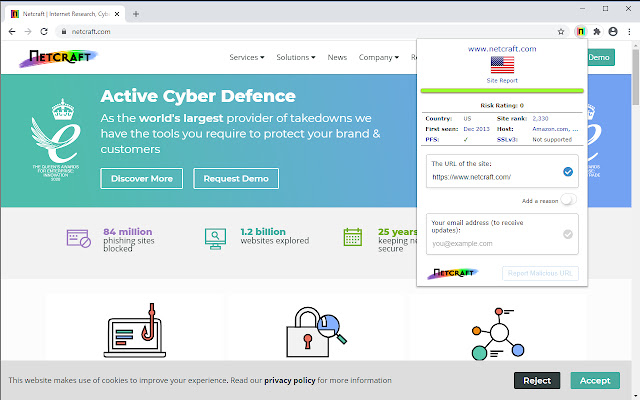
⚔️ Simplewall: Free and lightweight Firewall
Simple tool to configure Windows Filtering Platform (WFP) which can configure network activity on your computer.
The lightweight application is less than a megabyte, and it is compatible with Windows 7 SP1 and higher operating systems.
Main Features:
* Simple interface without annoying pop ups.
* Rules editor (create your own rules).
* Internal blocklist (block Windows spy / telemetry).
* Dropped packets information with notification and logging to a file feature (win7+).
* Allowed packets information with logging to a file feature (win8+).
Windows Subsystem for Linux (WSL) support.
* Windows Store support.
* Windows services support.
* Free and open source.
* Localization support.
*IPv6 support.
#app #windows #security
Simple tool to configure Windows Filtering Platform (WFP) which can configure network activity on your computer.
The lightweight application is less than a megabyte, and it is compatible with Windows 7 SP1 and higher operating systems.
Main Features:
* Simple interface without annoying pop ups.
* Rules editor (create your own rules).
* Internal blocklist (block Windows spy / telemetry).
* Dropped packets information with notification and logging to a file feature (win7+).
* Allowed packets information with logging to a file feature (win8+).
Windows Subsystem for Linux (WSL) support.
* Windows Store support.
* Windows services support.
* Free and open source.
* Localization support.
*IPv6 support.
#app #windows #security
🌎 Lingva Translate
Lingva Translate is an alternative front-end for Google Translate, serving as a Free and Open Source translator with over a hundred languages available.
Inspired by projects like NewPipe, Nitter, Invidious or Bibliogram, Lingva scrapes through GTranslate and retrieves the translation without using any Google-related service, preventing them from tracking.
#service #lifehack
Lingva Translate is an alternative front-end for Google Translate, serving as a Free and Open Source translator with over a hundred languages available.
Inspired by projects like NewPipe, Nitter, Invidious or Bibliogram, Lingva scrapes through GTranslate and retrieves the translation without using any Google-related service, preventing them from tracking.
#service #lifehack

📖 How Long to Read
Imagine a situation: you bought a book, but you don't know how long you will read it. Maybe reading the book will take only a few hours, maybe even days? Today we have a cool resource that will answer your question.
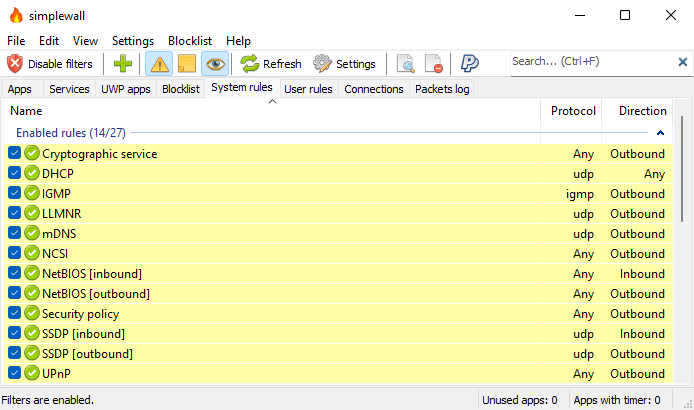
How Long to Read is a book search engine that helps you find out how long it will take to read books and provide reading time data that is tailored to you.
The service assumed a speed of 300 WPM for this calculation but you can complete a reading speed test to calculate using your own reading speed.
Sounds like magic, doesn't it?
#lifehack #service #books
Imagine a situation: you bought a book, but you don't know how long you will read it. Maybe reading the book will take only a few hours, maybe even days? Today we have a cool resource that will answer your question.
How Long to Read is a book search engine that helps you find out how long it will take to read books and provide reading time data that is tailored to you.
The service assumed a speed of 300 WPM for this calculation but you can complete a reading speed test to calculate using your own reading speed.
Sounds like magic, doesn't it?
#lifehack #service #books
📊 Terms of Service; Didn’t Read
“I have read and agree to the Terms” is the biggest lie on the web. “Terms of Service; Didn't Read” is a user rights initiative to rate and label website terms & privacy policies, from very good (class A) to very bad (class E).
This extension informs you instantly of your rights online by showing an unintrusive icon in the toolbar. You can click on this icon to get summaries from the Terms of Service; Didn't Read initiative.
Optionally you can notify companies for their grades by sharing on Twitter, if you do not like this feature, simply head over the settings and hide the share button.
This extension is open source.
#addon #chrome #firefox
“I have read and agree to the Terms” is the biggest lie on the web. “Terms of Service; Didn't Read” is a user rights initiative to rate and label website terms & privacy policies, from very good (class A) to very bad (class E).
This extension informs you instantly of your rights online by showing an unintrusive icon in the toolbar. You can click on this icon to get summaries from the Terms of Service; Didn't Read initiative.
Optionally you can notify companies for their grades by sharing on Twitter, if you do not like this feature, simply head over the settings and hide the share button.
This extension is open source.
#addon #chrome #firefox

🔐 Safing Portmaster
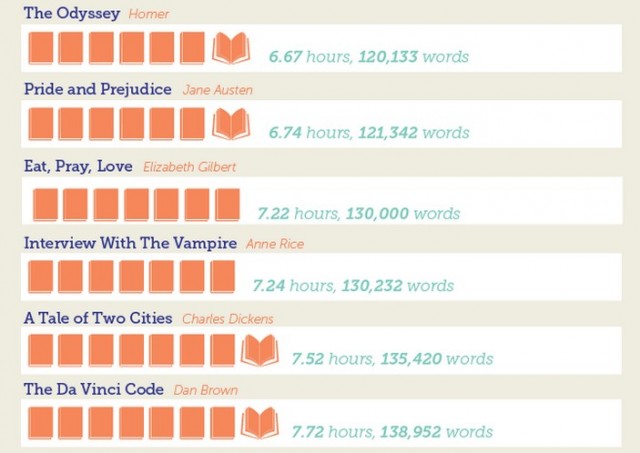
Portmaster is a free and open-source application that puts you back in charge over all your computer's network connections.
Main Features:
* Monitor All Network Activity
Discover everything that is happening on your computer. Expose every connection your applications make and detect evil ones.
* Block Unwanted Connections
Many programs connect to the Internet without your knowledge. When you find unwanted connections, you can now simply block them.
* Auto-Block via Selected Filter Lists
Automatically block ads, trackers and malware hosts via trusted domain-lists, which are also used by Ad-Blockers, etc. Easily change the defaults to fit your needs.
* Enforce Secure DNS
Even with invasive connections gone, you do not want to share your dns requests out in the open. With the Portmaster, you can easily re-route all your dns queries to a DNS-over-TLS provider of your choice.
#app #security #windows #linux
Portmaster is a free and open-source application that puts you back in charge over all your computer's network connections.
Main Features:
* Monitor All Network Activity
Discover everything that is happening on your computer. Expose every connection your applications make and detect evil ones.
* Block Unwanted Connections
Many programs connect to the Internet without your knowledge. When you find unwanted connections, you can now simply block them.
* Auto-Block via Selected Filter Lists
Automatically block ads, trackers and malware hosts via trusted domain-lists, which are also used by Ad-Blockers, etc. Easily change the defaults to fit your needs.
* Enforce Secure DNS
Even with invasive connections gone, you do not want to share your dns requests out in the open. With the Portmaster, you can easily re-route all your dns queries to a DNS-over-TLS provider of your choice.
#app #security #windows #linux
🔑 Nebulo - Dns over HTTPS/TLS
Nebulo is a free, open-source, no-root, light-weight dns-over-https, dns-over-tls, and dns-over-http-over-quic client for Android with emphasis on privacy and security. It is fast, highly-customizable, ad-free, efficient on the battery, contains zero analytics / tracking.
Nebulo uses Android's VPN APIs to create a dummy (local) VPN which intercepts only DNS requests and encrypts them before sending it to a DNS resolver of your choice. This dummy (local) VPN is not a real VPN and does not encrypt any other traffic or hide your real IP. As only one VPN can be active per profile at any given time, you can decide between using Nebulo or a real VPN.
Core Features:
* Encrypted DNS using dns-over-https, dns-over-tls, and dns-over-http-over-quic protocols.
* Customizable in-memory DNS cache with configurable cache-expiry.
* Preset list of privacy-respecting DNS servers.
* Add any DNS server.
* DNS speed test.
* DNS query logging.
* DNS blocklists.
* Disable IPv4 / IPv6.
* Allow captive portals.
* Allow search domains on the current network.
#app #android #security
Nebulo is a free, open-source, no-root, light-weight dns-over-https, dns-over-tls, and dns-over-http-over-quic client for Android with emphasis on privacy and security. It is fast, highly-customizable, ad-free, efficient on the battery, contains zero analytics / tracking.
Nebulo uses Android's VPN APIs to create a dummy (local) VPN which intercepts only DNS requests and encrypts them before sending it to a DNS resolver of your choice. This dummy (local) VPN is not a real VPN and does not encrypt any other traffic or hide your real IP. As only one VPN can be active per profile at any given time, you can decide between using Nebulo or a real VPN.
Core Features:
* Encrypted DNS using dns-over-https, dns-over-tls, and dns-over-http-over-quic protocols.
* Customizable in-memory DNS cache with configurable cache-expiry.
* Preset list of privacy-respecting DNS servers.
* Add any DNS server.
* DNS speed test.
* DNS query logging.
* DNS blocklists.
* Disable IPv4 / IPv6.
* Allow captive portals.
* Allow search domains on the current network.
#app #android #security
Google Play
Nebulo - DNS Changer DoH/DoT - Apps on Google Play
A safe alternative to old standards.
🏞️ ente - encrypted photo storage
ente provides a simple way to back up your memories.
It encrypts your photos and videos with your password before backing them up to the cloud, so only you can view them. Ente stores your encrypted data across multiple locations, including an underground fall out shelter, so your memories are preserved forever.
Ente lets you share your albums and folders with your loved ones, end-to-end encrypted, has an open architecture and source code that has been peer-reviewed trusted.
Features:
* Client side encryption (only you can view your photos and videos);
* Background sync;
* Shareable links for albums;
* Highlights of memories from previous years;
* Ability to detect and delete duplicate files;
* Image editor;
* EXIF viewer;
* Ability to free up disk space by deleting backed up photos;
* Recycle bin;
* 2FA;
* Lockscreen;
* Zero third-party tracking / analytics.
Ente is available on Android, iOS and the web.
#app #android #iphone
ente provides a simple way to back up your memories.
It encrypts your photos and videos with your password before backing them up to the cloud, so only you can view them. Ente stores your encrypted data across multiple locations, including an underground fall out shelter, so your memories are preserved forever.
Ente lets you share your albums and folders with your loved ones, end-to-end encrypted, has an open architecture and source code that has been peer-reviewed trusted.
Features:
* Client side encryption (only you can view your photos and videos);
* Background sync;
* Shareable links for albums;
* Highlights of memories from previous years;
* Ability to detect and delete duplicate files;
* Image editor;
* EXIF viewer;
* Ability to free up disk space by deleting backed up photos;
* Recycle bin;
* 2FA;
* Lockscreen;
* Zero third-party tracking / analytics.
Ente is available on Android, iOS and the web.
#app #android #iphone
Google Play
Ente Photos: Private Backups - Apps on Google Play
Backup, Organise, Share - Private photo storage with End-to-end Encryption
🎧 AIMP Player
AIMP is an ads free and extremely versatile music player with smart playlists, effects and internet radio.
AIMP can also be used to listen to streaming internet radio stations. It can function as an alarm clock, audio converter and more. In addition to the regular application, there's also a portable version that can be installed on a USB drive and easily moved from one computer to another.
AIMP has versions for Windows and Android.
Main Features:
* Supported formats: aac, ape, dff, dsf, flac, it, m4a, m4b, mo3, mod, mp2, mp3, mp4, mpc, mpga, mtm, ogg, opus, s3m, tta, umx, wav, webm;
* Support for Android Auto and custom Car PCs;
* Support for OpenSL / AudioTrack / AAudio output methods;
* Support for CUE Sheets;
* Support for OTG-storages and custom file providers;
* Support for user bookmarks;
* Support for user defined playback queue;
* Support for album arts and lyrics;
* Support for multiple playlists and smart-playlists based on folders;
* Support for internet radio (including Http Live Streaming);
* Automatic detection of tags encoding;
* Built-in 20-band graphic equalizer;
* Balance and playback speed control;
* Volume normalization using replay gain or peak-based normalization;
* Sleep timer feature;
* Custom themes support;
* Built-in light, dark and black themes;
* Support for night and day mode.
#app #android #windows #music
AIMP is an ads free and extremely versatile music player with smart playlists, effects and internet radio.
AIMP can also be used to listen to streaming internet radio stations. It can function as an alarm clock, audio converter and more. In addition to the regular application, there's also a portable version that can be installed on a USB drive and easily moved from one computer to another.
AIMP has versions for Windows and Android.
Main Features:
* Supported formats: aac, ape, dff, dsf, flac, it, m4a, m4b, mo3, mod, mp2, mp3, mp4, mpc, mpga, mtm, ogg, opus, s3m, tta, umx, wav, webm;
* Support for Android Auto and custom Car PCs;
* Support for OpenSL / AudioTrack / AAudio output methods;
* Support for CUE Sheets;
* Support for OTG-storages and custom file providers;
* Support for user bookmarks;
* Support for user defined playback queue;
* Support for album arts and lyrics;
* Support for multiple playlists and smart-playlists based on folders;
* Support for internet radio (including Http Live Streaming);
* Automatic detection of tags encoding;
* Built-in 20-band graphic equalizer;
* Balance and playback speed control;
* Volume normalization using replay gain or peak-based normalization;
* Sleep timer feature;
* Custom themes support;
* Built-in light, dark and black themes;
* Support for night and day mode.
#app #android #windows #music
Google Play
AIMP - Apps on Google Play
AIMP is old-school playlist-based audio player for Android OS
👍1
⌨️ FlorisBoard
FlorisBoard is a free and open-source keyboard for Android 7.0+ devices. It aims at being modern, user-friendly and customizable while fully respecting your privacy.
Main Features:
* Huge variety of Latin keyboard layouts;
* Limited support for non-Latin keyboard layouts (Arabic, Persian and Hebrew currently, more are planned);
* Easy switching between languages/layouts by defining subtypes in the settings;
* Full theme customization + theme presets for day/night themes;
* Automatic day/night theme switching;
* Keyboard layouts for typing in a (phone) number;
* Special characters input;
* Emoji/Emoticon keyboard;
* One-handed/compact mode for easier typing on large devices;
* Customization of key press sound/vibration;
* Customizable actions for gestures: swipe up/down/left/right, space bar left/right, delete key swipe);
* Integrated special symbols into character layouts;
* Clipboard/Cursor toolbar;
* Clipboard manager/history.
#app #android #keyboard
FlorisBoard is a free and open-source keyboard for Android 7.0+ devices. It aims at being modern, user-friendly and customizable while fully respecting your privacy.
Main Features:
* Huge variety of Latin keyboard layouts;
* Limited support for non-Latin keyboard layouts (Arabic, Persian and Hebrew currently, more are planned);
* Easy switching between languages/layouts by defining subtypes in the settings;
* Full theme customization + theme presets for day/night themes;
* Automatic day/night theme switching;
* Keyboard layouts for typing in a (phone) number;
* Special characters input;
* Emoji/Emoticon keyboard;
* One-handed/compact mode for easier typing on large devices;
* Customization of key press sound/vibration;
* Customizable actions for gestures: swipe up/down/left/right, space bar left/right, delete key swipe);
* Integrated special symbols into character layouts;
* Clipboard/Cursor toolbar;
* Clipboard manager/history.
#app #android #keyboard
f-droid.org
FlorisBoard | F-Droid - Free and Open Source Android App Repository
An open-source keyboard which respects your privacy. Currently in beta.
👍1
📌 Index Of Shared Extensions for Chrome and Firefox
1. 🔒 Streamer Mode for Firefox
2. ⏱️ YouTube timestamp
3. 🏞️ Search by Image
4. 🎙️ Read Aloud
5. 🗑️ ClearURLs
6. 🔥 AdNauseam
7. ⌨️ Demodal
8. 👉 Bypass Paywalls
9. ✅ Shepherd
10. 🕶️ Decentraleyes
11. 🔐 CanvasBlocker
12. 👻 PassBrow
13. 📖 xBrowserSync
14. 📊 Terms of Service; Didn’t Read
#addon #chrome #firefox
1. 🔒 Streamer Mode for Firefox
2. ⏱️ YouTube timestamp
3. 🏞️ Search by Image
4. 🎙️ Read Aloud
5. 🗑️ ClearURLs
6. 🔥 AdNauseam
7. ⌨️ Demodal
8. 👉 Bypass Paywalls
9. ✅ Shepherd
10. 🕶️ Decentraleyes
11. 🔐 CanvasBlocker
12. 👻 PassBrow
13. 📖 xBrowserSync
14. 📊 Terms of Service; Didn’t Read
#addon #chrome #firefox
Telegram
Lifehack of the day
🔒 Streamer Mode for Firefox
An extension that hides personal information from pages, similar to Discord's Streamer mode.
When people are sharing their screen on Discord, Zoom, or even on sites like Twitch, they often use their browser to react to videos…
An extension that hides personal information from pages, similar to Discord's Streamer mode.
When people are sharing their screen on Discord, Zoom, or even on sites like Twitch, they often use their browser to react to videos…
Lifehack of the day pinned «📌 Index Of Shared Extensions for Chrome and Firefox 1. 🔒 Streamer Mode for Firefox 2. ⏱️ YouTube timestamp 3. 🏞️ Search by Image 4. 🎙️ Read Aloud 5. 🗑️ ClearURLs 6. 🔥 AdNauseam 7. ⌨️ Demodal 8. 👉 Bypass Paywalls 9. ✅ Shepherd 10. 🕶️ Decentraleyes 11. 🔐 CanvasBlocker…»
📲 Unlock your iPhone without password
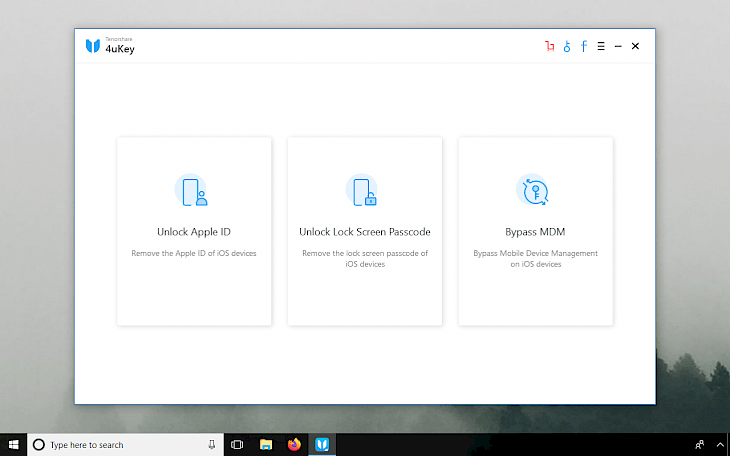
Sometimes it happens that you forgot your password or entered the wrong one several times and your iPhone is locked after a large number of attempts to enter an incorrect password. Don't be in a hurry to get upset, because we have a solution for you.
You can reset your password, remove protection with a six-digit access code, disable Touch ID or Face ID, and reset your phone to factory settings in seconds with the Tenorshare 4 key program.
Tenorshare is compatible with the latest versions of iOS, and you need to install it on Windows or Mac OS, and then connect the device to the computer. The application will provide everything by itself without entering a password.
Sounds like magic, doesn't it?
#lifehack #iphone #service
Sometimes it happens that you forgot your password or entered the wrong one several times and your iPhone is locked after a large number of attempts to enter an incorrect password. Don't be in a hurry to get upset, because we have a solution for you.
You can reset your password, remove protection with a six-digit access code, disable Touch ID or Face ID, and reset your phone to factory settings in seconds with the Tenorshare 4 key program.
Tenorshare is compatible with the latest versions of iOS, and you need to install it on Windows or Mac OS, and then connect the device to the computer. The application will provide everything by itself without entering a password.
Sounds like magic, doesn't it?
#lifehack #iphone #service
👍1
📌Index Of Shared Android and iPhone Apps📱
1. 🔋 Accu Battery
2. 📱 AppBlock
3. 📷 Manual Camera Compatibility
4. 🗑 Photo Deleter
5. 🎤 Microphone Blocker & Guard
6. 🎬 Emovi - Emoji Movie Trivia
7. ❌LTE Cleaner
8. 📺 Pure Tuber
9. 📌 APKShare
10. 👖 Abody.ai
11. 🔥 8bit Painter
12. 🧘♂️ Breathly
13. ✉️ FairEmail
14. 🔐 KeePassDX
15. ✏️ Notally
16. 🎵 BlackHole Music Player
17. 📞 Fake Contacts
18. 💻 Jitsi Meet
19. 🚀 LibreTorrent
20. 📳 Exodus
21. 🤷 Magisk
22. 🏠 Shade Launcher
23. 📨 Nekogram X
24. 🤔 Parallel Space
25. ✍️ Loop Habit Tracker
26. ⏲ Sleep Timer (Turn music off)
27. 📧 Silence
28. 📌Download Navi
29. 🎞️ NewPipe
30. 📟 i2pd client
31. 💬 Infinity-For-Reddit
32. 📲 Sharik
33. 🎵 Oto Music
34. 📲 Syncthing
35. 📞 Yet Another Call Blocker
36. ⌨️ AnySoftKeyboard
37. 📨 Element
38. 🚀 SimpleX Chat
39. 📻 AntennaPod
40. 📱 WebCall
41. 🔒 EDS Lite
42. 🔑 Aegis Authenticator
43. 📱 Trend Micro QR Scanner
44. 🕶️ GalleryVault
45. 🔑 Open Source Multi-Currency Wallet
46. 🔎 Google Go
47. 💬 Fritter
48. 🔋 DevCheck Hardware and System Info
49. 🕶️ Decentraleyes
50. 🎵 Retro Music Player
51. ⏱️ Transportr - Open Source Public Transit
52. 🔑 Tofu Authenticator
53. ⌨️ Hacker's Keyboard
54. 🔑 Nebulo - Dns over HTTPS/TLS
55. 🏞️ ente - encrypted photo storage
56. 🎧 AIMP Player
57. ⌨️ FlorisBoard
#app #android #iphone
1. 🔋 Accu Battery
2. 📱 AppBlock
3. 📷 Manual Camera Compatibility
4. 🗑 Photo Deleter
5. 🎤 Microphone Blocker & Guard
6. 🎬 Emovi - Emoji Movie Trivia
7. ❌LTE Cleaner
8. 📺 Pure Tuber
9. 📌 APKShare
10. 👖 Abody.ai
11. 🔥 8bit Painter
12. 🧘♂️ Breathly
13. ✉️ FairEmail
14. 🔐 KeePassDX
15. ✏️ Notally
16. 🎵 BlackHole Music Player
17. 📞 Fake Contacts
18. 💻 Jitsi Meet
19. 🚀 LibreTorrent
20. 📳 Exodus
21. 🤷 Magisk
22. 🏠 Shade Launcher
23. 📨 Nekogram X
24. 🤔 Parallel Space
25. ✍️ Loop Habit Tracker
26. ⏲ Sleep Timer (Turn music off)
27. 📧 Silence
28. 📌Download Navi
29. 🎞️ NewPipe
30. 📟 i2pd client
31. 💬 Infinity-For-Reddit
32. 📲 Sharik
33. 🎵 Oto Music
34. 📲 Syncthing
35. 📞 Yet Another Call Blocker
36. ⌨️ AnySoftKeyboard
37. 📨 Element
38. 🚀 SimpleX Chat
39. 📻 AntennaPod
40. 📱 WebCall
41. 🔒 EDS Lite
42. 🔑 Aegis Authenticator
43. 📱 Trend Micro QR Scanner
44. 🕶️ GalleryVault
45. 🔑 Open Source Multi-Currency Wallet
46. 🔎 Google Go
47. 💬 Fritter
48. 🔋 DevCheck Hardware and System Info
49. 🕶️ Decentraleyes
50. 🎵 Retro Music Player
51. ⏱️ Transportr - Open Source Public Transit
52. 🔑 Tofu Authenticator
53. ⌨️ Hacker's Keyboard
54. 🔑 Nebulo - Dns over HTTPS/TLS
55. 🏞️ ente - encrypted photo storage
56. 🎧 AIMP Player
57. ⌨️ FlorisBoard
#app #android #iphone
Telegram
Lifehack of the day
🔋 How to detect battery wear on Android
Each charge of your smartphone reduces the actual battery capacity. But you can monitor the battery status through special applications, as well as at least slow down battery wear.
1. Download the Accu Battery app.…
Each charge of your smartphone reduces the actual battery capacity. But you can monitor the battery status through special applications, as well as at least slow down battery wear.
1. Download the Accu Battery app.…
👍2
Lifehack of the day pinned «📌Index Of Shared Android and iPhone Apps📱 1. 🔋 Accu Battery 2. 📱 AppBlock 3. 📷 Manual Camera Compatibility 4. 🗑 Photo Deleter 5. 🎤 Microphone Blocker & Guard 6. 🎬 Emovi - Emoji Movie Trivia 7. ❌LTE Cleaner 8. 📺 Pure Tuber 9. 📌 APKShare 10. 👖 Abody.ai 11.…»
✅ A free and open source anti-malware
LibreAV is an attempt to detect malware in Android devices by utilising machine learning approach.
LibreAV uses permissions and intent-filters to detect malicious apps. While scanning, it loads the machine learning model and extracts permissions and intents from the installed applications on the user's device. These extracted features are then fed to the machine learning model in the form of a vector. The machine learning model returns a prediction score between 0 and 1 that denote the degree of maliciousness of the scanned application.
Features:
* Real time scan - Automatically scan new app installations;
* On device inference - Zero network traffic;
* Open-source - The source code is distributed under GNU GPLv3;
* Lightweight antivirus - Do not consume too much resources;
* 100% free and No ads.
#app #security #android
LibreAV is an attempt to detect malware in Android devices by utilising machine learning approach.
LibreAV uses permissions and intent-filters to detect malicious apps. While scanning, it loads the machine learning model and extracts permissions and intents from the installed applications on the user's device. These extracted features are then fed to the machine learning model in the form of a vector. The machine learning model returns a prediction score between 0 and 1 that denote the degree of maliciousness of the scanned application.
Features:
* Real time scan - Automatically scan new app installations;
* On device inference - Zero network traffic;
* Open-source - The source code is distributed under GNU GPLv3;
* Lightweight antivirus - Do not consume too much resources;
* 100% free and No ads.
#app #security #android
✉️ How to save a local backup of all Gmail emails
Google Takeout is the most efficient way to backup Gmail emails offline. Follow the steps below to create an offline Gmail backup.
1. Visit the website: Google Takeout.
2. Click the Deselect all.
3. Scroll down and select the checkbox next to Mail.
4. Click All Mail data included. You can choose specific folders or the entire Gmail.
5. Select OK and click Next Step.
6. Google will offer you multiple delivery methods, including Send download links via email, Add to Dropbox, Add to OneDrive and Add to Box, Add to Drive.
7. For offline backup, select Send download link via email.
8. You can easy split download files into multiple files and specify the size of each file.
9. Click on Create export.
After a time, Google will send an offline download link to your Gmail. You just need to download and store it in a safe place.
Similarly, you can take backup of YouTube, Google Maps, and other services using Google Takeout.
#lifehack #email #backup
Google Takeout is the most efficient way to backup Gmail emails offline. Follow the steps below to create an offline Gmail backup.
1. Visit the website: Google Takeout.
2. Click the Deselect all.
3. Scroll down and select the checkbox next to Mail.
4. Click All Mail data included. You can choose specific folders or the entire Gmail.
5. Select OK and click Next Step.
6. Google will offer you multiple delivery methods, including Send download links via email, Add to Dropbox, Add to OneDrive and Add to Box, Add to Drive.
7. For offline backup, select Send download link via email.
8. You can easy split download files into multiple files and specify the size of each file.
9. Click on Create export.
After a time, Google will send an offline download link to your Gmail. You just need to download and store it in a safe place.
Similarly, you can take backup of YouTube, Google Maps, and other services using Google Takeout.
#lifehack #email #backup
👻 AnonAddy
AnonAddy is an open-source anonymous email forwarding service, which allows you to create an unlimited number of email aliases.
Main Features:
* Protect your real email address from spam simply by deactivating/deleting aliases which receive unwanted emails.
* Determine who sold your data using a different email address for each site.
* Protect your identity in the event of a data breach by making it harder for hackers to cross-reference your accounts.
* Prevent tracking of incoming messages thanks to GPG/OpenPGP encryption support.
* Redirect without having to change your email address for each site individually.
* Reply to forwarded emails anonymously without revealing your real email address.
AnonAddy has an option of self-hosting.
#service #privacy #addon #chrome #firefox
AnonAddy is an open-source anonymous email forwarding service, which allows you to create an unlimited number of email aliases.
Main Features:
* Protect your real email address from spam simply by deactivating/deleting aliases which receive unwanted emails.
* Determine who sold your data using a different email address for each site.
* Protect your identity in the event of a data breach by making it harder for hackers to cross-reference your accounts.
* Prevent tracking of incoming messages thanks to GPG/OpenPGP encryption support.
* Redirect without having to change your email address for each site individually.
* Reply to forwarded emails anonymously without revealing your real email address.
AnonAddy has an option of self-hosting.
#service #privacy #addon #chrome #firefox
👍1
🤷 How to find your first liked Instagram post
Popular TikTokers and Twitter influencers from time to time share their first liked post on their Instagram accounts.
If you want to be nostalgic or share this information with your friends, then follow the steps below to see your first liked post on Instagram.
1. Open the Instagram app on your smartphone.
2. Tap the Profile icon on the bottom right corner (last icon.)
3. Tap three horizontal lines on the top right corner.
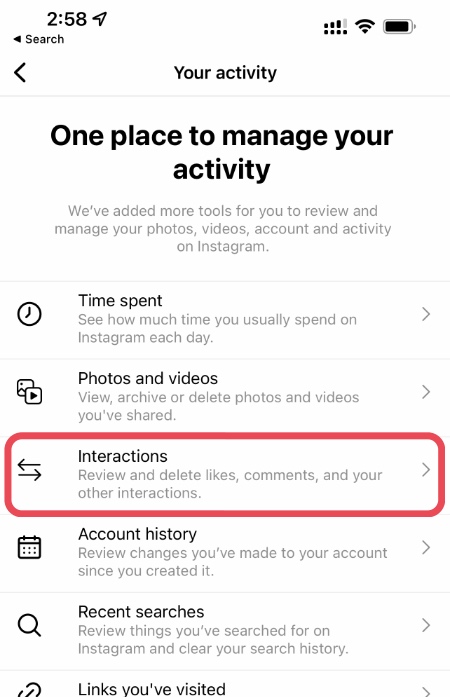
4. Select Your Activity and after that Tap Interactions.
5. Choose Likes and Tap Sort & Filter.
6. Open Sort by.
7. Select Oldest to newest and Tap the Apply button.
Instagram will provide you a never-ending list of chronologically arranged liked posts. You can tap on any of the posts or swipe through the thumbnails. And of course, you can share your first liked Instagram post on TikTok, Twitter, etc.
#lifehack #instagram
Popular TikTokers and Twitter influencers from time to time share their first liked post on their Instagram accounts.
If you want to be nostalgic or share this information with your friends, then follow the steps below to see your first liked post on Instagram.
1. Open the Instagram app on your smartphone.
2. Tap the Profile icon on the bottom right corner (last icon.)
3. Tap three horizontal lines on the top right corner.
4. Select Your Activity and after that Tap Interactions.
5. Choose Likes and Tap Sort & Filter.
6. Open Sort by.
7. Select Oldest to newest and Tap the Apply button.
Instagram will provide you a never-ending list of chronologically arranged liked posts. You can tap on any of the posts or swipe through the thumbnails. And of course, you can share your first liked Instagram post on TikTok, Twitter, etc.
#lifehack #instagram
👍1
📟 Gadgetbridge
Gadgetbridge is an Android application which will allow you to use your Pebble, Mi Band, Amazfit Bip and HPlus device (and more) without the vendor's closed source application and without the need to create an account and transmit any of your data to the vendor's servers.
You can get notifications on your wrist and (depending on the device):
* collect data from the device sensors;
* control music playing on your android device;
* see the weather;
* get directions
For a full list of supported device, please refer to the Homepage.
#app #android
Gadgetbridge is an Android application which will allow you to use your Pebble, Mi Band, Amazfit Bip and HPlus device (and more) without the vendor's closed source application and without the need to create an account and transmit any of your data to the vendor's servers.
You can get notifications on your wrist and (depending on the device):
* collect data from the device sensors;
* control music playing on your android device;
* see the weather;
* get directions
For a full list of supported device, please refer to the Homepage.
#app #android

🎨 MyPaint
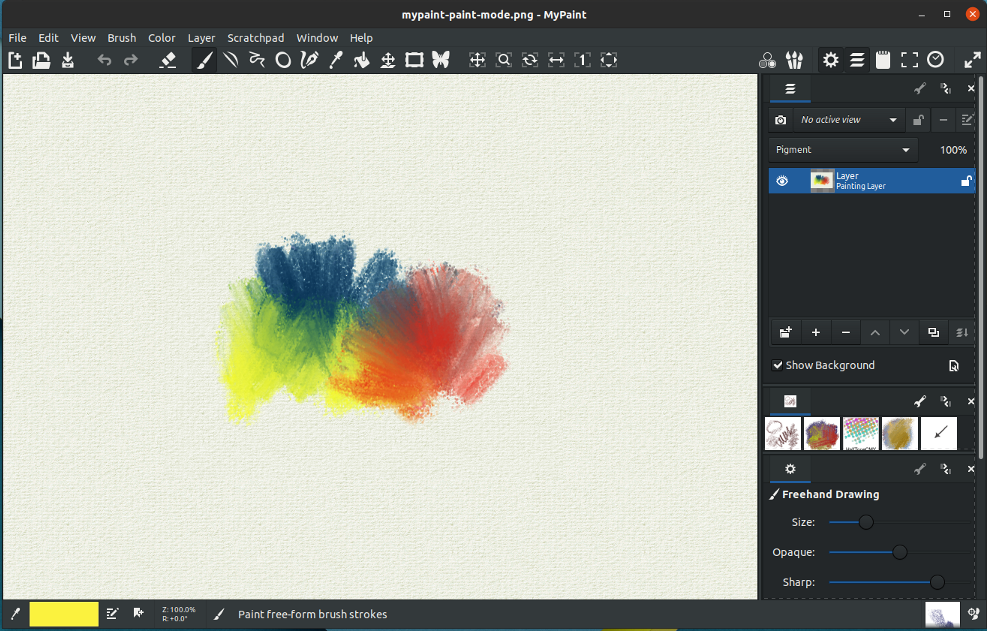
MyPaint is a fast and very simple drawing application for artists that allows you to work on your canvas with minimal distractions, calling up the interface only when you need it.
MyPaint supports pressure- or tilt-sensitive graphics tablets and comes with an easy-to-use brush collection.
There is an ability to create your own brushes depending on the dynamics of the brush (changing with speed, pressure, randomly).
Main Features:
* Infinite canvas;
* Extremely configurable brushes;
* Distraction-free fullscreen mode;
* Extensive graphic tablet support;
* Speed, simplicity, and expressiveness;
* Realistic paint-like pigment model;
* 15 bit Rec 709 linear RGB colorspace;
* Brush settings stored with each stroke on the canvas;
* Layers, various modes, and layer groups.
#app #windows #linux
MyPaint is a fast and very simple drawing application for artists that allows you to work on your canvas with minimal distractions, calling up the interface only when you need it.
MyPaint supports pressure- or tilt-sensitive graphics tablets and comes with an easy-to-use brush collection.
There is an ability to create your own brushes depending on the dynamics of the brush (changing with speed, pressure, randomly).
Main Features:
* Infinite canvas;
* Extremely configurable brushes;
* Distraction-free fullscreen mode;
* Extensive graphic tablet support;
* Speed, simplicity, and expressiveness;
* Realistic paint-like pigment model;
* 15 bit Rec 709 linear RGB colorspace;
* Brush settings stored with each stroke on the canvas;
* Layers, various modes, and layer groups.
#app #windows #linux
⚔️ The most effective method to shield yourself from phishing
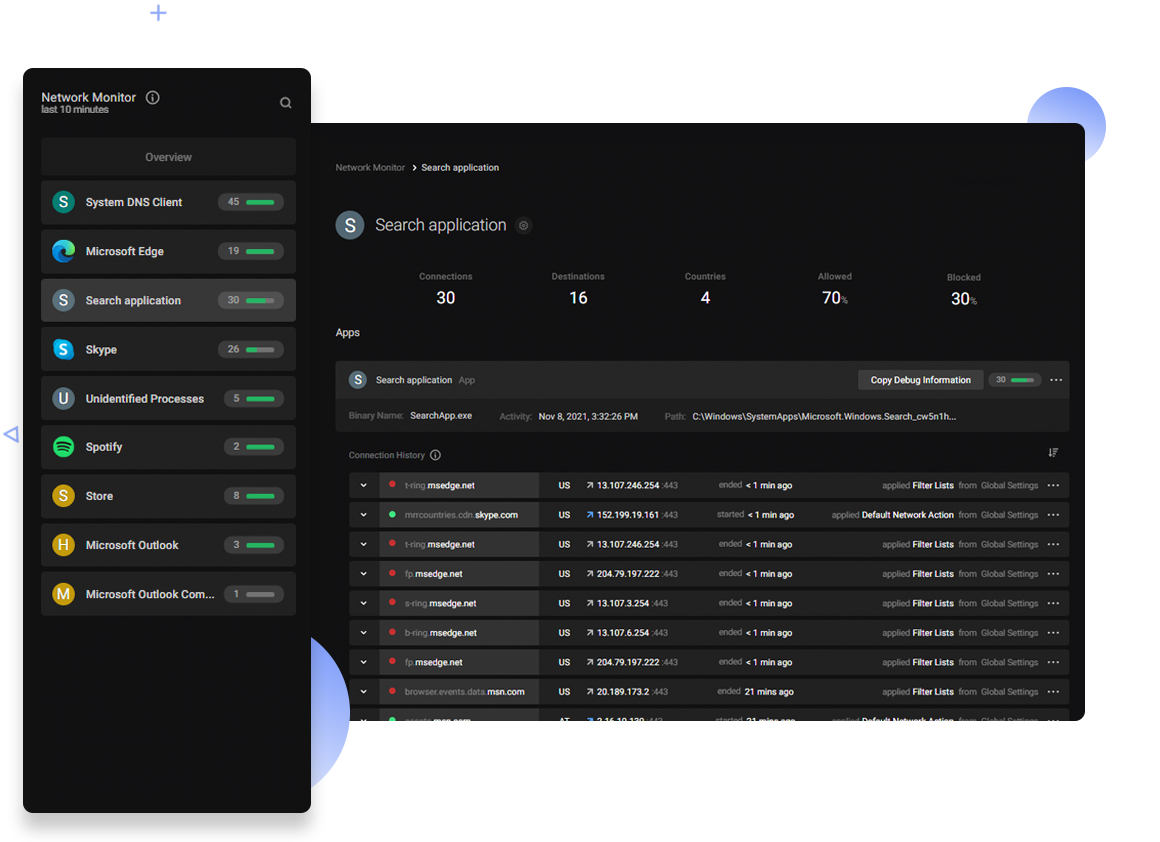
The Netcraft Extension is a tool allowing easy lookup of information relating to the sites you visit and providing protection from phishing and malicious JavaScript, including Coronavirus-related cybercrime.
Key Features:
• Protection against phishing sites;
• Protection against malicious JavaScript;
• Credential leak detection;
• Detailed site reports;
• Risk Ratings;
• Conveniently report suspected phishing & fraudulent sites;
• Perfect Forward Secrecy (PFS) indicator;
• Heartbleed indicator;
• Protection against cross site scripting (XSS).
#service #security #addon #chrome #firefox
The Netcraft Extension is a tool allowing easy lookup of information relating to the sites you visit and providing protection from phishing and malicious JavaScript, including Coronavirus-related cybercrime.
Key Features:
• Protection against phishing sites;
• Protection against malicious JavaScript;
• Credential leak detection;
• Detailed site reports;
• Risk Ratings;
• Conveniently report suspected phishing & fraudulent sites;
• Perfect Forward Secrecy (PFS) indicator;
• Heartbleed indicator;
• Protection against cross site scripting (XSS).
#service #security #addon #chrome #firefox