
Dark Reading: Attacks/Breaches
SolarWinds Faces Potential SEC Enforcement Act Over Orion Breach
In the nearly two years since the company discovered the cyber intrusion, SolarWinds has fundamentally rearchitected its development environment to make it much harder to compromise, CISO Tim Brown tells Dark Reading.
➖ Sent by @TheFeedReaderBot ➖
___________________________
@hacking_Attack
@Hacking_Video
SolarWinds Faces Potential SEC Enforcement Act Over Orion Breach
In the nearly two years since the company discovered the cyber intrusion, SolarWinds has fundamentally rearchitected its development environment to make it much harder to compromise, CISO Tim Brown tells Dark Reading.
➖ Sent by @TheFeedReaderBot ➖
___________________________
@hacking_Attack
@Hacking_Video
Dark Reading
SolarWinds Faces Potential SEC Enforcement Act Over Orion Breach
In the nearly two years since the company discovered the cyber intrusion, SolarWinds has fundamentally rearchitected its development environment to make it much harder to compromise, CISO Tim Brown tells Dark Reading.
Dark Reading: Attacks/Breaches
Out of Stealth: New SURF Zero-Trust Enterprise Browser
Investment round led by 11.2 Capital, Okta Ventures, and Mango Capital.
➖ Sent by @TheFeedReaderBot ➖
___________________________
@hacking_Attack
@Hacking_Video
Out of Stealth: New SURF Zero-Trust Enterprise Browser
Investment round led by 11.2 Capital, Okta Ventures, and Mango Capital.
➖ Sent by @TheFeedReaderBot ➖
___________________________
@hacking_Attack
@Hacking_Video
Dark Reading
Out of Stealth: New SURF Zero-Trust Enterprise Browser
Investment round led by 11.2 Capital, Okta Ventures, and Mango Capital.
Hacking Articles Tips Tricks Videos Tutorials
Photo
Black Hat Ethical Hacking
Offensive Security Tool: Mangle
Offensive Security Tool: ManglePost Views: 11 Premium Contenthttps://www.blackhatethicalhacking.com/wp-content/uploads/2022/09/Patreon.png Subscribe to Patreon to watch this episode.
Reading Time: 3 Minutes MangleMangle by optiv is a tool that manipulates aspects of compiled executables (.exe or DLL). You can remove known Indicators of Compromise (IoC) based strings and replace them with random characters, change the file by inflating the size to avoid EDRs, and can clone code-signing certs from legitimate files. In doing so, Mangle helps loaders evade on-disk and in-memory scanners.
These are the advanced techniques used against EDRs and AVs that have limited capabilities of blocking such attacks, especially when you using the sandbox, in combination with timed payloads, that trigger after passing the checkup.
See Also: So you want to be a hacker? Complete Offensive Security and Ethical Hacking Course InstallThe first step, as always, is to clone the repo. Before you compile Mangle, you’ll need to install the dependencies. To install them, run the following commands:
Trending: Offensive Security Tool: Monkey365
Trending: Offensive Security Tool: WinPwnage Usagehttps://www.blackhatethicalhacking.com/wp-content/uploads/2022/11/usage.png StringsMangle takes the input executable and looks for known strings that security products look for or alert on. These strings alone are not the sole point of detection. Often, these strings are in conjunction with other data points and pieces of telemetry for detection and prevention. Mangle finds these known strings and replaces the hex values with random ones to remove them. IMPORTANT: Mangle replaces the exact size of the strings it’s manipulating. It doesn’t add any more or any less, as this would create misalignments and instabilities in the file. Mangle does this using the -M command-line option.
Currently, Mangle only does Golang files but as time goes on other languages will be added. Beforehttps://www.blackhatethicalhacking.com/wp-content/uploads/2022/11/Strings_Before.png Afterhttps://www.blackhatethicalhacking.com/wp-content/uploads/2022/11/Strings_After.png
Trending: Exploit XSS Injections in a one-line powerful Technique InflatePretty much all EDRs can’t scan both on disk or in memory files beyond a certain size. This simply stems from the fact that large files take longer to review, scan, or monitor. EDRs do not want to impact performance by slowing down the user’s productivity. Mangle inflates files by creating a padding of Null bytes (Zeros) at the end of the file. This ensures that nothing inside the file is impacted. To inflate an executable, use the -S command-line option along with the number of bytes you want to add to the file. Large payloads are really not an issue anymore with how fast Internet speeds are, that being said, it’s not recommended to make a 2 gig file.
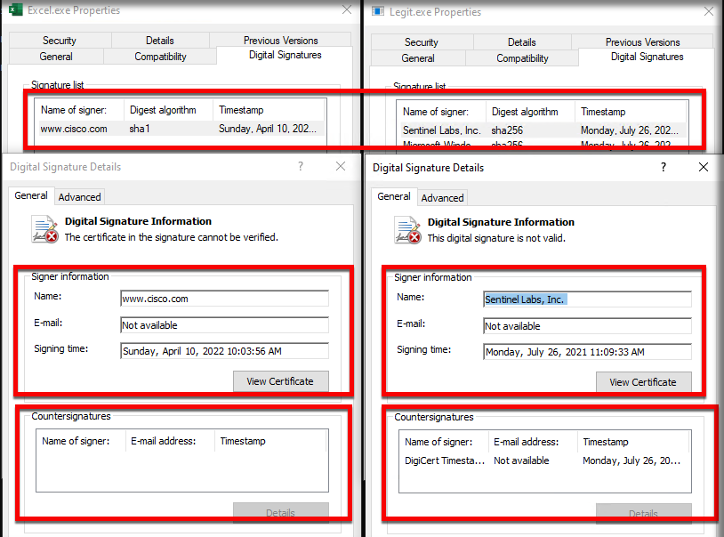
Based on test cases across numerous userland and kernel EDRs, it is recommended to increase the size by either 95-100 megabytes. Because vendors do not check large files, the activity goes unnoticed, resulting in the successful execution of shellcode. CertificateMangle also contains the ability to take the full chain and all attributes from a legitimate code-signing certificate from a file and copy it onto another file. This includes the signing date, counter signatures, and other measurable attributes.
While this feature may sound similar to anothe[...]
___________________________
@hacking_Attack
@Hacking_Video
Offensive Security Tool: Mangle
Offensive Security Tool: ManglePost Views: 11 Premium Contenthttps://www.blackhatethicalhacking.com/wp-content/uploads/2022/09/Patreon.png Subscribe to Patreon to watch this episode.
Reading Time: 3 Minutes MangleMangle by optiv is a tool that manipulates aspects of compiled executables (.exe or DLL). You can remove known Indicators of Compromise (IoC) based strings and replace them with random characters, change the file by inflating the size to avoid EDRs, and can clone code-signing certs from legitimate files. In doing so, Mangle helps loaders evade on-disk and in-memory scanners.
These are the advanced techniques used against EDRs and AVs that have limited capabilities of blocking such attacks, especially when you using the sandbox, in combination with timed payloads, that trigger after passing the checkup.
See Also: So you want to be a hacker? Complete Offensive Security and Ethical Hacking Course InstallThe first step, as always, is to clone the repo. Before you compile Mangle, you’ll need to install the dependencies. To install them, run the following commands:
go get github.com/Binject/debug/peThen build it go build Mangle.goImportantWhile Mangle is written in Golang, a lot of the features are designed to work on executable files from other languages. At the time of release, the only feature that is Golang specific is the string manipulation part.Trending: Offensive Security Tool: Monkey365
Trending: Offensive Security Tool: WinPwnage Usagehttps://www.blackhatethicalhacking.com/wp-content/uploads/2022/11/usage.png StringsMangle takes the input executable and looks for known strings that security products look for or alert on. These strings alone are not the sole point of detection. Often, these strings are in conjunction with other data points and pieces of telemetry for detection and prevention. Mangle finds these known strings and replaces the hex values with random ones to remove them. IMPORTANT: Mangle replaces the exact size of the strings it’s manipulating. It doesn’t add any more or any less, as this would create misalignments and instabilities in the file. Mangle does this using the -M command-line option.
Currently, Mangle only does Golang files but as time goes on other languages will be added. Beforehttps://www.blackhatethicalhacking.com/wp-content/uploads/2022/11/Strings_Before.png Afterhttps://www.blackhatethicalhacking.com/wp-content/uploads/2022/11/Strings_After.png
Trending: Exploit XSS Injections in a one-line powerful Technique InflatePretty much all EDRs can’t scan both on disk or in memory files beyond a certain size. This simply stems from the fact that large files take longer to review, scan, or monitor. EDRs do not want to impact performance by slowing down the user’s productivity. Mangle inflates files by creating a padding of Null bytes (Zeros) at the end of the file. This ensures that nothing inside the file is impacted. To inflate an executable, use the -S command-line option along with the number of bytes you want to add to the file. Large payloads are really not an issue anymore with how fast Internet speeds are, that being said, it’s not recommended to make a 2 gig file.
Based on test cases across numerous userland and kernel EDRs, it is recommended to increase the size by either 95-100 megabytes. Because vendors do not check large files, the activity goes unnoticed, resulting in the successful execution of shellcode. CertificateMangle also contains the ability to take the full chain and all attributes from a legitimate code-signing certificate from a file and copy it onto another file. This includes the signing date, counter signatures, and other measurable attributes.
While this feature may sound similar to anothe[...]
___________________________
@hacking_Attack
@Hacking_Video
Black Hat Ethical Hacking
Offensive Security Tool: Mangle | Black Hat Ethical Hacking
Mangle is a tool that manipulates aspects of compiled executables (.exe or DLL) to avoid detection from EDRs.
Hacking Articles Tips Tricks Videos Tutorials
Photo
Black Hat Ethical Hacking
Google Pixel screen-lock hack with $70k bug bounty payout
Google Pixel screen-lock hack with $70k bug bounty payoutPost Views: 64 Premium Contenthttps://www.blackhatethicalhacking.com/wp-content/uploads/2022/09/Patreon.png Subscribe to Patreon to watch this episode.
Reading Time: 3 Minutes A security researcher scored a $70k bug bounty payout after accidentally discovering a Google Pixel lock-screen bypass hack.The vulnerability, discovered by David Schütz, meant an attacker could unlock any Google Pixel phone without knowing the passcode. Google fixed the issue (tracked at CVE-2022-20465) with a November update, allowing Schütz to go public with his findings.
The vulnerability created a means for a potential hacker to bypass lock-screen protections such as fingerprint or PIN authentication and obtain physical access to a target device. The hack could be carried out with minimal technical skill against a range of mobile devices running Android, by following a series of steps.
Fortunately, the exploit is not something that would lend itself to remote exploitation.
See Also: So you want to be a hacker? Complete Offensive Security and Ethical Hacking Course Serendipity strikesAs explained in a blog post, Schütz came across the issue by chance when he forgot the PIN code of his Pixel phone and had to use the PUK code to regain access. After successfully completing the process, he noticed oddities in the lock screen he was confronted with.
“It was a fresh boot, and instead of the usual lock icon, the fingerprint icon was showing,” Schütz recalled. “It accepted my finger, which should not happen, since after a reboot, you must enter the lock screen PIN or password at least once to decrypt the device.”
After accepting his finger, the device crashed with a weird “Pixel is starting…” message, which Schütz addressed with a forced reboot.
Schütz decided to investigate the issue over subsequent days. On one occasion he forgot to reboot the phone, and just began from a normal unlocked state, locked the device, and hot-swapped the SIM tray, before carrying out the SIM PIN reset process.
After following this sequence before entering the PUK code and choosing a new PIN, Schütz was presented with his unlocked home screen.
The researcher realized that he had achieved a full lock screen bypass on the fully patched Pixel 6. The same trick worked on a Pixel 5. Easy exploitationSchütz realized the hack would be easily exploited by anyone, from spies to crooks and jealous spouses.
“Since the attacker could just bring his/her own PIN-locked SIM card, nothing other than physical access was required for exploitation. The attacker could just swap the SIM in the victim’s device, and perform the exploit with a SIM card that had a PIN lock and for which the attacker knew the correct PUK code.”
Trending: Using VPS for Bug Bounty, comparing VPS providers Trending: Offensive Security Tool: WinPwnage Patch puzzlementSchütz reported the issue to Google and the tech giant processed and filed the bug promptly, but remediation took far longer.
After telling Schütz the issue was a duplicate, and therefore not normally eligible for a bug bounty, Google failed to act for some weeks, before repeated chasing by Schütz and a demo of the exploit to Google staffers at a Google-run bug hunter event called ESCAL8 in September prompted action.
Shortly after this, Google said that even though Schütz’s report was a duplicate, it had only started working on a fix because of his submission, so the firm had decided to pay him a $70,000 bounty for the lock screen bypass.
The bug was fixed on November 5, allowing Schütz to disclose his findings and a video demonstrating the flaw.
The researcher deduced[...]
___________________________
@hacking_Attack
@Hacking_Video
Google Pixel screen-lock hack with $70k bug bounty payout
Google Pixel screen-lock hack with $70k bug bounty payoutPost Views: 64 Premium Contenthttps://www.blackhatethicalhacking.com/wp-content/uploads/2022/09/Patreon.png Subscribe to Patreon to watch this episode.
Reading Time: 3 Minutes A security researcher scored a $70k bug bounty payout after accidentally discovering a Google Pixel lock-screen bypass hack.The vulnerability, discovered by David Schütz, meant an attacker could unlock any Google Pixel phone without knowing the passcode. Google fixed the issue (tracked at CVE-2022-20465) with a November update, allowing Schütz to go public with his findings.
The vulnerability created a means for a potential hacker to bypass lock-screen protections such as fingerprint or PIN authentication and obtain physical access to a target device. The hack could be carried out with minimal technical skill against a range of mobile devices running Android, by following a series of steps.
Fortunately, the exploit is not something that would lend itself to remote exploitation.
See Also: So you want to be a hacker? Complete Offensive Security and Ethical Hacking Course Serendipity strikesAs explained in a blog post, Schütz came across the issue by chance when he forgot the PIN code of his Pixel phone and had to use the PUK code to regain access. After successfully completing the process, he noticed oddities in the lock screen he was confronted with.
“It was a fresh boot, and instead of the usual lock icon, the fingerprint icon was showing,” Schütz recalled. “It accepted my finger, which should not happen, since after a reboot, you must enter the lock screen PIN or password at least once to decrypt the device.”
After accepting his finger, the device crashed with a weird “Pixel is starting…” message, which Schütz addressed with a forced reboot.
Schütz decided to investigate the issue over subsequent days. On one occasion he forgot to reboot the phone, and just began from a normal unlocked state, locked the device, and hot-swapped the SIM tray, before carrying out the SIM PIN reset process.
After following this sequence before entering the PUK code and choosing a new PIN, Schütz was presented with his unlocked home screen.
The researcher realized that he had achieved a full lock screen bypass on the fully patched Pixel 6. The same trick worked on a Pixel 5. Easy exploitationSchütz realized the hack would be easily exploited by anyone, from spies to crooks and jealous spouses.
“Since the attacker could just bring his/her own PIN-locked SIM card, nothing other than physical access was required for exploitation. The attacker could just swap the SIM in the victim’s device, and perform the exploit with a SIM card that had a PIN lock and for which the attacker knew the correct PUK code.”
Trending: Using VPS for Bug Bounty, comparing VPS providers Trending: Offensive Security Tool: WinPwnage Patch puzzlementSchütz reported the issue to Google and the tech giant processed and filed the bug promptly, but remediation took far longer.
After telling Schütz the issue was a duplicate, and therefore not normally eligible for a bug bounty, Google failed to act for some weeks, before repeated chasing by Schütz and a demo of the exploit to Google staffers at a Google-run bug hunter event called ESCAL8 in September prompted action.
Shortly after this, Google said that even though Schütz’s report was a duplicate, it had only started working on a fix because of his submission, so the firm had decided to pay him a $70,000 bounty for the lock screen bypass.
The bug was fixed on November 5, allowing Schütz to disclose his findings and a video demonstrating the flaw.
The researcher deduced[...]
___________________________
@hacking_Attack
@Hacking_Video
Black Hat Ethical Hacking
Google Pixel screen-lock hack with $70k bug bounty payout | Black Hat Ethical Hacking
A security researcher scored a $70k bug bounty payout after accidentally discovering a Google Pixel lock-screen bypass hack.
Hacking Articles Tips Tricks Videos Tutorials
Black Hat Ethical Hacking Offensive Security Tool: Mangle Offensive Security Tool: ManglePost Views: 11 Premium Contenthttps://www.blackhatethicalhacking.com/wp-content/uploads/2022/09/Patreon.png Subscribe to Patreon to watch this episode. Reading Time:…
r tool that the author has developed, Limelighter, the major difference between the two is that Limelighter makes a fake certificate based off a domain and signs it with the current date and time, versus using valid attributes where the timestamp is taken from when the original file. This option can use DLL or .exe files to copy using the -C command-line option, along with the path to the file you want to copy the certificate from.
https://www.blackhatethicalhacking.com/wp-content/uploads/2022/11/Cert_Copy.png
Clone the repo from here: GitHub Link
Trending: Article: Using VPS for Bug Bounty, comparing VPS providers https://www.blackhatethicalhacking.com/wp-content/uploads/2022/03/Merch.png Recent Tools* https://www.blackhatethicalhacking.com/wp-content/uploads/2022/11/WinPwnage-300x150.jpg Offensive Security Tool: WinPwnageNovember 4, 2022
Reading Time: 3 minutes
* https://www.blackhatethicalhacking.com/wp-content/uploads/2022/10/lazypariah-300x150.png Offensive Security Tool: LAZYPARIAHOctober 28, 2022
Reading Time: 4 minutes
* https://www.blackhatethicalhacking.com/wp-content/uploads/2022/10/Parth-300x150.png Recon Tool: ParthOctober 27, 2022
Reading Time: 2 minutes
* https://www.blackhatethicalhacking.com/wp-content/uploads/2022/10/hakrawler-300x150.png Recon Tool: HakrawlerOctober 21, 2022
Reading Time: 3 minutes https://www.blackhatethicalhacking.com/wp-content/uploads/2022/06/OffSec-Course.png Offensive Security & Ethical Hacking CourseBegin the learning curve of hacking now!
The post Offensive Security Tool: Mangle first appeared on Black Hat Ethical Hacking.
___________________________
@hacking_Attack
@Hacking_Video
https://www.blackhatethicalhacking.com/wp-content/uploads/2022/11/Cert_Copy.png
Clone the repo from here: GitHub Link
Trending: Article: Using VPS for Bug Bounty, comparing VPS providers https://www.blackhatethicalhacking.com/wp-content/uploads/2022/03/Merch.png Recent Tools* https://www.blackhatethicalhacking.com/wp-content/uploads/2022/11/WinPwnage-300x150.jpg Offensive Security Tool: WinPwnageNovember 4, 2022
Reading Time: 3 minutes
* https://www.blackhatethicalhacking.com/wp-content/uploads/2022/10/lazypariah-300x150.png Offensive Security Tool: LAZYPARIAHOctober 28, 2022
Reading Time: 4 minutes
* https://www.blackhatethicalhacking.com/wp-content/uploads/2022/10/Parth-300x150.png Recon Tool: ParthOctober 27, 2022
Reading Time: 2 minutes
* https://www.blackhatethicalhacking.com/wp-content/uploads/2022/10/hakrawler-300x150.png Recon Tool: HakrawlerOctober 21, 2022
Reading Time: 3 minutes https://www.blackhatethicalhacking.com/wp-content/uploads/2022/06/OffSec-Course.png Offensive Security & Ethical Hacking CourseBegin the learning curve of hacking now!
The post Offensive Security Tool: Mangle first appeared on Black Hat Ethical Hacking.
___________________________
@hacking_Attack
@Hacking_Video
Hacking Articles Tips Tricks Videos Tutorials
Black Hat Ethical Hacking Google Pixel screen-lock hack with $70k bug bounty payout Google Pixel screen-lock hack with $70k bug bounty payoutPost Views: 64 Premium Contenthttps://www.blackhatethicalhacking.com/wp-content/uploads/2022/09/Patreon.png Subscribe…
from code changes that Android security screens can be stacked “on top” of each other.
“When the SIM PUK was reset successfully, a .dismiss() function was called by the PUK resetting component on the ‘security screen stack’, causing the device to dismiss the current one and show the security screen that was ‘under’ it in the stack,” he explained.
“Since the .dismiss() function simply dismissed the current security screen, it was vulnerable to race conditions” that meant that the PUK resetting component could dismiss a unrelated security screen, changed by a background process.
Google has changed the code, so it explicitly calls the type of security screen to be dismissed.
Trending: The Emotet botnet returns with a vengeance
Are u a security researcher? Or a company that writes articles or write ups about Cyber Security, Offensive Security (related to information security in general) that match with our specific audience and is worth sharing?
If you want to express your idea in an article contact us here for a quote: info@blackhatethicalhacking.com
Source: portswigger.net Source Link https://www.blackhatethicalhacking.com/wp-content/uploads/2022/03/Merch.png Recent News* https://www.blackhatethicalhacking.com/wp-content/uploads/2022/11/Images-for-the-News-posts-2-300x150.png New StrelaStealer malware steals your Outlook, Thunderbird accountsNovember 10, 2022
Reading Time: 4 minutes
* https://www.blackhatethicalhacking.com/wp-content/uploads/2022/11/Images-for-the-News-posts-1-300x150.png Malicious extension lets attackers control Google Chrome remotelyNovember 9, 2022
Reading Time: 4 minutes
* https://www.blackhatethicalhacking.com/wp-content/uploads/2022/11/Images-for-the-News-posts-300x150.png Azov Ransomware is a wiper, destroying data 666 bytes at a timeNovember 8, 2022
Reading Time: 4 minutes
* https://www.blackhatethicalhacking.com/wp-content/uploads/2022/11/Images-for-the-News-posts-13-300x150.png Microsoft sued for open-source piracy through GitHub CopilotNovember 7, 2022
Reading Time: 4 minutes
https://www.blackhatethicalhacking.com/wp-content/uploads/2022/06/OffSec-Course.png Offensive Security & Ethical Hacking CourseBegin the learning curve of hacking now!
The post Google Pixel screen-lock hack with $70k bug bounty payout first appeared on Black Hat Ethical Hacking.
___________________________
@hacking_Attack
@Hacking_Video
“When the SIM PUK was reset successfully, a .dismiss() function was called by the PUK resetting component on the ‘security screen stack’, causing the device to dismiss the current one and show the security screen that was ‘under’ it in the stack,” he explained.
“Since the .dismiss() function simply dismissed the current security screen, it was vulnerable to race conditions” that meant that the PUK resetting component could dismiss a unrelated security screen, changed by a background process.
Google has changed the code, so it explicitly calls the type of security screen to be dismissed.
Trending: The Emotet botnet returns with a vengeance
Are u a security researcher? Or a company that writes articles or write ups about Cyber Security, Offensive Security (related to information security in general) that match with our specific audience and is worth sharing?
If you want to express your idea in an article contact us here for a quote: info@blackhatethicalhacking.com
Source: portswigger.net Source Link https://www.blackhatethicalhacking.com/wp-content/uploads/2022/03/Merch.png Recent News* https://www.blackhatethicalhacking.com/wp-content/uploads/2022/11/Images-for-the-News-posts-2-300x150.png New StrelaStealer malware steals your Outlook, Thunderbird accountsNovember 10, 2022
Reading Time: 4 minutes
* https://www.blackhatethicalhacking.com/wp-content/uploads/2022/11/Images-for-the-News-posts-1-300x150.png Malicious extension lets attackers control Google Chrome remotelyNovember 9, 2022
Reading Time: 4 minutes
* https://www.blackhatethicalhacking.com/wp-content/uploads/2022/11/Images-for-the-News-posts-300x150.png Azov Ransomware is a wiper, destroying data 666 bytes at a timeNovember 8, 2022
Reading Time: 4 minutes
* https://www.blackhatethicalhacking.com/wp-content/uploads/2022/11/Images-for-the-News-posts-13-300x150.png Microsoft sued for open-source piracy through GitHub CopilotNovember 7, 2022
Reading Time: 4 minutes
https://www.blackhatethicalhacking.com/wp-content/uploads/2022/06/OffSec-Course.png Offensive Security & Ethical Hacking CourseBegin the learning curve of hacking now!
The post Google Pixel screen-lock hack with $70k bug bounty payout first appeared on Black Hat Ethical Hacking.
___________________________
@hacking_Attack
@Hacking_Video

Bypass Duplicate Tweet Protection using negative tweet id
Twitter doesn’t allow making tweets of same content in relatively near time frame.Continue reading on Medium »
Read more...
Twitter doesn’t allow making tweets of same content in relatively near time frame.Continue reading on Medium »
Read more...
Bypass Duplicate Tweet Protection using negative tweet id
https://jayateerthag.medium.com/bypass-duplicate-tweet-protection-using-negative-tweet-id-71e6802955b4?source=rss------bug_bounty-5
___________________________
@hacking_Attack
@Hacking_Video
https://jayateerthag.medium.com/bypass-duplicate-tweet-protection-using-negative-tweet-id-71e6802955b4?source=rss------bug_bounty-5
___________________________
@hacking_Attack
@Hacking_Video
Medium
Bypass Duplicate Tweet Protection using negative tweet id
Twitter doesn’t allow making tweets of same content in relatively near time frame.
Twitter doesn’t allow making tweets of same content in relatively near time frame.Continue reading on Medium » (https://jayateerthag.medium.com/bypass-duplicate-tweet-protection-using-negative-tweet-id-71e6802955b4?source=rss------bug_bounty-5)
___________________________
@hacking_Attack
@Hacking_Video
___________________________
@hacking_Attack
@Hacking_Video
Medium
Bypass Duplicate Tweet Protection using negative tweet id
Twitter doesn’t allow making tweets of same content in relatively near time frame.
Hacking Articles Tips Tricks Videos Tutorials
Photo
Kali Linux Tutorials
Cicd-Goat : A Deliberately Vulnerable CI/CD Environment
The CI/CD-Goat project allows engineers and security practitioners to learn and practice CI/CD security through a set of 10 challenges, enacted against a real, full blown CI/CD environment. The scenarios are of varying difficulty levels, with each scenario focusing on one primary attack vector.
The challenges cover the Top 10 CI/CD Security Risks, including Insufficient Flow Control Mechanisms, PPE (Poisoned Pipeline Execution), Dependency Chain Abuse, PBAC (Pipeline-Based Access Controls), and more.
The different challenges are inspired by Alice in Wonderland, each one is themed as a different character.
The project’s environment is based on Docker images and can be run locally. These images are:
1. Gitea (minimal git server)
2. Jenkins
3. Jenkins agent
4. LocalStack (cloud service emulator that runs in a single container)
5. Lighttpd
6. CTFd (Capture The Flag framework).
The images are configured to interconnect in a way that creates fully functional pipelines.
https://blogger.googleusercontent.com/img/b/R29vZ2xl/AVvXsEjCrm3duUda7pnb68HM9stO6a-5twOFYiYvf9h9W_J0LG9ZFaov7460SgGIu9t6D0pLt7wLSeYbhBHtc4xMNaAht40GFzYVu3eqINTI5oBb6bVlTCSc_k4Fa56w13t-qLHbFfPzHmjrOvEp1kIhhRb73Eo_Us4wnvJlrYH1eCcZDE9NW-eWW0K9-OM7/s823/cicd-goat1.png Download & RunThere’s no need to clone the repository. Linux & Maccurl -o cicd-goat/docker-compose.yaml --create-dirs https://raw.githubusercontent.com/cider-security-research/cicd-goat/main/docker-compose.yaml
cd cicd-goat && docker-compose up -d Windows (Powershell)mkdir cicd-goat; cd cicd-goat
curl -o docker-compose.yaml https://raw.githubusercontent.com/cider-security-research/cicd-goat/main/docker-compose.yaml
get-content docker-compose.yaml | %{$_ -replace "bridge","nat"}
docker-compose up -d UsageInstructions* Spoiler alert! Avoid browsing the repository files as they contain spoilers.
* To configure your git client for accessing private repositories we suggest cloning using the http url.
* In each challenge, find the flag – in the format of flag# (e.g flag2), or another format if mentioned specifically.
* Each challenge stands on its own. Do not use access gained in one challenge to solve another challenge.
* If needed, use the hints on CTFd.
* There is no need to exploit CVEs.
* No need to hijack admin accounts of Gitea or Jenkins (named “admin” or “red-queen”). Take the challenge1. After starting the containers, it might take up to 5 minutes until the containers configuration process is complete.
2. Login to CTFd at http://localhost:8000 to view the challenges:
* Username:
* Jenkins http://localhost:8080
* Username:
* Username:
* When forking a repository, don’t change the name of the forked repository. ContributingDevelopment1. Clone the repository.
2. Rename .git folders to make them usable:
python3 rename.py git
3. Install testing dependencies: pip3 install pipenv==2022.8.30 pipenv install –deploy
4. Run the development environment to experiment with new changes: rm -rf tmp tmp-ctfd/ cp -R ctfd/data/ tmp-ctfd/ docker-compose -f docker-compose-dev.yaml up -d
5. Make the desired changes:
* All services except CTFd are completely configured as code so desired changes should be made to the files in the appropriate folders.
* To make changes in CTFd, use the admin credentials.
6. Shutdown the environment, move changes made in CTFd and rebuild it: docker-compose -f docker-compose-dev.yaml down ./apply.sh # save CTFd changes docker-compose -f docker-compose-dev.yaml up -d –build
7. Run tests:[...]
___________________________
@hacking_Attack
@Hacking_Video
Cicd-Goat : A Deliberately Vulnerable CI/CD Environment
The CI/CD-Goat project allows engineers and security practitioners to learn and practice CI/CD security through a set of 10 challenges, enacted against a real, full blown CI/CD environment. The scenarios are of varying difficulty levels, with each scenario focusing on one primary attack vector.
The challenges cover the Top 10 CI/CD Security Risks, including Insufficient Flow Control Mechanisms, PPE (Poisoned Pipeline Execution), Dependency Chain Abuse, PBAC (Pipeline-Based Access Controls), and more.
The different challenges are inspired by Alice in Wonderland, each one is themed as a different character.
The project’s environment is based on Docker images and can be run locally. These images are:
1. Gitea (minimal git server)
2. Jenkins
3. Jenkins agent
4. LocalStack (cloud service emulator that runs in a single container)
5. Lighttpd
6. CTFd (Capture The Flag framework).
The images are configured to interconnect in a way that creates fully functional pipelines.
https://blogger.googleusercontent.com/img/b/R29vZ2xl/AVvXsEjCrm3duUda7pnb68HM9stO6a-5twOFYiYvf9h9W_J0LG9ZFaov7460SgGIu9t6D0pLt7wLSeYbhBHtc4xMNaAht40GFzYVu3eqINTI5oBb6bVlTCSc_k4Fa56w13t-qLHbFfPzHmjrOvEp1kIhhRb73Eo_Us4wnvJlrYH1eCcZDE9NW-eWW0K9-OM7/s823/cicd-goat1.png Download & RunThere’s no need to clone the repository. Linux & Maccurl -o cicd-goat/docker-compose.yaml --create-dirs https://raw.githubusercontent.com/cider-security-research/cicd-goat/main/docker-compose.yaml
cd cicd-goat && docker-compose up -d Windows (Powershell)mkdir cicd-goat; cd cicd-goat
curl -o docker-compose.yaml https://raw.githubusercontent.com/cider-security-research/cicd-goat/main/docker-compose.yaml
get-content docker-compose.yaml | %{$_ -replace "bridge","nat"}
docker-compose up -d UsageInstructions* Spoiler alert! Avoid browsing the repository files as they contain spoilers.
* To configure your git client for accessing private repositories we suggest cloning using the http url.
* In each challenge, find the flag – in the format of flag# (e.g flag2), or another format if mentioned specifically.
* Each challenge stands on its own. Do not use access gained in one challenge to solve another challenge.
* If needed, use the hints on CTFd.
* There is no need to exploit CVEs.
* No need to hijack admin accounts of Gitea or Jenkins (named “admin” or “red-queen”). Take the challenge1. After starting the containers, it might take up to 5 minutes until the containers configuration process is complete.
2. Login to CTFd at http://localhost:8000 to view the challenges:
* Username:
alice* Password: alice3. Hack: * Jenkins http://localhost:8080
* Username:
alice* Password: alice* Gitea http://localhost:3000 * Username:
thealice* Password: thealice4. Insert the flags on CTFd and find out if you got it right. Troubleshooting* If Gitea shows a blank page, refresh the page.* When forking a repository, don’t change the name of the forked repository. ContributingDevelopment1. Clone the repository.
2. Rename .git folders to make them usable:
python3 rename.py git
3. Install testing dependencies: pip3 install pipenv==2022.8.30 pipenv install –deploy
4. Run the development environment to experiment with new changes: rm -rf tmp tmp-ctfd/ cp -R ctfd/data/ tmp-ctfd/ docker-compose -f docker-compose-dev.yaml up -d
5. Make the desired changes:
* All services except CTFd are completely configured as code so desired changes should be made to the files in the appropriate folders.
* To make changes in CTFd, use the admin credentials.
6. Shutdown the environment, move changes made in CTFd and rebuild it: docker-compose -f docker-compose-dev.yaml down ./apply.sh # save CTFd changes docker-compose -f docker-compose-dev.yaml up -d –build
7. Run tests:[...]
___________________________
@hacking_Attack
@Hacking_Video
Kali Linux Tutorials
Cicd-Goat : A Deliberately Vulnerable CI/CD Environment
The CI/CD-Goat project allows engineers and security practitioners to learn and practice CI/CD security through a set of 10 challenges