
Hacking Articles Tips Tricks Videos Tutorials
Photo
Kali Linux Tutorials
LambdaGuard : AWS Serverless Security
LambdaGuard is an event-driven, serverless computing platform provided by Amazon Web Services. It is a computing service that runs code in response to events and automatically manages the computing resources required by that code.
LambdaGuard is an AWS Lambda auditing tool designed to create asset visibility and provide actionable results. It provides a meaningful overview in terms of statistical analysis, AWS service dependencies and configuration checks from the security perspective.
Requirements
* Python 3.6+
* Java 11 (optional for SonarQube)
Install
From PyPI
pip3 install lambdaguard
From Github
git clone https://github.com/Skyscanner/lambdaguard
cd lambdaguard
sudo make install
AWS Access
You will need a set of AWS access keys and permissions to run LambdaGuard.
make aws
Run
*
*
*
*
*
*
*
*
SonarQube: Static Code Analysis
Download sonar-scanner-cli
* https://github.com/SonarSource/sonar-scanner-cli
Build SonarQube
*
Use SonarQube
*
Config should have the following format:
{
“command”: “sonar-scanner -X”,
“url”: “http://localhost:9000”,
“login”: “admin”,
“password”: “admin”
}
Development
make -B clean
make dev
. dev/bin/activate
make install-dev
make test
Download
___________________________
@hacking_Attack
@Hacking_Video
LambdaGuard : AWS Serverless Security
LambdaGuard is an event-driven, serverless computing platform provided by Amazon Web Services. It is a computing service that runs code in response to events and automatically manages the computing resources required by that code.
LambdaGuard is an AWS Lambda auditing tool designed to create asset visibility and provide actionable results. It provides a meaningful overview in terms of statistical analysis, AWS service dependencies and configuration checks from the security perspective.
Requirements
* Python 3.6+
* Java 11 (optional for SonarQube)
Install
From PyPI
pip3 install lambdaguard
From Github
git clone https://github.com/Skyscanner/lambdaguard
cd lambdaguard
sudo make install
AWS Access
You will need a set of AWS access keys and permissions to run LambdaGuard.
make aws
Run
*
lambdaguard --help*
lambdaguard --function arn:aws:lambda:function*
lambdaguard --input function-arns.txt*
lambdaguard --output /tmp/lambdaguard*
lambdaguard --profile LambdaGuardProfile*
lambdaguard --keys ACCESS_KEY_ID SECRET_ACCESS_KEY*
lambdaguard --region eu-west-1*
lambdaguard --verboseSonarQube: Static Code Analysis
Download sonar-scanner-cli
* https://github.com/SonarSource/sonar-scanner-cli
Build SonarQube
*
make sonarqubeUse SonarQube
*
lambdaguard --sonarqube config.jsonConfig should have the following format:
{
“command”: “sonar-scanner -X”,
“url”: “http://localhost:9000”,
“login”: “admin”,
“password”: “admin”
}
Development
make -B clean
make dev
. dev/bin/activate
make install-dev
make test
Download
___________________________
@hacking_Attack
@Hacking_Video
Kali Linux Tutorials
LambdaGuard : AWS Serverless Security !!! Kali Linux
LambdaGuard is an event-driven, serverless computing platform provided by Amazon Web Services. It is a computing service that runs code.
Hacking Articles Tips Tricks Videos Tutorials
Photo
Kali Linux Tutorials
modDetective : Tool That Chronologizes Files Based On Modification Time In Order To Investigate Recent System Activity
modDetective is a small Python tool that chronologizes files based on modification time in order to investigate recent system activity. This can be used in CTF’s in order to pinpoint where escalation and attack vectors may exist.
To see the tool in its most useful form, try running the command as follows:
What is modDetective Doing?
modDetective is very elementary in how it operates. It simply walks the filesystem, with bounds determined by user specified options (-i is for ignore, meaning the tool will walk every directory EXCEPT for the ones specified in the -i option, and -e is for exclusive, meaning the tool will ONLY walk the directories specified). While walking, it picks up the modification times of each file, then orders these modification times in order to output them chronologically.
Additionally, in the output you will potentially see some files highlighted red. These files are denoted as “Indicators of User Activity,” Since recent modifications to these files indicate that a user is currently active. As of now, these files include .swp files, .bash_history, .python_history and .viminfo. This list will be extended as I brainstorm more files that indicate present user activity.
Requirements
modDetective currently works only with python3; python2 compatability will be completed shortly (hence the lack of f strings). Standard libraries should be fine.
Download
___________________________
@hacking_Attack
@Hacking_Video
modDetective : Tool That Chronologizes Files Based On Modification Time In Order To Investigate Recent System Activity
modDetective is a small Python tool that chronologizes files based on modification time in order to investigate recent system activity. This can be used in CTF’s in order to pinpoint where escalation and attack vectors may exist.
To see the tool in its most useful form, try running the command as follows:
python3 modDetective.py -i /usr/share,/usr/lib,/lib. This will ignore the /usr/lib, /usr/share, and /lib directories, which tend not to have anything of interest. Also note that by default the “dynamic” directories are ignored (/proc, /sys, /run, /snap, /dev).What is modDetective Doing?
modDetective is very elementary in how it operates. It simply walks the filesystem, with bounds determined by user specified options (-i is for ignore, meaning the tool will walk every directory EXCEPT for the ones specified in the -i option, and -e is for exclusive, meaning the tool will ONLY walk the directories specified). While walking, it picks up the modification times of each file, then orders these modification times in order to output them chronologically.
Additionally, in the output you will potentially see some files highlighted red. These files are denoted as “Indicators of User Activity,” Since recent modifications to these files indicate that a user is currently active. As of now, these files include .swp files, .bash_history, .python_history and .viminfo. This list will be extended as I brainstorm more files that indicate present user activity.
Requirements
modDetective currently works only with python3; python2 compatability will be completed shortly (hence the lack of f strings). Standard libraries should be fine.
Download
___________________________
@hacking_Attack
@Hacking_Video
Kali Linux Tutorials
modDetective - Tool That Chronologizes Files Based On Modification Time
modDetective is a small Python tool that chronologizes files based on modification time in order to investigate recent system activity.
Hacking Articles Tips Tricks Videos Tutorials
Photo
KitPloit - PenTest Tools!
Faraday Community - Open Source Penetration Testing and Vulnerability Management Platform
https://blogger.googleusercontent.com/img/b/R29vZ2xl/AVvXsEjcRLXuN5yeZFLKw7hHuQany23jvKlwfkkYms1CfKR3sPaRDd1B0c6A9B_jknbL7FCDcG9f1tcbUC5-AKboQouoYtEDzOKWC8fjbzAAsO4nKgfqysQvXgRl3wkcx8F8tqmiQcXgBusFCeshKbSc2gv4V1z95jVu6TQOQM4m28mNdeOfRitMz715dy9k/w640-h360/banner.jpg Faraday was built from within the security community, to make vulnerability management easier and enhance our work. What IDEs are to programming, Faraday is to pentesting.
Offensive security had two difficult tasks: designing smart ways of getting new information, and keeping track of findings to improve further work.
This new update brings: New scanning, reporting and UI experience Focus on pentestingGet your work organized and focus on what you do best. With Faradaycommunity, you may focus on pentesting while we help you with the rest..
Check out the documentation here. InstallationThe easiest way to get faraday up and running is using our docker-compose
# Docker-compose
$ wget https://raw.githubusercontent.com/infobyte/faraday/master/docker-compose.yaml
$ docker-compose up Manage your findingsManage, classify and triage your results through Faraday’s dashboard, designed with and for pentesters.
Get an overview of your vulnerabilities and ease your work. https://blogger.googleusercontent.com/img/b/R29vZ2xl/AVvXsEiw2PH0FSnLXAaRo5TfO_CpABbwtyFIiMDrZQs3RB8i4Bz9ZDJSLAqngCj5erqAh1Io5Ixsa4gpQrlZTwoCc8N0_PiVy--sZUTpNRzCLtG4JbU3aDjt1jL7L4suQd6323Dbi9rU0RzDTOQmOWOqzd4XESIQoh196_m1LJdfQ3YTn37rr_Sa4a-hFShZ/w640-h280/vulns-1.jpg https://blogger.googleusercontent.com/img/b/R29vZ2xl/AVvXsEiefq8-DRp91yZ-8NqO5DiC0N1oCQwK1mAz0Rb3GpHh2uApSCJHwTgWZqpzgzgKRyDYm-V6tftdL4uRXKLwDKsyo9NyF7B4_6N-kLJtYCuMw0O99-Ro45cwknewU9Of65SmsXrlljrJO9gVZRaG8uwCSGoBMUPtJ345FuHfm6g9zvP7JR67OlIZcOeq/w640-h280/vulns-2.jpg By right clicking on any vulnerability, you may filter, tag and classify your results with ease. You may also add comments to vulnerabilities and add evidence with just a few clicks https://blogger.googleusercontent.com/img/b/R29vZ2xl/AVvXsEjtgcFuMhi-YHULLM9Pe0wcNYFvFaVPDUIAZthW8ldvfY89L0ZTw28TEnt4ytn6b3UT-uSQhUz3qe6MjRd6fYwvKhO-tTBdf6IDpogXnVm9cDaEwsIbN7XBZMZmnyK4R_KSPpZjwx-RcEAB_9tKaJanssMYxcdVnKrNR-sTCHWBL7k7gltrcQGgKzfc/s1600/right-click.jpg In the asset tab, information on each asset is presented, for a detailed follow-up on every device in your network. This insight might be especially useful if you hold critical data on certain assets, so the impact of vulnerabilities may be assessed through this information. If responsibilities over each asset are clear, this view helps to organize and follow the work of asset owners too.
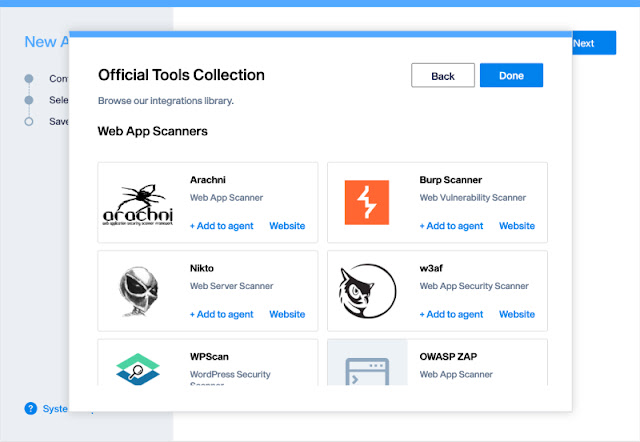
Here, you can obtain information about the OS, services, ports and vulnerabilities associated with each of your assets, which will give you a better understanding of your scope and help you to gain an overview of what you are assessing. https://blogger.googleusercontent.com/img/b/R29vZ2xl/AVvXsEhl-SoNrTxSD1vbsJY-1ZQyfx5pfU21wDj1c14T4_146xW99nISGsiBFkXDuq4I_KkTdPiX0NyP4KsaTZPoYZWfgbGmbKZpWkadShb6m4pnU-RoBDoU9BES_UYX999aXESYxwBDUairCO-04JA4xOd21MnVgZwqSVQBO6mBrosdhBwyiYhYFnlb6oo3/w640-h400/assets.jpg https://blogger.googleusercontent.com/img/b/R29vZ2xl/AVvXsEhe_YpAqsCTuW1PQ_YMWwDyU-xct7Y-2cTIXvhN4CJ3TV8jRdZfcaFpQD9zQYv5bjavhV4ElpTlQ9325u34D5S7JL9oD1BtcEyCm51tRpBEPyq26XzYyfzIyqZTbVkS9ThNGKn3_ev2QBWS7Pj-7Xot0nRDdd_mAuT19hwLpqvHfa6Hh8CVaza40zv7/w640-h418/host.jpg Use your favorite toolsIntegrate scanners with Faraday Agents Dispatcher. This feature will allow you to orchestrate the most common used security tools and have averything available from your Faraday instance. Once your scan is finished, you will be able to see all the results in the main dashboard. https://blogger.googleusercontent.com/img/b/R29vZ2xl/AVvXsEgri0tMcwXfK4uTEJvpVhJ17hFpiRalUBXDyAhkqu2Mq4tw[...]
___________________________
@hacking_Attack
@Hacking_Video
Faraday Community - Open Source Penetration Testing and Vulnerability Management Platform
https://blogger.googleusercontent.com/img/b/R29vZ2xl/AVvXsEjcRLXuN5yeZFLKw7hHuQany23jvKlwfkkYms1CfKR3sPaRDd1B0c6A9B_jknbL7FCDcG9f1tcbUC5-AKboQouoYtEDzOKWC8fjbzAAsO4nKgfqysQvXgRl3wkcx8F8tqmiQcXgBusFCeshKbSc2gv4V1z95jVu6TQOQM4m28mNdeOfRitMz715dy9k/w640-h360/banner.jpg Faraday was built from within the security community, to make vulnerability management easier and enhance our work. What IDEs are to programming, Faraday is to pentesting.
Offensive security had two difficult tasks: designing smart ways of getting new information, and keeping track of findings to improve further work.
This new update brings: New scanning, reporting and UI experience Focus on pentestingGet your work organized and focus on what you do best. With Faradaycommunity, you may focus on pentesting while we help you with the rest..
Check out the documentation here. InstallationThe easiest way to get faraday up and running is using our docker-compose
# Docker-compose
$ wget https://raw.githubusercontent.com/infobyte/faraday/master/docker-compose.yaml
$ docker-compose up Manage your findingsManage, classify and triage your results through Faraday’s dashboard, designed with and for pentesters.
Get an overview of your vulnerabilities and ease your work. https://blogger.googleusercontent.com/img/b/R29vZ2xl/AVvXsEiw2PH0FSnLXAaRo5TfO_CpABbwtyFIiMDrZQs3RB8i4Bz9ZDJSLAqngCj5erqAh1Io5Ixsa4gpQrlZTwoCc8N0_PiVy--sZUTpNRzCLtG4JbU3aDjt1jL7L4suQd6323Dbi9rU0RzDTOQmOWOqzd4XESIQoh196_m1LJdfQ3YTn37rr_Sa4a-hFShZ/w640-h280/vulns-1.jpg https://blogger.googleusercontent.com/img/b/R29vZ2xl/AVvXsEiefq8-DRp91yZ-8NqO5DiC0N1oCQwK1mAz0Rb3GpHh2uApSCJHwTgWZqpzgzgKRyDYm-V6tftdL4uRXKLwDKsyo9NyF7B4_6N-kLJtYCuMw0O99-Ro45cwknewU9Of65SmsXrlljrJO9gVZRaG8uwCSGoBMUPtJ345FuHfm6g9zvP7JR67OlIZcOeq/w640-h280/vulns-2.jpg By right clicking on any vulnerability, you may filter, tag and classify your results with ease. You may also add comments to vulnerabilities and add evidence with just a few clicks https://blogger.googleusercontent.com/img/b/R29vZ2xl/AVvXsEjtgcFuMhi-YHULLM9Pe0wcNYFvFaVPDUIAZthW8ldvfY89L0ZTw28TEnt4ytn6b3UT-uSQhUz3qe6MjRd6fYwvKhO-tTBdf6IDpogXnVm9cDaEwsIbN7XBZMZmnyK4R_KSPpZjwx-RcEAB_9tKaJanssMYxcdVnKrNR-sTCHWBL7k7gltrcQGgKzfc/s1600/right-click.jpg In the asset tab, information on each asset is presented, for a detailed follow-up on every device in your network. This insight might be especially useful if you hold critical data on certain assets, so the impact of vulnerabilities may be assessed through this information. If responsibilities over each asset are clear, this view helps to organize and follow the work of asset owners too.
Here, you can obtain information about the OS, services, ports and vulnerabilities associated with each of your assets, which will give you a better understanding of your scope and help you to gain an overview of what you are assessing. https://blogger.googleusercontent.com/img/b/R29vZ2xl/AVvXsEhl-SoNrTxSD1vbsJY-1ZQyfx5pfU21wDj1c14T4_146xW99nISGsiBFkXDuq4I_KkTdPiX0NyP4KsaTZPoYZWfgbGmbKZpWkadShb6m4pnU-RoBDoU9BES_UYX999aXESYxwBDUairCO-04JA4xOd21MnVgZwqSVQBO6mBrosdhBwyiYhYFnlb6oo3/w640-h400/assets.jpg https://blogger.googleusercontent.com/img/b/R29vZ2xl/AVvXsEhe_YpAqsCTuW1PQ_YMWwDyU-xct7Y-2cTIXvhN4CJ3TV8jRdZfcaFpQD9zQYv5bjavhV4ElpTlQ9325u34D5S7JL9oD1BtcEyCm51tRpBEPyq26XzYyfzIyqZTbVkS9ThNGKn3_ev2QBWS7Pj-7Xot0nRDdd_mAuT19hwLpqvHfa6Hh8CVaza40zv7/w640-h418/host.jpg Use your favorite toolsIntegrate scanners with Faraday Agents Dispatcher. This feature will allow you to orchestrate the most common used security tools and have averything available from your Faraday instance. Once your scan is finished, you will be able to see all the results in the main dashboard. https://blogger.googleusercontent.com/img/b/R29vZ2xl/AVvXsEgri0tMcwXfK4uTEJvpVhJ17hFpiRalUBXDyAhkqu2Mq4tw[...]
___________________________
@hacking_Attack
@Hacking_Video
Kitploit
Kitploit – Maintenance in Progress
Kitploit is temporarily under maintenance. We’ll be back shortly with improvements.
Hacking Articles Tips Tricks Videos Tutorials
Photo
KitPloit - PenTest Tools!
Kali Linux 2022.3 - Penetration Testing and Ethical Hacking Linux Distribution
https://blogger.googleusercontent.com/img/b/R29vZ2xl/AVvXsEjbHClh2kvbaX_X8Dc86ZcAQSmWrfQypGElk6SGE_vNyFQNPOIMVQAksldW4kYpROJ8fckz-pHzqCFp8F8gOcqX2ddY_vfV-mQhb_UODttoxdCuC-VdhbgrZ8iabVUcytfPKCoOvESPOP939r84L2KvMwzGAEQVt3pVrgjt51fCZxL9aM7zGWH9-bpc/w640-h334/banner-2022.3-release.jpg
Time for another Kali Linux release! – Kali Linux 2022.3. This release has various impressive updates.
The highlights for Kali’s 2022.3’s release:
* Discord Server - Kali’s new community real-time chat option has launched!
* Test Lab Environment - Quickly create a test bed to learn, practice, and benchmark tools and compare their results
* Opening Kali-Tools Repo - We have opened up the Kali tools repository & are accepting your submissions!
* Help Wanted - We are looking for a Go developer to help us on an open-source project
* Kali NetHunter Updates - New releases in our NetHunter store
* Virtual Machines Updates - New VirtualBox image format, weekly images, and build-scripts to build your own
* New Tools In Kali - Would not be a release without some new tools!
For more details, see the bug tracker changelog.
More info here.
Download Kali Linux 2022.3
Kali Linux 2022.3 - Penetration Testing and Ethical Hacking Linux Distribution
https://blogger.googleusercontent.com/img/b/R29vZ2xl/AVvXsEjbHClh2kvbaX_X8Dc86ZcAQSmWrfQypGElk6SGE_vNyFQNPOIMVQAksldW4kYpROJ8fckz-pHzqCFp8F8gOcqX2ddY_vfV-mQhb_UODttoxdCuC-VdhbgrZ8iabVUcytfPKCoOvESPOP939r84L2KvMwzGAEQVt3pVrgjt51fCZxL9aM7zGWH9-bpc/w640-h334/banner-2022.3-release.jpg
Time for another Kali Linux release! – Kali Linux 2022.3. This release has various impressive updates.
The highlights for Kali’s 2022.3’s release:
* Discord Server - Kali’s new community real-time chat option has launched!
* Test Lab Environment - Quickly create a test bed to learn, practice, and benchmark tools and compare their results
* Opening Kali-Tools Repo - We have opened up the Kali tools repository & are accepting your submissions!
* Help Wanted - We are looking for a Go developer to help us on an open-source project
* Kali NetHunter Updates - New releases in our NetHunter store
* Virtual Machines Updates - New VirtualBox image format, weekly images, and build-scripts to build your own
* New Tools In Kali - Would not be a release without some new tools!
For more details, see the bug tracker changelog.
More info here.
Download Kali Linux 2022.3
Hacking Articles Tips Tricks Videos Tutorials
KitPloit - PenTest Tools! Faraday Community - Open Source Penetration Testing and Vulnerability Management Platform https://blogger.googleusercontent.com/img/b/R29vZ2xl/AVvXsEjcRLXuN5yeZFLKw7hHuQany23jvKlwfkkYms1CfKR3sPaRDd1B0c6A9B_jknbL7FCDcG9f1tcbUC5-A…
yssNTwQxPUL1wCdIIbnFGRX3GjUDun6XKmjN15mBW0gc2gAJ71B5BX1RKtpPxLwqPiHWDbKjSXigQvBrElTpWZZOSt3eZtrbFKVmlh0JbSWudXUNQKhjZtQ4D-c179vLC9Z9xyzTzJlx/w640-h172/select-tools.jpg Choose the scanners that best fit your needs. https://blogger.googleusercontent.com/img/b/R29vZ2xl/AVvXsEiaHU_s05sbapi_pCM35VEaZySCmqHCdWuaHn-emQtlKAyWe4TOY5TMCRXYk54rhjcz1q9JotfYgcL76oF8-fH9V9FflQhaQUoQ8BJNbky1rh55e24axqFEHhPJxsEjlC7q6E_gRb-AVTHUfS8WrtyE61dwghSqsnA8JMnnP9Ydxwauv3HfVnGUUa7w/w640-h442/official-tools.jpg Share your resultsOnce you’re done, export your results in a CSV format.
Check out some of our features Full centralizationWith Faraday, you may oversee your cybersecurity efforts, prioritize actions and manage your resources from a single platform. Elegant integration of scanning toolsMake sense of today’s overwhelming number of tools. Faraday’s technology aligns +80 key plugins with your current needs, normalizing and deduplicating vulnerabilities. Powerful AutomationSave time by automating pivotal steps of Vulnerability Management. Scan, create reports, and schedule pipelines of custom actions, all following your requirements. Intuitive dashboardFaraday’s intuitive dashboard guides teams through vulnerability management with ease. Scan, analyze, automate, tag, and prioritize, each with just a few clicks. Smart visibilityGet full visibility of your security posture in real-time. Advanced filters, navigation, and analytics help you strategize and focus your work. Easier teamworkCoordinate efforts by sending tickets to Jira, Gitlab, and ServiceNow directly from Faraday. Planning aheadManage your security team with Faraday planner. Keep up by communicating with your peers and receiving notifications. Work as usual, but betterGet your work organized on the run when pentesting with Faraday CLI. Proudly Open SourceWe believe in the power of teams, most of our integrations and core technologies are open source, allowing any team to build custom implementations and integrations.
For more information check out our website www.faradaysec.com
___________________________
@hacking_Attack
@Hacking_Video
Check out some of our features Full centralizationWith Faraday, you may oversee your cybersecurity efforts, prioritize actions and manage your resources from a single platform. Elegant integration of scanning toolsMake sense of today’s overwhelming number of tools. Faraday’s technology aligns +80 key plugins with your current needs, normalizing and deduplicating vulnerabilities. Powerful AutomationSave time by automating pivotal steps of Vulnerability Management. Scan, create reports, and schedule pipelines of custom actions, all following your requirements. Intuitive dashboardFaraday’s intuitive dashboard guides teams through vulnerability management with ease. Scan, analyze, automate, tag, and prioritize, each with just a few clicks. Smart visibilityGet full visibility of your security posture in real-time. Advanced filters, navigation, and analytics help you strategize and focus your work. Easier teamworkCoordinate efforts by sending tickets to Jira, Gitlab, and ServiceNow directly from Faraday. Planning aheadManage your security team with Faraday planner. Keep up by communicating with your peers and receiving notifications. Work as usual, but betterGet your work organized on the run when pentesting with Faraday CLI. Proudly Open SourceWe believe in the power of teams, most of our integrations and core technologies are open source, allowing any team to build custom implementations and integrations.
For more information check out our website www.faradaysec.com
___________________________
@hacking_Attack
@Hacking_Video
Deep Web
Anyone else having trouble logging into Vice city this morning?
submitted by /u/iLegit-penguin
[link] [comments]
___________________________
@hacking_Attack
@Hacking_Video
Anyone else having trouble logging into Vice city this morning?
submitted by /u/iLegit-penguin
[link] [comments]
___________________________
@hacking_Attack
@Hacking_Video
reddit
Anyone else having trouble logging into Vice city this morning?
Posted in r/deepweb by u/iLegit-penguin • 0 points and 0 comments
Hacking Articles Tips Tricks Videos Tutorials
Photo
Deep Web
EC-Council's Essentials Series - Get Started for Free!
submitted by /u/cybersocdm
[link] [comments]
___________________________
@hacking_Attack
@Hacking_Video
EC-Council's Essentials Series - Get Started for Free!
submitted by /u/cybersocdm
[link] [comments]
___________________________
@hacking_Attack
@Hacking_Video
reddit
EC-Council's Essentials Series - Get Started for Free!
Posted in r/deepweb by u/cybersocdm • 2 points and 0 comments
Deep Web
i am m0ta behind a lot hacks
here is my ... i am active, as of now, this is for you Tabitha.
fuck you bryce i know more
hackers reunite
submitted by /u/_m0ta_
[link] [comments]
___________________________
@hacking_Attack
@Hacking_Video
i am m0ta behind a lot hacks
here is my ... i am active, as of now, this is for you Tabitha.
fuck you bryce i know more
hackers reunite
submitted by /u/_m0ta_
[link] [comments]
___________________________
@hacking_Attack
@Hacking_Video
reddit
i am m0ta behind a lot hacks
here is my ... i am active, as of now, this is for you Tabitha. fuck you bryce i know more hackers reunite
Deep Web
ytc
I scroll ytcracker's passwords and usernames in 24 hours.... all of them.
submitted by /u/_m0ta_
[link] [comments]
___________________________
@hacking_Attack
@Hacking_Video
ytc
I scroll ytcracker's passwords and usernames in 24 hours.... all of them.
submitted by /u/_m0ta_
[link] [comments]
___________________________
@hacking_Attack
@Hacking_Video
reddit
ytc
I scroll ytcracker's passwords and usernames in 24 hours.... all of them.
Faraday Community - Open Source Penetration Testing and Vulnerability Management Platform
http://www.kitploit.com/2022/08/faraday-community-open-source.html
___________________________
@hacking_Attack
@Hacking_Video
http://www.kitploit.com/2022/08/faraday-community-open-source.html
___________________________
@hacking_Attack
@Hacking_Video
Kitploit
Kitploit – Maintenance in Progress
Kitploit is temporarily under maintenance. We’ll be back shortly with improvements.
Faraday was built from within the security community (http://faradaysec.com/community-v4/?utm_medium=cta&utm_source=kitploit&utm_campaign=kitploitcommunity&utm_content=community), to make vulnerability management easier and enhance our work. What IDEs are to programming, Faraday (https://faradaysec.com/?utm_medium=cta&utm_source=kitploit&utm_campaign=kitploitweb&utm_content=webhome) is to pentesting.
Offensive security had two difficult tasks: designing smart ways of getting new information, and keeping track of findings to improve further work.
This new update brings: New scanning, reporting and UI experience
Focus on pentesting Get your work organized and focus on what you do best. With Faraday (https://faradaysec.com/?utm_medium=cta&utm_source=kitploit&utm_campaign=kitploitweb&utm_content=webhome)community, you may focus on pentesting while we help you with the rest..
Check out the documentation here. (https://docs.faradaysec.com/) InstallationThe easiest way to get faraday up and running is using our docker-compose# Docker-compose
$ wget https://raw.githubusercontent.com/infobyte/faraday/master/docker-compose.yaml
$ docker-compose up Manage your findingsManage, classify and triage your results through Faraday’s dashboard (https://docs.faradaysec.com/Dashboard-v4/), designed with and for pentesters.
Get an overview of your vulnerabilities and ease your work.
___________________________
@hacking_Attack
@Hacking_Video
Offensive security had two difficult tasks: designing smart ways of getting new information, and keeping track of findings to improve further work.
This new update brings: New scanning, reporting and UI experience
Focus on pentesting Get your work organized and focus on what you do best. With Faraday (https://faradaysec.com/?utm_medium=cta&utm_source=kitploit&utm_campaign=kitploitweb&utm_content=webhome)community, you may focus on pentesting while we help you with the rest..
Check out the documentation here. (https://docs.faradaysec.com/) InstallationThe easiest way to get faraday up and running is using our docker-compose# Docker-compose
$ wget https://raw.githubusercontent.com/infobyte/faraday/master/docker-compose.yaml
$ docker-compose up Manage your findingsManage, classify and triage your results through Faraday’s dashboard (https://docs.faradaysec.com/Dashboard-v4/), designed with and for pentesters.
Get an overview of your vulnerabilities and ease your work.
___________________________
@hacking_Attack
@Hacking_Video
Faraday
Faraday - Community v4 Release
Faraday open source collaborative penetration testing tool
By right clicking on any vulnerability, you may filter, tag and classify your results with ease. You may also add comments to vulnerabilities and add evidence with just a few clicks
___________________________
@hacking_Attack
@Hacking_Video
___________________________
@hacking_Attack
@Hacking_Video
In the asset tab, information on each asset is presented, for a detailed follow-up on every device in your network. This insight might be especially useful if you hold critical data on certain assets, so the impact of vulnerabilities may be assessed through this information. If responsibilities over each asset are clear, this view helps to organize and follow the work of asset owners too.
Here, you can obtain information about the OS, services, ports and vulnerabilities associated with each of your assets, which will give you a better understanding of your scope and help you to gain an overview of what you are assessing.
___________________________
@hacking_Attack
@Hacking_Video
Here, you can obtain information about the OS, services, ports and vulnerabilities associated with each of your assets, which will give you a better understanding of your scope and help you to gain an overview of what you are assessing.
___________________________
@hacking_Attack
@Hacking_Video