
Hacking Articles Tips Tricks Videos Tutorials
Photo
Black Hat Ethical Hacking
Offensive Security Tool: Offensive-Azure
Offensive Security Tool: Offensive-AzurePost Views: 5 Premium Contenthttps://www.blackhatethicalhacking.com/wp-content/uploads/2022/08/Patreon.png Subscribe to Patreon to watch this episode.
Reading Time: 2 Minutes Offensive-AzureOffensive-Azure by blacklanternsecurity is a collection of offensive tools targeting Microsoft Azure written in Python to be platform agnostic. It offers various scripts that can be used against Microsoft Azure in different attack vectors ranging from token manipulation, domain enumeration getting info in regards to the tenant without requiring authentication and much more. Aimed at the red team and pentesters, to evaluate the setup of Azure in various environments.
See Also: So you want to be a hacker? Complete Offensive Security and Ethical Hacking Course
The current list of tools can be found below with a brief description of their functionality.
* ./Device_Code/device_code_easy_mode.py
⦿ Generates a code to be entered by the target user
⦿ Can be used for general token generation or during a phishing/social engineering campaign.
* ./Access_Tokens/token_juggle.py
⦿ Takes in a refresh token in various ways and retrieves a new refresh token and an access token for the resource specified
* ./Access_Tokens/read_token.py
⦿ Takes in an access token and parses the included claims information, checks for expiration, attempts to validate signature
* ./Outsider_Recon/outsider_recon.py
⦿ Takes in a domain and enumerates as much information as possible about the tenant without requiring authentication
* ./User_Enum/user_enum.py
⦿ Takes in a username or list of usernames and attempts to enumerate valid accounts using one of three methods
⦿ Can also be used to perform a password spray
* ./Azure_AD/get_tenant.py
⦿ Takes in an access token or refresh token, outputs tenant ID and tenant Name
⦿ Creates text output file as well as BloodHound compatible aztenant file
* ./Azure_AD/get_users.py
⦿ Takes in an access token or refresh token, outputs all users in Azure AD and all available user properties in Microsoft Graph
⦿ Creates three data files, a condensed json file, a raw json file, and a BloodHound compatible azusers file
* ./Azure_AD/get_groups.py
⦿ Takes in an access token or refresh token, outputs all groups in Azure AD and all available group properties in Microsoft Graph
⦿ Creates three data files, a condensed json file, a raw json file, and a BloodHound compatible azgroups file
* ./Azure_AD/get_group_members.py
⦿ Takes in an access token or refresh token, outputs all group memberships in Azure AD and all available group member properties in Microsoft Graph
⦿ Creates three data files, a condensed json file, a raw json file, and a BloodHound compatible azgroups file
* ./Azure_AD/get_subscriptions.py
⦿ Takes in an ARM token or refresh token, outputs all subscriptions in Azure and all available subscription properties in Azure Resource Manager
⦿ Creates three data files, a condensed json file, a raw json file, and a BloodHound compatible azgroups file
* ./Azure_AD/get_resource_groups.py
⦿ Takes in an ARM token or refresh token, outputs all resource groups in Azure and all available resource group properties in Azure Resource Manager
⦿ Creates two data files, a raw json file, and a BloodHound compatible azgroups file
* ./Azure_AD/get_vms.py
⦿ Takes in an ARM token or refresh token, outputs all virtual machines in Azure and all available VM properties in Azure Resource Manager
⦿ Creates two data files, a raw json file, and a BloodHound compatible azgroups file
Trending: Offensive Security Tool: DDoS-Layer7-bheh InstallationOffensive Azure can be installed in a number of ways or not at all.
You are welcome to clone the repository and execute t[...]
___________________________
@hacking_Attack
@Hacking_Video
Offensive Security Tool: Offensive-Azure
Offensive Security Tool: Offensive-AzurePost Views: 5 Premium Contenthttps://www.blackhatethicalhacking.com/wp-content/uploads/2022/08/Patreon.png Subscribe to Patreon to watch this episode.
Reading Time: 2 Minutes Offensive-AzureOffensive-Azure by blacklanternsecurity is a collection of offensive tools targeting Microsoft Azure written in Python to be platform agnostic. It offers various scripts that can be used against Microsoft Azure in different attack vectors ranging from token manipulation, domain enumeration getting info in regards to the tenant without requiring authentication and much more. Aimed at the red team and pentesters, to evaluate the setup of Azure in various environments.
See Also: So you want to be a hacker? Complete Offensive Security and Ethical Hacking Course
The current list of tools can be found below with a brief description of their functionality.
* ./Device_Code/device_code_easy_mode.py
⦿ Generates a code to be entered by the target user
⦿ Can be used for general token generation or during a phishing/social engineering campaign.
* ./Access_Tokens/token_juggle.py
⦿ Takes in a refresh token in various ways and retrieves a new refresh token and an access token for the resource specified
* ./Access_Tokens/read_token.py
⦿ Takes in an access token and parses the included claims information, checks for expiration, attempts to validate signature
* ./Outsider_Recon/outsider_recon.py
⦿ Takes in a domain and enumerates as much information as possible about the tenant without requiring authentication
* ./User_Enum/user_enum.py
⦿ Takes in a username or list of usernames and attempts to enumerate valid accounts using one of three methods
⦿ Can also be used to perform a password spray
* ./Azure_AD/get_tenant.py
⦿ Takes in an access token or refresh token, outputs tenant ID and tenant Name
⦿ Creates text output file as well as BloodHound compatible aztenant file
* ./Azure_AD/get_users.py
⦿ Takes in an access token or refresh token, outputs all users in Azure AD and all available user properties in Microsoft Graph
⦿ Creates three data files, a condensed json file, a raw json file, and a BloodHound compatible azusers file
* ./Azure_AD/get_groups.py
⦿ Takes in an access token or refresh token, outputs all groups in Azure AD and all available group properties in Microsoft Graph
⦿ Creates three data files, a condensed json file, a raw json file, and a BloodHound compatible azgroups file
* ./Azure_AD/get_group_members.py
⦿ Takes in an access token or refresh token, outputs all group memberships in Azure AD and all available group member properties in Microsoft Graph
⦿ Creates three data files, a condensed json file, a raw json file, and a BloodHound compatible azgroups file
* ./Azure_AD/get_subscriptions.py
⦿ Takes in an ARM token or refresh token, outputs all subscriptions in Azure and all available subscription properties in Azure Resource Manager
⦿ Creates three data files, a condensed json file, a raw json file, and a BloodHound compatible azgroups file
* ./Azure_AD/get_resource_groups.py
⦿ Takes in an ARM token or refresh token, outputs all resource groups in Azure and all available resource group properties in Azure Resource Manager
⦿ Creates two data files, a raw json file, and a BloodHound compatible azgroups file
* ./Azure_AD/get_vms.py
⦿ Takes in an ARM token or refresh token, outputs all virtual machines in Azure and all available VM properties in Azure Resource Manager
⦿ Creates two data files, a raw json file, and a BloodHound compatible azgroups file
Trending: Offensive Security Tool: DDoS-Layer7-bheh InstallationOffensive Azure can be installed in a number of ways or not at all.
You are welcome to clone the repository and execute t[...]
___________________________
@hacking_Attack
@Hacking_Video
Black Hat Ethical Hacking
Offensive Security Tool: Offensive-Azure | Black Hat Ethical Hacking
Offensive-Azure is a collection of offensive tools targeting Microsoft Azure written in Python to be platform agnostic.
Hacking Articles Tips Tricks Videos Tutorials
Black Hat Ethical Hacking New Linux malware called RapperBot brute-forces Linux SSH servers to breach networks New Linux malware called RapperBot brute-forces Linux SSH servers to breach networksPost Views: 19 Premium Contenthttps://www.blackhatethicalhacking.com/wp…
rform DDoS attacks or engage in coin-mining by hijacking the host’s available computational resources, and some do both.
The goal of RapperBot, however, isn’t evident, as the authors have kept its DDoS functions limited and even removed and re-introduced them at some point.
Also, the removal of self-propagation and the addition of persistence and detection-avoidance mechanisms indicate that the botnet’s operators may be interested in initial access sales to ransomware actors.
Fortinet reports that its analysts saw no additional payloads delivered post-compromise during the monitoring period, so the malware just nests on the infected Linux hosts and sits dormant.
Trending: GitHub introduces 2FA and quality of life improvements for npm Are u a security researcher? Or a company that writes articles or write ups about Cyber Security, Offensive Security (related to information security in general) that match with our specific audience and is worth sharing?
If you want to express your idea in an article contact us here for a quote: info@blackhatethicalhacking.com
Source: bleepingcomputer.com Source Link https://www.blackhatethicalhacking.com/wp-content/uploads/2022/03/Merch.png Recent News* https://www.blackhatethicalhacking.com/wp-content/uploads/2022/08/Images-for-the-News-posts-1-300x150.png Jenkins security: Unpatched XSS, CSRF bugs included in latest plugin advisoryAugust 4, 2022
Reading Time: 3 minutes
* https://www.blackhatethicalhacking.com/wp-content/uploads/2022/08/Images-for-the-News-posts-300x150.png VMware urges admins to patch critical auth bypass bug immediatelyAugust 3, 2022
Reading Time: 3 minutes
* https://www.blackhatethicalhacking.com/wp-content/uploads/2022/08/Images-for-the-News-posts-4-300x150.png Thousand apps leak Twitter API keys, some allowing account hijacksAugust 2, 2022
Reading Time: 3 minutes
* https://www.blackhatethicalhacking.com/wp-content/uploads/2022/08/Images-for-the-News-posts-3-300x150.png XSS vulnerabilities in Google Cloud, Google Play could lead to account hijacksAugust 1, 2022
Reading Time: 2 minutes
https://www.blackhatethicalhacking.com/wp-content/uploads/2022/06/OffSec-Course.png Offensive Security & Ethical Hacking CourseBegin the learning curve of hacking now!
The post New Linux malware called RapperBot brute-forces Linux SSH servers to breach networks first appeared on Black Hat Ethical Hacking.
___________________________
@hacking_Attack
@Hacking_Video
The goal of RapperBot, however, isn’t evident, as the authors have kept its DDoS functions limited and even removed and re-introduced them at some point.
Also, the removal of self-propagation and the addition of persistence and detection-avoidance mechanisms indicate that the botnet’s operators may be interested in initial access sales to ransomware actors.
Fortinet reports that its analysts saw no additional payloads delivered post-compromise during the monitoring period, so the malware just nests on the infected Linux hosts and sits dormant.
Trending: GitHub introduces 2FA and quality of life improvements for npm Are u a security researcher? Or a company that writes articles or write ups about Cyber Security, Offensive Security (related to information security in general) that match with our specific audience and is worth sharing?
If you want to express your idea in an article contact us here for a quote: info@blackhatethicalhacking.com
Source: bleepingcomputer.com Source Link https://www.blackhatethicalhacking.com/wp-content/uploads/2022/03/Merch.png Recent News* https://www.blackhatethicalhacking.com/wp-content/uploads/2022/08/Images-for-the-News-posts-1-300x150.png Jenkins security: Unpatched XSS, CSRF bugs included in latest plugin advisoryAugust 4, 2022
Reading Time: 3 minutes
* https://www.blackhatethicalhacking.com/wp-content/uploads/2022/08/Images-for-the-News-posts-300x150.png VMware urges admins to patch critical auth bypass bug immediatelyAugust 3, 2022
Reading Time: 3 minutes
* https://www.blackhatethicalhacking.com/wp-content/uploads/2022/08/Images-for-the-News-posts-4-300x150.png Thousand apps leak Twitter API keys, some allowing account hijacksAugust 2, 2022
Reading Time: 3 minutes
* https://www.blackhatethicalhacking.com/wp-content/uploads/2022/08/Images-for-the-News-posts-3-300x150.png XSS vulnerabilities in Google Cloud, Google Play could lead to account hijacksAugust 1, 2022
Reading Time: 2 minutes
https://www.blackhatethicalhacking.com/wp-content/uploads/2022/06/OffSec-Course.png Offensive Security & Ethical Hacking CourseBegin the learning curve of hacking now!
The post New Linux malware called RapperBot brute-forces Linux SSH servers to breach networks first appeared on Black Hat Ethical Hacking.
___________________________
@hacking_Attack
@Hacking_Video

Hacking Articles Tips Tricks Videos Tutorials
Black Hat Ethical Hacking Offensive Security Tool: Offensive-Azure Offensive Security Tool: Offensive-AzurePost Views: 5 Premium Contenthttps://www.blackhatethicalhacking.com/wp-content/uploads/2022/08/Patreon.png Subscribe to Patreon to watch this episode.…
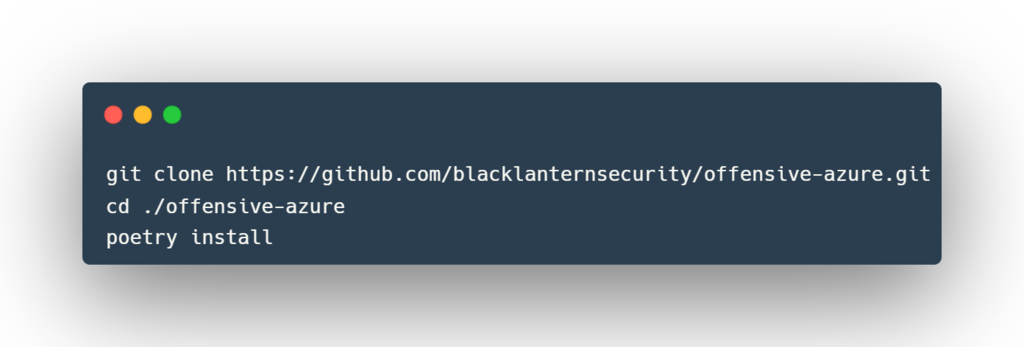
he specific scripts you want. A requirements.txt file is included for each module to make this as easy as possible. PoetryThe project is built to work with poetry. To use, follow the next few steps:
https://www.blackhatethicalhacking.com/wp-content/uploads/2022/08/Poetry-1024x347.png PipThe packaged version of the repo is also kept on pypi so you can use pip to install as well. They recommend to use pipenv to keep your environment as clean as possible.
https://www.blackhatethicalhacking.com/wp-content/uploads/2022/08/Pip.png UsageIt is up to you for how you wish to use this toolkit. Each module can be ran independently, or you can install it as a package and use it in that way. Each module is exported to a script named the same as the module file. For example: Poetryhttps://www.blackhatethicalhacking.com/wp-content/uploads/2022/08/Poetry_usage.png Piphttps://www.blackhatethicalhacking.com/wp-content/uploads/2022/08/Pip_usage.png
Clone the repo from here: GitHub Link
Trending: Write up: Find Hidden Info using Google Dorking manually, and Automated using Pagodo https://www.blackhatethicalhacking.com/wp-content/uploads/2022/03/Merch.png Recent Tools* https://www.blackhatethicalhacking.com/wp-content/uploads/2022/07/Pretender-300x150.png Offensive Security Tool: PretenderJuly 29, 2022
Reading Time: 4 minutes
* https://www.blackhatethicalhacking.com/wp-content/uploads/2022/07/DDoS-Layer7-bheh-300x150.png Offensive Security Tool: DDoS-Layer7-bhehJuly 28, 2022
Reading Time: 3 minutes
* https://www.blackhatethicalhacking.com/wp-content/uploads/2022/07/GitHacker-300x150.png Offensive Security Tool: GitHackerJuly 22, 2022
Reading Time: 3 minutes
* https://www.blackhatethicalhacking.com/wp-content/uploads/2022/07/Sarenka-300x150.png OSINT Tool: SARENKAJuly 21, 2022
Reading Time: 3 minutes https://www.blackhatethicalhacking.com/wp-content/uploads/2022/06/OffSec-Course.png Offensive Security & Ethical Hacking CourseBegin the learning curve of hacking now!
The post Offensive Security Tool: Offensive-Azure first appeared on Black Hat Ethical Hacking.
___________________________
@hacking_Attack
@Hacking_Video
https://www.blackhatethicalhacking.com/wp-content/uploads/2022/08/Poetry-1024x347.png PipThe packaged version of the repo is also kept on pypi so you can use pip to install as well. They recommend to use pipenv to keep your environment as clean as possible.
https://www.blackhatethicalhacking.com/wp-content/uploads/2022/08/Pip.png UsageIt is up to you for how you wish to use this toolkit. Each module can be ran independently, or you can install it as a package and use it in that way. Each module is exported to a script named the same as the module file. For example: Poetryhttps://www.blackhatethicalhacking.com/wp-content/uploads/2022/08/Poetry_usage.png Piphttps://www.blackhatethicalhacking.com/wp-content/uploads/2022/08/Pip_usage.png
Clone the repo from here: GitHub Link
Trending: Write up: Find Hidden Info using Google Dorking manually, and Automated using Pagodo https://www.blackhatethicalhacking.com/wp-content/uploads/2022/03/Merch.png Recent Tools* https://www.blackhatethicalhacking.com/wp-content/uploads/2022/07/Pretender-300x150.png Offensive Security Tool: PretenderJuly 29, 2022
Reading Time: 4 minutes
* https://www.blackhatethicalhacking.com/wp-content/uploads/2022/07/DDoS-Layer7-bheh-300x150.png Offensive Security Tool: DDoS-Layer7-bhehJuly 28, 2022
Reading Time: 3 minutes
* https://www.blackhatethicalhacking.com/wp-content/uploads/2022/07/GitHacker-300x150.png Offensive Security Tool: GitHackerJuly 22, 2022
Reading Time: 3 minutes
* https://www.blackhatethicalhacking.com/wp-content/uploads/2022/07/Sarenka-300x150.png OSINT Tool: SARENKAJuly 21, 2022
Reading Time: 3 minutes https://www.blackhatethicalhacking.com/wp-content/uploads/2022/06/OffSec-Course.png Offensive Security & Ethical Hacking CourseBegin the learning curve of hacking now!
The post Offensive Security Tool: Offensive-Azure first appeared on Black Hat Ethical Hacking.
___________________________
@hacking_Attack
@Hacking_Video
Forked protocols are not battle-tested: Agave Uninitialized Proxy Vulnerability
https://medium.com/@hacxyk/forked-protocols-are-not-battle-tested-agave-uninitialized-proxy-vulnerability-6b5d587b3a07?source=rss------bug_bounty-5
___________________________
@hacking_Attack
@Hacking_Video
https://medium.com/@hacxyk/forked-protocols-are-not-battle-tested-agave-uninitialized-proxy-vulnerability-6b5d587b3a07?source=rss------bug_bounty-5
___________________________
@hacking_Attack
@Hacking_Video
Medium
Forked protocols are not battle-tested: Agave Uninitialized Proxy Vulnerability
Having a similar name, Agave.finance is a forked from Aave V2 on the Gnosis chain. One would think that a fork of a battle-tested protocol…
Having a similar name, Agave.finance is a forked from Aave V2 on the Gnosis chain. One would think that a fork of a battle-tested protocol…Continue reading on Medium » (https://medium.com/@hacxyk/forked-protocols-are-not-battle-tested-agave-uninitialized-proxy-vulnerability-6b5d587b3a07?source=rss------bug_bounty-5)
___________________________
@hacking_Attack
@Hacking_Video
___________________________
@hacking_Attack
@Hacking_Video
Medium
Forked protocols are not battle-tested: Agave Uninitialized Proxy Vulnerability
Having a similar name, Agave.finance is a forked from Aave V2 on the Gnosis chain. One would think that a fork of a battle-tested protocol…
Forked protocols are not battle-tested: Agave Uninitialized Proxy Vulnerability
Having a similar name, Agave.finance is a forked from Aave V2 on the Gnosis chain. One would think that a fork of a battle-tested protocol…Continue reading on Medium »
Read more...
Having a similar name, Agave.finance is a forked from Aave V2 on the Gnosis chain. One would think that a fork of a battle-tested protocol…Continue reading on Medium »
Read more...
How Blind SQL Injection Works
https://medium.com/@pentesterclubpvtltd/how-blind-sql-injection-works-1126e82f2494?source=rss------bug_bounty-5
Blind SQL injection is a type of SQL injection attack where the attacker indirectly discovers information by analyzing server reactions to…Continue reading on Medium » (https://medium.com/@pentesterclubpvtltd/how-blind-sql-injection-works-1126e82f2494?source=rss------bug_bounty-5)
___________________________
@hacking_Attack
@Hacking_Video
https://medium.com/@pentesterclubpvtltd/how-blind-sql-injection-works-1126e82f2494?source=rss------bug_bounty-5
Blind SQL injection is a type of SQL injection attack where the attacker indirectly discovers information by analyzing server reactions to…Continue reading on Medium » (https://medium.com/@pentesterclubpvtltd/how-blind-sql-injection-works-1126e82f2494?source=rss------bug_bounty-5)
___________________________
@hacking_Attack
@Hacking_Video
Medium
How Blind SQL Injection Works
Blind SQL injection is a type of SQL injection attack where the attacker indirectly discovers information by analyzing server reactions to…
Double Blind Sql Injection
https://medium.com/@pentesterclubpvtltd/double-blind-sql-injection-89c3cffb59e7?source=rss------bug_bounty-5
SQL Injection vulnerabilities are often detected by analyzing error messages received from the database, but sometimes we cannot exploit…Continue reading on Medium » (https://medium.com/@pentesterclubpvtltd/double-blind-sql-injection-89c3cffb59e7?source=rss------bug_bounty-5)
___________________________
@hacking_Attack
@Hacking_Video
https://medium.com/@pentesterclubpvtltd/double-blind-sql-injection-89c3cffb59e7?source=rss------bug_bounty-5
SQL Injection vulnerabilities are often detected by analyzing error messages received from the database, but sometimes we cannot exploit…Continue reading on Medium » (https://medium.com/@pentesterclubpvtltd/double-blind-sql-injection-89c3cffb59e7?source=rss------bug_bounty-5)
___________________________
@hacking_Attack
@Hacking_Video
Medium
Double Blind Sql Injection
SQL Injection vulnerabilities are often detected by analyzing error messages received from the database, but sometimes we cannot exploit…
Error Based Sql Injection
https://medium.com/@pentesterclubpvtltd/error-based-sql-injection-185acaf43666?source=rss------bug_bounty-5
What Is Error-Based SQL Injection?Continue reading on Medium » (https://medium.com/@pentesterclubpvtltd/error-based-sql-injection-185acaf43666?source=rss------bug_bounty-5)
___________________________
@hacking_Attack
@Hacking_Video
https://medium.com/@pentesterclubpvtltd/error-based-sql-injection-185acaf43666?source=rss------bug_bounty-5
What Is Error-Based SQL Injection?Continue reading on Medium » (https://medium.com/@pentesterclubpvtltd/error-based-sql-injection-185acaf43666?source=rss------bug_bounty-5)
___________________________
@hacking_Attack
@Hacking_Video
Medium
Error Based Sql Injection
What Is Error-Based SQL Injection?
How Blind SQL Injection Works
Blind SQL injection is a type of SQL injection attack where the attacker indirectly discovers information by analyzing server reactions to…Continue reading on Medium »
Read more...
Blind SQL injection is a type of SQL injection attack where the attacker indirectly discovers information by analyzing server reactions to…Continue reading on Medium »
Read more...
Double Blind Sql Injection
SQL Injection vulnerabilities are often detected by analyzing error messages received from the database, but sometimes we cannot exploit…Continue reading on Medium »
Read more...
SQL Injection vulnerabilities are often detected by analyzing error messages received from the database, but sometimes we cannot exploit…Continue reading on Medium »
Read more...
Automated Tools Sql NINJA
sqlmap is an open source penetration testing tool that automates the process of detecting and exploiting SQL injection flaws and taking…Continue reading on Medium »
Read more...
sqlmap is an open source penetration testing tool that automates the process of detecting and exploiting SQL injection flaws and taking…Continue reading on Medium »
Read more...
Peetch - An eBPF Playground
http://www.kitploit.com/2022/08/peetch-ebpf-playground.html
___________________________
@hacking_Attack
@Hacking_Video
http://www.kitploit.com/2022/08/peetch-ebpf-playground.html
___________________________
@hacking_Attack
@Hacking_Video
KitPloit - PenTest & Hacking Tools
Peetch - An eBPF Playground
peetch is a collection of tools aimed at experimenting with different aspects of eBPF to bypass TLS protocol protections. Currently, peetch includes two subcommands. The first called dump aims to sniff network traffic by associating information about the source process with each packet. The second called tls allows to identify processes using OpenSSL (https://www.kitploit.com/search/label/OpenSSL) to extract cryptographic keys. Combined, these two commands make it possible to decrypt TLS exchanges recorded in the PCAPng format.
Installation peetch relies on several dependencies including non-merged modifications of bcc (https://github.com/iovisor/bcc) and Scapy (https://github.com/secdev/scapy). A Docker image can be easily built in order to easily test peetch using the following command: docker build -t quarkslab/peetch .
Commands Walk Through The following examples assume that you used the following command to enter the Docker image and launch examples within it: docker run --privileged --network host --mount type=bind,source=/sys,target=/sys --mount type=bind,source=/proc,target=/proc --rm -it quarkslab/peetch
dump This sub-command gives you the ability to sniff packets (https://www.kitploit.com/search/label/Packets) using an eBPF TC classifier and to retrieve the corresponding PID and process names with: peetch dump
curl/1289291 - Ether / IP / TCP 10.211.55.10:53052 > 208.97.177.124:https S / Padding
curl/1289291 - Ether / IP / TCP 208.97.177.124:https > 10.211.55.10:53052 SA / Padding
curl/1289291 - Ether / IP / TCP 10.211.55.10:53052 > 208.97.177.124:https A / Padding
curl/1289291 - Ether / IP / TCP 10.211.55.10:53052 > 208.97.177.124:https PA / Raw / Padding
curl/1289291 - Ether / IP / TCP 208.97.177.124:https > 10.211.55.10:53052 A / Padding
Note that for demonstration purposes, dump will only capture (https://www.kitploit.com/search/label/Capture) IPv4 based TCP segments. For convenience, the captured packets can be store to PCAPng along with process information using --write: peetch dump --write peetch.pcapng
^C
This PCAPng can easily be manipulated with Wireshark (https://www.kitploit.com/search/label/Wireshark) or Scapy: scapy
>>> l = rdpcap("peetch.pcapng")
>>> l[0]
>>>
>>> l[0].comment
b'curl/1289909'
tls This sub-command aims at identifying process that uses OpenSSl and makes it is to dump several things like plaintext and secrets. By default, peetch tls will only display one line per process, the --directions argument makes it possible to display the exchanges messages: peetch tls --directions
<- curl (1291078) 208.97.177.124/443 TLS1.2 ECDHE-RSA-AES128-GCM-SHA256
> curl (1291078) 208.97.177.124/443 TLS1.-1 ECDHE-RSA-AES128-GCM-SHA256
Displaying OpenSSL buffer content is achieved with --content. peetch tls --content
<- curl (1290608) 208.97.177.124/443 TLS1.2 ECDHE-RSA-AES128-GCM-SHA256
0000 47 45 54 20 2F 20 48 54 54 50 2F 31 2E 31 0D 0A GET / HTTP/1.1..
0010 48 6F 73 74 3A 20 77 77 77 2E 70 65 72 64 75 2E Host: www.perdu.
0020 63 6F 6D 0D 0A 55 73 65 72 2D 41 67 65 6E 74 3A com..User-Agent:
0030 20 63 75 72 6C 2F 37 2E 36 38 2E 30 0D 0A 41 63 curl/7.68.0..Ac
-> curl (1290608) 208.97.177.124/443 TLS1.-1 ECDHE-RSA-AES128-GCM-SHA256
0000 48 54 54 50 2F 31 2E 31 20 32 30 30 20 4F 4B 0D HTTP/1.1 200 OK.
0010 0A 44 61 74 65 3A 20 54 68 75 2C 20 31 39 20 4D .Date: Thu, 19 M
0020 61 79 20 32 30 32 32 20 31 38 3A 31 36 3A 30 31 ay 2022 18:16:01
0030 20 47 4D 54 0D 0A 53 65 72 76 65 72 3A 20 41 70 GMT..Server: Ap
The --secrets arguments will display TLS Master Secrets extracted from memory. The following example leverages --write to write master secrets to discuss to simplify (https://www.kitploit.com/search/label/Simplify) decruypting TLS messages with Scapy: $ (sleep 5; curl https://www.perdu.com/?name=highly%20secret%20information --tls-max 1.2 -http1.1) &
# peetch tls --write &
___________________________
@hacking_Attack
@Hacking_Video
Installation peetch relies on several dependencies including non-merged modifications of bcc (https://github.com/iovisor/bcc) and Scapy (https://github.com/secdev/scapy). A Docker image can be easily built in order to easily test peetch using the following command: docker build -t quarkslab/peetch .
Commands Walk Through The following examples assume that you used the following command to enter the Docker image and launch examples within it: docker run --privileged --network host --mount type=bind,source=/sys,target=/sys --mount type=bind,source=/proc,target=/proc --rm -it quarkslab/peetch
dump This sub-command gives you the ability to sniff packets (https://www.kitploit.com/search/label/Packets) using an eBPF TC classifier and to retrieve the corresponding PID and process names with: peetch dump
curl/1289291 - Ether / IP / TCP 10.211.55.10:53052 > 208.97.177.124:https S / Padding
curl/1289291 - Ether / IP / TCP 208.97.177.124:https > 10.211.55.10:53052 SA / Padding
curl/1289291 - Ether / IP / TCP 10.211.55.10:53052 > 208.97.177.124:https A / Padding
curl/1289291 - Ether / IP / TCP 10.211.55.10:53052 > 208.97.177.124:https PA / Raw / Padding
curl/1289291 - Ether / IP / TCP 208.97.177.124:https > 10.211.55.10:53052 A / Padding
Note that for demonstration purposes, dump will only capture (https://www.kitploit.com/search/label/Capture) IPv4 based TCP segments. For convenience, the captured packets can be store to PCAPng along with process information using --write: peetch dump --write peetch.pcapng
^C
This PCAPng can easily be manipulated with Wireshark (https://www.kitploit.com/search/label/Wireshark) or Scapy: scapy
>>> l = rdpcap("peetch.pcapng")
>>> l[0]
>>>
>>> l[0].comment
b'curl/1289909'
tls This sub-command aims at identifying process that uses OpenSSl and makes it is to dump several things like plaintext and secrets. By default, peetch tls will only display one line per process, the --directions argument makes it possible to display the exchanges messages: peetch tls --directions
<- curl (1291078) 208.97.177.124/443 TLS1.2 ECDHE-RSA-AES128-GCM-SHA256
> curl (1291078) 208.97.177.124/443 TLS1.-1 ECDHE-RSA-AES128-GCM-SHA256
Displaying OpenSSL buffer content is achieved with --content. peetch tls --content
<- curl (1290608) 208.97.177.124/443 TLS1.2 ECDHE-RSA-AES128-GCM-SHA256
0000 47 45 54 20 2F 20 48 54 54 50 2F 31 2E 31 0D 0A GET / HTTP/1.1..
0010 48 6F 73 74 3A 20 77 77 77 2E 70 65 72 64 75 2E Host: www.perdu.
0020 63 6F 6D 0D 0A 55 73 65 72 2D 41 67 65 6E 74 3A com..User-Agent:
0030 20 63 75 72 6C 2F 37 2E 36 38 2E 30 0D 0A 41 63 curl/7.68.0..Ac
-> curl (1290608) 208.97.177.124/443 TLS1.-1 ECDHE-RSA-AES128-GCM-SHA256
0000 48 54 54 50 2F 31 2E 31 20 32 30 30 20 4F 4B 0D HTTP/1.1 200 OK.
0010 0A 44 61 74 65 3A 20 54 68 75 2C 20 31 39 20 4D .Date: Thu, 19 M
0020 61 79 20 32 30 32 32 20 31 38 3A 31 36 3A 30 31 ay 2022 18:16:01
0030 20 47 4D 54 0D 0A 53 65 72 76 65 72 3A 20 41 70 GMT..Server: Ap
The --secrets arguments will display TLS Master Secrets extracted from memory. The following example leverages --write to write master secrets to discuss to simplify (https://www.kitploit.com/search/label/Simplify) decruypting TLS messages with Scapy: $ (sleep 5; curl https://www.perdu.com/?name=highly%20secret%20information --tls-max 1.2 -http1.1) &
# peetch tls --write &
___________________________
@hacking_Attack
@Hacking_Video
KitPloit - PenTest & Hacking Tools
Leading source of security tools, hacking tools, cybersecurity and network security. Learn about new tools and updates in one place.
curl (1293232) 208.97.177.124/443 TLS1.2 ECDHE-RSA-AES128-GCM-SHA256
# peetch dump --write traffic.pcapng
^C
# Add the master secret to a PCAPng file
$ editcap --inject-secrets tls,1293232-master_secret.log traffic.pcapng traffic-ms.pcapng
$ scapy
>>> load_layer("tls")
>>> conf.tls_session_enable = True
>>> l = rdpcap("traffic-ms.pcapng")
>>> l[13][TLS].msg
[]
Limitations By design, peetch only supports OpenSSL and TLS 1.2.
Download Peetch (https://github.com/quarkslab/peetch)
___________________________
@hacking_Attack
@Hacking_Video
# peetch dump --write traffic.pcapng
^C
# Add the master secret to a PCAPng file
$ editcap --inject-secrets tls,1293232-master_secret.log traffic.pcapng traffic-ms.pcapng
$ scapy
>>> load_layer("tls")
>>> conf.tls_session_enable = True
>>> l = rdpcap("traffic-ms.pcapng")
>>> l[13][TLS].msg
[]
Limitations By design, peetch only supports OpenSSL and TLS 1.2.
Download Peetch (https://github.com/quarkslab/peetch)
___________________________
@hacking_Attack
@Hacking_Video
GitHub
GitHub - quarkslab/peetch: An eBPF playground
An eBPF playground. Contribute to quarkslab/peetch development by creating an account on GitHub.