
Hacking Articles Tips Tricks Videos Tutorials
Black Hat Ethical Hacking Recon Tool: Domain Analyzer Recon Tool: Domain AnalyzerPost Views: 18 Premium Content https://www.blackhatethicalhacking.com/wp-content/uploads/2022/05/Patreon.png Subscribe to Patreon to watch this episode. Reading Time: 4 Minutes…
to crawl. A default value of 5000 URLs is set.
* Follows redirections using HTML and JavaScript Location tag and HTTP response codes. This extended edition has more features!* World-domination: You can automatically analyze the whole world!
* Robin-hood: Although it is still in development, it will let you send automatically an email to the mails found during scan with the analysis information.
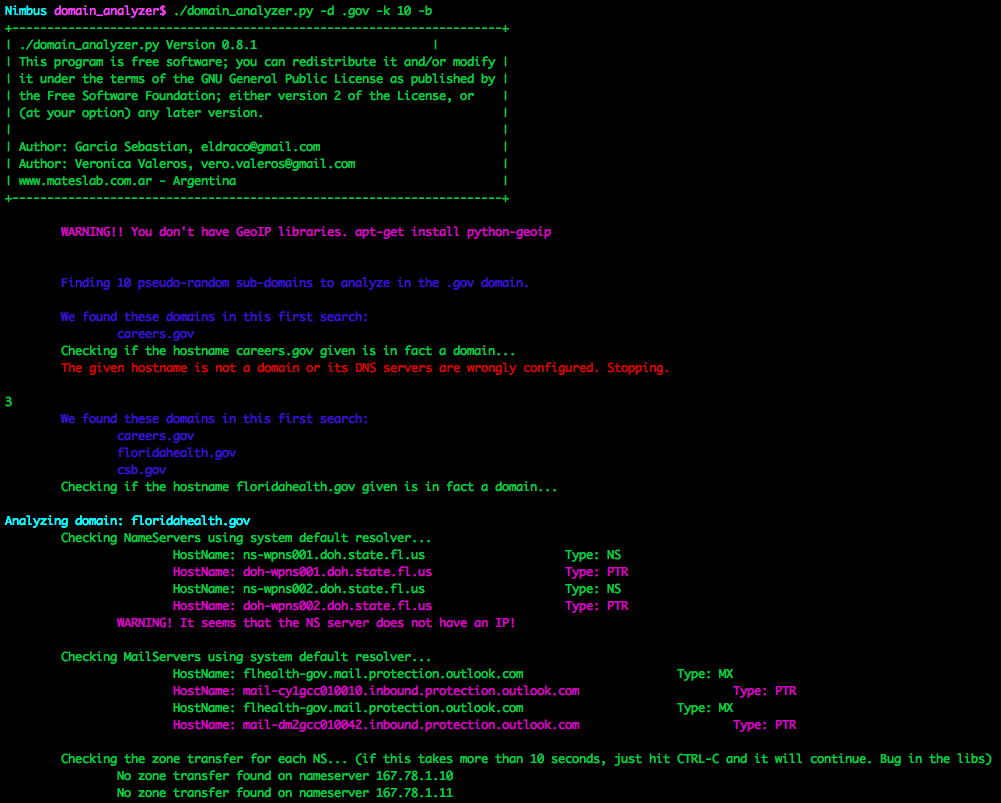
* Robtex DNS: With this incredible function, every time you found a DNS servers with Zone Transfer, it will retrieve from the Robtex site other domains using that DNS server! It will automatically analyze them too! This can be a never ending test! Every vulnerable DNS server can be used by hundreds of domains, which in turn can be using other vulnerable DNS servers. BEWARE! Domains retrieved can be unrelated to the first one. Examples* Find 10 random domains in the .gov domain and analyze them fully (including web crawling). If it finds some Zone Transfer, retrieve more domains using them from Robtex!!
domain_analyzer.py -d .gov -k 10 -b
* (Very Quick and dirty) Find everything related with .edu.cn domain, store everything in directories. Do not search for active host, do not nmap scan them, do not reverse-dns the netblock, do not search for emails.
domain_analyzer.py -d edu.cn -b -o -g -a -n
* Analyze the 386.edu.ru domain fully
domain_analyzer.py -d 386.edu.ru -b -o
* (Pentester mode). Analyze a domain fully. Do not find other domains. Print everything in a pdf file. Store everything on disk. When finished open Zenmap and show me the topology every host found at the same time!
domain_analyzer.py -d amigos.net -o -e
* (Quick with web crawl only). Ignore everything with ‘google’ on it.
domain_analyzer.py -d mil.cn -b -o -g -a -n -v google -x ‘-O –reason –webxml –traceroute -sS -sV -sC -PN -n -v -p 80,4443’
* (Everything) Crawl up to 100 URLs of this site including subdomains. Store output into a file and download every INTERESTING file found to disk.
crawler.py -u www.386.edu.ru -w -s -m 100 -f
* (Quick and dirty) Crawl the site very quick. Do not download files. Store the output to a file.
crawler.py -u www.386.edu.ru -w -m 20
* (If you want to analyze metadata later with lafoca). Verbose prints which extensions are being downloaded. Download only the set of archives corresponding to Documents (.doc, .docx, .ppt, .xls, .odt. etc.)
crawler.py -u ieeeexplore.ieee.org/otherfiles/ -d -v
Most of these features can be deactivated.
See Also: Hacking Stories: Kevin Poulsen, aka Dark Dante, and his hacking activities on ARPANET’s networks InstallationJust untar the .tar.gz file and copy the python files to the /usr/bin/ directory. Domain_analyzer needs to be run as root. The crawler can be run as a non-privileged user. If you want all the features (web crawler, pdf and colors), which is nice, also copy these files to /usr/bin or /usr/local/bin
* ansistrm.py
* crawler.py
* pyText2pdf.py
If you have any issues with the GeoIP database, download it from its original source here. And install it in where your system needs it, usually at /opt/local/share/GeoIP/GeoIP.dat Docker ImageThey are migrating the tool to run on Python 3, however, until a new version is released, they have created a docker image that can be used to run domain analyzer on Python 2.7, and has all the dependencies already installed.
https://www.blackhatethicalhacking.com/wp-content/uploads/2022/06/SS1.png
See Also: The Difference between Vulnerability Assessment and Pentesting https://www.blackhatethicalhacking.com/wp-content/uploads/2022/03/Merch-1024x1024.png Recent Tools* https://www.blackhatethicalhacking.com/wp-content/uploads/2022/05/deepsleep-90x90.png Offensive Security Tool: DeepSleep7 days ago
* https://www.blackhatethicalhacki[...]
___________________________
@hacking_Attack
@Hacking_Video
* Follows redirections using HTML and JavaScript Location tag and HTTP response codes. This extended edition has more features!* World-domination: You can automatically analyze the whole world!
* Robin-hood: Although it is still in development, it will let you send automatically an email to the mails found during scan with the analysis information.
* Robtex DNS: With this incredible function, every time you found a DNS servers with Zone Transfer, it will retrieve from the Robtex site other domains using that DNS server! It will automatically analyze them too! This can be a never ending test! Every vulnerable DNS server can be used by hundreds of domains, which in turn can be using other vulnerable DNS servers. BEWARE! Domains retrieved can be unrelated to the first one. Examples* Find 10 random domains in the .gov domain and analyze them fully (including web crawling). If it finds some Zone Transfer, retrieve more domains using them from Robtex!!
domain_analyzer.py -d .gov -k 10 -b
* (Very Quick and dirty) Find everything related with .edu.cn domain, store everything in directories. Do not search for active host, do not nmap scan them, do not reverse-dns the netblock, do not search for emails.
domain_analyzer.py -d edu.cn -b -o -g -a -n
* Analyze the 386.edu.ru domain fully
domain_analyzer.py -d 386.edu.ru -b -o
* (Pentester mode). Analyze a domain fully. Do not find other domains. Print everything in a pdf file. Store everything on disk. When finished open Zenmap and show me the topology every host found at the same time!
domain_analyzer.py -d amigos.net -o -e
* (Quick with web crawl only). Ignore everything with ‘google’ on it.
domain_analyzer.py -d mil.cn -b -o -g -a -n -v google -x ‘-O –reason –webxml –traceroute -sS -sV -sC -PN -n -v -p 80,4443’
* (Everything) Crawl up to 100 URLs of this site including subdomains. Store output into a file and download every INTERESTING file found to disk.
crawler.py -u www.386.edu.ru -w -s -m 100 -f
* (Quick and dirty) Crawl the site very quick. Do not download files. Store the output to a file.
crawler.py -u www.386.edu.ru -w -m 20
* (If you want to analyze metadata later with lafoca). Verbose prints which extensions are being downloaded. Download only the set of archives corresponding to Documents (.doc, .docx, .ppt, .xls, .odt. etc.)
crawler.py -u ieeeexplore.ieee.org/otherfiles/ -d -v
Most of these features can be deactivated.
See Also: Hacking Stories: Kevin Poulsen, aka Dark Dante, and his hacking activities on ARPANET’s networks InstallationJust untar the .tar.gz file and copy the python files to the /usr/bin/ directory. Domain_analyzer needs to be run as root. The crawler can be run as a non-privileged user. If you want all the features (web crawler, pdf and colors), which is nice, also copy these files to /usr/bin or /usr/local/bin
* ansistrm.py
* crawler.py
* pyText2pdf.py
If you have any issues with the GeoIP database, download it from its original source here. And install it in where your system needs it, usually at /opt/local/share/GeoIP/GeoIP.dat Docker ImageThey are migrating the tool to run on Python 3, however, until a new version is released, they have created a docker image that can be used to run domain analyzer on Python 2.7, and has all the dependencies already installed.
docker run --rm -it verovaleros/domain_analyzer:python2.7 /domain_analyzer/domain_analyzer.py -d Screenshots1. Example domain_analyzer.py -d .gov -k 10 -bhttps://www.blackhatethicalhacking.com/wp-content/uploads/2022/06/SS1.png
See Also: The Difference between Vulnerability Assessment and Pentesting https://www.blackhatethicalhacking.com/wp-content/uploads/2022/03/Merch-1024x1024.png Recent Tools* https://www.blackhatethicalhacking.com/wp-content/uploads/2022/05/deepsleep-90x90.png Offensive Security Tool: DeepSleep7 days ago
* https://www.blackhatethicalhacki[...]
___________________________
@hacking_Attack
@Hacking_Video
Hacking Articles Tips Tricks Videos Tutorials
to crawl. A default value of 5000 URLs is set. * Follows redirections using HTML and JavaScript Location tag and HTTP response codes. This extended edition has more features!* World-domination: You can automatically analyze the whole world! * Robin-hood: Although…
ng.com/wp-content/uploads/2022/05/qsreplace-90x90.png Recon Tool: qsreplace1 week ago
* https://www.blackhatethicalhacking.com/wp-content/uploads/2022/05/Arjun-90x90.png Offensive Security Tool: Arjun2 weeks ago
* https://www.blackhatethicalhacking.com/wp-content/uploads/2022/05/Dorks-collections-list-90x90.png Recon Tool: Dorks collections list2 weeks ago
* https://www.blackhatethicalhacking.com/wp-content/uploads/2022/05/malicious-pdf-90x90.png Offensive Security Tool: malicious-pdf3 weeks ago
* https://www.blackhatethicalhacking.com/wp-content/uploads/2022/05/scanmycode-90x90.png Static Code Analysis Tool: scanmycode-ce4 weeks ago
* https://www.blackhatethicalhacking.com/wp-content/uploads/2022/04/MOSINT-1-90x90.png OSINT Tool: MOSINT1 month ago
* https://www.blackhatethicalhacking.com/wp-content/uploads/2022/04/findomain-90x90.png Recon Tool: Findomain1 month ago
* https://www.blackhatethicalhacking.com/wp-content/uploads/2022/04/keethief-90x90.png Offensive Security Tool: KeeThief1 month ago
* https://www.blackhatethicalhacking.com/wp-content/uploads/2022/04/reconftw-90x90.png Recon Tool: ReconFTW1 month ago
The post Recon Tool: Domain Analyzer first appeared on Black Hat Ethical Hacking.
___________________________
@hacking_Attack
@Hacking_Video
* https://www.blackhatethicalhacking.com/wp-content/uploads/2022/05/Arjun-90x90.png Offensive Security Tool: Arjun2 weeks ago
* https://www.blackhatethicalhacking.com/wp-content/uploads/2022/05/Dorks-collections-list-90x90.png Recon Tool: Dorks collections list2 weeks ago
* https://www.blackhatethicalhacking.com/wp-content/uploads/2022/05/malicious-pdf-90x90.png Offensive Security Tool: malicious-pdf3 weeks ago
* https://www.blackhatethicalhacking.com/wp-content/uploads/2022/05/scanmycode-90x90.png Static Code Analysis Tool: scanmycode-ce4 weeks ago
* https://www.blackhatethicalhacking.com/wp-content/uploads/2022/04/MOSINT-1-90x90.png OSINT Tool: MOSINT1 month ago
* https://www.blackhatethicalhacking.com/wp-content/uploads/2022/04/findomain-90x90.png Recon Tool: Findomain1 month ago
* https://www.blackhatethicalhacking.com/wp-content/uploads/2022/04/keethief-90x90.png Offensive Security Tool: KeeThief1 month ago
* https://www.blackhatethicalhacking.com/wp-content/uploads/2022/04/reconftw-90x90.png Recon Tool: ReconFTW1 month ago
The post Recon Tool: Domain Analyzer first appeared on Black Hat Ethical Hacking.
___________________________
@hacking_Attack
@Hacking_Video

Atomic-Operator - A Python Package Is Used To Execute Atomic Red Team Tests (Atomics) Across Multiple Operating System Environments
http://www.kitploit.com/2022/06/atomic-operator-python-package-is-used.html
___________________________
@hacking_Attack
@Hacking_Video
http://www.kitploit.com/2022/06/atomic-operator-python-package-is-used.html
___________________________
@hacking_Attack
@Hacking_Video
KitPloit - PenTest & Hacking Tools
Atomic-Operator - A Python Package Is Used To Execute Atomic Red Team Tests (Atomics) Across Multiple Operating System Environments
* Create a hidden file in a hidden directory (61a782e5-9a19-40b5-8ba4-69a4b9f3d7be)
Mac Hidden file (cddb9098-3b47-4e01-9d3b-6f5f323288a9)
Create Windows System File with Attrib (f70974c8-c094-4574-b542-2c545af95a32)
Create Windows Hidden File (https://www.kitploit.com/search/label/Hidden%20File) with Attrib (dadb792e-4358-4d8d-9207-b771faa0daa5)
Hidden files (3b7015f2-3144-4205-b799-b05580621379)
Hide a Directory (b115ecaf-3b24-4ed2-aefe-2fcb9db913d3)
Show all hidden files (9a1ec7da-b892-449f-ad68-67066d04380c)
Running Tests Remotely In order to run a test remotely you must provide some additional properties (and options if desired). The main method to run tests is named run. # This will run ALL tests compatiable with your local operating system
atomic-operator run --atomics-path "/tmp/some_directory/redcanaryco-atomic-red-team-3700624" --hosts "10.32.1.0" --username "my_username" --password "my_password" When running commands remotely against Windows hosts you may need to configure PSRemoting. See details here: Windows Remoting (https://github.com/swimlane/atomic-operator/blob/main/docs/windows-remote.md) Additional parameters You can see additional parameters by running the following command: atomic-operator run -- --help Parameter Name Type Default Description techniques list all One or more defined techniques by attack_technique ID. test_guids list None One or more Atomic test GUIDs. select_tests bool False Select one or more atomic tests to run when a techniques are specified. atomics_path str os.getcwd() The path of Atomic tests. check_prereqs bool False Whether or not to check for prereq dependencies (prereq_comand). get_prereqs bool False Whether or not you want to retrieve prerequisites. cleanup bool False Whether or not you want to run cleanup command(s). copy_source_files bool True Whether or not you want to copy any related source (src, bin, etc.) files to a remote host. command_timeout int 20 Time duration for each command before timeout. debug bool False Whether or not you want to output details about tests being ran. prompt_for_input_args bool False Whether you want to prompt for input arguments for each test. return_atomics bool False Whether or not you want to return atomics instead of running them. config_file str None A path to a conifg_file which is used to automate atomic-operator in environments. config_file_only bool False Whether or not you want to run tests based on the provided config_file only. hosts list None A list of one or more remote hosts to run a test on. username str None Username for authentication (https://www.kitploit.com/search/label/Authentication) of remote connections. password str None Password for authentication of remote connections. ssh_key_path str None Path to a SSH Key for authentication of remote connections. private_key_string str None A private SSH Key string used for authentication of remote connections. verify_ssl bool False Whether or not to verify ssl when connecting over RDP (windows). ssh_port int 22 SSH port for authentication of remote connections. ssh_timeout int 5 SSH timeout for authentication of remote connections. **kwargs dict None If additional flags are passed into the run command then we will attempt to match them with defined inputs within Atomic tests and replace their value with the provided value. You should see a similar output to the following: NAME
atomic-operator run - The main method in which we run Atomic Red Team tests.
SYNOPSIS
atomic-operator run
DESCRIPTION
The main method in which we run Atomic Red Team tests.
FLAGS
--techniques=TECHNIQUES
Type: list
Default: ['all']
One or more defined techniques by attack_technique ID. Defaults to 'all'.
--test_guids=TEST_GUIDS
___________________________
@hacking_Attack
@Hacking_Video
Mac Hidden file (cddb9098-3b47-4e01-9d3b-6f5f323288a9)
Create Windows System File with Attrib (f70974c8-c094-4574-b542-2c545af95a32)
Create Windows Hidden File (https://www.kitploit.com/search/label/Hidden%20File) with Attrib (dadb792e-4358-4d8d-9207-b771faa0daa5)
Hidden files (3b7015f2-3144-4205-b799-b05580621379)
Hide a Directory (b115ecaf-3b24-4ed2-aefe-2fcb9db913d3)
Show all hidden files (9a1ec7da-b892-449f-ad68-67066d04380c)
Running Tests Remotely In order to run a test remotely you must provide some additional properties (and options if desired). The main method to run tests is named run. # This will run ALL tests compatiable with your local operating system
atomic-operator run --atomics-path "/tmp/some_directory/redcanaryco-atomic-red-team-3700624" --hosts "10.32.1.0" --username "my_username" --password "my_password" When running commands remotely against Windows hosts you may need to configure PSRemoting. See details here: Windows Remoting (https://github.com/swimlane/atomic-operator/blob/main/docs/windows-remote.md) Additional parameters You can see additional parameters by running the following command: atomic-operator run -- --help Parameter Name Type Default Description techniques list all One or more defined techniques by attack_technique ID. test_guids list None One or more Atomic test GUIDs. select_tests bool False Select one or more atomic tests to run when a techniques are specified. atomics_path str os.getcwd() The path of Atomic tests. check_prereqs bool False Whether or not to check for prereq dependencies (prereq_comand). get_prereqs bool False Whether or not you want to retrieve prerequisites. cleanup bool False Whether or not you want to run cleanup command(s). copy_source_files bool True Whether or not you want to copy any related source (src, bin, etc.) files to a remote host. command_timeout int 20 Time duration for each command before timeout. debug bool False Whether or not you want to output details about tests being ran. prompt_for_input_args bool False Whether you want to prompt for input arguments for each test. return_atomics bool False Whether or not you want to return atomics instead of running them. config_file str None A path to a conifg_file which is used to automate atomic-operator in environments. config_file_only bool False Whether or not you want to run tests based on the provided config_file only. hosts list None A list of one or more remote hosts to run a test on. username str None Username for authentication (https://www.kitploit.com/search/label/Authentication) of remote connections. password str None Password for authentication of remote connections. ssh_key_path str None Path to a SSH Key for authentication of remote connections. private_key_string str None A private SSH Key string used for authentication of remote connections. verify_ssl bool False Whether or not to verify ssl when connecting over RDP (windows). ssh_port int 22 SSH port for authentication of remote connections. ssh_timeout int 5 SSH timeout for authentication of remote connections. **kwargs dict None If additional flags are passed into the run command then we will attempt to match them with defined inputs within Atomic tests and replace their value with the provided value. You should see a similar output to the following: NAME
atomic-operator run - The main method in which we run Atomic Red Team tests.
SYNOPSIS
atomic-operator run
DESCRIPTION
The main method in which we run Atomic Red Team tests.
FLAGS
--techniques=TECHNIQUES
Type: list
Default: ['all']
One or more defined techniques by attack_technique ID. Defaults to 'all'.
--test_guids=TEST_GUIDS
___________________________
@hacking_Attack
@Hacking_Video
KitPloit - PenTest & Hacking Tools
Leading source of security tools, hacking tools, cybersecurity and network security. Learn about new tools and updates in one place.
Type: list
Default: []
One or more Atomic test GUIDs. Defaults to None.
--select_tests=SELECT_TESTS
Type: bool
Default: False
Select one or more tests from provided techniques. Defaults to False.
--atomics_path=ATOMICS_PATH
Default: '/U...
The path of Atomic tests. Defaults to os.getcwd().
--check_prereqs=CHECK_PREREQS
Default: False
Whether or not to check for prereq dependencies (pr ereq_comand). Defaults to False.
--get_prereqs=GET_PREREQS
Default: False
Whether or not you want to retrieve prerequisites. Defaults to False.
--cleanup=CLEANUP
Default: False
Whether or not you want to run cleanup command(s). Defaults to False.
--copy_source_files=COPY_SOURCE_FILES
Default: True
Whether or not you want to copy any related source (src, bin, etc.) files to a remote host. Defaults to True.
--command_timeout=COMMAND_TIMEOUT
Default: 20
Timeout duration for each command. Defaults to 20.
--debug=DEBUG
Default: False
Whether or not you want to output details about tests being ran. Defaults to False.
--prompt_for_input_args=PROMPT_FOR_INPUT_ARGS
Default: False
Whether you want to prompt for input arguments for each test. Defaults to False.
--return_atomics=RETURN_ATOMICS
Default: False
Whether or not you want to return atomics instead of running them. Defaults to False.
--config_file=CONFIG_FILE
Type: Optional[]
Default: None
A path to a conifg_file which is used to automate atomic-operator in environments. Default to None.
--config_file_only=CONFIG_FILE_ONLY
Default: False
Whether or not you want to run tests based on the provided config_file only. Defaults to False.
--hosts=HOSTS
Default: []
A list of one or more remote hosts to run a test on. Defaults to [].
--username=USERNAME
Type: Optional[]
Default: None
Username for authentication of remote connections. Defaults to None.
--password=PASSWORD
Type: Optional[]
Default: None
Password for authentication of remote connections. Defaults to None.
--ssh_key_path=SSH_KEY_PATH
Type: Optional[]
Default: None
Path to a SSH Key for authentication of remote connections. Defaults to None.
--private_key_string=PRIVATE_KEY_STRING
Type: Optional[]
Default: None
A private SSH Key string used for authentication of remote connections. Defaults to None.
--verify_ssl=VERIFY_SSL
Default: False
Whether or not to verify ssl when connecting over RDP (windows). Defaults to False.
--ssh_port=SSH_PORT
Default: 22
SSH port for authentication of remote connections. Defaults to 22.
--ssh_timeout=SSH_TIMEOUT
Default: 5
SSH timeout for authentication of remote connections. Defaults to 5.
Additional flags are accepted.
If provided, keys matching inputs for a test will be replaced. Default is None.
Running atomic-operator using a config_file In addition to the ability to pass in parameters with atomic-operator you can also pass in a path to a config_file that contains all the atomic tests and their potential inputs. You can see an example of this config_file here: atomic_tests:
- guid: f7e6ec05-c19e-4a80-a7e7-241027992fdb
input_arguments:
output_file:
value: custom_output.txt
input_file:
value: custom_input.txt
- guid: 3ff64f0b-3af2-3866-339d-38d9791407c3
input_arguments:
second_arg:
value: SWAPPPED argument
- guid: 32f90516-4bc9-43bd-b18d-2cbe0b7ca9b2 Usage example (scripts) To use atomic-operator you must instantiate an AtomicOperator object. from atomic_operator import AtomicOperator
operator = AtomicOperator()
___________________________
@hacking_Attack
@Hacking_Video
Default: []
One or more Atomic test GUIDs. Defaults to None.
--select_tests=SELECT_TESTS
Type: bool
Default: False
Select one or more tests from provided techniques. Defaults to False.
--atomics_path=ATOMICS_PATH
Default: '/U...
The path of Atomic tests. Defaults to os.getcwd().
--check_prereqs=CHECK_PREREQS
Default: False
Whether or not to check for prereq dependencies (pr ereq_comand). Defaults to False.
--get_prereqs=GET_PREREQS
Default: False
Whether or not you want to retrieve prerequisites. Defaults to False.
--cleanup=CLEANUP
Default: False
Whether or not you want to run cleanup command(s). Defaults to False.
--copy_source_files=COPY_SOURCE_FILES
Default: True
Whether or not you want to copy any related source (src, bin, etc.) files to a remote host. Defaults to True.
--command_timeout=COMMAND_TIMEOUT
Default: 20
Timeout duration for each command. Defaults to 20.
--debug=DEBUG
Default: False
Whether or not you want to output details about tests being ran. Defaults to False.
--prompt_for_input_args=PROMPT_FOR_INPUT_ARGS
Default: False
Whether you want to prompt for input arguments for each test. Defaults to False.
--return_atomics=RETURN_ATOMICS
Default: False
Whether or not you want to return atomics instead of running them. Defaults to False.
--config_file=CONFIG_FILE
Type: Optional[]
Default: None
A path to a conifg_file which is used to automate atomic-operator in environments. Default to None.
--config_file_only=CONFIG_FILE_ONLY
Default: False
Whether or not you want to run tests based on the provided config_file only. Defaults to False.
--hosts=HOSTS
Default: []
A list of one or more remote hosts to run a test on. Defaults to [].
--username=USERNAME
Type: Optional[]
Default: None
Username for authentication of remote connections. Defaults to None.
--password=PASSWORD
Type: Optional[]
Default: None
Password for authentication of remote connections. Defaults to None.
--ssh_key_path=SSH_KEY_PATH
Type: Optional[]
Default: None
Path to a SSH Key for authentication of remote connections. Defaults to None.
--private_key_string=PRIVATE_KEY_STRING
Type: Optional[]
Default: None
A private SSH Key string used for authentication of remote connections. Defaults to None.
--verify_ssl=VERIFY_SSL
Default: False
Whether or not to verify ssl when connecting over RDP (windows). Defaults to False.
--ssh_port=SSH_PORT
Default: 22
SSH port for authentication of remote connections. Defaults to 22.
--ssh_timeout=SSH_TIMEOUT
Default: 5
SSH timeout for authentication of remote connections. Defaults to 5.
Additional flags are accepted.
If provided, keys matching inputs for a test will be replaced. Default is None.
Running atomic-operator using a config_file In addition to the ability to pass in parameters with atomic-operator you can also pass in a path to a config_file that contains all the atomic tests and their potential inputs. You can see an example of this config_file here: atomic_tests:
- guid: f7e6ec05-c19e-4a80-a7e7-241027992fdb
input_arguments:
output_file:
value: custom_output.txt
input_file:
value: custom_input.txt
- guid: 3ff64f0b-3af2-3866-339d-38d9791407c3
input_arguments:
second_arg:
value: SWAPPPED argument
- guid: 32f90516-4bc9-43bd-b18d-2cbe0b7ca9b2 Usage example (scripts) To use atomic-operator you must instantiate an AtomicOperator object. from atomic_operator import AtomicOperator
operator = AtomicOperator()
___________________________
@hacking_Attack
@Hacking_Video
# This will download a local copy of the atomic-red-team repository
print(operator.get_atomics('/tmp/some_directory'))
# this will run tests on your local system
operator.run(
technique: str='All',
atomics_path=os.getcwd(),
check_dependencies=False,
get_prereqs=False,
cleanup=False,
command_timeout=20,
debug=False,
prompt_for_input_args=False,
**kwargs
) Getting Help Please create an issue (https://github.com/swimlane/atomic-operator/pulls) if you have questions or run into any issues. Built With carcass (https://github.com/MSAdministrator/carcass) - Python packaging template Contributing Please read CONTRIBUTING.md (https://github.com/swimlane/atomic-operator/blob/main/CONTRIBUTING.md) for details on our code of conduct, and the process for submitting pull requests to us. Versioning We use SemVer (http://semver.org/) for versioning. Authors Josh Rickard - Initial work - MSAdministrator (https://github.com/MSAdministrator) See also the list of contributors (https://github.com/swimlane/atomic-operator/contributors) who participated in this project. License This project is licensed under the MIT License - see the LICENSE (https://github.com/swimlane/atomic-operator/blob/main/LICENSE.md) file for details Shoutout Thanks to keithmccammon (https://github.com/keithmccammon) for helping identify issues with macOS M1 based proccesssor and providing a fix
Download Atomic-Operator (https://github.com/swimlane/atomic-operator)
___________________________
@hacking_Attack
@Hacking_Video
print(operator.get_atomics('/tmp/some_directory'))
# this will run tests on your local system
operator.run(
technique: str='All',
atomics_path=os.getcwd(),
check_dependencies=False,
get_prereqs=False,
cleanup=False,
command_timeout=20,
debug=False,
prompt_for_input_args=False,
**kwargs
) Getting Help Please create an issue (https://github.com/swimlane/atomic-operator/pulls) if you have questions or run into any issues. Built With carcass (https://github.com/MSAdministrator/carcass) - Python packaging template Contributing Please read CONTRIBUTING.md (https://github.com/swimlane/atomic-operator/blob/main/CONTRIBUTING.md) for details on our code of conduct, and the process for submitting pull requests to us. Versioning We use SemVer (http://semver.org/) for versioning. Authors Josh Rickard - Initial work - MSAdministrator (https://github.com/MSAdministrator) See also the list of contributors (https://github.com/swimlane/atomic-operator/contributors) who participated in this project. License This project is licensed under the MIT License - see the LICENSE (https://github.com/swimlane/atomic-operator/blob/main/LICENSE.md) file for details Shoutout Thanks to keithmccammon (https://github.com/keithmccammon) for helping identify issues with macOS M1 based proccesssor and providing a fix
Download Atomic-Operator (https://github.com/swimlane/atomic-operator)
___________________________
@hacking_Attack
@Hacking_Video
GitHub
Pull requests · swimlane/atomic-operator
A Python package is used to execute Atomic Red Team tests (Atomics) across multiple operating system environments. - Pull requests · swimlane/atomic-operator
Hacking Articles Tips Tricks Videos Tutorials
Photo
Hacking on Medium
Exploited Vulnerabilities In An Egyptian Website
https://cdn-images-1.medium.com/max/640/1*5xlGShRRGog1O_2ndmnP-g.jpeg
This blog is for informational purpose only, so that emerging bug hunters could follow similar methodology and responsibly disclose the…
Continue reading on Medium »
___________________________
@hacking_Attack
@Hacking_Video
Exploited Vulnerabilities In An Egyptian Website
https://cdn-images-1.medium.com/max/640/1*5xlGShRRGog1O_2ndmnP-g.jpeg
This blog is for informational purpose only, so that emerging bug hunters could follow similar methodology and responsibly disclose the…
Continue reading on Medium »
___________________________
@hacking_Attack
@Hacking_Video
Medium
Exploited Vulnerabilities In An Egyptian Website
This blog is for informational purpose only, so that emerging bug hunters could follow similar methodology and responsibly disclose the…
Hacking Articles Tips Tricks Videos Tutorials
Photo
Hacking on Medium
An Overview Of Cyber Security
https://cdn-images-1.medium.com/max/640/0*WEjFziaCwbuLQQ10.jpg
Cyber Security is a very important issue these days as we become more and more reliant on the internet. A computer virus can cause…
Continue reading on Medium »
___________________________
@hacking_Attack
@Hacking_Video
An Overview Of Cyber Security
https://cdn-images-1.medium.com/max/640/0*WEjFziaCwbuLQQ10.jpg
Cyber Security is a very important issue these days as we become more and more reliant on the internet. A computer virus can cause…
Continue reading on Medium »
___________________________
@hacking_Attack
@Hacking_Video
Medium
An Overview Of Cyber Security
Cyber Security is a very important issue these days as we become more and more reliant on the internet. A computer virus can cause…
Hacking Articles Tips Tricks Videos Tutorials
Photo
Hacking on Medium
Moto E32s Unboxing | Moto E32s Review | Moto e32s First Look | upload by Allaboutsubha
Continue reading on Medium »
___________________________
@hacking_Attack
@Hacking_Video
Moto E32s Unboxing | Moto E32s Review | Moto e32s First Look | upload by Allaboutsubha
Continue reading on Medium »
___________________________
@hacking_Attack
@Hacking_Video
Medium
Moto E32s Unboxing | Moto E32s Review | Moto e32s First Look | upload by Allaboutsubha
Hacking Articles Tips Tricks Videos Tutorials
Photo
Hacking on Medium
Man In The Middle (MITM)
https://cdn-images-1.medium.com/max/640/0*bL6sZCExRs64jYIg.png
Man In The Middle Attack (MITM)
Continue reading on Medium »
___________________________
@hacking_Attack
@Hacking_Video
Man In The Middle (MITM)
https://cdn-images-1.medium.com/max/640/0*bL6sZCExRs64jYIg.png
Man In The Middle Attack (MITM)
Continue reading on Medium »
___________________________
@hacking_Attack
@Hacking_Video
Medium
Man In The Middle (MITM)
Man In The Middle Attack (MITM)
Hacking Articles Tips Tricks Videos Tutorials
Photo
Hacking on Medium
Biggest Cyber Crime of ₹ 571,092,184 in Assam from Oil India Limited Co.
https://cdn-images-1.medium.com/max/640/0*ewsBT4LXrZveuj0G.png
Recently Oil India Limited Company suffered a Cyber Attack.
Continue reading on Medium »
___________________________
@hacking_Attack
@Hacking_Video
Biggest Cyber Crime of ₹ 571,092,184 in Assam from Oil India Limited Co.
https://cdn-images-1.medium.com/max/640/0*ewsBT4LXrZveuj0G.png
Recently Oil India Limited Company suffered a Cyber Attack.
Continue reading on Medium »
___________________________
@hacking_Attack
@Hacking_Video
Medium
Biggest Cyber Crime of ₹ 571,092,184 in Assam from Oil India Limited Co.
Recently Oil India Limited Company suffered a Cyber Attack. On 10th April in the afternoon, when some employees were working, they suddenly…
Hacking Articles Tips Tricks Videos Tutorials
Photo
KitPloit - PenTest Tools!
Atomic-Operator - A Python Package Is Used To Execute Atomic Red Team Tests (Atomics) Across Multiple Operating System Environments
https://blogger.googleusercontent.com/img/b/R29vZ2xl/AVvXsEjQ-olHqvRjRQm1ILeNewVPQ5Xq1oDz6AsR0gRAV28__6g2xkptlf5a1bsENN6ewg6IlRbkO2sV6QNXU9VJI1MIWcbWdZRjBa6gkgZN1EnTkGf4Owq_LCJc4tnmo2JIB-_-g0fSS2NmIiAawavL64nBuPgZpeMjB_FzoEGGX1ctBMdAhm0RYGbdzSGP/w640-h314/atomic-operator.png This python package is used to execute Atomic Red Team tests (Atomics) across multiple operating system environments.
(What's new?) Why?
Additionally,
* Generating alerts to test products
* Testing EDR and other security tools
* Identifying way to perform defensive evasion from an adversary perspective
* Plus more. Features* Support local and remote execution of Atomic Red Teams tests on Windows, macOS, and Linux systems
* Supports running atomic-tests against
* Assist with downloading the atomic-red-team repository
* Can be automated further based on a configuration file
* A command-line and importable Python package
* Select specific tests when one or more techniques are specified
* Plus more Getting Started
If you are wanting a PowerShell version, please checkout Invoke-AtomicRedTeam.
* Get Atomics Install / clone Atomic Red Team repository
* atomic-operator Understand the options availble in atomic-operator
* Running Test on Command Line or Running Tests within a Script
* Running Tests via Configuration File InstallationYou can install atomic-operator on OS X, Linux, or Windows. You can also install it directly from the source. To install, see the commands under the relevant operating system heading, below. PrerequisitesThe following libraries are required and installed by atomic-operator:
___________________________
@hacking_Attack
@Hacking_Video
Atomic-Operator - A Python Package Is Used To Execute Atomic Red Team Tests (Atomics) Across Multiple Operating System Environments
https://blogger.googleusercontent.com/img/b/R29vZ2xl/AVvXsEjQ-olHqvRjRQm1ILeNewVPQ5Xq1oDz6AsR0gRAV28__6g2xkptlf5a1bsENN6ewg6IlRbkO2sV6QNXU9VJI1MIWcbWdZRjBa6gkgZN1EnTkGf4Owq_LCJc4tnmo2JIB-_-g0fSS2NmIiAawavL64nBuPgZpeMjB_FzoEGGX1ctBMdAhm0RYGbdzSGP/w640-h314/atomic-operator.png This python package is used to execute Atomic Red Team tests (Atomics) across multiple operating system environments.
(What's new?) Why?
atomic-operatorenables security professionals to test their detection and defensive capabilities against prescribed techniques defined within atomic-red-team. By utilizing a testing framework such as atomic-operator, you can identify both your defensive capabilities as well as gaps in defensive coverage.Additionally,
atomic-operatorcan be used in many other situations like:* Generating alerts to test products
* Testing EDR and other security tools
* Identifying way to perform defensive evasion from an adversary perspective
* Plus more. Features* Support local and remote execution of Atomic Red Teams tests on Windows, macOS, and Linux systems
* Supports running atomic-tests against
iaas:aws* Can prompt for input arguments but not required* Assist with downloading the atomic-red-team repository
* Can be automated further based on a configuration file
* A command-line and importable Python package
* Select specific tests when one or more techniques are specified
* Plus more Getting Started
atomic-operatoris a Python-only package hosted on PyPi and works with Python 3.6 and greater.If you are wanting a PowerShell version, please checkout Invoke-AtomicRedTeam.
pip install atomic-operatorThe next steps will guide you through setting up and running atomic-operator.* Get Atomics Install / clone Atomic Red Team repository
* atomic-operator Understand the options availble in atomic-operator
* Running Test on Command Line or Running Tests within a Script
* Running Tests via Configuration File InstallationYou can install atomic-operator on OS X, Linux, or Windows. You can also install it directly from the source. To install, see the commands under the relevant operating system heading, below. PrerequisitesThe following libraries are required and installed by atomic-operator:
pyyaml==5.4.1
fire==0.4.0
requests==2.26.0
attrs==21.2.0
pick==1.2.0
macOS, Linux and Windows:pip install atomic-operatormacOS using M1 processorgit clone https://github.com/swimlane/atomic-operator.git
cd atomic-operator
# Satisfy ModuleNotFoundError: No module named 'setuptools_rust'
brew install rust
pip3 install --upgrade pip
pip3 install setuptools_rust
# Back to our regularly scheduled programming . . .
pip install -r requirements.txt
python setup.py installInstalling from sourcegit clone https://github.com/swimlane/atomic-operator.git
cd atomic-operator
pip install -r requirements.txt
python setup.py installUsage example (command line)You can run atomic-operatorfrom the command line or within your own Python scripts. To use atomic-operatorat the command line simply enter the following in your terminal: atomic-operator --help
atomic-operator run -- --helpPlease note that to see details about the run command run atomic-operator run -- --helpand NOT atomic-operator run --helpRetrieving Atomic TestsIn order to use atomic-operatoryou must have one or more atomic-red-team tests (Atomics) on your local system. atomic-operatorprovides you with the ability to download the Atomic Red Team repository. You can do s[...]___________________________
@hacking_Attack
@Hacking_Video
KitPloit - PenTest & Hacking Tools
Atomic-Operator - A Python Package Is Used To Execute Atomic Red Team Tests (Atomics) Across Multiple Operating System Environments
Hacking Articles Tips Tricks Videos Tutorials
KitPloit - PenTest Tools! Atomic-Operator - A Python Package Is Used To Execute Atomic Red Team Tests (Atomics) Across Multiple Operating System Environments https://blogger.googleusercontent.com/img/b/R29vZ2xl/AVvXsEjQ-olHqvRjRQm1ILeNewVPQ5Xq1oDz6AsR0gR…
o by running the following at the command line:
___________________________
@hacking_Attack
@Hacking_Video
atomic-operator get_atomics
# You can specify the destination directory by using the --destination flag
atomic-operator get_atomics --destination "/tmp/some_directory"
Running Tests LocallyIn order to run a test you must provide some additional properties (and options if desired). The main method to run tests is named run. # This will run ALL tests compatiable with your local operating system
atomic-operator run --atomics-path "/tmp/some_directory/redcanaryco-atomic-red-team-3700624"You can select individual tests when you provide one or more specific techniques. For example running the following on the command line: atomic-operator run --techniques T1564.001 --select_testsWill prompt the user with a selection list of tests associated with that technique. A user can select one or more tests by using the space bar to highlight the desired test: Select Test(s) for Technique T1564.001 (Hide Artifacts: Hidden Files and Directories)
* Create a hidden file in a hidden directory (61a782e5-9a19-40b5-8ba4-69a4b9f3d7be)
Mac Hidden file (cddb9098-3b47-4e01-9d3b-6f5f323288a9)
Create Windows System File with Attrib (f70974c8-c094-4574-b542-2c545af95a32)
Create Windows Hidden File with Attrib (dadb792e-4358-4d8d-9207-b771faa0daa5)
Hidden files (3b7015f2-3144-4205-b799-b05580621379)
Hide a Directory (b115ecaf-3b24-4ed2-aefe-2fcb9db913d3)
Show all hidden files (9a1ec7da-b892-449f-ad68-67066d04380c) Running Tests RemotelyIn order to run a test remotely you must provide some additional properties (and options if desired). The main method to run tests is named run. # This will run ALL tests compatiable with your local operating system
atomic-operator run --atomics-path "/tmp/some_directory/redcanaryco-atomic-red-team-3700624" --hosts "10.32.1.0" --username "my_username" --password "my_password"When running commands remotely against Windows hosts you may need to configure PSRemoting. See details here: Windows Remoting Additional parametersYou can see additional parameters by running the following command: atomic-operator run -- --helpParameter Name Type Default Description techniques list all One or more defined techniques by attack_technique ID. test_guids list None One or more Atomic test GUIDs. select_tests bool False Select one or more atomic tests to run when a techniques are specified. atomics_path str os.getcwd() The path of Atomic tests. check_prereqs bool False Whether or not to check for prereq dependencies (prereq_comand). get_prereqs bool False Whether or not you want to retrieve prerequisites. cleanup bool False Whether or not you want to run cleanup command(s). copy_source_files bool True Whether or not you want to copy any related source (src, bin, etc.) files to a remote host. command_timeout int 20 Time duration for each command before timeout. debug bool False Whether or not you want to output details about tests being ran. prompt_for_input_args bool False Whether you want to prompt for input arguments for each test. return_atomics bool False Whether or not you want to return atomics instead of running them. config_file str None A path to a conifg_file which is used to automate atomic-operator in environments. config_file_only bool False Whether or not you want to run tests based on the provided config_file only. hosts list None A list of one or more remote hosts to run a test on. username str None Username for authentication of remote connections. password str None Password for authentication of remote connections. ssh_key_path str None Path to a SSH Key for authentication of remote connections. private_key_string str None A private SSH Key string used for authentication of remote connections. verify_ssl bool False Whether or not to verify ssl when connecting over RDP (windows). ssh_port int 22 SSH port for authentication of remote connections. ssh_timeout int 5 SSH timeout for authentication o[...]___________________________
@hacking_Attack
@Hacking_Video