
Now relaunch Wireshark either open a PCAP file or start a live capture. In search filter you can use additional filtering parameters each starting with 'wft'. Wireshark will show dropdown for all filtering parameters available. Note all these additional filtering parameters are available for both source & destinations IP/Domain values.
___________________________
@hacking_Attack
@Hacking_Video
___________________________
@hacking_Attack
@Hacking_Video
List of filters available Note all these options also available for destination, just replace 'wft.src' with 'wft.dst' wft.src.domain (Source Domain Resolution using previous DNS traffic) wft.src.detection (Source IP/Domain detection using IOC data) wft.src.severity (Source IP/Domain detection severity using IOC data) wft.src.threat_type (Source IP/Domain threat type severity using IOC data) wft.src.tags (Source IP/Domain asset tags) wft.src.os (Source IP/Domain operating system specified in vulnerability report) wft.src.cve_ids (Comma separated list of CVE IDS for source IP/Domain) wft.src.top_cvss_score (Top CVSS score among all CVE IDs for a given host) LICENSE: This work is licensed under a Creative Commons Attribution-NonCommercial-ShareAlike 4.0 International License.
Download Wireshark-Forensics-Plugin (https://github.com/rjbhide/wireshark-forensics-plugin)
___________________________
@hacking_Attack
@Hacking_Video
Download Wireshark-Forensics-Plugin (https://github.com/rjbhide/wireshark-forensics-plugin)
___________________________
@hacking_Attack
@Hacking_Video
GitHub
GitHub - rjbhide/wireshark-forensics-plugin
Contribute to rjbhide/wireshark-forensics-plugin development by creating an account on GitHub.
Hacking Articles Tips Tricks Videos Tutorials
Photo
Black Hat Ethical Hacking
Offensive Security Tool: SQLMap
https://www.blackhatethicalhacking.com/wp-content/uploads/2021/08/Untitled-design-2-1.png Offensive Security Tool: SQLMapPost Views: 187 https://www.blackhatethicalhacking.com/wp-content/uploads/2021/08/BECOME-A-PATRON-AND-UNLOCK-EXCLUSIVE-VIDEOS-1.png Reading Time: 3 Minutes
Offensive Security Tool: SQLMap GitHub Link SQLMapSQLMap written by stamparm, is an open source penetration testing tool that automates the process of detecting and exploiting SQL injection flaws and taking over of database servers. It comes with a powerful detection engine, many niche features for the ultimate penetration tester, and a broad range of switches including database fingerprinting, over data fetching from the database, accessing the underlying file system, and executing commands on the operating system via out-of-band connections.
It allows for easy discovery and exploitation of SQL injection vulnerabilities. It will not catch every bug or even be able to exploit some known SQLi bugs. What it will do is make your life much easier in the 80% of cases it will work for. A lot of tweaks and understanding needs to be taken in consideration, so that it can respond accurately based on what you are looking for, minimizing the false positives. Helping all Pentesters, Bug Bounty Hunters achieve better, faster results in one of the most important tools when it comes to SQL Injection Attacks.
See Also: Cisco bug gives remote attackers root privileges via debug mode Screenshotshttps://www.blackhatethicalhacking.com/wp-content/uploads/2022/01/68747470733a2f2f7261772e6769746875622e636f6d2f77696b692f73716c6d617070726f6a6563742f73716c6d61702f696d616765732f73716c6d61705f73637265656e73686f742e706e67.png
You can visit the collection of screenshots demonstrating some of the features on the wiki.
See Also: Hacking stories – Operation Troy – How researchers linked the cyberattacks InstallationYou can download the latest tarball by clicking here or latest zipball by clicking here.
Preferably, you can download sqlmap by cloning the Git repository:
git clone –depth 1 https://github.com/sqlmapproject/sqlmap.git sqlmap-dev
sqlmap works out of the box with Python version 2.6, 2.7 and 3.x on any platform.
See Also: Complete Offensive Security and Ethical Hacking Course UsageTo get a list of basic options and switches use:
python sqlmap.py -h
To get a list of all options and switches use:
python sqlmap.py -hh
You can find a sample run here. To get an overview of sqlmap capabilities, a list of supported features, and a description of all options and switches, along with examples, you are advised to consult the user’s manual. Links* Homepage: https://sqlmap.org
* Download: .tar.gz or .zip
* Commits RSS feed: https://github.com/sqlmapproject/sqlmap/commits/master.atom
* Issue tracker: https://github.com/sqlmapproject/sqlmap/issues
* User’s manual: https://github.com/sqlmapproject/sqlmap/wiki
* Frequently Asked Questions (FAQ): https://github.com/sqlmapproject/sqlmap/wiki/FAQ
* Twitter: @sqlmap
* Demos: https://www.youtube.com/user/inquisb/videos
* Screenshots: https://github.com/sqlmapproject/sqlmap/wiki/Screenshots https://www.blackhatethicalhacking.com/wp-content/uploads/2022/01/merch.png Recent Tools* https://www.blackhatethicalhacking.com/wp-content/uploads/2022/01/comit_stream-90x90.png OSINT Tool: Commit Stream1 day ago
* https://www.blackhatethicalhacking.com/wp-content/uploads/2022/01/EDR-Hooked-90x90.png Offensive Security Tool: Ivy1 week ago
* https://www.blackhatethicalhacking.com/wp-content/uploads/2022/01/osmedeus-details-folder-90x90.png Offensive Security Tool: Osmedeus2 weeks ago
* https://www.blackhatethicalhacking.com/wp-content/uploads/2021/12/bas[...]
___________________________
@hacking_Attack
@Hacking_Video
Offensive Security Tool: SQLMap
https://www.blackhatethicalhacking.com/wp-content/uploads/2021/08/Untitled-design-2-1.png Offensive Security Tool: SQLMapPost Views: 187 https://www.blackhatethicalhacking.com/wp-content/uploads/2021/08/BECOME-A-PATRON-AND-UNLOCK-EXCLUSIVE-VIDEOS-1.png Reading Time: 3 Minutes
Offensive Security Tool: SQLMap GitHub Link SQLMapSQLMap written by stamparm, is an open source penetration testing tool that automates the process of detecting and exploiting SQL injection flaws and taking over of database servers. It comes with a powerful detection engine, many niche features for the ultimate penetration tester, and a broad range of switches including database fingerprinting, over data fetching from the database, accessing the underlying file system, and executing commands on the operating system via out-of-band connections.
It allows for easy discovery and exploitation of SQL injection vulnerabilities. It will not catch every bug or even be able to exploit some known SQLi bugs. What it will do is make your life much easier in the 80% of cases it will work for. A lot of tweaks and understanding needs to be taken in consideration, so that it can respond accurately based on what you are looking for, minimizing the false positives. Helping all Pentesters, Bug Bounty Hunters achieve better, faster results in one of the most important tools when it comes to SQL Injection Attacks.
See Also: Cisco bug gives remote attackers root privileges via debug mode Screenshotshttps://www.blackhatethicalhacking.com/wp-content/uploads/2022/01/68747470733a2f2f7261772e6769746875622e636f6d2f77696b692f73716c6d617070726f6a6563742f73716c6d61702f696d616765732f73716c6d61705f73637265656e73686f742e706e67.png
You can visit the collection of screenshots demonstrating some of the features on the wiki.
See Also: Hacking stories – Operation Troy – How researchers linked the cyberattacks InstallationYou can download the latest tarball by clicking here or latest zipball by clicking here.
Preferably, you can download sqlmap by cloning the Git repository:
git clone –depth 1 https://github.com/sqlmapproject/sqlmap.git sqlmap-dev
sqlmap works out of the box with Python version 2.6, 2.7 and 3.x on any platform.
See Also: Complete Offensive Security and Ethical Hacking Course UsageTo get a list of basic options and switches use:
python sqlmap.py -h
To get a list of all options and switches use:
python sqlmap.py -hh
You can find a sample run here. To get an overview of sqlmap capabilities, a list of supported features, and a description of all options and switches, along with examples, you are advised to consult the user’s manual. Links* Homepage: https://sqlmap.org
* Download: .tar.gz or .zip
* Commits RSS feed: https://github.com/sqlmapproject/sqlmap/commits/master.atom
* Issue tracker: https://github.com/sqlmapproject/sqlmap/issues
* User’s manual: https://github.com/sqlmapproject/sqlmap/wiki
* Frequently Asked Questions (FAQ): https://github.com/sqlmapproject/sqlmap/wiki/FAQ
* Twitter: @sqlmap
* Demos: https://www.youtube.com/user/inquisb/videos
* Screenshots: https://github.com/sqlmapproject/sqlmap/wiki/Screenshots https://www.blackhatethicalhacking.com/wp-content/uploads/2022/01/merch.png Recent Tools* https://www.blackhatethicalhacking.com/wp-content/uploads/2022/01/comit_stream-90x90.png OSINT Tool: Commit Stream1 day ago
* https://www.blackhatethicalhacking.com/wp-content/uploads/2022/01/EDR-Hooked-90x90.png Offensive Security Tool: Ivy1 week ago
* https://www.blackhatethicalhacking.com/wp-content/uploads/2022/01/osmedeus-details-folder-90x90.png Offensive Security Tool: Osmedeus2 weeks ago
* https://www.blackhatethicalhacking.com/wp-content/uploads/2021/12/bas[...]
___________________________
@hacking_Attack
@Hacking_Video
Black Hat Ethical Hacking
Offensive Security Tool: SQLMap | Black Hat Ethical Hacking
SQLMap allows for easy discovery and exploitation of SQL injection vulnerabilities.
Hacking Articles Tips Tricks Videos Tutorials
Black Hat Ethical Hacking Offensive Security Tool: SQLMap https://www.blackhatethicalhacking.com/wp-content/uploads/2021/08/Untitled-design-2-1.png Offensive Security Tool: SQLMapPost Views: 187 https://www.blackhatethicalhacking.com/wp-content/uploads/2021/08/BECOME…
ic_spraying-90x90.png Offensive Security Tool: Spray3653 weeks ago
* https://www.blackhatethicalhacking.com/wp-content/uploads/2021/12/log4j-attack-diagram-r3-90x90.png Offensive Security Tool: log4j Honeypot Flask4 weeks ago
* https://www.blackhatethicalhacking.com/wp-content/uploads/2021/12/log4j-scan-90x90.png Offensive Security Tool: log4j-scan1 month ago
* https://www.blackhatethicalhacking.com/wp-content/uploads/2021/12/40pivot2-90x90.png Offensive Security Tool: Cobalt Strike1 month ago
* https://www.blackhatethicalhacking.com/wp-content/uploads/2021/12/gomapenum-90x90.png Offensive Security Tool: GoMapEnum2 months ago
* https://www.blackhatethicalhacking.com/wp-content/uploads/2021/11/hashcat-90x90.png Offensive Security Tool: Hashcat2 months ago
* https://www.blackhatethicalhacking.com/wp-content/uploads/2021/11/bugbountytools-90x90.png Offensive Security Tools: Awesome Bug Bounty Tools2 months ago
The post Offensive Security Tool: SQLMap first appeared on Black Hat Ethical Hacking.
___________________________
@hacking_Attack
@Hacking_Video
* https://www.blackhatethicalhacking.com/wp-content/uploads/2021/12/log4j-attack-diagram-r3-90x90.png Offensive Security Tool: log4j Honeypot Flask4 weeks ago
* https://www.blackhatethicalhacking.com/wp-content/uploads/2021/12/log4j-scan-90x90.png Offensive Security Tool: log4j-scan1 month ago
* https://www.blackhatethicalhacking.com/wp-content/uploads/2021/12/40pivot2-90x90.png Offensive Security Tool: Cobalt Strike1 month ago
* https://www.blackhatethicalhacking.com/wp-content/uploads/2021/12/gomapenum-90x90.png Offensive Security Tool: GoMapEnum2 months ago
* https://www.blackhatethicalhacking.com/wp-content/uploads/2021/11/hashcat-90x90.png Offensive Security Tool: Hashcat2 months ago
* https://www.blackhatethicalhacking.com/wp-content/uploads/2021/11/bugbountytools-90x90.png Offensive Security Tools: Awesome Bug Bounty Tools2 months ago
The post Offensive Security Tool: SQLMap first appeared on Black Hat Ethical Hacking.
___________________________
@hacking_Attack
@Hacking_Video

Hacking Articles Tips Tricks Videos Tutorials
Photo
KitPloit - PenTest Tools!
Wireshark-Forensics-Plugin - A cross-platform Wireshark plugin that correlates network traffic data with threat intelligence, asset categorization & vulnerability data
http://2.bp.blogspot.com/-w8TM1KGRJfc/Yd0K2XatRQI/AAAAAAAA70s/tMoB9LYLerMx2fLtnyCHNQe7l0a9BCZQQCK4BGAYYCw/w640-h514/wireshark-forensics-plugin_2-784947.png Wireshark is the most widely used network traffic analyzer. It is an important tool for both live traffic analysis & forensic analysis for forensic/malware analysts. Even though Wireshark provides incredibly powerful functionalities for protocol parsing & filtering, it does not provide any contextual information about network endpoints. For a typical analyst, who has to comb through GBs of PCAP files to identify malicious activity, it's like finding a needle in a haystack.
Wireshark Forensics Toolkit is a cross-platform Wireshark plugin that correlates network traffic data with threat intelligence, asset categorization & vulnerability data to speed up network forensic analysis. It does it by extending Wireshark native search filter functionality to allow filtering based on these additional contextual attributes. It works with both PCAP files and real-time traffic captures.
This toolkit provides the following functionality
* Loads malicious Indicators CSV exported from Threat Intelligence Platforms like MISP and associates it with each source/destination IP from network traffic
* Loads asset classification information based on IP-Range to Asset Type mapping which enables filtering incoming/outgoing traffic from a specific type of assets (e.g. filter for ‘Database Server’, ‘Employee Laptop’ etc)
* Loads exported vulnerability scan information exported from Qualys/Nessus map IP to CVEs.
* Extends native Wireshark filter functionality to allow filtering based severity, source, asset type & CVE information for each source or destination IP address in network logs How To Use1. Download source Zip file or checkout the code
2. Folder data/formatted_reports has 3 files
* asset_tags.csv : Information about asset ip/domain/cidr and associated tags. Default file has few examples for intranet IPs & DNS servers
* asset_vulnerabilities.csv : Details about CVE IDs and top CVSS score value for each asset
* indicators.csv : IOC data with attributes type, value, severity & threat type
1. All 3 files mentioned in step (2) can either be manually edited or vulnerabilities & indicators file can be generated using exported MISP & Tenable Nessus scan report. Need to place exported files under following folders with exact name specified
* data/raw_reports/misp.csv : this file can be exported from MISP from following location, Export->CSV_Sig->Generate then Download http://4.bp.blogspot.com/-rbEMMDUsZbc/Yd0K2FVYo3I/AAAAAAAA70k/3Iah8v_pO5Id1W2lOTQdZEbIIVwEdpZmQCK4BGAYYCw/w640-h36/wireshark-forensics-plugin_1-784177.png * data/raw_reports/nessus.csv : this file can be exported from tenable nessus interface. Goto Scans->Scan Results->Select latest full scan entry. Select Vulnerability Detail List from Dropdown. http://2.bp.blogspot.com/-w8TM1KGRJfc/Yd0K2XatRQI/AAAAAAAA70s/tMoB9LYLerMx2fLtnyCHNQe7l0a9BCZQQCK4BGAYYCw/w640-h514/wireshark-forensics-plugin_2-784947.png Then goto Options->Export as CSV->Select All->Submit. Rename downloaded file as nessus.csv and copy it to raw_reports/nessus.csv
1.
If you planning to download data from ThreatStream instead of using MISP, provide username, api_key and filter in config.json file. Each time you run python script, it will try to grab latest IOCs from threatstream & store them in data/formatted_reports/indicators.csv file.
2.
Run wft.exe if you are on windows, else run 'python wft.py' on Mac or Ubuntu to install and/or replace updated report files. Script will automatically pick up Wireshark Install location. If you have installed [...]
___________________________
@hacking_Attack
@Hacking_Video
Wireshark-Forensics-Plugin - A cross-platform Wireshark plugin that correlates network traffic data with threat intelligence, asset categorization & vulnerability data
http://2.bp.blogspot.com/-w8TM1KGRJfc/Yd0K2XatRQI/AAAAAAAA70s/tMoB9LYLerMx2fLtnyCHNQe7l0a9BCZQQCK4BGAYYCw/w640-h514/wireshark-forensics-plugin_2-784947.png Wireshark is the most widely used network traffic analyzer. It is an important tool for both live traffic analysis & forensic analysis for forensic/malware analysts. Even though Wireshark provides incredibly powerful functionalities for protocol parsing & filtering, it does not provide any contextual information about network endpoints. For a typical analyst, who has to comb through GBs of PCAP files to identify malicious activity, it's like finding a needle in a haystack.
Wireshark Forensics Toolkit is a cross-platform Wireshark plugin that correlates network traffic data with threat intelligence, asset categorization & vulnerability data to speed up network forensic analysis. It does it by extending Wireshark native search filter functionality to allow filtering based on these additional contextual attributes. It works with both PCAP files and real-time traffic captures.
This toolkit provides the following functionality
* Loads malicious Indicators CSV exported from Threat Intelligence Platforms like MISP and associates it with each source/destination IP from network traffic
* Loads asset classification information based on IP-Range to Asset Type mapping which enables filtering incoming/outgoing traffic from a specific type of assets (e.g. filter for ‘Database Server’, ‘Employee Laptop’ etc)
* Loads exported vulnerability scan information exported from Qualys/Nessus map IP to CVEs.
* Extends native Wireshark filter functionality to allow filtering based severity, source, asset type & CVE information for each source or destination IP address in network logs How To Use1. Download source Zip file or checkout the code
2. Folder data/formatted_reports has 3 files
* asset_tags.csv : Information about asset ip/domain/cidr and associated tags. Default file has few examples for intranet IPs & DNS servers
* asset_vulnerabilities.csv : Details about CVE IDs and top CVSS score value for each asset
* indicators.csv : IOC data with attributes type, value, severity & threat type
1. All 3 files mentioned in step (2) can either be manually edited or vulnerabilities & indicators file can be generated using exported MISP & Tenable Nessus scan report. Need to place exported files under following folders with exact name specified
* data/raw_reports/misp.csv : this file can be exported from MISP from following location, Export->CSV_Sig->Generate then Download http://4.bp.blogspot.com/-rbEMMDUsZbc/Yd0K2FVYo3I/AAAAAAAA70k/3Iah8v_pO5Id1W2lOTQdZEbIIVwEdpZmQCK4BGAYYCw/w640-h36/wireshark-forensics-plugin_1-784177.png * data/raw_reports/nessus.csv : this file can be exported from tenable nessus interface. Goto Scans->Scan Results->Select latest full scan entry. Select Vulnerability Detail List from Dropdown. http://2.bp.blogspot.com/-w8TM1KGRJfc/Yd0K2XatRQI/AAAAAAAA70s/tMoB9LYLerMx2fLtnyCHNQe7l0a9BCZQQCK4BGAYYCw/w640-h514/wireshark-forensics-plugin_2-784947.png Then goto Options->Export as CSV->Select All->Submit. Rename downloaded file as nessus.csv and copy it to raw_reports/nessus.csv
1.
If you planning to download data from ThreatStream instead of using MISP, provide username, api_key and filter in config.json file. Each time you run python script, it will try to grab latest IOCs from threatstream & store them in data/formatted_reports/indicators.csv file.
2.
Run wft.exe if you are on windows, else run 'python wft.py' on Mac or Ubuntu to install and/or replace updated report files. Script will automatically pick up Wireshark Install location. If you have installed [...]
___________________________
@hacking_Attack
@Hacking_Video
KitPloit - PenTest & Hacking Tools
Wireshark-Forensics-Plugin - A cross-platform Wireshark plugin that correlates network traffic data with threat intelligence,…
Hacking Articles Tips Tricks Videos Tutorials
KitPloit - PenTest Tools! Wireshark-Forensics-Plugin - A cross-platform Wireshark plugin that correlates network traffic data with threat intelligence, asset categorization & vulnerability data http://2.bp.blogspot.com/-w8TM1KGRJfc/Yd0K2XatRQI/AAAAAAAA70…
wireshark on custom path or using Wireshark Portable App then you can provide location as command line argument. E.g. while using Portable App, location would look something like this 'C:\Downloads\WiresharkPortable\Data'
3.
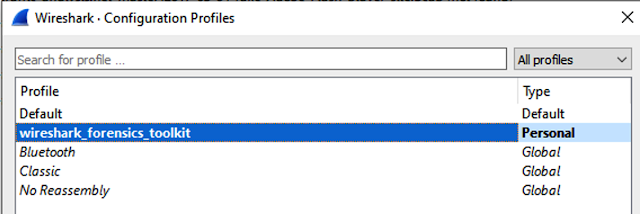
Post Installation, Open Wireshark & go to Edit->Configuration Profiles and select wireshark forensic toolkit profile. This will enable all additional columns http://3.bp.blogspot.com/-1FskHkEhl1w/Yd0K2mj1LmI/AAAAAAAA700/z1FWOOh2wQg329JVL6npx10SqarCpehyQCK4BGAYYCw/w640-h214/wireshark-forensics-plugin_3-785819.png 4.
Now relaunch Wireshark either open a PCAP file or start a live capture. In search filter you can use additional filtering parameters each starting with 'wft'. Wireshark will show dropdown for all filtering parameters available. Note all these additional filtering parameters are available for both source & destinations IP/Domain values. http://2.bp.blogspot.com/-0D0R6YfxNxo/Yd0K2g_oRGI/AAAAAAAA708/AZPd0VwultAjVHQMX8XE8lwn4hllNhCsQCK4BGAYYCw/w640-h200/wireshark-forensics-plugin_4-786651.png List of filters availableNote all these options also available for destination, just replace 'wft.src' with 'wft.dst'
* wft.src.domain (Source Domain Resolution using previous DNS traffic)
* wft.src.detection (Source IP/Domain detection using IOC data)
* wft.src.severity (Source IP/Domain detection severity using IOC data)
* wft.src.threat_type (Source IP/Domain threat type severity using IOC data)
* wft.src.tags (Source IP/Domain asset tags)
* wft.src.os (Source IP/Domain operating system specified in vulnerability report)
* wft.src.cve_ids (Comma separated list of CVE IDS for source IP/Domain)
* wft.src.top_cvss_score (Top CVSS score among all CVE IDs for a given host) LICENSE:This work is licensed under a Creative Commons Attribution-NonCommercial-ShareAlike 4.0 International License. Download Wireshark-Forensics-Plugin
___________________________
@hacking_Attack
@Hacking_Video
3.
Post Installation, Open Wireshark & go to Edit->Configuration Profiles and select wireshark forensic toolkit profile. This will enable all additional columns http://3.bp.blogspot.com/-1FskHkEhl1w/Yd0K2mj1LmI/AAAAAAAA700/z1FWOOh2wQg329JVL6npx10SqarCpehyQCK4BGAYYCw/w640-h214/wireshark-forensics-plugin_3-785819.png 4.
Now relaunch Wireshark either open a PCAP file or start a live capture. In search filter you can use additional filtering parameters each starting with 'wft'. Wireshark will show dropdown for all filtering parameters available. Note all these additional filtering parameters are available for both source & destinations IP/Domain values. http://2.bp.blogspot.com/-0D0R6YfxNxo/Yd0K2g_oRGI/AAAAAAAA708/AZPd0VwultAjVHQMX8XE8lwn4hllNhCsQCK4BGAYYCw/w640-h200/wireshark-forensics-plugin_4-786651.png List of filters availableNote all these options also available for destination, just replace 'wft.src' with 'wft.dst'
* wft.src.domain (Source Domain Resolution using previous DNS traffic)
* wft.src.detection (Source IP/Domain detection using IOC data)
* wft.src.severity (Source IP/Domain detection severity using IOC data)
* wft.src.threat_type (Source IP/Domain threat type severity using IOC data)
* wft.src.tags (Source IP/Domain asset tags)
* wft.src.os (Source IP/Domain operating system specified in vulnerability report)
* wft.src.cve_ids (Comma separated list of CVE IDS for source IP/Domain)
* wft.src.top_cvss_score (Top CVSS score among all CVE IDs for a given host) LICENSE:This work is licensed under a Creative Commons Attribution-NonCommercial-ShareAlike 4.0 International License. Download Wireshark-Forensics-Plugin
___________________________
@hacking_Attack
@Hacking_Video
Hacking Articles Tips Tricks Videos Tutorials
Photo
Hacking on Medium
Bypassing 2FA With Cookies!
https://cdn-images-1.medium.com/max/602/0*W3m2LM6epd1Bmsfg.png
If you have two-factor authentication (2FA) enabled on your account, you can’t be compromised, right?
Continue reading on Medium »
___________________________
@hacking_Attack
@Hacking_Video
Bypassing 2FA With Cookies!
https://cdn-images-1.medium.com/max/602/0*W3m2LM6epd1Bmsfg.png
If you have two-factor authentication (2FA) enabled on your account, you can’t be compromised, right?
Continue reading on Medium »
___________________________
@hacking_Attack
@Hacking_Video
Medium
Bypassing 2FA With Cookies!
If you have two-factor authentication (2FA) enabled on your account, you can’t be compromised, right?
Hacking Articles Tips Tricks Videos Tutorials
Photo
Hacking on Medium
Using Open Source Intelligence (OSINT)
https://cdn-images-1.medium.com/max/626/0*30jL_SOJ0Lu6Ly6t.jpg
Recently, Netflix’s ‘The Great Hack’ has sparked a lot of interest around data privacy. The documentary covers Cambridge Analytica and how…
Continue reading on Medium »
___________________________
@hacking_Attack
@Hacking_Video
Using Open Source Intelligence (OSINT)
https://cdn-images-1.medium.com/max/626/0*30jL_SOJ0Lu6Ly6t.jpg
Recently, Netflix’s ‘The Great Hack’ has sparked a lot of interest around data privacy. The documentary covers Cambridge Analytica and how…
Continue reading on Medium »
___________________________
@hacking_Attack
@Hacking_Video
Medium
Using Open Source Intelligence (OSINT)
Recently, Netflix’s ‘The Great Hack’ has sparked a lot of interest around data privacy. The documentary covers Cambridge Analytica and how…
Hacking Articles Tips Tricks Videos Tutorials
Photo
Hacking on Medium
Bad Logic App — C2 Simulation
https://cdn-images-1.medium.com/max/1500/0*oEjhTbA6xnn_wQBM.jpg
Recently I’m falling in love with Azures Logic Apps and had a thought on how to turn them into a C2 simulation. Running attack simulations…
Continue reading on Medium »
___________________________
@hacking_Attack
@Hacking_Video
Bad Logic App — C2 Simulation
https://cdn-images-1.medium.com/max/1500/0*oEjhTbA6xnn_wQBM.jpg
Recently I’m falling in love with Azures Logic Apps and had a thought on how to turn them into a C2 simulation. Running attack simulations…
Continue reading on Medium »
___________________________
@hacking_Attack
@Hacking_Video
Medium
Bad Logic App — C2 Simulation
Recently I’m falling in love with Azures Logic Apps and had a thought on how to turn them into a C2 simulation. Running attack simulations…
Hacking Articles Tips Tricks Videos Tutorials
Photo
Hacking on Medium
Bypass AzureAD Administration Portal Restriction
https://cdn-images-1.medium.com/max/997/0*tv9DyTVpcKUVU4yw.png
The security of active directory will always be a hot topic. AD contains all your identities/structure and isn’t something you want anyone…
Continue reading on Medium »
___________________________
@hacking_Attack
@Hacking_Video
Bypass AzureAD Administration Portal Restriction
https://cdn-images-1.medium.com/max/997/0*tv9DyTVpcKUVU4yw.png
The security of active directory will always be a hot topic. AD contains all your identities/structure and isn’t something you want anyone…
Continue reading on Medium »
___________________________
@hacking_Attack
@Hacking_Video
Medium
Bypass AzureAD Administration Portal Restriction
The security of active directory will always be a hot topic. AD contains all your identities/structure and isn’t something you want anyone…
Hacking Articles Tips Tricks Videos Tutorials
Photo
Hacking on Medium
Windows Shell — Discovery Stage
https://cdn-images-1.medium.com/max/626/0*mt1x3y-LPYBRsELP.jpg
Sometimes you don’t always need a Meterpreter shell. Depending on the intent, Netcat might be all you need. The benefit being that Windows…
Continue reading on Medium »
___________________________
@hacking_Attack
@Hacking_Video
Windows Shell — Discovery Stage
https://cdn-images-1.medium.com/max/626/0*mt1x3y-LPYBRsELP.jpg
Sometimes you don’t always need a Meterpreter shell. Depending on the intent, Netcat might be all you need. The benefit being that Windows…
Continue reading on Medium »
___________________________
@hacking_Attack
@Hacking_Video
Medium
Windows Shell — Discovery Stage
Sometimes you don’t always need a Meterpreter shell. Depending on the intent, Netcat might be all you need. The benefit being that Windows…