
#english
## agree (on/to) something VS agreed (on/to) something
### 1. "We agree something"
- Tense: Present tense.
- Meaning: Refers to an action that is happening now or is generally true. It indicates that you and someone else are currently reaching an agreement or agree on something habitually.
#### Examples:
- We agree on the plan to move forward.
(We are currently in agreement about the plan.)
- Whenever we discuss important matters, we agree the terms quickly.
(This is a habitual action; it happens every time.)
---
### 2. "We agreed something"
- Tense: Past tense.
- Meaning: Refers to an action that has already happened. It indicates that you and someone else reached an agreement in the past.
#### Examples:
- We agreed on the budget during yesterday’s meeting.
(The agreement about the budget happened in the past.)
- We agreed the new rules before implementing them.
(The agreement was reached before the rules were implemented.)
---
### 3. Note on Usage
- While "agree something" is correct in certain contexts, it is more common to say "agree on something" or "agree to something" in everyday English for clarity.
- Examples:
- We agree on the strategy.
- We agreed to their terms.
- Omitting the preposition (e.g., "We agree something") often sounds more formal or business-like.
---
### 4. Summary
- "We agree something": Present tense; describes an ongoing or habitual action.
- "We agreed something": Past tense; describes an action completed in the past.
Always consider the timeframe of your statement when choosing between the two.
## agree (on/to) something VS agreed (on/to) something
### 1. "We agree something"
- Tense: Present tense.
- Meaning: Refers to an action that is happening now or is generally true. It indicates that you and someone else are currently reaching an agreement or agree on something habitually.
#### Examples:
- We agree on the plan to move forward.
(We are currently in agreement about the plan.)
- Whenever we discuss important matters, we agree the terms quickly.
(This is a habitual action; it happens every time.)
---
### 2. "We agreed something"
- Tense: Past tense.
- Meaning: Refers to an action that has already happened. It indicates that you and someone else reached an agreement in the past.
#### Examples:
- We agreed on the budget during yesterday’s meeting.
(The agreement about the budget happened in the past.)
- We agreed the new rules before implementing them.
(The agreement was reached before the rules were implemented.)
---
### 3. Note on Usage
- While "agree something" is correct in certain contexts, it is more common to say "agree on something" or "agree to something" in everyday English for clarity.
- Examples:
- We agree on the strategy.
- We agreed to their terms.
- Omitting the preposition (e.g., "We agree something") often sounds more formal or business-like.
---
### 4. Summary
- "We agree something": Present tense; describes an ongoing or habitual action.
- "We agreed something": Past tense; describes an action completed in the past.
Always consider the timeframe of your statement when choosing between the two.
#unixtips
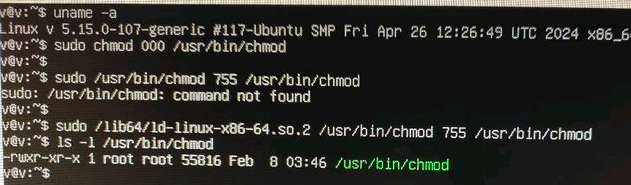
推上读到这个小技巧:Linux系统误将chmod权限改成了000,如何恢复?
答:不用慌,使用ld动态库调用chmod即可恢复。
我在我的 PopOS 22.04上实际测试了一下,目录
!image
推上读到这个小技巧:Linux系统误将chmod权限改成了000,如何恢复?
答:不用慌,使用ld动态库调用chmod即可恢复。
我在我的 PopOS 22.04上实际测试了一下,目录
/lib64 要改成 /lib, ld-linux-后面的部分也因系统而异,但这个解决方案确实有效。事实上,你一辈子也可能赶不上一回干这种蠢事,但知道遇到这种情况下仍然有简单的解还是很开心。sudo chmod 000 /usr/bin/chmod
sudo /usr/bin/chmod 755 /usr/bin/chmod
sudo: /usr/bin/chmod: command not found
sudo /lib64/ld-linux-x86-64.so.2 /usr/bin/chmod 755 /usr/bin/chmod
ls -l /usr/bin/chmod
-rwxr-xr-x 1 root root 55816 Feb 8 03:46 /usr/bin/chmod
!image
当东德巨变发生时,普京正在那儿任职。他当时还只是克格勃的一个小中层。他深知俄罗斯的生活条件远逊于东德,因此当他不得不搬回莫斯科时,他的小轿车上拉着他的德国造洗衣机也就毫不意外。看到这儿,我也就理解了俄乌战场上俄军为什么什么东西都从乌克兰往回搬。
今天看完了纪录片《转折点:原子弹与冷战》(共九集,每集一小时)。非常赞,也很中立。片子里没少批评美国。下面会有剧透,讨厌剧透的同学看到这儿就可以打住啦。
---
波罗的海三国,还有中欧和东欧各国人民追求自由和独立的精神真是让我非常动容。特别是东德莱比锡那场深夜游行,令我印象分外深刻。当时的东德领导人昂纳克本已经下令要镇压这次活动,但最后军方汇报说没有人扔石头,人群都是一只手捧着蜡烛,一只手挡风,我们没法向这样和平的人群开枪。德国人还是素质高,做不出先把水搅浑再趁乱开枪这种事。
纪录片详细介绍了普京如何崛起。腐败又没有能力治理国家的叶利钦担心自己下台后会被清算,精心选择了没有什么资历的普京作为自己的继承人。
普京上台为了发动第二次车臣战争,指使自己人往莫斯科的居民楼放炸弹,一次就炸死近百人。而这样的爆炸发生了好几次,然后嫁祸给车臣分离主义分子。
纪录片也详细介绍了俄乌战争的来龙去脉。普京入侵格鲁吉亚(至今还占领着格鲁吉亚20%的土地),抢走克里米亚,欧美都没有强烈反应,这让普京有了更大的胃口。而费尽千辛万苦才摆脱沙俄加苏联近400年统治的乌克兰人,在此次危机时刻有了一个真正爱乌克兰的总统,他在强敌之下选择了抵抗到底而不是逃跑,这是乌克兰的幸运也是欧洲的幸运。
小国拉脱维亚几乎倾囊而出军援乌克兰,因为乌克兰今天遭受的苦难,他们感同身受。
希望团结的欧洲能够早日战胜自私自大的普京。希望即使普京丧心病狂到真要扔核弹,执行者也不会执行。人是有良知的,只是良知并不总是胜利。
毫无疑问,只要大家都还屯着核武器,核战迟早会发生。这也许就是人类的宿命。
---
波罗的海三国,还有中欧和东欧各国人民追求自由和独立的精神真是让我非常动容。特别是东德莱比锡那场深夜游行,令我印象分外深刻。当时的东德领导人昂纳克本已经下令要镇压这次活动,但最后军方汇报说没有人扔石头,人群都是一只手捧着蜡烛,一只手挡风,我们没法向这样和平的人群开枪。德国人还是素质高,做不出先把水搅浑再趁乱开枪这种事。
纪录片详细介绍了普京如何崛起。腐败又没有能力治理国家的叶利钦担心自己下台后会被清算,精心选择了没有什么资历的普京作为自己的继承人。
普京上台为了发动第二次车臣战争,指使自己人往莫斯科的居民楼放炸弹,一次就炸死近百人。而这样的爆炸发生了好几次,然后嫁祸给车臣分离主义分子。
纪录片也详细介绍了俄乌战争的来龙去脉。普京入侵格鲁吉亚(至今还占领着格鲁吉亚20%的土地),抢走克里米亚,欧美都没有强烈反应,这让普京有了更大的胃口。而费尽千辛万苦才摆脱沙俄加苏联近400年统治的乌克兰人,在此次危机时刻有了一个真正爱乌克兰的总统,他在强敌之下选择了抵抗到底而不是逃跑,这是乌克兰的幸运也是欧洲的幸运。
小国拉脱维亚几乎倾囊而出军援乌克兰,因为乌克兰今天遭受的苦难,他们感同身受。
希望团结的欧洲能够早日战胜自私自大的普京。希望即使普京丧心病狂到真要扔核弹,执行者也不会执行。人是有良知的,只是良知并不总是胜利。
毫无疑问,只要大家都还屯着核武器,核战迟早会发生。这也许就是人类的宿命。
## 示意图利器 D2
制作示意图的工具有很多。
我喜欢使用基于文本代码的作图工具,来绘制线框图,比如 Mermaid、Plantuml、Graphviz。
!img
它们都能根据代码,生成图片,非常适合放入代码仓库,进行版本管理。
最近,我发现了一个更易用的同类工具 D2,简单直观,功能强大,下面介绍给大家。
!img
D2 可以命令行使用,也可以浏览器使用。假定你有一个图片代码文件
> $ d2 example.d2
大部分时候,我都通过浏览器使用它。它有一个线上生成器 play.d2lang.com(下图),把代码贴进去,按下"compile"按钮,马上生成图片。
!img
想要 A 节点(节点的名称为 A),直接输入 A 就可以了。
> A
!img
A 只是节点名称,如果要定制节点的内容,就像下面这样写。
> A: 甲
!img
接着,添加一个节点。
> A: 甲
> B: 乙
!img
把它们连起来。
> A: 甲
> B: 乙
> A -> B
!img
连接可以用正箭头(
箭头上还能添加文字。
> A: 甲
> B: 乙
> A -> B: 连接
!img
节点之间可以有多根连线。
> A: 甲
> B: 乙
> A -> B: 请求
> A <- B: 响应
!img
节点的连接也可以写在一行。
> 甲 -> 丙 <- 乙: 连接
!img
> 阶段一 -> 阶段二 -> 阶段三 -> 阶段四
> 阶段四 -> 阶段一: 反馈
!img
这些语法就够画出基本的线框图了,是不是挺简单。
D2 可以绘制非常复杂的图,更多语法参考文档。
!img
最后提一下,如果想修改节点形状,方框改成圆形,就像下面这样写。
> A: 甲
> A.shape: circle
!img
形状甚至可以改成一朵云,表示云服务。
> A: 甲
> A.shape: cloud
!img
线条颜色也可以改。
> A: 甲
> A.style.stroke: red
!img
#tools
制作示意图的工具有很多。
我喜欢使用基于文本代码的作图工具,来绘制线框图,比如 Mermaid、Plantuml、Graphviz。
!img
它们都能根据代码,生成图片,非常适合放入代码仓库,进行版本管理。
最近,我发现了一个更易用的同类工具 D2,简单直观,功能强大,下面介绍给大家。
!img
D2 可以命令行使用,也可以浏览器使用。假定你有一个图片代码文件
example.d2,那么生成图片的命令如下。> $ d2 example.d2
大部分时候,我都通过浏览器使用它。它有一个线上生成器 play.d2lang.com(下图),把代码贴进去,按下"compile"按钮,马上生成图片。
!img
想要 A 节点(节点的名称为 A),直接输入 A 就可以了。
> A
!img
A 只是节点名称,如果要定制节点的内容,就像下面这样写。
> A: 甲
!img
接着,添加一个节点。
> A: 甲
> B: 乙
!img
把它们连起来。
> A: 甲
> B: 乙
> A -> B
!img
连接可以用正箭头(
->)、也可以用反箭头(<-),甚至双向箭头(<->)。如果不需要箭头,就直接连线(--)。箭头上还能添加文字。
> A: 甲
> B: 乙
> A -> B: 连接
!img
节点之间可以有多根连线。
> A: 甲
> B: 乙
> A -> B: 请求
> A <- B: 响应
!img
节点的连接也可以写在一行。
> 甲 -> 丙 <- 乙: 连接
!img
> 阶段一 -> 阶段二 -> 阶段三 -> 阶段四
> 阶段四 -> 阶段一: 反馈
!img
这些语法就够画出基本的线框图了,是不是挺简单。
D2 可以绘制非常复杂的图,更多语法参考文档。
!img
最后提一下,如果想修改节点形状,方框改成圆形,就像下面这样写。
> A: 甲
> A.shape: circle
!img
形状甚至可以改成一朵云,表示云服务。
> A: 甲
> A.shape: cloud
!img
线条颜色也可以改。
> A: 甲
> A.style.stroke: red
!img
#tools
