This media is not supported in your browser
VIEW IN TELEGRAM
A couple of short news items from the video-generation front.
Veo 3.1 is rolling out a feature that lets you upload not just one, but several images as references along with your prompt. And these aren’t first-frame or last-frame inputs — they work more like Nanabanane does: actual reference images.
Veo 3.1 is rolling out a feature that lets you upload not just one, but several images as references along with your prompt. And these aren’t first-frame or last-frame inputs — they work more like Nanabanane does: actual reference images.
👍204🔥56❤53🎉53
Nana Banana PRO just dropped on vortex.channel 🍌✨
And honestly, this might be the craziest realism I’ve seen in a while.
Pro tip: switch to 4K right away — otherwise you won’t feel the full power of the model.
Take literally any photo → add any prompt — and the realism goes absolutely off the charts.
The level of detail and natural texture is insane. Try it — you’ll end up zooming in on every pore and surface, searching for at least one hint of AI. Spoiler: you won’t find it.
You can try it here: https://vortex.channel/agent.php
👈
And honestly, this might be the craziest realism I’ve seen in a while.
Pro tip: switch to 4K right away — otherwise you won’t feel the full power of the model.
Take literally any photo → add any prompt — and the realism goes absolutely off the charts.
The level of detail and natural texture is insane. Try it — you’ll end up zooming in on every pore and surface, searching for at least one hint of AI. Spoiler: you won’t find it.
You can try it here: https://vortex.channel/agent.php
👈
👍953🔥210🎉206❤190
Nanabanana does an excellent job with 360-degree panoramas.
You just need to add to the prompt: “inner space of spaceship, an equirectangular symmetrical image with a perfect seam for 360 viewing.”
Then go here: https://renderstuff.com/tools/360-panorama-web-viewer/
You just need to add to the prompt: “inner space of spaceship, an equirectangular symmetrical image with a perfect seam for 360 viewing.”
Then go here: https://renderstuff.com/tools/360-panorama-web-viewer/
👍128🔥36❤31🎉28
There hasn’t been anything about Nanabanana for a long time :) Here’s the official Banana prompting guide from Google:
https://blog.google/products/gemini/prompting-tips-nano-banana-pro/
https://blog.google/products/gemini/prompting-tips-nano-banana-pro/
Google
7 tips to get the most out of Nano Banana Pro
Here are some tips for writing more effective prompts for image generation and editing in Gemini using Nano Banana Pro.
👍160🎉37❤34🔥30
Let me share my thoughts on Flux 2.
I’ve gathered some tests—you can take a look—but in my opinion (and judging by the buzz in the comments), Flux doesn’t outperform Nanabanana Pro. That’s if we’re just comparing images without considering cost, censorship, usability, and of course, model size.
The general sentiment is probably this: Banana is better at realism and skin. Flux does eyes well, but without extra nudging it tends to drift into a more “artistic” look. Banana understands prompts a bit better, while Flux has a tendency to “yellow” the image.
We’re definitely getting spoiled—just recently we were counting fingers, and now we’re discussing “skin nuances.” 😃
I’m sure there will be people for whom the new Flux is a better fit, depending on their specific needs.
I’ve gathered some tests—you can take a look—but in my opinion (and judging by the buzz in the comments), Flux doesn’t outperform Nanabanana Pro. That’s if we’re just comparing images without considering cost, censorship, usability, and of course, model size.
The general sentiment is probably this: Banana is better at realism and skin. Flux does eyes well, but without extra nudging it tends to drift into a more “artistic” look. Banana understands prompts a bit better, while Flux has a tendency to “yellow” the image.
We’re definitely getting spoiled—just recently we were counting fingers, and now we’re discussing “skin nuances.” 😃
I’m sure there will be people for whom the new Flux is a better fit, depending on their specific needs.
👍3.02K🔥232❤210🎉209
This media is not supported in your browser
VIEW IN TELEGRAM
This media is not supported in your browser
VIEW IN TELEGRAM
This media is not supported in your browser
VIEW IN TELEGRAM
This media is not supported in your browser
VIEW IN TELEGRAM
This media is not supported in your browser
VIEW IN TELEGRAM
This media is not supported in your browser
VIEW IN TELEGRAM
Pika have shown signs of life and rolled out their video generator Pika V2.5.
It can output videos with resolutions from 480p up to 1080p. At the same time, 480p is generated on the free plan in under a minute, costing 12 credits per generation out of the 80 available per month.
It follows prompts quite well. For example:
• A cyberpunk cat holding a sign with a text “Psy Eyes”
• A cat looking at a cyberpunk city from the edge of the roof at night with flying cars, view from behind, very high detail
• An endless path with walls made of big vertical monitors each showing a different picture, night
• Drone footage of a Valhalla at the Ragnarok moment
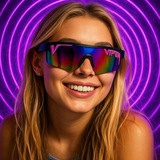
• Smiling beautiful woman in sunglasses on a beach
Along with this update, all previous models — 1.0, 1.5, 2.1, 2.2, and Turbo — have been removed from general access and remain only in specific tools like Pikascenes, which depend on them. It feels like a transition to a new model with a new architecture.
It can output videos with resolutions from 480p up to 1080p. At the same time, 480p is generated on the free plan in under a minute, costing 12 credits per generation out of the 80 available per month.
It follows prompts quite well. For example:
• A cyberpunk cat holding a sign with a text “Psy Eyes”
• A cat looking at a cyberpunk city from the edge of the roof at night with flying cars, view from behind, very high detail
• An endless path with walls made of big vertical monitors each showing a different picture, night
• Drone footage of a Valhalla at the Ragnarok moment
• Smiling beautiful woman in sunglasses on a beach
Along with this update, all previous models — 1.0, 1.5, 2.1, 2.2, and Turbo — have been removed from general access and remain only in specific tools like Pikascenes, which depend on them. It feels like a transition to a new model with a new architecture.
👍2.21K🎉707❤688🔥663
Seedream 4.1
They’re already rolling it out on Dreamina.
I’ve got the 4.1 model now, and the 4K resolution is in place.
I looked into it and browsed around the internet:
It still doesn’t reach Nanabanana pro, especially when it comes to text rendering and handling complex prompts. Otherwise, it’s basically the usual Seedream 4.0 — I didn’t notice much difference.
They’re already rolling it out on Dreamina.
I’ve got the 4.1 model now, and the 4K resolution is in place.
I looked into it and browsed around the internet:
It still doesn’t reach Nanabanana pro, especially when it comes to text rendering and handling complex prompts. Otherwise, it’s basically the usual Seedream 4.0 — I didn’t notice much difference.
👍238❤79🎉70🔥69
Media is too big
VIEW IN TELEGRAM
🤩 Kling AI O1 is here — the video version of Nano Banana! I’ve reviewed tons of AI video tools, but this one actually feels studio-grade. Kling AI O1 solves the continuity problem that always trips creators up — finally, everything stays consistent. Forget switching between apps. This unified multimodal video model lets you handle images, videos, elements, and text in a single workflow, from generating new shots to restyling or extending them. Consistency at its core: Kling O1 understands images and videos deeply, and can use multiple-angle reference images to remember your characters, props, and scenes — just like a human director. It goes beyond single objects: you can mix multiple subjects or blend them with references. Even in complex scenes, O1 locks onto and preserves each character and prop. No matter how the environment changes, every actor stays consistent across all shots, delivering industrial-grade continuity. No glitches, no surprises — whatever you lock stays locked. From hours of editing to minutes of precise creation. If you care about professional-level storytelling, this is a must-try. All cases from Kling AI Creative Partner BOB #klingai #videoNanoBanana #klingO1 https://app.klingai.com/global/omni/new?utm_source=twitter&utm_medium=social&utm_campaign=omniVORTEX
👍179🔥70🎉63❤61
Media is too big
VIEW IN TELEGRAM
Veo 3.1 vs. Kling 2.6
Although Veo 3.1 outperformed Kling 2.6 in the close-up test, it fell slightly short in all the other tests. In Veo 3.1’s results, objects appeared randomly, and the camera movements were abrupt or didn’t match the command. Don’t get me wrong—Kling 2.6 definitely had its flaws (its audio was quieter and often didn’t match the prompt). Nevertheless, Kling 2.6 impressed me more than I expected. While the advantage was small, I would give Kling 2.6 a slight edge in this round of tests.
Although Veo 3.1 outperformed Kling 2.6 in the close-up test, it fell slightly short in all the other tests. In Veo 3.1’s results, objects appeared randomly, and the camera movements were abrupt or didn’t match the command. Don’t get me wrong—Kling 2.6 definitely had its flaws (its audio was quieter and often didn’t match the prompt). Nevertheless, Kling 2.6 impressed me more than I expected. While the advantage was small, I would give Kling 2.6 a slight edge in this round of tests.
👍349❤108🎉98🔥96