
🔰ETHICAL HACKING USING ANDROID DEVICE🔰
🆔 In This Course You Get Some Videos Tutorials For Learning Hacking Using Android Devices
⭕️L!NK:- https://mega.nz/folder/aVsFzQ4S#MYrQ9rc3pjDjq2pjVHCtoA
⚠️ Sorry for post again guys Antihyper Deleted this By Mistake😞
➖ @Anonymous_CreeW➖
🆔 In This Course You Get Some Videos Tutorials For Learning Hacking Using Android Devices
⭕️L!NK:- https://mega.nz/folder/aVsFzQ4S#MYrQ9rc3pjDjq2pjVHCtoA
⚠️ Sorry for post again guys Antihyper Deleted this By Mistake😞
➖ @Anonymous_CreeW➖

This media is not supported in your browser
VIEW IN TELEGRAM
🔰4 Proven Ways To Find a Website's IP Address 🔰
This tutorial teaches you how to find the IP address of a website. You can do this by using your computer's built-in "traceroute" function, or by downloading and using a free traceroute app for your iPhone or Android.
♨#1 ON WINDOWS♨
• Open your PC and click on start menu. Search For "cmd" (Without quotes)
• Right Click on cmd and click on "Run as administration"
• Now enter a command -
ping website address -t
Ex. - ping google.com -t
• Now hit enter. You will get it.
===============================
♨# 2 ON MAC OS♨
• Open Spotlight (Click the magnifying glass-shaped icon in the top-right corner of the screen.)
• Search for Network Utility and open it. After that Click on Traceroute tab in network utility.
• Now Enter website address in input box and click on trace button You will see the IP address of website
================================
♨ #3 ON ANDROID ♨
• Download and install PingTools Network Utility app then open it.
• Tap ☰. It's in the upper-left corner of the screen. A pop-out menu will appear.
• Now tap Traceroute Enter Website address and click on trace button
=================================
♨ #4 ON IPHONE ♨
•Install and Open Inettools app
•Click on Traceroute then Click on adress bar and input website address (e.g. google.com)
•Click on start. You will see the IP address of website.
=================================
📝Note - Do not try to find ip address of Government sites (.gov, .gov.in, ac.in etc)
Share And Support Us🌹
➖ @Anonymous_CreeW ➖
This tutorial teaches you how to find the IP address of a website. You can do this by using your computer's built-in "traceroute" function, or by downloading and using a free traceroute app for your iPhone or Android.
♨#1 ON WINDOWS♨
• Open your PC and click on start menu. Search For "cmd" (Without quotes)
• Right Click on cmd and click on "Run as administration"
• Now enter a command -
ping website address -t
Ex. - ping google.com -t
• Now hit enter. You will get it.
===============================
♨# 2 ON MAC OS♨
• Open Spotlight (Click the magnifying glass-shaped icon in the top-right corner of the screen.)
• Search for Network Utility and open it. After that Click on Traceroute tab in network utility.
• Now Enter website address in input box and click on trace button You will see the IP address of website
================================
♨ #3 ON ANDROID ♨
• Download and install PingTools Network Utility app then open it.
• Tap ☰. It's in the upper-left corner of the screen. A pop-out menu will appear.
• Now tap Traceroute Enter Website address and click on trace button
=================================
♨ #4 ON IPHONE ♨
•Install and Open Inettools app
•Click on Traceroute then Click on adress bar and input website address (e.g. google.com)
•Click on start. You will see the IP address of website.
=================================
📝Note - Do not try to find ip address of Government sites (.gov, .gov.in, ac.in etc)
Share And Support Us🌹
➖ @Anonymous_CreeW ➖

Forwarded from Anonymous Hackerz 🌀 Python🌀 Programming 🌀 Netflix Hack
This media is not supported in your browser
VIEW IN TELEGRAM
🔰Android Hacking Full Advance Professional Course🔰
💢 Total Videos :- 31
💢 Language (
💢 Resolution :- 1920×1080 Full HD
💢 Videos Duration Time :- 6Hour.48Min.22Sec.
💢 System Used :- Kali Linux, Windows 8.1, And Windows 10
💢 Basic Knowledge Of Kali Linux And Windows
♻️ L!NK :- https://drive.google.com/drive/folders/1_G6kt5leGkmzMs_hveS0oUya591gVso2
➖@Anonymous_CreeW➖
💢 Total Videos :- 31
💢 Language (
हिंदी)💢 Resolution :- 1920×1080 Full HD
💢 Videos Duration Time :- 6Hour.48Min.22Sec.
💢 System Used :- Kali Linux, Windows 8.1, And Windows 10
💢 Basic Knowledge Of Kali Linux And Windows
♻️ L!NK :- https://drive.google.com/drive/folders/1_G6kt5leGkmzMs_hveS0oUya591gVso2
➖@Anonymous_CreeW➖

This media is not supported in your browser
VIEW IN TELEGRAM
🔰 TOP Sites to Provide FAKE Identity !!! 🔰
🌀 https://fakena.me/
🌀 https://fauxid.com/
🌀 https://www.fakexy.com/
🌀 https://www.elfqrin.com/fakeid.php
🌀 https://www.fakenamegenerator.com/
🌀 https://www.fakepersongenerator.com/
🌀 https://www.fakeaddressgenerator.com/
🌀 https://datafakegenerator.com
🌀 http://namegenerators.org
➖ @Anonymous_CreeW➖
🌀 https://fakena.me/
🌀 https://fauxid.com/
🌀 https://www.fakexy.com/
🌀 https://www.elfqrin.com/fakeid.php
🌀 https://www.fakenamegenerator.com/
🌀 https://www.fakepersongenerator.com/
🌀 https://www.fakeaddressgenerator.com/
🌀 https://datafakegenerator.com
🌀 http://namegenerators.org
➖ @Anonymous_CreeW➖

This media is not supported in your browser
VIEW IN TELEGRAM
🔰BLACKHAT ACCOUNT CRACKING COURSE🔰
🌀 This Course Will Teach You To What Is Cracking And How you Can Crack Premium Accounts With Some Software And Tools. In This Course You Will Get Knowledge About Cracking
⭕ L!NK :-
https://mega.nz/folder/6pggnYwD#zncBEg-OKsWLs4soZGqwFg
➖ @Anonymous_CreeW➖
🌀 This Course Will Teach You To What Is Cracking And How you Can Crack Premium Accounts With Some Software And Tools. In This Course You Will Get Knowledge About Cracking
⭕ L!NK :-
https://mega.nz/folder/6pggnYwD#zncBEg-OKsWLs4soZGqwFg
➖ @Anonymous_CreeW➖

This media is not supported in your browser
VIEW IN TELEGRAM
This media is not supported in your browser
VIEW IN TELEGRAM

🌀 Facebook Information 🌀
FBI is an accurate facebook account information gathering, all sensitive information can be gathered even though the target converts all of its privacy to (only me).
❇️ Installation:
$
$
$
$
$
$
❇️ Usage:
$
$
$
Paste Any User ID, then it will show all you all information of that user. You can use dump_id to find ID or copy from User's Profile Link.
➖➖➖➖➖➖➖➖➖➖➖➖➖
FBI is an accurate facebook account information gathering, all sensitive information can be gathered even though the target converts all of its privacy to (only me).
❇️ Installation:
$
apt update && apt upgrade$
apt install git python2$
git clone https://github.com/xHak9x/fbi.git$
cd fbi$
pip2 install -r requirements.txt$
python2 fbi.py❇️ Usage:
$
help (To see Commands)$
token (Login with Fake id)$
get_infoPaste Any User ID, then it will show all you all information of that user. You can use dump_id to find ID or copy from User's Profile Link.
➖➖➖➖➖➖➖➖➖➖➖➖➖
This media is not supported in your browser
VIEW IN TELEGRAM
This media is not supported in your browser
VIEW IN TELEGRAM
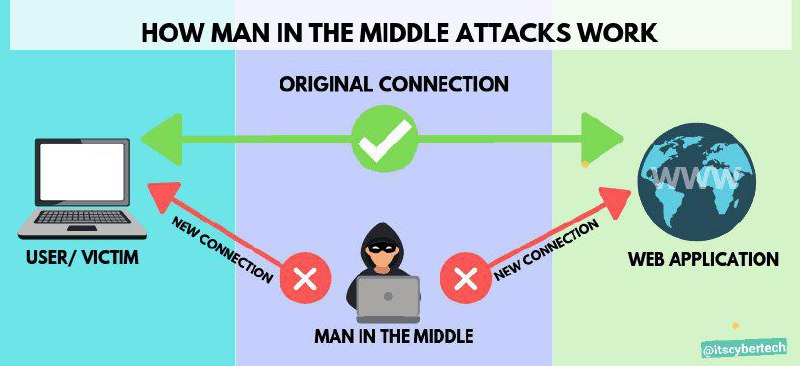
👹 MAN IN THE MIDDLE ATTACK✈
Man-in-the-Middle (MITM) attack happens when a hacker inserts themselves between a user and a website.
Attackers have many different reasons and methods for using a MITM attack. Typically, they’re trying to steal something, like credit card numbers or user login credentials. Sometimes they’re snooping on private conversations, which might include trade secrets or other valuable information
😉Usefull Types of Man-in-the Middle Attacks
⭐ Wi-Fi Eavesdropping
If you’ve ever used a laptop in a coffee shop, you may have noticed a pop-up that says “This network is not secure.” Public wi-fi is usually provided “as-is,” with no guarantees over the quality of service.
However, unencrypted wi-fi connections are easy to eavesdrop. It’s much like having a conversation in a public restaurant – anyone can listen in
Another Wi-Fi Eavesdropping attack happens when a hacker creates its own wi-fi hotspot, called an “Evil Twin.” They make the connection look just like the authentic one, down to the network ID and passwords. Users may accidentally (or automatically) connect to the “evil twin,” allowing the hacker to snoop on their activity.
⭐ Email Hijacking
In this type of cyber security attack, a hacker compromises a user’s email account. Often, the hacker silently waits, gathering information and eavesdropping on the email conversations. Hackers may have a search script that looks for specific keywords, like “bank” or “secret Democrat strategies.”
Email hijacking works well with social engineering. Hackers might use information from a hacked email account to impersonate an online friend. They may also use spear-phishing to manipulate a user to install malicious software.
⭐ Session Hijacking
This type of Man-in-the attack is typically used to compromise social media accounts. With most social media sites, the website stores a “session browser cookie” on the user’s machine. This cookie is invalidated when the user logs off. But while the session is active, the cookie provides identity, access, and tracking information.
A Session Hijack occurs when an attacker steals a session cookie. This can happen if the user’s machine is infected with malware or browser hijackers. It can also happen when an attacker uses a cross-scripting XSS attack – where the attacker injects malicious code into a frequently-used website.
Advance Tutorials On Man in the middle attack are coming soon stay connected with Us🌹
➖ @Anonymous_CreeW ➖
Man-in-the-Middle (MITM) attack happens when a hacker inserts themselves between a user and a website.
Attackers have many different reasons and methods for using a MITM attack. Typically, they’re trying to steal something, like credit card numbers or user login credentials. Sometimes they’re snooping on private conversations, which might include trade secrets or other valuable information
😉Usefull Types of Man-in-the Middle Attacks
⭐ Wi-Fi Eavesdropping
If you’ve ever used a laptop in a coffee shop, you may have noticed a pop-up that says “This network is not secure.” Public wi-fi is usually provided “as-is,” with no guarantees over the quality of service.
However, unencrypted wi-fi connections are easy to eavesdrop. It’s much like having a conversation in a public restaurant – anyone can listen in
Another Wi-Fi Eavesdropping attack happens when a hacker creates its own wi-fi hotspot, called an “Evil Twin.” They make the connection look just like the authentic one, down to the network ID and passwords. Users may accidentally (or automatically) connect to the “evil twin,” allowing the hacker to snoop on their activity.
⭐ Email Hijacking
In this type of cyber security attack, a hacker compromises a user’s email account. Often, the hacker silently waits, gathering information and eavesdropping on the email conversations. Hackers may have a search script that looks for specific keywords, like “bank” or “secret Democrat strategies.”
Email hijacking works well with social engineering. Hackers might use information from a hacked email account to impersonate an online friend. They may also use spear-phishing to manipulate a user to install malicious software.
⭐ Session Hijacking
This type of Man-in-the attack is typically used to compromise social media accounts. With most social media sites, the website stores a “session browser cookie” on the user’s machine. This cookie is invalidated when the user logs off. But while the session is active, the cookie provides identity, access, and tracking information.
A Session Hijack occurs when an attacker steals a session cookie. This can happen if the user’s machine is infected with malware or browser hijackers. It can also happen when an attacker uses a cross-scripting XSS attack – where the attacker injects malicious code into a frequently-used website.
Advance Tutorials On Man in the middle attack are coming soon stay connected with Us🌹
➖ @Anonymous_CreeW ➖
Forwarded from Anonymous Hackerz 🌀 Python🌀 Programming 🌀 Netflix Hack
This media is not supported in your browser
VIEW IN TELEGRAM
🔰 Technical Sagar All Hacking Courses Collection 🔰
🔥MEDIA FIRE LINKS !!!!
◾️ TechMaster Course
♨️ Link: https://bit.ly/2YTVgSJ
◾️ Quick Hack Course
♨️ Link: https://bit.ly/2WrvhR6
◾️ Money Making Course
♨️ Link: https://bit.ly/3fMvNAO
◾️ Deleted Video Course
♨️ Link: https://bit.ly/2YVXHnK
◾️HackStars Course
♨️ Link: https://bit.ly/35QVMCv
➖ @Anonymous_CreeW➖
🔥MEDIA FIRE LINKS !!!!
◾️ TechMaster Course
♨️ Link: https://bit.ly/2YTVgSJ
◾️ Quick Hack Course
♨️ Link: https://bit.ly/2WrvhR6
◾️ Money Making Course
♨️ Link: https://bit.ly/3fMvNAO
◾️ Deleted Video Course
♨️ Link: https://bit.ly/2YVXHnK
◾️HackStars Course
♨️ Link: https://bit.ly/35QVMCv
➖ @Anonymous_CreeW➖

This media is not supported in your browser
VIEW IN TELEGRAM
🔰SHUT DOWN YOUR ANDROID DEVICE BY MAKING CALL FROM ANOTHER PHONE🔰
➖➖➖➖➖➖➖➖➖➖➖➖
⭕️Step 1. First of all, download and install the Automateit app. This app needs root access. So, make sure to grant the root permission.
⭕️Step 2. Next, select ‘My Rules’ and tap on the (+) icon.
⭕️Step 3. In the next screen tap on the ‘Call State Trigger’
⭕️Step 4. Now, choose the option ‘Incoming Call’
⭕️Step 5. In the next step, select the contact. You can choose from saved contacts or can create a new one.
⭕️Step 6. Now tap on ‘Next’ and on the next screen, select ‘Shutdown Device Action’
⭕️Step 7.Now you need to provide the name for the rule and save the rule.
Now you just need to make a call from the contact you specified and your Android device will be shut down.
❣SHARE 🤝 SUPPORT ❣️
➖➖➖➖➖➖➖➖➖➖➖➖
➖➖➖➖➖➖➖➖➖➖➖➖
⭕️Step 1. First of all, download and install the Automateit app. This app needs root access. So, make sure to grant the root permission.
⭕️Step 2. Next, select ‘My Rules’ and tap on the (+) icon.
⭕️Step 3. In the next screen tap on the ‘Call State Trigger’
⭕️Step 4. Now, choose the option ‘Incoming Call’
⭕️Step 5. In the next step, select the contact. You can choose from saved contacts or can create a new one.
⭕️Step 6. Now tap on ‘Next’ and on the next screen, select ‘Shutdown Device Action’
⭕️Step 7.Now you need to provide the name for the rule and save the rule.
Now you just need to make a call from the contact you specified and your Android device will be shut down.
❣SHARE 🤝 SUPPORT ❣️
➖➖➖➖➖➖➖➖➖➖➖➖
This media is not supported in your browser
VIEW IN TELEGRAM
🔰 Install Kali Linux In Any Android Without Root 🤩
👋 Hello Guys today i will teach you how you can use linux distribution on your android device
👇By this method you can install
✅Distributions• Kali Linux ,ubantu ,debian
✅Browsers• Firefox ( desktop)
✅Desktop• Lxde Xfce
✅Development• Python Ide, Git
👉 on your Android smartphone without any root access 🤩
👣 Steps To Setup -
◽ Step#1 First You need to download two Apps on your android device
•UserLand - Free Download
•VNC Viewer - Free Download
◽Step#2 After Download Install Them Normally
◽Step#3 Open Userland App Now you will see the list of above metioned distro, and other things
◽Step#4 choose any which you want to install on your device
◽Step#5 it will ask you to create a username and password, just create any username and pass and keeo them in mind
◽Step#6 Now choose connection type "VNC"
◽Step#7 it will prepare environment automatically for you
◽Step#8 after that just click on that distro which you chooses in step#4 and you will connect to it in vnc viewer app, vnc will ask password simply put there which we created in step#5
Enjoy Now 😊 you can install multiple things its depend on you ❤
Support Anonymous HackerZ🌹 for more awesome tricks and hacks.
🚨Leechers Give credit to hcktech
➖ @Anonymous_CreeW➖
👋 Hello Guys today i will teach you how you can use linux distribution on your android device
👇By this method you can install
✅Distributions• Kali Linux ,ubantu ,debian
✅Browsers• Firefox ( desktop)
✅Desktop• Lxde Xfce
✅Development• Python Ide, Git
👉 on your Android smartphone without any root access 🤩
👣 Steps To Setup -
◽ Step#1 First You need to download two Apps on your android device
•UserLand - Free Download
•VNC Viewer - Free Download
◽Step#2 After Download Install Them Normally
◽Step#3 Open Userland App Now you will see the list of above metioned distro, and other things
◽Step#4 choose any which you want to install on your device
◽Step#5 it will ask you to create a username and password, just create any username and pass and keeo them in mind
◽Step#6 Now choose connection type "VNC"
◽Step#7 it will prepare environment automatically for you
◽Step#8 after that just click on that distro which you chooses in step#4 and you will connect to it in vnc viewer app, vnc will ask password simply put there which we created in step#5
Enjoy Now 😊 you can install multiple things its depend on you ❤
Support Anonymous HackerZ🌹 for more awesome tricks and hacks.
🚨Leechers Give credit to hcktech
➖ @Anonymous_CreeW➖
