
This media is not supported in your browser
VIEW IN TELEGRAM
This media is not supported in your browser
VIEW IN TELEGRAM
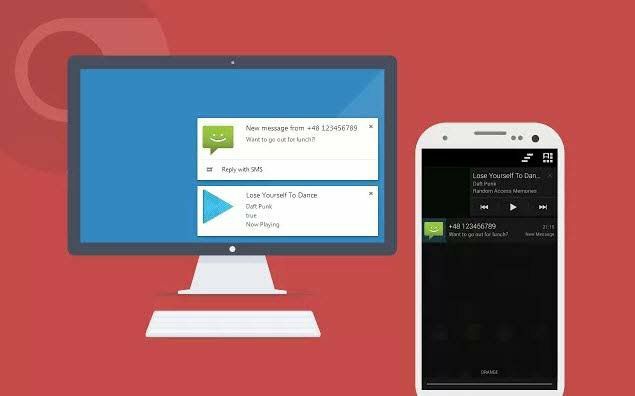
🔰How To Receive All Your Android SMS On PC🔰
🔹 Many of you works on your PC for a long and at that it looks quite difficult to pickup android and read out every SMS received on it.
🔹 Mostly when you device is on charging and you working at distance from it
🔹Steps To Get All Your Android SMS On PC:-
1. First of all download and install app Mighty Text in your android device.
2. Now in your Google Chrome browser add the extension Mighty Text.
3. Now open the app you will need an initial pair up with your PC as it will be done over wifi network on which both the devices being connected.
4. Now when you setup is done now you will see your android name on the icon when you click on it.
5. Thats it all done, now when you android receive any SMS it will transfer on your extension of PC and you can read it there.
Share 👇
➖➖➖➖➖🔻➖➖➖➖➖
https://t.me/itscybertech
➖➖➖➖➖🔺➖➖➖➖➖
🔹 Many of you works on your PC for a long and at that it looks quite difficult to pickup android and read out every SMS received on it.
🔹 Mostly when you device is on charging and you working at distance from it
🔹Steps To Get All Your Android SMS On PC:-
1. First of all download and install app Mighty Text in your android device.
2. Now in your Google Chrome browser add the extension Mighty Text.
3. Now open the app you will need an initial pair up with your PC as it will be done over wifi network on which both the devices being connected.
4. Now when you setup is done now you will see your android name on the icon when you click on it.
5. Thats it all done, now when you android receive any SMS it will transfer on your extension of PC and you can read it there.
Share 👇
➖➖➖➖➖🔻➖➖➖➖➖
https://t.me/itscybertech
➖➖➖➖➖🔺➖➖➖➖➖
This media is not supported in your browser
VIEW IN TELEGRAM
🔰 Recover Deleted Photos Even It's 1 Year Old 🔰
💰Paid Trick For Free ❤️😍
👣Steps:-
🔹Step 1 - Install The App Given Below..
Click To Get
🔹Step 2 - Click On "Search The Image U Want To Restore"
🔹Step 3 - Click On Display All Of Period And Select When U Deleted The Image..
🔹Step 4 - Select The Image U Waana Restore..
U Got Your Deleted Photo Recover Easily😍❤️
༺━━ @itscybertech ━━༻
💰Paid Trick For Free ❤️😍
👣Steps:-
🔹Step 1 - Install The App Given Below..
Click To Get
🔹Step 2 - Click On "Search The Image U Want To Restore"
🔹Step 3 - Click On Display All Of Period And Select When U Deleted The Image..
🔹Step 4 - Select The Image U Waana Restore..
U Got Your Deleted Photo Recover Easily😍❤️
༺━━ @itscybertech ━━༻
This media is not supported in your browser
VIEW IN TELEGRAM
🤹♂ Learn A to Z Android Oreo Build 25+ Apps Course :- 📺
✨ Type :- Paid ( Download Free )
🧾 ɪɴᴛʀᴏᴅᴜᴄᴛɪᴏɴ :-📃
👉🏻
https://telegra.ph/IntroDuction-10-22-2
❤️ Download :-
👉🏻 From Google Drive
👉🏻 From Media Fire
💾 Size :- 4GB
༺━━ @itscybertech━━༻
✨ Type :- Paid ( Download Free )
🧾 ɪɴᴛʀᴏᴅᴜᴄᴛɪᴏɴ :-📃
👉🏻
https://telegra.ph/IntroDuction-10-22-2
❤️ Download :-
👉🏻 From Google Drive
👉🏻 From Media Fire
💾 Size :- 4GB
༺━━ @itscybertech━━༻

Cyber Tech™ pinned «🤹♂ Learn A to Z Android Oreo Build 25+ Apps Course :- 📺 ✨ Type :- Paid ( Download Free ) 🧾 ɪɴᴛʀᴏᴅᴜᴄᴛɪᴏɴ :-📃 👉🏻 https://telegra.ph/IntroDuction-10-22-2 ❤️ Download :- 👉🏻 From Google Drive 👉🏻 From Media Fire 💾 Size :- 4GB ༺━━ @itscybertech━━༻»
Forwarded from Cyber Tech™ (Manager)
Sql injection and defence.pdf
6.4 MB
This media is not supported in your browser
VIEW IN TELEGRAM
This media is not supported in your browser
VIEW IN TELEGRAM
🔰Python Programming Apk Bundle 🔰
🌀1. Lucky Patcher - Please install it First so that all apps work Correctly
🌀2. Programming Hub(Updated + In App purchase Hacked) - Click on try pro and just press Yes on Lucky patcher popup and it's all done
🌀3. Learn To Code(Ad Removed)
🌀4. Solo Learn (Ad Removed + Everything Unlocked)
🌀5. Py - Nothing was possible but has a nice ui and interface everything is unlocked rather then the last excercises(Who even needs that u can do it on Ur own)
🌀6. PyNote (Ad-Removed) - NICE Ui for practice of python and good tutorials
🌀7. Python Tutorial (Ad-Removed) - Revise from basic to Pro in this one app after u learn python
🌀8. Pydroid3 (Premiumized) - A python IDE with terminal and Python3 interpreter with all premium features unlocked
@itscybertech
➖➖➖➖➖➖🔻➖➖➖➖➖
🌀1. Lucky Patcher - Please install it First so that all apps work Correctly
🌀2. Programming Hub(Updated + In App purchase Hacked) - Click on try pro and just press Yes on Lucky patcher popup and it's all done
🌀3. Learn To Code(Ad Removed)
🌀4. Solo Learn (Ad Removed + Everything Unlocked)
🌀5. Py - Nothing was possible but has a nice ui and interface everything is unlocked rather then the last excercises(Who even needs that u can do it on Ur own)
🌀6. PyNote (Ad-Removed) - NICE Ui for practice of python and good tutorials
🌀7. Python Tutorial (Ad-Removed) - Revise from basic to Pro in this one app after u learn python
🌀8. Pydroid3 (Premiumized) - A python IDE with terminal and Python3 interpreter with all premium features unlocked
@itscybertech
➖➖➖➖➖➖🔻➖➖➖➖➖