❤6
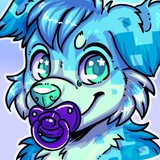
Doodled up a Baby New Year! $
3 slots
🔠 🔠 🔠 🔠 🔠 🔠
Also if anyone wants to adopt this lil wolf puppy new year, $15 USD and the character is yours!
3 slots
Also if anyone wants to adopt this lil wolf puppy new year, $15 USD and the character is yours!
Please open Telegram to view this post
VIEW IN TELEGRAM
👀2❤1
❤3
Happy New Year Babies!!! It's a lot of your's first one yeah? 😏
Have the finished ref I made for the NYE adoptable!
Have the finished ref I made for the NYE adoptable!
Please open Telegram to view this post
VIEW IN TELEGRAM
❤2
I turn them back on! here is where I play with the multiply layers, glow dodge, and overlay layers. This piece has 3 layers for the shade multiply, 3 for the eyes, and the highlights are overlay, glow dodge, and flat of various opacities. I also added 2 add glow layers on the eyes and used a mixture of g brush and the soft airbrush to make the effect
But we aren't done yet!
But we aren't done yet!
❤8
I add a color gradient and set it to overlay and reduce the opacity. I play around a lot with angles here. I will often also do a multiply gradient to transparent to add an overall shadow. However, I think the overlay is enough for this piece. I also added a pink background. Now we are nearly done!
❤4