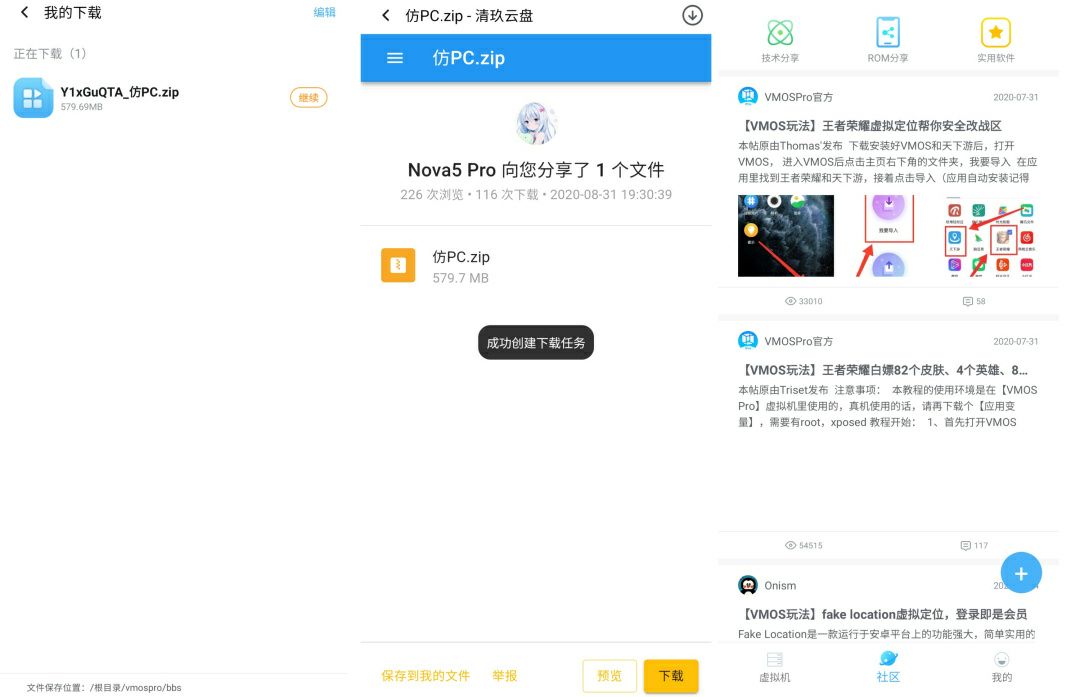
What's the different between VMOS Pro & VMOS?
1. VMOS Pro supports many ROMs like Android 7.1 64-bit and Android 5.1 free ROMs also payment VIP Android 7 & 5.1 with root and Xposed and Gapps
2. VMOS it's for now only Android 5.1 support root and Gapps but it's need unlocker
1. VMOS Pro supports many ROMs like Android 7.1 64-bit and Android 5.1 free ROMs also payment VIP Android 7 & 5.1 with root and Xposed and Gapps
2. VMOS it's for now only Android 5.1 support root and Gapps but it's need unlocker
Warning ⚠
So there is a warning ⚠️ that when you use the modified and unofficial versions you agree to violate your privacy and expose yourself to stealing your data.
Modified versions contain Trojans, Malware viruses, so avoid using them
So there is a warning ⚠️ that when you use the modified and unofficial versions you agree to violate your privacy and expose yourself to stealing your data.
Modified versions contain Trojans, Malware viruses, so avoid using them
Prevent your data from remote wiping by the company:
As more and more companies require their employees using business apps or store relevant information on their devices, how to protect the data becomes a hard nut to crack. Under this circumstance, some of them involved the “remote wipe permission”. By signing the BYOD (Bring Your Own Device) agreement, employees should give companies access to wipe the data on their phone for business purpose. Actually, a recent survey by Acronis showed that around 21% of companies “perform remote wipes when an employee quits or is terminated.”
Although this is considered to be an efficient way of protecting the interest of companies, a growing number of employees felt to be kind of “offended” by their employers. “It’s just like a loaded gun pointing to my personal data,” said by one of the employees. Another one of them lost all the photos of a relative who had passed away.
In order to avoid the risks, what should we do?
Actually, there should be lots of methods.
Some companies have a timely reminder to let their employees back up the data. Some employees delete the apps or files for wiping data before resign. These sort of ways are helpful, but they just partially resolved the issue, as the data could still be wiped at any time.
How could we get the risk totally settled?
Is it the only way of owning another device for business? The answer is, no. Owning another device is certainly a perfect way to resolve the issue, but it’s lack of cost-performance and convenience.
What’s more, there’s even another risk for losing one of the devices. By adding another virtual system to store all the business stuff, and give the company wiping permission for it should be a brilliant way.
Hard to find one?
VMOS could help you out. With the VM (virtual machine) technology, VMOS contained a whole Android system inside the app, which allows you to install/delete/run apps just like normal. With the root access equipped, you can put anything you like into the virtual system, and will not affect your physical device. The message penetration function also prevents you from missing any information.
In this way, we could put all the business apps inside the virtual system. Whenever the companies would like to delete them, it would happen only in VMOS, the data in your phone will be stored safe and sound.
As more and more companies require their employees using business apps or store relevant information on their devices, how to protect the data becomes a hard nut to crack. Under this circumstance, some of them involved the “remote wipe permission”. By signing the BYOD (Bring Your Own Device) agreement, employees should give companies access to wipe the data on their phone for business purpose. Actually, a recent survey by Acronis showed that around 21% of companies “perform remote wipes when an employee quits or is terminated.”
Although this is considered to be an efficient way of protecting the interest of companies, a growing number of employees felt to be kind of “offended” by their employers. “It’s just like a loaded gun pointing to my personal data,” said by one of the employees. Another one of them lost all the photos of a relative who had passed away.
In order to avoid the risks, what should we do?
Actually, there should be lots of methods.
Some companies have a timely reminder to let their employees back up the data. Some employees delete the apps or files for wiping data before resign. These sort of ways are helpful, but they just partially resolved the issue, as the data could still be wiped at any time.
How could we get the risk totally settled?
Is it the only way of owning another device for business? The answer is, no. Owning another device is certainly a perfect way to resolve the issue, but it’s lack of cost-performance and convenience.
What’s more, there’s even another risk for losing one of the devices. By adding another virtual system to store all the business stuff, and give the company wiping permission for it should be a brilliant way.
Hard to find one?
VMOS could help you out. With the VM (virtual machine) technology, VMOS contained a whole Android system inside the app, which allows you to install/delete/run apps just like normal. With the root access equipped, you can put anything you like into the virtual system, and will not affect your physical device. The message penetration function also prevents you from missing any information.
In this way, we could put all the business apps inside the virtual system. Whenever the companies would like to delete them, it would happen only in VMOS, the data in your phone will be stored safe and sound.
What Is Data Privacy and Why Is it Important?
Data privacy has always been important. It’s why people put locks on filing cabinets and rent safety deposit boxes at their banks. But as more of our data becomes digitized, and we share more information online, data privacy is taking on greater importance.
A single company may possess the personal information of millions of customers—data that it needs to keep private so that customers’ identities stay as safe and protected as possible, and the company’s reputation remains untarnished. (Can you say “data breach”?) But data privacy isn’t just a business concern.
You, as an individual, have a lot at stake when it comes to data privacy. The more you know about it, the better able you’ll be to help protect yourself from a large number of risks.
What is data privacy?
Data privacy relates to how a piece of information—or data—should be handled based on its relative importance. For instance, you likely wouldn’t mind sharing your name with a stranger in the process of introducing yourself, but there’s other information you wouldn’t share, at least not until you become more acquainted with that person. Open a new bank account, though, and you’ll probably be asked to share a tremendous amount of personal information, well beyond your name.
In the digital age, we typically apply the concept of data privacy to critical personal information, also known as personally identifiable information (PII) and personal health information (PHI). This can include Social Security numbers, health and medical records, financial data, including bank account and credit card numbers, and even basic, but still sensitive, information, such as full names, addresses and birthdates. The list of personal information can be pretty extensive,
For a business, data privacy goes beyond the PII of its employees and customers. It also includes the information that helps the company operate, whether it’s proprietary research and development data or financial information that shows how it’s spending and investing its money.
Why is data privacy important?
When data that should be kept private gets in the wrong hands, bad things can happen.
Example:
Your information could be for sale on the dark web.
LifeLock identity theft protection sees more threats to your identity, like your personal info on the dark web. And if you become a victim of identity theft, dedicated Identity Restoration Agents will work to fix it.
Data privacy has always been important. It’s why people put locks on filing cabinets and rent safety deposit boxes at their banks. But as more of our data becomes digitized, and we share more information online, data privacy is taking on greater importance.
A single company may possess the personal information of millions of customers—data that it needs to keep private so that customers’ identities stay as safe and protected as possible, and the company’s reputation remains untarnished. (Can you say “data breach”?) But data privacy isn’t just a business concern.
You, as an individual, have a lot at stake when it comes to data privacy. The more you know about it, the better able you’ll be to help protect yourself from a large number of risks.
What is data privacy?
Data privacy relates to how a piece of information—or data—should be handled based on its relative importance. For instance, you likely wouldn’t mind sharing your name with a stranger in the process of introducing yourself, but there’s other information you wouldn’t share, at least not until you become more acquainted with that person. Open a new bank account, though, and you’ll probably be asked to share a tremendous amount of personal information, well beyond your name.
In the digital age, we typically apply the concept of data privacy to critical personal information, also known as personally identifiable information (PII) and personal health information (PHI). This can include Social Security numbers, health and medical records, financial data, including bank account and credit card numbers, and even basic, but still sensitive, information, such as full names, addresses and birthdates. The list of personal information can be pretty extensive,
For a business, data privacy goes beyond the PII of its employees and customers. It also includes the information that helps the company operate, whether it’s proprietary research and development data or financial information that shows how it’s spending and investing its money.
Why is data privacy important?
When data that should be kept private gets in the wrong hands, bad things can happen.
Example:
Your information could be for sale on the dark web.
LifeLock identity theft protection sees more threats to your identity, like your personal info on the dark web. And if you become a victim of identity theft, dedicated Identity Restoration Agents will work to fix it.
VMOS Security
VMOS has been programmed to be a protection tool similar to Qubes OS.
It isolates a section of your phone, meaning everything that happens inside VMOS will not affect your phone if you do not export anything
VMOS has been programmed to be a protection tool similar to Qubes OS.
It isolates a section of your phone, meaning everything that happens inside VMOS will not affect your phone if you do not export anything
Run VMOS:
There are specific specifications that must be available in your phone:
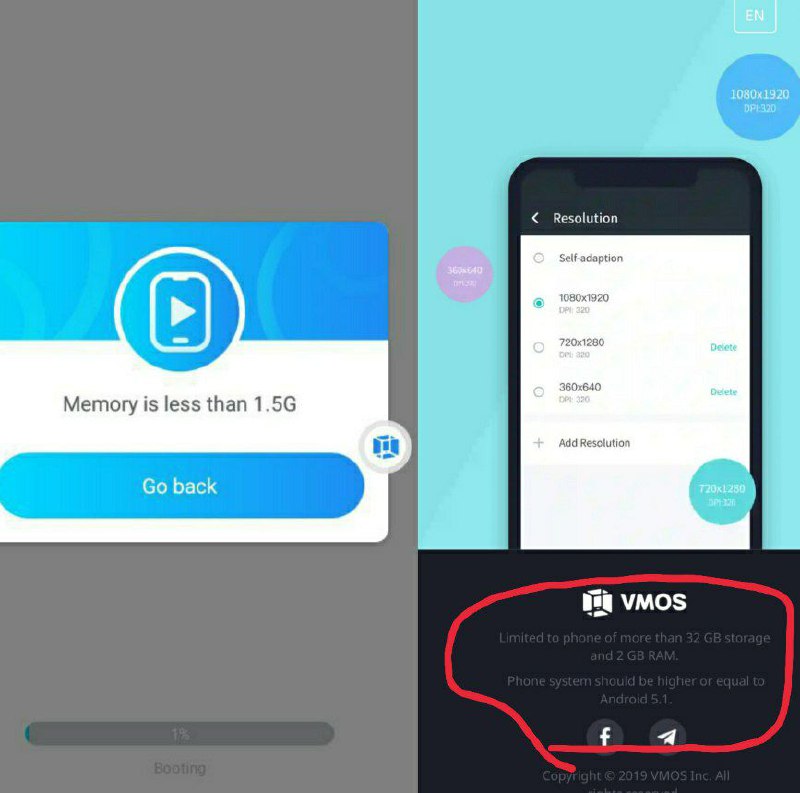
Limited to phone of more than 32 GB storage and 2 GB RAM.Phone system should be higher or equal to Android 5.1.
There are specific specifications that must be available in your phone:
Limited to phone of more than 32 GB storage and 2 GB RAM.Phone system should be higher or equal to Android 5.1.
Black screen in VMOS Pro Global English:
You can try this
1. Click on the floating icon
2. Click on the Settings button
3. Stop VMOS and clear cashed memory
4. Click on delete option and re-open the rom again
Should be fixed like this
You can try this
1. Click on the floating icon
2. Click on the Settings button
3. Stop VMOS and clear cashed memory
4. Click on delete option and re-open the rom again
Should be fixed like this

Change Languages For Chinese Version to English Language:
1. Click on settings
2. Choice USA English Language
1. Click on settings
2. Choice USA English Language
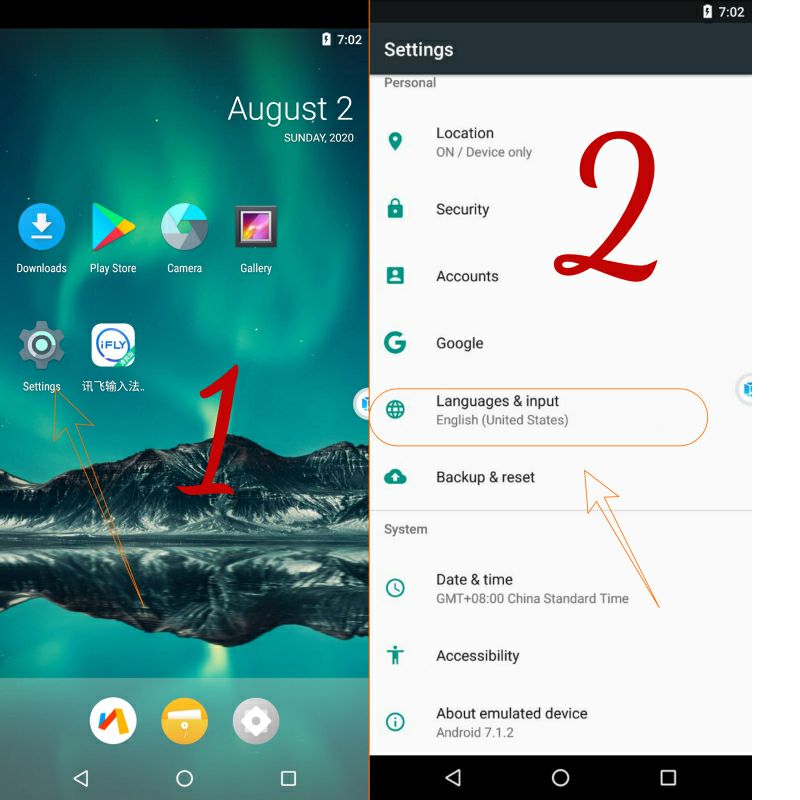
But even with the conversion of the language into English:
The settings option will remain on the floating icon and what it contains in Chinese.
So this is a picture to help you understand the options a bit
The settings option will remain on the floating icon and what it contains in Chinese.
So this is a picture to help you understand the options a bit

Changing the model name or number in VMOS:
is not something every Android user seeks to do but it’s still a useful trick for some users. It was really very easy for the rooted users to change Android device model number on KitKat, Lollipop and older versions of the OS but things changed after the introduction of Android 6.0 Marshmallow. So, if you own a rooted phone, here’s how you can change Android device model number using the steps described below. To change Android phone name though, you do not require root privilege.
this it's old way with root
Now, VMOS supports this through a new option that appears in the settings that enables you to change the model of your phone. Please try it and send us information about what happened after the experiment.
If you have another method that has been tried successfully, like modifying Build.prop on your phone, please let us know by feedback with hashtag #feedback or #solution.
Banning game can be solved in PUBG game.
is not something every Android user seeks to do but it’s still a useful trick for some users. It was really very easy for the rooted users to change Android device model number on KitKat, Lollipop and older versions of the OS but things changed after the introduction of Android 6.0 Marshmallow. So, if you own a rooted phone, here’s how you can change Android device model number using the steps described below. To change Android phone name though, you do not require root privilege.
this it's old way with root
Now, VMOS supports this through a new option that appears in the settings that enables you to change the model of your phone. Please try it and send us information about what happened after the experiment.
If you have another method that has been tried successfully, like modifying Build.prop on your phone, please let us know by feedback with hashtag #feedback or #solution.
Banning game can be solved in PUBG game.

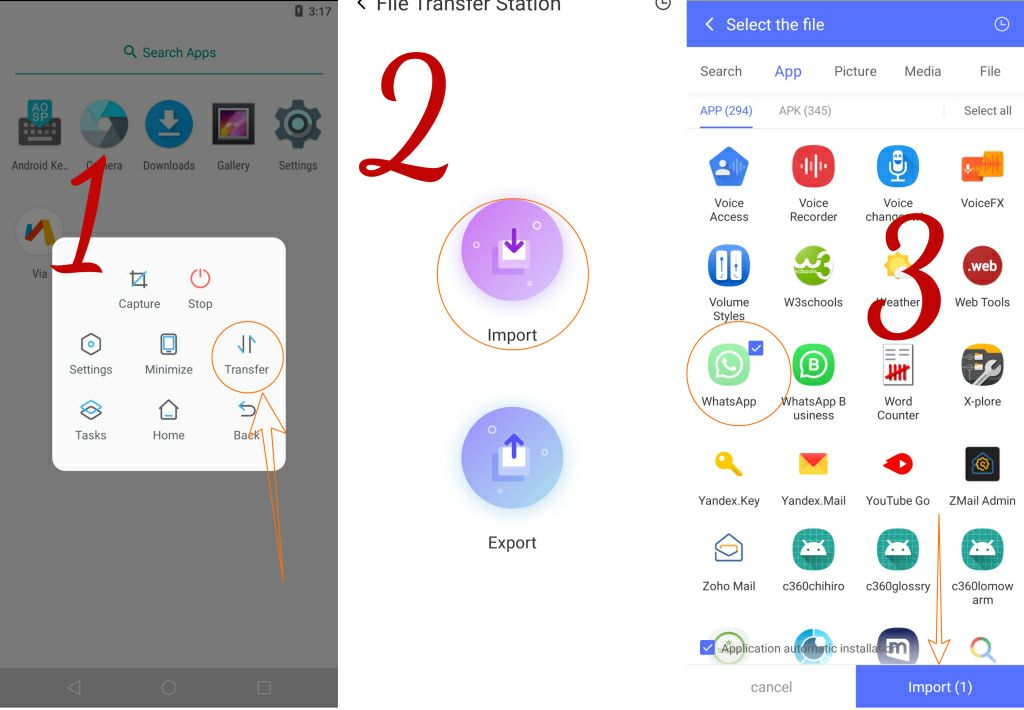
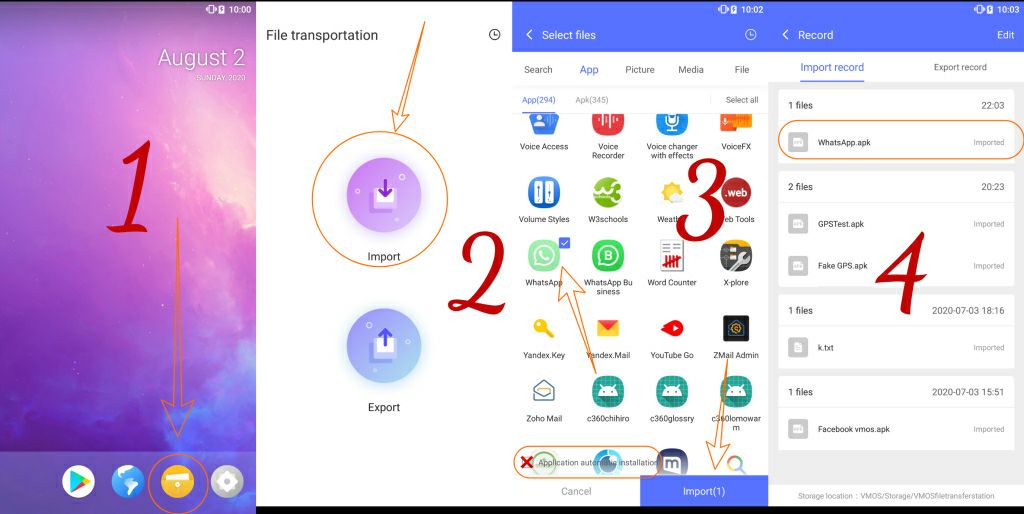
How to import files to VMOS:
This way for VMOS Pro Global and VMOS Chinese Version
1. Click on the floating icon
2. Click on Transfer
3. Click on import
4. Choice your app
5. ✔️ mark on automatic installation
This way for VMOS Pro Global and VMOS Chinese Version
1. Click on the floating icon
2. Click on Transfer
3. Click on import
4. Choice your app
5. ✔️ mark on automatic installation
How to import files to VMOS:
This way for VMOS 1.0.63 Global and 1.0.31 Chinese version
1. Click on File Transfer app
2. Click on import
3. Choice your app
4. ❌ Don't mark on automatic installation
5. Click on the app to install him.
This way for VMOS 1.0.63 Global and 1.0.31 Chinese version
1. Click on File Transfer app
2. Click on import
3. Choice your app
4. ❌ Don't mark on automatic installation
5. Click on the app to install him.
On the issue of security and privacy:
Modified copies of VMOS don't used in any way, and no question is ever permitted about those versions
We are not responsible for what happens to your data as a result of its use
To check if you have the official or modified version, check these signatures:
VMOS Global 1.0.63:
▫️MD5 checksum:
▫️SHA1 checksum:
▫️SHA256:
▫️Signature:
VMOS Chinese Version 1.0.31:
▪️MD5 checksum:
▪️SHA1 checksum:
▪️SHA256:
▪️Signature:
Chinese VMOS Pro:
▪️MD5 checksum:
▪️SHA1 checksum:
▪️SHA256:
▪️Signature:
VMOS Pro Global:
▫️MD5 checksum:
▫️SHA1 checksum:
▫️SHA256:
▫️Signature:
Modified copies of VMOS don't used in any way, and no question is ever permitted about those versions
We are not responsible for what happens to your data as a result of its use
To check if you have the official or modified version, check these signatures:
VMOS Global 1.0.63:
▫️MD5 checksum:
38d4f424aac5ceb007044757dfa6f586▫️SHA1 checksum:
8649f3d7eaecfacd567435d8f6c3b7270b0311ae▫️SHA256:
6175f97b58a1385d3ac5847c1dcc040d2048b1bb5f862ba0f29663198f6d8cf0▫️Signature:
e89b158e4bcf988ebd09eb83f5378e87VMOS Chinese Version 1.0.31:
▪️MD5 checksum:
ea85e1845348c8b9c8eaf2d70074e802▪️SHA1 checksum:
25a0a27e1f60435b36023fee9d4dc12218927dd2▪️SHA256:
42752cb2a5713dfde50956da218731ff407bee381e80b676bd128fff5f972ca8▪️Signature:
aa7851eaa29b87970354c15241192d40Chinese VMOS Pro:
▪️MD5 checksum:
0d6264b99c19764195284007755d6129▪️SHA1 checksum:
5e638a7afabc15eca2879a50b573433fae153636▪️SHA256:
8e8917336f37f1cf13d2efd7577480c6e4e6165d392834018a9fc2aa020203bd▪️Signature:
dead9c09203dd60eb4d1b885b8c13204VMOS Pro Global:
▫️MD5 checksum:
8a460e2931b286ee283bd6ac96435a9a▫️SHA1 checksum:
18081d2aa0bdd4aefdf5f582620ee87658449ede▫️SHA256:
b232a637c10805b377f91d1361bc38db44f9e935edc55e70022b1c1a65fdd9bd▫️Signature:
dead9c09203dd60eb4d1b885b8c13204
👍1
Error installing the package:
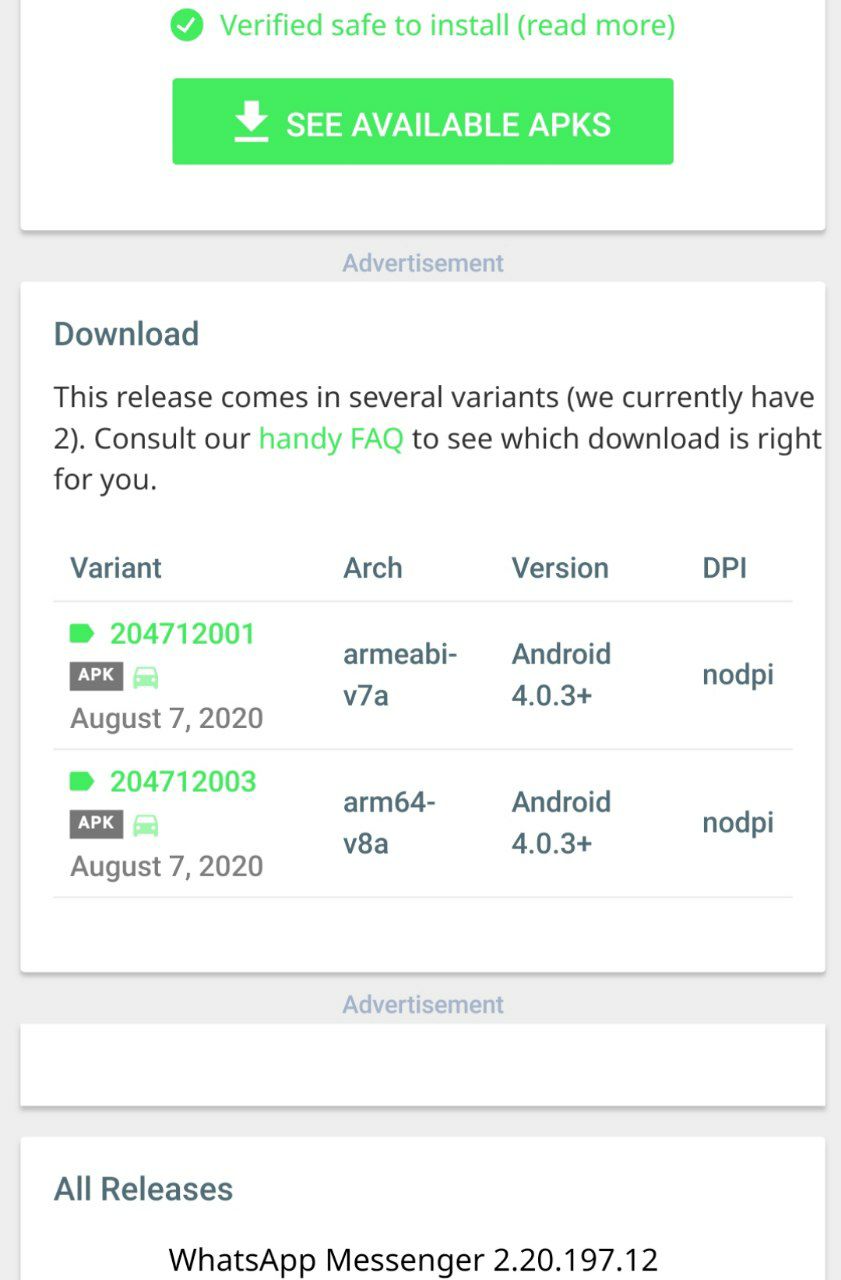
1. ROMs Android 5 it's 32bit
Here you can install any application that works with the architecture armeabi-v7a
2. ROMs Android 7 in global 64bit
Here you can install any application that works with the architecture arm64-v8a
3. Check arm your app if 64bit or 32bit
4. You can import any app from your phone to vmos if you are used ROMs Android 7
Note: you can't import app from your phone to VMOS version 1.0.63 or VMOS pro Android 5.1 if your phone 64bit and you have download the app from play store
Note: some of apps can't installed if you download it from Play Store because Maybe they're apks
If you have a problem after taking the requirements to install it, try downloading it from the Play Store or Aurora inside VMOS
1. ROMs Android 5 it's 32bit
Here you can install any application that works with the architecture armeabi-v7a
2. ROMs Android 7 in global 64bit
Here you can install any application that works with the architecture arm64-v8a
3. Check arm your app if 64bit or 32bit
4. You can import any app from your phone to vmos if you are used ROMs Android 7
Note: you can't import app from your phone to VMOS version 1.0.63 or VMOS pro Android 5.1 if your phone 64bit and you have download the app from play store
Note: some of apps can't installed if you download it from Play Store because Maybe they're apks
If you have a problem after taking the requirements to install it, try downloading it from the Play Store or Aurora inside VMOS
Snapchat & All apps & games needs SafetyNet:
Currently, you cannot use Snapchat and those apps and games in VMOS due to a problem SafetyNet
Currently, you cannot use Snapchat and those apps and games in VMOS due to a problem SafetyNet

Phone space consumption:
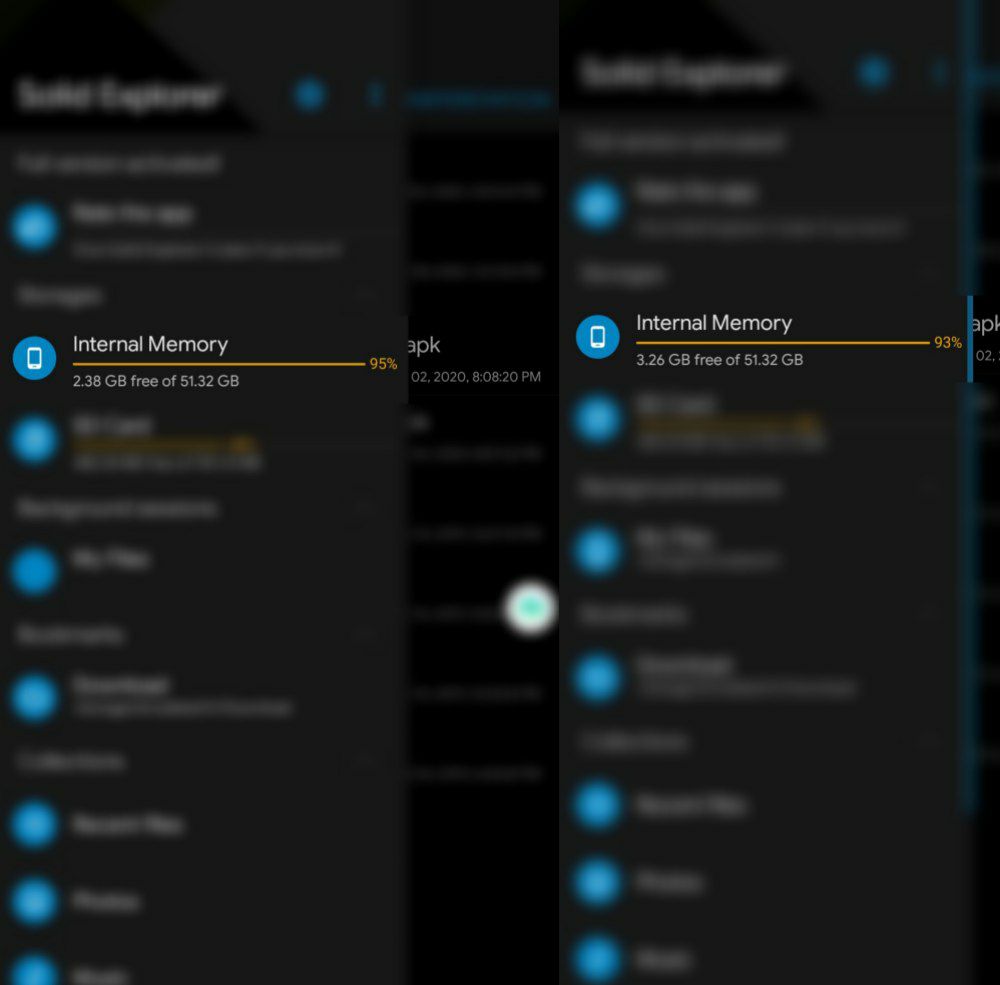
Pay attention to the phone space when adding a new ROM, after downloading it, more phone space is consumed. So if you have roms that you do not use, remove them from it
Pay attention to the phone space when adding a new ROM, after downloading it, more phone space is consumed. So if you have roms that you do not use, remove them from it
Nice feature:
You can click and drag on the application icon to the left when it is green to display the application.
Without clicking the Applications button and the slot
You can click and drag on the application icon to the left when it is green to display the application.
Without clicking the Applications button and the slot

Why this happened?
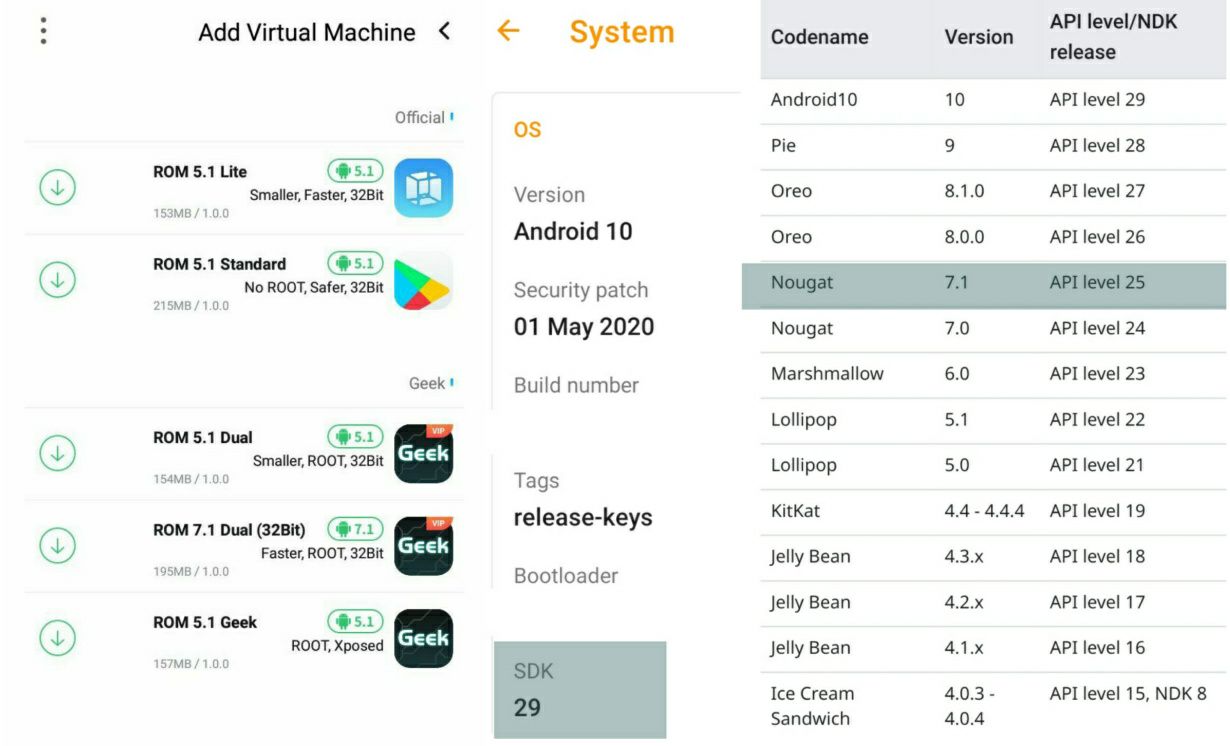
You can't download ROMs Android 7 64bit?
Because your phone not supported 64bit and your os isn't android 7.1 SDK 25
You can't download ROMs Android 7 64bit?
Because your phone not supported 64bit and your os isn't android 7.1 SDK 25
A message appears containing insufficient space message:
When you see this message.
This indicates that your phone does not meet the application requirements
When you see this message.
This indicates that your phone does not meet the application requirements
Custom Roms:
The developers have allowed creating custom ROMs with many features is done by third-party developers.
But it must be noted
The temporarily imported ROM needs to be modified based on the official VMOS package before it can be imported.
You can download a lot of custom ROMs with root features through the Chinese version
Note: remember use it at your own risk and don't ask for it in the group
The developers have allowed creating custom ROMs with many features is done by third-party developers.
But it must be noted
The temporarily imported ROM needs to be modified based on the official VMOS package before it can be imported.
You can download a lot of custom ROMs with root features through the Chinese version
Note: remember use it at your own risk and don't ask for it in the group