About VMOS:
The VMOS app is not a hacking tool or a tool that allows you to violate the privacy or break the terms of service terms for other applications.
It is an Android emulator Read the app features and why dev programed him
this description is from the website itself. Read it well
before you send postes here
• What Can-Root Virtual Machine on Android Do for Daily Life
• Reading the Qualities & Purpose of this VMOS Project.
We are not responsible for your use of the application in any way
Do not post such things here
The VMOS app is not a hacking tool or a tool that allows you to violate the privacy or break the terms of service terms for other applications.
It is an Android emulator Read the app features and why dev programed him
this description is from the website itself. Read it well
before you send postes here
• What Can-Root Virtual Machine on Android Do for Daily Life
• Reading the Qualities & Purpose of this VMOS Project.
We are not responsible for your use of the application in any way
Do not post such things here

❤1
Article details
Introduction to Virtual Master
Release Date: July 23, 2019
Introduction to Virtual Master:
Virtual Master is an APP (Android application) software based on Virtual Machine (VM for short) technology. Through VM technology, the open source Android system (supporting any version) can be run on any version of Linux or Android system in the form of ordinary application installation without root permission.
That is to run a complete Android system through one application, and is not restricted by the host system (Android system on the phone).
Similar to VMWare on PC, OS in OS.
The operating system version and function can be customized. The customized operating system has root permissions, and the permissions will not involve the security of the host system. Virtual Master can customize secure system-level services for enterprises, and can also provide customized ROM requirements for enthusiast users, and can also provide developers with simulated arbitrary operations The system is convenient for adapting.
The world's first Android emulator that can run on Android, the mobile version of VMware, an independent and complete Android system, comes with ROOT environment, custom resolution, game applications run in the background, and can be dual-opened simultaneously.
Introduction to Virtual Master
Release Date: July 23, 2019
Introduction to Virtual Master:
Virtual Master is an APP (Android application) software based on Virtual Machine (VM for short) technology. Through VM technology, the open source Android system (supporting any version) can be run on any version of Linux or Android system in the form of ordinary application installation without root permission.
That is to run a complete Android system through one application, and is not restricted by the host system (Android system on the phone).
Similar to VMWare on PC, OS in OS.
The operating system version and function can be customized. The customized operating system has root permissions, and the permissions will not involve the security of the host system. Virtual Master can customize secure system-level services for enterprises, and can also provide customized ROM requirements for enthusiast users, and can also provide developers with simulated arbitrary operations The system is convenient for adapting.
The world's first Android emulator that can run on Android, the mobile version of VMware, an independent and complete Android system, comes with ROOT environment, custom resolution, game applications run in the background, and can be dual-opened simultaneously.
[Article details VMOS Pro VIP Service Agreement]
Release Date: May 14, 2020
VMOS Pro VIP Service Agreement:
Important hint
Welcome to use the VMOS Pro VIP (hereinafter referred to as "VIP") service. To protect your rights, please read all the contents of this service agreement (hereinafter referred to as the "Agreement") in detail before using the VIP service, especially the bold part. Minors should read with the legal guardian.
Unless you have read and accepted all the terms of this agreement, you have no right to use the VIP service. Your purchase and/or use of VIP services is deemed to have read and agreed to be bound by this agreement.
Article 1:
Acceptance and revision of service agreement:
1.1 The content of this agreement includes the main body of the agreement, "VMOS Pro Terms of Service", "VMOS Pro Privacy Policy", and various rules that have been issued or that may be issued/updated in the future by Hunan Small Computing Technology Information Co., Ltd. All rules are an integral part of this agreement and have the same legal effect as the body of the agreement. If there is a conflict between the body of this agreement and the foregoing rules, the body of this agreement shall prevail. Unless otherwise expressly stated, your use of VIP services is bound by this agreement.
1.2 If this agreement and related service terms need to be revised due to business development, Hunan Small Computing Technology Information Co., Ltd. will announce it on the VMOS Pro platform. You can check the latest version of the agreement terms. After Hunan Xiaosuan Technology Information Co., Ltd. revises the above terms, if you do not accept the revised terms, you can choose to terminate the use of VIP services.
If you continue to use this service, you will be deemed to have accepted the revised agreement.
Article 2
Definition:
2.1VIP: Refers to the network value-added services provided by Hunan Small Computing Technology Information Co., Ltd. After you become a VIP, you can enjoy certain privileges or participate in activities in accordance with this agreement. The specific service content is provided by Hunan Small Computing Technology Information Co., Ltd. Prevail. The ownership and operation rights of VIP, as well as the right to formulate VIP systems and activities, belong to Hunan Xiaosuan Technology Information Co., Ltd., and Hunan Xiaosuan Technology Information Co., Ltd. has the right to interpret within the scope of the law.
2.2 "User" or "You": Refers to an individual or single entity who enjoys the VIP service provided by Hunan Xiaosuan Technology Information Co., Ltd.
Article 3:
Procedures for becoming a VIP:
3.1 If you want to use the VIP service, you need to log in to your VMOS Pro account first, or register a VMOS Pro account and log in. After successfully logging in to your VMOS Pro account, apply for VIP service. If you use another third-party account to log in to VMOS Pro, you should ensure the stability, authenticity and availability of the third-party account. If you cannot log in to VMOS Pro due to third-party account reasons (such as the third-party account being blocked, etc.), You should contact the company of the third-party account.
The VMOS Pro that you log in when you use the VIP service is a Hunan calculation...
Release Date: May 14, 2020
VMOS Pro VIP Service Agreement:
Important hint
Welcome to use the VMOS Pro VIP (hereinafter referred to as "VIP") service. To protect your rights, please read all the contents of this service agreement (hereinafter referred to as the "Agreement") in detail before using the VIP service, especially the bold part. Minors should read with the legal guardian.
Unless you have read and accepted all the terms of this agreement, you have no right to use the VIP service. Your purchase and/or use of VIP services is deemed to have read and agreed to be bound by this agreement.
Article 1:
Acceptance and revision of service agreement:
1.1 The content of this agreement includes the main body of the agreement, "VMOS Pro Terms of Service", "VMOS Pro Privacy Policy", and various rules that have been issued or that may be issued/updated in the future by Hunan Small Computing Technology Information Co., Ltd. All rules are an integral part of this agreement and have the same legal effect as the body of the agreement. If there is a conflict between the body of this agreement and the foregoing rules, the body of this agreement shall prevail. Unless otherwise expressly stated, your use of VIP services is bound by this agreement.
1.2 If this agreement and related service terms need to be revised due to business development, Hunan Small Computing Technology Information Co., Ltd. will announce it on the VMOS Pro platform. You can check the latest version of the agreement terms. After Hunan Xiaosuan Technology Information Co., Ltd. revises the above terms, if you do not accept the revised terms, you can choose to terminate the use of VIP services.
If you continue to use this service, you will be deemed to have accepted the revised agreement.
Article 2
Definition:
2.1VIP: Refers to the network value-added services provided by Hunan Small Computing Technology Information Co., Ltd. After you become a VIP, you can enjoy certain privileges or participate in activities in accordance with this agreement. The specific service content is provided by Hunan Small Computing Technology Information Co., Ltd. Prevail. The ownership and operation rights of VIP, as well as the right to formulate VIP systems and activities, belong to Hunan Xiaosuan Technology Information Co., Ltd., and Hunan Xiaosuan Technology Information Co., Ltd. has the right to interpret within the scope of the law.
2.2 "User" or "You": Refers to an individual or single entity who enjoys the VIP service provided by Hunan Xiaosuan Technology Information Co., Ltd.
Article 3:
Procedures for becoming a VIP:
3.1 If you want to use the VIP service, you need to log in to your VMOS Pro account first, or register a VMOS Pro account and log in. After successfully logging in to your VMOS Pro account, apply for VIP service. If you use another third-party account to log in to VMOS Pro, you should ensure the stability, authenticity and availability of the third-party account. If you cannot log in to VMOS Pro due to third-party account reasons (such as the third-party account being blocked, etc.), You should contact the company of the third-party account.
The VMOS Pro that you log in when you use the VIP service is a Hunan calculation...
Telegraph
Article details VMOS Pro VIP Service Agreement
Article details VMOS Pro VIP Service AgreementRelease Date: May 14, 2020VMOS Pro VIP Service Agreement:Important hint Welcome to use the VMOS Pro VIP (hereinafter referred to as "VIP") service. To protect your rights, please read all the contents of this…
#FAQ VMOS from website.
1. What is VMOS?
VMOS is an APP software based on Virtual Machine (VM).
VMOS can be installed in the form of a normal APP to Linux or Android system through VM technology.
That is to run another complete Android system through an application.
Moreover, VMOS is not controlled by the host system. (Android on the phone)
2. Does VMOS run in the cloud?
VMOS is running locally, including the memory (RAM) consumed by the runtime and the storage space (ROM) consumption.
3. What is the difference between VMOS and cloud phones?
The biggest difference between VMOS and cloud mobile phones lies in resource consumption.
All the performance parameters of cloud mobile phones are derived from the merchants, you can only change the internet speed.
However, VMOS is completely depended on the performance of the real machine.
4. What are the requirements for VMOS operation?
Because VMOS is a virtual system, the size of the system is difficult to reduce.
So at least 2gb (RAM) + 2gb (ROM) free space is required to enter VMOS, and 3gb ram + 32gb rom or higher mobile phones are recommended.
5. Why does VMOS ask so many permissions?
we are asking all these permissions for better simulation of a real phone.
VMOS is a system can install Apps, we are asking specific permissions to make sure users can use apps that need those specific permissions. (Android 5.1 ask all permissions before you download apps)
1. Floating window permission: For better playing the virtual machine on the real machine interface.
2. Storage permissions: Because the data in the virtual machine is empty, considering that you need to transfer the local file. This permission will only be used for the file transfer station.
3. Recording permission: This permission will only be used when you use voice transmission or call.
4. Camera Permissions: This permission will only be used when you use the camera, such as scanning QR code, taking photos, and video calling.
5. Device information: Because the device information of VMOS is originally empty, you need to obtain the device information of the real machine to make the device information of the virtual machine the same. There is sensitive information in these data, but we do not upload and collect data.
6. Telephone rights: The device information such as IMEI of some mobile phones is permission.
6. What data does VMOS collect?
For better user experiences, we collect your phone model and the error log.
7. Why I can't see the floating ball?
The floating ball needs to be granted permission by the real system.
8. Why does the floating ball change color?
The color of the floating ball is to better distinguish whether it is in the real machine or in the virtual machine.
Blue: In the virtual machine.
Green: The real machine.
9. What is the floating window?
The floating window can change VMOS's picture into a small window, similar to the application window on PC.
It can be freely zoomed and dragged.
You can also realize the simultaneous operation of the real machine and the virtual machine.
10. How to zoom in and out of the floating window?
When the pushpin in the upper left corner of the floating window is white, use two fingers zoom in and out.
Click the pushpin to lock and unlock the window.
11. How to make the floating window horizontal?
When the pushpin is white, there is a spin button in the lower right corner of the floating window.
12. How to mute VMOS in the floating window?
When the pushpin is white, there is a mute button in the lower-left corner of the floating window.
13. How to turn off the floating window?
There is a minimize button in the upper right corner of the floating window, click it to zoom out.
14. How to activate Xposed?
Restart VMOS after Xposed installed.
15. Why I can't install magisk?
VMOS and magisk need to be adapted (mean make it suitable modify for used in VMOS).. It takes time.
16. How to run the apps in the background?
After running the application, click "Return" in the floating ball, or press HOME in the real machine.
1. What is VMOS?
VMOS is an APP software based on Virtual Machine (VM).
VMOS can be installed in the form of a normal APP to Linux or Android system through VM technology.
That is to run another complete Android system through an application.
Moreover, VMOS is not controlled by the host system. (Android on the phone)
2. Does VMOS run in the cloud?
VMOS is running locally, including the memory (RAM) consumed by the runtime and the storage space (ROM) consumption.
3. What is the difference between VMOS and cloud phones?
The biggest difference between VMOS and cloud mobile phones lies in resource consumption.
All the performance parameters of cloud mobile phones are derived from the merchants, you can only change the internet speed.
However, VMOS is completely depended on the performance of the real machine.
4. What are the requirements for VMOS operation?
Because VMOS is a virtual system, the size of the system is difficult to reduce.
So at least 2gb (RAM) + 2gb (ROM) free space is required to enter VMOS, and 3gb ram + 32gb rom or higher mobile phones are recommended.
5. Why does VMOS ask so many permissions?
we are asking all these permissions for better simulation of a real phone.
VMOS is a system can install Apps, we are asking specific permissions to make sure users can use apps that need those specific permissions. (Android 5.1 ask all permissions before you download apps)
1. Floating window permission: For better playing the virtual machine on the real machine interface.
2. Storage permissions: Because the data in the virtual machine is empty, considering that you need to transfer the local file. This permission will only be used for the file transfer station.
3. Recording permission: This permission will only be used when you use voice transmission or call.
4. Camera Permissions: This permission will only be used when you use the camera, such as scanning QR code, taking photos, and video calling.
5. Device information: Because the device information of VMOS is originally empty, you need to obtain the device information of the real machine to make the device information of the virtual machine the same. There is sensitive information in these data, but we do not upload and collect data.
6. Telephone rights: The device information such as IMEI of some mobile phones is permission.
6. What data does VMOS collect?
For better user experiences, we collect your phone model and the error log.
7. Why I can't see the floating ball?
The floating ball needs to be granted permission by the real system.
8. Why does the floating ball change color?
The color of the floating ball is to better distinguish whether it is in the real machine or in the virtual machine.
Blue: In the virtual machine.
Green: The real machine.
9. What is the floating window?
The floating window can change VMOS's picture into a small window, similar to the application window on PC.
It can be freely zoomed and dragged.
You can also realize the simultaneous operation of the real machine and the virtual machine.
10. How to zoom in and out of the floating window?
When the pushpin in the upper left corner of the floating window is white, use two fingers zoom in and out.
Click the pushpin to lock and unlock the window.
11. How to make the floating window horizontal?
When the pushpin is white, there is a spin button in the lower right corner of the floating window.
12. How to mute VMOS in the floating window?
When the pushpin is white, there is a mute button in the lower-left corner of the floating window.
13. How to turn off the floating window?
There is a minimize button in the upper right corner of the floating window, click it to zoom out.
14. How to activate Xposed?
Restart VMOS after Xposed installed.
15. Why I can't install magisk?
VMOS and magisk need to be adapted (mean make it suitable modify for used in VMOS).. It takes time.
16. How to run the apps in the background?
After running the application, click "Return" in the floating ball, or press HOME in the real machine.

👍2
17. Why does the background run App drop, kill, black screen, or reboot, etc.?
1. The phone's memory is exhausted and is killed by the system.
For example, the virtual machine opened a game, the real machine also ran the game. One of these two will be killed if the storage is insufficient.
2. The battery optimization's been added, the system automatically detects high power consumption.
Then the system kills the process by default.
It would be solved by adding a whitelist to the battery optimization of the real machine settings.
18. Why some apps or games aren't running?
Compatibility issues exist in some apps or games, our dev team would fix it case by case.
19. Why does the phone stuck and became very hot?
The real phone configuration is not good enough.
Or you are running a game.
20. Why can't I use the SIM card to make a call?
This function is currently under developing.
21. Why can't I connect WIFI?
Currently, the hardware information of the WIFI is penetrated, and the list of nearby WIFIs is completed. (but we can't choose from the wifi list, it should be done in your real system)
We will keep moving on.
22. Why can't I connect Bluetooth?
As for Bluetooth, please connect the other device(headphone, watch, Gamepad...) in your real system.
VMOS has the same Bluetooth environment as the real system.
23. Why can't I use NFC?
It's under developing.
24. Can I import local files and applications into VMOS?
Sure, we have a built-in app in VMOS called file transfer station in yellow.
25. Helio p60(Realme 1)
VMOS has purchased the same phone type abroad to fix this problem.
Please keep an eye on the VMOS update.
26. Free Fire?
The dev team is now trying to fix this issue.
Please keep an eye on our next update.
27. Can't play games
A. Game detects VMOS
B. The game needs some real hardware sensors, or some information, the virtual machine does not get it from the real phone.
C. The Android version is too low. Can not run the game
D. The phone configuration is too poor. Cause the game to flashback
28. Internet Error
1. VMOS system has the same internet environment with the real system.
wifi button in VMOS is not running for the time being.
2. If you still get internet error.
Can you visit VMOS Website?
If can't, please change Wifi to data (or data to Wifi), or connect it with VPN.
(all internet setting should be done in your real phone system)
29. Can't connect VPN in VMOS?
Please connect VPN in your real system.
The VM system has the same internet environment as the real system.
30. Laggy/lag/lagging
Adjust your settings depends on your device.
graphics→smoothly
frame rate→high
shadow→OFF
Automatic graphics→disabled
31. Gyroscope
We have recorded this issue.
Developers are working on it
32. About location permission
Basically?
VMOS itself doesn't need your location.
Location permission is for Apps (like Pokemon Go, etc.) in VMOS that might need it
33. Will the android version of VMOS be android 9.0?
It's already on our plan list.
We will upgrade Android 5.1 to Android 9.0 soon.
Keep an eye on our updates.
34. How many storage/spaces does VMOS need?
Insufficient storage.
The entire app is around 300 MB.
Considering apps will be installed in VMOS, we recommend at least 2 GB free spaces in the device.
However, sometimes the insufficient storage would still pop up even if there are 2 GB empty spaces.
In this case, please try to spare more for VMOS.
35. Can't find root/no root
Developer options→Grant root permission
36. Can't open VMOS
We recommend running VMOS on a phone with more than 3GB RAM and 32 GB Storage.
37. Screen Rotation
Click VMOS ball→Notifications→Auto-rotate.
38. VMOS is extremely slow to turn on?
VMOS is not a simple app, it's a virtual system
39. The screen freezes after I entered PUBG Mobile (global).
Don't install too many apps in VMOS. Please shut down all other apps before using VMOS and run PUBG again.
We will optimize the system as soon as possible at the same time.
1. The phone's memory is exhausted and is killed by the system.
For example, the virtual machine opened a game, the real machine also ran the game. One of these two will be killed if the storage is insufficient.
2. The battery optimization's been added, the system automatically detects high power consumption.
Then the system kills the process by default.
It would be solved by adding a whitelist to the battery optimization of the real machine settings.
18. Why some apps or games aren't running?
Compatibility issues exist in some apps or games, our dev team would fix it case by case.
19. Why does the phone stuck and became very hot?
The real phone configuration is not good enough.
Or you are running a game.
20. Why can't I use the SIM card to make a call?
This function is currently under developing.
21. Why can't I connect WIFI?
Currently, the hardware information of the WIFI is penetrated, and the list of nearby WIFIs is completed. (but we can't choose from the wifi list, it should be done in your real system)
We will keep moving on.
22. Why can't I connect Bluetooth?
As for Bluetooth, please connect the other device(headphone, watch, Gamepad...) in your real system.
VMOS has the same Bluetooth environment as the real system.
23. Why can't I use NFC?
It's under developing.
24. Can I import local files and applications into VMOS?
Sure, we have a built-in app in VMOS called file transfer station in yellow.
25. Helio p60(Realme 1)
VMOS has purchased the same phone type abroad to fix this problem.
Please keep an eye on the VMOS update.
26. Free Fire?
The dev team is now trying to fix this issue.
Please keep an eye on our next update.
27. Can't play games
A. Game detects VMOS
B. The game needs some real hardware sensors, or some information, the virtual machine does not get it from the real phone.
C. The Android version is too low. Can not run the game
D. The phone configuration is too poor. Cause the game to flashback
28. Internet Error
1. VMOS system has the same internet environment with the real system.
wifi button in VMOS is not running for the time being.
2. If you still get internet error.
Can you visit VMOS Website?
If can't, please change Wifi to data (or data to Wifi), or connect it with VPN.
(all internet setting should be done in your real phone system)
29. Can't connect VPN in VMOS?
Please connect VPN in your real system.
The VM system has the same internet environment as the real system.
30. Laggy/lag/lagging
Adjust your settings depends on your device.
graphics→smoothly
frame rate→high
shadow→OFF
Automatic graphics→disabled
31. Gyroscope
We have recorded this issue.
Developers are working on it
32. About location permission
Basically?
VMOS itself doesn't need your location.
Location permission is for Apps (like Pokemon Go, etc.) in VMOS that might need it
33. Will the android version of VMOS be android 9.0?
It's already on our plan list.
We will upgrade Android 5.1 to Android 9.0 soon.
Keep an eye on our updates.
34. How many storage/spaces does VMOS need?
Insufficient storage.
The entire app is around 300 MB.
Considering apps will be installed in VMOS, we recommend at least 2 GB free spaces in the device.
However, sometimes the insufficient storage would still pop up even if there are 2 GB empty spaces.
In this case, please try to spare more for VMOS.
35. Can't find root/no root
Developer options→Grant root permission
36. Can't open VMOS
We recommend running VMOS on a phone with more than 3GB RAM and 32 GB Storage.
37. Screen Rotation
Click VMOS ball→Notifications→Auto-rotate.
38. VMOS is extremely slow to turn on?
VMOS is not a simple app, it's a virtual system
39. The screen freezes after I entered PUBG Mobile (global).
Don't install too many apps in VMOS. Please shut down all other apps before using VMOS and run PUBG again.
We will optimize the system as soon as possible at the same time.
40. Will VMOS has Lite version for 2GB (or less)
Maybe, in a longer future.
41. The brightness adjustment doesn't work, neither go up nor go down
Currently?
it's not possible to change brightness in VMOS.
It could only be the same as the real system.
We apologize for any misunderstanding this situation as caused.
We'll figure out a solution to add a hint in the virtual system.
42. Why does VMOS need the permission of IMEI?
We are asking IMEI for the better simulation of the real system.
Also, as VMOS is a system that would install apps inside,
IMEI is asked to make sure users could use the apps which need IMEI.
43. Flash Player
VMOS can't realize the adaption with Flash Player currently.
44. Android 4 system
VMOS can't realize the adaption with Android 4 system currently.
45. Custom Recovery
It's on our plan list.
Please keep an eye on the VMOS update.
46. How to uninstall Google App in VMOS?
Download MT file manager→Delete related file folders.
47. Pokemon Go
We've already noticed this issue.
VMOS is currently 32 bit, while Pokemon Go requires 64 bit.
We are fixing it now.
48. VMOS couldn't run in Android 9
We've already noticed this issue.
It's related to compatible with Android 9.
Our dev team is working on it.sss
Maybe, in a longer future.
41. The brightness adjustment doesn't work, neither go up nor go down
Currently?
it's not possible to change brightness in VMOS.
It could only be the same as the real system.
We apologize for any misunderstanding this situation as caused.
We'll figure out a solution to add a hint in the virtual system.
42. Why does VMOS need the permission of IMEI?
We are asking IMEI for the better simulation of the real system.
Also, as VMOS is a system that would install apps inside,
IMEI is asked to make sure users could use the apps which need IMEI.
43. Flash Player
VMOS can't realize the adaption with Flash Player currently.
44. Android 4 system
VMOS can't realize the adaption with Android 4 system currently.
45. Custom Recovery
It's on our plan list.
Please keep an eye on the VMOS update.
46. How to uninstall Google App in VMOS?
Download MT file manager→Delete related file folders.
47. Pokemon Go
We've already noticed this issue.
VMOS is currently 32 bit, while Pokemon Go requires 64 bit.
We are fixing it now.
48. VMOS couldn't run in Android 9
We've already noticed this issue.
It's related to compatible with Android 9.
Our dev team is working on it.sss
👍1
Play Store does not work and I cannot download apps?
Yes, that's correct. The store is restricted in a number of countries and cannot be used. So you have to use VPN
Or you can use Aurora store from the bot @AuroraOfficial
Yes, that's correct. The store is restricted in a number of countries and cannot be used. So you have to use VPN
Or you can use Aurora store from the bot @AuroraOfficial

🌭1

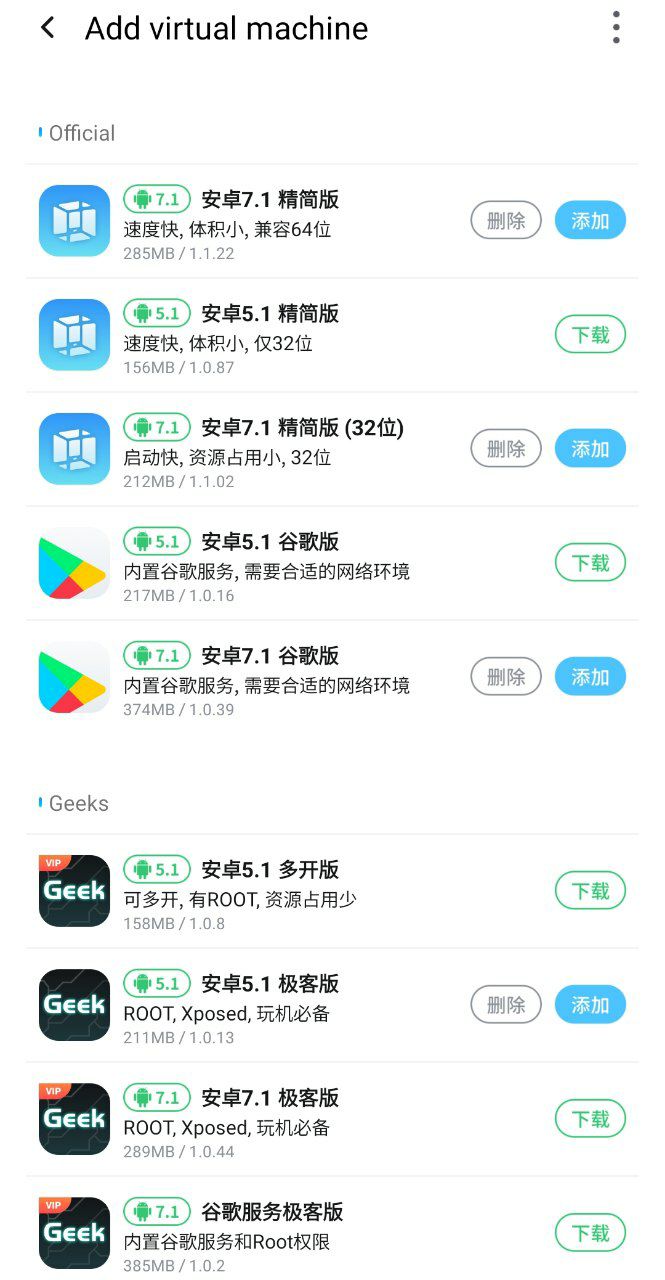
What's the different between VIP ROMs and free ROMs?
The different is VIP ROMs support Gapps and Root & Xposed but free ROMs Support Gapps for free
The different is VIP ROMs support Gapps and Root & Xposed but free ROMs Support Gapps for free
👍1
What's the different between VMOS Pro & VMOS?
1. VMOS Pro supports many ROMs like Android 7.1 64-bit and Android 5.1 free ROMs also payment VIP Android 7 & 5.1 with root and Xposed and Gapps
2. VMOS it's for now only Android 5.1 support root and Gapps but it's need unlocker
1. VMOS Pro supports many ROMs like Android 7.1 64-bit and Android 5.1 free ROMs also payment VIP Android 7 & 5.1 with root and Xposed and Gapps
2. VMOS it's for now only Android 5.1 support root and Gapps but it's need unlocker
Warning ⚠
So there is a warning ⚠️ that when you use the modified and unofficial versions you agree to violate your privacy and expose yourself to stealing your data.
Modified versions contain Trojans, Malware viruses, so avoid using them
So there is a warning ⚠️ that when you use the modified and unofficial versions you agree to violate your privacy and expose yourself to stealing your data.
Modified versions contain Trojans, Malware viruses, so avoid using them
Prevent your data from remote wiping by the company:
As more and more companies require their employees using business apps or store relevant information on their devices, how to protect the data becomes a hard nut to crack. Under this circumstance, some of them involved the “remote wipe permission”. By signing the BYOD (Bring Your Own Device) agreement, employees should give companies access to wipe the data on their phone for business purpose. Actually, a recent survey by Acronis showed that around 21% of companies “perform remote wipes when an employee quits or is terminated.”
Although this is considered to be an efficient way of protecting the interest of companies, a growing number of employees felt to be kind of “offended” by their employers. “It’s just like a loaded gun pointing to my personal data,” said by one of the employees. Another one of them lost all the photos of a relative who had passed away.
In order to avoid the risks, what should we do?
Actually, there should be lots of methods.
Some companies have a timely reminder to let their employees back up the data. Some employees delete the apps or files for wiping data before resign. These sort of ways are helpful, but they just partially resolved the issue, as the data could still be wiped at any time.
How could we get the risk totally settled?
Is it the only way of owning another device for business? The answer is, no. Owning another device is certainly a perfect way to resolve the issue, but it’s lack of cost-performance and convenience.
What’s more, there’s even another risk for losing one of the devices. By adding another virtual system to store all the business stuff, and give the company wiping permission for it should be a brilliant way.
Hard to find one?
VMOS could help you out. With the VM (virtual machine) technology, VMOS contained a whole Android system inside the app, which allows you to install/delete/run apps just like normal. With the root access equipped, you can put anything you like into the virtual system, and will not affect your physical device. The message penetration function also prevents you from missing any information.
In this way, we could put all the business apps inside the virtual system. Whenever the companies would like to delete them, it would happen only in VMOS, the data in your phone will be stored safe and sound.
As more and more companies require their employees using business apps or store relevant information on their devices, how to protect the data becomes a hard nut to crack. Under this circumstance, some of them involved the “remote wipe permission”. By signing the BYOD (Bring Your Own Device) agreement, employees should give companies access to wipe the data on their phone for business purpose. Actually, a recent survey by Acronis showed that around 21% of companies “perform remote wipes when an employee quits or is terminated.”
Although this is considered to be an efficient way of protecting the interest of companies, a growing number of employees felt to be kind of “offended” by their employers. “It’s just like a loaded gun pointing to my personal data,” said by one of the employees. Another one of them lost all the photos of a relative who had passed away.
In order to avoid the risks, what should we do?
Actually, there should be lots of methods.
Some companies have a timely reminder to let their employees back up the data. Some employees delete the apps or files for wiping data before resign. These sort of ways are helpful, but they just partially resolved the issue, as the data could still be wiped at any time.
How could we get the risk totally settled?
Is it the only way of owning another device for business? The answer is, no. Owning another device is certainly a perfect way to resolve the issue, but it’s lack of cost-performance and convenience.
What’s more, there’s even another risk for losing one of the devices. By adding another virtual system to store all the business stuff, and give the company wiping permission for it should be a brilliant way.
Hard to find one?
VMOS could help you out. With the VM (virtual machine) technology, VMOS contained a whole Android system inside the app, which allows you to install/delete/run apps just like normal. With the root access equipped, you can put anything you like into the virtual system, and will not affect your physical device. The message penetration function also prevents you from missing any information.
In this way, we could put all the business apps inside the virtual system. Whenever the companies would like to delete them, it would happen only in VMOS, the data in your phone will be stored safe and sound.
What Is Data Privacy and Why Is it Important?
Data privacy has always been important. It’s why people put locks on filing cabinets and rent safety deposit boxes at their banks. But as more of our data becomes digitized, and we share more information online, data privacy is taking on greater importance.
A single company may possess the personal information of millions of customers—data that it needs to keep private so that customers’ identities stay as safe and protected as possible, and the company’s reputation remains untarnished. (Can you say “data breach”?) But data privacy isn’t just a business concern.
You, as an individual, have a lot at stake when it comes to data privacy. The more you know about it, the better able you’ll be to help protect yourself from a large number of risks.
What is data privacy?
Data privacy relates to how a piece of information—or data—should be handled based on its relative importance. For instance, you likely wouldn’t mind sharing your name with a stranger in the process of introducing yourself, but there’s other information you wouldn’t share, at least not until you become more acquainted with that person. Open a new bank account, though, and you’ll probably be asked to share a tremendous amount of personal information, well beyond your name.
In the digital age, we typically apply the concept of data privacy to critical personal information, also known as personally identifiable information (PII) and personal health information (PHI). This can include Social Security numbers, health and medical records, financial data, including bank account and credit card numbers, and even basic, but still sensitive, information, such as full names, addresses and birthdates. The list of personal information can be pretty extensive,
For a business, data privacy goes beyond the PII of its employees and customers. It also includes the information that helps the company operate, whether it’s proprietary research and development data or financial information that shows how it’s spending and investing its money.
Why is data privacy important?
When data that should be kept private gets in the wrong hands, bad things can happen.
Example:
Your information could be for sale on the dark web.
LifeLock identity theft protection sees more threats to your identity, like your personal info on the dark web. And if you become a victim of identity theft, dedicated Identity Restoration Agents will work to fix it.
Data privacy has always been important. It’s why people put locks on filing cabinets and rent safety deposit boxes at their banks. But as more of our data becomes digitized, and we share more information online, data privacy is taking on greater importance.
A single company may possess the personal information of millions of customers—data that it needs to keep private so that customers’ identities stay as safe and protected as possible, and the company’s reputation remains untarnished. (Can you say “data breach”?) But data privacy isn’t just a business concern.
You, as an individual, have a lot at stake when it comes to data privacy. The more you know about it, the better able you’ll be to help protect yourself from a large number of risks.
What is data privacy?
Data privacy relates to how a piece of information—or data—should be handled based on its relative importance. For instance, you likely wouldn’t mind sharing your name with a stranger in the process of introducing yourself, but there’s other information you wouldn’t share, at least not until you become more acquainted with that person. Open a new bank account, though, and you’ll probably be asked to share a tremendous amount of personal information, well beyond your name.
In the digital age, we typically apply the concept of data privacy to critical personal information, also known as personally identifiable information (PII) and personal health information (PHI). This can include Social Security numbers, health and medical records, financial data, including bank account and credit card numbers, and even basic, but still sensitive, information, such as full names, addresses and birthdates. The list of personal information can be pretty extensive,
For a business, data privacy goes beyond the PII of its employees and customers. It also includes the information that helps the company operate, whether it’s proprietary research and development data or financial information that shows how it’s spending and investing its money.
Why is data privacy important?
When data that should be kept private gets in the wrong hands, bad things can happen.
Example:
Your information could be for sale on the dark web.
LifeLock identity theft protection sees more threats to your identity, like your personal info on the dark web. And if you become a victim of identity theft, dedicated Identity Restoration Agents will work to fix it.
VMOS Security
VMOS has been programmed to be a protection tool similar to Qubes OS.
It isolates a section of your phone, meaning everything that happens inside VMOS will not affect your phone if you do not export anything
VMOS has been programmed to be a protection tool similar to Qubes OS.
It isolates a section of your phone, meaning everything that happens inside VMOS will not affect your phone if you do not export anything
Run VMOS:
There are specific specifications that must be available in your phone:
Limited to phone of more than 32 GB storage and 2 GB RAM.Phone system should be higher or equal to Android 5.1.
There are specific specifications that must be available in your phone:
Limited to phone of more than 32 GB storage and 2 GB RAM.Phone system should be higher or equal to Android 5.1.