
Forwarded from BotNews
Bot API 7.0
Announcing our biggest Bot API update yet!
Reactions
• Introducing full reaction support for bots.
• Bots can now react to messages with setMessageReaction.
• Message reactions now generate updates for bots.
• Added the
Replies 2.0
• Bots can now reply to messages in other chats or topics.
• Added the ExternalReplyInfo class, to track replies across chats.
• The new class ReplyParameters replaces individual reply options in all relevant methods and lets bots quote parts of any message.
• The new field
Link Preview Customization
• Bots can now set a custom URL to generate link previews in outgoing messages.
• Added support for custom size and position of link previews.
• Added the class LinkPreviewOptions to support these new options.
Batch Actions
• Bots can now delete multiple messages in a single request via deleteMessages.
• Bots can now forward or copy multiple messages in a single request via the respective forwardMessages and copyMessages methods.
Boosts & Giveaways
• Added support for Giveaway messages, allowing bots to detect their creation and completion.
• Added updates about chat boost changes via the new classes ChatBoostUpdated and ChatBoostRemoved.
• Bots can now see if a boost came from a premium sub, a gift code, or a giveaway, as well as check all active user boosts via getUserChatBoosts.
General
• Blockquotes are now supported in MarkdownV2 and HTML parse modes.
• Web Apps won't close when calling
• Web Apps can now toggle the visibility and on-click behavior of the Settings Button.
• Bots can now request multiple users, see KeyboardButtonRequestUsers.
• The class Chat has new fields holding profile and background colors, custom emoji, and more.
• And a great deal more. See the full changelog for details:
https://core.telegram.org/bots/api-changelog#december-29-2023
Happy Holidays from the Telegram Team 🎆
Announcing our biggest Bot API update yet!
Reactions
• Introducing full reaction support for bots.
• Bots can now react to messages with setMessageReaction.
• Message reactions now generate updates for bots.
• Added the
available_reactions field to the class Chat.Replies 2.0
• Bots can now reply to messages in other chats or topics.
• Added the ExternalReplyInfo class, to track replies across chats.
• The new class ReplyParameters replaces individual reply options in all relevant methods and lets bots quote parts of any message.
• The new field
quote of the class Message lets bots detect incoming quoted text.Link Preview Customization
• Bots can now set a custom URL to generate link previews in outgoing messages.
• Added support for custom size and position of link previews.
• Added the class LinkPreviewOptions to support these new options.
Batch Actions
• Bots can now delete multiple messages in a single request via deleteMessages.
• Bots can now forward or copy multiple messages in a single request via the respective forwardMessages and copyMessages methods.
Boosts & Giveaways
• Added support for Giveaway messages, allowing bots to detect their creation and completion.
• Added updates about chat boost changes via the new classes ChatBoostUpdated and ChatBoostRemoved.
• Bots can now see if a boost came from a premium sub, a gift code, or a giveaway, as well as check all active user boosts via getUserChatBoosts.
General
• Blockquotes are now supported in MarkdownV2 and HTML parse modes.
• Web Apps won't close when calling
openTelegramLink.• Web Apps can now toggle the visibility and on-click behavior of the Settings Button.
• Bots can now request multiple users, see KeyboardButtonRequestUsers.
• The class Chat has new fields holding profile and background colors, custom emoji, and more.
• And a great deal more. See the full changelog for details:
https://core.telegram.org/bots/api-changelog#december-29-2023
Happy Holidays from the Telegram Team 🎆
Forwarded from John
Excepted one time view voice note in 1 to 1 chat that I have been told.
No
No
Forwarded from zaid
ah actually, bots can send reactions now, but they still can't see messages reactions
Forwarded from KeralaGram [Official]®
Colorful Calls, Thanos Snap Effect, and an Epic Update for Bots.
🌐 Blog : https://telegram.org/blog/calls-and-bots/
📆
#Telegram #Stable #Update #DEC2023
ℹ️ @KeralagramChannel
🌐 Blog : https://telegram.org/blog/calls-and-bots/
📆
DEC,2023#Telegram #Stable #Update #DEC2023
ℹ️ @KeralagramChannel
Telegram
Colorful Calls, Thanos Snap Effect, and an Epic Update for Bots
Telegram's 10th update of 2023 adds improved calls with a colorful new design that use less of your phone's battery, a new vaporize effect when you delete messages, the largest bot update in Telegram's history – and more.
Forwarded from Telegram Info English (bazan.)
This media is not supported in your browser
VIEW IN TELEGRAM
Upgraded Calls
• This update has completely redesigned the appearance of calls, adding new animations and colored backgrounds.
• The background color changes depending on the stage of the call: during a call, during a conversation and after it ends.
• The updated interface consumes less resources, which saves battery power and works better on older devices.
• Hundreds of fixes have been made, and communication quality has improved.
• “More improvements to connection and audio quality are coming in 2024,” the blog states.
For a complete list of changes, follow the link.
• This update has completely redesigned the appearance of calls, adding new animations and colored backgrounds.
• The background color changes depending on the stage of the call: during a call, during a conversation and after it ends.
• The updated interface consumes less resources, which saves battery power and works better on older devices.
• Hundreds of fixes have been made, and communication quality has improved.
• “More improvements to connection and audio quality are coming in 2024,” the blog states.
For a complete list of changes, follow the link.
Forwarded from Telegram Info English (bazan.)
This media is not supported in your browser
VIEW IN TELEGRAM
An Epic Bot Update
• The bot platform received the largest update in the history of Telegram.
• Now they can send reactions to messages, manage reactions, quotes and links, reply to other chats - and much more.
• Bots with admin rights in channels can now receive information about giveaways and boosts from users.
• Bot developers can check out all the new features here.
For a complete list of changes, follow the link.
• The bot platform received the largest update in the history of Telegram.
• Now they can send reactions to messages, manage reactions, quotes and links, reply to other chats - and much more.
• Bots with admin rights in channels can now receive information about giveaways and boosts from users.
• Bot developers can check out all the new features here.
For a complete list of changes, follow the link.
Forwarded from Beta Info English (Sominemo)
Updated Saved Messages
In the Beta version of Telegram for Android, Saved Messages has received new features.
Saved Messages are now grouped by message peers, which is users, chats, and channels. Sources in this list can be pinned. This, for example, allows you to only see your saved messages of a specific person or channel, if you forwarded anything from them into the Saved Messages chat.
The message will be categorized as “Author Hidden” if the user you forwarded the message from has restrictions set for the “Who can add a link to my account when forwarding my messages” setting.
The Saved Messages tab has also appeared in the channel, group and user profiles. It only shows if you have any messages saved. This way you can quickly view the messages saved from this source.
The update is in testing right now, so for some users it may work incorrectly or not work at all.
Previously, the updated Saved Messages were seen in Telegram for iOS version 10.5 and Telegram Desktop version 4.14.
#Android
In the Beta version of Telegram for Android, Saved Messages has received new features.
Saved Messages are now grouped by message peers, which is users, chats, and channels. Sources in this list can be pinned. This, for example, allows you to only see your saved messages of a specific person or channel, if you forwarded anything from them into the Saved Messages chat.
The message will be categorized as “Author Hidden” if the user you forwarded the message from has restrictions set for the “Who can add a link to my account when forwarding my messages” setting.
The Saved Messages tab has also appeared in the channel, group and user profiles. It only shows if you have any messages saved. This way you can quickly view the messages saved from this source.
The update is in testing right now, so for some users it may work incorrectly or not work at all.
Previously, the updated Saved Messages were seen in Telegram for iOS version 10.5 and Telegram Desktop version 4.14.
#Android
Forwarded from Telegram Info English (>_run)
Changes on the Telegram Ads Platform
Over the recent period, the official advertising platform Telegram Ads has undergone several significant changes. Here’s an overview of the new features now available to advertisers:
• Targeting not just channels but their audiences. Instead of targeting specific channels, some authors can now target the audience of those channels. When setting up an ad, you can specify a list of channels, and their subscribers will see the ad not only on those channels but also on others.
• Using Target topics intersection. Ads can be tailored to users interested in multiple topics simultaneously.
• Setting display limits per person. Advertisers can set the frequency of ad displays to a specific user, ranging from 1 to 4 times per day.
• Device segmentation. You can choose between iOS or Android devices, mobile or desktop platforms, or opt-out of device type segmentation.
• The minimum rate for 1000 impressions is now €1.5, in the Politics & Incidents category, it’s €0.75.
• The option to restrict ad displays in channels of the Politics & Incidents category.
• Private links for ads. Advertisers can now use individual invitation links in ad campaigns for more accurate statistics, but the channel must remain public.
• Adding an avatar to the ad. When promoting a channel or bot, their avatar will be used, and when advertising a website, you can upload your image; otherwise, it will be generated based on the site’s data.
• Viewing statistics on new subscribers from ad campaigns is possible in the channel’s statistics section.
• Using 12 different captions for buttons. The following captions are available: “Visit site,” “Subscribe,” “Watch,” “Read,” “Learn more,” “Open,” “Register,” “Buy,” “Order,” “Play,” “Try,” “Submit request.”
#AboutAds
Over the recent period, the official advertising platform Telegram Ads has undergone several significant changes. Here’s an overview of the new features now available to advertisers:
• Targeting not just channels but their audiences. Instead of targeting specific channels, some authors can now target the audience of those channels. When setting up an ad, you can specify a list of channels, and their subscribers will see the ad not only on those channels but also on others.
• Using Target topics intersection. Ads can be tailored to users interested in multiple topics simultaneously.
• Setting display limits per person. Advertisers can set the frequency of ad displays to a specific user, ranging from 1 to 4 times per day.
• Device segmentation. You can choose between iOS or Android devices, mobile or desktop platforms, or opt-out of device type segmentation.
• The minimum rate for 1000 impressions is now €1.5, in the Politics & Incidents category, it’s €0.75.
• The option to restrict ad displays in channels of the Politics & Incidents category.
• Private links for ads. Advertisers can now use individual invitation links in ad campaigns for more accurate statistics, but the channel must remain public.
• Adding an avatar to the ad. When promoting a channel or bot, their avatar will be used, and when advertising a website, you can upload your image; otherwise, it will be generated based on the site’s data.
• Viewing statistics on new subscribers from ad campaigns is possible in the channel’s statistics section.
• Using 12 different captions for buttons. The following captions are available: “Visit site,” “Subscribe,” “Watch,” “Read,” “Learn more,” “Open,” “Register,” “Buy,” “Order,” “Play,” “Try,” “Submit request.”
#AboutAds
Forwarded from Telegram Info English (- Sobhan)
Tags in "Saved Messages" Chat on iOS
The Telegram for iOS in the "Saved Messages" chat now allows users to label messages with reactions, making it easier to find all messages marked with a particular reaction in the future. In this way, reactions in this chat begin to serve as tags.
Quick message search is not yet available, but the appearance of reactions has already changed: they now look like labels.
#iOS
The Telegram for iOS in the "Saved Messages" chat now allows users to label messages with reactions, making it easier to find all messages marked with a particular reaction in the future. In this way, reactions in this chat begin to serve as tags.
Quick message search is not yet available, but the appearance of reactions has already changed: they now look like labels.
#iOS
Forwarded from Telegram Info English (Dunjaša🎐)
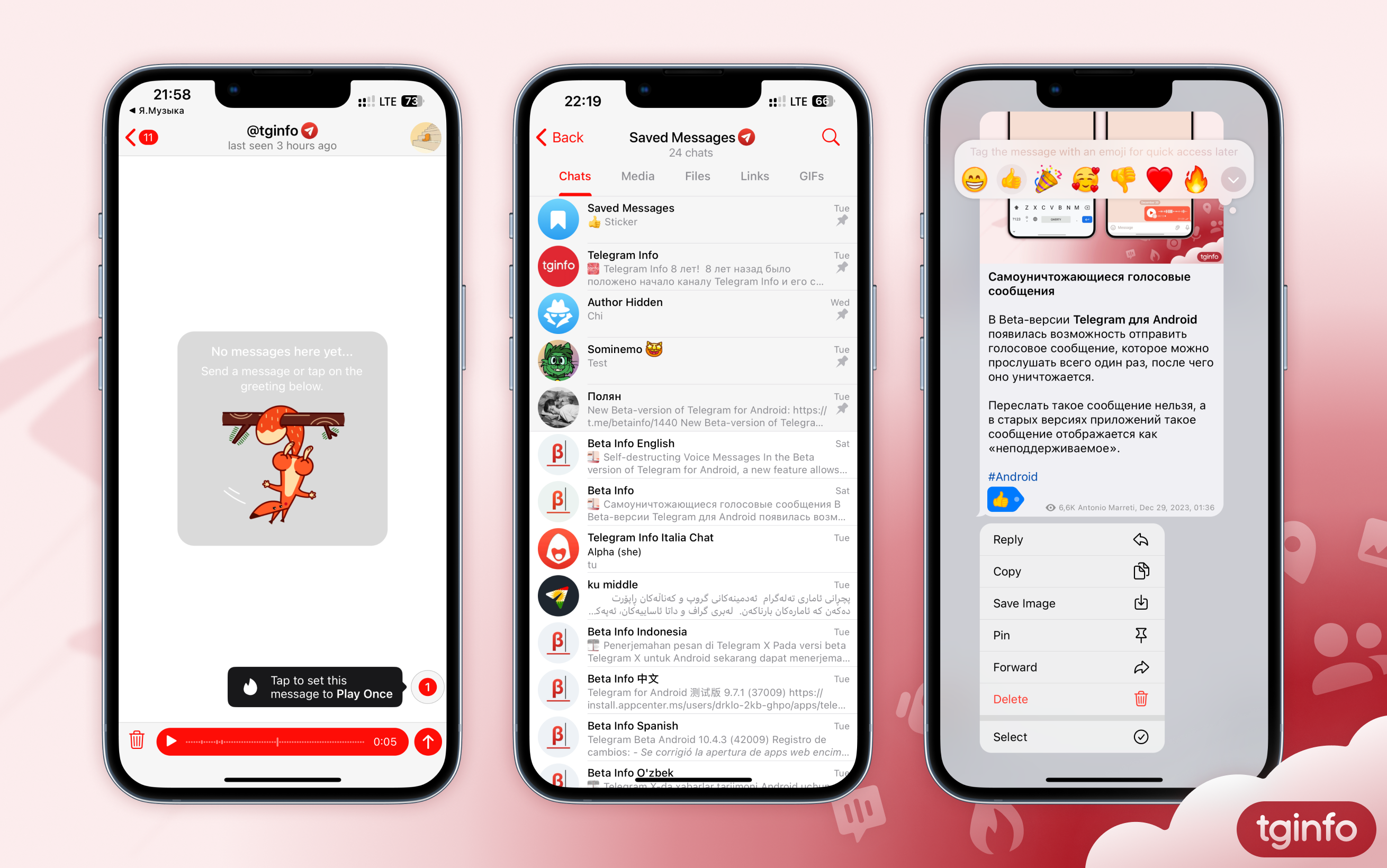
Unmentioned New Features on Telegram
On December 31, in their official blog, Telegram representatives hinted at the presence of several innovations, which they promised to talk about in January. Some of these features have already appeared in stable versions of applications.
1. Self-destructing voice messages
Telegram users now have the option to send a voice message that will be automatically deleted after the recipient listens to it.
• This message can only be sent in a personal chat.
• This message cannot be forwarded or recorded.
• If the recipient has started listening to a message, it will be deleted as soon as they finish listening to it or close the playback screen.
• In older versions of Telegram, such a voice message is displayed as “unsupported”.
Whether this feature will be implemented for video messages is unknown.
2. Updated the Saved Messages chat
Some users can now view the Saved Messages as Sections.
• To switch to section mode, you need to open the Saved Messages chat and click on its title.
• The list of sections is generated automatically by the application: each section corresponds to a separate chat from which messages were previously forwarded to the Saved Messages. In this case, messages sent to the Saved Messages by the user itself are displayed in the “My Notes” section, and messages from users who have prohibited linking their account when forwarding are stored in the “Author Hidden” section.
• Sections are sorted by the date of the last message forwarded from a given chat to the Saved Messages.
• Sections can be pinned, and pinned sections can be arranged in a convenient order.
• When you go to any section, the application displays all messages forwarded from the corresponding chat. Next to each message there is an icon to go to the original message, and at the bottom of the screen there is a button to go to the chat itself.
• In profiles of chats and channels from which at least one message was forwarded to the Saved Messages, the “Saved Messages” tab is now available. It displays all messages forwarded to Saved Messages from this chat.
⚠️ Attention: Currently only some users have these functions. The editors have no information about when they will become available to everyone.
3. Tags in Saved Messages chat on iOS
In one of the versions of the application for iOS, users could mark messages in the Saved Messages chat with reactions in order to quickly find all messages for any of them in the future. Thus, the reactions in this chat were supposed to function as tags.
However, the search for messages based on their reactions did not become available. In addition, in a subsequent update, references to the ability to sort messages based on reactions also disappeared from the interface.
#update #Android #iOS #Desktop #macOS
On December 31, in their official blog, Telegram representatives hinted at the presence of several innovations, which they promised to talk about in January. Some of these features have already appeared in stable versions of applications.
1. Self-destructing voice messages
Telegram users now have the option to send a voice message that will be automatically deleted after the recipient listens to it.
• This message can only be sent in a personal chat.
• This message cannot be forwarded or recorded.
• If the recipient has started listening to a message, it will be deleted as soon as they finish listening to it or close the playback screen.
• In older versions of Telegram, such a voice message is displayed as “unsupported”.
Whether this feature will be implemented for video messages is unknown.
2. Updated the Saved Messages chat
Some users can now view the Saved Messages as Sections.
• To switch to section mode, you need to open the Saved Messages chat and click on its title.
• The list of sections is generated automatically by the application: each section corresponds to a separate chat from which messages were previously forwarded to the Saved Messages. In this case, messages sent to the Saved Messages by the user itself are displayed in the “My Notes” section, and messages from users who have prohibited linking their account when forwarding are stored in the “Author Hidden” section.
• Sections are sorted by the date of the last message forwarded from a given chat to the Saved Messages.
• Sections can be pinned, and pinned sections can be arranged in a convenient order.
• When you go to any section, the application displays all messages forwarded from the corresponding chat. Next to each message there is an icon to go to the original message, and at the bottom of the screen there is a button to go to the chat itself.
• In profiles of chats and channels from which at least one message was forwarded to the Saved Messages, the “Saved Messages” tab is now available. It displays all messages forwarded to Saved Messages from this chat.
⚠️ Attention: Currently only some users have these functions. The editors have no information about when they will become available to everyone.
3. Tags in Saved Messages chat on iOS
In one of the versions of the application for iOS, users could mark messages in the Saved Messages chat with reactions in order to quickly find all messages for any of them in the future. Thus, the reactions in this chat were supposed to function as tags.
However, the search for messages based on their reactions did not become available. In addition, in a subsequent update, references to the ability to sort messages based on reactions also disappeared from the interface.
#update #Android #iOS #Desktop #macOS
Forwarded from Telegram Info English (Dunjaša🎐)
How to Disable the Thanos Snap Effect
Telegram for Android and iOS have a new animation when deleting messages called "The Thanos Snap Effect". Some users want to disable this animation, but don't know how to do it.
Android
In the Telegram app for Android, you can disable animation in Settings › Power Saving › Animations in Chats › Dust-effect deletion.
iOS
Unfortunately, there is no way to disable this animation in the iOS app.
#FAQ
Telegram for Android and iOS have a new animation when deleting messages called "The Thanos Snap Effect". Some users want to disable this animation, but don't know how to do it.
Android
In the Telegram app for Android, you can disable animation in Settings › Power Saving › Animations in Chats › Dust-effect deletion.
iOS
Unfortunately, there is no way to disable this animation in the iOS app.
#FAQ
Forwarded from Telegram Info English (Dunjaša🎐)
Best and Worst Telegram Features in 2023
Friends! Today we are holding our traditional poll for the best and worst Telegram features of 2023.
Last year, the app was updated with many features for both regular users and Telegram Premium subscribers. It is now possible to publish stories, choose personal colors for yourself and your channels, display similar channels and much more.
Please note: multiple answers are available in each poll. Please vote thoughtfully and select no more than three options per poll. Thank you!
List of ongoing polls:
• Best innovation
• Worst innovation
#survey
Friends! Today we are holding our traditional poll for the best and worst Telegram features of 2023.
Last year, the app was updated with many features for both regular users and Telegram Premium subscribers. It is now possible to publish stories, choose personal colors for yourself and your channels, display similar channels and much more.
Please note: multiple answers are available in each poll. Please vote thoughtfully and select no more than three options per poll. Thank you!
List of ongoing polls:
• Best innovation
• Worst innovation
#survey
Forwarded from Telegram Info English (Dunjaša🎐)
The best new feature in Telegram released in 2023 is...
Anonymous Poll
42%
Real-time translation
22%
Power Saving mode
28%
List of chat members with timestamps who read or reacted to a message
11%
Selecting wallpapers for private chats
34%
Stories in Telegram
44%
Replies 2.0
14%
Personal user colors (for replies, link snippets, and profile blocks)
18%
Telegram Premium giveaways in channels
34%
Similar channels
18%
Custom emoji as reactions in channels
Forwarded from Telegram Info English (Dunjaša🎐)
The worst new feature in Telegram released in 2023 is...
Anonymous Poll
12%
List of chat members with timestamps who read or reacted to a message
10%
Chat Folders
11%
Selecting wallpapers for private chats
39%
Stories in Telegram
15%
Stealth Mode in stories
42%
Boost system in channels
35%
Non-Clickable Media in Link Previews
27%
Being not able to go to the message to which a reply is being drafted for
16%
Personal user colors (for replies, link snippets, and profile blocks)
17%
Ability to set a wallpaper for the channel that is visible to all subscribers
Forwarded from Telegram Info English (Antonio Marreti)
This media is not supported in your browser
VIEW IN TELEGRAM
Self-destructing Video Messages And Pause During Recording
In the upcoming Telegram update, it will be possible to send video messages that can be viewed only once. Previously, a similar feature was introduced for voice messages.
Additionally, an option to pause the recording of both voice and, likely, video messages will be introduced.
In the upcoming Telegram update, it will be possible to send video messages that can be viewed only once. Previously, a similar feature was introduced for voice messages.
Additionally, an option to pause the recording of both voice and, likely, video messages will be introduced.
Forwarded from Telegram Info English (Dunjaša🎐)
Lines have appeared in the source code of Telegram for iOS which hint that Telegram is preparing a feature to close private messages from users who don't have Telegram Premium.
The privacy setting that will control this is called "Who can write to me". This will allow you to choose which users can send you private messages: "Everyone" or only "Contacts and Premium".
It is known that in the future only users with Premium subscription will be able to use this option.
It's important to notice that now only mentions of this feature have been found in Telegram's code, and it hasn't been officially announced yet, so the feature may have some changes in the final version.
#iOS
Please open Telegram to view this post
VIEW IN TELEGRAM
Forwarded from Telegram Info English (Dunjaša🎐)
Along with the feature to limit receiving private messages, some other new features for users with Premium subscription have been noticed in the Telegram for iOS source code:
1. Hide timestamps when you read messages in private chats
• Based on the lines in source code, it seems that in the future Telegram will start displaying timestamps of when you read messages in private chats (similar to small groups).
• If a user can see your last seen time, they will also see the time their message has been read.
• If you activate the option, your chat partner will not be able to view the time when you viewed their messages.
• If you activate this option, you will also not be able to see when the person you are talking to has read your messages.
• This is about hiding the time of reading, not the fact of reading. Telegram will still display the message as read, even if the other user hides their read time.
2. Access user's last seen time
• If you choose hide your last seen time, you won't see other people's precise last seen time anymore.
• Telegram is working on a feature that will allow Premium subscribers who hide their last seen time to continue to see the exact time of other user's last activity.
• The Premium subscription will not allow you to bypass other user's privacy settings: if a conversation partner's last seen time is hidden to all or specific users, it will still remains hidden to those people.
#iOS
Please open Telegram to view this post
VIEW IN TELEGRAM
Forwarded from max
Telegram-FAQ-AND-updates
#new or did I notice this late?
It's just new text
Super reaction was since adding of reactions
Super reaction was since adding of reactions