
4️⃣ MODES OF THE FIXED MARKET PROFILE
The ATAS platform provides advanced functionality for working with market profiles. A fixed profile, a dynamic profile in drawing mode, and a profile indicator help to get a full picture of horizontal volumes.
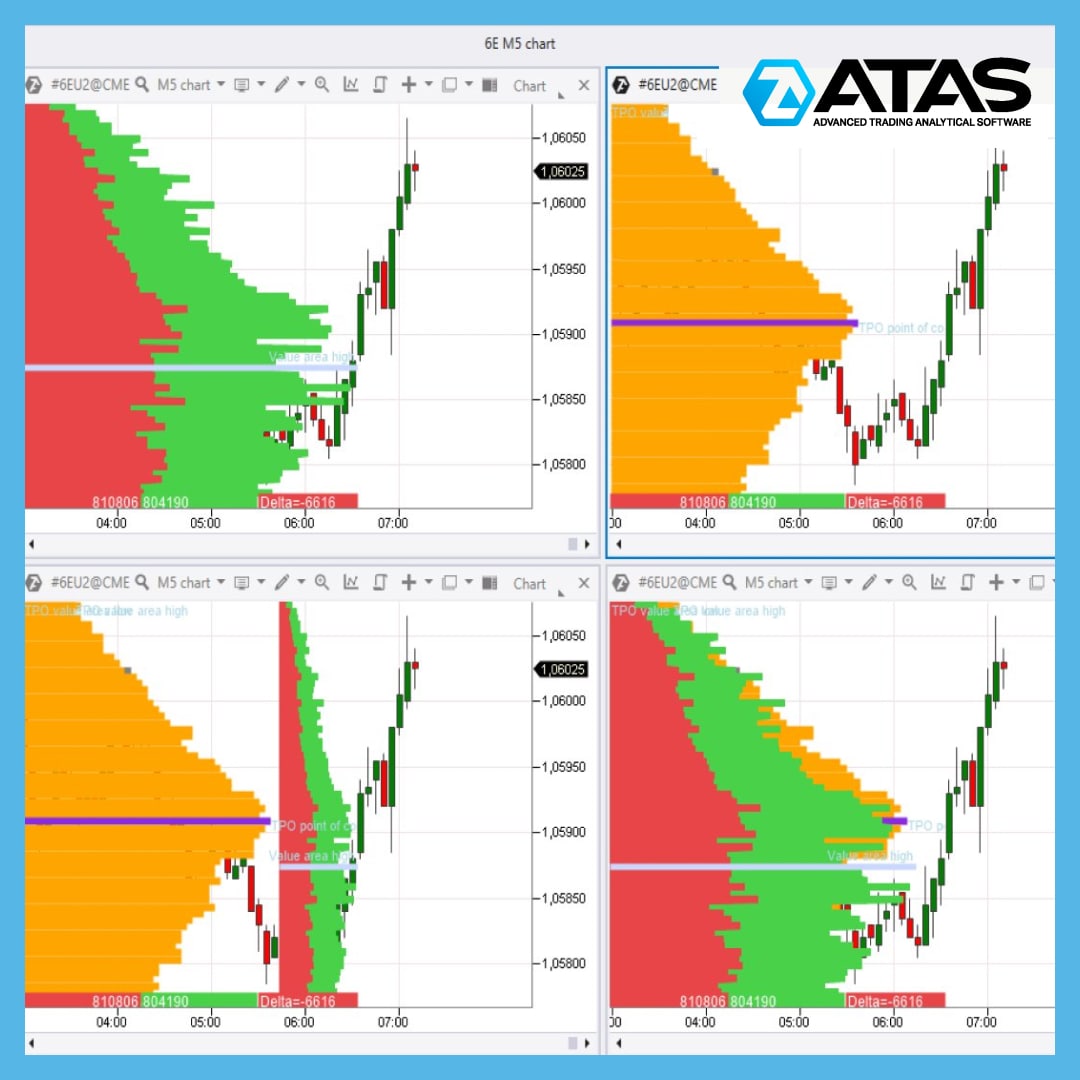
You can see four modes of the fixed profile in the picture:
1️⃣ → top left: a regular profile
2️⃣ → top right: a profile in TPO mode
3️⃣ → bottom left: a profile and TPO
4️⃣ → bottom right: a profile and TPO superimposed on each other.
All parameters of the fixed profile have flexible settings. You can individually choose the color, transparency, gradient, and display of important levels (value zones, maximum volume levels).
In each mode the fixed profile can be built based on information about trades, volumes, time, bid/ask trades (by default), delta (two ways of displaying).
How to use market profiles? Read in detail on our blog: https://bit.ly/3dJZ4PS
Download a trial version of ATAS with full functionality for free! A powerful and at the same time convenient trading and analytical platform will change your understanding of trading in the markets of popular futures, stocks and cryptocurrencies.
Support service bot
Chat group for communication
The ATAS platform provides advanced functionality for working with market profiles. A fixed profile, a dynamic profile in drawing mode, and a profile indicator help to get a full picture of horizontal volumes.
You can see four modes of the fixed profile in the picture:
1️⃣ → top left: a regular profile
2️⃣ → top right: a profile in TPO mode
3️⃣ → bottom left: a profile and TPO
4️⃣ → bottom right: a profile and TPO superimposed on each other.
All parameters of the fixed profile have flexible settings. You can individually choose the color, transparency, gradient, and display of important levels (value zones, maximum volume levels).
In each mode the fixed profile can be built based on information about trades, volumes, time, bid/ask trades (by default), delta (two ways of displaying).
How to use market profiles? Read in detail on our blog: https://bit.ly/3dJZ4PS
Download a trial version of ATAS with full functionality for free! A powerful and at the same time convenient trading and analytical platform will change your understanding of trading in the markets of popular futures, stocks and cryptocurrencies.
Support service bot
Chat group for communication
👍3❤2
In this video, we’re going to tell you about a trading strategy using imbalance levels. These levels can be identified with the help of the Market Profile indicator. Before using the strategy on a live account, do your own research.
📌Watch the video on YouTube - https://youtu.be/vyEKGUSSWuI
Support service bot
Chat group for communication
📌Watch the video on YouTube - https://youtu.be/vyEKGUSSWuI
Support service bot
Chat group for communication
YouTube
How to Find an Entry Point for a Trade Using Imbalance Levels
📌Do you want to trade successfully?
Download ATAS for free with full functionality: https://bit.ly/3TvhpR1
In this video, we’re going to tell you about a trading strategy using imbalance levels. These levels can be identified with the help of the Market…
Download ATAS for free with full functionality: https://bit.ly/3TvhpR1
In this video, we’re going to tell you about a trading strategy using imbalance levels. These levels can be identified with the help of the Market…
👍8🔥1
MARKET STRUCTURE ANALYSIS IN DAILY TIMEFRAME
One should start the analysis of the market structure in the daily time frame. Since the long-term structure of the market is always more important and trading against the daily trend is not effective. We can use two instruments for the analysis:
👉 “Fixed TPO and Profile” with “Contract” period. This instrument clearly shows the main levels of maximum volumes accumulated for a traded contract.
👉 “Dynamic Levels” with “Monthly” period. You can remove the Value area levels and highlight the maximum volume level in this indicator.
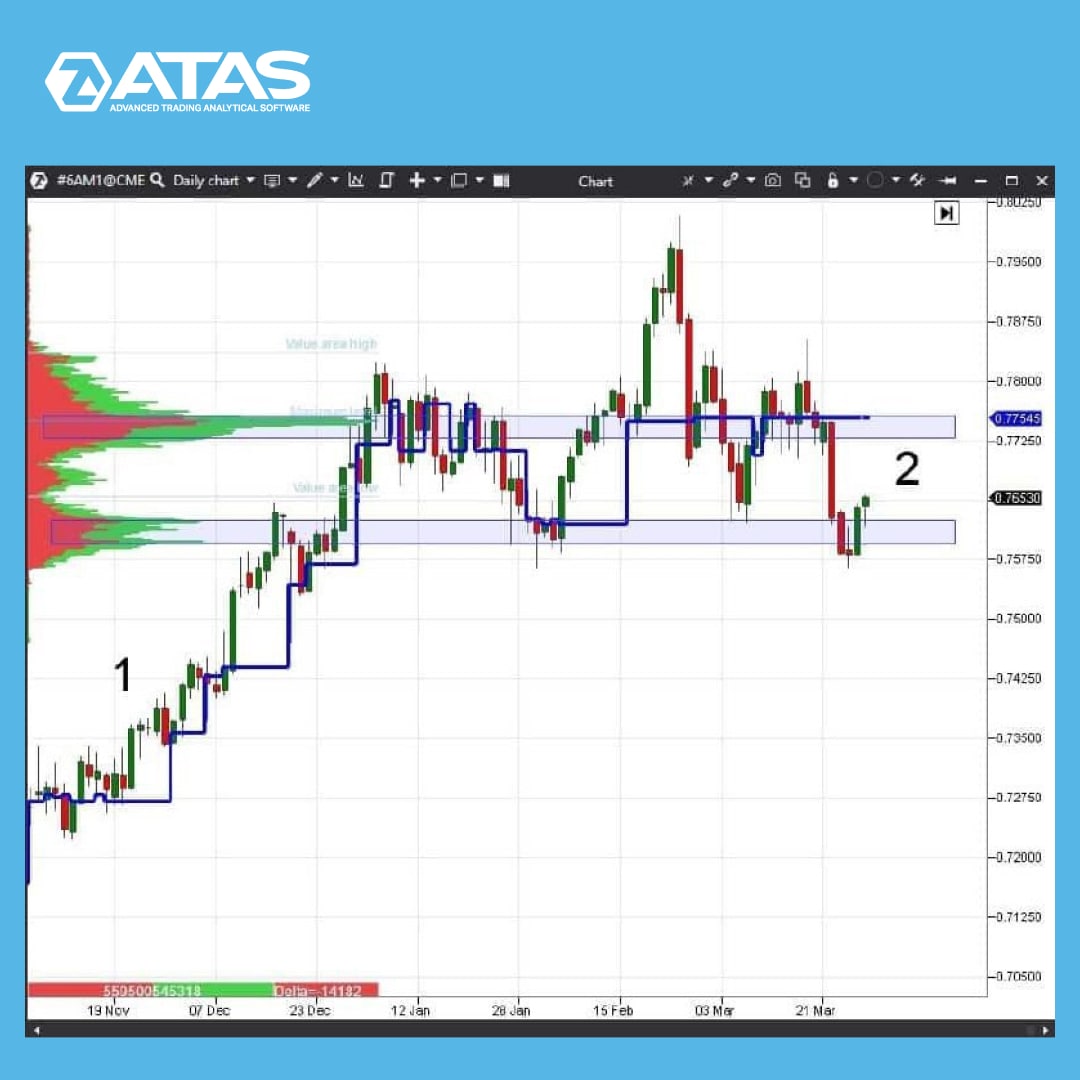
The image shows the 6A(AUDUSD) futures chart in the daily time frame.
At point 1 the chart is in a steady trend, the price is consistently above the maximum volume level of the “Dynamic Levels” indicator.
The situation has changed at point 2. The maximum volume level of the “Dynamic Levels” indicator moves chaotically, goes down, goes up. This indicates the flat state of the market.
Read more useful tips in our blog at the link https://bit.ly/3pSVllJ
Support service bot
Chat group for communication
One should start the analysis of the market structure in the daily time frame. Since the long-term structure of the market is always more important and trading against the daily trend is not effective. We can use two instruments for the analysis:
👉 “Fixed TPO and Profile” with “Contract” period. This instrument clearly shows the main levels of maximum volumes accumulated for a traded contract.
👉 “Dynamic Levels” with “Monthly” period. You can remove the Value area levels and highlight the maximum volume level in this indicator.
The image shows the 6A(AUDUSD) futures chart in the daily time frame.
At point 1 the chart is in a steady trend, the price is consistently above the maximum volume level of the “Dynamic Levels” indicator.
The situation has changed at point 2. The maximum volume level of the “Dynamic Levels” indicator moves chaotically, goes down, goes up. This indicates the flat state of the market.
Read more useful tips in our blog at the link https://bit.ly/3pSVllJ
Support service bot
Chat group for communication
👍9
THE RELATIVE VOLUME FILTER – A COOL FEATURE FOR CLUSTER CHARTS
Traders and technical analysts of financial markets have probably faced the problem of reconfiguring charts every time when changing time frames and/or financial instruments. The reasons why this happens are obvious. The more often you have to change the time frame or something else, the more urgent the problem is.
A possible solution is to create a database of your own templates (snapshots) where the settings of charts and indicators are stored, but this option has its drawbacks.
👉 For the convenience of its users, the team of the ATAS trading and analytical platform has developed a special solution – the Relative Volume filter which can be applied to a cluster chart.
To activate the Relative Volume filter:
✔️ open the chart;
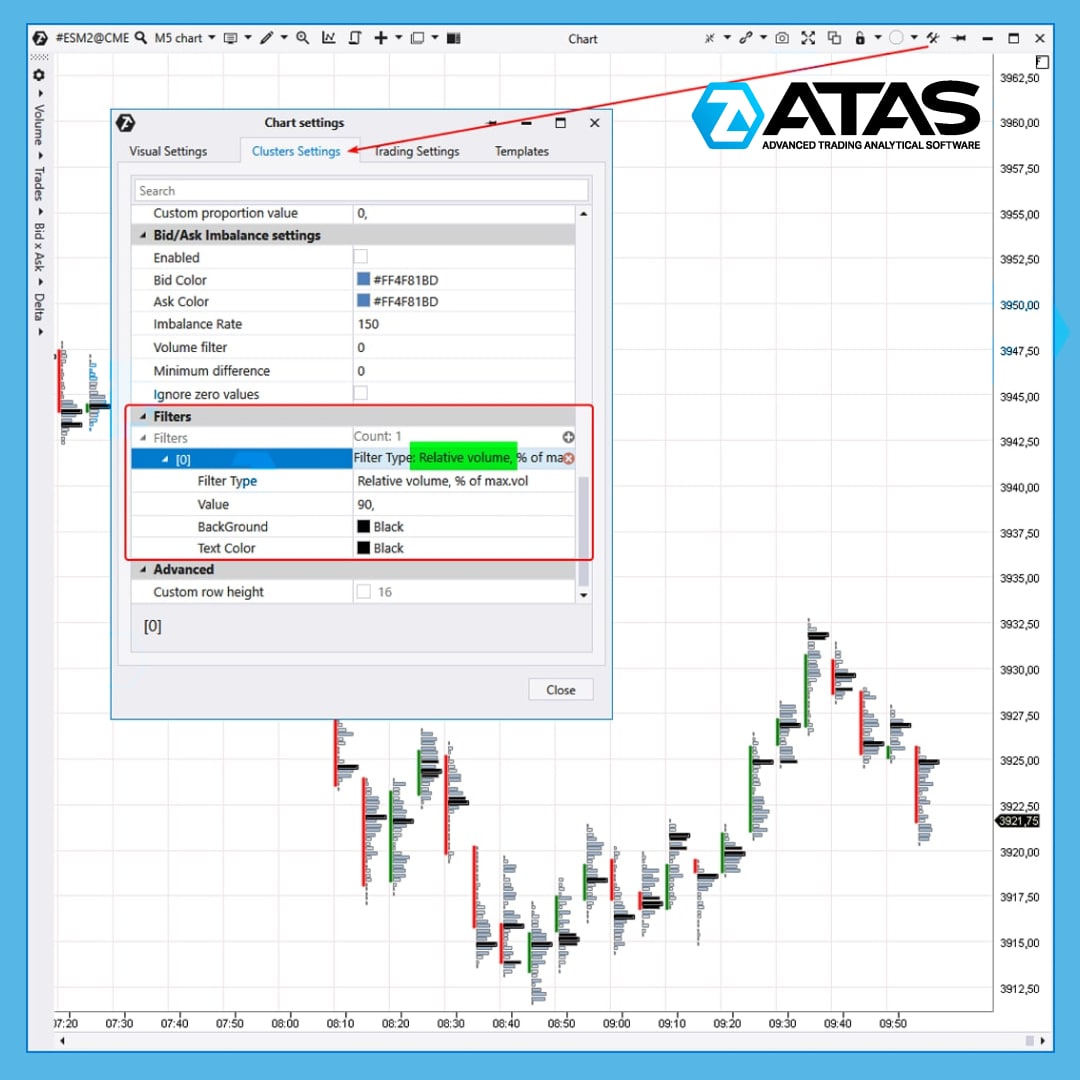
✔️ in the chart settings, go to the Cluster Settings tab;
✔️ in the Filters section, add a filter by clicking on the plus sign;
✔️ in the filter settings, select Relative Volume (by volume or by the number of trades);
✔️ Specify the value as a percentage.
For example, the Relative Volume filter = 90% on the attached chart. It means that ATAS automatically finds the largest volume among all clusters loaded on the chart and takes its value as 100%. After that, all clusters whose volume is at least 90% of the maximum are painted black.
Let's say we used absolute values. If you changed the period, for example, from 5 minutes to 4 hours, a lot of black clusters would appear on the chart. This would require time to reconfigure the filter. But if you use relative values as a percentage, the work becomes much easier.
☝️ Please note that you can add multiple filters with different colors.
If you have any questions when setting up the Relative Volume filter for cluster charts, please contact the support service.
You can find information about filters and other useful tools of the ATAS platform in our blog at the link https://bit.ly/3e6V8sK
Support service bot
Chat group for communication
Traders and technical analysts of financial markets have probably faced the problem of reconfiguring charts every time when changing time frames and/or financial instruments. The reasons why this happens are obvious. The more often you have to change the time frame or something else, the more urgent the problem is.
A possible solution is to create a database of your own templates (snapshots) where the settings of charts and indicators are stored, but this option has its drawbacks.
👉 For the convenience of its users, the team of the ATAS trading and analytical platform has developed a special solution – the Relative Volume filter which can be applied to a cluster chart.
To activate the Relative Volume filter:
✔️ open the chart;
✔️ in the chart settings, go to the Cluster Settings tab;
✔️ in the Filters section, add a filter by clicking on the plus sign;
✔️ in the filter settings, select Relative Volume (by volume or by the number of trades);
✔️ Specify the value as a percentage.
For example, the Relative Volume filter = 90% on the attached chart. It means that ATAS automatically finds the largest volume among all clusters loaded on the chart and takes its value as 100%. After that, all clusters whose volume is at least 90% of the maximum are painted black.
Let's say we used absolute values. If you changed the period, for example, from 5 minutes to 4 hours, a lot of black clusters would appear on the chart. This would require time to reconfigure the filter. But if you use relative values as a percentage, the work becomes much easier.
☝️ Please note that you can add multiple filters with different colors.
If you have any questions when setting up the Relative Volume filter for cluster charts, please contact the support service.
You can find information about filters and other useful tools of the ATAS platform in our blog at the link https://bit.ly/3e6V8sK
Support service bot
Chat group for communication
👍6🔥1
Hello friends!
We would like to present you BETA 5.7.33.200 – a fresh update of ATAS which has made the platform even more functional and easy-to-use. See for yourself.
What's new?
✅ FTX (another connector) is now available for crypto traders. It is a rapidly growing exchange with support for margin spot trading and a huge variety of unique derivatives and securities. Now you can receive quotes and make trades on FTX directly from ATAS.
What's improved?
✅ Our main pride in this update is the ChartTrader.
✔️ Now you can specify not only the order size as a % value of the portfolio size, but also the base and quote currencies. For example, for the BTCUSDT pair, it can be either BTC or USDT.
✔️ You can choose the type of order on the exchange (TimeInForce: GoodTillCancel, FillOrKill, ImmediateOrCancel, etc.) and use the additional options: ReduceOnly, PostOnly, CloseOnTrigger, etc.
✔️ You can assign a price type for conditional orders (Index price, Last price, Mark price, etc.).
✔️ Before sending an order, you will see its cost and the maximum possible volume.
✔️ If there are no portfolios available, the platform will offer to connect a connector and detailed instructions on how to do it.
✅ Three new sets of ready-made settings are available in the template gallery:
✔️ Basic Prop DOM with a summary of useful information for prop trading through Smart DOM;
✔️ Advanced Limit Tracking allows you to track the addition and removal of volumes at limit levels and highlight big limits with filters.
✔️ Minimalistic Compact – asks, bids, price scale, daily volume profile and nothing extra.
✅ We tried to make the strategy settings even more convenient. Using the "Activate by zero position" flag, you can not only check the position, but also check for pending orders.
✅ "Gradient proportion" has returned to the display settings of cluster charts. If you increase the %, there will be fewer contrasting clusters.
✅ When you save the connector settings, the platform automatically finds an active connection and offers to reconnect to it.
✅ Of course, we could not ignore the indicators. This time, the improvements have been made to the new Bar Timer alert and the VWAP flag.
✅ A help button has appeared at the top of the screen. If you click on it, you can find out the details of the latest updates, suggest your own ideas for improving the platform, go to the Knowledge Base or contact technical support.
✅ Now ATAS also “speaks” Chinese. Other localizations are coming up next, for example, Spanish.
Read more about the update at the link: https://bit.ly/3L0u4rk
Support service bot
Chat group for communication
We would like to present you BETA 5.7.33.200 – a fresh update of ATAS which has made the platform even more functional and easy-to-use. See for yourself.
What's new?
✅ FTX (another connector) is now available for crypto traders. It is a rapidly growing exchange with support for margin spot trading and a huge variety of unique derivatives and securities. Now you can receive quotes and make trades on FTX directly from ATAS.
What's improved?
✅ Our main pride in this update is the ChartTrader.
✔️ Now you can specify not only the order size as a % value of the portfolio size, but also the base and quote currencies. For example, for the BTCUSDT pair, it can be either BTC or USDT.
✔️ You can choose the type of order on the exchange (TimeInForce: GoodTillCancel, FillOrKill, ImmediateOrCancel, etc.) and use the additional options: ReduceOnly, PostOnly, CloseOnTrigger, etc.
✔️ You can assign a price type for conditional orders (Index price, Last price, Mark price, etc.).
✔️ Before sending an order, you will see its cost and the maximum possible volume.
✔️ If there are no portfolios available, the platform will offer to connect a connector and detailed instructions on how to do it.
✅ Three new sets of ready-made settings are available in the template gallery:
✔️ Basic Prop DOM with a summary of useful information for prop trading through Smart DOM;
✔️ Advanced Limit Tracking allows you to track the addition and removal of volumes at limit levels and highlight big limits with filters.
✔️ Minimalistic Compact – asks, bids, price scale, daily volume profile and nothing extra.
✅ We tried to make the strategy settings even more convenient. Using the "Activate by zero position" flag, you can not only check the position, but also check for pending orders.
✅ "Gradient proportion" has returned to the display settings of cluster charts. If you increase the %, there will be fewer contrasting clusters.
✅ When you save the connector settings, the platform automatically finds an active connection and offers to reconnect to it.
✅ Of course, we could not ignore the indicators. This time, the improvements have been made to the new Bar Timer alert and the VWAP flag.
✅ A help button has appeared at the top of the screen. If you click on it, you can find out the details of the latest updates, suggest your own ideas for improving the platform, go to the Knowledge Base or contact technical support.
✅ Now ATAS also “speaks” Chinese. Other localizations are coming up next, for example, Spanish.
Read more about the update at the link: https://bit.ly/3L0u4rk
Support service bot
Chat group for communication
👍2🔥1
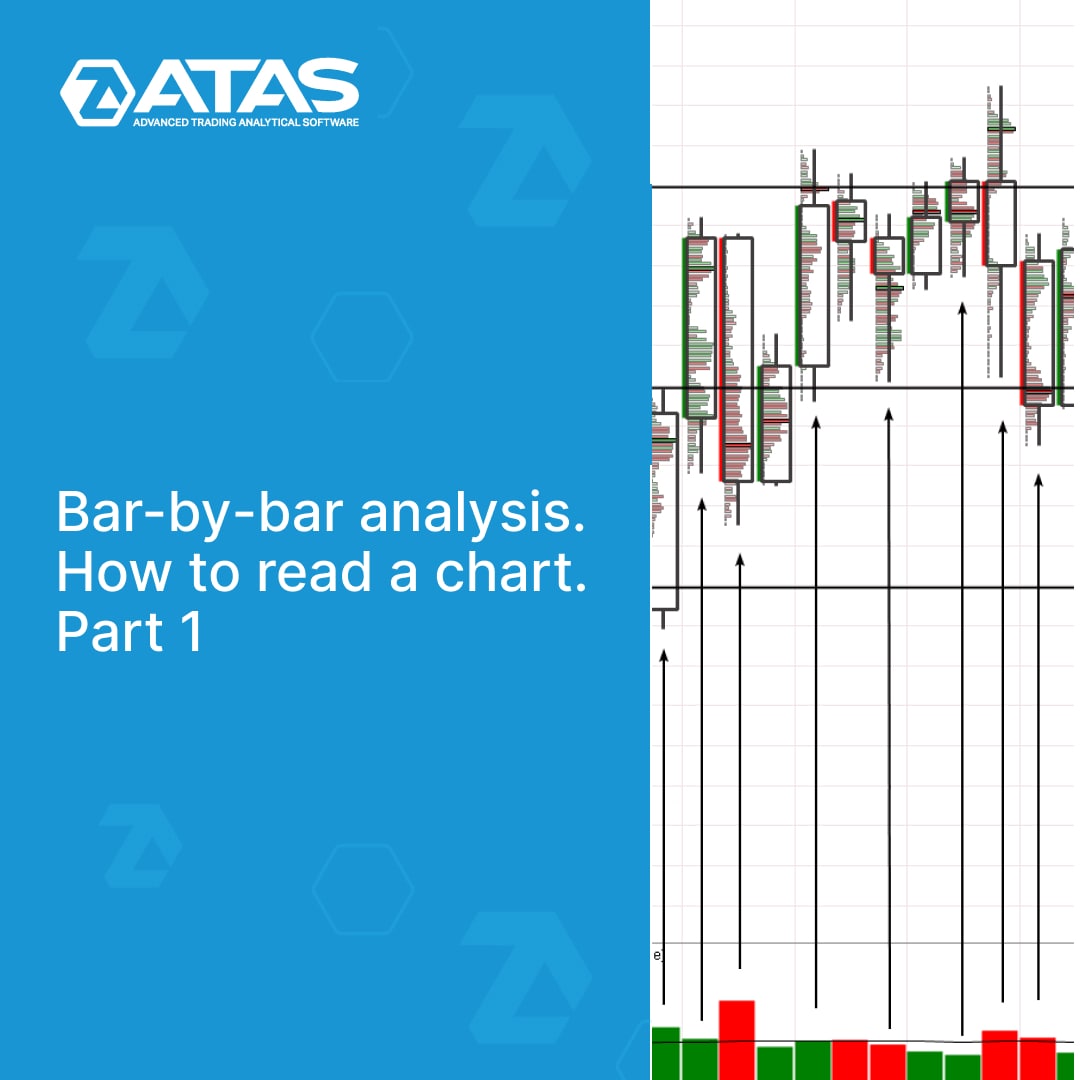
Bar-by-bar analysis is a complex approach aimed at a deep understanding of the market situation. It makes the most of the information available on the chart.
In our new article at the link https://bit.ly/3AQf1f9, we will try to turn attention to this method by giving several examples of bar chart reading.
Find out in detail:
👉What bar-by-bar analysis is;
👉Advantages and disadvantages of the method;
👉Books about bar-by-bar analysis;
👉Principles of reading a chart;
👉Examples of reading the market using bar-by-bar analysis in the bitcoin market.
Stay tuned for our blog updates so that you do not miss the next article in the series. It will give examples of bar-by-bar analysis of futures charts from the CME exchange.
Support service bot
Chat group for communication
In our new article at the link https://bit.ly/3AQf1f9, we will try to turn attention to this method by giving several examples of bar chart reading.
Find out in detail:
👉What bar-by-bar analysis is;
👉Advantages and disadvantages of the method;
👉Books about bar-by-bar analysis;
👉Principles of reading a chart;
👉Examples of reading the market using bar-by-bar analysis in the bitcoin market.
Stay tuned for our blog updates so that you do not miss the next article in the series. It will give examples of bar-by-bar analysis of futures charts from the CME exchange.
Support service bot
Chat group for communication
👍3
TRADE ON FTX WITH ATAS
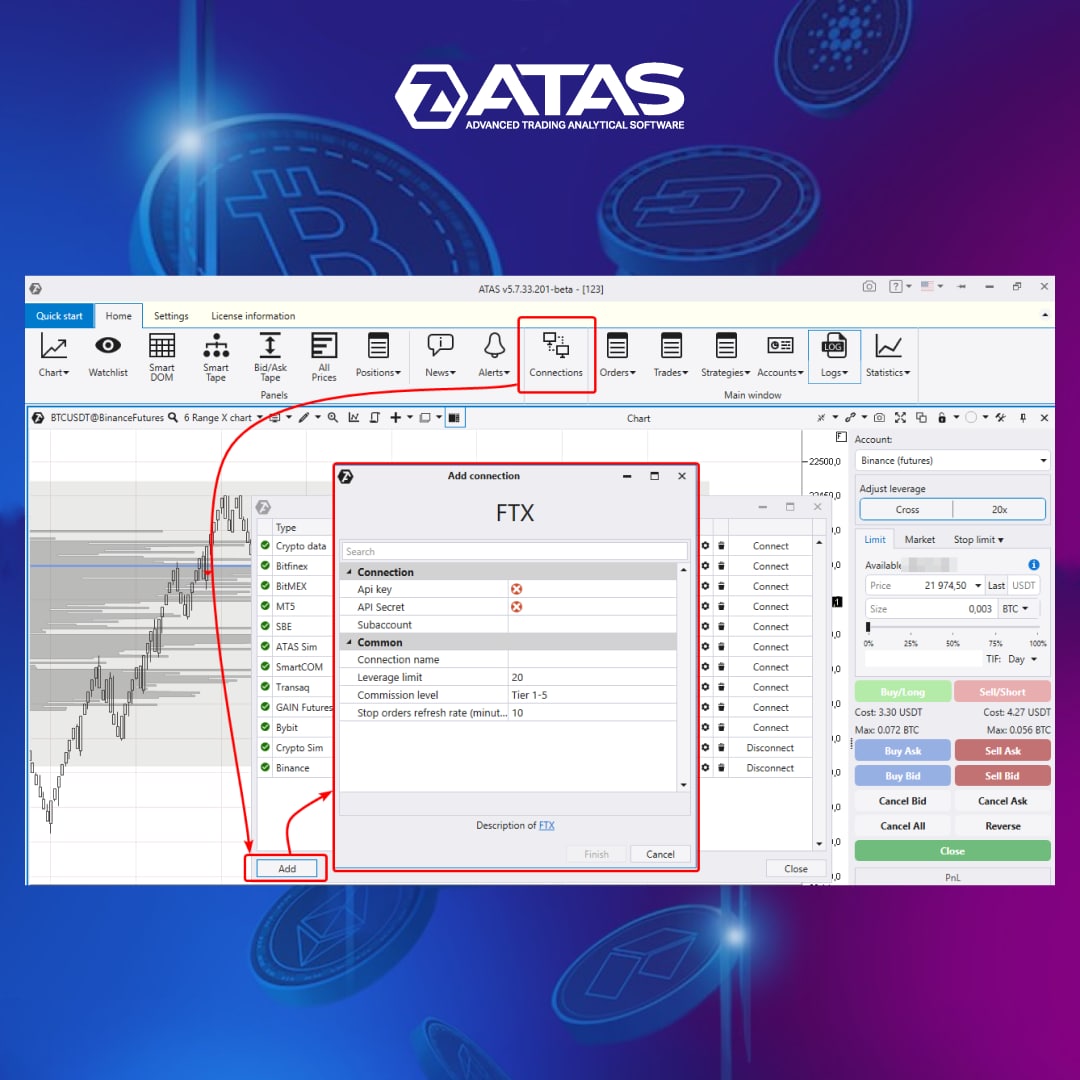
Due to numerous requests, a connection to the FTX cryptocurrency exchange has become available in the latest update of the ATAS trading and analytical platform. FTX is an exchange where assets worth over $10 billion are traded per day. Now you can use powerful features of the professional ATAS platform for FTX instruments.
The connection is established according to the standard scheme:
✅First of all, you must have a registered account on the FTX exchange. Create a new connection in the API section to get an API Key and API Secret.
✅Then, add a new connection (as shown in the screenshot) in the ATAS platform and paste the given API Key and API Secret.
If you have any connection problems, contact the company's support service.
We wish you successful trading on the FTX cryptocurrency exchange with the ATAS platform!
Support service bot
Chat group for communication
Due to numerous requests, a connection to the FTX cryptocurrency exchange has become available in the latest update of the ATAS trading and analytical platform. FTX is an exchange where assets worth over $10 billion are traded per day. Now you can use powerful features of the professional ATAS platform for FTX instruments.
The connection is established according to the standard scheme:
✅First of all, you must have a registered account on the FTX exchange. Create a new connection in the API section to get an API Key and API Secret.
✅Then, add a new connection (as shown in the screenshot) in the ATAS platform and paste the given API Key and API Secret.
If you have any connection problems, contact the company's support service.
We wish you successful trading on the FTX cryptocurrency exchange with the ATAS platform!
Support service bot
Chat group for communication
👍5🔥3
NEW FUNCTIONALITY OF CHART TRADER
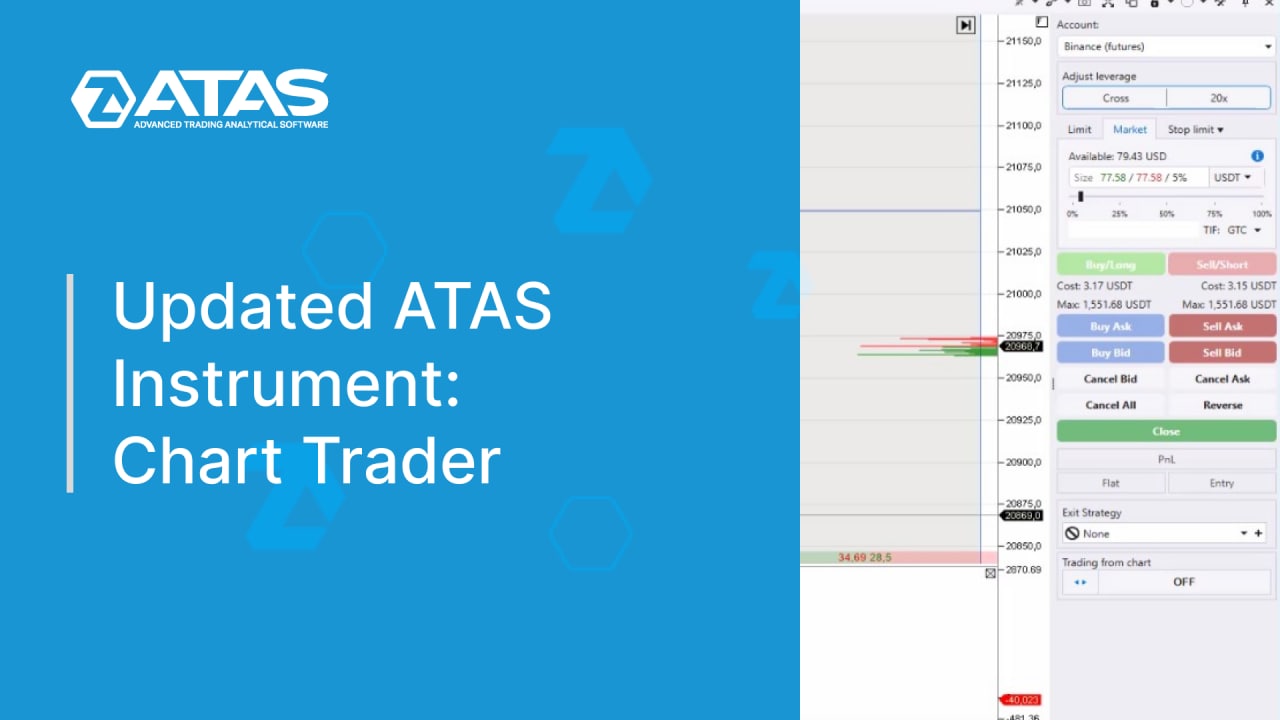
A few days ago we told you about the recent update. It made the platform even more easy-to-use and functional. One of the most important achievements of all new versions since 5.7.33 is the improved Chart Trader interface.
🎥 You will find a detailed guide to new features and settings of the trading panel in the following video: https://youtu.be/kGrBshH5Crs
Support service bot
Chat group for communication
A few days ago we told you about the recent update. It made the platform even more easy-to-use and functional. One of the most important achievements of all new versions since 5.7.33 is the improved Chart Trader interface.
🎥 You will find a detailed guide to new features and settings of the trading panel in the following video: https://youtu.be/kGrBshH5Crs
Support service bot
Chat group for communication
👍5🔥5
WHAT IS VSA DISTRIBUTION
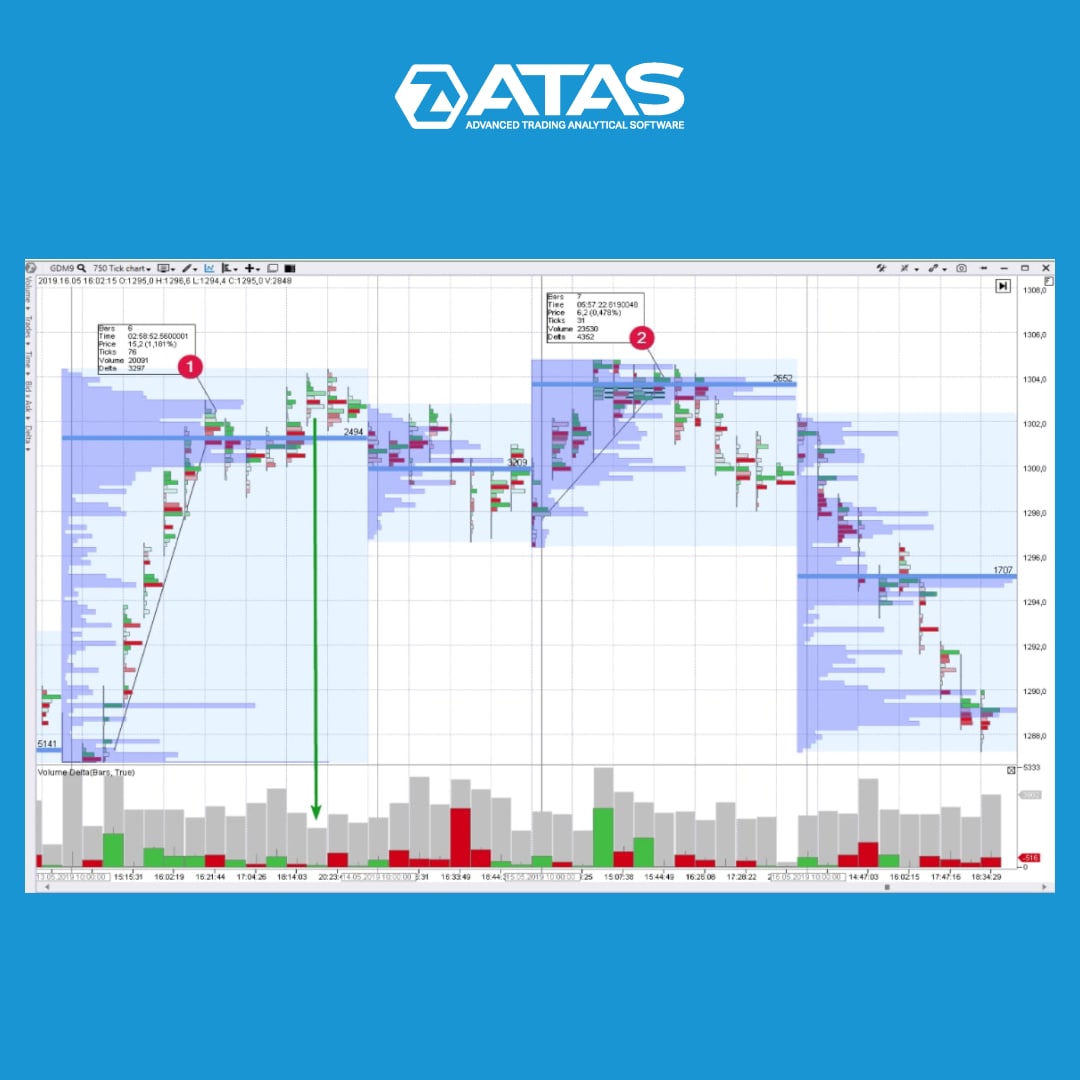
Distribution is a trading range at the market highs in which a financial instrument changes its owner. As a rule, the major interest (insider, smart money or composite operator) uses the current market situation in order to distribute the asset they own at high prices.
The general features are the following:
👉 An extremely powerful upward impulse passes at the beginning of the distribution area. Usually it is accompanied with good news in the media. A major player sort of advertises stock/futures/currency in order to make minor players snap the instrument up like hot cakes. From the VSA point of view, an analyst registers the buying climax and/or the End of Rising Market.
👉 Then the buyers’ pressure exhausts. The upward waves become less powerful. New highs are just a situational overrun of previous records. The major player provides false support to the market only to buy time and sell more.
👉 Downward movement starts on the growing volume (Selling Pressure) after the final false upward movement (Upthrust) and is accompanied with weak rallies (No Demand).
👉 As for the stock market, the stock becomes weaker than the index.
Find more information about VSA in our blog at the link in a bio.
Support service bot
Chat group for communication
Distribution is a trading range at the market highs in which a financial instrument changes its owner. As a rule, the major interest (insider, smart money or composite operator) uses the current market situation in order to distribute the asset they own at high prices.
The general features are the following:
👉 An extremely powerful upward impulse passes at the beginning of the distribution area. Usually it is accompanied with good news in the media. A major player sort of advertises stock/futures/currency in order to make minor players snap the instrument up like hot cakes. From the VSA point of view, an analyst registers the buying climax and/or the End of Rising Market.
👉 Then the buyers’ pressure exhausts. The upward waves become less powerful. New highs are just a situational overrun of previous records. The major player provides false support to the market only to buy time and sell more.
👉 Downward movement starts on the growing volume (Selling Pressure) after the final false upward movement (Upthrust) and is accompanied with weak rallies (No Demand).
👉 As for the stock market, the stock becomes weaker than the index.
Find more information about VSA in our blog at the link in a bio.
Support service bot
Chat group for communication
👍7
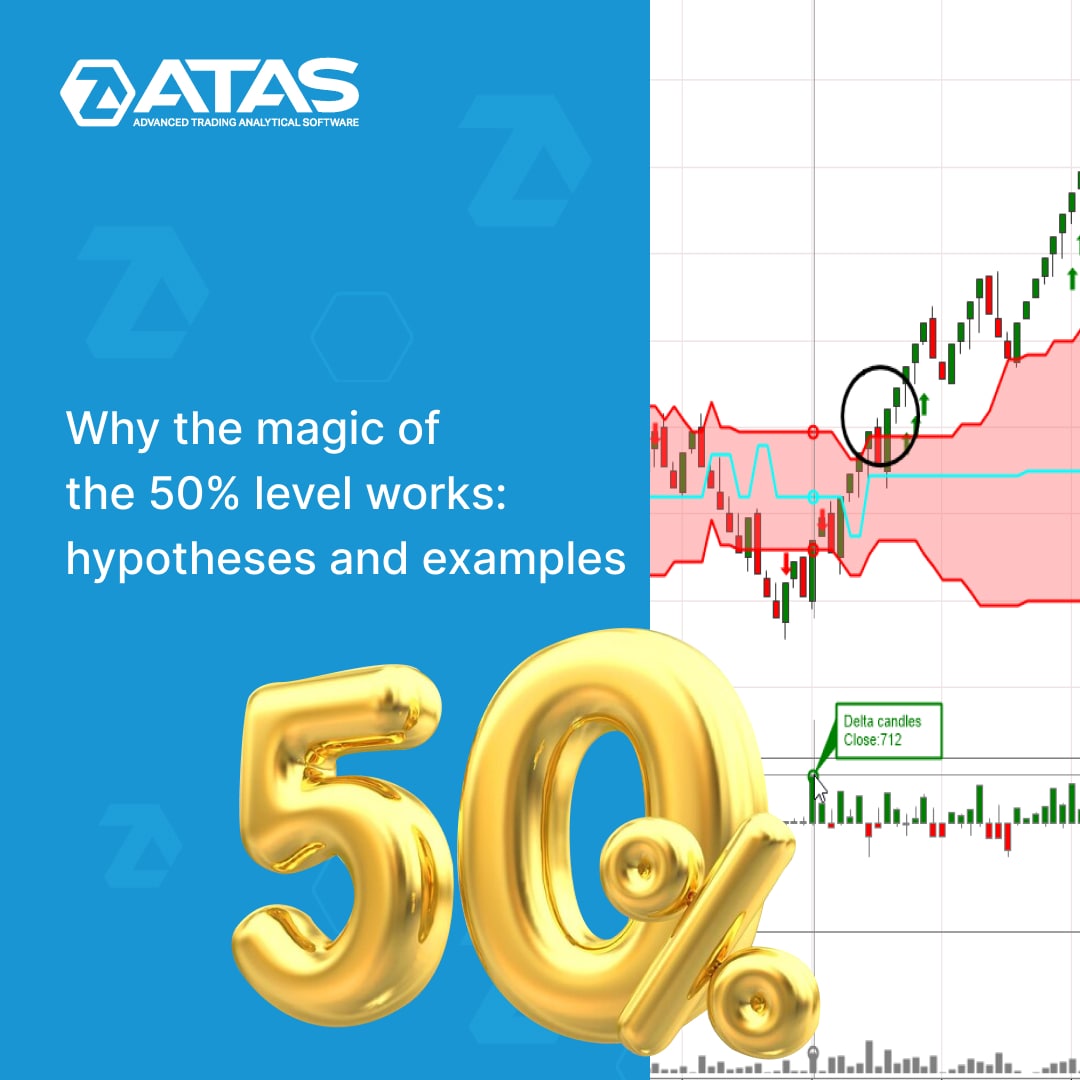
50% is a simple technique that can be used even by a beginner trader. At the same time, the professionals’ experience confirms that it is very effective.
By using 50% retracements, traders can find entry and exit points, improve the accuracy of trading decisions and reduce risks on any time frames.
We have collected comprehensive information about the 50% level in a new article in our blog.
👉 what is the 50% retracement;
👉 how traders should use retracements to make a profit;
👉 thoughts on the nature of the phenomenon;
👉 why the 50% level works – three hypotheses.
Find out in detail at the link https://bit.ly/3Buarn6
The article has detailed chart examples. Read for yourself and share with other traders.
Support service bot
Chat group for communication
By using 50% retracements, traders can find entry and exit points, improve the accuracy of trading decisions and reduce risks on any time frames.
We have collected comprehensive information about the 50% level in a new article in our blog.
👉 what is the 50% retracement;
👉 how traders should use retracements to make a profit;
👉 thoughts on the nature of the phenomenon;
👉 why the 50% level works – three hypotheses.
Find out in detail at the link https://bit.ly/3Buarn6
The article has detailed chart examples. Read for yourself and share with other traders.
Support service bot
Chat group for communication
👍5
HOW THE US FINANCIAL MARKET IS REGULATED
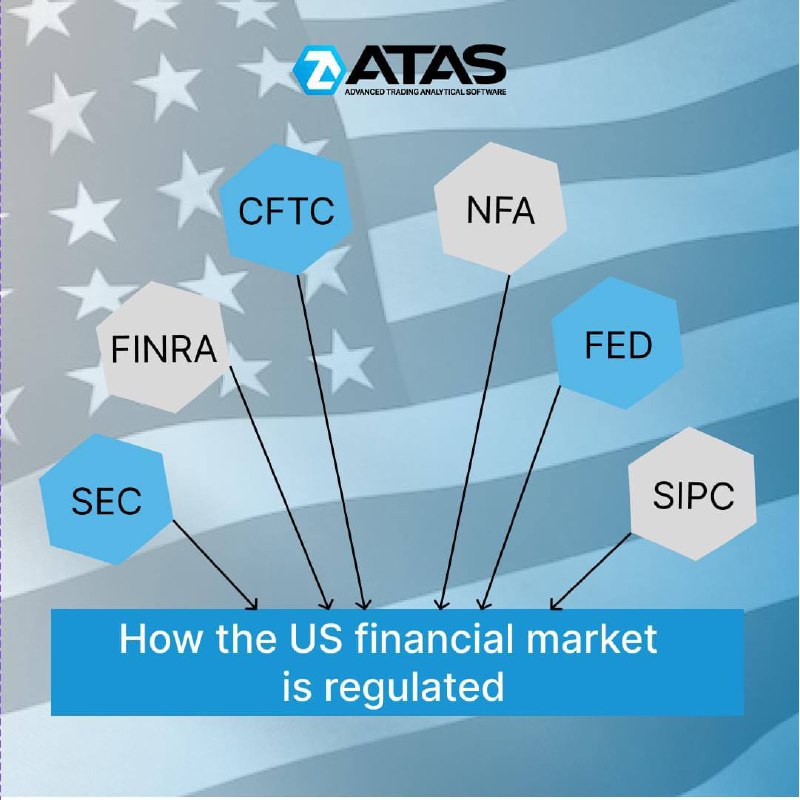
Financial Supervisory Authorities (regulators) ensure that market participants do not violate the rules, and that trading is carried out honestly and transparently.
For example, trading in the US financial markets is regulated by:
👉 SEC (The United States Securities and Exchange Commission, founded in 1934 under President Roosevelt) is an agency of the US government. It is the main body that oversees and regulates the US securities market.
👉 FINRA (Financial Industry Regulatory Authority) – is a private American corporation that enforces the rules of trading in the over-the-counter market (OTC market). It was created in 1939 by the decision of the US Congress.
👉 CFTC (Commodity Futures Trading Commission). The central government agency of the USA that ensures the enforcement of the Commodity Exchange Act.
👉 NFA is the National Futures Association founded in 1984. It is a regulator in the derivatives markets, including the market of exchange-traded index futures. The NFA is funded by membership and evaluation fees and membership is mandatory for many market participants.
👉 FED (Federal Reserve System) is not a classic regulator, but the relevant rules approved by the Fed must be followed by financial market participants.
👉 SIPC is the Securities Investor Protection Corporation. It was created under the Securities Investor Protection Act (SIPA) in 1970. SIPC is also not exactly a regulator, it is controlled by the Securities and Exchange Commission. The purpose of SIPC is to expedite the recovery and return of client’s missing assets during the liquidation of a bankrupt investment company.
Read the article to learn more about the specifics of US stock trading: https://bit.ly/3xWs4ez
Support service bot
Chat group for communication
Financial Supervisory Authorities (regulators) ensure that market participants do not violate the rules, and that trading is carried out honestly and transparently.
For example, trading in the US financial markets is regulated by:
👉 SEC (The United States Securities and Exchange Commission, founded in 1934 under President Roosevelt) is an agency of the US government. It is the main body that oversees and regulates the US securities market.
👉 FINRA (Financial Industry Regulatory Authority) – is a private American corporation that enforces the rules of trading in the over-the-counter market (OTC market). It was created in 1939 by the decision of the US Congress.
👉 CFTC (Commodity Futures Trading Commission). The central government agency of the USA that ensures the enforcement of the Commodity Exchange Act.
👉 NFA is the National Futures Association founded in 1984. It is a regulator in the derivatives markets, including the market of exchange-traded index futures. The NFA is funded by membership and evaluation fees and membership is mandatory for many market participants.
👉 FED (Federal Reserve System) is not a classic regulator, but the relevant rules approved by the Fed must be followed by financial market participants.
👉 SIPC is the Securities Investor Protection Corporation. It was created under the Securities Investor Protection Act (SIPA) in 1970. SIPC is also not exactly a regulator, it is controlled by the Securities and Exchange Commission. The purpose of SIPC is to expedite the recovery and return of client’s missing assets during the liquidation of a bankrupt investment company.
Read the article to learn more about the specifics of US stock trading: https://bit.ly/3xWs4ez
Support service bot
Chat group for communication
👍7
HOW TO FIND TRACES OF “SMART MONEY” USING THE CLUSTER SEARCH INDICATOR IN ATAS
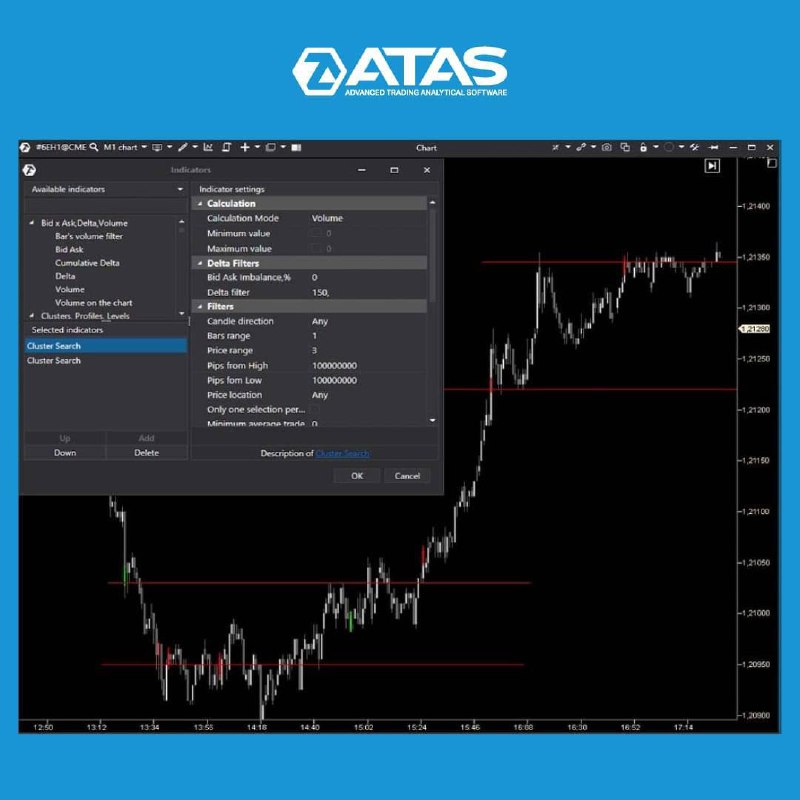
It is very important for traders to decide at what levels they will trade. We are going to look at big trades and the limit side of the trade using the Cluster Search indicator.
We are going to use two Cluster Search indicators to find levels where a fierce battle between buyers and sellers took place.
Market orders are often absorbed by limit orders at the end of a focused movement and as a result the price reverses. These are the levels that the Cluster Search indicator can detect. If you want to separate the European and American sessions, it is necessary to use four indicators. Two for each session – one for buys and the other one for sells.
Learn more about the cluster analysis and Cluster Search indicator at the link: https://bit.ly/3rts5TE
Support service bot
Chat group for communication
It is very important for traders to decide at what levels they will trade. We are going to look at big trades and the limit side of the trade using the Cluster Search indicator.
We are going to use two Cluster Search indicators to find levels where a fierce battle between buyers and sellers took place.
Market orders are often absorbed by limit orders at the end of a focused movement and as a result the price reverses. These are the levels that the Cluster Search indicator can detect. If you want to separate the European and American sessions, it is necessary to use four indicators. Two for each session – one for buys and the other one for sells.
Learn more about the cluster analysis and Cluster Search indicator at the link: https://bit.ly/3rts5TE
Support service bot
Chat group for communication
👍5🔥3
ATAS IS CONQUERING THE WORLD OF TRADING
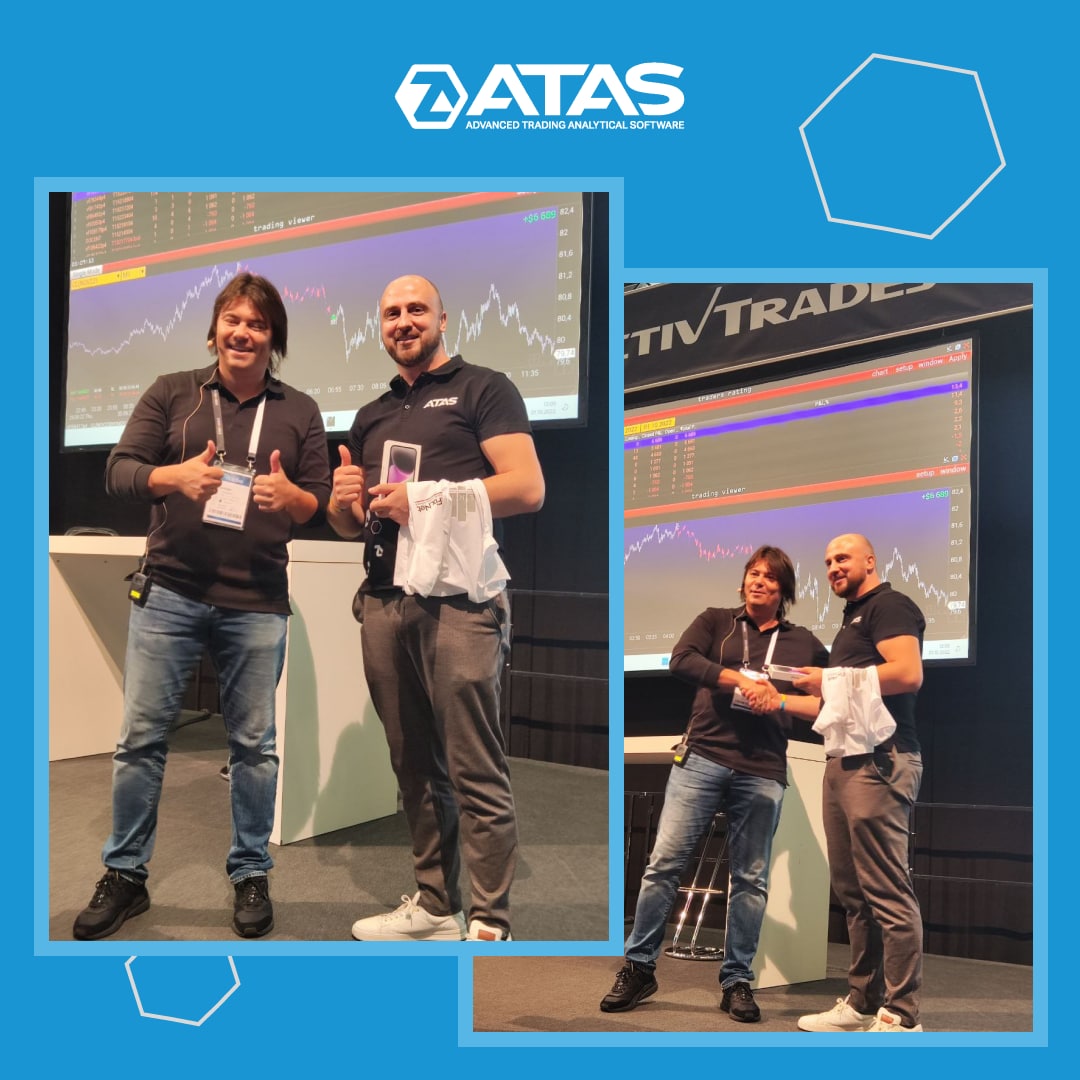
Dear friends, we would like to share a photo report from Frankfurt am Main, Germany, where the World of Trading conference was held.
WoT is an annual prestigious exhibition and conference that brings together leading representatives of the trade industry in Frankfurt am Main. This time, representatives from more than 60 stock exchanges, brokers, software vendors, educational companies, specialized publishers and online resources met to exchange ideas.
The ATAS team presented the functionality of the platform to the public and received a lot of positive feedback! This motivates us to develop, improve trading instruments and the quality of service for our clients.
Moreover, we went even further and won a trading competition organized by colleagues from VolFix. The ATAS team is always ready to demonstrate the analytical power of the platform in practice! As Vasyl Gryshchenko, the Founder and CEO of VolFix, noted: VOLUME ALWAYS WINS!
Dear friends, we would like to share a photo report from Frankfurt am Main, Germany, where the World of Trading conference was held.
WoT is an annual prestigious exhibition and conference that brings together leading representatives of the trade industry in Frankfurt am Main. This time, representatives from more than 60 stock exchanges, brokers, software vendors, educational companies, specialized publishers and online resources met to exchange ideas.
The ATAS team presented the functionality of the platform to the public and received a lot of positive feedback! This motivates us to develop, improve trading instruments and the quality of service for our clients.
Moreover, we went even further and won a trading competition organized by colleagues from VolFix. The ATAS team is always ready to demonstrate the analytical power of the platform in practice! As Vasyl Gryshchenko, the Founder and CEO of VolFix, noted: VOLUME ALWAYS WINS!
👏8👍3
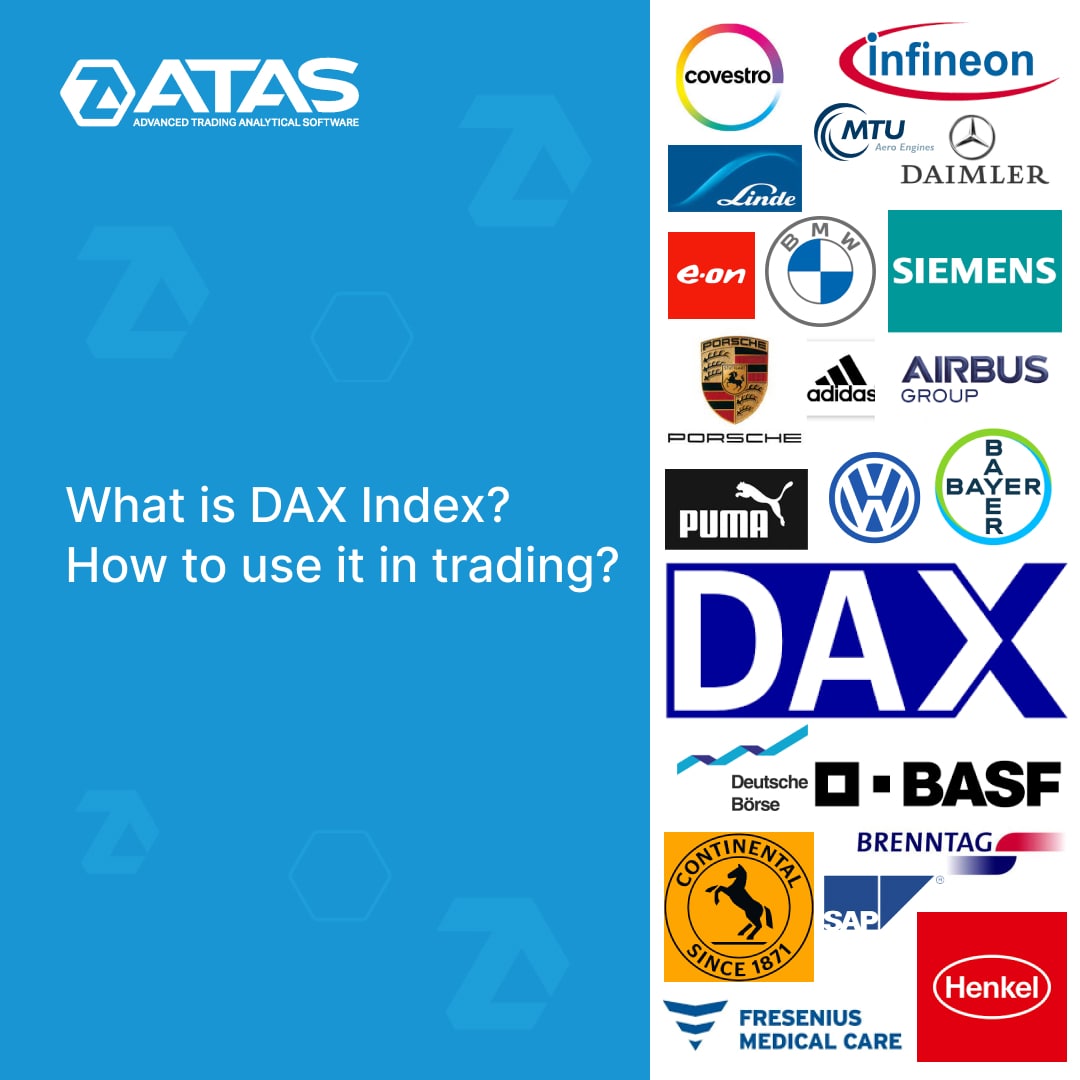
In the stock market October is known as a "bear market killer". According to statistics, October is the month when prolonged declines of the stock market usually end.
There is every reason to believe that the beginning of October will continue the tradition. We can see upward reversals on the charts of all major stock indices, including the DAX 🇩🇪.
If you do not know what the DAX is, a new article will give you the answers: https://bit.ly/3SY8FSO
Support service bot
Chat group for communication
There is every reason to believe that the beginning of October will continue the tradition. We can see upward reversals on the charts of all major stock indices, including the DAX 🇩🇪.
If you do not know what the DAX is, a new article will give you the answers: https://bit.ly/3SY8FSO
Support service bot
Chat group for communication
👍4❤3
ABOUT CLEARING IN LAYMAN’S TERMS
Clearing on the exchange is the time for non-cash settlements between the accounts of market participants.
👉 To go through clearing, you must have funds on your trading account to ensure the result of the transaction (if it is negative) and a security margin, which is set not by the broker but by the exchange itself. If the time of clearing has come but you do not have enough free funds on your account to ensure an open position when transferring through clearing, the position will be closed at an average daily price which is much worse than the market price, and a fine will also be imposed. Therefore, be careful when transferring a position through clearing!
☝️ Here is a quick reference that will help you not to get confused in terms:
Intraday Margin is set by the broker intraday.
Initial Margin is a sum on the balance that is necessary for transferring the contract through the night on the FIRST day!
Maintenance Margin – is a sum on the balance that is necessary for transferring the position overnight on the second and subsequent days.
To learn more about the margin required to transfer a clearing position, read the article:
https://bit.ly/3yGCuiV
Support service bot
Chat group for communication
Clearing on the exchange is the time for non-cash settlements between the accounts of market participants.
👉 To go through clearing, you must have funds on your trading account to ensure the result of the transaction (if it is negative) and a security margin, which is set not by the broker but by the exchange itself. If the time of clearing has come but you do not have enough free funds on your account to ensure an open position when transferring through clearing, the position will be closed at an average daily price which is much worse than the market price, and a fine will also be imposed. Therefore, be careful when transferring a position through clearing!
☝️ Here is a quick reference that will help you not to get confused in terms:
Intraday Margin is set by the broker intraday.
Initial Margin is a sum on the balance that is necessary for transferring the contract through the night on the FIRST day!
Maintenance Margin – is a sum on the balance that is necessary for transferring the position overnight on the second and subsequent days.
To learn more about the margin required to transfer a clearing position, read the article:
https://bit.ly/3yGCuiV
Support service bot
Chat group for communication
👍4
Fall 2022 could be an important period for crypto firm Ripple Labs, which has been in a state of court with the SEC regulator for about 2 years now. There is news that the court may decide in favor of Ripple. There will be several important dates before the end of the year, and the head of Ripple Labs, Brad Garlinghouse, believes that the lawsuit will end in early 2023.
Against the backdrop of this news, the XRP/USD rate rose strongly in September, attracting traders. Is it not in a trap?
A new article on our blog tells about what XRP is: https://bit.ly/3VNoXA2
Support service bot
Chat group for communication
Against the backdrop of this news, the XRP/USD rate rose strongly in September, attracting traders. Is it not in a trap?
A new article on our blog tells about what XRP is: https://bit.ly/3VNoXA2
Support service bot
Chat group for communication
👍6👏1
RISK CALCULATION
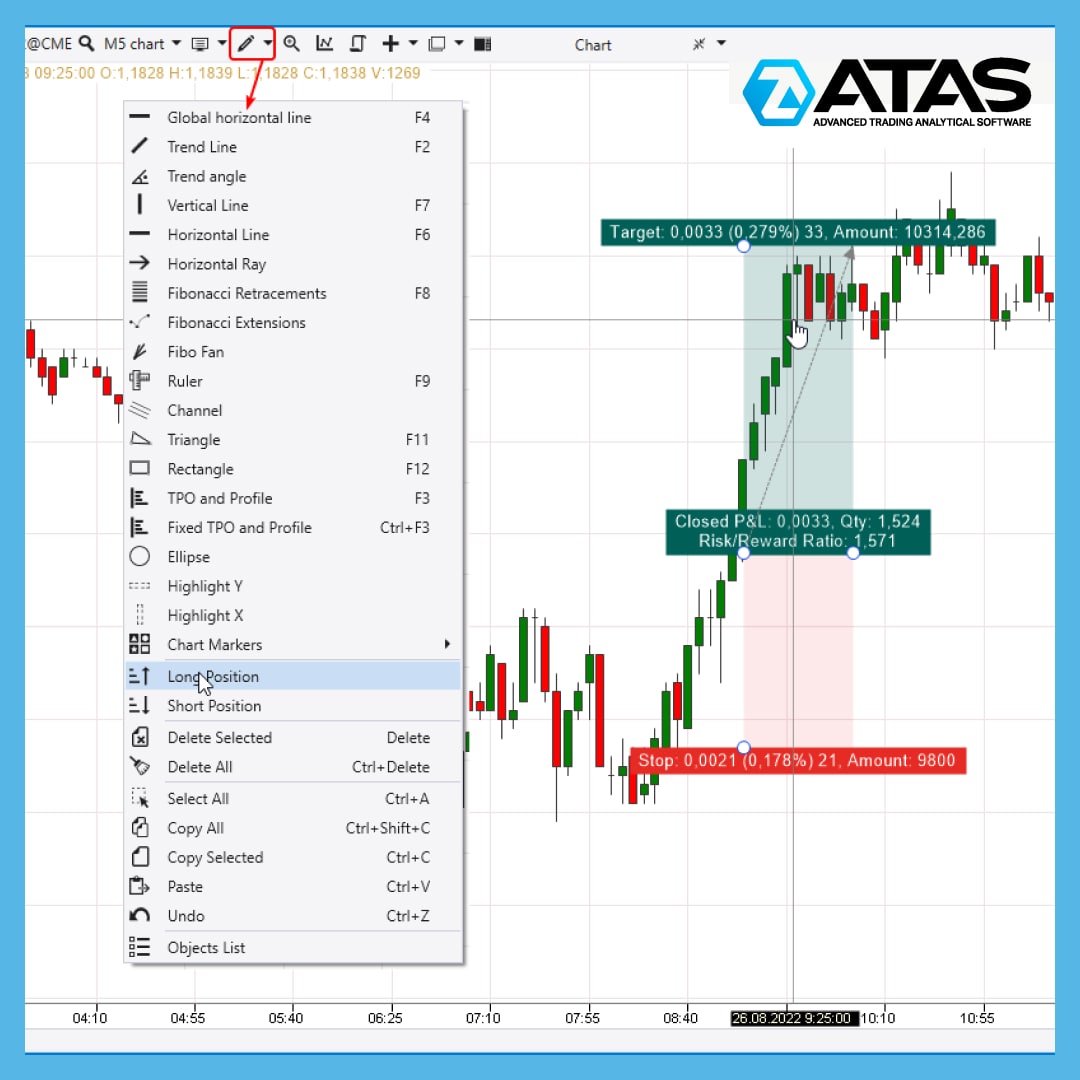
Risk Calculation is a super useful feature for risk management.
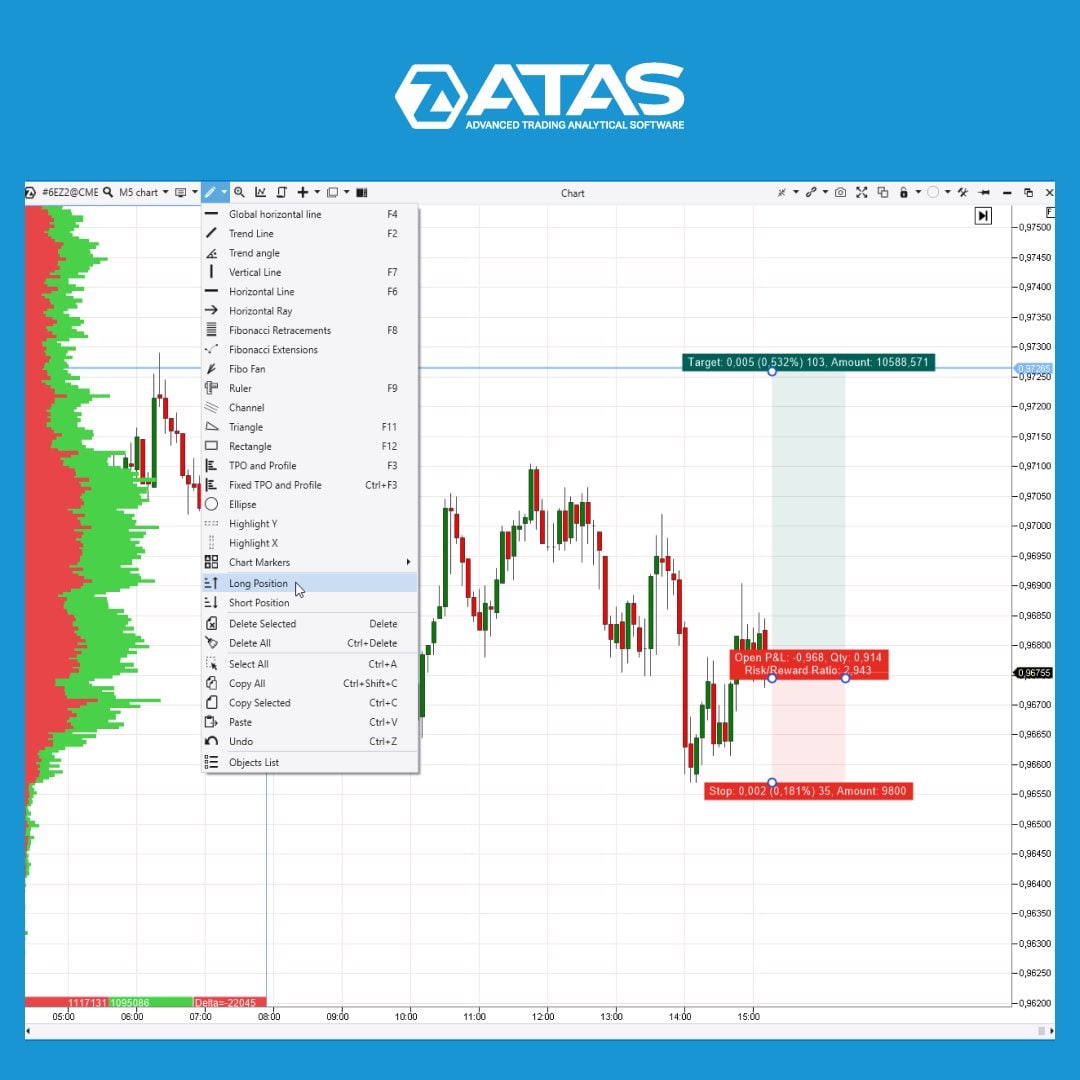
Are you planning to open a purchase? Select Long Position from the drawing tools menu → a tool will appear on the chart to calculate the ratio of the possible reward to the risk taken.
Set levels:
👉 entering a position;
👉 take profit level;
👉 stop loss level.
The ATAS platform will calculate the Risk:Reward ratio for you. It is desirable that it exceeds the ratio of 1:2.
This tool will also be useful for developing strategies based on historical data.
Do not neglect routine, but vital calculations. Keep risks under control! The ATAS platform will help you with this.
Read more life hacks from professional traders in our blog https://bit.ly/3DCHA2t
Support service bot
Chat group for communication
Risk Calculation is a super useful feature for risk management.
Are you planning to open a purchase? Select Long Position from the drawing tools menu → a tool will appear on the chart to calculate the ratio of the possible reward to the risk taken.
Set levels:
👉 entering a position;
👉 take profit level;
👉 stop loss level.
The ATAS platform will calculate the Risk:Reward ratio for you. It is desirable that it exceeds the ratio of 1:2.
This tool will also be useful for developing strategies based on historical data.
Do not neglect routine, but vital calculations. Keep risks under control! The ATAS platform will help you with this.
Read more life hacks from professional traders in our blog https://bit.ly/3DCHA2t
Support service bot
Chat group for communication
👍5🔥2
Fall of 2022. Leading cryptocurrency exchange Bitget announces a partnership with Lionel Messi, the legendary Argentine footballer and winner of a record seven Ballon d'Or awards.
Meanwhile, the ATAS team announces that a connector to the Bitget exchange has been added to the platform. Now ATAS users can use powerful volume analysis instruments to trade on another promising cryptocurrency exchange.
Detailed instructions for connecting to Bitget can be found in the article at the link: https://bit.ly/3SQFErm
Share the news with those who are interested in professional cryptocurrency trading. The ATAS platform expands the opportunities for crypto traders!
Support service bot
Chat group for communication
Meanwhile, the ATAS team announces that a connector to the Bitget exchange has been added to the platform. Now ATAS users can use powerful volume analysis instruments to trade on another promising cryptocurrency exchange.
Detailed instructions for connecting to Bitget can be found in the article at the link: https://bit.ly/3SQFErm
Share the news with those who are interested in professional cryptocurrency trading. The ATAS platform expands the opportunities for crypto traders!
Support service bot
Chat group for communication
🔥3👏2👍1
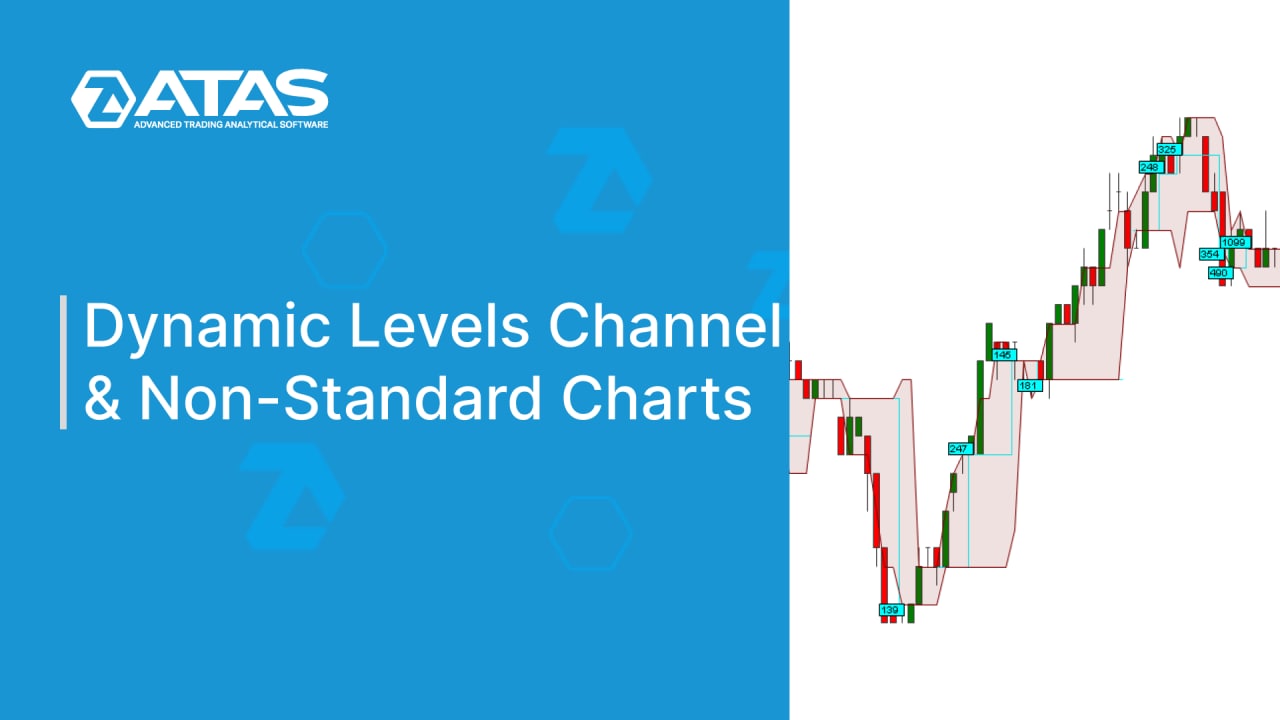
In this video we’ll discuss how to apply such a useful and informative indicator as the Dynamic Levels Channel. And what’s more important, how to use it on non-standard charts.
Watch video - https://youtu.be/CwRr1iBROTQ
Support service bot
Chat group for communication
Watch video - https://youtu.be/CwRr1iBROTQ
Support service bot
Chat group for communication
🔥6👍1
⚡️Market Replay has appeared in the ATAS platform! ⚡️
It allows you to replay history and trade as if the charts were being formed in real time. This is a universal simulator that uses tick history of more than 10 exchanges to recreate market situations as realistically as possible.
Why Market Replay ATAS is cooler than its alternatives
We are not the first to turn to historical data. But Market Replay is implemented much better in the ATAS platform than any other instrument you have worked with:
💥Detailed history including unique Level II data. Only in the Market Replay of the ATAS platform you can use the advantages of the DOM, market depth, and limit orders.
💥Data is downloaded directly from the server. There is no need to download archives with history, fill up your drive space, and synchronize them with the trading simulator.
💥You can use history at any time. There is no need to keep your computer turned on and wait for hours for data to accumulate in real time. Just choose the date you want and start trading!
What special features are waiting for you in Market Replay
Market Replay will be of interest to both pros and beginner traders. It provides more opportunities than testing strategies on a demo account in real time.
You are not stuck in the current market situation – you can travel back to any day in the history.
Flexible speed settings save you time – use fast forward to see the result of a trade almost right away.
When you trade on history, you do not risk real capital!
✅Set the time range - choose the start and end dates of the trading.
✅Explore the behavior of different markets: crypto, futures, stocks.
✅Make long/short trades using limit/market orders without risking real money.
✅Analyze the results of your trading in the statistics window.
✅Control the playback speed: slow down the drawing of the chart to 0.1x or speed up the visualization by 50x or more.
✅Use your favorite instruments: Smart DOM, Scalping DOM, Smart Tape, Bid/Ask tape, all available indicators.
✅Pause Replay at any time to track the logic of asset movement in the market.
Many traders spend their whole lives and impressive sums of money to find the Holy Grail. ATAS saves you years and money! Travel back in time with Market Replay to simulate as many historical trading cases as possible and prepare for the challenges of the real market.
Details at the link https://bit.ly/market_replay
Support service bot
Chat group for communication
It allows you to replay history and trade as if the charts were being formed in real time. This is a universal simulator that uses tick history of more than 10 exchanges to recreate market situations as realistically as possible.
Why Market Replay ATAS is cooler than its alternatives
We are not the first to turn to historical data. But Market Replay is implemented much better in the ATAS platform than any other instrument you have worked with:
💥Detailed history including unique Level II data. Only in the Market Replay of the ATAS platform you can use the advantages of the DOM, market depth, and limit orders.
💥Data is downloaded directly from the server. There is no need to download archives with history, fill up your drive space, and synchronize them with the trading simulator.
💥You can use history at any time. There is no need to keep your computer turned on and wait for hours for data to accumulate in real time. Just choose the date you want and start trading!
What special features are waiting for you in Market Replay
Market Replay will be of interest to both pros and beginner traders. It provides more opportunities than testing strategies on a demo account in real time.
You are not stuck in the current market situation – you can travel back to any day in the history.
Flexible speed settings save you time – use fast forward to see the result of a trade almost right away.
When you trade on history, you do not risk real capital!
✅Set the time range - choose the start and end dates of the trading.
✅Explore the behavior of different markets: crypto, futures, stocks.
✅Make long/short trades using limit/market orders without risking real money.
✅Analyze the results of your trading in the statistics window.
✅Control the playback speed: slow down the drawing of the chart to 0.1x or speed up the visualization by 50x or more.
✅Use your favorite instruments: Smart DOM, Scalping DOM, Smart Tape, Bid/Ask tape, all available indicators.
✅Pause Replay at any time to track the logic of asset movement in the market.
Many traders spend their whole lives and impressive sums of money to find the Holy Grail. ATAS saves you years and money! Travel back in time with Market Replay to simulate as many historical trading cases as possible and prepare for the challenges of the real market.
Details at the link https://bit.ly/market_replay
Support service bot
Chat group for communication
👍11🔥3
DRAWING TOOL FOR DEAL PLANNING
We share a life hack for planning trading operations in the ATAS platform. Applying it is very simple:
👉 From the drawing menu, select Long Position (if you plan to go long) or Short Position (if you plan to go short).
👉On the chart, indicate the levels: where the position will be opened, where you plan to set stop loss and take profit.
👉The ATAS platform will calculate the ratio of accepted risk to potential profit – Risk:Reward Ratio.
In the tool settings, you can specify your account size, the maximum allowable risk relative to the account size (2% by default), and adjust the take profit and stop loss levels.
The platform will provide key figures for the planned deal. This will allow you to manage your capital more effectively and focus on analyzing volumes and searching for ideas, instead of being distracted by calculations.
What other drawing tools are there, what they can be useful for and how to set them up - read in the Knowledge Base.
Download the platform and enjoy all the benefits of trading in ATAS right now: http://bit.ly/3hI0s7L
Support service bot
Chat group for communication
We share a life hack for planning trading operations in the ATAS platform. Applying it is very simple:
👉 From the drawing menu, select Long Position (if you plan to go long) or Short Position (if you plan to go short).
👉On the chart, indicate the levels: where the position will be opened, where you plan to set stop loss and take profit.
👉The ATAS platform will calculate the ratio of accepted risk to potential profit – Risk:Reward Ratio.
In the tool settings, you can specify your account size, the maximum allowable risk relative to the account size (2% by default), and adjust the take profit and stop loss levels.
The platform will provide key figures for the planned deal. This will allow you to manage your capital more effectively and focus on analyzing volumes and searching for ideas, instead of being distracted by calculations.
What other drawing tools are there, what they can be useful for and how to set them up - read in the Knowledge Base.
Download the platform and enjoy all the benefits of trading in ATAS right now: http://bit.ly/3hI0s7L
Support service bot
Chat group for communication
👍6