
Dear Friends!
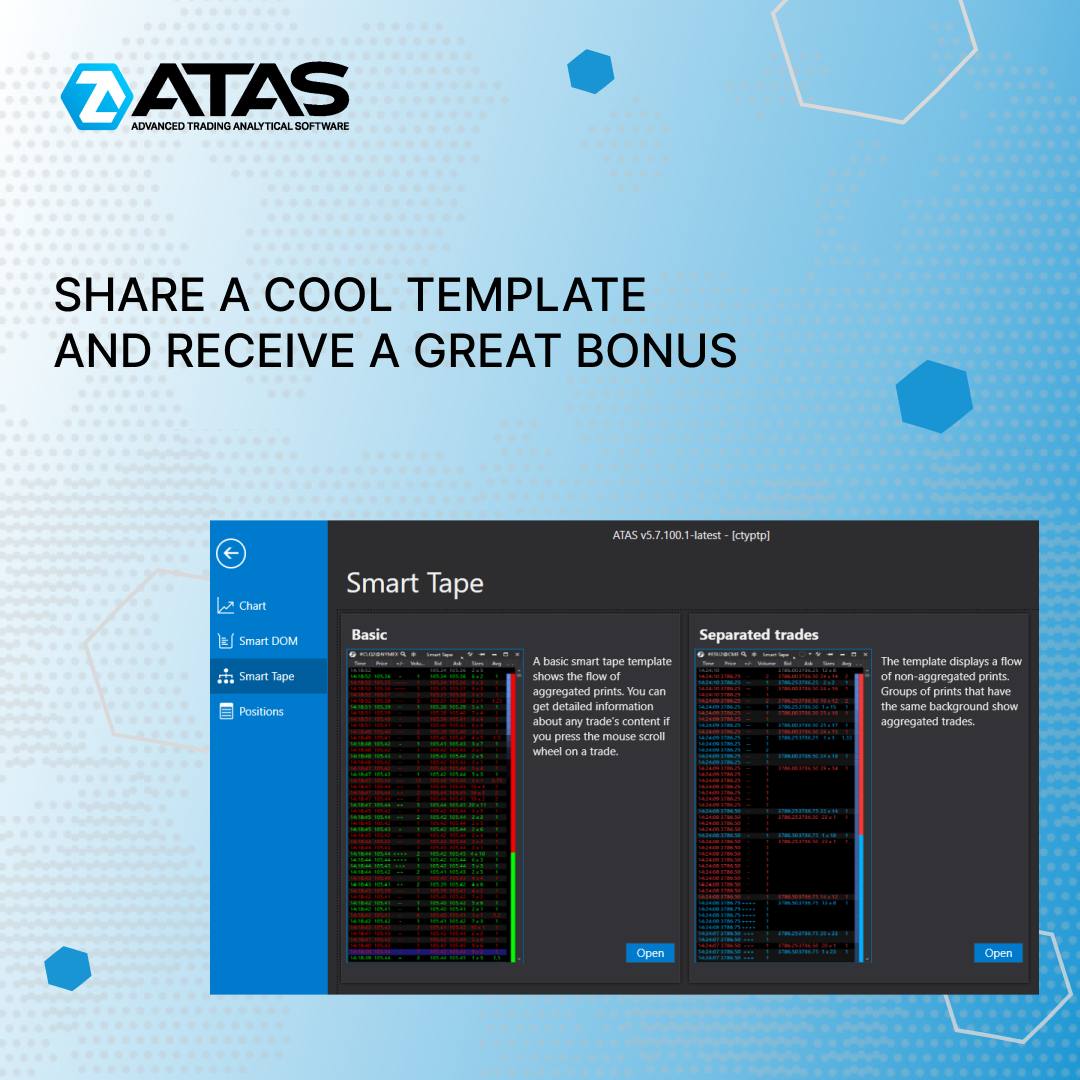
Meet the new ATAS functionality! Trading templates are collected in a single gallery from now on. Save time on choosing instruments for your trading model – use ready-made combinations of chart settings, the DOM, a smart tape, etc. Just use a suitable template and you instantly get a ready-made customized chart.
SHARE A COOL TEMPLATE AND RECEIVE A GREAT BONUS
One should take pride in selecting the ideal configuration of indicators or prints for the analysis of a trading model. Properly configured instruments increase the quality and efficiency of trading.
Would you like your work to be appreciated by other traders? Share your template options with other members of the ATAS community!
We will select the most useful templates and add them to the public gallery. And that is not all! The authors of the best templates will receive one additional month of free use of the platform as a thank-you for their contribution to the development of the community.
REQUIREMENTS FOR TEMPLATES:
👉Preview. Write a brief description of the template: why it is useful, what can be seen with it.
👉Nothing extra. The template should not be overloaded with indicators. We will not add templates that create a heavy load.
👉Visually convenient. Data should be displayed equally well in different chart modes: candlestick, bar, line, cluster.
Examples of using. Successful cases, detailed description or screenshots of how the template works (optional).
💪All templates undergo mandatory moderation before getting into the ATAS gallery. If your author’s template meets the specified criteria, it will soon appear in the ATAS public gallery.
Please send your templates to support@atas.net
Meet the new ATAS functionality! Trading templates are collected in a single gallery from now on. Save time on choosing instruments for your trading model – use ready-made combinations of chart settings, the DOM, a smart tape, etc. Just use a suitable template and you instantly get a ready-made customized chart.
SHARE A COOL TEMPLATE AND RECEIVE A GREAT BONUS
One should take pride in selecting the ideal configuration of indicators or prints for the analysis of a trading model. Properly configured instruments increase the quality and efficiency of trading.
Would you like your work to be appreciated by other traders? Share your template options with other members of the ATAS community!
We will select the most useful templates and add them to the public gallery. And that is not all! The authors of the best templates will receive one additional month of free use of the platform as a thank-you for their contribution to the development of the community.
REQUIREMENTS FOR TEMPLATES:
👉Preview. Write a brief description of the template: why it is useful, what can be seen with it.
👉Nothing extra. The template should not be overloaded with indicators. We will not add templates that create a heavy load.
👉Visually convenient. Data should be displayed equally well in different chart modes: candlestick, bar, line, cluster.
Examples of using. Successful cases, detailed description or screenshots of how the template works (optional).
💪All templates undergo mandatory moderation before getting into the ATAS gallery. If your author’s template meets the specified criteria, it will soon appear in the ATAS public gallery.
Please send your templates to support@atas.net
👍5
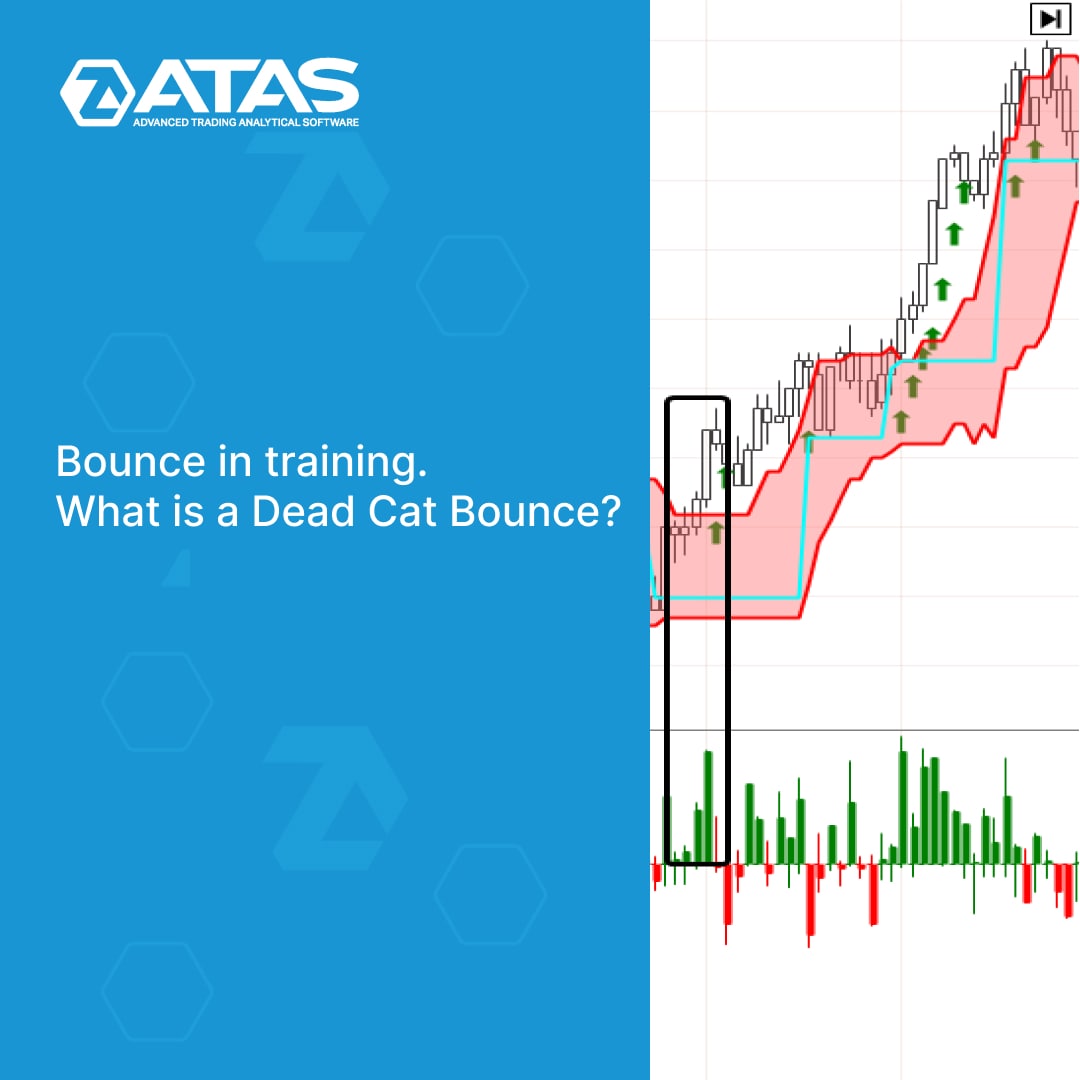
Bounces are a technical analysis pattern based on an upward price reversal from an existing support level. Bounces of various sizes occur in all markets every day.
How to trade bounces on the exchange? There are no easy tasks in trading, otherwise everyone would be millionaires. But professional indicators from the ATAS platform that are used for volume analysis help to solve such problems. A new article in our blog is about it.
Read in the article:
👉What are bounces, their advantages and disadvantages
👉Types of bounces
👉What is a dead cat bounce
The article contains real charts with examples of setups for trading bounces, each example is accompanied by a detailed description. Read and share with other traders.
Read full text at the link: https://bit.ly/3bdvW2A
Support service bot
Chat group for communication
How to trade bounces on the exchange? There are no easy tasks in trading, otherwise everyone would be millionaires. But professional indicators from the ATAS platform that are used for volume analysis help to solve such problems. A new article in our blog is about it.
Read in the article:
👉What are bounces, their advantages and disadvantages
👉Types of bounces
👉What is a dead cat bounce
The article contains real charts with examples of setups for trading bounces, each example is accompanied by a detailed description. Read and share with other traders.
Read full text at the link: https://bit.ly/3bdvW2A
Support service bot
Chat group for communication
👍4
USER-FRIENDLY INSTRUMENTS MANAGER
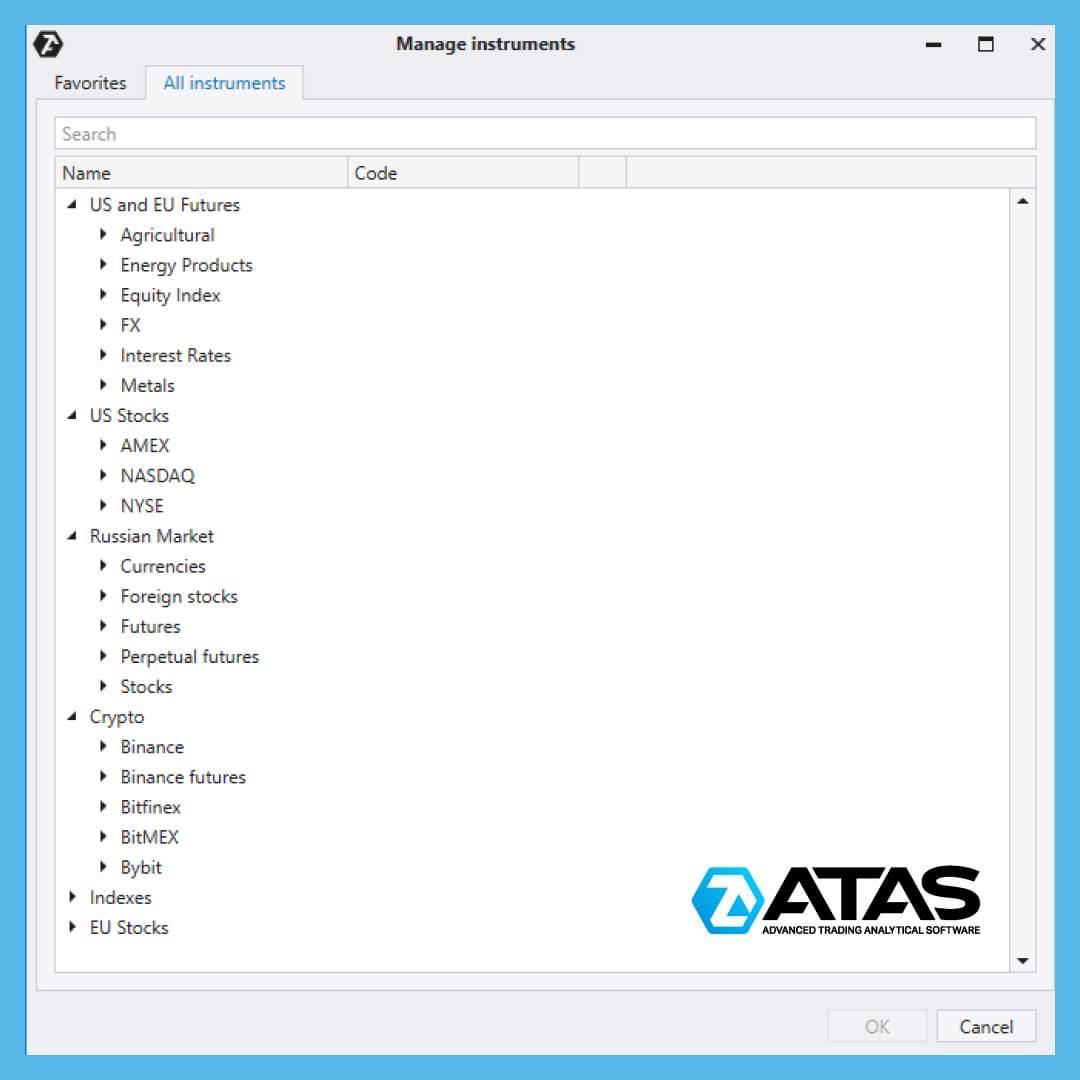
The ATAS platform allows its users to easily navigate various types of markets thanks to the instrument manager, where all instruments are carefully divided into six sections:
1️⃣ US and EU Futures - US and European derivatives markets
2️⃣ US Stocks - US stock market
3️⃣ Russian Market - instruments of the Moscow Exchange
4️⃣ Crypto - spot and futures sections of cryptocurrency exchanges
5️⃣ Indexes - volatility indices and others
6️⃣ EU Stocks - European stock market
There is a Search field that allows to quickly find the desired instrument. When you enter the first letters, ATAS already offers relevant results.
Another cool thing is Favorites. This function is for frequently used instruments. Place the star icon next to the instrument you open most often and it will appear on the Favorites tab. As a result, you can create a personalized list to open the desired chart even faster.
You can find more information about the advantages of working with charts in the ATAS platform in this article: https://bit.ly/3OTSwLy
Support service bot
Chat group for communication
The ATAS platform allows its users to easily navigate various types of markets thanks to the instrument manager, where all instruments are carefully divided into six sections:
1️⃣ US and EU Futures - US and European derivatives markets
2️⃣ US Stocks - US stock market
3️⃣ Russian Market - instruments of the Moscow Exchange
4️⃣ Crypto - spot and futures sections of cryptocurrency exchanges
5️⃣ Indexes - volatility indices and others
6️⃣ EU Stocks - European stock market
There is a Search field that allows to quickly find the desired instrument. When you enter the first letters, ATAS already offers relevant results.
Another cool thing is Favorites. This function is for frequently used instruments. Place the star icon next to the instrument you open most often and it will appear on the Favorites tab. As a result, you can create a personalized list to open the desired chart even faster.
You can find more information about the advantages of working with charts in the ATAS platform in this article: https://bit.ly/3OTSwLy
Support service bot
Chat group for communication
👍4
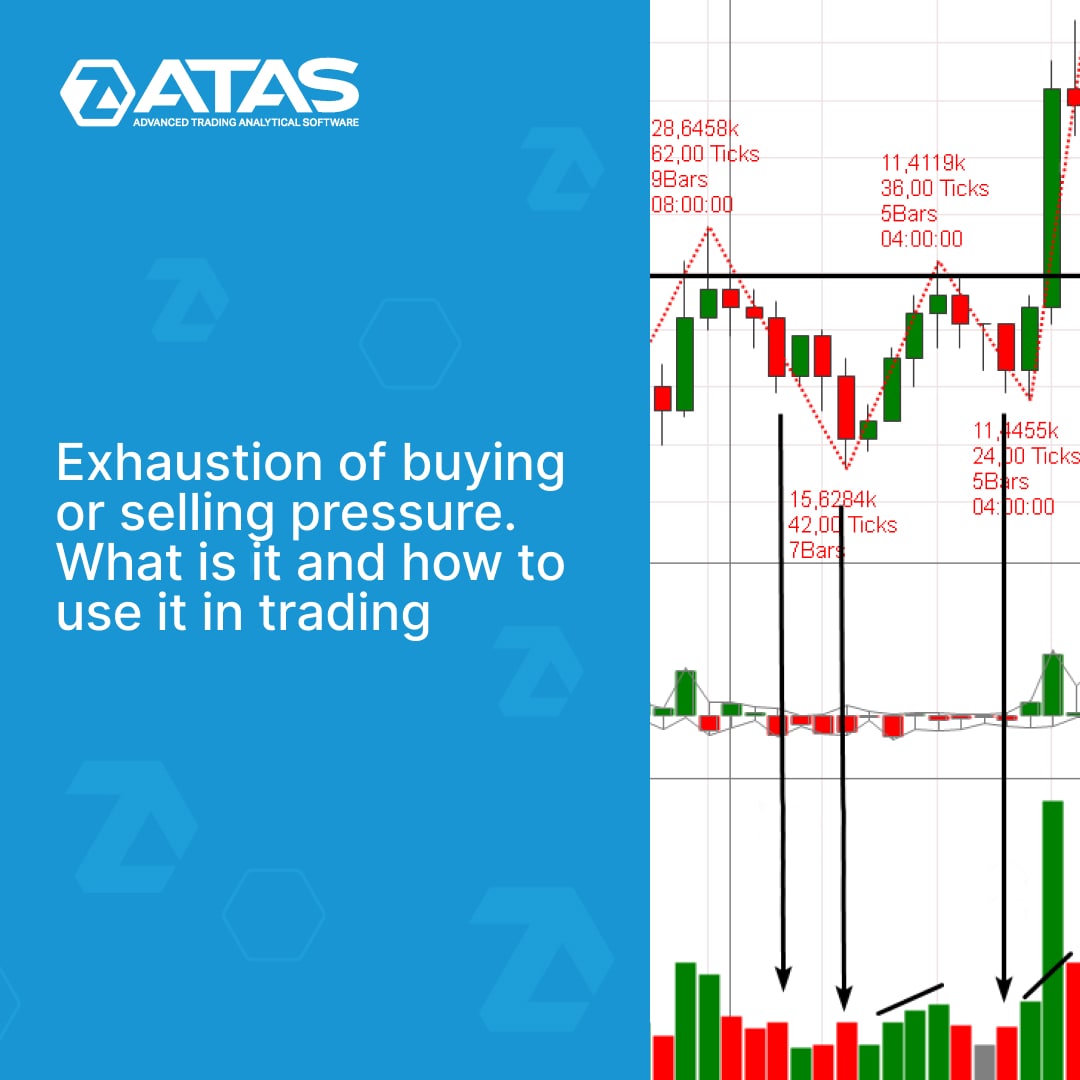
Double/triple bottom/top, head and shoulders, and other tech patterns can be confirmed by reading the volume indicators. A buying/selling exhaustion signal will be helpful in this case.
Read a new article in our blog to find out how to read this signal from a chart: https://bit.ly/3SsbiMK
Learn more about exhaustions:
👉What is volume exhaustion
👉How to use it to find profitable trading setups
👉Examples on charts
Share the article with those who are looking for reliable signals on the stock chart. After all, volume exhaustion is directly related to the inviolable law of supply and demand.
Support service bot
Chat group for communication
Read a new article in our blog to find out how to read this signal from a chart: https://bit.ly/3SsbiMK
Learn more about exhaustions:
👉What is volume exhaustion
👉How to use it to find profitable trading setups
👉Examples on charts
Share the article with those who are looking for reliable signals on the stock chart. After all, volume exhaustion is directly related to the inviolable law of supply and demand.
Support service bot
Chat group for communication
👍5
ALERTS
Alerts are one the most useful features of the ATAS trading and analytical platform. It allows you to receive notifications when a given condition is fulfilled.
As Warren Buffett says, "The stock market is a device for transferring money from the impatient to the patient." Alerts help to endure and wait for the right moment.
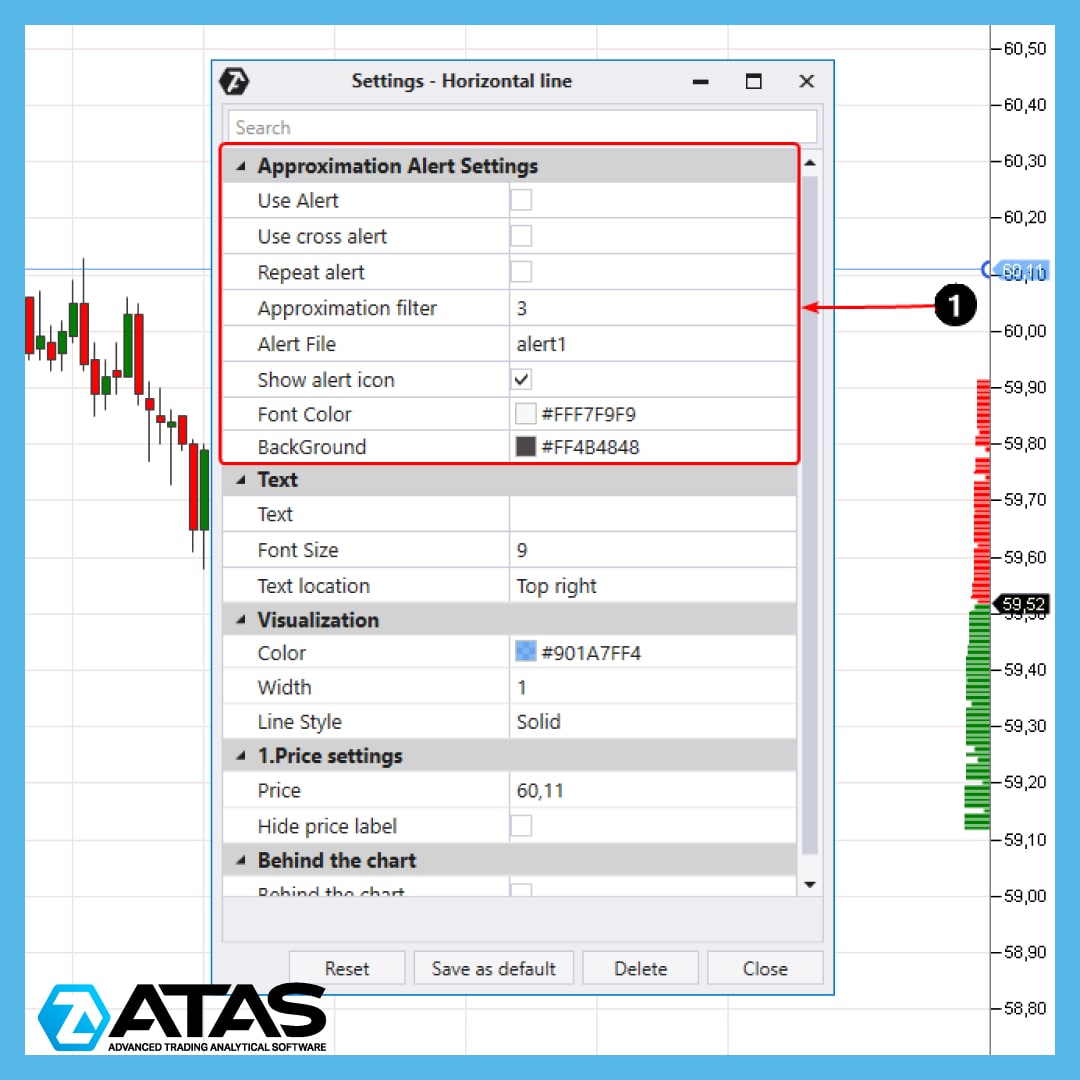
To set an alert when the price reaches a given level, add a line to this level (1) on the chart and tick Use Alert in its settings.
Alerts can be set not only on the chart, but also:
⏰ in the Smart Tape module
⏰ in the Order Flow, Cluster Search, Dynamic level, Big trades indicators and others.
Here are some options for working with alerts in the ATAS platform:
👉 receiving alerts only once or every time a condition is met;
👉 receiving alerts by email and/or Telegram;
👉 support for crypto, stocks, futures markets;
👉 setting the sound for the alert.
All completed alerts are stored in a separate list which can be viewed by clicking on the corresponding button in the main menu.
You can find more information about how to work with alerts in the ATAS platform in this article: https://bit.ly/3oQpCkN
Support service bot
Chat group for communication
Alerts are one the most useful features of the ATAS trading and analytical platform. It allows you to receive notifications when a given condition is fulfilled.
As Warren Buffett says, "The stock market is a device for transferring money from the impatient to the patient." Alerts help to endure and wait for the right moment.
To set an alert when the price reaches a given level, add a line to this level (1) on the chart and tick Use Alert in its settings.
Alerts can be set not only on the chart, but also:
⏰ in the Smart Tape module
⏰ in the Order Flow, Cluster Search, Dynamic level, Big trades indicators and others.
Here are some options for working with alerts in the ATAS platform:
👉 receiving alerts only once or every time a condition is met;
👉 receiving alerts by email and/or Telegram;
👉 support for crypto, stocks, futures markets;
👉 setting the sound for the alert.
All completed alerts are stored in a separate list which can be viewed by clicking on the corresponding button in the main menu.
You can find more information about how to work with alerts in the ATAS platform in this article: https://bit.ly/3oQpCkN
Support service bot
Chat group for communication
👍5🙏1
A new article in our blog is devoted to the recent historical records of the Microsoft stock. Read in the article:
👉History of company creation.
👉How much one share, bought during the IPO in 1986, costs now.
👉Why MSFT is ahead of the market and its fundamental development strategy grounds.
👉Where to see the dividend sizes and the current rate.
👉Analyst forecasts.
Read full text at the link: https://bit.ly/3A5jj3f
Share this article with those who look for reliable stock for investing.
Support service bot
Chat group for communication
👉History of company creation.
👉How much one share, bought during the IPO in 1986, costs now.
👉Why MSFT is ahead of the market and its fundamental development strategy grounds.
👉Where to see the dividend sizes and the current rate.
👉Analyst forecasts.
Read full text at the link: https://bit.ly/3A5jj3f
Share this article with those who look for reliable stock for investing.
Support service bot
Chat group for communication
👍3
CUSTOM TIME FRAMES
Simple trading platforms offer only basic time frames: minutes М1, М5, М15, М30, 1-hour, 4-hour, daily, weekly, monthly.
The more advanced the software is, the bigger set of time frames for technical analysis and trading it can offer.
The ATAS platform offers unlimited freedom to choose time frames! In addition to the extended set with the most requested features, you have the ability to create custom time frames to meet your needs.
Let's take an example of how it works and create a 40-second time frame.
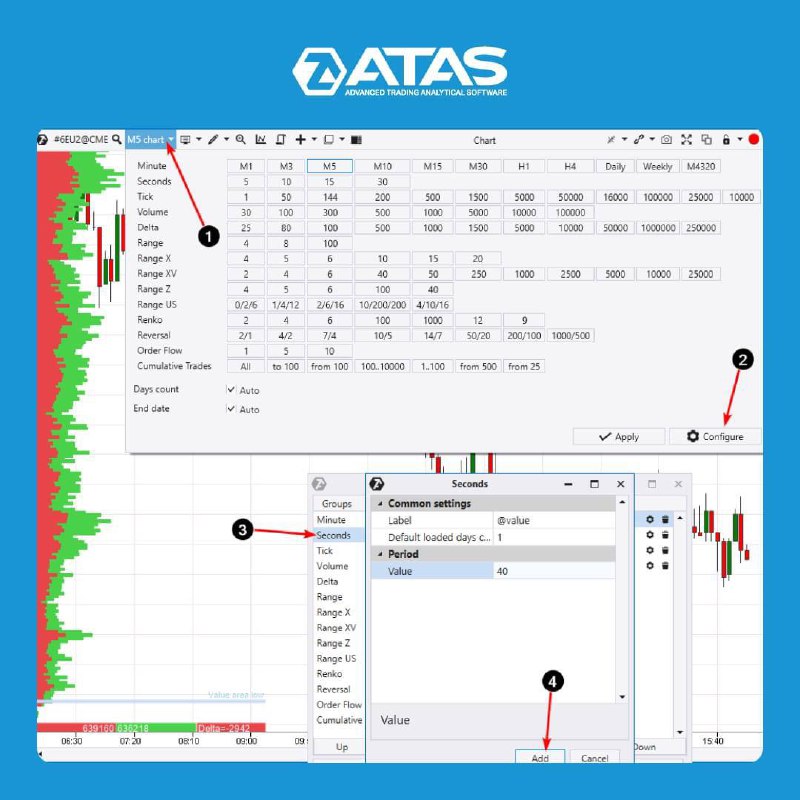
👉 To enter the timeframe menu, click on the corresponding icon in the title of the chart window.
👉 Click Configure to set up time frames.
👉 Select the Seconds line, click on the “gear”, the settings icon.
👉 Specify Value = 40, press the Add button.
Done!
You can set up custom frames for any type of chart – tick, range, renko and more. This will allow you to create unique charts and explore the markets from a different angle, which means gaining an advantage over other traders.
Download a trial version of the ATAS trading and analytical platform with full functionality for free at https://bit.ly/3SHki0G
Support service bot
Chat group for communication
Simple trading platforms offer only basic time frames: minutes М1, М5, М15, М30, 1-hour, 4-hour, daily, weekly, monthly.
The more advanced the software is, the bigger set of time frames for technical analysis and trading it can offer.
The ATAS platform offers unlimited freedom to choose time frames! In addition to the extended set with the most requested features, you have the ability to create custom time frames to meet your needs.
Let's take an example of how it works and create a 40-second time frame.
👉 To enter the timeframe menu, click on the corresponding icon in the title of the chart window.
👉 Click Configure to set up time frames.
👉 Select the Seconds line, click on the “gear”, the settings icon.
👉 Specify Value = 40, press the Add button.
Done!
You can set up custom frames for any type of chart – tick, range, renko and more. This will allow you to create unique charts and explore the markets from a different angle, which means gaining an advantage over other traders.
Download a trial version of the ATAS trading and analytical platform with full functionality for free at https://bit.ly/3SHki0G
Support service bot
Chat group for communication
👍4
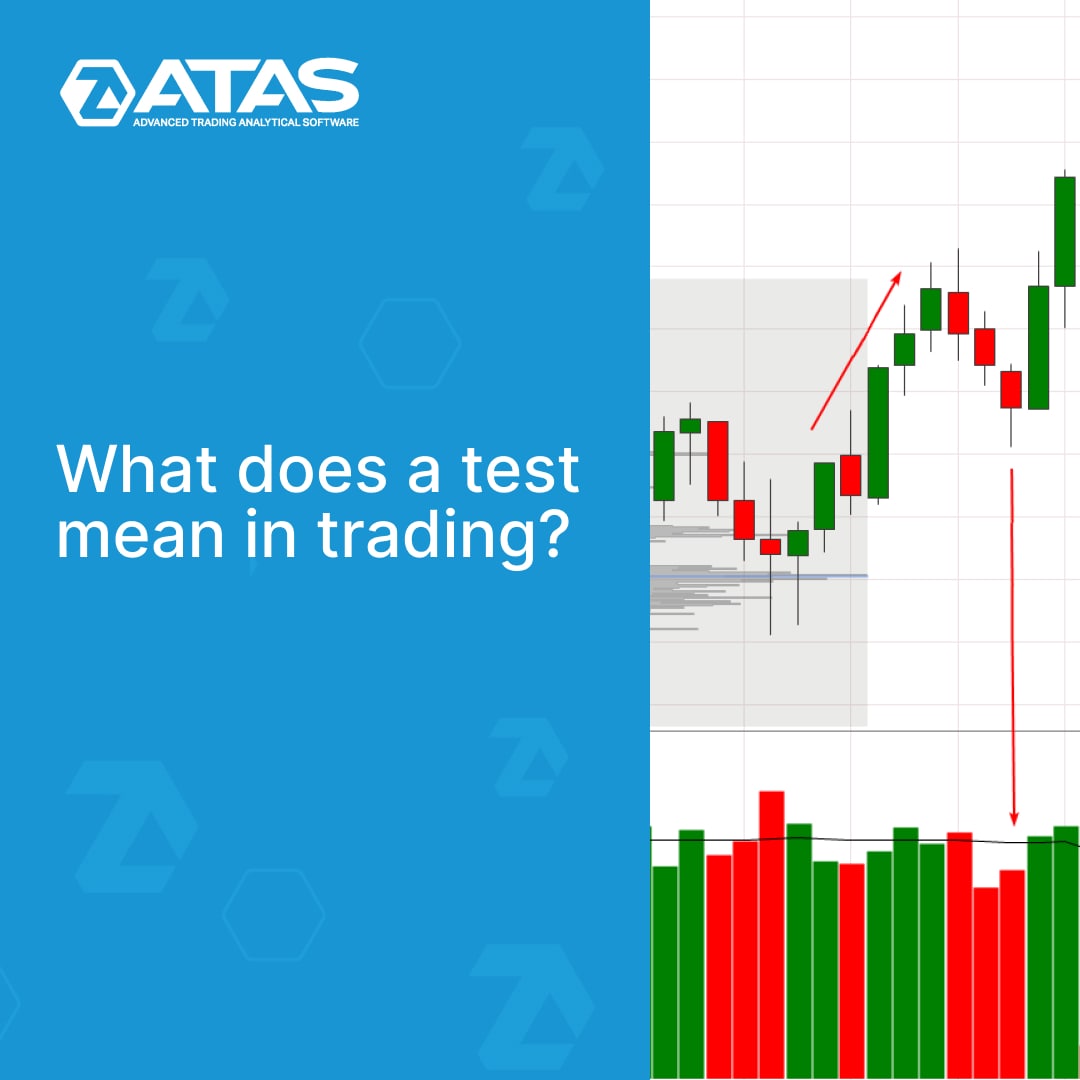
The term “testing” is common among those who analyze price and volume charts. However, in our opinion, it is often used superficially.
When doing a chart analysis test, always ask yourself the following questions:
👉 Who is testing?
👉 What is being tested?
👉 What is the purpose?
A new post on our blog is aimed to give a test new meanings in trading. We will explain the VSA logic and clear examples of testing in different markets. Read the full text at the link: https://bit.ly/3Pkhrb2
Support service bot
Chat group for communication
When doing a chart analysis test, always ask yourself the following questions:
👉 Who is testing?
👉 What is being tested?
👉 What is the purpose?
A new post on our blog is aimed to give a test new meanings in trading. We will explain the VSA logic and clear examples of testing in different markets. Read the full text at the link: https://bit.ly/3Pkhrb2
Support service bot
Chat group for communication
👍2🔥1
STUDYING HISTORY
ATAS servers store gigabytes of tick trading history for hundreds of instruments from different exchanges. ALL transactions are recorded, taking into account their volume, price and type (buy or sell).
You can study the history of trading in detail and even view each trade on the smart tape.
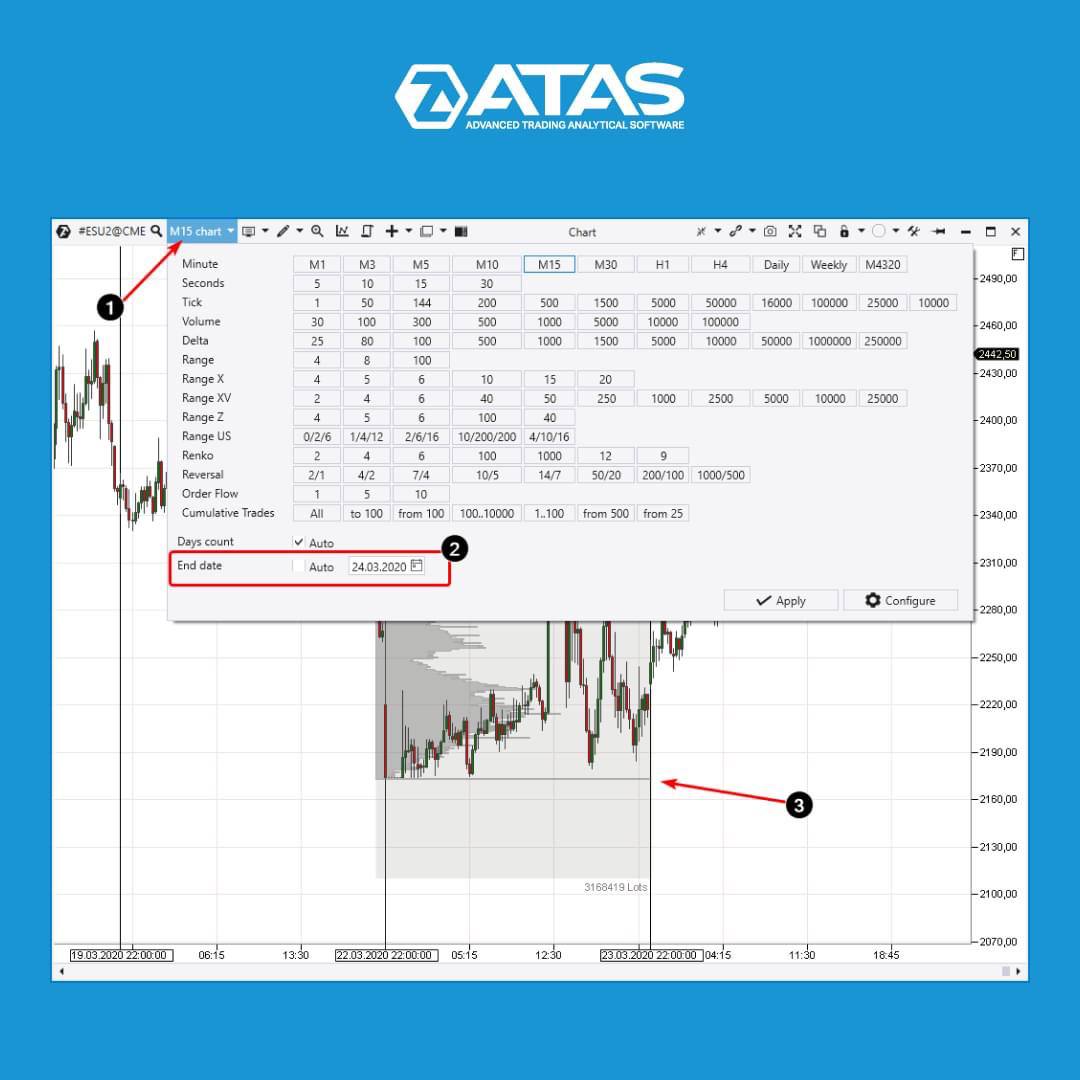
Let's say you were interested in the formation of a bottom in the S&P-500 futures market during the panic caused by the spread of the coronavirus:
✔️Open the chart window by clicking on the time frame icon (1).
✔️Specify the date you are interested in in the End date field. Enter April 23, 2020, click Apply and...
Ready!
Please note that when entering the date, the Auto must be unticked, otherwise the platform will load the current data☝️
The market profile shows (3) that there were huge volumes at the very bottom of the market, the profile has an unnatural “spike” at the 2174 level. It must be a reflection of the most powerful traders buying up all available supply, after which the global market went up.
Download a trial version of the ATAS platform with full functionality for free right now at https://bit.ly/3Pxzevv Explore detailed history with professional indicators for volume analysis!
Support service bot
Chat group for communication
ATAS servers store gigabytes of tick trading history for hundreds of instruments from different exchanges. ALL transactions are recorded, taking into account their volume, price and type (buy or sell).
You can study the history of trading in detail and even view each trade on the smart tape.
Let's say you were interested in the formation of a bottom in the S&P-500 futures market during the panic caused by the spread of the coronavirus:
✔️Open the chart window by clicking on the time frame icon (1).
✔️Specify the date you are interested in in the End date field. Enter April 23, 2020, click Apply and...
Ready!
Please note that when entering the date, the Auto must be unticked, otherwise the platform will load the current data☝️
The market profile shows (3) that there were huge volumes at the very bottom of the market, the profile has an unnatural “spike” at the 2174 level. It must be a reflection of the most powerful traders buying up all available supply, after which the global market went up.
Download a trial version of the ATAS platform with full functionality for free right now at https://bit.ly/3Pxzevv Explore detailed history with professional indicators for volume analysis!
Support service bot
Chat group for communication
❤2👍2
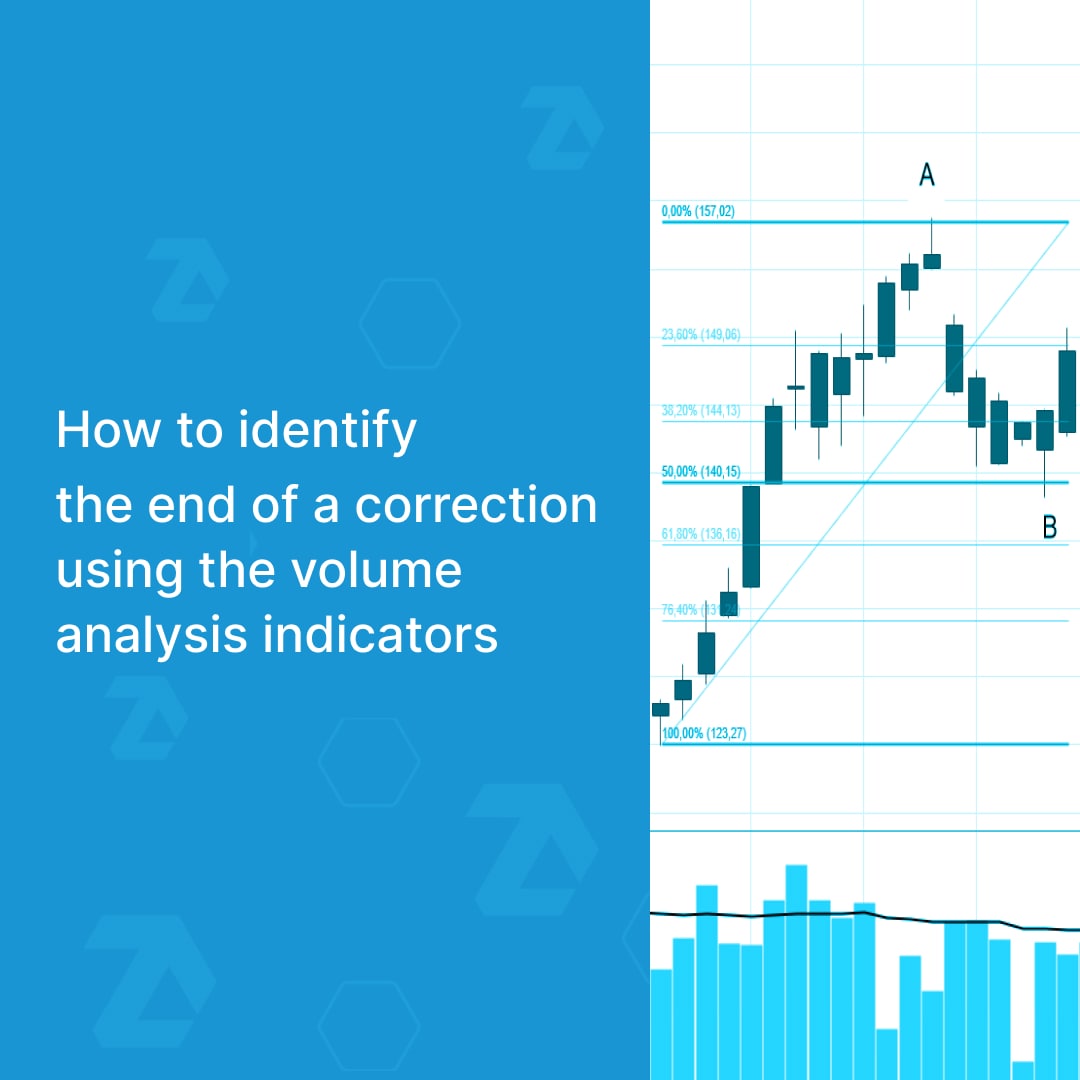
The end of a correction is very important because at this moment traders have an opportunity to enter a position with a potentially high reward (in case of a trend resumption) and reduce risks by setting a stop-loss.
A new article in the ATAS blog describes traditional and modern ways of identifying the end of a correction.
Read in this article:
👉 What is a correction.
👉 When to enter a position.
👉 How to use various indicators to identify/confirm signals that indicate the end of a correction and a trend resumption.
👉 When to exit a position.
You can read at the link https://bit.ly/3SWFKPv
The article has chart examples. Share it with those who are looking for effective ways to earn money through trend trading.
Support service bot
Chat group for communication
A new article in the ATAS blog describes traditional and modern ways of identifying the end of a correction.
Read in this article:
👉 What is a correction.
👉 When to enter a position.
👉 How to use various indicators to identify/confirm signals that indicate the end of a correction and a trend resumption.
👉 When to exit a position.
You can read at the link https://bit.ly/3SWFKPv
The article has chart examples. Share it with those who are looking for effective ways to earn money through trend trading.
Support service bot
Chat group for communication
👍3
4️⃣ MODES OF THE FIXED MARKET PROFILE
The ATAS platform provides advanced functionality for working with market profiles. A fixed profile, a dynamic profile in drawing mode, and a profile indicator help to get a full picture of horizontal volumes.
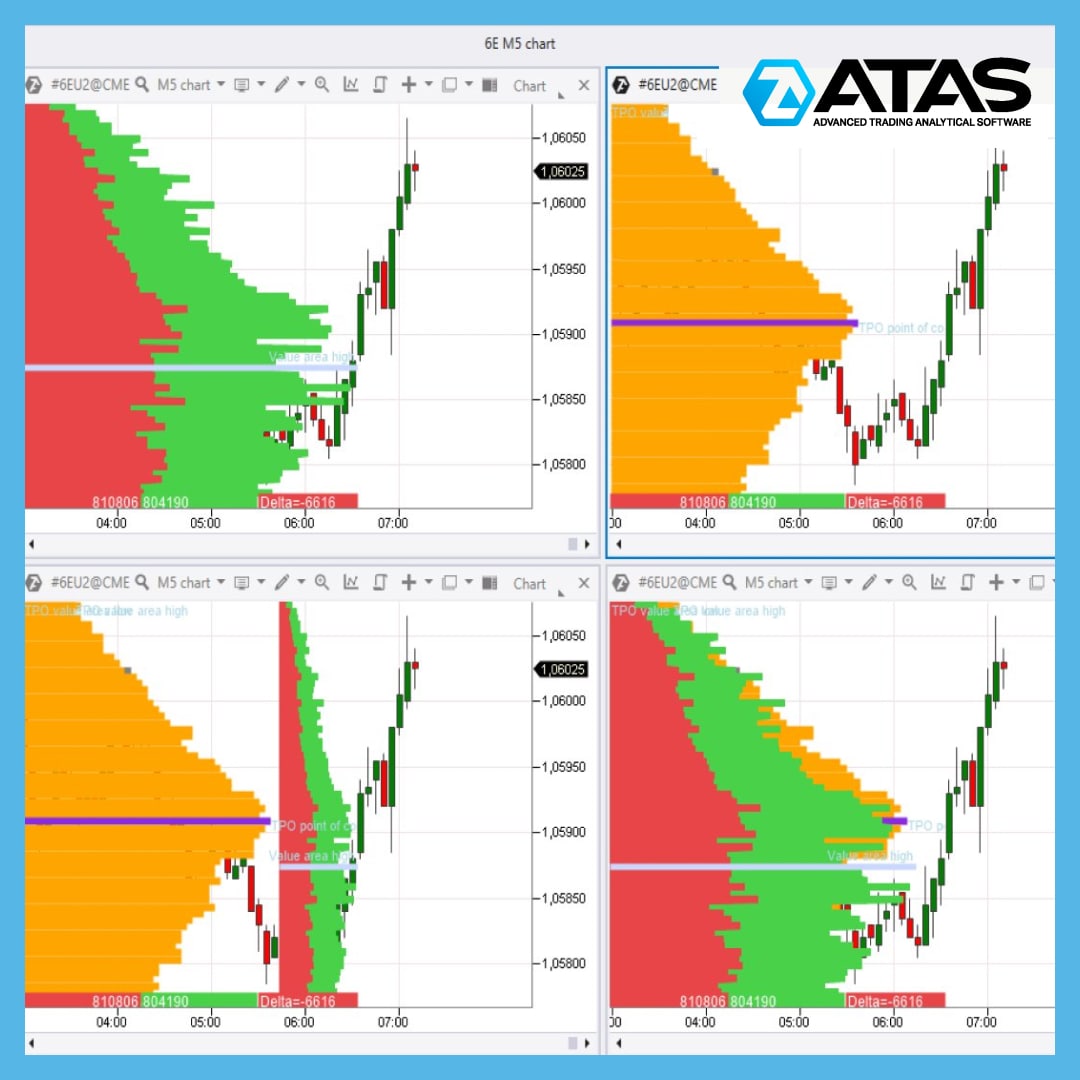
You can see four modes of the fixed profile in the picture:
1️⃣ → top left: a regular profile
2️⃣ → top right: a profile in TPO mode
3️⃣ → bottom left: a profile and TPO
4️⃣ → bottom right: a profile and TPO superimposed on each other.
All parameters of the fixed profile have flexible settings. You can individually choose the color, transparency, gradient, and display of important levels (value zones, maximum volume levels).
In each mode the fixed profile can be built based on information about trades, volumes, time, bid/ask trades (by default), delta (two ways of displaying).
How to use market profiles? Read in detail on our blog: https://bit.ly/3dJZ4PS
Download a trial version of ATAS with full functionality for free! A powerful and at the same time convenient trading and analytical platform will change your understanding of trading in the markets of popular futures, stocks and cryptocurrencies.
Support service bot
Chat group for communication
The ATAS platform provides advanced functionality for working with market profiles. A fixed profile, a dynamic profile in drawing mode, and a profile indicator help to get a full picture of horizontal volumes.
You can see four modes of the fixed profile in the picture:
1️⃣ → top left: a regular profile
2️⃣ → top right: a profile in TPO mode
3️⃣ → bottom left: a profile and TPO
4️⃣ → bottom right: a profile and TPO superimposed on each other.
All parameters of the fixed profile have flexible settings. You can individually choose the color, transparency, gradient, and display of important levels (value zones, maximum volume levels).
In each mode the fixed profile can be built based on information about trades, volumes, time, bid/ask trades (by default), delta (two ways of displaying).
How to use market profiles? Read in detail on our blog: https://bit.ly/3dJZ4PS
Download a trial version of ATAS with full functionality for free! A powerful and at the same time convenient trading and analytical platform will change your understanding of trading in the markets of popular futures, stocks and cryptocurrencies.
Support service bot
Chat group for communication
👍3❤2
In this video, we’re going to tell you about a trading strategy using imbalance levels. These levels can be identified with the help of the Market Profile indicator. Before using the strategy on a live account, do your own research.
📌Watch the video on YouTube - https://youtu.be/vyEKGUSSWuI
Support service bot
Chat group for communication
📌Watch the video on YouTube - https://youtu.be/vyEKGUSSWuI
Support service bot
Chat group for communication
YouTube
How to Find an Entry Point for a Trade Using Imbalance Levels
📌Do you want to trade successfully?
Download ATAS for free with full functionality: https://bit.ly/3TvhpR1
In this video, we’re going to tell you about a trading strategy using imbalance levels. These levels can be identified with the help of the Market…
Download ATAS for free with full functionality: https://bit.ly/3TvhpR1
In this video, we’re going to tell you about a trading strategy using imbalance levels. These levels can be identified with the help of the Market…
👍8🔥1
MARKET STRUCTURE ANALYSIS IN DAILY TIMEFRAME
One should start the analysis of the market structure in the daily time frame. Since the long-term structure of the market is always more important and trading against the daily trend is not effective. We can use two instruments for the analysis:
👉 “Fixed TPO and Profile” with “Contract” period. This instrument clearly shows the main levels of maximum volumes accumulated for a traded contract.
👉 “Dynamic Levels” with “Monthly” period. You can remove the Value area levels and highlight the maximum volume level in this indicator.
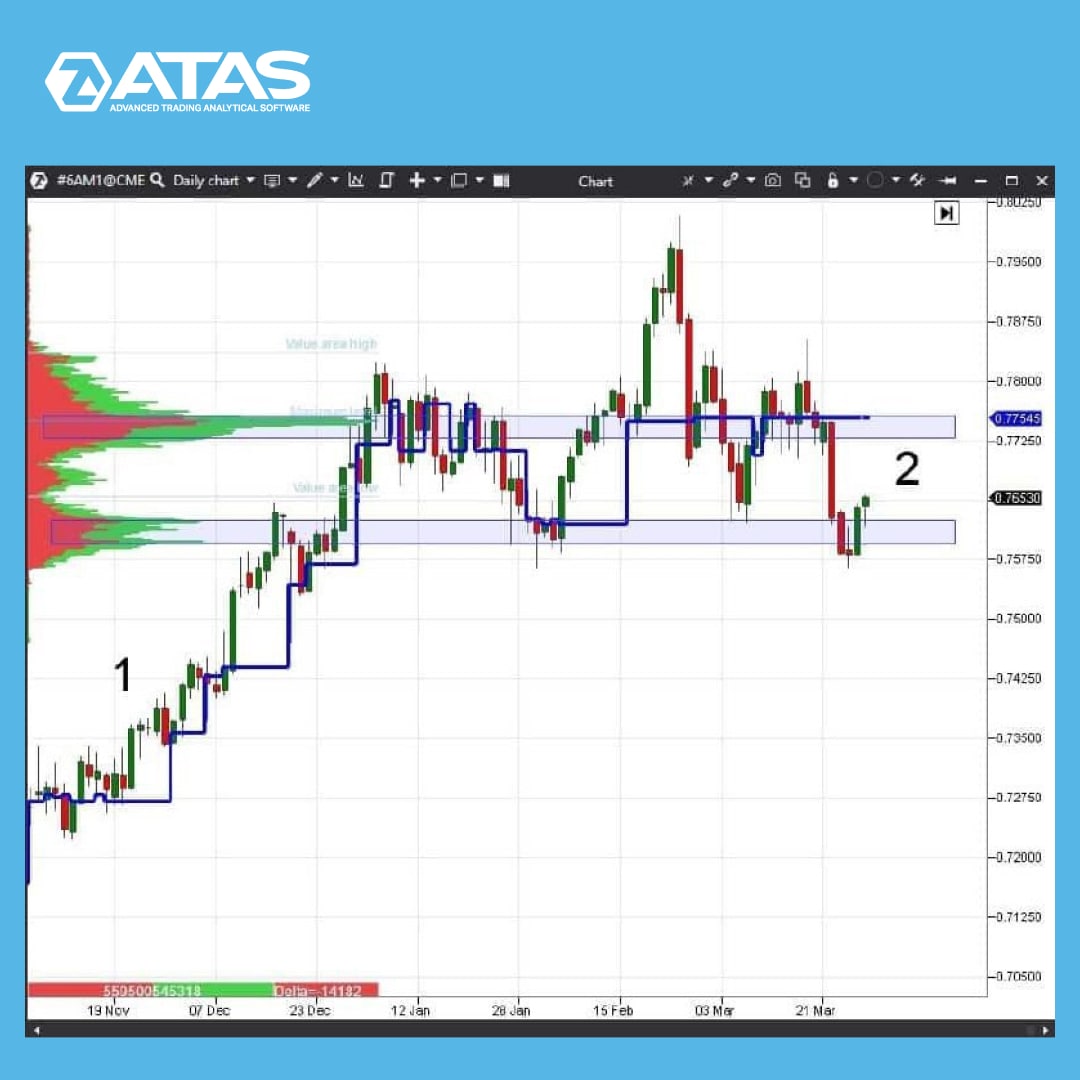
The image shows the 6A(AUDUSD) futures chart in the daily time frame.
At point 1 the chart is in a steady trend, the price is consistently above the maximum volume level of the “Dynamic Levels” indicator.
The situation has changed at point 2. The maximum volume level of the “Dynamic Levels” indicator moves chaotically, goes down, goes up. This indicates the flat state of the market.
Read more useful tips in our blog at the link https://bit.ly/3pSVllJ
Support service bot
Chat group for communication
One should start the analysis of the market structure in the daily time frame. Since the long-term structure of the market is always more important and trading against the daily trend is not effective. We can use two instruments for the analysis:
👉 “Fixed TPO and Profile” with “Contract” period. This instrument clearly shows the main levels of maximum volumes accumulated for a traded contract.
👉 “Dynamic Levels” with “Monthly” period. You can remove the Value area levels and highlight the maximum volume level in this indicator.
The image shows the 6A(AUDUSD) futures chart in the daily time frame.
At point 1 the chart is in a steady trend, the price is consistently above the maximum volume level of the “Dynamic Levels” indicator.
The situation has changed at point 2. The maximum volume level of the “Dynamic Levels” indicator moves chaotically, goes down, goes up. This indicates the flat state of the market.
Read more useful tips in our blog at the link https://bit.ly/3pSVllJ
Support service bot
Chat group for communication
👍9
THE RELATIVE VOLUME FILTER – A COOL FEATURE FOR CLUSTER CHARTS
Traders and technical analysts of financial markets have probably faced the problem of reconfiguring charts every time when changing time frames and/or financial instruments. The reasons why this happens are obvious. The more often you have to change the time frame or something else, the more urgent the problem is.
A possible solution is to create a database of your own templates (snapshots) where the settings of charts and indicators are stored, but this option has its drawbacks.
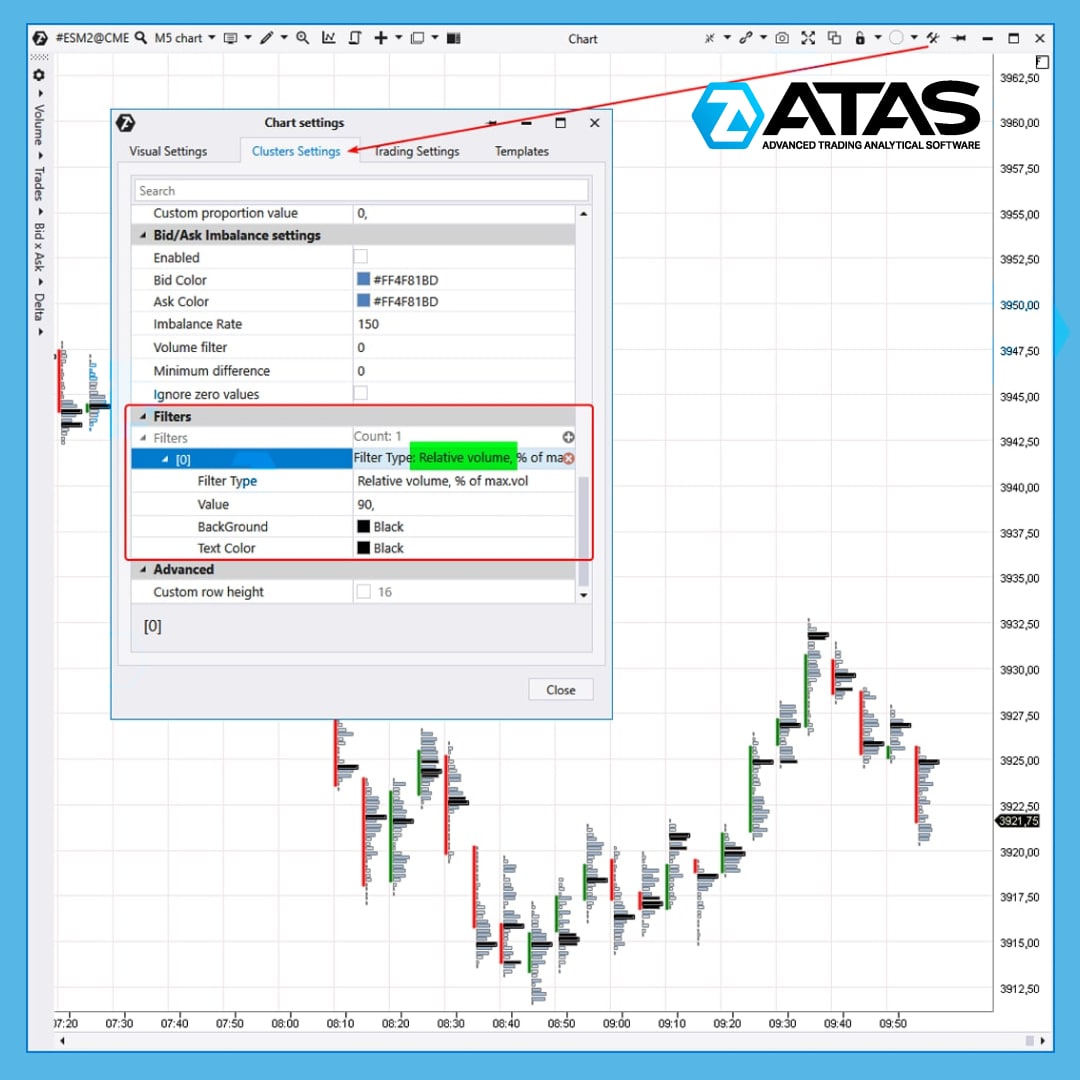
👉 For the convenience of its users, the team of the ATAS trading and analytical platform has developed a special solution – the Relative Volume filter which can be applied to a cluster chart.
To activate the Relative Volume filter:
✔️ open the chart;
✔️ in the chart settings, go to the Cluster Settings tab;
✔️ in the Filters section, add a filter by clicking on the plus sign;
✔️ in the filter settings, select Relative Volume (by volume or by the number of trades);
✔️ Specify the value as a percentage.
For example, the Relative Volume filter = 90% on the attached chart. It means that ATAS automatically finds the largest volume among all clusters loaded on the chart and takes its value as 100%. After that, all clusters whose volume is at least 90% of the maximum are painted black.
Let's say we used absolute values. If you changed the period, for example, from 5 minutes to 4 hours, a lot of black clusters would appear on the chart. This would require time to reconfigure the filter. But if you use relative values as a percentage, the work becomes much easier.
☝️ Please note that you can add multiple filters with different colors.
If you have any questions when setting up the Relative Volume filter for cluster charts, please contact the support service.
You can find information about filters and other useful tools of the ATAS platform in our blog at the link https://bit.ly/3e6V8sK
Support service bot
Chat group for communication
Traders and technical analysts of financial markets have probably faced the problem of reconfiguring charts every time when changing time frames and/or financial instruments. The reasons why this happens are obvious. The more often you have to change the time frame or something else, the more urgent the problem is.
A possible solution is to create a database of your own templates (snapshots) where the settings of charts and indicators are stored, but this option has its drawbacks.
👉 For the convenience of its users, the team of the ATAS trading and analytical platform has developed a special solution – the Relative Volume filter which can be applied to a cluster chart.
To activate the Relative Volume filter:
✔️ open the chart;
✔️ in the chart settings, go to the Cluster Settings tab;
✔️ in the Filters section, add a filter by clicking on the plus sign;
✔️ in the filter settings, select Relative Volume (by volume or by the number of trades);
✔️ Specify the value as a percentage.
For example, the Relative Volume filter = 90% on the attached chart. It means that ATAS automatically finds the largest volume among all clusters loaded on the chart and takes its value as 100%. After that, all clusters whose volume is at least 90% of the maximum are painted black.
Let's say we used absolute values. If you changed the period, for example, from 5 minutes to 4 hours, a lot of black clusters would appear on the chart. This would require time to reconfigure the filter. But if you use relative values as a percentage, the work becomes much easier.
☝️ Please note that you can add multiple filters with different colors.
If you have any questions when setting up the Relative Volume filter for cluster charts, please contact the support service.
You can find information about filters and other useful tools of the ATAS platform in our blog at the link https://bit.ly/3e6V8sK
Support service bot
Chat group for communication
👍6🔥1
Hello friends!
We would like to present you BETA 5.7.33.200 – a fresh update of ATAS which has made the platform even more functional and easy-to-use. See for yourself.
What's new?
✅ FTX (another connector) is now available for crypto traders. It is a rapidly growing exchange with support for margin spot trading and a huge variety of unique derivatives and securities. Now you can receive quotes and make trades on FTX directly from ATAS.
What's improved?
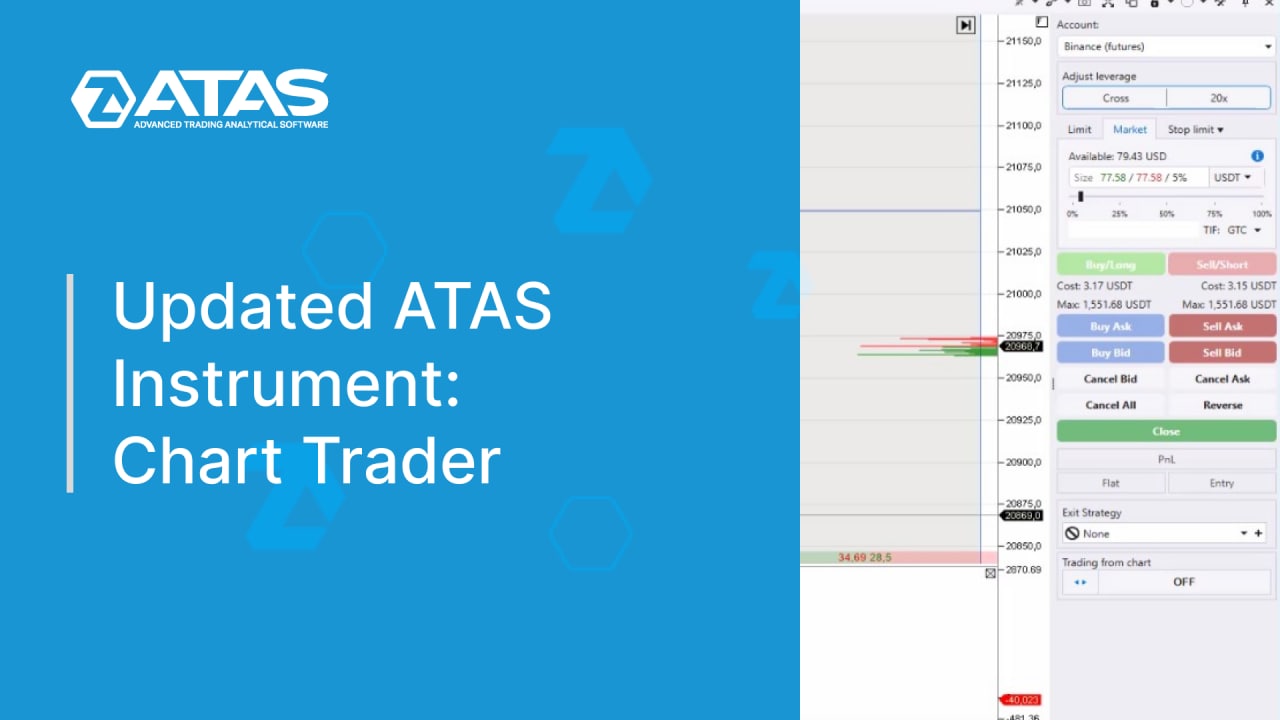
✅ Our main pride in this update is the ChartTrader.
✔️ Now you can specify not only the order size as a % value of the portfolio size, but also the base and quote currencies. For example, for the BTCUSDT pair, it can be either BTC or USDT.
✔️ You can choose the type of order on the exchange (TimeInForce: GoodTillCancel, FillOrKill, ImmediateOrCancel, etc.) and use the additional options: ReduceOnly, PostOnly, CloseOnTrigger, etc.
✔️ You can assign a price type for conditional orders (Index price, Last price, Mark price, etc.).
✔️ Before sending an order, you will see its cost and the maximum possible volume.
✔️ If there are no portfolios available, the platform will offer to connect a connector and detailed instructions on how to do it.
✅ Three new sets of ready-made settings are available in the template gallery:
✔️ Basic Prop DOM with a summary of useful information for prop trading through Smart DOM;
✔️ Advanced Limit Tracking allows you to track the addition and removal of volumes at limit levels and highlight big limits with filters.
✔️ Minimalistic Compact – asks, bids, price scale, daily volume profile and nothing extra.
✅ We tried to make the strategy settings even more convenient. Using the "Activate by zero position" flag, you can not only check the position, but also check for pending orders.
✅ "Gradient proportion" has returned to the display settings of cluster charts. If you increase the %, there will be fewer contrasting clusters.
✅ When you save the connector settings, the platform automatically finds an active connection and offers to reconnect to it.
✅ Of course, we could not ignore the indicators. This time, the improvements have been made to the new Bar Timer alert and the VWAP flag.
✅ A help button has appeared at the top of the screen. If you click on it, you can find out the details of the latest updates, suggest your own ideas for improving the platform, go to the Knowledge Base or contact technical support.
✅ Now ATAS also “speaks” Chinese. Other localizations are coming up next, for example, Spanish.
Read more about the update at the link: https://bit.ly/3L0u4rk
Support service bot
Chat group for communication
We would like to present you BETA 5.7.33.200 – a fresh update of ATAS which has made the platform even more functional and easy-to-use. See for yourself.
What's new?
✅ FTX (another connector) is now available for crypto traders. It is a rapidly growing exchange with support for margin spot trading and a huge variety of unique derivatives and securities. Now you can receive quotes and make trades on FTX directly from ATAS.
What's improved?
✅ Our main pride in this update is the ChartTrader.
✔️ Now you can specify not only the order size as a % value of the portfolio size, but also the base and quote currencies. For example, for the BTCUSDT pair, it can be either BTC or USDT.
✔️ You can choose the type of order on the exchange (TimeInForce: GoodTillCancel, FillOrKill, ImmediateOrCancel, etc.) and use the additional options: ReduceOnly, PostOnly, CloseOnTrigger, etc.
✔️ You can assign a price type for conditional orders (Index price, Last price, Mark price, etc.).
✔️ Before sending an order, you will see its cost and the maximum possible volume.
✔️ If there are no portfolios available, the platform will offer to connect a connector and detailed instructions on how to do it.
✅ Three new sets of ready-made settings are available in the template gallery:
✔️ Basic Prop DOM with a summary of useful information for prop trading through Smart DOM;
✔️ Advanced Limit Tracking allows you to track the addition and removal of volumes at limit levels and highlight big limits with filters.
✔️ Minimalistic Compact – asks, bids, price scale, daily volume profile and nothing extra.
✅ We tried to make the strategy settings even more convenient. Using the "Activate by zero position" flag, you can not only check the position, but also check for pending orders.
✅ "Gradient proportion" has returned to the display settings of cluster charts. If you increase the %, there will be fewer contrasting clusters.
✅ When you save the connector settings, the platform automatically finds an active connection and offers to reconnect to it.
✅ Of course, we could not ignore the indicators. This time, the improvements have been made to the new Bar Timer alert and the VWAP flag.
✅ A help button has appeared at the top of the screen. If you click on it, you can find out the details of the latest updates, suggest your own ideas for improving the platform, go to the Knowledge Base or contact technical support.
✅ Now ATAS also “speaks” Chinese. Other localizations are coming up next, for example, Spanish.
Read more about the update at the link: https://bit.ly/3L0u4rk
Support service bot
Chat group for communication
👍2🔥1
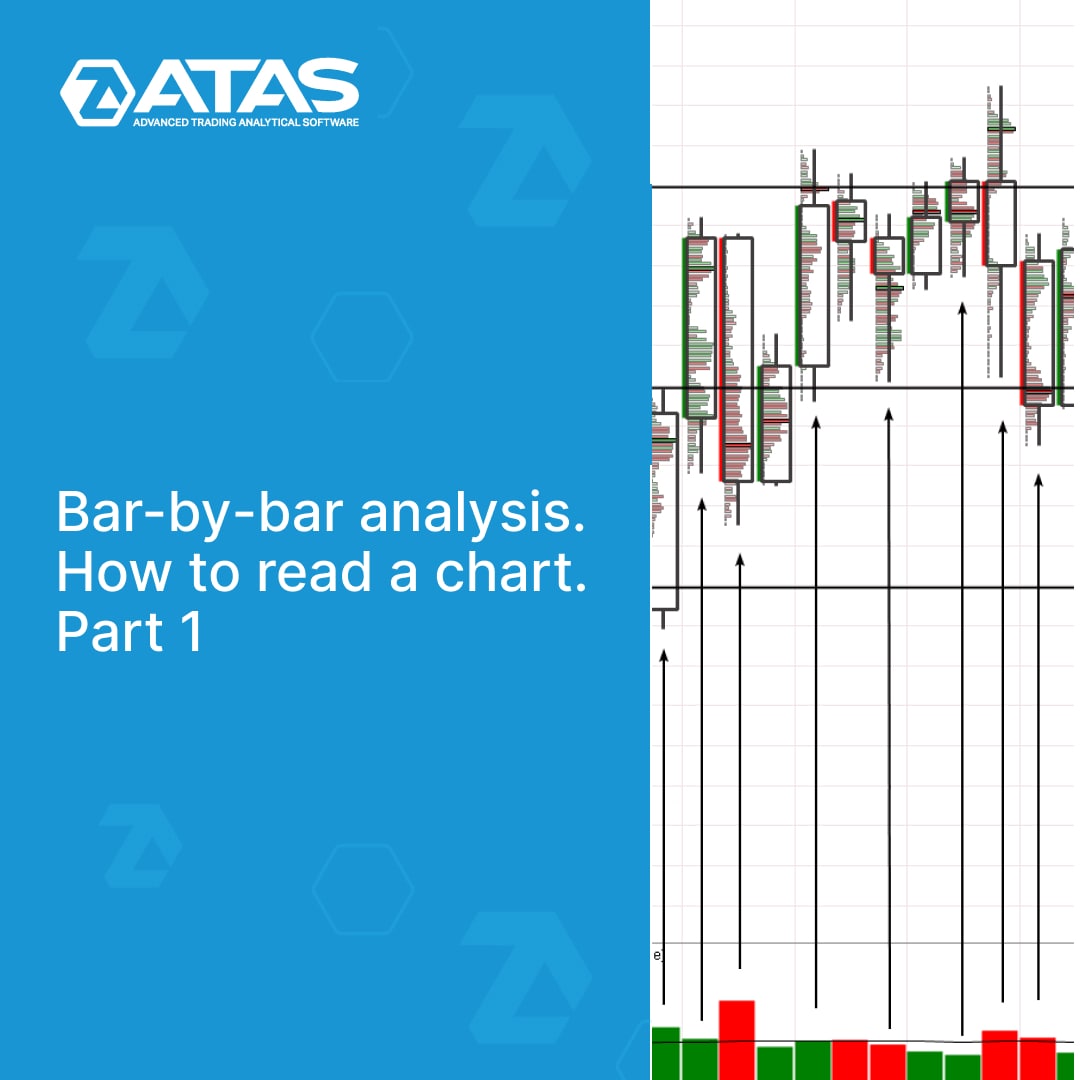
Bar-by-bar analysis is a complex approach aimed at a deep understanding of the market situation. It makes the most of the information available on the chart.
In our new article at the link https://bit.ly/3AQf1f9, we will try to turn attention to this method by giving several examples of bar chart reading.
Find out in detail:
👉What bar-by-bar analysis is;
👉Advantages and disadvantages of the method;
👉Books about bar-by-bar analysis;
👉Principles of reading a chart;
👉Examples of reading the market using bar-by-bar analysis in the bitcoin market.
Stay tuned for our blog updates so that you do not miss the next article in the series. It will give examples of bar-by-bar analysis of futures charts from the CME exchange.
Support service bot
Chat group for communication
In our new article at the link https://bit.ly/3AQf1f9, we will try to turn attention to this method by giving several examples of bar chart reading.
Find out in detail:
👉What bar-by-bar analysis is;
👉Advantages and disadvantages of the method;
👉Books about bar-by-bar analysis;
👉Principles of reading a chart;
👉Examples of reading the market using bar-by-bar analysis in the bitcoin market.
Stay tuned for our blog updates so that you do not miss the next article in the series. It will give examples of bar-by-bar analysis of futures charts from the CME exchange.
Support service bot
Chat group for communication
👍3
TRADE ON FTX WITH ATAS
Due to numerous requests, a connection to the FTX cryptocurrency exchange has become available in the latest update of the ATAS trading and analytical platform. FTX is an exchange where assets worth over $10 billion are traded per day. Now you can use powerful features of the professional ATAS platform for FTX instruments.
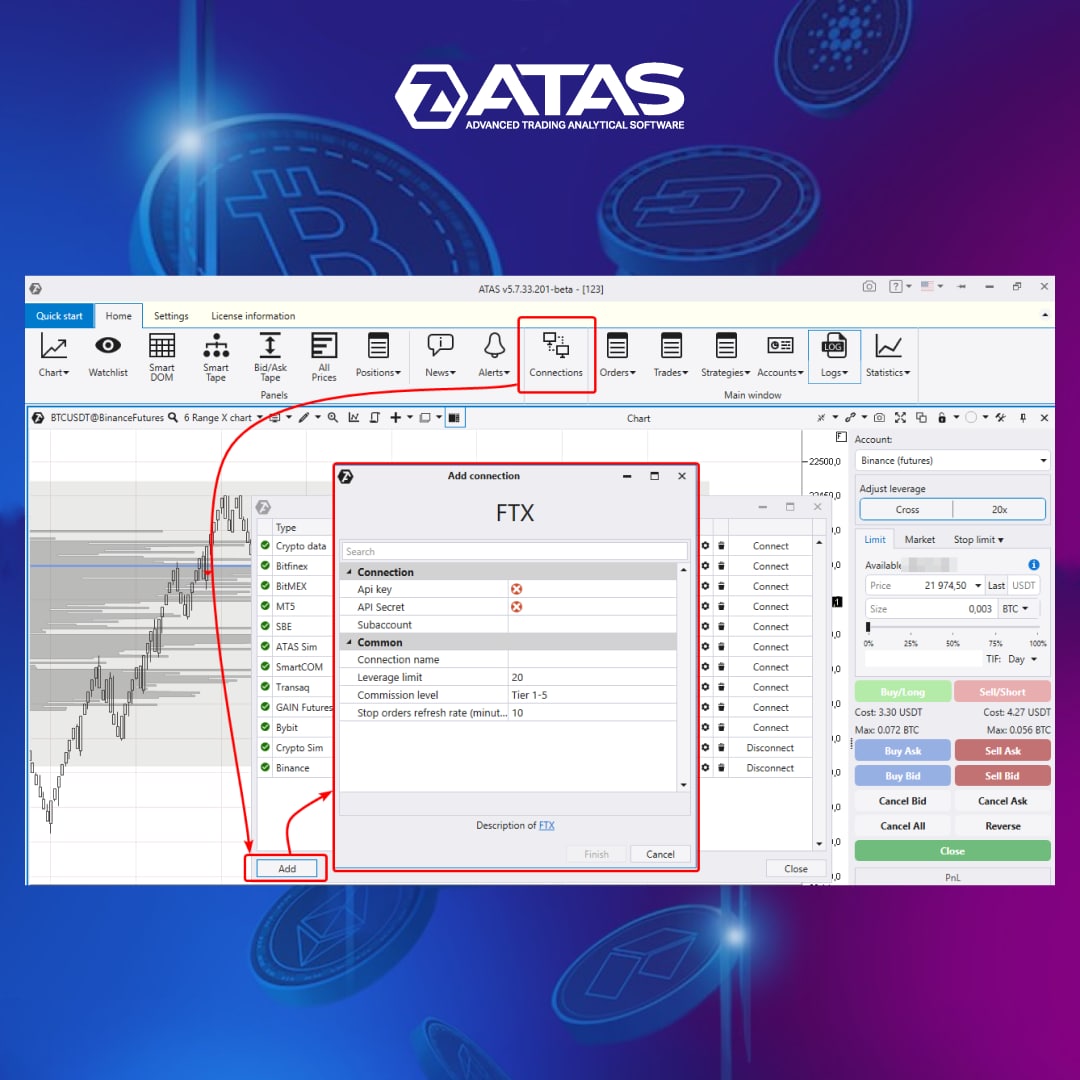
The connection is established according to the standard scheme:
✅First of all, you must have a registered account on the FTX exchange. Create a new connection in the API section to get an API Key and API Secret.
✅Then, add a new connection (as shown in the screenshot) in the ATAS platform and paste the given API Key and API Secret.
If you have any connection problems, contact the company's support service.
We wish you successful trading on the FTX cryptocurrency exchange with the ATAS platform!
Support service bot
Chat group for communication
Due to numerous requests, a connection to the FTX cryptocurrency exchange has become available in the latest update of the ATAS trading and analytical platform. FTX is an exchange where assets worth over $10 billion are traded per day. Now you can use powerful features of the professional ATAS platform for FTX instruments.
The connection is established according to the standard scheme:
✅First of all, you must have a registered account on the FTX exchange. Create a new connection in the API section to get an API Key and API Secret.
✅Then, add a new connection (as shown in the screenshot) in the ATAS platform and paste the given API Key and API Secret.
If you have any connection problems, contact the company's support service.
We wish you successful trading on the FTX cryptocurrency exchange with the ATAS platform!
Support service bot
Chat group for communication
👍5🔥3
NEW FUNCTIONALITY OF CHART TRADER
A few days ago we told you about the recent update. It made the platform even more easy-to-use and functional. One of the most important achievements of all new versions since 5.7.33 is the improved Chart Trader interface.
🎥 You will find a detailed guide to new features and settings of the trading panel in the following video: https://youtu.be/kGrBshH5Crs
Support service bot
Chat group for communication
A few days ago we told you about the recent update. It made the platform even more easy-to-use and functional. One of the most important achievements of all new versions since 5.7.33 is the improved Chart Trader interface.
🎥 You will find a detailed guide to new features and settings of the trading panel in the following video: https://youtu.be/kGrBshH5Crs
Support service bot
Chat group for communication
👍5🔥5
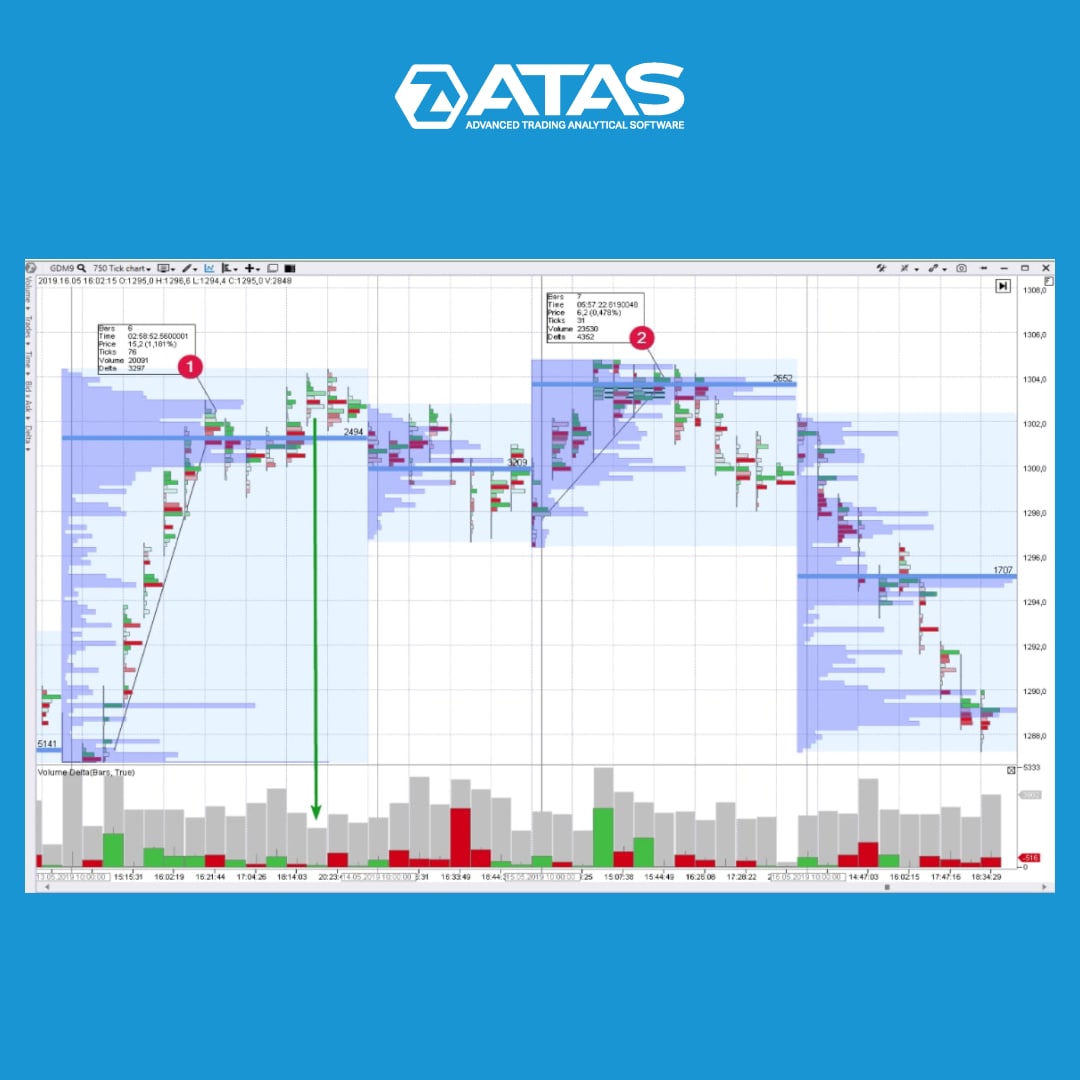
WHAT IS VSA DISTRIBUTION
Distribution is a trading range at the market highs in which a financial instrument changes its owner. As a rule, the major interest (insider, smart money or composite operator) uses the current market situation in order to distribute the asset they own at high prices.
The general features are the following:
👉 An extremely powerful upward impulse passes at the beginning of the distribution area. Usually it is accompanied with good news in the media. A major player sort of advertises stock/futures/currency in order to make minor players snap the instrument up like hot cakes. From the VSA point of view, an analyst registers the buying climax and/or the End of Rising Market.
👉 Then the buyers’ pressure exhausts. The upward waves become less powerful. New highs are just a situational overrun of previous records. The major player provides false support to the market only to buy time and sell more.
👉 Downward movement starts on the growing volume (Selling Pressure) after the final false upward movement (Upthrust) and is accompanied with weak rallies (No Demand).
👉 As for the stock market, the stock becomes weaker than the index.
Find more information about VSA in our blog at the link in a bio.
Support service bot
Chat group for communication
Distribution is a trading range at the market highs in which a financial instrument changes its owner. As a rule, the major interest (insider, smart money or composite operator) uses the current market situation in order to distribute the asset they own at high prices.
The general features are the following:
👉 An extremely powerful upward impulse passes at the beginning of the distribution area. Usually it is accompanied with good news in the media. A major player sort of advertises stock/futures/currency in order to make minor players snap the instrument up like hot cakes. From the VSA point of view, an analyst registers the buying climax and/or the End of Rising Market.
👉 Then the buyers’ pressure exhausts. The upward waves become less powerful. New highs are just a situational overrun of previous records. The major player provides false support to the market only to buy time and sell more.
👉 Downward movement starts on the growing volume (Selling Pressure) after the final false upward movement (Upthrust) and is accompanied with weak rallies (No Demand).
👉 As for the stock market, the stock becomes weaker than the index.
Find more information about VSA in our blog at the link in a bio.
Support service bot
Chat group for communication
👍7
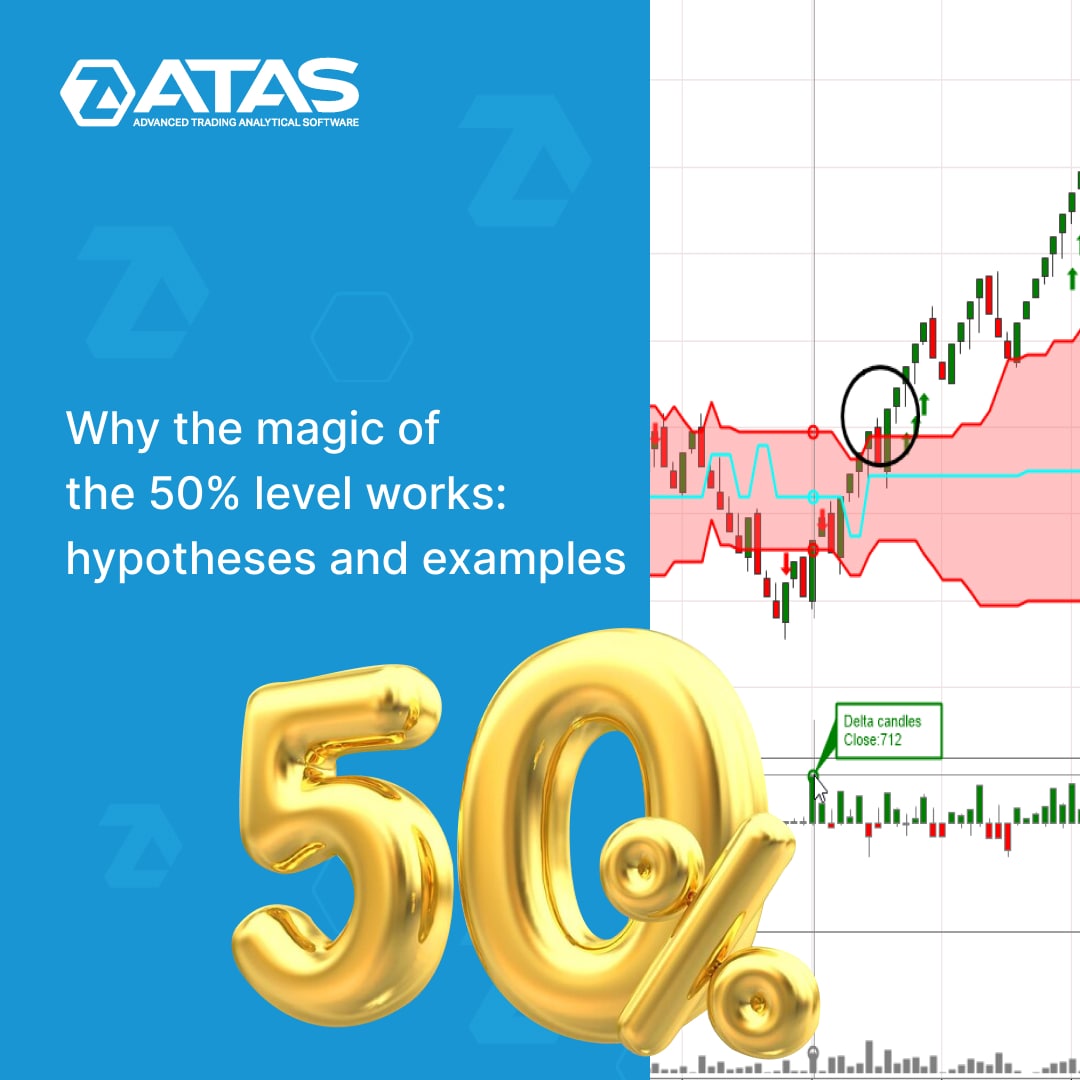
50% is a simple technique that can be used even by a beginner trader. At the same time, the professionals’ experience confirms that it is very effective.
By using 50% retracements, traders can find entry and exit points, improve the accuracy of trading decisions and reduce risks on any time frames.
We have collected comprehensive information about the 50% level in a new article in our blog.
👉 what is the 50% retracement;
👉 how traders should use retracements to make a profit;
👉 thoughts on the nature of the phenomenon;
👉 why the 50% level works – three hypotheses.
Find out in detail at the link https://bit.ly/3Buarn6
The article has detailed chart examples. Read for yourself and share with other traders.
Support service bot
Chat group for communication
By using 50% retracements, traders can find entry and exit points, improve the accuracy of trading decisions and reduce risks on any time frames.
We have collected comprehensive information about the 50% level in a new article in our blog.
👉 what is the 50% retracement;
👉 how traders should use retracements to make a profit;
👉 thoughts on the nature of the phenomenon;
👉 why the 50% level works – three hypotheses.
Find out in detail at the link https://bit.ly/3Buarn6
The article has detailed chart examples. Read for yourself and share with other traders.
Support service bot
Chat group for communication
👍5
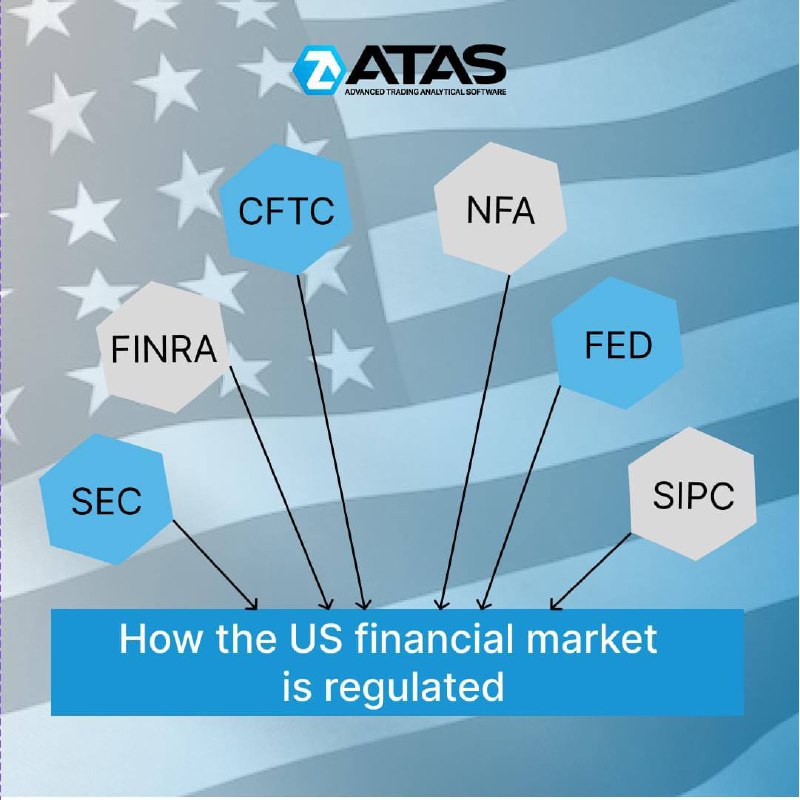
HOW THE US FINANCIAL MARKET IS REGULATED
Financial Supervisory Authorities (regulators) ensure that market participants do not violate the rules, and that trading is carried out honestly and transparently.
For example, trading in the US financial markets is regulated by:
👉 SEC (The United States Securities and Exchange Commission, founded in 1934 under President Roosevelt) is an agency of the US government. It is the main body that oversees and regulates the US securities market.
👉 FINRA (Financial Industry Regulatory Authority) – is a private American corporation that enforces the rules of trading in the over-the-counter market (OTC market). It was created in 1939 by the decision of the US Congress.
👉 CFTC (Commodity Futures Trading Commission). The central government agency of the USA that ensures the enforcement of the Commodity Exchange Act.
👉 NFA is the National Futures Association founded in 1984. It is a regulator in the derivatives markets, including the market of exchange-traded index futures. The NFA is funded by membership and evaluation fees and membership is mandatory for many market participants.
👉 FED (Federal Reserve System) is not a classic regulator, but the relevant rules approved by the Fed must be followed by financial market participants.
👉 SIPC is the Securities Investor Protection Corporation. It was created under the Securities Investor Protection Act (SIPA) in 1970. SIPC is also not exactly a regulator, it is controlled by the Securities and Exchange Commission. The purpose of SIPC is to expedite the recovery and return of client’s missing assets during the liquidation of a bankrupt investment company.
Read the article to learn more about the specifics of US stock trading: https://bit.ly/3xWs4ez
Support service bot
Chat group for communication
Financial Supervisory Authorities (regulators) ensure that market participants do not violate the rules, and that trading is carried out honestly and transparently.
For example, trading in the US financial markets is regulated by:
👉 SEC (The United States Securities and Exchange Commission, founded in 1934 under President Roosevelt) is an agency of the US government. It is the main body that oversees and regulates the US securities market.
👉 FINRA (Financial Industry Regulatory Authority) – is a private American corporation that enforces the rules of trading in the over-the-counter market (OTC market). It was created in 1939 by the decision of the US Congress.
👉 CFTC (Commodity Futures Trading Commission). The central government agency of the USA that ensures the enforcement of the Commodity Exchange Act.
👉 NFA is the National Futures Association founded in 1984. It is a regulator in the derivatives markets, including the market of exchange-traded index futures. The NFA is funded by membership and evaluation fees and membership is mandatory for many market participants.
👉 FED (Federal Reserve System) is not a classic regulator, but the relevant rules approved by the Fed must be followed by financial market participants.
👉 SIPC is the Securities Investor Protection Corporation. It was created under the Securities Investor Protection Act (SIPA) in 1970. SIPC is also not exactly a regulator, it is controlled by the Securities and Exchange Commission. The purpose of SIPC is to expedite the recovery and return of client’s missing assets during the liquidation of a bankrupt investment company.
Read the article to learn more about the specifics of US stock trading: https://bit.ly/3xWs4ez
Support service bot
Chat group for communication
👍7